change time TOYOTA SEQUOIA 2015 2.G User Guide
[x] Cancel search | Manufacturer: TOYOTA, Model Year: 2015, Model line: SEQUOIA, Model: TOYOTA SEQUOIA 2015 2.GPages: 664, PDF Size: 13.16 MB
Page 317 of 664
317
3-1. Using the air conditioning system and defogger
3
Interior features
Windshield wiper de-icer
: If equipped
■The de-icer can be operated when
●The engine switch is in the ON position.
● The back window is completely closed.
CAUTION
■When the windshield wiper de-icer is on
Do not touch the glass at the lower part of the windshield or to the side of the
front pillars as the surfaces can become very hot and burn you.
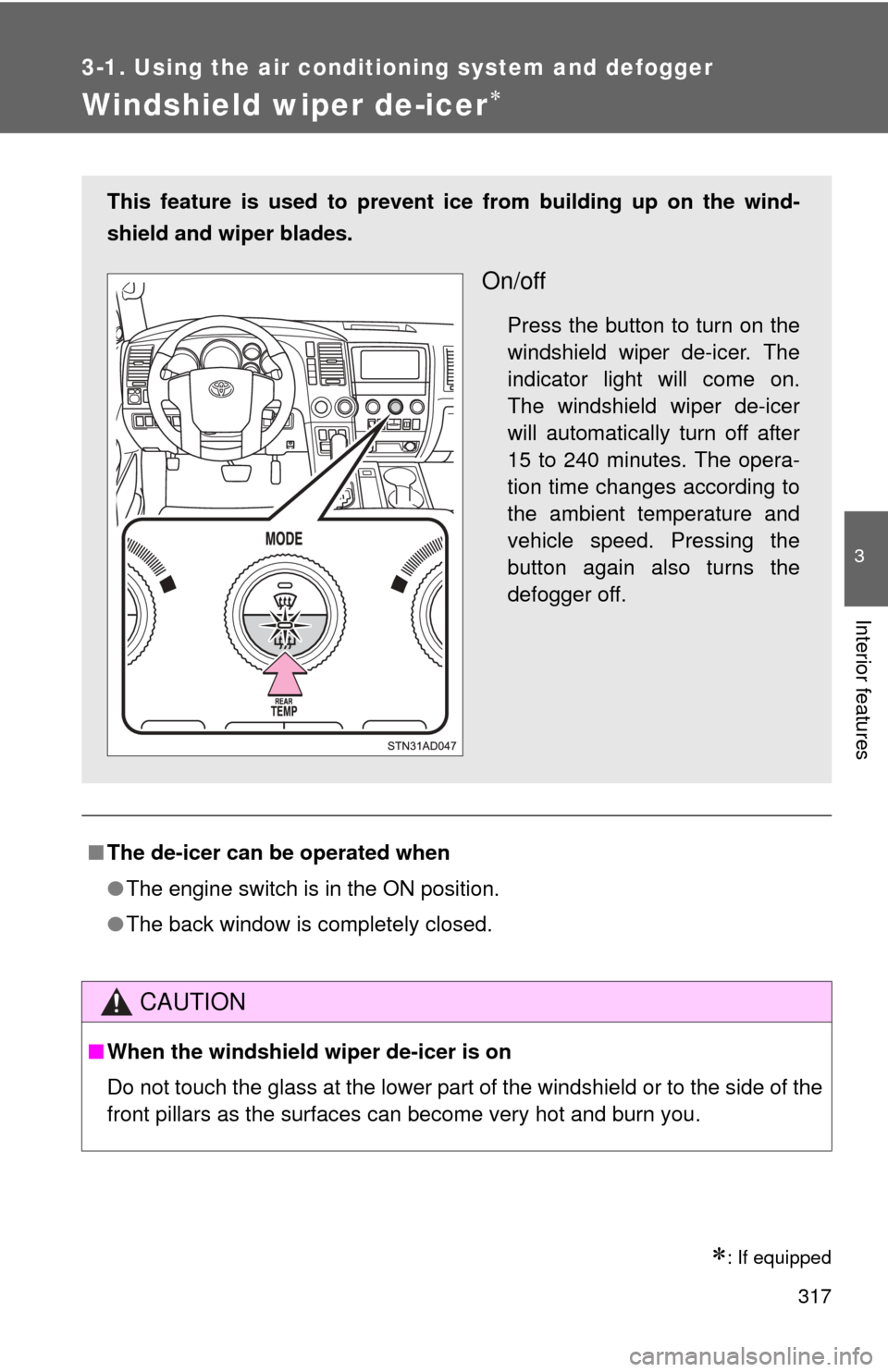
This feature is used to prevent ice from building up on the wind-
shield and wiper blades.
On/off
Press the button to turn on the
windshield wiper de-icer. The
indicator light will come on.
The windshield wiper de-icer
will automatically turn off after
15 to 240 minutes. The opera-
tion time changes according to
the ambient temperature and
vehicle speed. Pressing the
button again also turns the
defogger off.
Page 321 of 664
321
3-2. Using the multimedia system
3
Interior features
Operating the touch screen
By touching the screen with your finger, you can control the Audio,
hands-free system, etc.
■ Drag
*
Touch the screen with your finger and move the screen to the
desired position.
●Scrolling the lists
● Using scroll bar in lists
■ Flick
*
Touch the screen with your finger and then quickly move the
screen.
●Scrolling the main screen page
● Returning to the menu scr een from the sub-menu screen
(screen one level below)
*: The above operations may not be performed on all screens.
■ When using the touch screen
●If the screen is cold, the display may be dark, or the system may seem to
be operating slightly slower than normal.
● The screen may seem dark and hard to see when viewed through sun-
glasses. Change your angle of viewing, adjust the display on the “Dis\
play
Settings” screen ( P. 328) or remove your sunglasses.
■ Using cellular phones
Interference may be heard through the multimedia system’s speakers if a
cellular phone is being used inside or close to the vehicle while the multime-
dia system is operating.
Page 322 of 664

322 3-2. Using the multimedia system
CAUTION
■For vehicles sold in U.S.A. and Canada
●Part 15 of the FCC Rules
FCC Warning:
Any unauthorized changes or modifications to this equipment will void the
user’s authority to operate this device.
● Laser products
This product is a class 1 laser product.
Do not open the cover of the player or attempt to repair the unit yourself.
Refer servicing to qualified personnel.
• Do not take this unit apart or attempt to make any changes yourself.
This is an intricate unit that uses a laser pickup to retrieve information
from the surface of compact discs. The laser is carefully shielded so
that its rays remain inside the cabinet. Therefore, never try to disas-
semble the player or alter any of its parts since you may be exposed to
laser rays and dangerous voltages.
• This product utilizes a laser. Use of controls or adjustments or performance of procedures other
than those specified herein may result in hazardous radiation expo-
sure.
THE USE OF OPTICAL INSTRUMENTS WITH THIS PRODUCT WILL
INCREASE EYE HAZARD.
Page 326 of 664

326 3-2. Using the multimedia system
General settingsSettings are available for adjusting the operation sounds, screen ani-
mation, etc.
■ Screen for general settings
Press the “SETUP” button.
Select “General” on the “Setup” screen.
“English”, “Français” or
“Español” can be selected.
On/off can be selected to
sound beeps.
Select to change the screen
color.
Select to change the keyboard
layout.
The animation effect for the
screen can be set to on/off.
Select to delete personal data
( P. 327)
Select to update program ver-
sions. For details, contact your
Toyota dealer.
Select to display the software
information. Notices related to
third party software used in
this product are enlisted. (This
includes instructions for
obtaining such software,
where applicable.)
■ To return to the default settings
Select “Default”, and then “Yes”.
Page 327 of 664
327
3-2. Using the multimedia system
3
Interior features
■
Delete personal data
Select “Delete Personal Data” on the “General Settings”
screen.
Select “Delete”.
Check carefully beforehand, as data cannot be retrieved once
deleted.
A confirmation screen will be displayed. Select “Yes”.
The following personal data will be deleted or changed to its
default settings.
• General settings
• Audio settings
• Phone settings
Audio settings
Settings are available for adjusting the radio operation, cover art, etc.
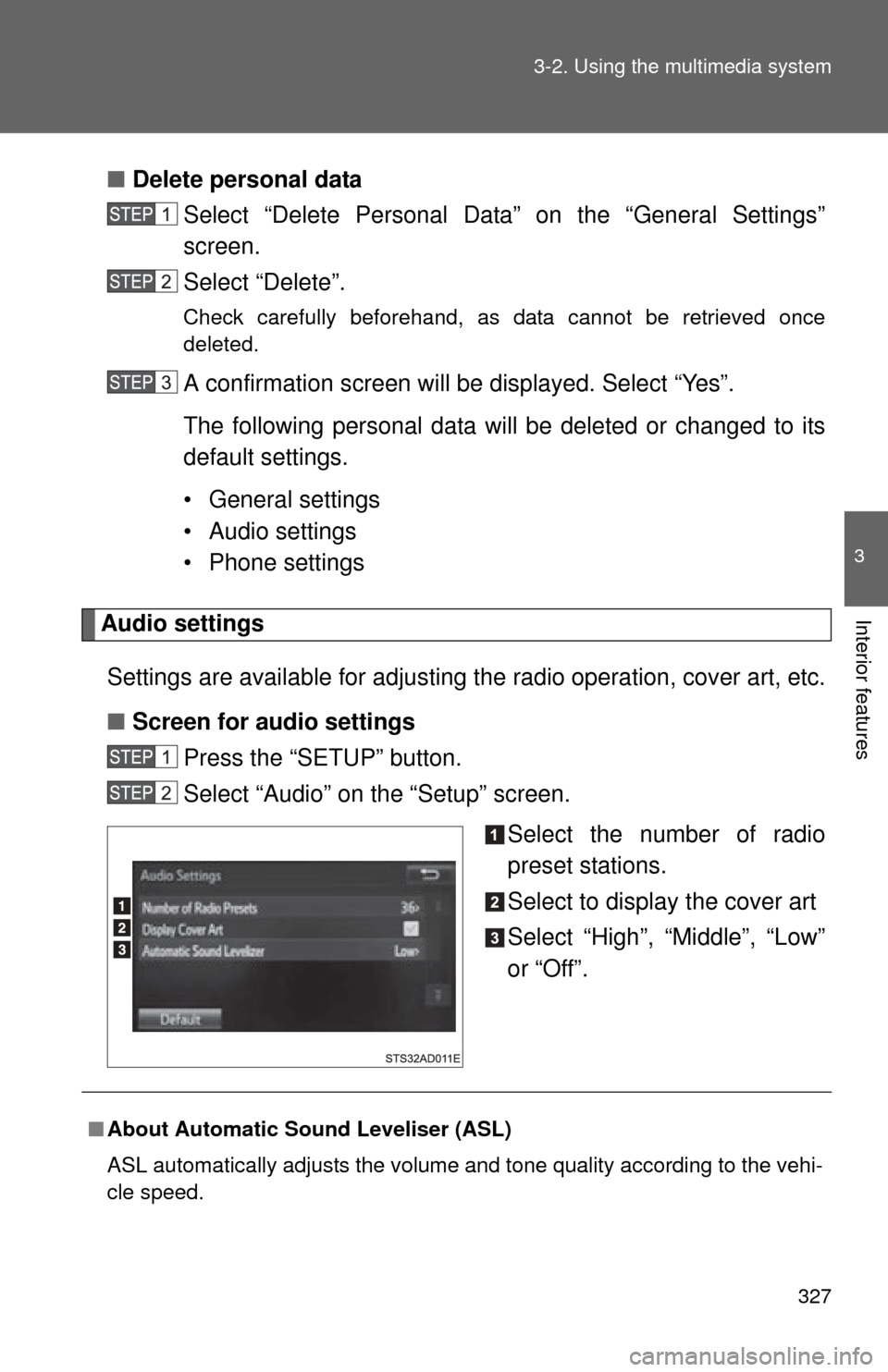
■ Screen for audio settings
Press the “SETUP” button.
Select “Audio” on the “Setup” screen.
Select the number of radio
preset stations.
Select to display the cover art
Select “High”, “Middle”, “Low”
or “Off”.
■About Automatic Sound Leveliser (ASL)
ASL automatically adjusts the volume and tone quality according to the vehi-
cle speed.
Page 328 of 664
328 3-2. Using the multimedia system
Display settingsSettings are available for adjusting the contrast and brightness of the
screen.
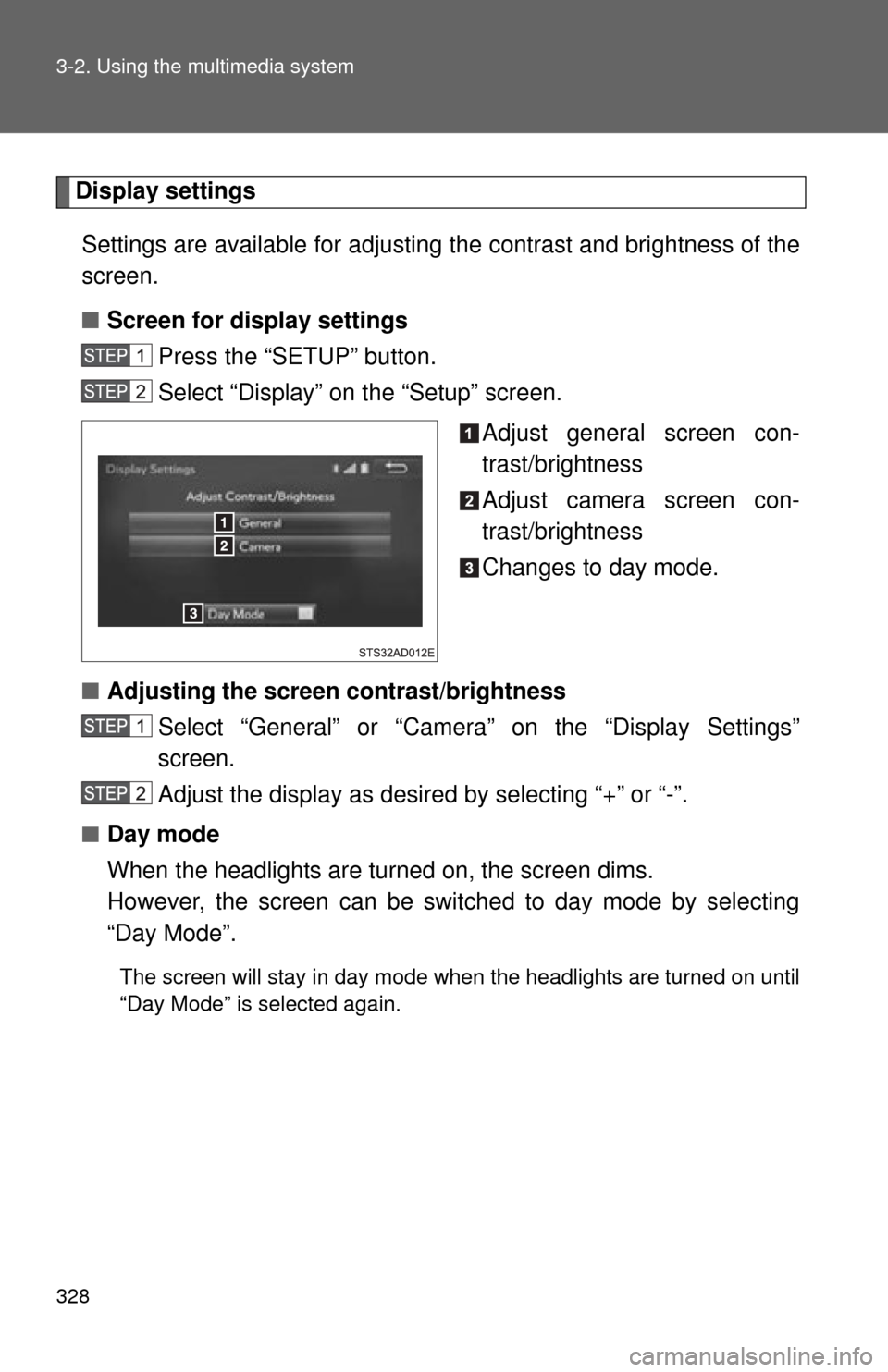
■ Screen for display settings
Press the “SETUP” button.
Select “Display” on the “Setup” screen.
Adjust general screen con-
trast/brightness
Adjust camera screen con-
trast/brightness
Changes to day mode.
■ Adjusting the screen contrast/brightness
Select “General” or “Camera” on the “Display Settings”
screen.
Adjust the display as desired by selecting “+” or “-”.
■ Day mode
When the headlights are turned on, the screen dims.
However, the screen can be switched to day mode by selecting
“Day Mode”.
The screen will stay in day mode when the headlights are turned on until
“Day Mode” is selected again.
Page 335 of 664
335
3-2. Using the multimedia system
3
Interior features
Setting station presets
Search for desired stations by turning the “TUNE·SCROLL”
knob or pressing the “ TRACK” or “SEEK” button.
Select “(add new)”
To change the preset station to a different one, select and hold the
preset station.
Select “Yes”.
Select “OK” after setting the new preset station.
■ Refreshing the station list
Select “Refresh” on the “Station List” screen.
To cancel the refresh, select “Cancel Refresh”.
■Reception sensitivity
●Maintaining perfect radio reception at all times is difficult due to the con-
tinually changing position of the antenna, differences in signal strength
and surrounding objects, such as trains, transmitters, etc.
● The radio antenna is mounted inside the rear quarter window. To main-
tain clear radio reception, do not attach metallic window tinting or other
metallic objects to the antenna wire mounted inside the rear quarter win-
dow.
Page 344 of 664
344 3-2. Using the multimedia system
■About iPod
●“Made for iPod”, “Made for iPhone” and “Made for iPad” mean that an
electronic accessory has been designed to connect specifically to iPod or
iPhone, or iPad, respectively, and has been certified by the developer to
meet Apple performance standards.
● Apple is not responsible for the operation of this device or its compliance
with safety and regulatory standards. Please note that the use of this
accessory with iPod, iPhone or iPad may affect wireless performance.
● iPad, iPhone, iPod, iPod classic, iPod nano, and iPod touch are trade-
marks of Apple Inc., registered in the U.S. and other countries. Lightning
is a trademark of Apple Inc.
■ iPod cover art
●Depending on the iPod and songs in the iPod, iPod cover art may be dis-
played.
● This function can be changed to on/off. ( P. 327)
● It may take time to display iPod cover art, and the iPod may not be oper-
ated while the cover art display is in process.
● Only iPod cover art that is saved in JPEG format can be displayed.
Page 345 of 664
345
3-2. Using the multimedia system
3
Interior features
■
iPod functions
●When an iPod is connected and the audio source is changed to iPod
mode, the iPod will resume play from the same point in which it was last
used.
● Depending on the iPod that is connected to the system, certain functions
may not be available. If a function is unavailable due to a malfunction (as
opposed to a system specification), disconnecting the device and recon-
necting it may resolve the problem.
● While connected to the system, the iPod cannot be operated with its own
controls. It is necessary to use the controls of the vehicle’s multimedia
system instead.
● When the battery level of an iPod is very low, the iPod may not operate. If
so, charge the iPod before use.
● Compatible models ( P. 347)
■ iPod problems
To resolve most problems encountered when using your iPod, disconnect
your iPod from the vehicle iPod connection and reset it. For instructions on
how to reset your iPod, refer to your iPod Owner’s Manual.
Page 352 of 664

352 3-2. Using the multimedia system
●AAC file compatibility
• Compatible standards
MPEG4/AAC-LC
• Compatible sampling frequencies 11.025/12/16/22.05/24/32/44.1/48 (kHz)
• Compatible bit rates 16-320 (kbps)
• Compatible channel modes: 1 ch and 2 ch
● File names
The only files that can be recognized as MP3/WMA/AAC and played are
those with the extension .mp3 or .wma.
● ID3, WMA and AAC tags
ID3 tags can be added to MP3 files, making it possible to record the track
title, artist name, etc.
The system is compatible with ID3 Ver. 1.0, 1.1, and Ver. 2.2, 2.3 ID3 tags.
(The number of characters is based on ID3 Ver. 1.0 and 1.1.)
WMA tags can be added to WMA files, making it possible to record the
track title and artist name in the same way as with ID3 tags.
AAC tags can be added to AAC files, making it possible to record the track
title and artist name in the same way as with ID3 tags.
● MP3, WMA and AAC playback
• When a device containing MP3, WMA and AAC files is connected, all
files in the USB memory device are checked. Once the file check is fin-
ished, the first MP3, WMA and AAC file is played. To make the file
check finish more quickly, we recommend that you do not include any
files other than MP3, WMA and AAC files or create any unnecessary
folders.
• When a USB memory device is connected and the audio source is changed to USB memory mode, the USB memory device will start
playing the first file in the first folder. If the same device is removed and
reconnected (and the contents have not been changed), the USB
memory device will resume play from the same point in which it was
last used.
● Extensions
If the file extensions .mp3, .wma and .m4a are used for files other than
MP3, WMA and AAC files, they will be skipped (not played).