instrument cluster TOYOTA SEQUOIA 2015 2.G User Guide
[x] Cancel search | Manufacturer: TOYOTA, Model Year: 2015, Model line: SEQUOIA, Model: TOYOTA SEQUOIA 2015 2.GPages: 664, PDF Size: 13.16 MB
Page 174 of 664
174 2-2. Instrument cluster
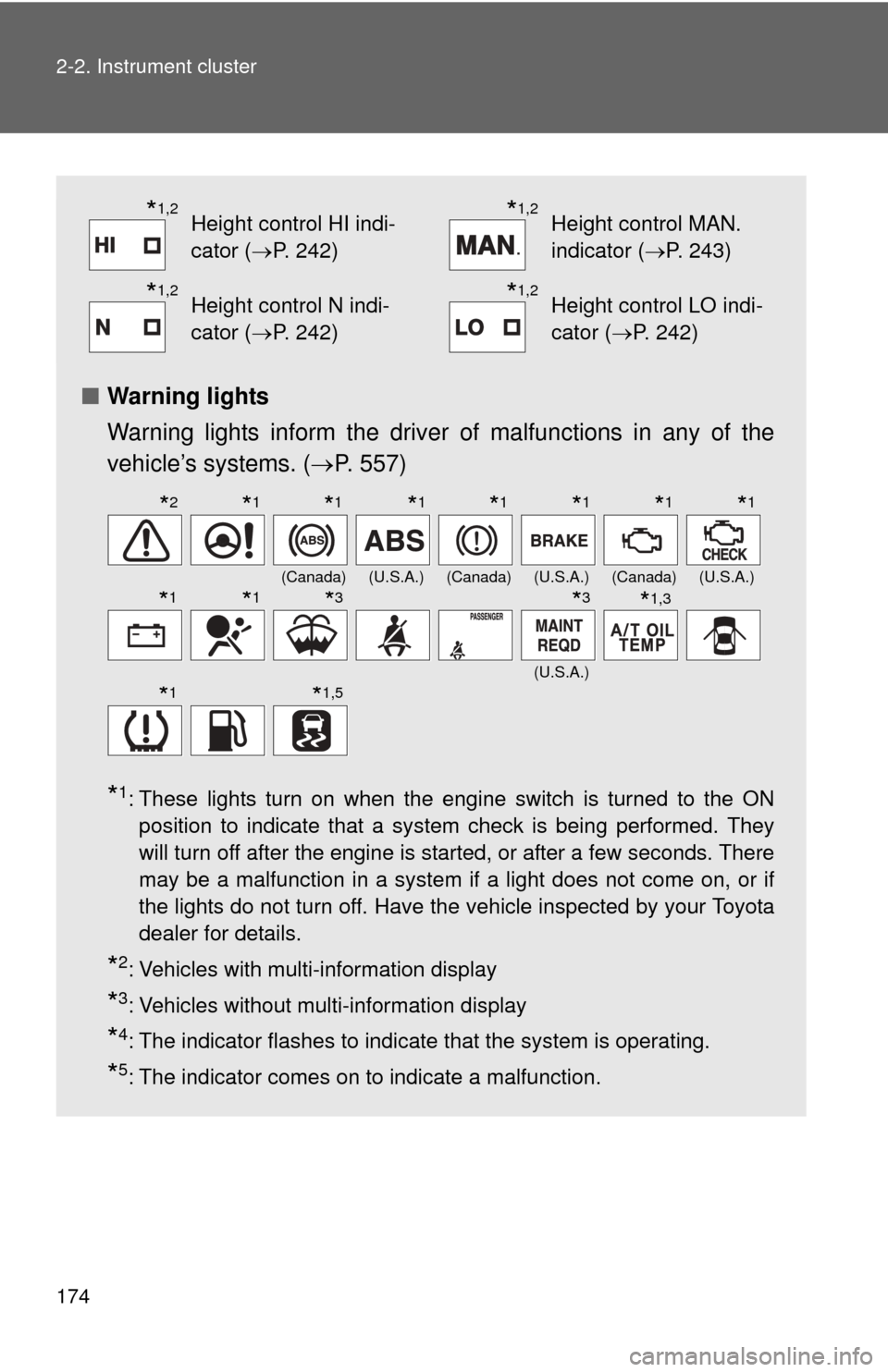
■Warning lights
Warning lights inform the driver of malfunctions in any of the
vehicle’s systems. ( P. 557)
*1: These lights turn on when the engine switch is turned to the ON
position to indicate that a system check is being performed. They
will turn off after the engine is started, or after a few seconds. There
may be a malfunction in a system if a light does not come on, or if
the lights do not turn off. Have the vehicle inspected by your Toyota
dealer for details.
*2: Vehicles with multi-information display
*3: Vehicles without multi-information display
*4: The indicator flashes to indicate that the system is operating.
*5: The indicator comes on to indicate a malfunction.
*1,2Height control HI indi-
cator (P. 242)*1,2Height control MAN.
indicator (P. 243)
*1,2Height control N indi-
cator (P. 242)*1,2Height control LO indi-
cator (P. 242)
(Canada)(U.S.A.)(Canada)(U.S.A.)(Canada)(U.S.A.)
(U.S.A.)
*2*1*1*1*1*1*1*1
*1*1*3*3*1,3
*1*1,5
Page 175 of 664
175
2-2. Instrument cluster
2
When driving
CAUTION
■
If a safety system warning light does not come on
Should a safety system light such as ABS and the SRS airbag warning light
not come on when you start the engine, this could mean that these systems
are not available to help protect you in an accident, which could result in
death or serious injury. Have the vehicle inspected by your Toyota dealer
immediately if this occurs.
*6: In order to confirm operation, the BSM outside rear view mirror indi-
cators illuminate in the following situations:
• When the engine switch is turned to the ON position while the BSM main switch is set to ON.
• When the BSM main switch is set to ON while the engine switch is in the ON position.
If the system is functioning correctly, the BSM outside rear view mirror
indicators will turn off after a few seconds.
If the BSM outside rear view mirror indicators do not illuminate or do
not turn off, there may be a malfunction with the system.
If this occurs, have the vehicle inspected by your Toyota dealer.
Page 176 of 664
176
2-2. Instrument cluster
Multi-information display
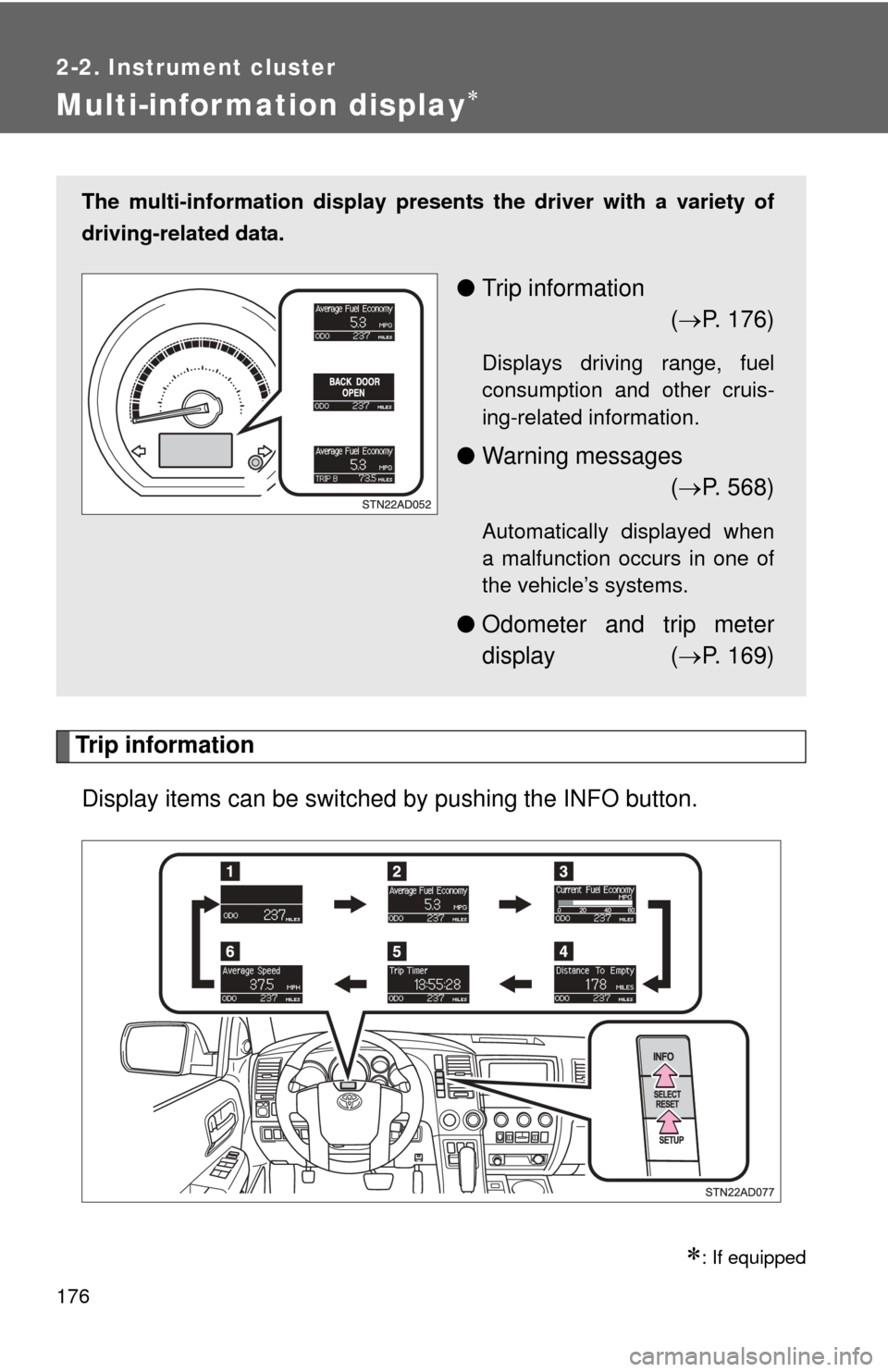
Trip informationDisplay items can be switched by pushing the INFO button.
: If equipped
The multi-information display presen ts the driver with a variety of
driving-related data.
● Trip information
( P. 176)
Displays driving range, fuel
consumption and other cruis-
ing-related information.
● Warning messages
( P. 568)
Automatically displayed when
a malfunction occurs in one of
the vehicle’s systems.
● Odometer and trip meter
display ( P. 169)
Page 177 of 664
177
2-2. Instrument cluster
2
When driving
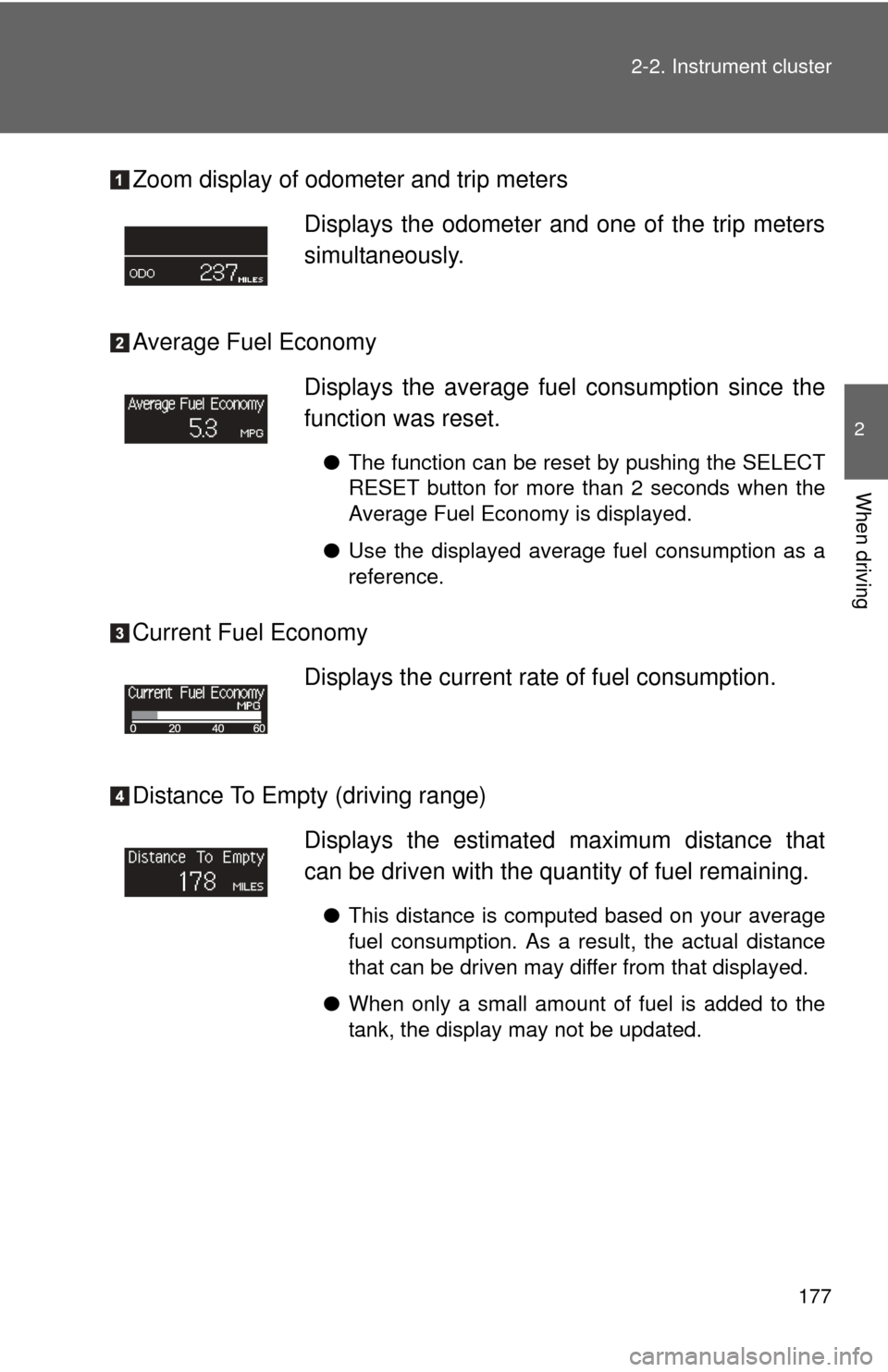
Zoom display of odometer and trip meters
Average Fuel Economy
Current Fuel Economy
Distance To Empty (driving range)
Displays the odometer and one of the trip meters
simultaneously.
Displays the average fuel
consumption since the
function was reset.
● The function can be reset by pushing the SELECT
RESET button for more than 2 seconds when the
Average Fuel Economy is displayed.
● Use the displayed average fuel consumption as a
reference.
Displays the current rate of fuel consumption.
Displays the estimated maximum distance that
can be driven with the quantity of fuel remaining.
●This distance is computed based on your average
fuel consumption. As a result, the actual distance
that can be driven may differ from that displayed.
● When only a small amount of fuel is added to the
tank, the display may not be updated.
Page 178 of 664
178 2-2. Instrument cluster
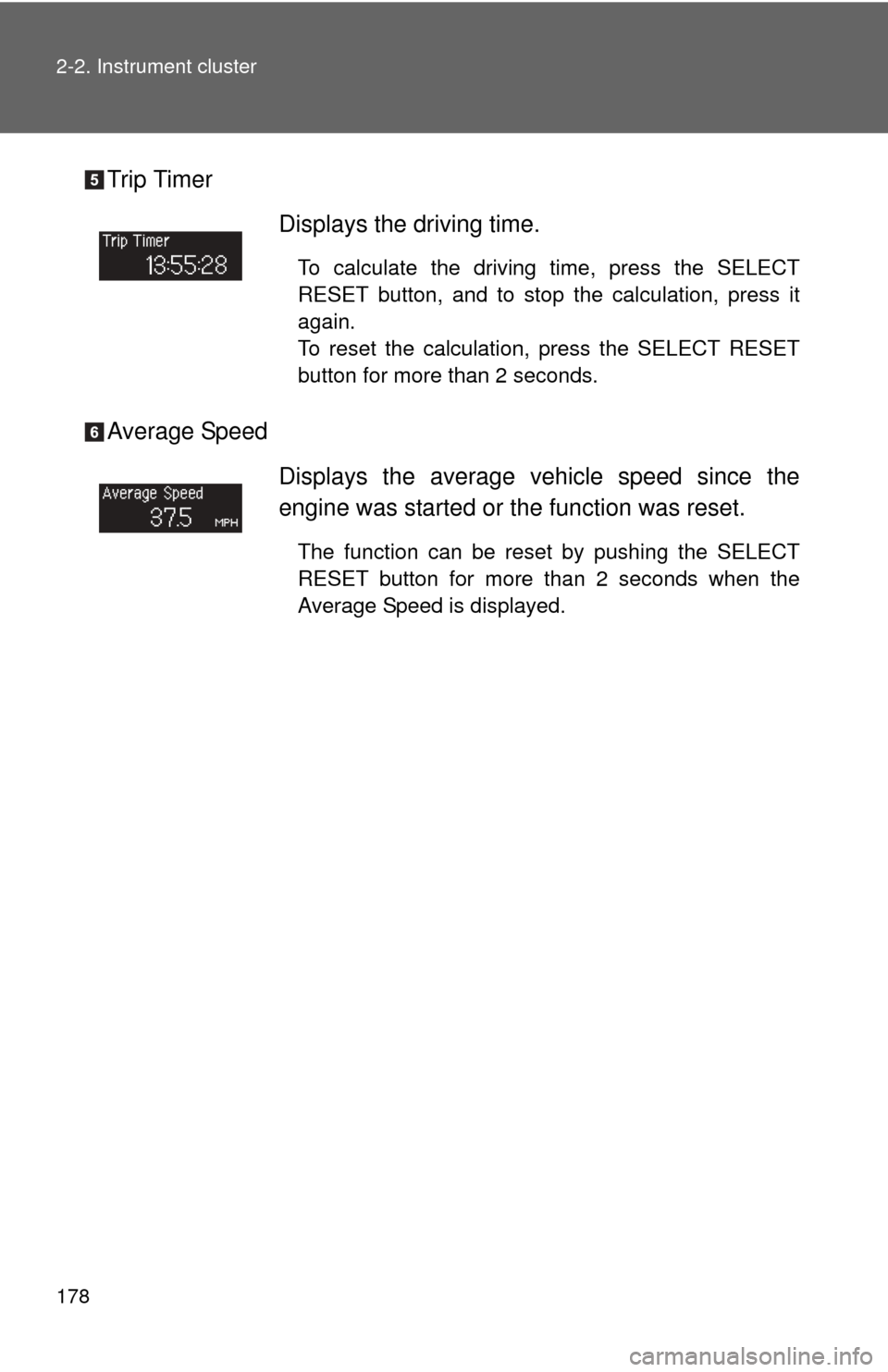
Trip Timer
Average SpeedDisplays the driving time.
To calculate the driving time, press the SELECT
RESET button, and to stop the calculation, press it
again.
To reset the calculation, press the SELECT RESET
button for more than 2 seconds.
Displays the average vehicle speed since the
engine was started or the function was reset.
The function can be reset by pushing the SELECT
RESET button for more than 2 seconds when the
Average Speed is displayed.
Page 179 of 664
179
2-2. Instrument cluster
2
When driving
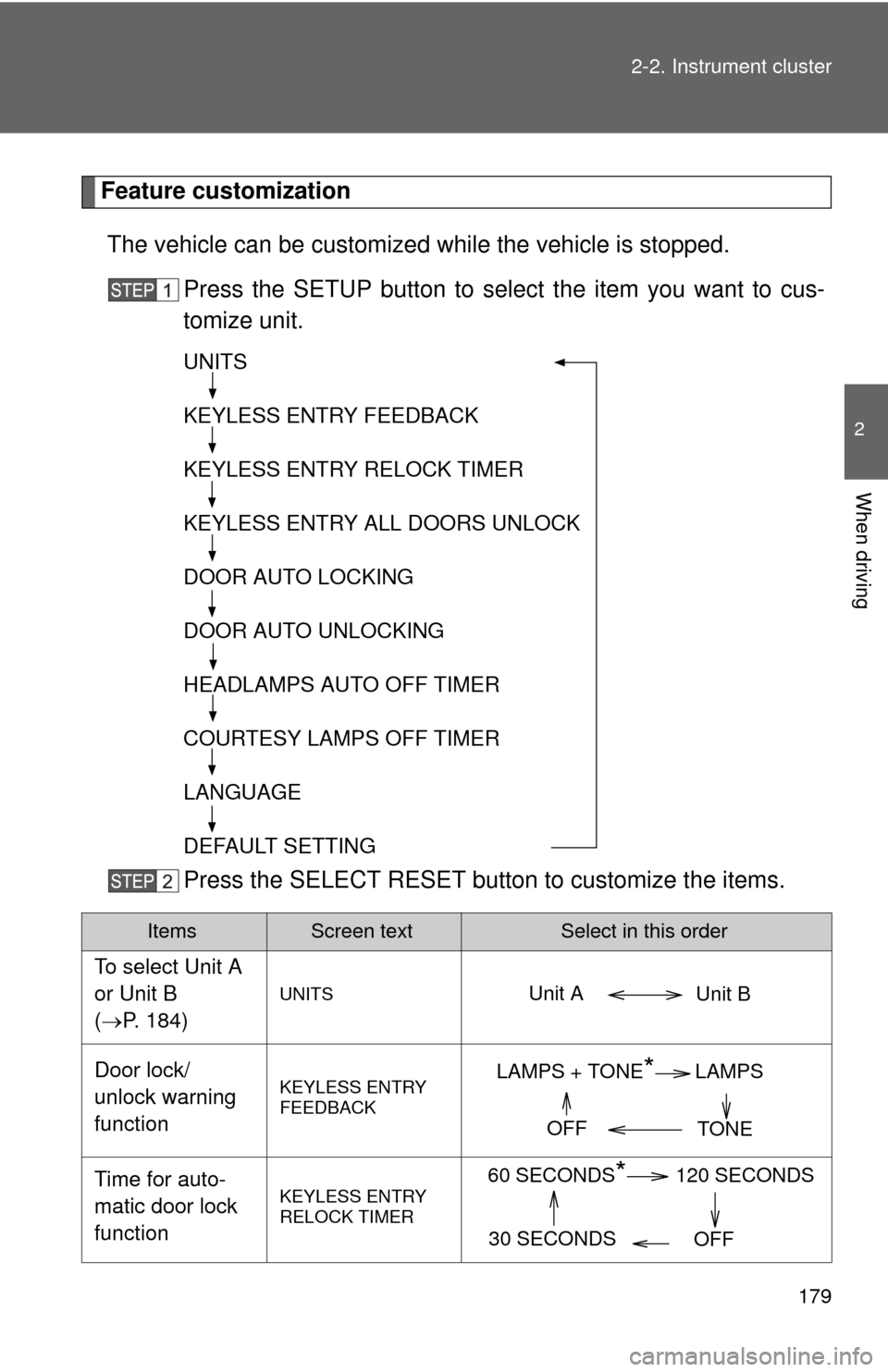
Feature customization
The vehicle can be customized while the vehicle is stopped.
Press the SETUP button to select the item you want to cus-
tomize unit.
Press the SELECT RESET butt on to customize the items.
ItemsScreen textSelect in this order
To select Unit A
or Unit B
(P. 184)
UNITS
Door lock/
unlock warning
functionKEYLESS ENTRY
FEEDBACK
Time for auto-
matic door lock
functionKEYLESS ENTRY
RELOCK TIMER
UNITS
KEYLESS ENTRY FEEDBACK
KEYLESS ENTRY RELOCK TIMER
KEYLESS ENTRY ALL DOORS UNLOCK
DOOR AUTO LOCKING
DOOR AUTO UNLOCKING
HEADLAMPS AUTO OFF TIMER
COURTESY LAMPS OFF TIMER
LANGUAGE
DEFAULT SETTING
Unit B
Unit A
LAMPS + TONE*LAMPS
TONE
OFF
60 SECONDS*120 SECONDS
30 SECONDS OFF
Page 180 of 664
180 2-2. Instrument cluster
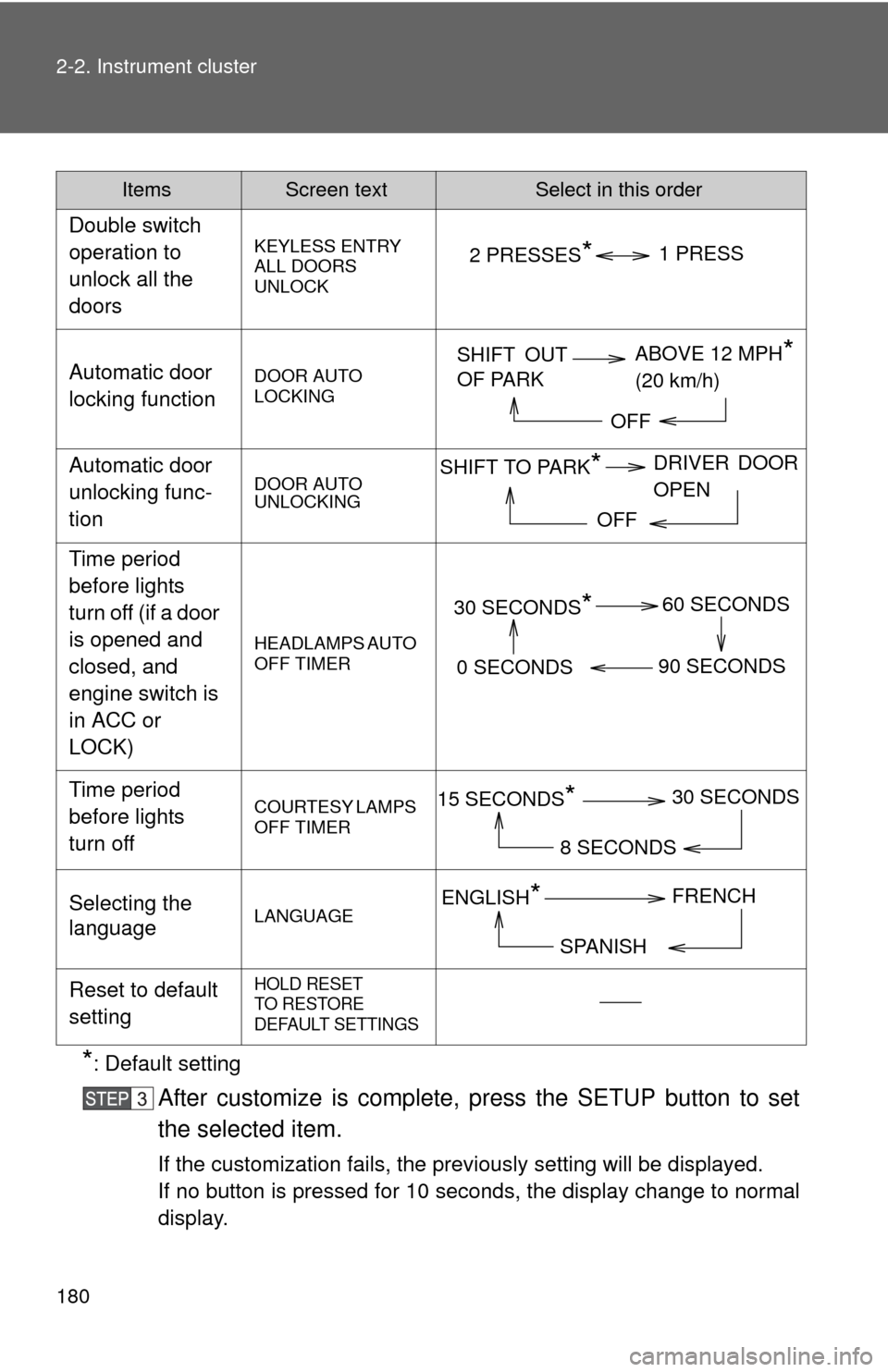
*: Default setting
After customize is complete, press the SETUP button to set
the selected item.
If the customization fails, the previously setting will be displayed.
If no button is pressed for 10 seconds, the display change to normal
display.
Double switch
operation to
unlock all the
doors
KEYLESS ENTRY
ALL DOORS
UNLOCK
Automatic door
locking functionDOOR AUTO
LOCKING
Automatic door
unlocking func-
tionDOOR AUTO
UNLOCKING
Time period
before lights
turn off (if a door
is opened and
closed, and
engine switch is
in ACC or
LOCK)
HEADLAMPS AUTO
OFF TIMER
Time period
before lights
turn offCOURTESY LAMPS
OFF TIMER
Selecting the
languageLANGUAGE
Reset to default
settingHOLD RESET
TO RESTORE
DEFAULT SETTINGS
ItemsScreen textSelect in this order
2 PRESSES*1 PRESS
SHIFT OUT
OF PARK
ABOVE 12 MPH*
(20 km/h)
OFF
SHIFT TO PARK*DRIVER DOOR
OPEN
OFF
30 SECONDS*60 SECONDS
90 SECONDS
0 SECONDS
15 SECONDS*30 SECONDS
8 SECONDS
ENGLISH*FRENCH
SPANISH
Page 181 of 664
181
2-2. Instrument cluster
2
When driving
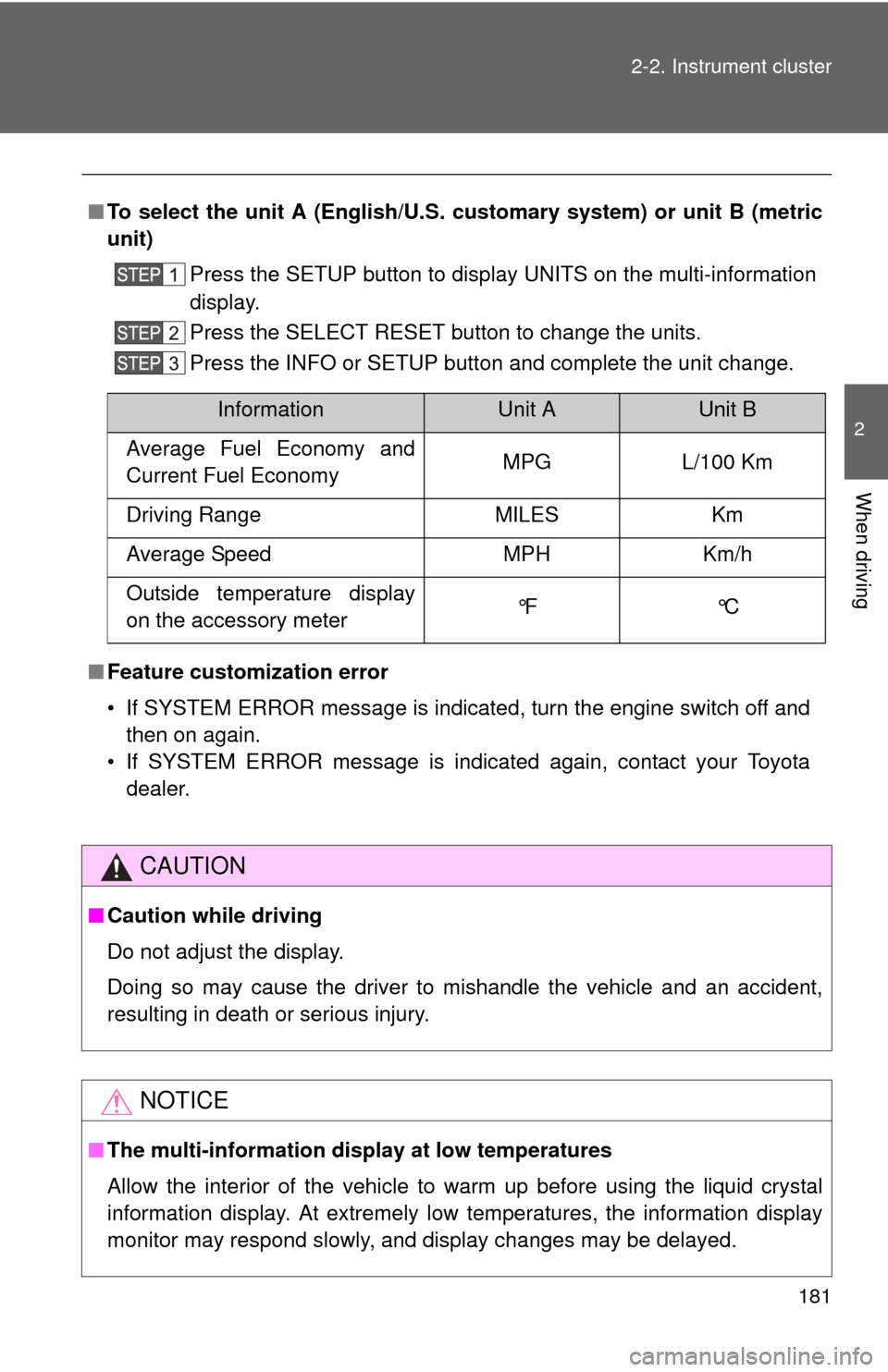
■
To select the unit A (English/U.S. customary system) or unit B (metric
unit)
Press the SETUP button to display UNITS on the multi-information
display.
Press the SELECT RESET button to change the units.
Press the INFO or SETUP button and complete the unit change.
■ Feature customization error
• If SYSTEM ERROR message is indicated, turn the engine switch off and
then on again.
• If SYSTEM ERROR message is indicated again, contact your Toyota dealer.
CAUTION
■Caution while driving
Do not adjust the display.
Doing so may cause the driver to mishandle the vehicle and an accident,
resulting in death or serious injury.
NOTICE
■The multi-information disp lay at low temperatures
Allow the interior of the vehicle to warm up before using the liquid crystal
information display. At extremely low temperatures, the information display
monitor may respond slowly, and display changes may be delayed.
InformationUnit AUnit B
Average Fuel Economy and
Current Fuel Economy MPG L/100 Km
Driving Range MILES Km
Average Speed MPH Km/h
Outside temperature display
on the accessory meter °F °C
Page 182 of 664
182
2-2. Instrument cluster
Accessor y meter
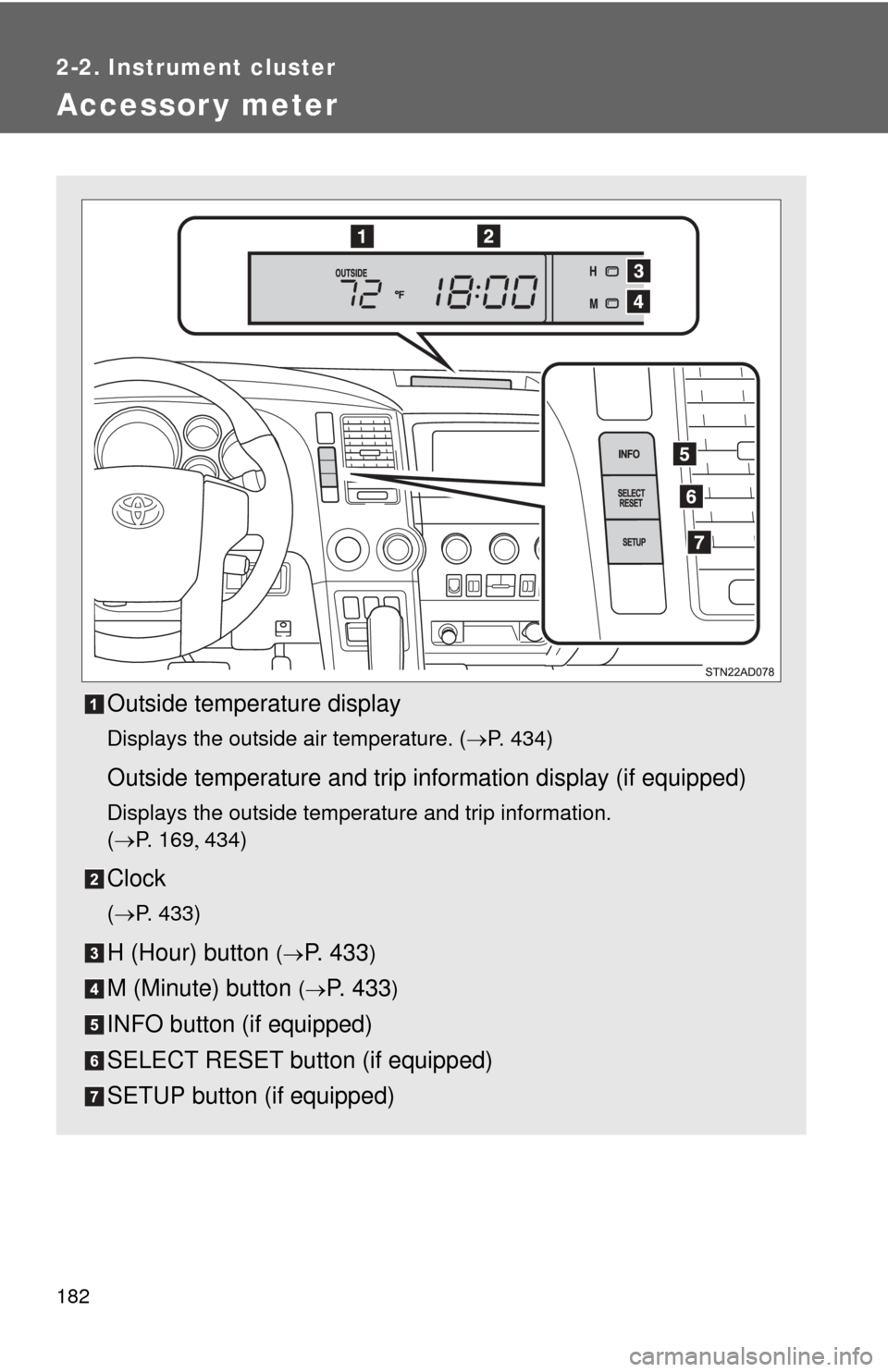
Outside temperature display
Displays the outside air temperature. (P. 434)
Outside temperature and trip information display (if equipped)
Displays the outside temperature and trip information.
(P. 1 6 9 434)
Clock
(P. 433)
H (Hour) button (P. 4 3 3)
M (Minute) button (P. 433)
INFO button (if equipped)
SELECT RESET button (if equipped)
SETUP button (if equipped)
Page 183 of 664
183
2-2. Instrument cluster
2
When driving
Outside temperature and trip in
formation display (if equipped)
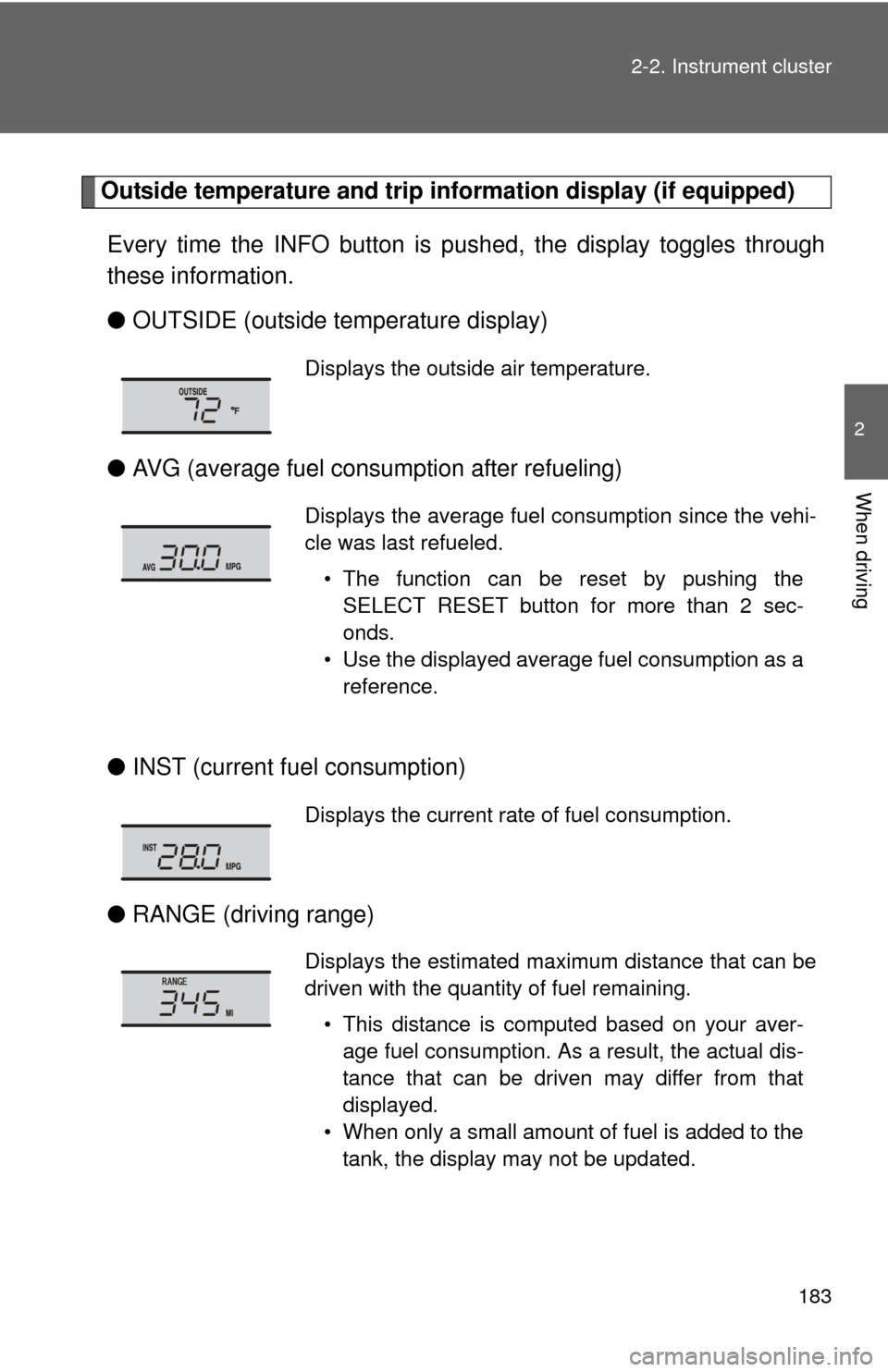
Every time the INFO button is pushed, the display toggles through
these information.
● OUTSIDE (outside temperature display)
● AVG (average fuel consumption after refueling)
● INST (current fu el consumption)
● RANGE (driving range)
Displays the outside air temperature.
Displays the average fuel consumption since the vehi-
cle was last refueled.
• The function can be reset by pushing theSELECT RESET button for more than 2 sec-
onds.
• Use the displayed average fuel consumption as a reference.
Displays the current rate of fuel consumption.
Displays the estimated maximum distance that can be
driven with the quantity of fuel remaining.
• This distance is computed based on your aver-age fuel consumption. As a result, the actual dis-
tance that can be driven may differ from that
displayed.
• When only a small amount of fuel is added to the tank, the display may not be updated.