reset TOYOTA SEQUOIA 2015 2.G User Guide
[x] Cancel search | Manufacturer: TOYOTA, Model Year: 2015, Model line: SEQUOIA, Model: TOYOTA SEQUOIA 2015 2.GPages: 664, PDF Size: 13.16 MB
Page 181 of 664
181
2-2. Instrument cluster
2
When driving
■
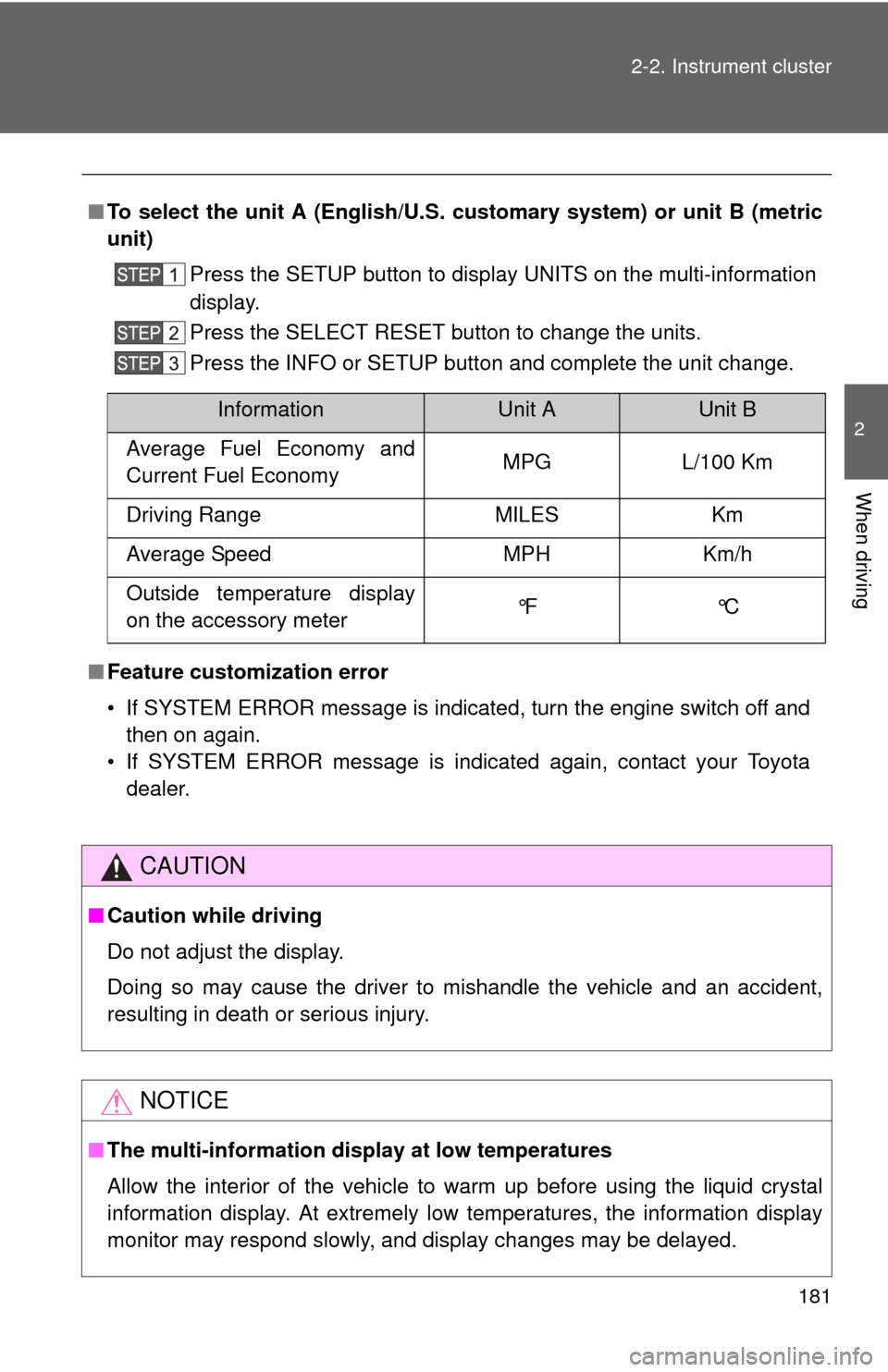
To select the unit A (English/U.S. customary system) or unit B (metric
unit)
Press the SETUP button to display UNITS on the multi-information
display.
Press the SELECT RESET button to change the units.
Press the INFO or SETUP button and complete the unit change.
■ Feature customization error
• If SYSTEM ERROR message is indicated, turn the engine switch off and
then on again.
• If SYSTEM ERROR message is indicated again, contact your Toyota dealer.
CAUTION
■Caution while driving
Do not adjust the display.
Doing so may cause the driver to mishandle the vehicle and an accident,
resulting in death or serious injury.
NOTICE
■The multi-information disp lay at low temperatures
Allow the interior of the vehicle to warm up before using the liquid crystal
information display. At extremely low temperatures, the information display
monitor may respond slowly, and display changes may be delayed.
InformationUnit AUnit B
Average Fuel Economy and
Current Fuel Economy MPG L/100 Km
Driving Range MILES Km
Average Speed MPH Km/h
Outside temperature display
on the accessory meter °F °C
Page 182 of 664
182
2-2. Instrument cluster
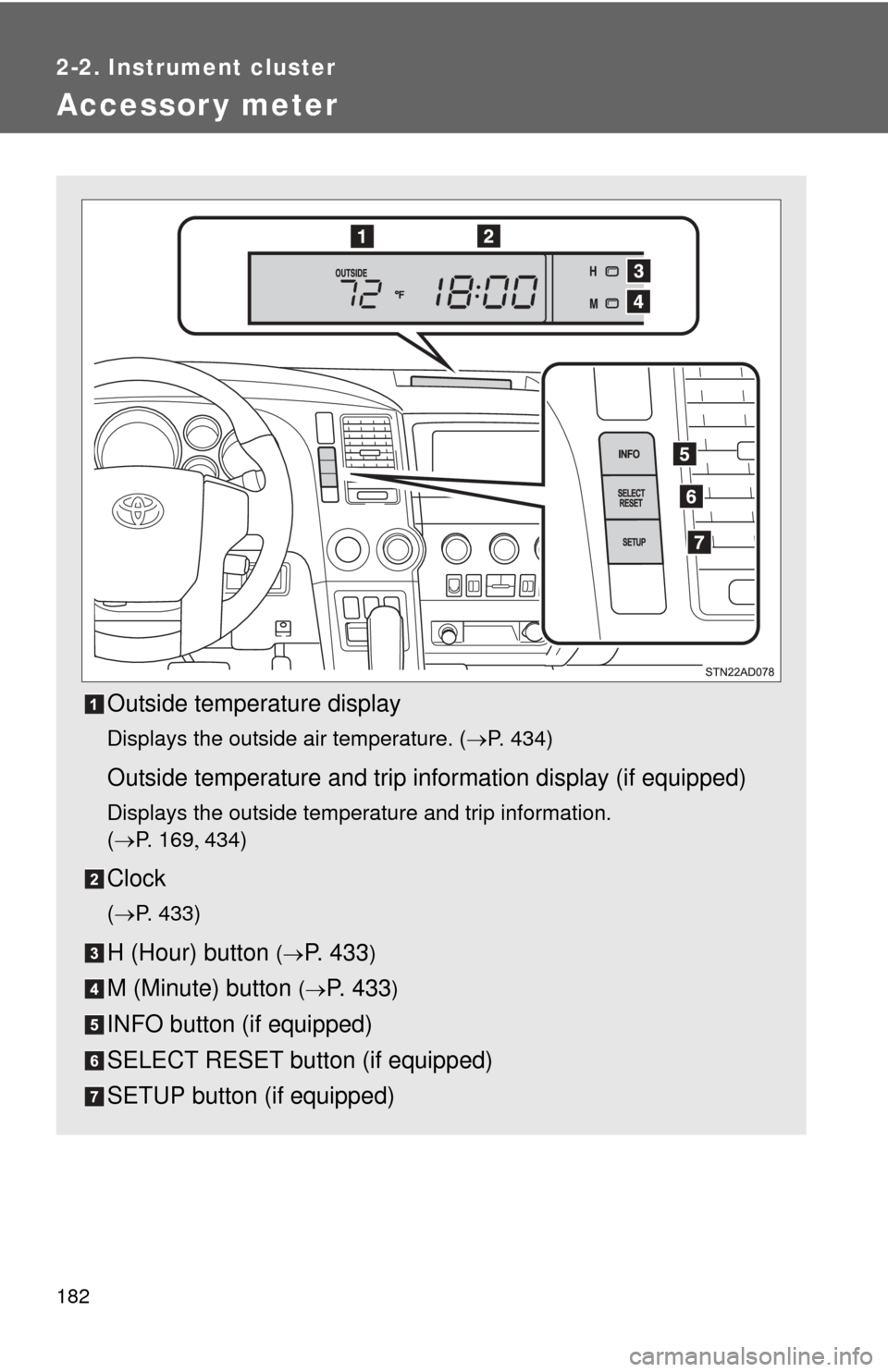
Accessor y meter
Outside temperature display
Displays the outside air temperature. (P. 434)
Outside temperature and trip information display (if equipped)
Displays the outside temperature and trip information.
(P. 1 6 9 434)
Clock
(P. 433)
H (Hour) button (P. 4 3 3)
M (Minute) button (P. 433)
INFO button (if equipped)
SELECT RESET button (if equipped)
SETUP button (if equipped)
Page 183 of 664
183
2-2. Instrument cluster
2
When driving
Outside temperature and trip in
formation display (if equipped)
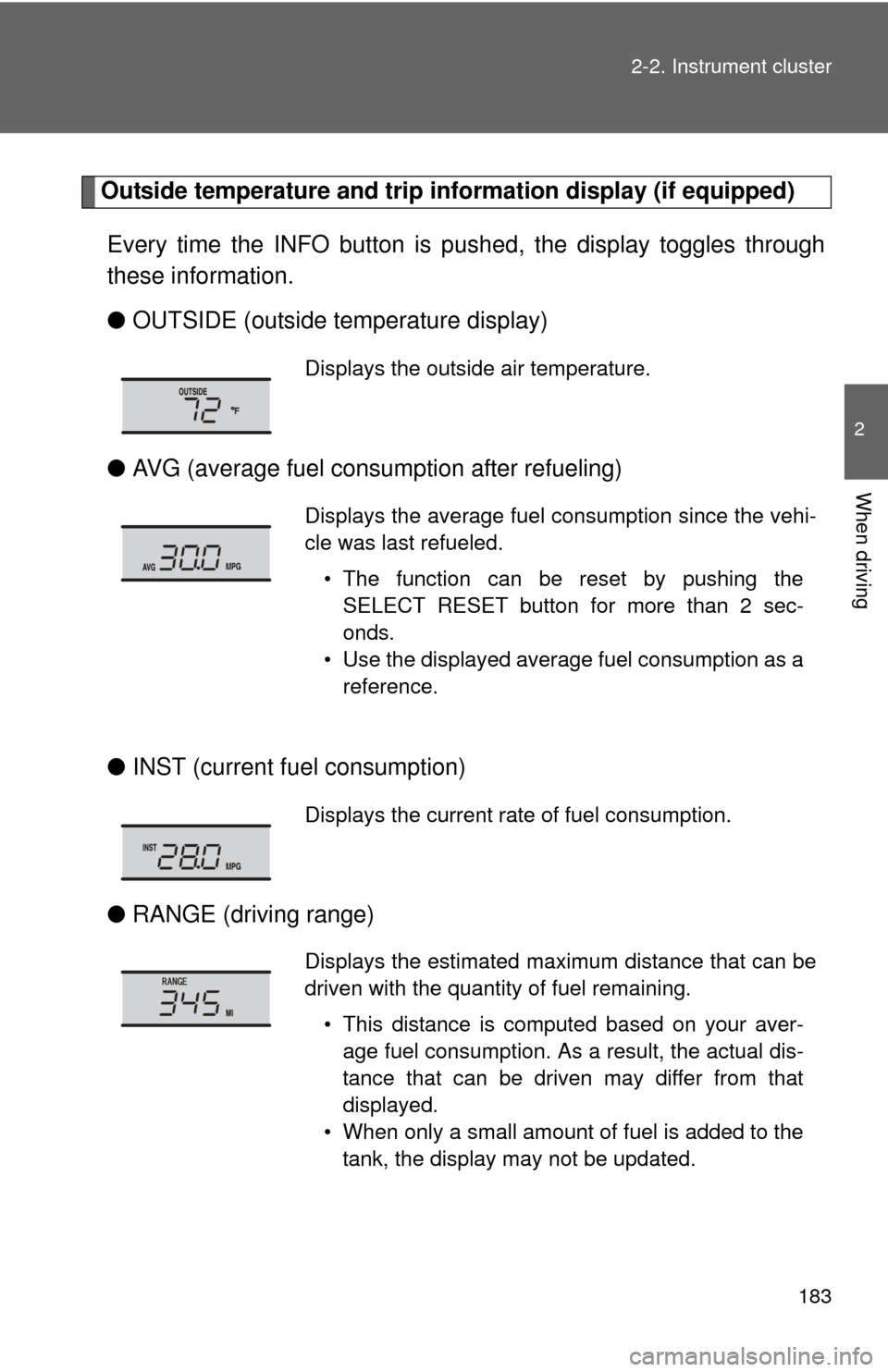
Every time the INFO button is pushed, the display toggles through
these information.
● OUTSIDE (outside temperature display)
● AVG (average fuel consumption after refueling)
● INST (current fu el consumption)
● RANGE (driving range)
Displays the outside air temperature.
Displays the average fuel consumption since the vehi-
cle was last refueled.
• The function can be reset by pushing theSELECT RESET button for more than 2 sec-
onds.
• Use the displayed average fuel consumption as a reference.
Displays the current rate of fuel consumption.
Displays the estimated maximum distance that can be
driven with the quantity of fuel remaining.
• This distance is computed based on your aver-age fuel consumption. As a result, the actual dis-
tance that can be driven may differ from that
displayed.
• When only a small amount of fuel is added to the tank, the display may not be updated.
Page 202 of 664
202 2-4. Using other driving systems
■Cruise control can be set when
●The shift lever is in the D or range 4 or higher of S has been selected.
● Vehicle speed is above approximately 25 mph (40 km/h).
■ Accelerating after setting the vehicle speed
●The vehicle can be accelerated normally. After acceleration, the set
speed resumes.
● Even without canceling the cruise control, the set speed can be
increased by first accelerating the vehicle to the desired speed and then
pushing the lever down to set the new speed.
■ Automatic cruise control cancelation
Cruise control will stop maintaining the vehicle speed in any of the following
situations.
●Actual vehicle speed falls more than approximately 10 mph (16 km/h)
below the preset vehicle speed.
At this time, the memorized set speed is not retained.
● Actual vehicle speed is below approximately 25 mph (40 km/h).
● VSC is activated.
● The operation cannot be switched for 5 seconds or more after operating
the front wheel drive control switch or the center differential lock switch.
(4WD models)
■ If the cruise control indicator flashes
Press the ON-OFF button once to deactivate the system, and then press the
button again to reactivate the system.
If the cruise control speed cannot be set or if the cruise control cancels
immediately after being activated, there may be a malfunction in the cruise
control system. Have the vehicle inspected by your Toyota dealer.
Page 212 of 664
212 2-4. Using other driving systems
■Dynamic laser cruise control can be set when
●The shift lever is in the D or range 4 or higher of S has been selected.
● Vehicle speed is above approximately 30 mph (50 km/h).
■ Switching modes
The mode cannot be switched to constant speed control mode if vehicle-to-
vehicle distance control mode has been used. The mode also cannot be
switched from constant speed control to vehicle-to-vehicle distance control
mode. Turn the system off by pressing the ON-OFF button, and turn it on
again.
■ Accelerating after setting the vehicle speed
The vehicle can accelerate normally. After acceleration, the set speed
resumes. However, during vehicle-to-vehicle distance control mode, the
vehicle speed may decrease below the set speed in order to maintain the
distance to the vehicle ahead.
■ Automatic cancelation of vehicle -to-vehicle distance control
Vehicle-to-vehicle distance control driving is automatically canceled in the
following situations:
● Actual vehicle speed falls below approximately 25 mph (40 km/h)
● VSC is activated
● The sensor cannot operate correctly because it is covered in some way.
*
●The windshield wipers are operating at high or low speed.*
●The operation cannot be switched for 5 seconds or more after operating
the front wheel drive control switch or the center differential lock switch.
(4WD models)
*: Vehicle-to-vehicle distance control driving must be reset by pressing the
ON-OFF button again.
If vehicle-to-vehicle distance control dr iving is automatically canceled for any
other reason, there may be a malfunction in the system. Contact your Toyota
dealer.
Page 327 of 664
327
3-2. Using the multimedia system
3
Interior features
■
Delete personal data
Select “Delete Personal Data” on the “General Settings”
screen.
Select “Delete”.
Check carefully beforehand, as data cannot be retrieved once
deleted.
A confirmation screen will be displayed. Select “Yes”.
The following personal data will be deleted or changed to its
default settings.
• General settings
• Audio settings
• Phone settings
Audio settings
Settings are available for adjusting the radio operation, cover art, etc.
■ Screen for audio settings
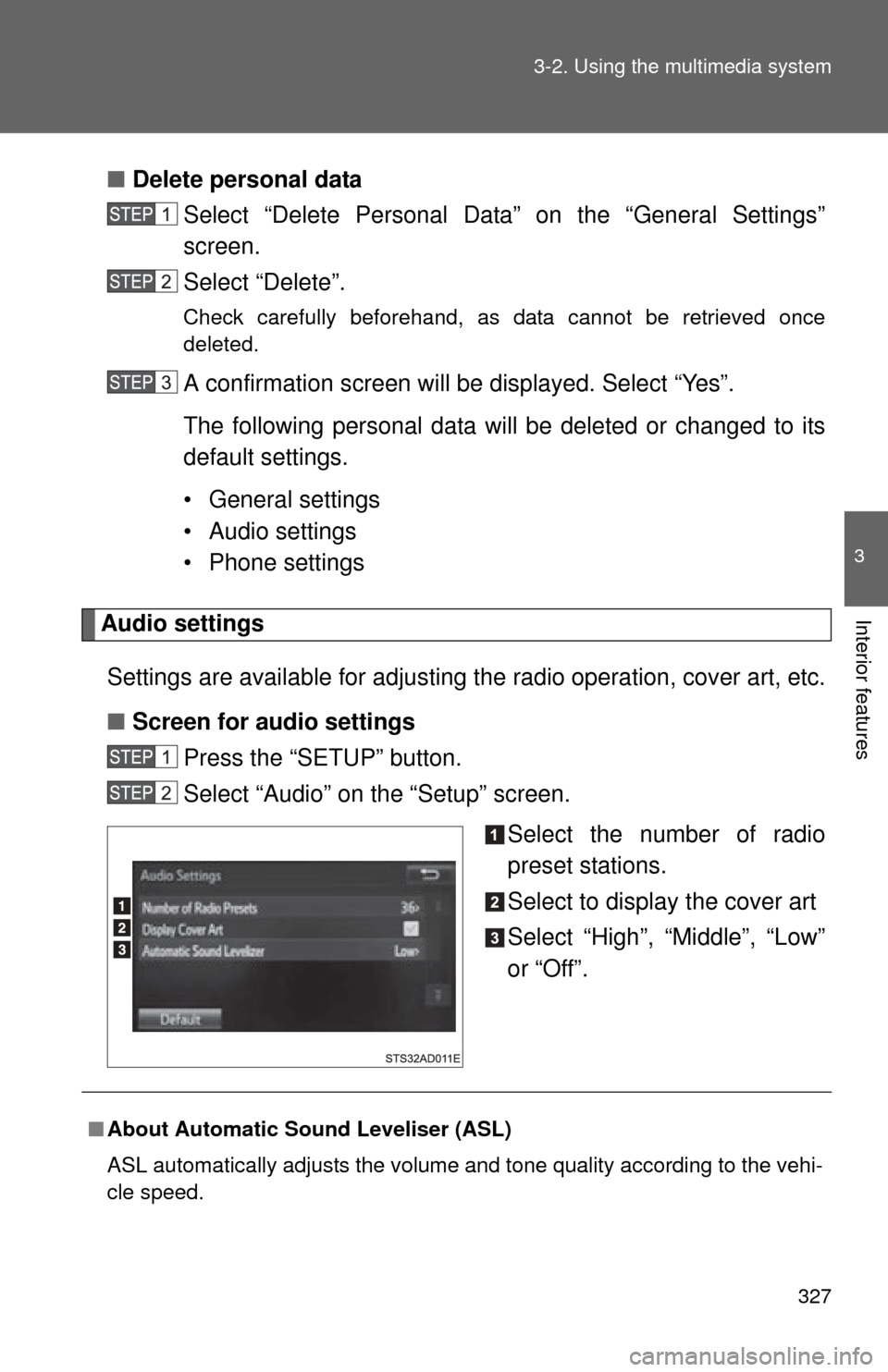
Press the “SETUP” button.
Select “Audio” on the “Setup” screen.
Select the number of radio
preset stations.
Select to display the cover art
Select “High”, “Middle”, “Low”
or “Off”.
■About Automatic Sound Leveliser (ASL)
ASL automatically adjusts the volume and tone quality according to the vehi-
cle speed.
Page 334 of 664
334
3-2. Using the multimedia system
Using the radio
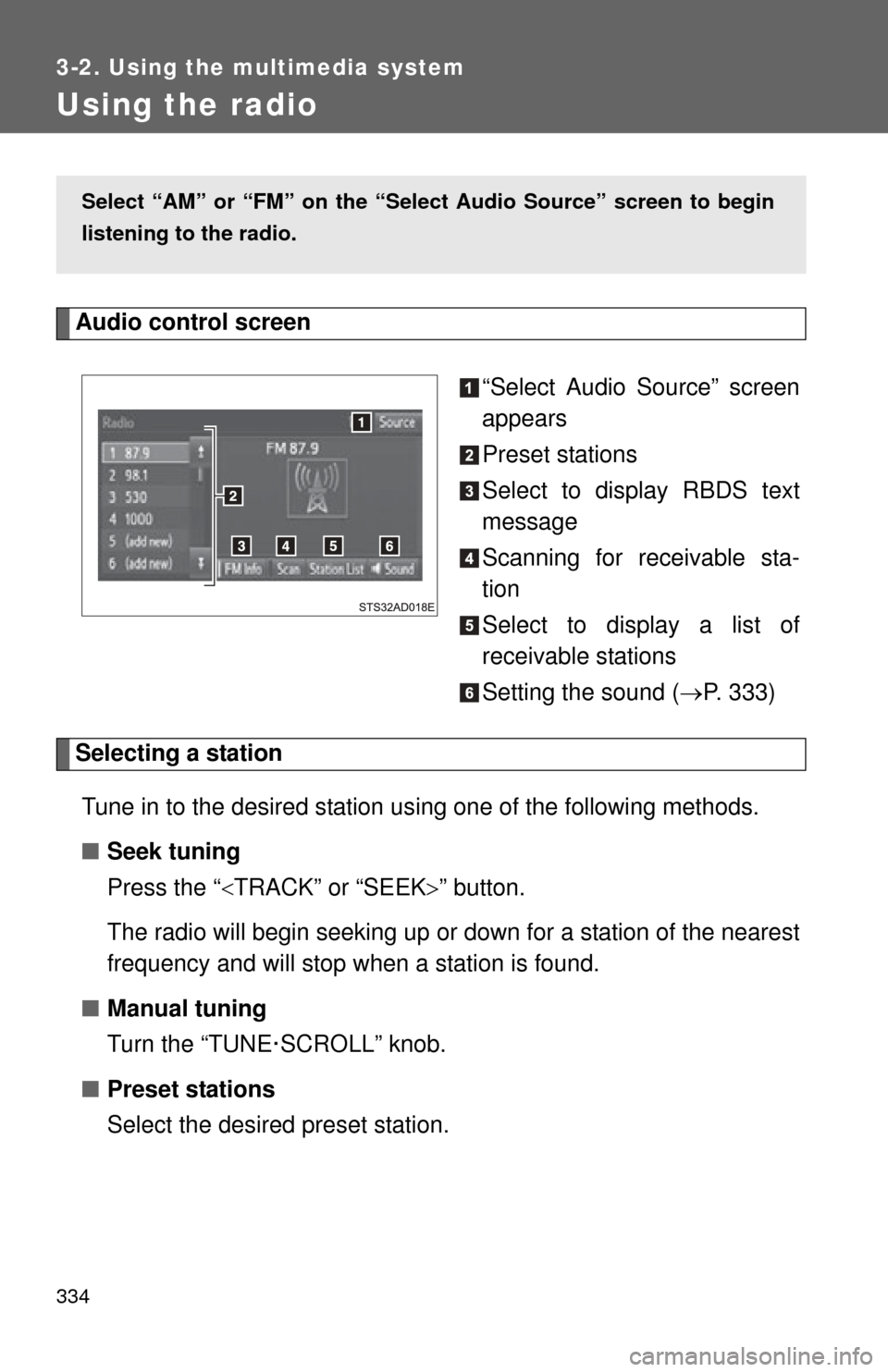
Audio control screen“Select Audio Source” screen
appears
Preset stations
Select to display RBDS text
message
Scanning for receivable sta-
tion
Select to display a list of
receivable stations
Setting the sound (P. 333)
Selecting a station
Tune in to the desired station using one of the following methods.
■ Seek tuning
Press the “ TRACK” or “SEEK ” button.
The radio will begin seeking up or down for a station of the nearest
frequency and will stop when a station is found.
■ Manual tuning
Turn the “TUNE·SCROLL” knob.
■ Preset stations
Select the desired preset station.
Select “AM” or “FM” on the “Sel ect Audio Source” screen to begin
listening to the radio.
Page 335 of 664
335
3-2. Using the multimedia system
3
Interior features
Setting station presets
Search for desired stations by turning the “TUNE·SCROLL”
knob or pressing the “ TRACK” or “SEEK” button.
Select “(add new)”
To change the preset station to a different one, select and hold the
preset station.
Select “Yes”.
Select “OK” after setting the new preset station.
■ Refreshing the station list
Select “Refresh” on the “Station List” screen.
To cancel the refresh, select “Cancel Refresh”.
■Reception sensitivity
●Maintaining perfect radio reception at all times is difficult due to the con-
tinually changing position of the antenna, differences in signal strength
and surrounding objects, such as trains, transmitters, etc.
● The radio antenna is mounted inside the rear quarter window. To main-
tain clear radio reception, do not attach metallic window tinting or other
metallic objects to the antenna wire mounted inside the rear quarter win-
dow.
Page 345 of 664
345
3-2. Using the multimedia system
3
Interior features
■
iPod functions
●When an iPod is connected and the audio source is changed to iPod
mode, the iPod will resume play from the same point in which it was last
used.
● Depending on the iPod that is connected to the system, certain functions
may not be available. If a function is unavailable due to a malfunction (as
opposed to a system specification), disconnecting the device and recon-
necting it may resolve the problem.
● While connected to the system, the iPod cannot be operated with its own
controls. It is necessary to use the controls of the vehicle’s multimedia
system instead.
● When the battery level of an iPod is very low, the iPod may not operate. If
so, charge the iPod before use.
● Compatible models ( P. 347)
■ iPod problems
To resolve most problems encountered when using your iPod, disconnect
your iPod from the vehicle iPod connection and reset it. For instructions on
how to reset your iPod, refer to your iPod Owner’s Manual.
Page 395 of 664
395
3-2. Using the multimedia system
3
Interior features
Select to delete contacts from
the contact list.
* (
P. 398)
Select to reset all setup
items.
*
*
: For PBAP compatible Bluetooth®
phones only, this function is avail-
able when “Automatic Contact/
History Transfer” is set to off.
( P. 394)
■ Update contacts from phone
Operation methods differ between PBAP compatible and PBAP
incompatible but OPP compatible Bluetooth
® phones.
If your cellular phone is neit her PBAP nor OPP compatible, the
contacts cannot be transferred.
● For PBAP Compatible Bluetooth
® Phones
Select “Update Contacts from Phone”.
Check that a confirmation screen is displayed when the oper-
ation is complete.
This operation may be unnecessary depending on the type of cellu-
lar phone.
Depending on the type of cellular phone, OBEX authentication may
be required when transferring contact data. Enter “1234” into the
Bluetooth
® phone.
If another Bluetooth
® device is connected when transferring contact
data, depending on the phone, the connected Bluetooth® device
may need to be disconnected.
Depending on the type of Bluetooth
® phone being connected, it may
be necessary to perform additional steps on the phone.