fuel TOYOTA SEQUOIA 2017 2.G User Guide
[x] Cancel search | Manufacturer: TOYOTA, Model Year: 2017, Model line: SEQUOIA, Model: TOYOTA SEQUOIA 2017 2.GPages: 576, PDF Size: 12.76 MB
Page 104 of 576

104 1-5. Refueling
NOTICE
■Refueling
Do not spill fuel during refueling.
Doing so may damage the vehicle, such as causing the emission control
systems to operate abnormally or damaging fuel system components or the
vehicle’s painted surface.
■ E85 fuel
E85 fuel can be used only in flex-fuel vehicles. Do not add E85 fuel to a gas-
oline-engine vehicle.
Filling a gasoline-engine vehicle with E85 fuel will have a negative impact on
starting and driving performance and will cause damage to the fuel system
components.
Page 150 of 576
150 2-1. Driving procedures
■Operating your vehicle in a foreign country
Comply with the relevant vehicle registration laws and confirm the availability
of the correct fuel. ( →P. 515)
■ When turning off the engine
The emission system operating sounds may continue for a short time after
the engine is turned off. This is not a malfunction, and helps to ensure opti-
mal performance of the emission system.
CAUTION
■When starting the vehicle
Always keep your foot on the brake pedal while stopped with the engine run-
ning. This prevents the vehicle from creeping.
■ When driving the vehicle
●Do not drive if you are unfamiliar with the location of the brake and accel-
erator pedals to avoid depressing the wrong pedal.
• Accidentally depressing the accelerator pedal instead of the brake
pedal will result in sudden acceleration that may lead to an accident
that could result in death or serious injury.
• When backing up, you may twist your body around, leading to a diffi- culty in operating the pedals. Make sure to operate the pedals properly.
• Make sure to keep a correct driving posture even when moving the vehicle only slightly, allowing you to depress the brake and accelerator
pedals properly.
• Depress the brake pedal using your right foot. Depressing the brake pedal using your left foot may delay response in an emergency, result-
ing in an accident.
● Do not drive the vehicle over or st op the vehicle near flammable materials.
The exhaust system and exhaust gases can be extremely hot. This may
cause a fire if there is any flammable material nearby.
● Do not let the vehicle roll backwards while the shift lever is in a driving
position, or roll forward while the shift lever is in R.
Doing so may cause the engine to stall or lead to poor brake and steering
performance, resulting in an accident or damage to the vehicle.
Page 161 of 576
161
2-1. Driving procedures
2
When driving
Automatic transmission
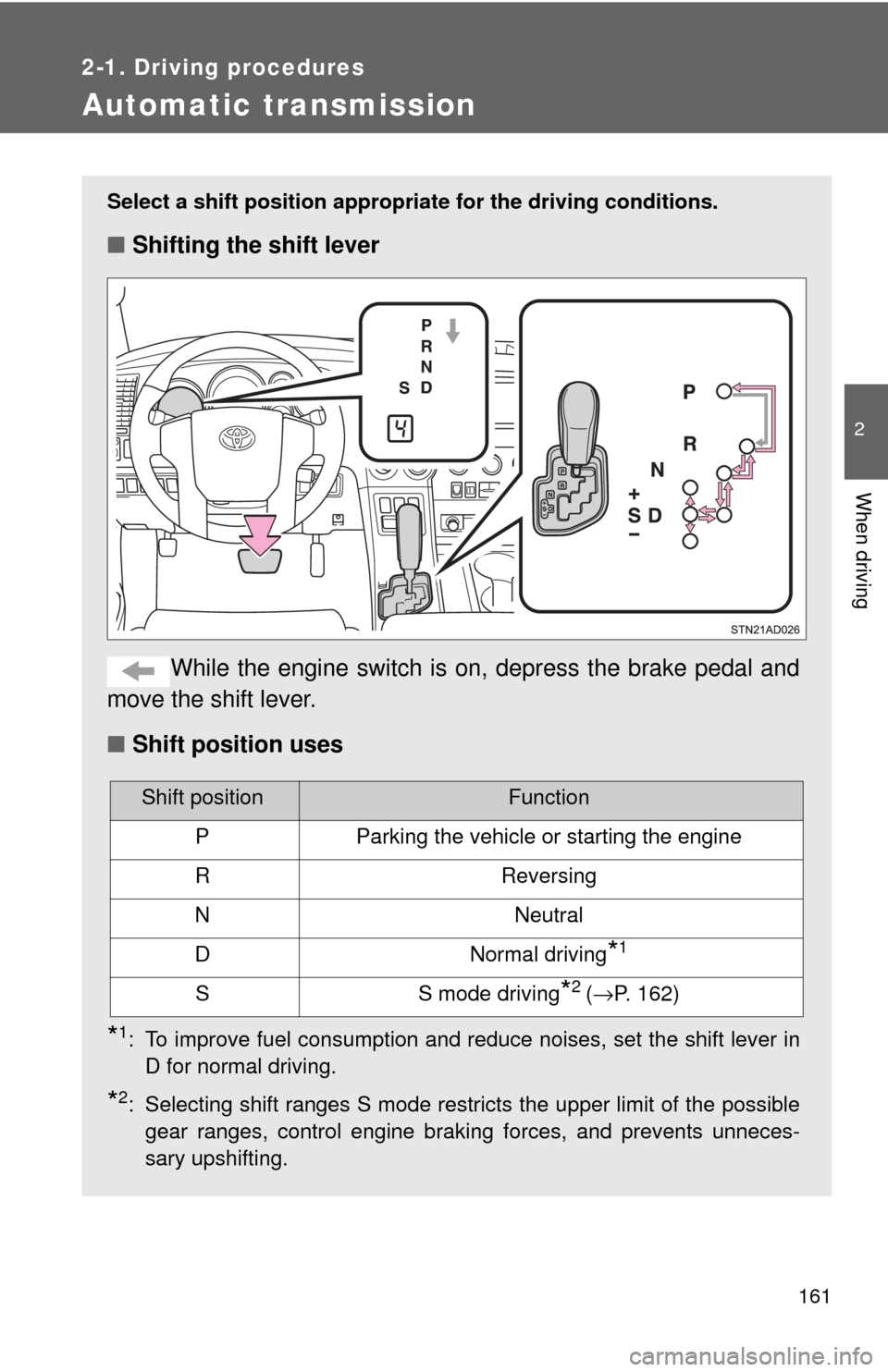
Select a shift position appropriate for the driving conditions.
■Shifting the shift lever
While the engine switch is on, depress the brake pedal and
move the shift lever.
■ Shift position uses
*1: To improve fuel consumption and reduce noises, set the shift lever in
D for normal driving.
*2: Selecting shift ranges S mode restricts the upper limit of the possiblegear ranges, control engine braking forces, and prevents unneces-
sary upshifting.
Shift positionFunction
PParking the vehicle or starting the engine
RReversing
NNeutral
DNormal driving*1
SS mode driving*2 (→P. 162)
Page 168 of 576
168
2-2. Instrument cluster
Gauges and meters
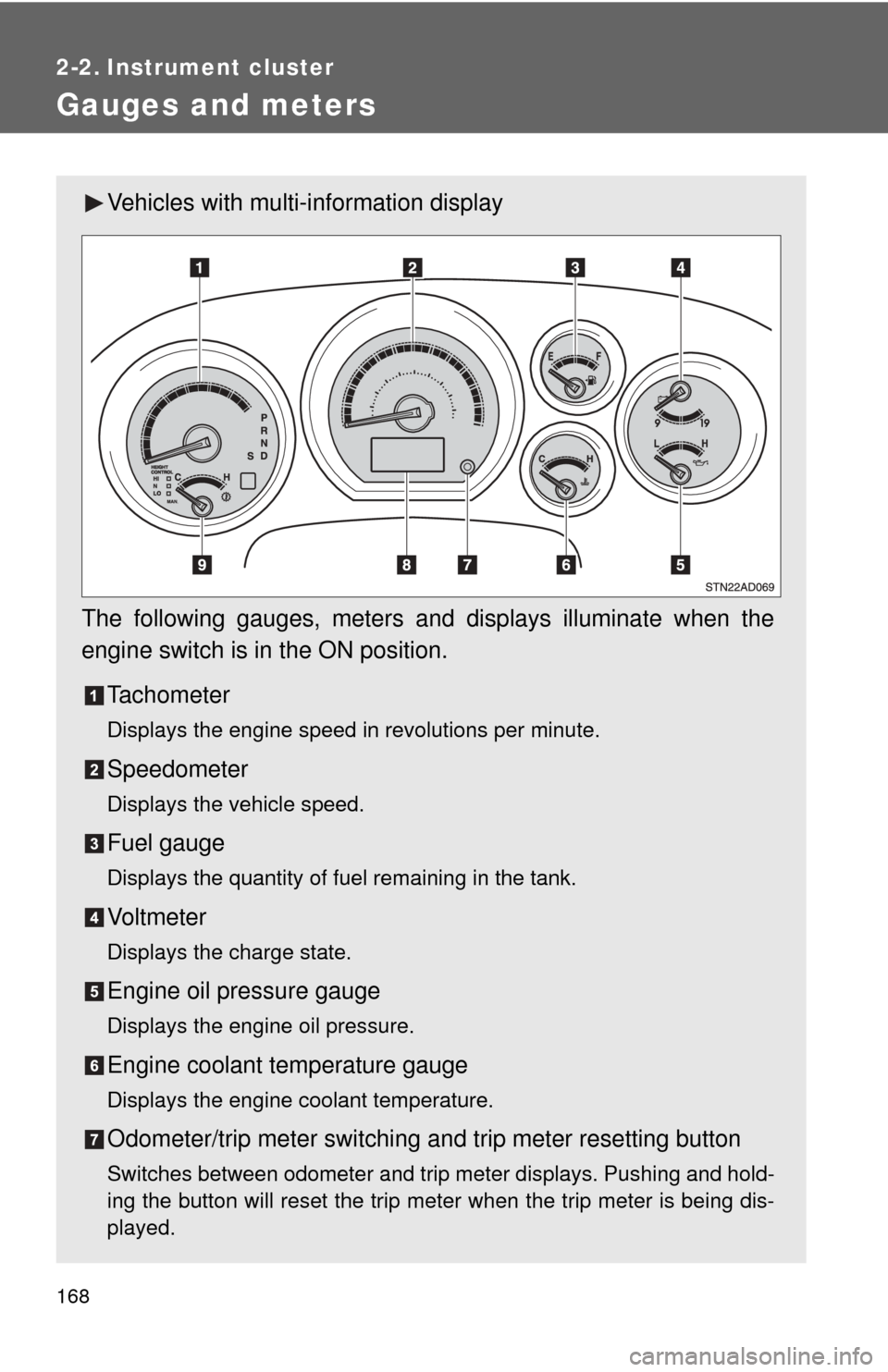
Vehicles with multi-information display
The following gauges, meters and displays illuminate when the
engine switch is in the ON position. Tachometer
Displays the engine speed in revolutions per minute.
Speedometer
Displays the vehicle speed.
Fuel gauge
Displays the quantity of fuel remaining in the tank.
Vo l t m e t e r
Displays the charge state.
Engine oil pressure gauge
Displays the engine oil pressure.
Engine coolant temperature gauge
Displays the engine coolant temperature.
Odometer/trip meter switching and trip meter resetting button
Switches between odometer and trip meter displays. Pushing and hold-
ing the button will reset the trip meter when the trip meter is being dis-
played.
Page 170 of 576
170 2-2. Instrument cluster
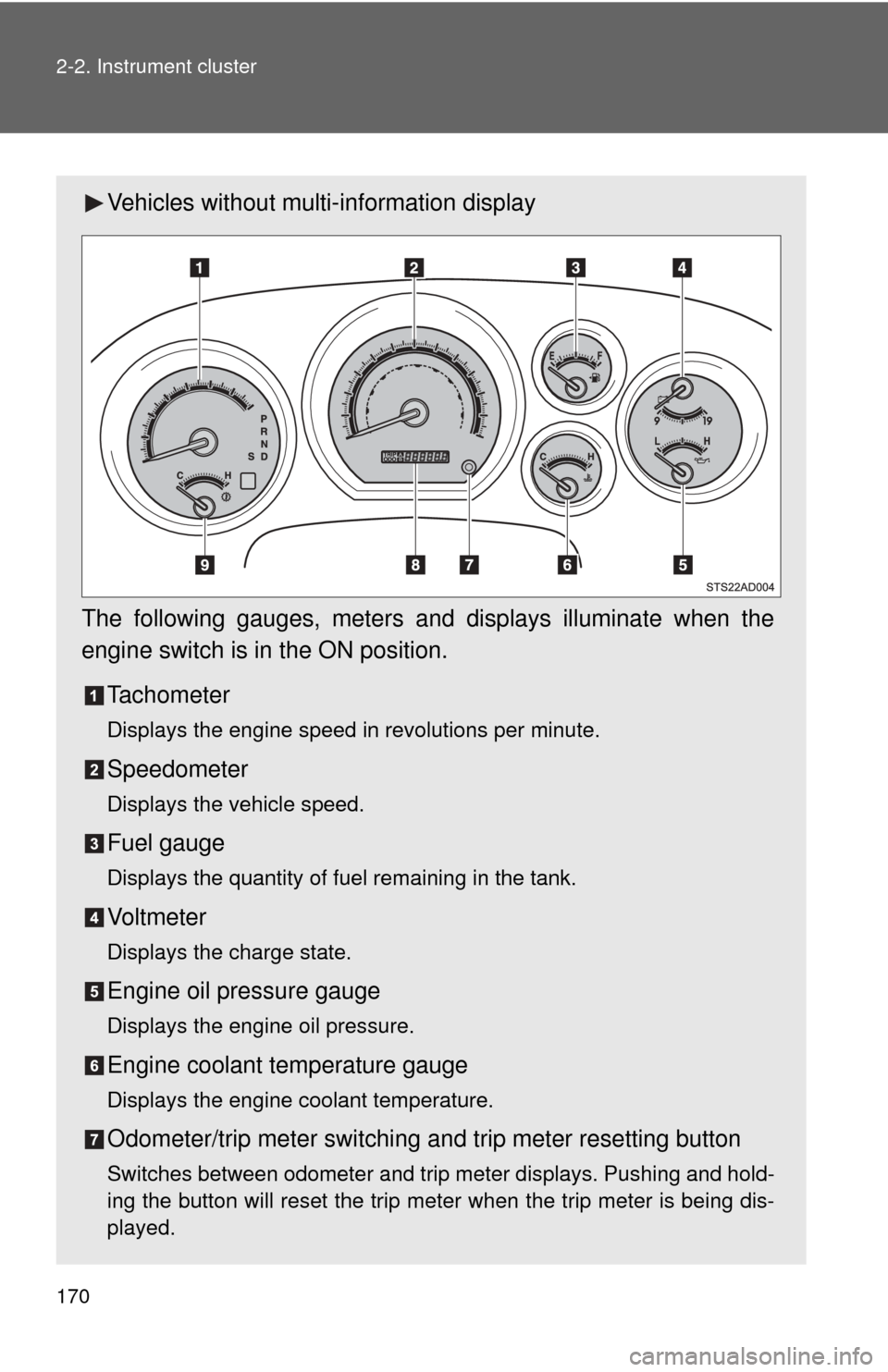
Vehicles without multi-information display
The following gauges, meters and displays illuminate when the
engine switch is in the ON position. Tachometer
Displays the engine speed in revolutions per minute.
Speedometer
Displays the vehicle speed.
Fuel gauge
Displays the quantity of fuel remaining in the tank.
Vo l t m e t e r
Displays the charge state.
Engine oil pressure gauge
Displays the engine oil pressure.
Engine coolant temperature gauge
Displays the engine coolant temperature.
Odometer/trip meter switching and trip meter resetting button
Switches between odometer and trip meter displays. Pushing and hold-
ing the button will reset the trip meter when the trip meter is being dis-
played.
Page 178 of 576
178
2-2. Instrument cluster
Multi-information display∗
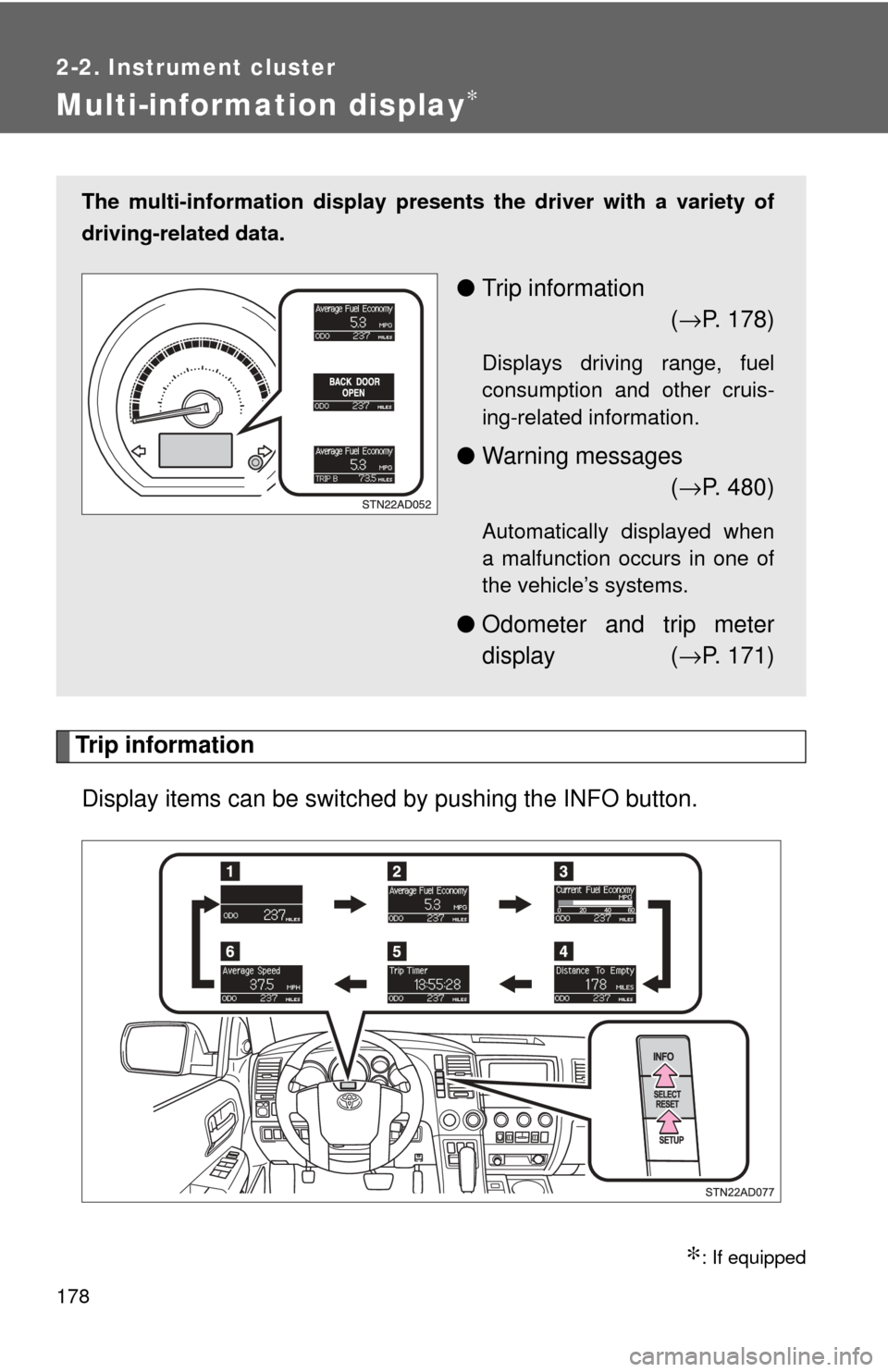
Trip informationDisplay items can be switched by pushing the INFO button.
∗: If equipped
The multi-information display presen ts the driver with a variety of
driving-related data.
● Trip information
(→ P. 178)
Displays driving range, fuel
consumption and other cruis-
ing-related information.
● Warning messages
(→ P. 480)
Automatically displayed when
a malfunction occurs in one of
the vehicle’s systems.
● Odometer and trip meter
display ( →P. 171)
Page 179 of 576
179
2-2. Instrument cluster
2
When driving
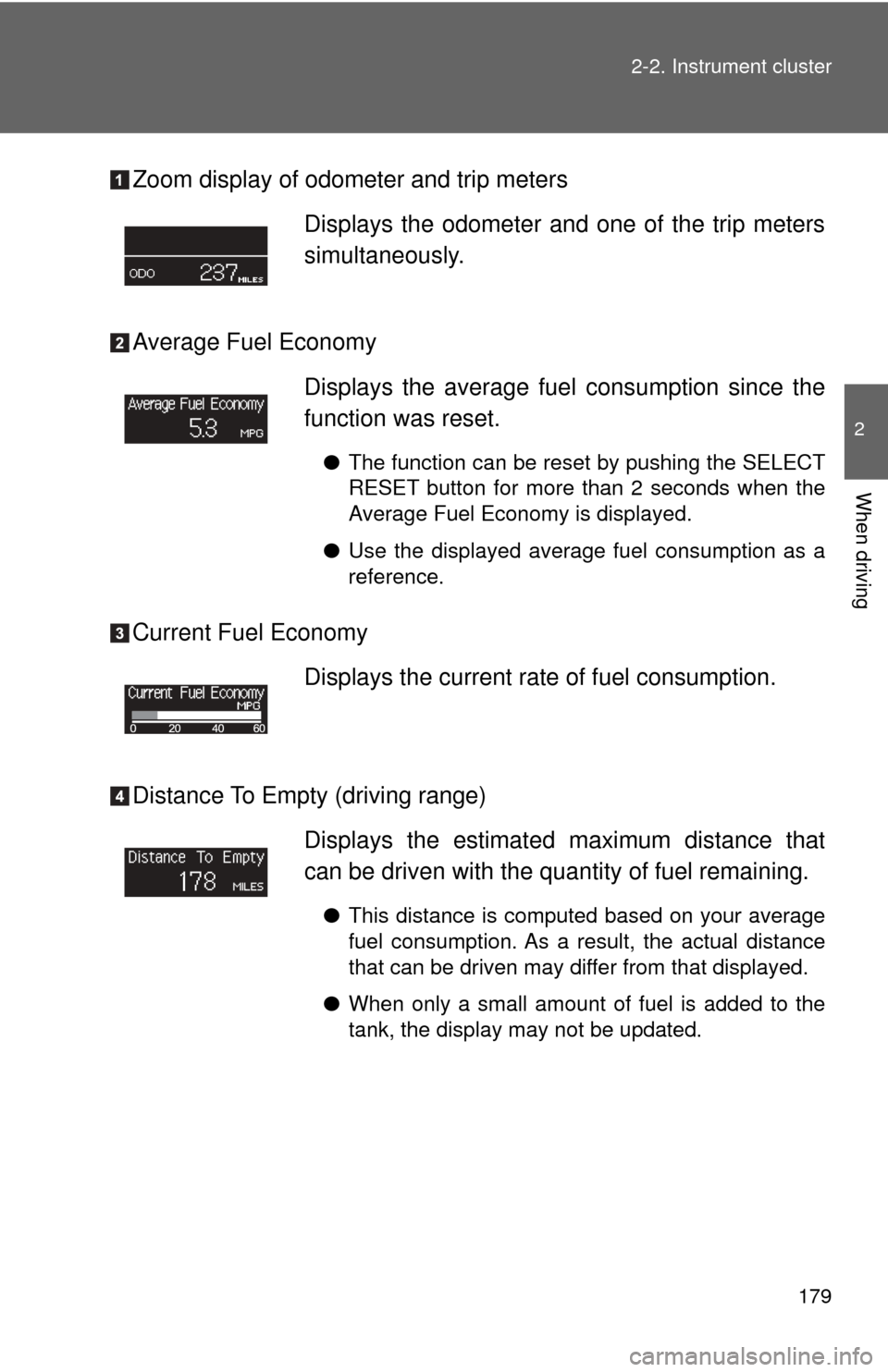
Zoom display of odometer and trip meters
Average Fuel Economy
Current Fuel Economy
Distance To Empty (driving range)
Displays the odometer and one of the trip meters
simultaneously.
Displays the average fuel
consumption since the
function was reset.
● The function can be reset by pushing the SELECT
RESET button for more than 2 seconds when the
Average Fuel Economy is displayed.
● Use the displayed average fuel consumption as a
reference.
Displays the current rate of fuel consumption.
Displays the estimat ed maximum distance that
can be driven with the quantity of fuel remaining.
● This distance is computed based on your average
fuel consumption. As a result, the actual distance
that can be driven may differ from that displayed.
● When only a small amount of fuel is added to the
tank, the display may not be updated.
Page 183 of 576
183
2-2. Instrument cluster
2
When driving
■
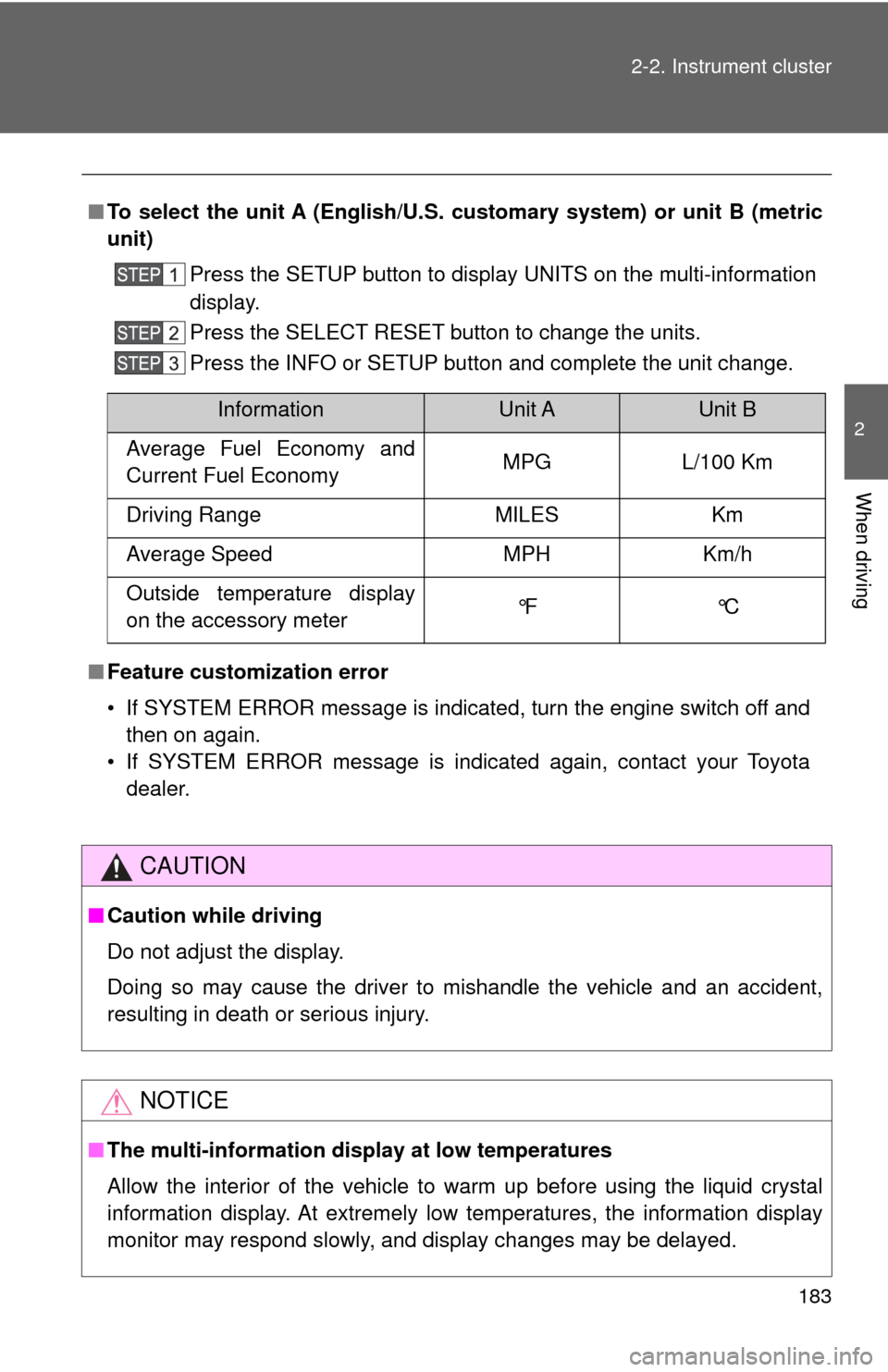
To select the unit A (English/U.S. customary system) or unit B (metric
unit)
Press the SETUP button to display UNITS on the multi-information
display.
Press the SELECT RESET button to change the units.
Press the INFO or SETUP button and complete the unit change.
■ Feature customization error
• If SYSTEM ERROR message is indicated, turn the engine switch off and
then on again.
• If SYSTEM ERROR message is indicated again, contact your Toyota dealer.
CAUTION
■Caution while driving
Do not adjust the display.
Doing so may cause the driver to mishandle the vehicle and an accident,
resulting in death or serious injury.
NOTICE
■The multi-information disp lay at low temperatures
Allow the interior of the vehicle to warm up before using the liquid crystal
information display. At extremely low temperatures, the information display
monitor may respond slowly, and display changes may be delayed.
InformationUnit AUnit B
Average Fuel Economy and
Current Fuel Economy MPG L/100 Km
Driving Range MILES Km
Average Speed MPH Km/h
Outside temperature display
on the accessory meter °F °C
Page 185 of 576
185
2-2. Instrument cluster
2
When driving
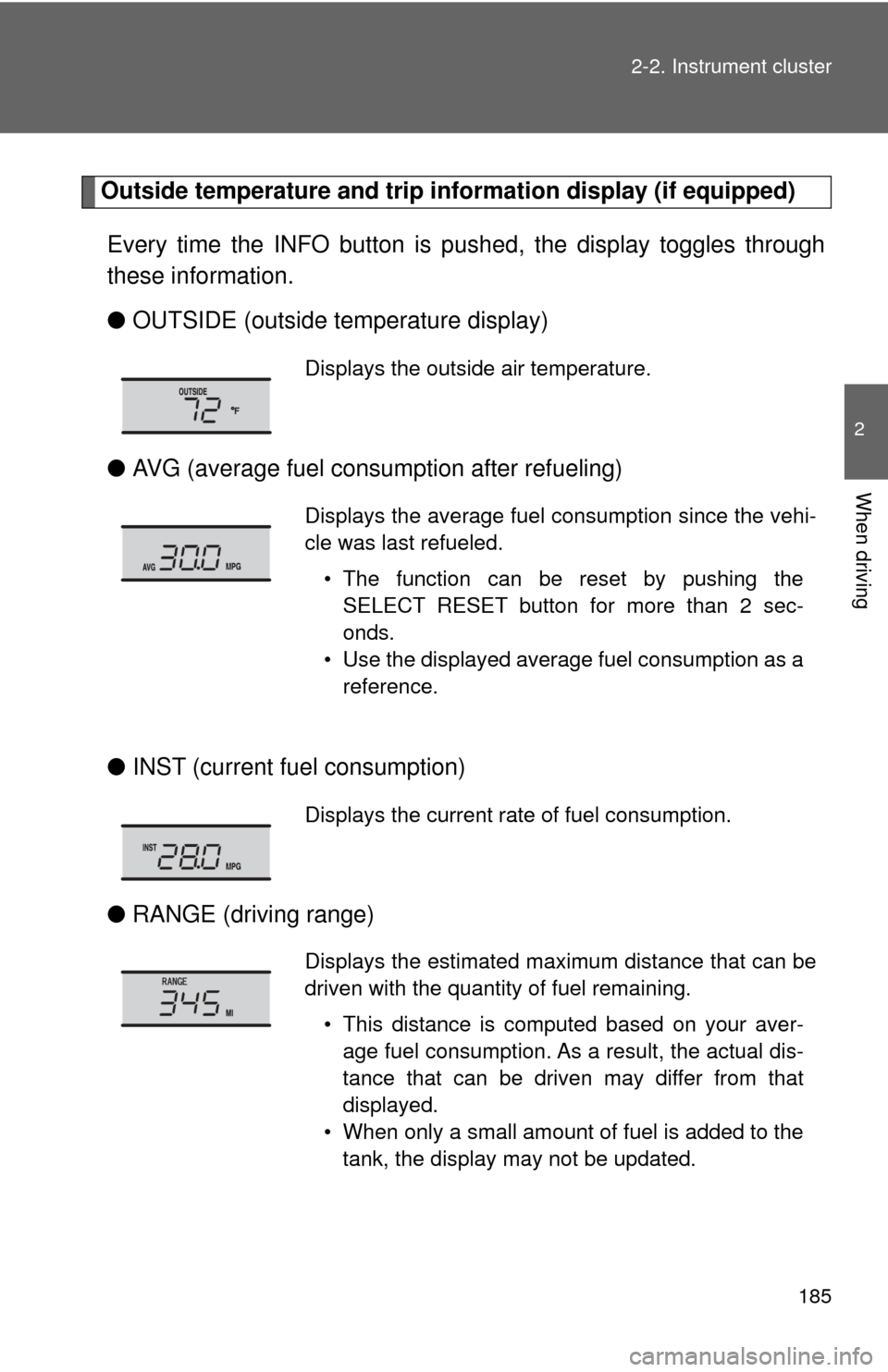
Outside temperature and trip in
formation display (if equipped)
Every time the INFO button is pushed, the display toggles through
these information.
● OUTSIDE (outside temperature display)
● AVG (average fuel consumption after refueling)
● INST (current fuel consumption)
● RANGE (driving range)
Displays the outside air temperature.
Displays the average fuel consumption since the vehi-
cle was last refueled.
• The function can be reset by pushing theSELECT RESET button for more than 2 sec-
onds.
• Use the displayed average fuel consumption as a reference.
Displays the current rate of fuel consumption.
Displays the estimated maximum distance that can be
driven with the quantity of fuel remaining.
• This distance is computed based on your aver-age fuel consumption. As a result, the actual dis-
tance that can be driven may differ from that
displayed.
• When only a small amount of fuel is added to the tank, the display may not be updated.
Page 186 of 576
186 2-2. Instrument cluster
●Display off
■The accessory meter can be operated when
The engine switch must be in the ON position.
■ To select the unit A (English/U.S. customary system) or unit B (metric
unit) (vehicles without mu lti-information display)
Press the SETUP button to change the units.
CAUTION
■ Caution while driving
Do not adjust the display.
Doing so may cause the driver to mishandle the vehicle and cause an acci-
dent, resulting in death or serious injury.
InformationUnit AUnit B
Average fuel consumption and
current fuel consumption MPG L/100 Km
Driving range MILES Km
Outside temperature °F °C