reset TOYOTA SEQUOIA 2017 2.G User Guide
[x] Cancel search | Manufacturer: TOYOTA, Model Year: 2017, Model line: SEQUOIA, Model: TOYOTA SEQUOIA 2017 2.GPages: 576, PDF Size: 12.76 MB
Page 183 of 576
183
2-2. Instrument cluster
2
When driving
■
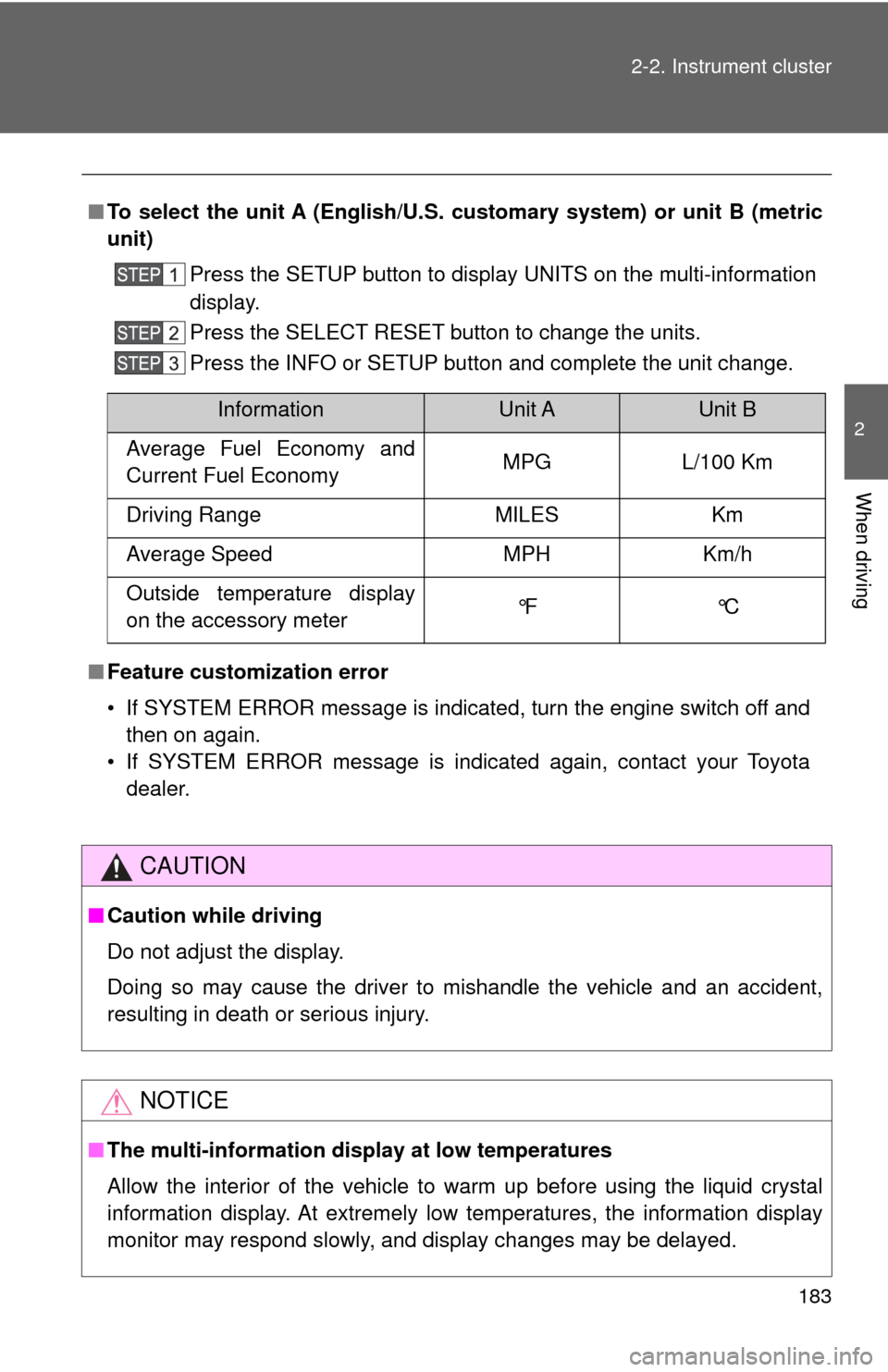
To select the unit A (English/U.S. customary system) or unit B (metric
unit)
Press the SETUP button to display UNITS on the multi-information
display.
Press the SELECT RESET button to change the units.
Press the INFO or SETUP button and complete the unit change.
■ Feature customization error
• If SYSTEM ERROR message is indicated, turn the engine switch off and
then on again.
• If SYSTEM ERROR message is indicated again, contact your Toyota dealer.
CAUTION
■Caution while driving
Do not adjust the display.
Doing so may cause the driver to mishandle the vehicle and an accident,
resulting in death or serious injury.
NOTICE
■The multi-information disp lay at low temperatures
Allow the interior of the vehicle to warm up before using the liquid crystal
information display. At extremely low temperatures, the information display
monitor may respond slowly, and display changes may be delayed.
InformationUnit AUnit B
Average Fuel Economy and
Current Fuel Economy MPG L/100 Km
Driving Range MILES Km
Average Speed MPH Km/h
Outside temperature display
on the accessory meter °F °C
Page 184 of 576
184
2-2. Instrument cluster
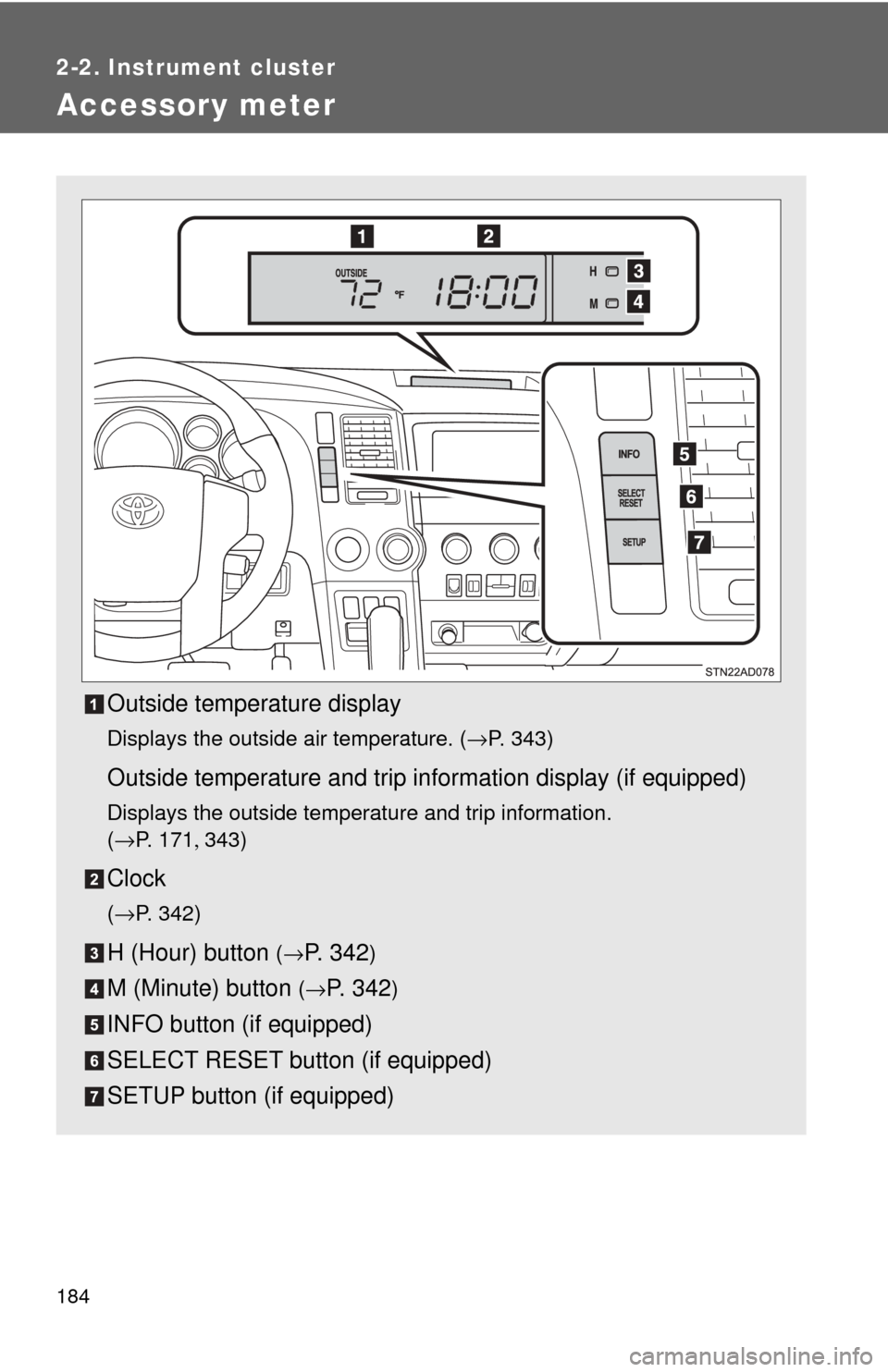
Accessory meter
Outside temperature display
Displays the outside air temperature. (→P. 343)
Outside temperature and trip information display (if equipped)
Displays the outside temperature and trip information.
(→P. 1 7 1 , 343)
Clock
(→P. 3 4 2 )
H (Hour) button (→P. 3 4 2)
M (Minute) button (→P. 342)
INFO button (if equipped)
SELECT RESET button (if equipped)
SETUP button (if equipped)
Page 185 of 576
185
2-2. Instrument cluster
2
When driving
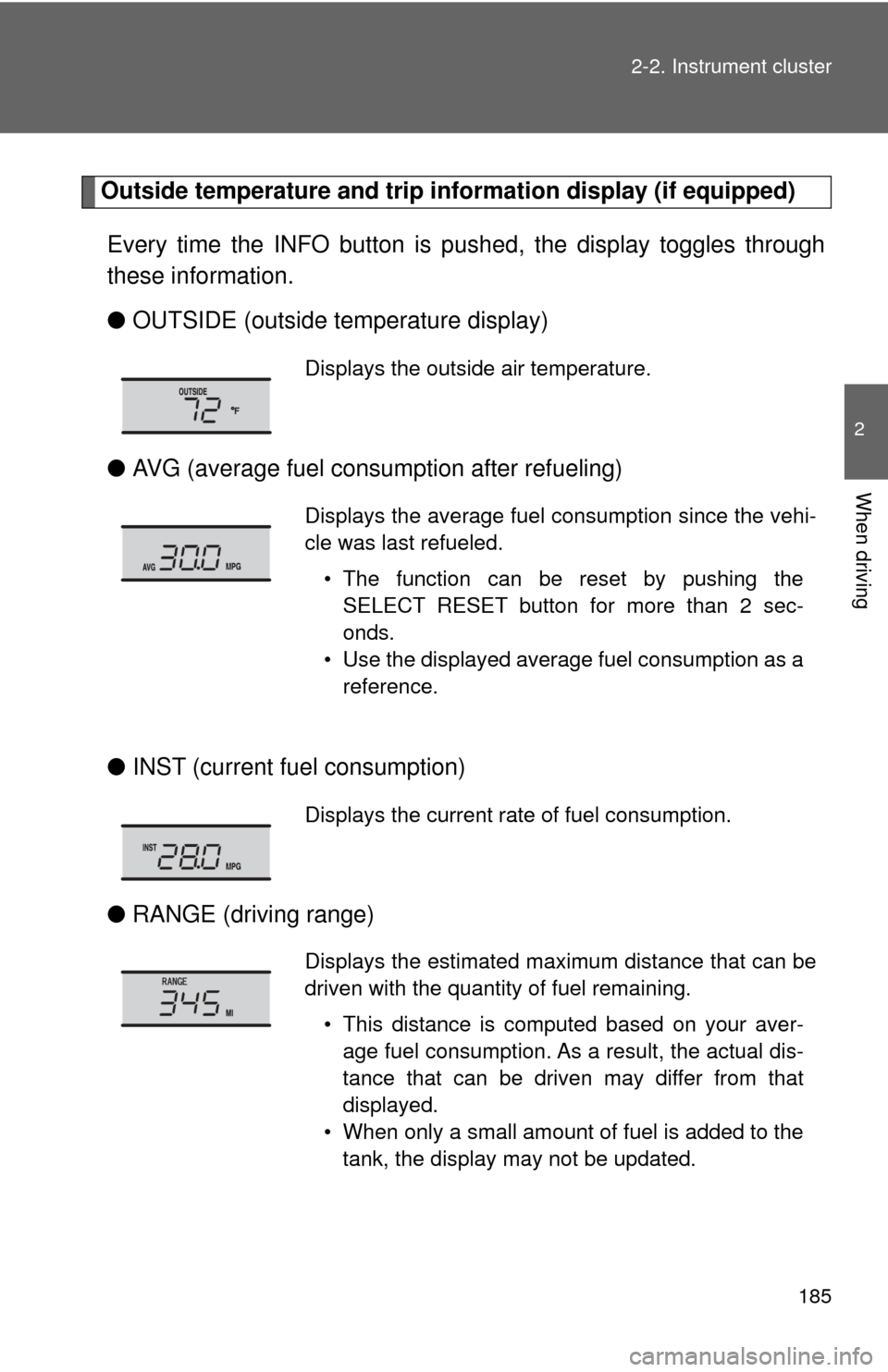
Outside temperature and trip in
formation display (if equipped)
Every time the INFO button is pushed, the display toggles through
these information.
● OUTSIDE (outside temperature display)
● AVG (average fuel consumption after refueling)
● INST (current fuel consumption)
● RANGE (driving range)
Displays the outside air temperature.
Displays the average fuel consumption since the vehi-
cle was last refueled.
• The function can be reset by pushing theSELECT RESET button for more than 2 sec-
onds.
• Use the displayed average fuel consumption as a reference.
Displays the current rate of fuel consumption.
Displays the estimated maximum distance that can be
driven with the quantity of fuel remaining.
• This distance is computed based on your aver-age fuel consumption. As a result, the actual dis-
tance that can be driven may differ from that
displayed.
• When only a small amount of fuel is added to the tank, the display may not be updated.
Page 204 of 576
204 2-4. Using other driving systems
■Cruise control can be set when
●The shift lever is in the D or range 4 or higher of S has been selected.
● Vehicle speed is above approximately 25 mph (40 km/h).
■ Accelerating after setting the vehicle speed
●The vehicle can be accelerated normally. After acceleration, the set
speed resumes.
● Even without canceling the cruise control, the set speed can be
increased by first accelerating the vehicle to the desired speed and then
pushing the lever down to set the new speed.
■ Automatic cruise control cancelation
Cruise control will stop maintaining the vehicle speed in any of the following
situations.
●Actual vehicle speed falls more than approximately 10 mph (16 km/h)
below the preset vehicle speed.
At this time, the memorized set speed is not retained.
● Actual vehicle speed is below approximately 25 mph (40 km/h).
● VSC is activated.
● The operation cannot be switched for 5 seconds or more after operating
the front wheel drive control switch or the center differential lock switch.
(4WD models)
■ If the cruise control indicator flashes
Press the ON-OFF button once to deactivate the system, and then press the
button again to reactivate the system.
If the cruise control speed cannot be set or if the cruise control cancels
immediately after being activated, there may be a malfunction in the cruise
control system. Have the vehicle inspected by your Toyota dealer.
Page 214 of 576
214 2-4. Using other driving systems
■Dynamic laser cruise control can be set when
●The shift lever is in the D or range 4 or higher of S has been selected.
● Vehicle speed is above approximately 30 mph (50 km/h).
■ Switching modes
The mode cannot be switched to constant speed control mode if vehicle-to-
vehicle distance control mode has been used. The mode also cannot be
switched from constant speed control to vehicle-to-vehicle distance control
mode. Turn the system off by pressing the ON-OFF button, and turn it on
again.
■ Accelerating after setting the vehicle speed
The vehicle can accelerate normally. After acceleration, the set speed
resumes. However, during vehicle-to-vehicle distance control mode, the
vehicle speed may decrease below the set speed in order to maintain the
distance to the vehicle ahead.
■ Automatic cancelation of vehicle -to-vehicle distance control
Vehicle-to-vehicle distance control driving is automatically canceled in the
following situations:
● Actual vehicle speed falls below approximately 25 mph (40 km/h)
● VSC is activated
● The sensor cannot operate correctly because it is covered in some way.
*
●The windshield wipers are operating at high or low speed.*
●The operation cannot be switched for 5 seconds or more after operating
the front wheel drive control switch or the center differential lock switch.
(4WD models)
*: Vehicle-to-vehicle distance control driving must be reset by pressing the
ON-OFF button again.
If vehicle-to-vehicle distance control driving is automatically canceled for any
other reason, there may be a malfunction in the system. Contact your Toyota
dealer.
Page 389 of 576
389
4-2. Maintenance
4
Maintenance and care
■
Resetting the maintenance required reminder light (vehicles without
multi-information display) or th e message indicating maintenance is
required (vehicles with multi-information display) (U.S.A. only)
After the required maintenance is performed according to the maintenance
schedule, please reset the reminder light or message.
To reset the reminder light or message, follow the procedures described
below:
Turn the engine switch off with the trip meter A reading shown.
While pressing the trip meter reset button ( →P. 168), turn the
engine switch on.
Without multi-information display
Continue to press and hold the button until the trip meter displays
000000.
With multi-information display Continue to press and hold the button until “MAINT REQD RESET
MODE COMPLETE” appears on the multi-information display.
■ Allow inspection and repairs to be performed by a Toyota dealer
● Toyota technicians are well-trained specialists and are kept up to date
with the latest service information. They are well informed about the
operations of all systems on your vehicle.
● Keep a copy of the repair order. It proves that the maintenance that has
been performed is under warranty coverage. If any problem should arise
while your vehicle is under warranty, your Toyota dealer will promptly
take care of it.
Page 418 of 576
418 4-3. Do-it-yourself maintenance
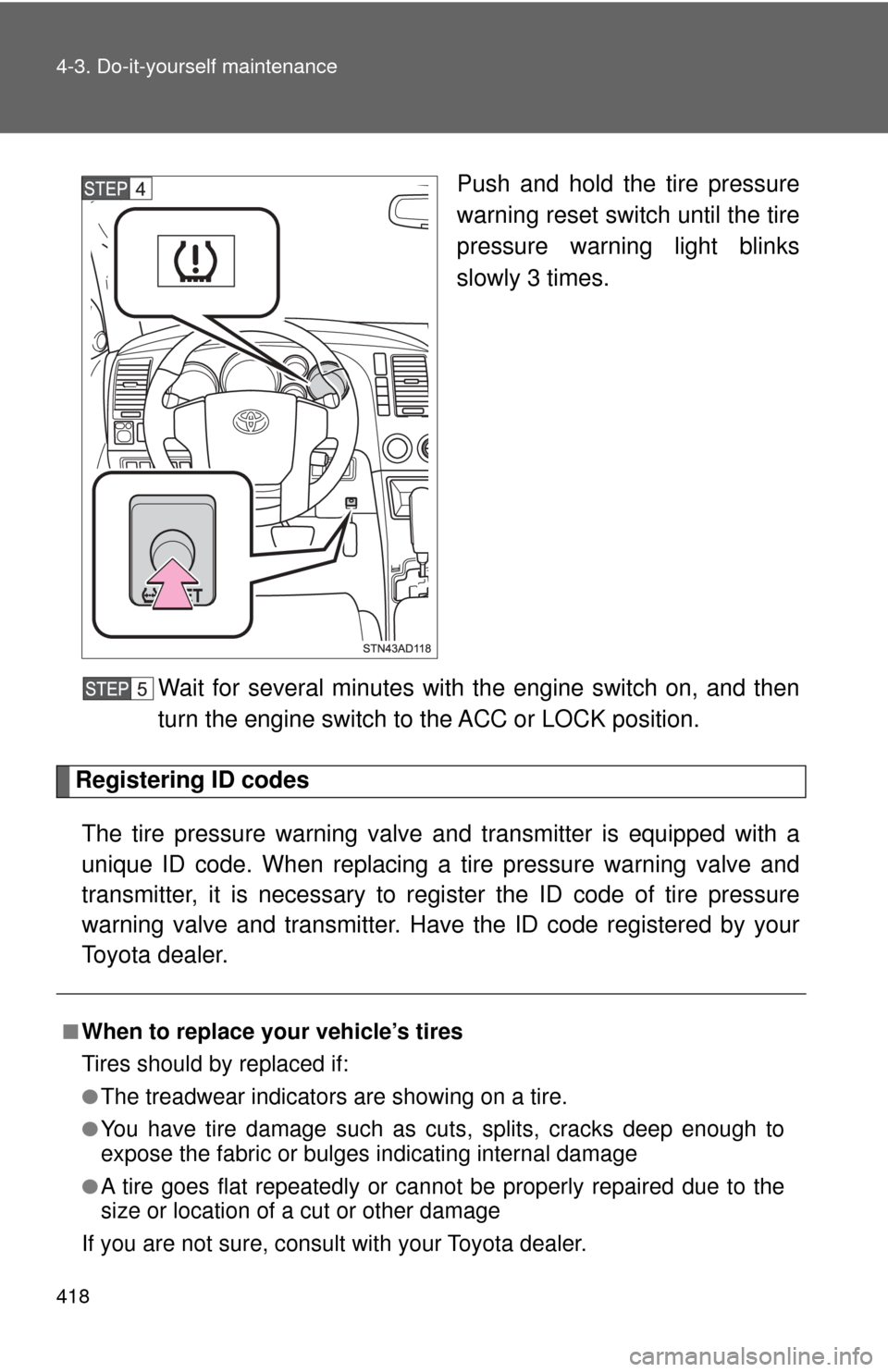
Push and hold the tire pressure
warning reset switch until the tire
pressure warning light blinks
slowly 3 times.
Wait for several minutes with the engine switch on, and then
turn the engine switch to the ACC or LOCK position.
Registering ID codes The tire pressure warning valve and transmitter is equipped with a
unique ID code. When replacing a tire pressure warning valve and
transmitter, it is necessary to regi ster the ID code of tire pressure
warning valve and transmitter. Have the ID code registered by your
Toyota dealer.
■When to replace your vehicle’s tires
Tires should by replaced if:
●The treadwear indicators are showing on a tire.
●You have tire damage such as cuts, splits, cracks deep enough to
expose the fabric or bulges indicating internal damage
●A tire goes flat repeatedly or ca nnot be properly repaired due to the
size or location of a cut or other damage
If you are not sure, consult with your Toyota dealer.
Page 420 of 576

420 4-3. Do-it-yourself maintenance
3Snow tiresFor driving on snow-covered roads or icy roads, we recommend using
snow tires. If you need snow tires, select tires of the same size, con-
struction and load capacity as the or iginally installed tires. Since your
vehicle has radial tires as original equipment, make sure your snow
tires also have radial construction . Do not install studded tires without
first checking local regulations for possible restriction. Snow tires
should be installe d on all wheels. (→P. 266)
■Initializing the tire pr essure warning system
Initialize the tires with the tire inflati on pressure adjusted to the specified
level.
■If you push the tire pressure warning reset switch accidentally
If initialization is performed, adjust the tire in flation pressure to the speci-
fied level and initialize the tire pressure warning system again.
■When the initialization of the tire pressure warning system has
failed
Initialization can be completed in se veral minutes. However, in the fol-
lowing cases, the settings have not been recorded and the system will
not operate properly. If repeated attemp ts to record tire inflation pressure
settings are unsuccessful, have the vehicle inspected by your Toyota
dealer.
●When operating the tire pressure warning reset switch, the tire pres-
sure warning light does not blink 3 times.
●After carrying out the initialization procedure, the tire pressure warn-
ing light blinks for 1 minute and then stays on after driving for about
20 minutes.
■Routine tire inflation pressure checks
The tire pressure warning system doe s not replace routine tire inflation
pressure checks. Make sure to check tire inflation pressure as part of
your routine of daily vehicle checks.
Page 422 of 576
422 4-3. Do-it-yourself maintenance
CAUTION
■When initializing the tire pressure warning system
Do not push the tire pressure warnin g reset switch without first adjusting
the tire inflation pressure to the spec ified level. Otherwise, the tire pres-
sure warning light may not come on ev en if the tire inflation pressure is
low, or it may come on when the tire inflation pressure is actually normal.
NOTICE
■Repairing or replacing tires, wheels, tire pressure warning valves,
transmitters and tire valve caps
●When removing or fitting the wheels, tires or the tire pressure warning
valve and transmitter, contact your Toyota dealer as the tire pressure
warning valve and transmitter may be damaged if not handled cor-
rectly.
●When replacing tire valve caps, do not use tire valve caps other than
those specified. The cap may become stuck.
■To avoid damage to the tire pressure warning valves and transmit-
ters
When a tire is repaired with liquid sealants, the tire pressure warning
valve and transmitter may not operate properly. If a liquid sealant is
used, contact your Toyota dealer or other qualified service shop as soon
as possible. Make sure to replace the tire pressure warning valve and
transmitter when replacing the tire. ( →P. 417)
■Driving on rough roads
Take particular care when driving on roads with loose surfaces or pot-
holes.
These conditions may cause losses in tire inflation pressure, reducing
the cushioning ability of the tires. In addition driving on rough roads may
cause damage to the tires themselves, as well as the vehicle’ s wheels
and body.
■If tire inflation pressures become low while driving
Do not continue driving, or your tires and/or wheels may be ruined.
Page 473 of 576
5
When trouble arises
473
5-2. Steps to take in an emergency
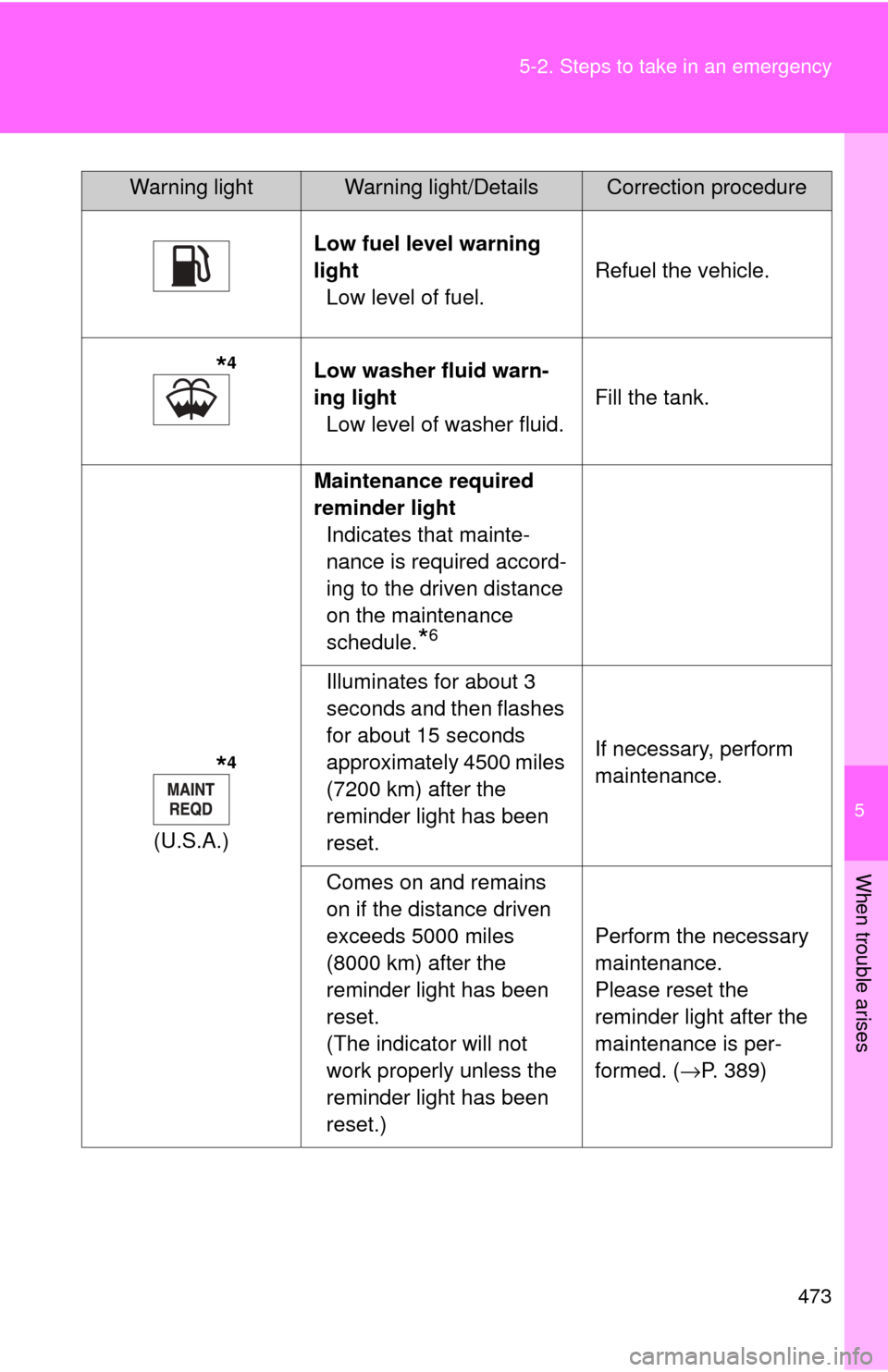
Low fuel level warning
light
Low level of fuel. Refuel the vehicle.
*4Low washer fluid warn-
ing light
Low level of washer fluid. Fill the tank.
*4
(U.S.A.)Maintenance required
reminder light
Indicates that mainte-
nance is required accord-
ing to the driven distance
on the maintenance
schedule.
*6
Illuminates for about 3
seconds and then flashes
for about 15 seconds
approximately 4500 miles
(7200 km) after the
reminder light has been
reset. If necessary, perform
maintenance.
Comes on and remains
on if the distance driven
exceeds 5000 miles
(8000 km) after the
reminder light has been
reset.
(The indicator will not
work properly unless the
reminder light has been
reset.) Perform the necessary
maintenance.
Please reset the
reminder light after the
maintenance is per-
formed. (→P. 389)
Warning lightWarning light/DetailsCorrection procedure