lock TOYOTA SEQUOIA 2021 (in English) User Guide
[x] Cancel search | Manufacturer: TOYOTA, Model Year: 2021, Model line: SEQUOIA, Model: TOYOTA SEQUOIA 2021Pages: 59, PDF Size: 7.34 MB
Page 19 of 59
17
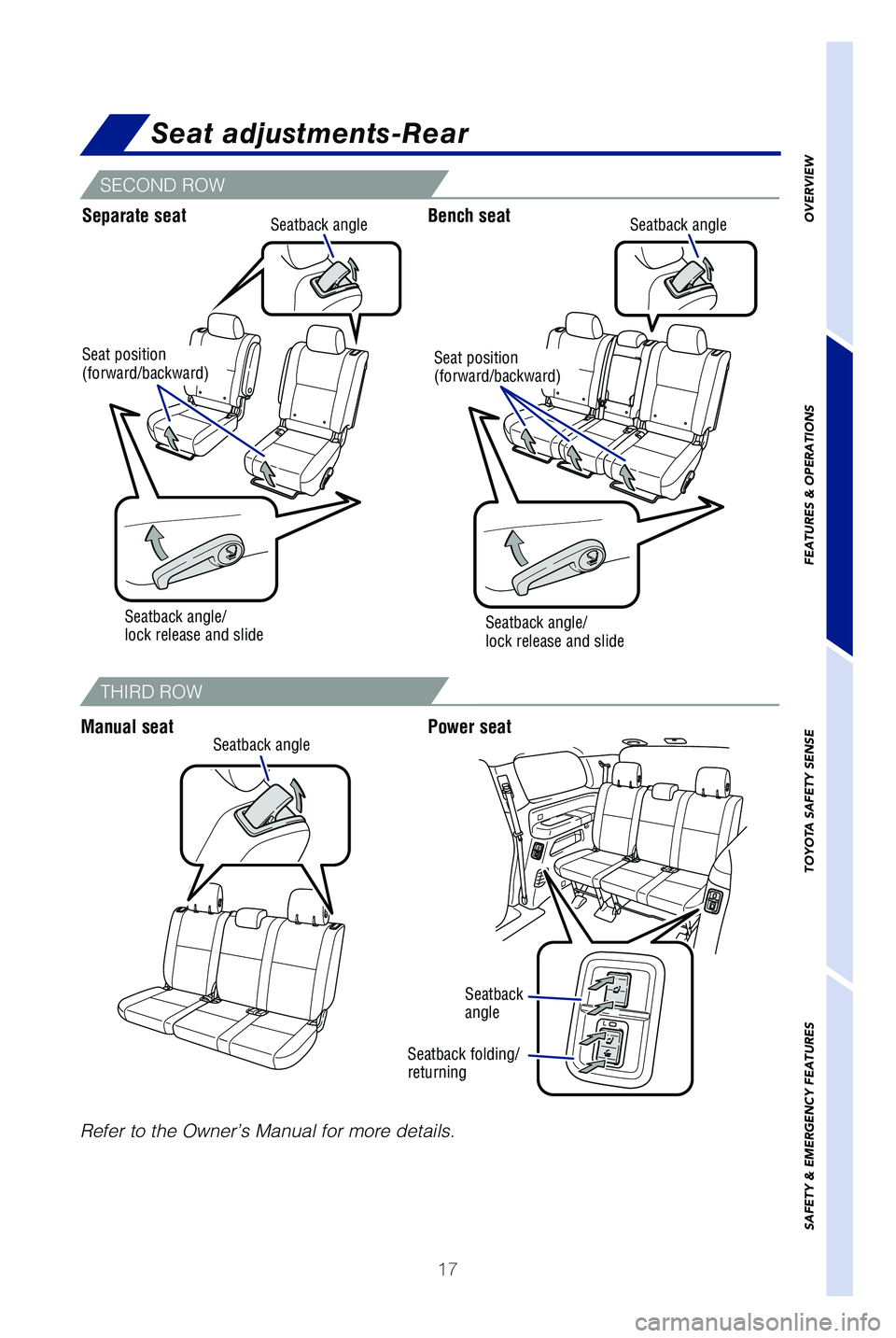
Seat adjustments-Rear
Seatback angle/
lock release and slide
Separate seatBench seat
Manual seat Power seat
THIRD ROW
SECOND ROW
Seatback angle
Seatback angleSeatback angle
Seatback
angle
Seatback folding/
returning
Seat position
(forward/backward)Seat position
(forward/backward)
Seatback angle/
lock release and slide
OVERVIEW
FEATURES & OPERATIONS
TOYOTA SAFETY SENSE
SAFETY & EMERGENCY FEATURES
Refer to the Owner’s Manual for more details.
Page 20 of 59
18
FEATURES & OPERATIONSSeats-Head restraints
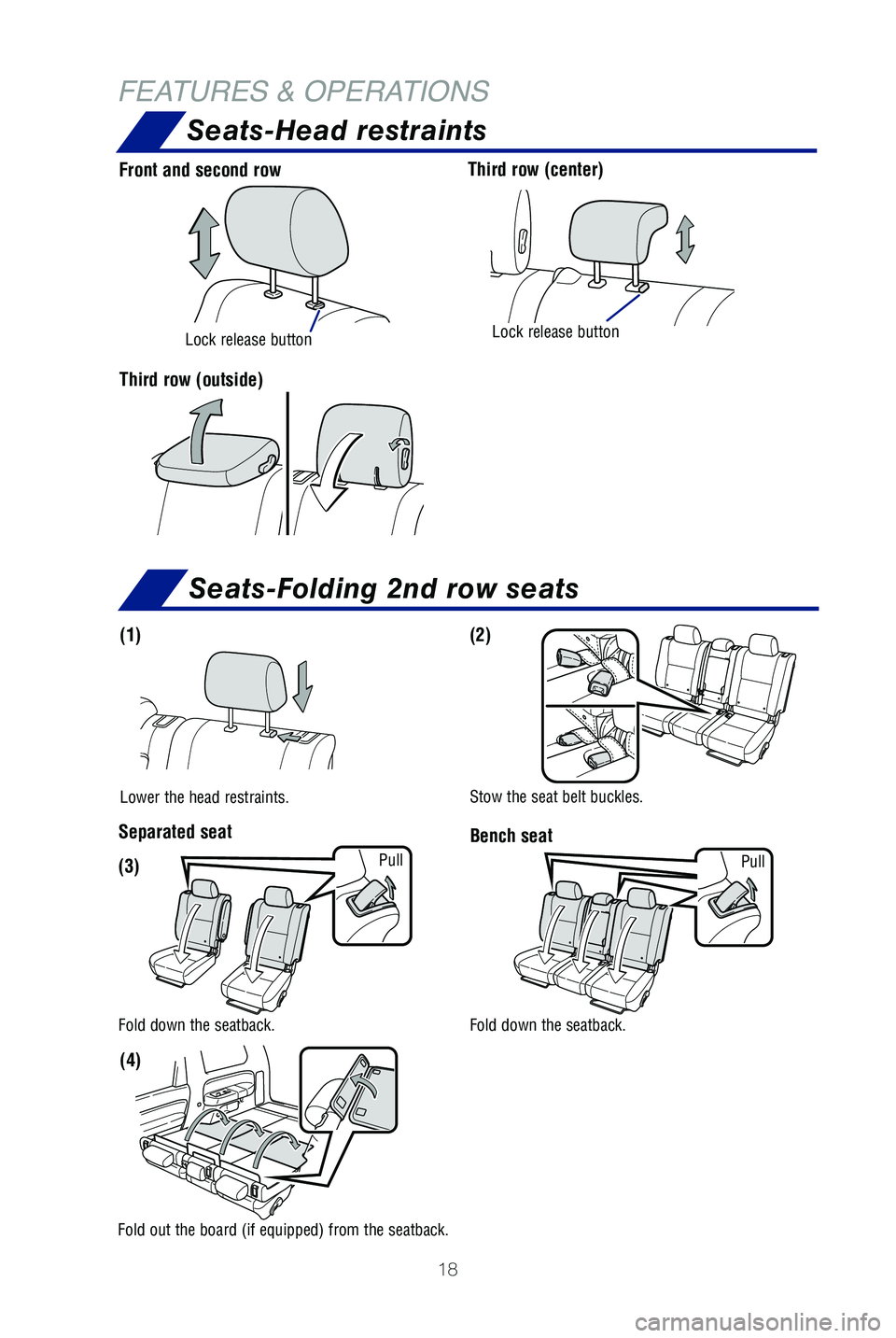
Front and second row Third row (center)
Lock release buttonLock release button
Third row (outside)
Seats-Folding 2nd row seats
Lower the head restraints. Stow the seat belt buckles.
(1)
(3)
(2)
(4)
Pull Pull
Separated seat
Bench seat
Fold down the seatback. Fold down the seatback.
Fold out the board (if equipped) from the seatback.
Page 22 of 59
20
FEATURES & OPERATIONS
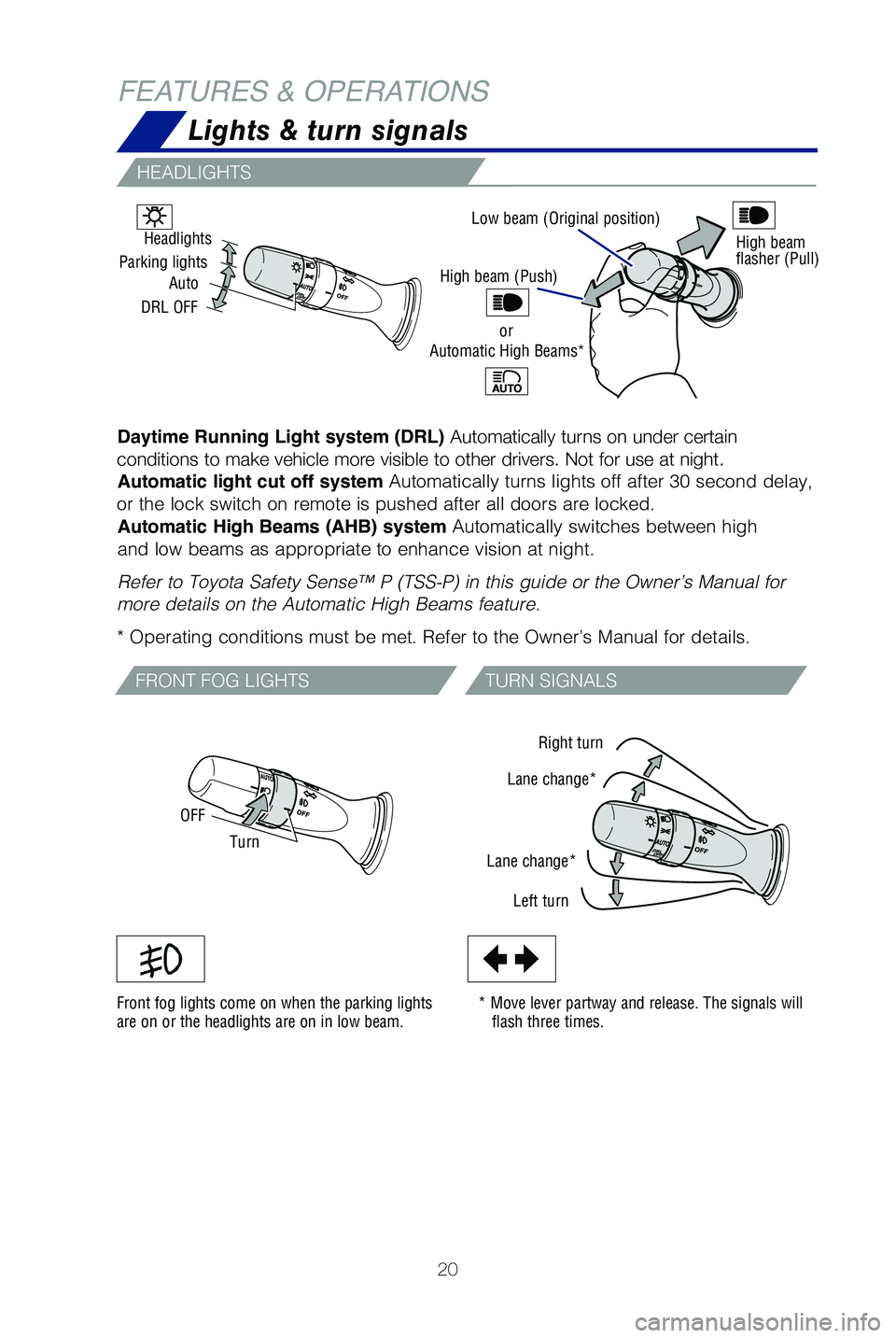
Low beam (Original position)
Daytime Running Light system (DRL) Automatically turns on under certain
conditions to make vehicle more visible to other drivers. Not for use at night. Automatic light cut off system Automatically turns lights off after 30 second delay,
or the lock switch on remote is pushed after all doors are locked. Automatic High Beams (AHB) system Automatically switches between high
and low beams as appropriate to enhance vision at night.
Refer to Toyota Safety Sense™ P (TSS-P) in this guide or the Owner’\
s Manual for
more details on the Automatic High Beams feature.
* Operating conditions must be met. Refer to the Owner’s Manual for d\
etails.
Front fog lights come on when the parking lights
are on or the headlights are on in low beam. * Move lever partway and release. The signals will
flash three times. Right turn
Lane change*
Lane change* Left turn High beam
flasher (Pull)
Turn
OFF
Auto
Headlights
Parking lights
DRL OFF
HEADLIGHTS
FRONT FOG LIGHTS TURN SIGNALS
High beam (Push)
orAutomatic High Beams*
Lights & turn signals
Page 23 of 59
21
Windshield wipers & washers
Power windows
FRONT
REAR
OVERVIEW
FEATURES & OPERATIONS
TOYOTA SAFETY SENSE
SAFETY & EMERGENCY FEATURES
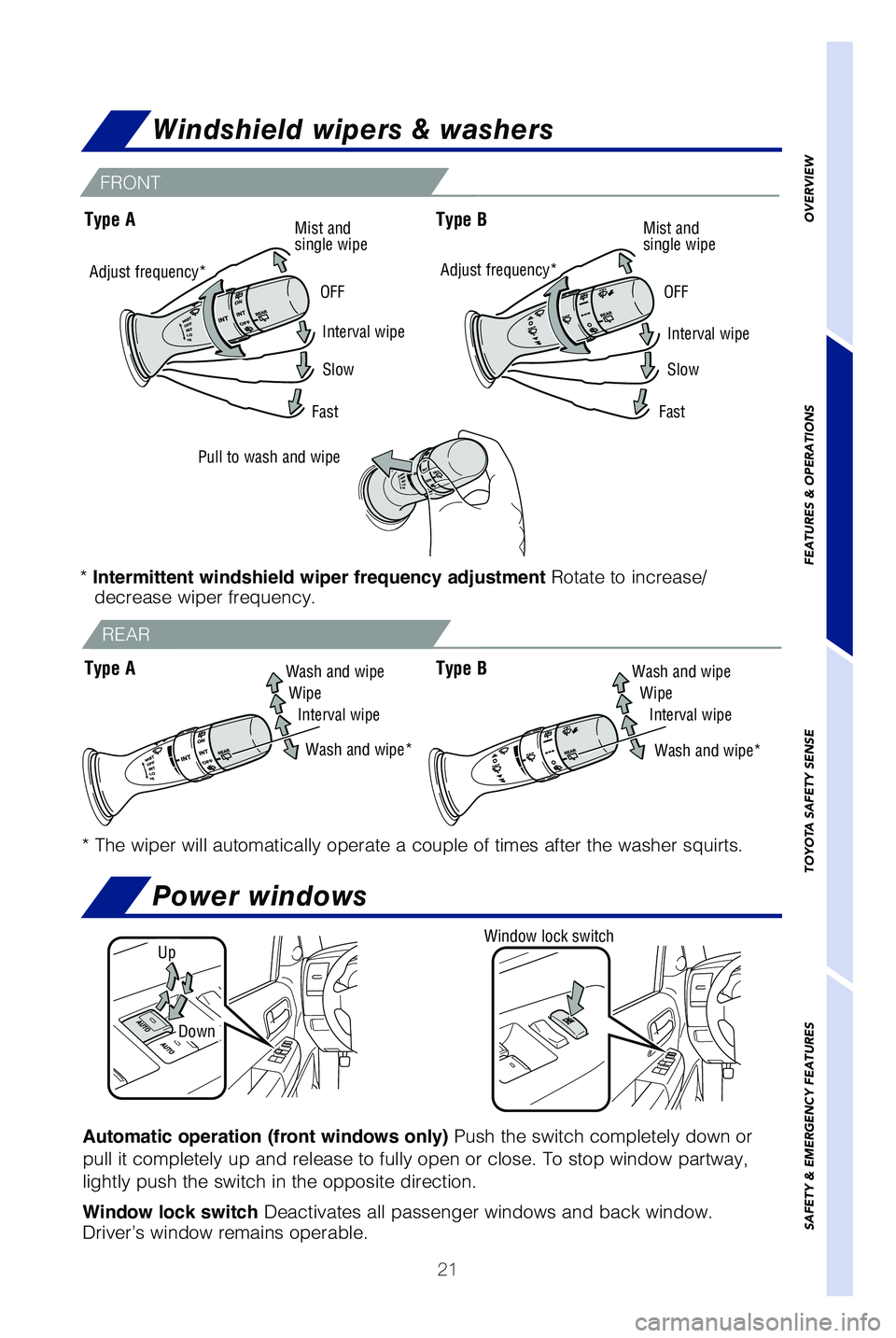
* The wiper will automatically operate a couple of times after the washe\
r squirts.
Interval wipe
OFF
OFF
Mist and
single wipe
Mist and
single wipe
Slow
Fast
Pull to wash and wipe
Wash and wipeWipe Wipe
Interval wipe Interval wipe
Wash and wipe*
Window lock switch
Automatic operation (front windows only) Push the switch completely down or
pull it completely up and release to fully open or close. To stop window\
partway,
lightly push the switch in the opposite direction.
Window lock switch Deactivates all passenger windows and back window.
Driver’s window remains operable.
Up
Down
Adjust frequency*
*
Intermittent windshield wiper frequency adjustment Rotate to increase/
decrease wiper frequency.
Type A
Type B
Interval wipe
Slow
Fast
Adjust frequency*
Type AWash and wipe
Wash and wipe*Type B
Page 31 of 59
29
OVERVIEW
FEATURES & OPERATIONS
TOYOTA SAFETY SENSE
SAFETY & EMERGENCY FEATURES
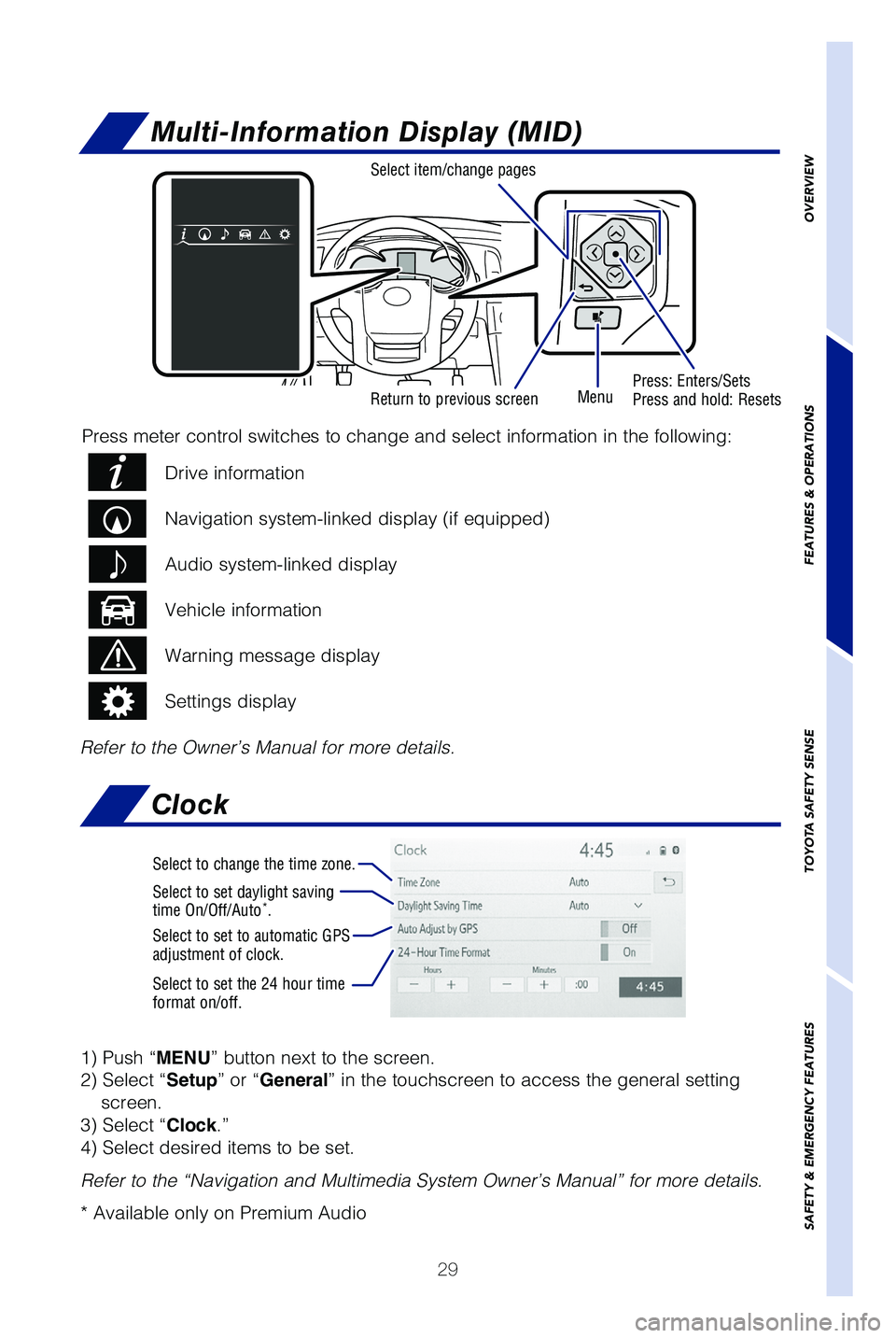
Multi-Information Display (MID)
Return to previous screen Press: Enters/Sets
Press and hold: Resets
Menu
Select item/change pages
Drive information
Navigation system-linked display (if equipped)
Audio system-linked display
Vehicle information
Warning message display
Settings display
Press meter control switches to change and select information in the fol\
lowing:
Refer to the Owner’s Manual for more details.
Clock
1) Push “MENU” button next to the screen.
2) Select “Setup” or “General” in the touchscreen to access the general setting screen.
3) Select “Clock.”
4) Select desired items to be set.
Refer to the “Navigation and Multimedia System Owner’s Manual” \
for more details.
* Available only on Premium Audio
Select to change the time zone.
Select to set daylight saving
time On/Off/Auto*.
Select to set to automatic GPS
adjustment of clock.
Select to set the 24 hour time
format on/off.
Page 49 of 59
47
OVERVIEW
FEATURES & OPERATIONS
TOYOTA SAFETY SENSE
SAFETY & EMERGENCY FEATURES
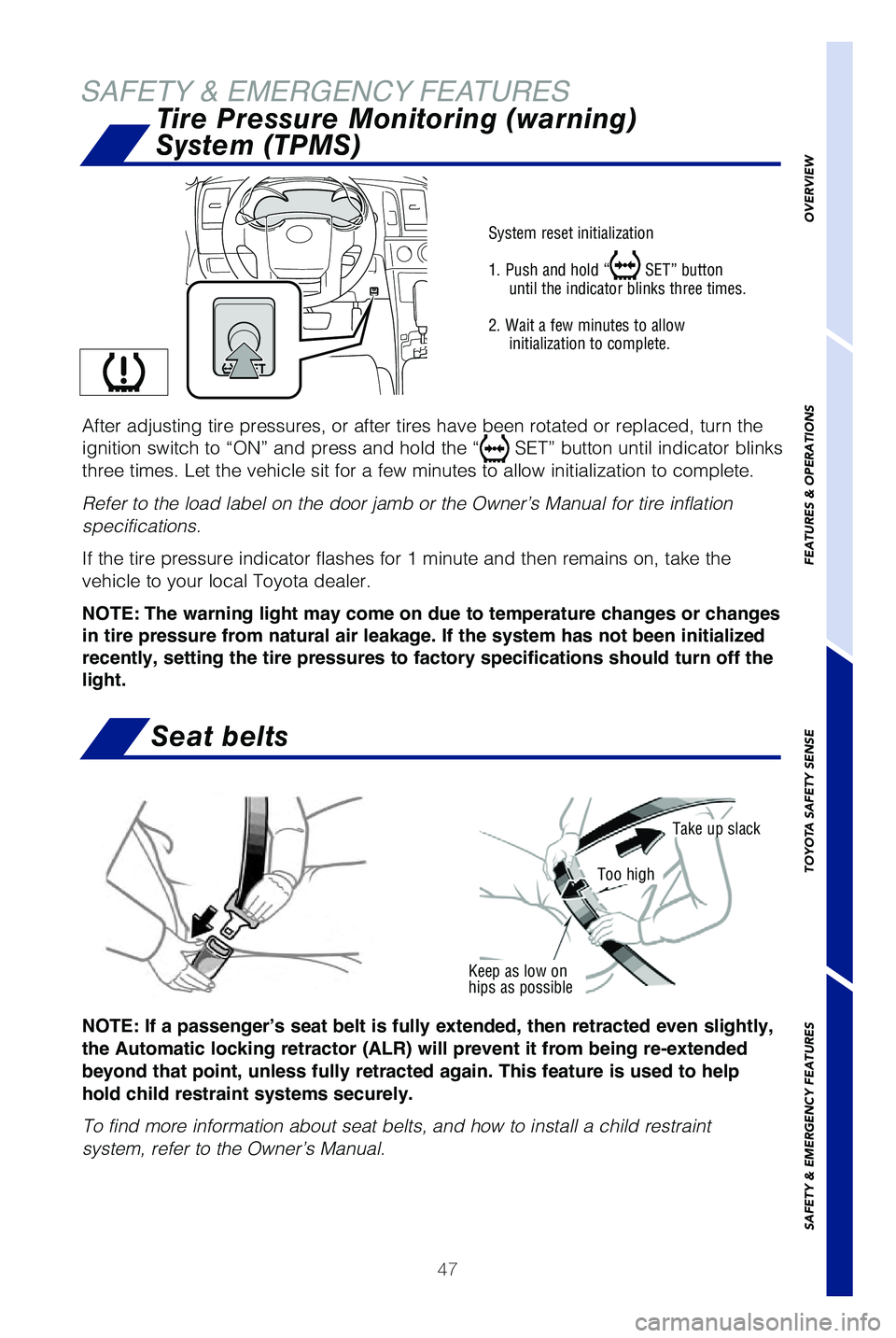
Keep as low on
hips as possible
Take up slack
Too high
System reset initialization
1. Push and hold “
SET” button
until the indicator blinks three times.
2. Wait a few minutes to allow initialization to complete.
After adjusting tire pressures, or after tires have been rotated or repl\
aced, turn the
ignition switch to “ON” and press and hold the “
SET” button until indicator blinks
three times. Let the vehicle sit for a few minutes to allow initializati\
on to complete.
Refer to the load label on the door jamb or the Owner’s Manual for ti\
re inflation
specifications.
If the tire pressure indicator flashes for 1 minute and then remains on,\
take the
vehicle to your local Toyota dealer.
NOTE: The warning light may come on due to temperature changes or changes
in tire pressure from natural air leakage. If the system has not been initialized
recently, setting the tire pressures to factory specifications should turn off the
light.
NOTE: If a passenger’s seat belt is fully extended, then retracted even slightly,
the Automatic locking retractor (ALR) will prevent it from being re-extended
beyond that point, unless fully retracted again. This feature is used to help
hold child restraint systems securely.
To find more information about seat belts, and how to install a child re\
straint
system, refer to the Owner’s Manual.
Seat belts
Tire Pressure Monitoring (warning)
System (TPMS)
SAFETY & EMERGENCY FEATURES
Page 50 of 59
 User Guide 48
SAFETY & EMERGENCY FEATURESRear door child safety locks
Moving the lever downward will allow the door to be opened only from the\
outside.
Rear door
Unlock
Lock
Safety Connect®
Safety Connect is")
48
SAFETY & EMERGENCY FEATURESRear door child safety locks
Moving the lever downward will allow the door to be opened only from the\
outside.
Rear door
Unlock
Lock
Safety Connect®
Safety Connect is a subscription-based telematics service that uses Glob\
al
Positioning System (GPS) data and embedded cellular technology to prov\
ide safety
and security features to subscribers. Safety Connect is staffed with liv\
e agents at
the Toyota response center, which operates 24 hours per day, 7 days per \
week.
Services for subscribers include:
• Automatic collision notification
• Stolen vehicle locator
• Emergency assistance (“SOS” button)
• Enhanced roadside assistance
For additional information, refer to the “Owner’s Manual” or vi\
sit www.toyota.com/
connected-services.
Microphone
LED light indicators
(Green is Active)
“SOS” button
Page 51 of 59
49
OVERVIEW
FEATURES & OPERATIONS
TOYOTA SAFETY SENSE
SAFETY & EMERGENCY FEATURES
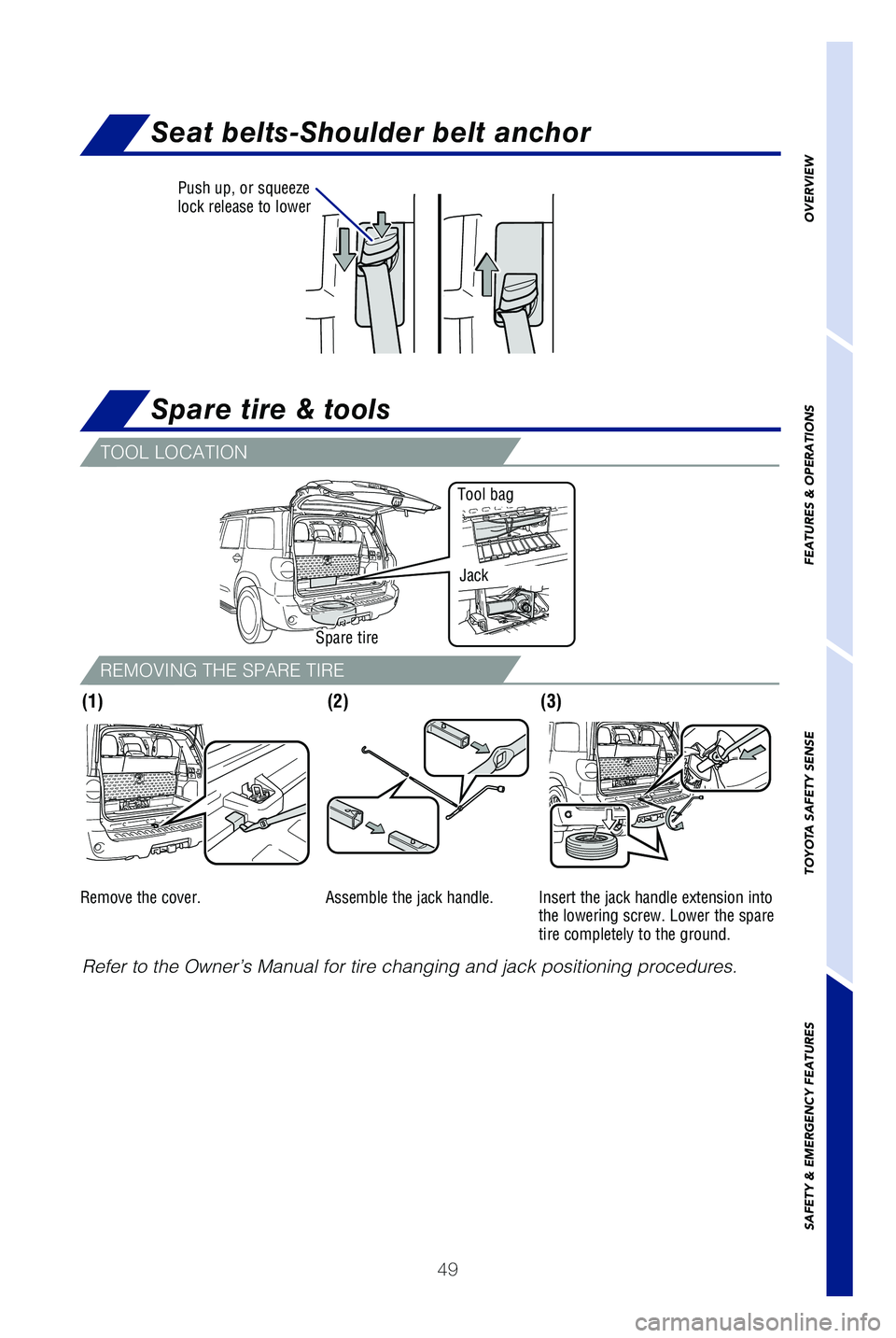
Seat belts-Shoulder belt anchor
Spare tire & tools
Push up, or squeeze
lock release to lower
Refer to the Owner’s Manual for tire changing and jack positioning pr\
ocedures.
(2)(3)
Spare tire
Tool bag
Jack
(1)
TOOL LOCATION
REMOVING THE SPARE TIRE
Remove the cover. Assemble the jack handle. Insert the jack handle extension into
the lowering screw. Lower the spare
tire completely to the ground.
Page 52 of 59
 User Guide 50
Star Safety System™
Your vehicle comes standard with the Star Safety SystemTM, which combines Anti-
lock Braking System (ABS), Brake Assist (BA), Electronic Brake-force\
Distribution
(EBD), Sma")
50
Star Safety System™
Your vehicle comes standard with the Star Safety SystemTM, which combines Anti-
lock Braking System (ABS), Brake Assist (BA), Electronic Brake-force\
Distribution
(EBD), Smart Stop Technology (SST), Traction Control (TRAC) and Ve\
hicle Stability
Control (VSC).
Refer to the Owner’s Manual for more details and important information on limitations
to these systems.
ANTI-LOCK BRAKE SYSTEM (ABS)
Toyota’s ABS sensors detect which wheels are locking up and limits wh\
eel lockup
by “pulsing” each wheel’s brakes independently. Pulsing release\
s brake pressure
repeatedly for fractions of a second. This helps the tires attain the tr\
action that
current road conditions will allow, helping you to stay in directional c\
ontrol.
BRAKE ASSIST (BA)
Brake Assist is designed to detect sudden or “panic” braking, and \
then add braking
pressure to help decrease the vehicle’s stopping distance. When there\
’s only a split
second to react, Brake Assist can add additional brake pressure more qui\
ckly than
just the driver alone can.
ELECTRONIC BRAKE FORCE DISTRIBUTION (EBD)
Toyota’s ABS technology has Electronic Brake-force Distribution (EBD\
) to help
maintain control and balance when braking. EBD responds to sudden stops \
by
redistributing brake force to enhance the braking effectiveness of all f\
our wheels.
SMART STOP TECHNOLOGY (SST)
Smart Stop Technology automatically reduces engine power when the accele\
rator
and brake pedals are pressed simultaneously under certain conditions.
SST engages when the accelerator is depressed first and the brakes are a\
pplied
firmly for longer than one-half second at speeds greater than five miles\
per hour.
SST doesn’t engage if the brake pedal is depressed before the acceler\
ator pedal,
allowing vehicles to start on a steep hill and safely accelerate without\
rolling
backward.
SAFETY & EMERGENCY FEATURES
VEHICLE STABILITY CONTROL (VSC)
VSC helps prevent loss of traction during cornering by reducing engine p\
ower and
applying brake force to selected wheels.
Toyota’s VSC monitors steering angle and the direction your vehicle i\
s traveling.
When it senses that the front or rear wheels begin to lose traction, VSC\
reduces
engine power and applies braking to selected wheels. This helps restore \
traction
and vehicle control.