key battery TOYOTA SEQUOIA 2021 (in English) User Guide
[x] Cancel search | Manufacturer: TOYOTA, Model Year: 2021, Model line: SEQUOIA, Model: TOYOTA SEQUOIA 2021Pages: 588, PDF Size: 12.76 MB
Page 217 of 588
2174-2. Driving procedures
4
Driving
SEQUOIA_OM_USA_OM0C035U■
If the engine does not start
●The engine immobilizer system may not have been deactivated. ( P. 82)
Contact your Toyota dealer.
● Check that the shift lever is securely set in P. The engine may not start if the
shift lever is displaced out of P. “Shift to P Position” will b e displayed on the
multi-information display.
■ Steering lock
After turning the engine switch off and opening and closing the doors, the
steering wheel will be locked due to the steering lock function. Operating the
engine switch again automatically cancels the steering lock.
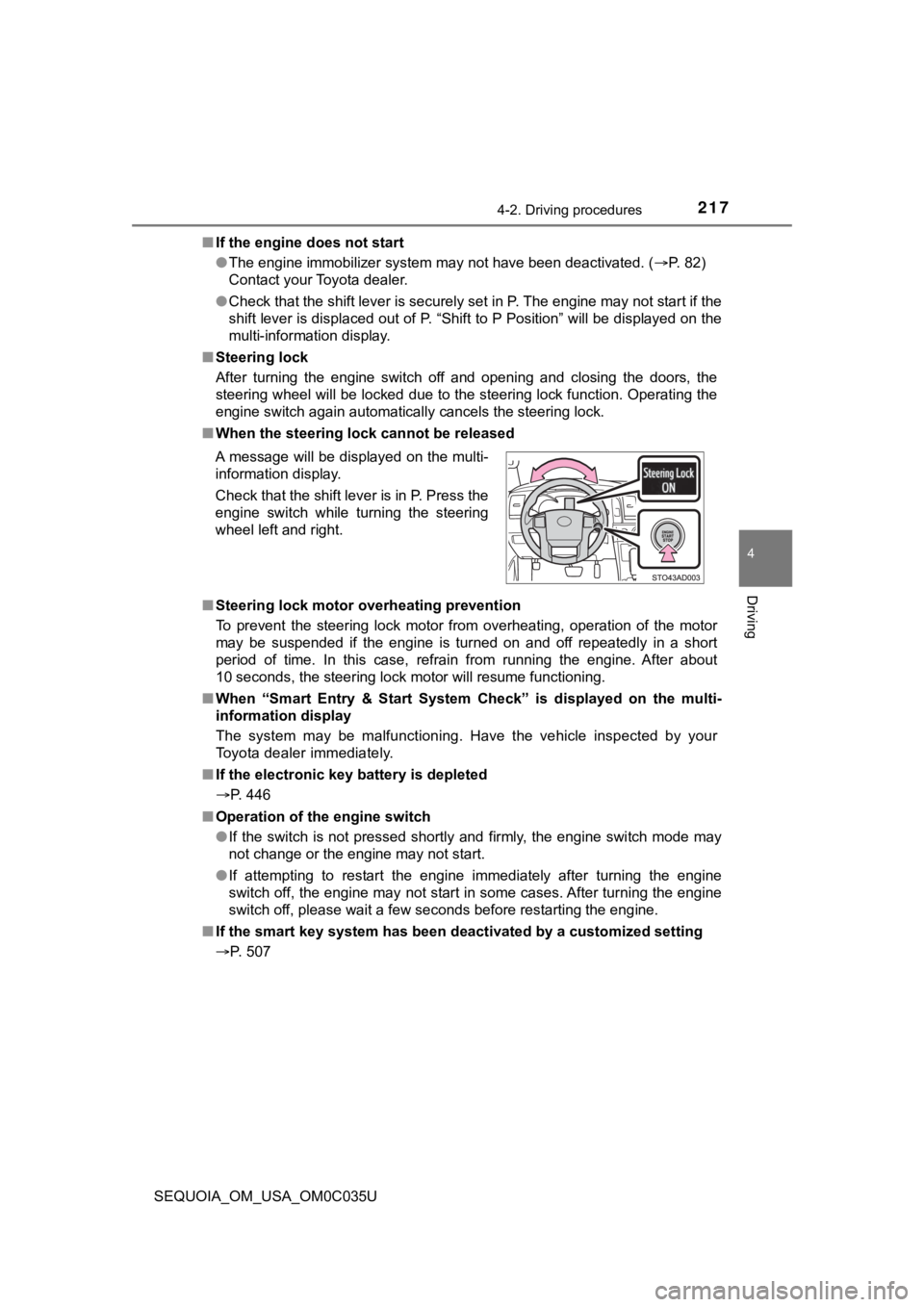
■ When the steering lock cannot be released
■ Steering lock motor overheating prevention
To prevent the steering lock motor from overheating, operation of the motor
may be suspended if the engine is turned on and off repeatedly in a short
period of time. In this case, refrain from running the engine. After about
10 seconds, the steering lock motor will resume functioning.
■ When “Smart Entry & Start System Check” is displayed on the multi-
information display
The system may be malfunctioning. Have the vehicle inspected by your
Toyota dealer immediately.
■ If the electronic key battery is depleted
P. 446
■ Operation of the engine switch
●If the switch is not pressed shortly and firmly, the engine swi tch mode may
not change or the engine may not start.
● If attempting to restart the engine immediately after turning t he engine
switch off, the engine may not start in some cases. After turni ng the engine
switch off, please wait a few seconds before restarting the eng ine.
■ If the smart key system has been d eactivated by a customized setting
P. 507 A message will be displayed on the multi-
information display.
Check that the shift lever is in P. Press the
engine switch while turning the steering
wheel left and right.
Page 397 of 588
397
Maintenance and care6
SEQUOIA_OM_USA_OM0C035U6-1. Maintenance and care
Cleaning and protecting the vehicle exterior .......... 398
Cleaning and protecting the vehicle interior ........... 402
6-2. Maintenance Maintenance requirements ................... 405
General maintenance........ 407
Emission inspection and maintenance (I/M)
programs......................... 410
6-3. Do-it-yourself maintenance
Do-it-yourself service precautions ..................... 411
Hood ................................. 414
Engine compartment ......... 415
Tires .................................. 426
Tire inflation pressure ....... 438
Wheels .............................. 441
Air conditioning filter.......... 444
Electronic key battery........ 446
Checking and replacing fuses ............................... 448
Light bulbs......................... 451
Page 446 of 588
4466-3. Do-it-yourself maintenance
SEQUOIA_OM_USA_OM0C035U
Electronic key batter y
●Flathead screwdriver
● Small flathead screwdriver
● Lithium battery CR2032
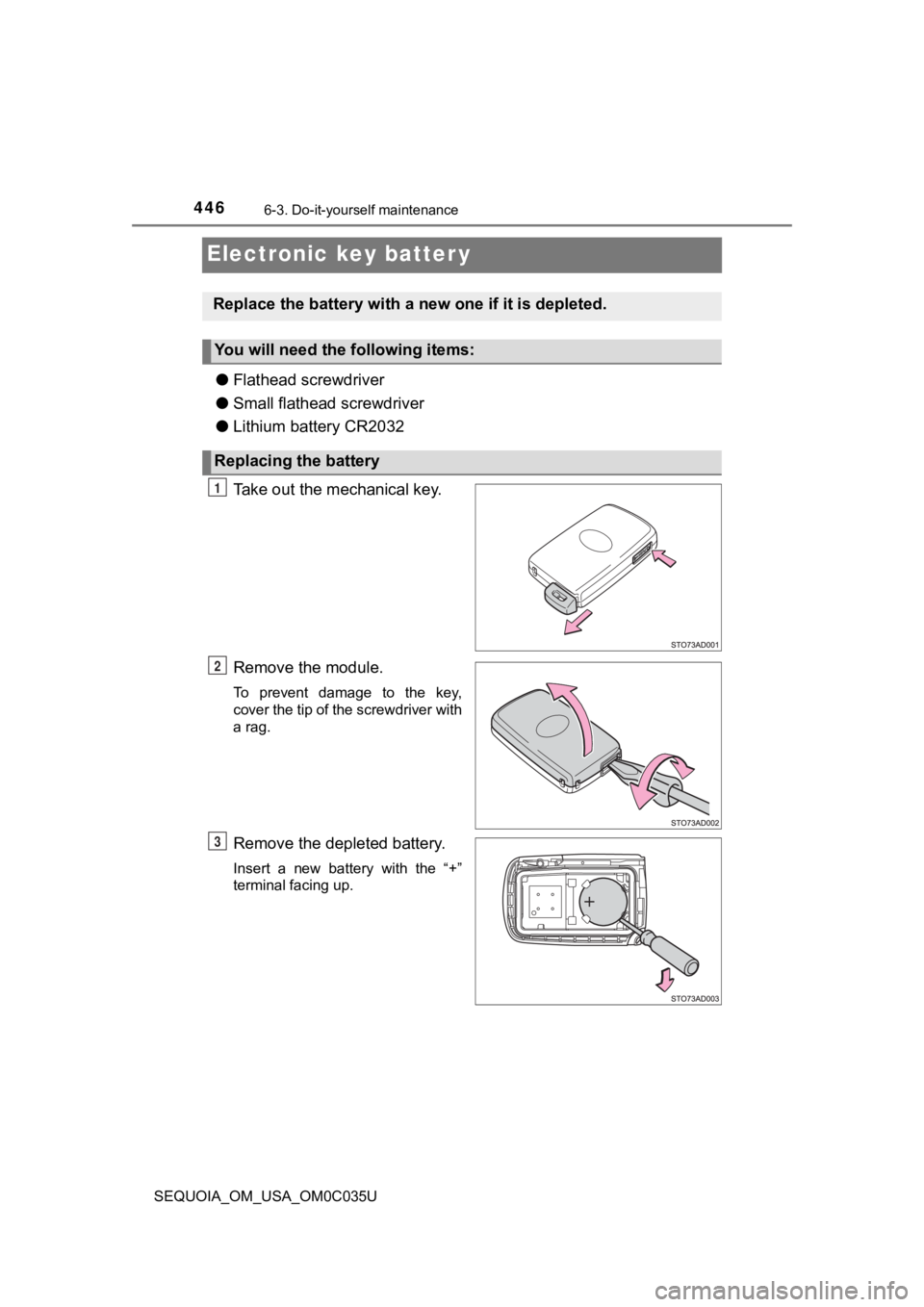
Take out the mechanical key.
Remove the module.
To prevent damage to the key,
cover the tip of the screwdriver with
a rag.
Remove the depleted battery.
Insert a new battery with the “+”
terminal facing up.
Replace the battery with a n ew one if it is depleted.
You will need the following items:
Replacing the battery
1
2
3
Page 447 of 588
4476-3. Do-it-yourself maintenance
6
Maintenance and care
SEQUOIA_OM_USA_OM0C035U
■Use a CR2032 lithium battery
●Batteries can be purchased at your Toyota dealer, local electri cal appliance
shops or camera stores.
● Replace only with the same or equivalent type recommended by the manu-
facturer.
● Dispose of used batteries according to local laws.
■ If the electronic key battery is depleted
The following symptoms may occur:
●The smart key system and wireless remote control will not funct ion properly.
● The operational range will be reduced.
WARNING
■Removed battery a nd other parts
These parts are small and if swallowed by a child, they can cause choking.
Keep away from children. Failure to do so could result in death or serious
injury.
NOTICE
■ For normal operation after replacing the battery
Observe the following precautions to prevent accidents:
● Always work with dry hands.
Moisture may cause the battery to rust.
● Do not touch or move any other component inside the remote cont rol.
● Do not bend either of the battery terminals.
Page 459 of 588

459
When trouble arises7
SEQUOIA_OM_USA_OM0C035U7-1. Essential information
Emergency flashers .......... 460
If your vehicle has to be stopped in an
emergency ...................... 461
If the vehicle is trapped in rising water.................. 463
7-2. Steps to take in an emergency
If your vehicle needs to be towed ......................... 464
If you think something is wrong .............................. 468
Fuel pump shut off system ............................ 469
If a warning light turns on or a warning buzzer
sounds ............................ 470
If a warning message is displayed......................... 479
If you have a flat tire.......... 491
If the engine will not start ................................. 505
If the electronic key does not operate properly ........ 507
If the vehicle battery is discharged ...................... 509
If your vehicle overheats ... 513
If the vehicle becomes stuck ............................... 516
Page 488 of 588
4887-2. Steps to take in an emergency
SEQUOIA_OM_USA_OM0C035U
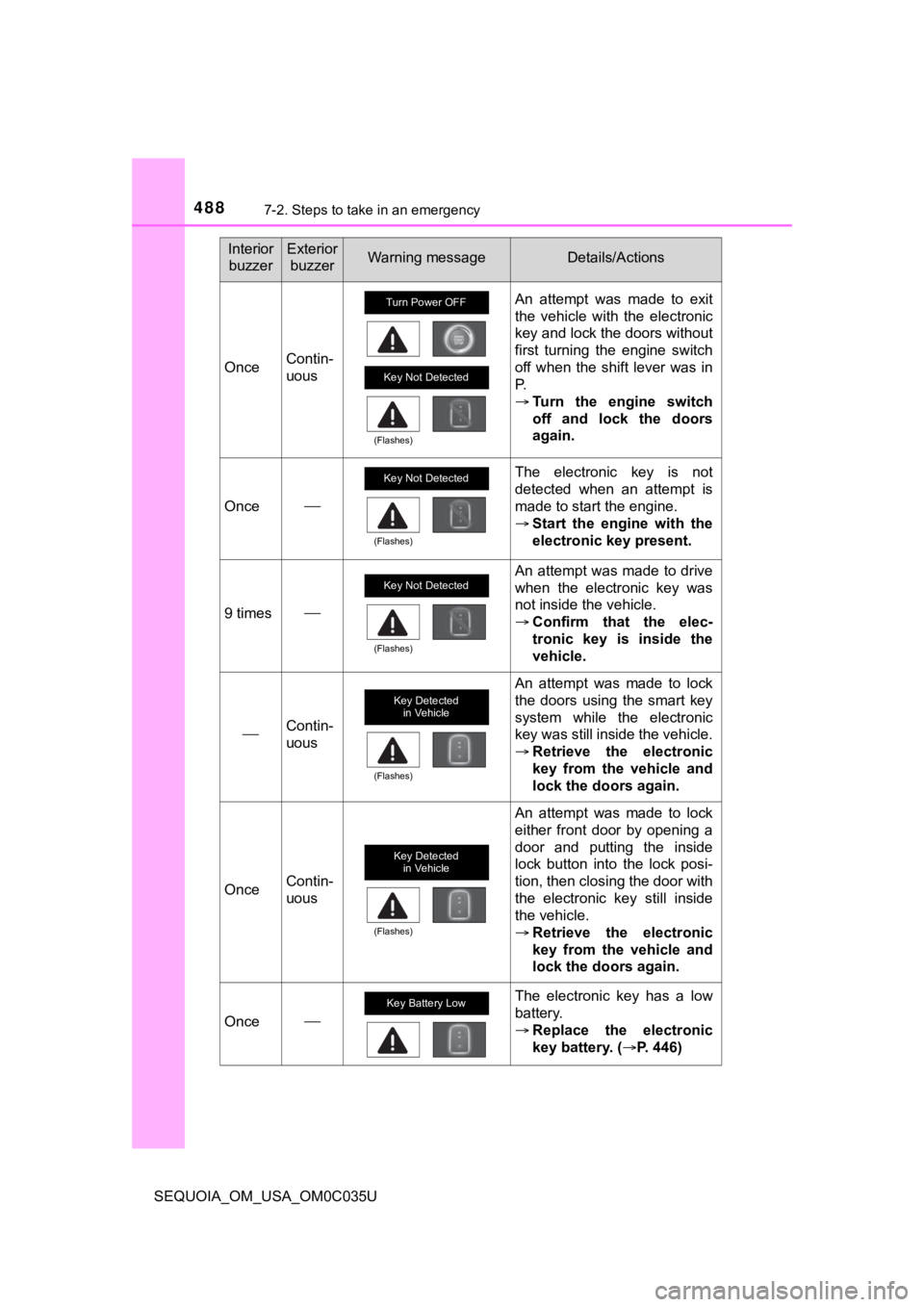
OnceContin-
uous
An attempt was made to exit
the vehicle with the electronic
key and lock the doors without
first turning the engine switch
off when the shift lever was in
P.
Turn the engine switch
off and lock the doors
again.
Once
The electronic key is not
detected when an attempt is
made to start the engine.
Start the engine with the
electronic key present.
9 times
An attempt was made to drive
when the electronic key was
not inside the vehicle.
Confirm that the elec-
tronic key is inside the
vehicle.
Contin-
uous
An attempt was made to lock
the doors using the smart key
system while the electronic
key was still inside the vehicle.
Retrieve the electronic
key from the vehicle and
lock the doors again.
OnceContin-
uous
An attempt was made to lock
either front door by opening a
door and putting the inside
lock button into the lock posi-
tion, then closing the door with
the electronic key still inside
the vehicle.
Retrieve the electronic
key from the vehicle and
lock the doors again.
Once
The electronic key has a low
battery.
Replace the electronic
key battery. ( P. 446)
Interior
buzzerExterior buzzerWarning messageDetails/Actions
Turn Power OFF
Key Not Detected
(Flashes)
Key Not Detected
(Flashes)
Key Not Detected
(Flashes)
Key Detected in Vehicle
(Flashes)
Key Detected
in Vehicle
(Flashes)
Key Battery Low
Page 507 of 588
5077-2. Steps to take in an emergency
SEQUOIA_OM_USA_OM0C035U
7
When trouble arises
If the electronic key does not operate
properly
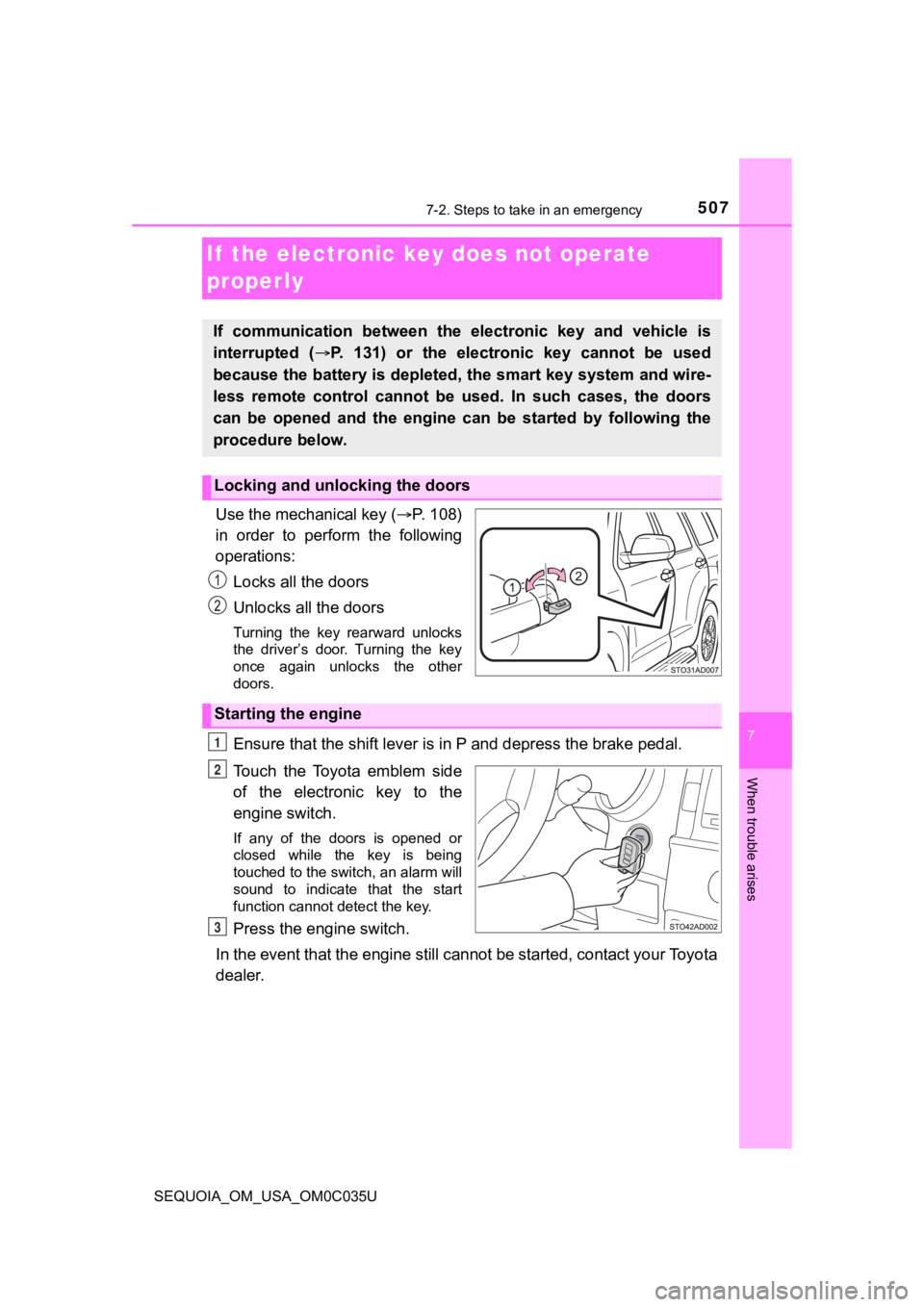
Use the mechanical key (P. 108)
in order to perform the following
operations:
Locks all the doors
Unlocks all the doors
Turning the key rearward unlocks
the driver’s door. Turning the key
once again unlocks the other
doors.
Ensure that the shift lever is in P and depress the brake pedal.
Touch the Toyota emblem side
of the electronic key to the
engine switch.
If any of the doors is opened or
closed while the key is being
touched to the switch, an alarm will
sound to indicate that the start
function cannot detect the key.
Press the engine switch.
In the event that the engine still cannot be started, contact your Toyota
dealer.
If communication between the electronic key and vehicle is
interrupted ( P. 131) or the electronic key cannot be used
because the battery is depleted, the smart key system and wire-
less remote control cannot be used. In such cases, the doors
can be opened and the engine c an be started by following the
procedure below.
Locking and unlocking the doors
Starting the engine
1
2
3
Page 508 of 588

5087-2. Steps to take in an emergency
SEQUOIA_OM_USA_OM0C035U
■Stopping the engine
Shift the shift lever to P and press the engine switch as you normally do when
stopping the engine.
■ Replacing the key battery
As the above procedure is a temporary measure, it is recommende d that the
electronic key battery be replaced immediately when the battery is depleted.
( P. 446)
■ Changing engine switch modes
Within 10 seconds of the buzzer sounding, release the brake ped al and press
the engine switch.
The engine does not start and modes will be changed each time t he switch is
pressed. ( P. 215)
Page 509 of 588
5097-2. Steps to take in an emergency
SEQUOIA_OM_USA_OM0C035U
7
When trouble arises
If the vehicle batter y is discharged
If you have a set of jumper (or booster) cables and a second ve hicle
with a 12-volt battery, you can jump start your vehicle by foll owing the
steps below.
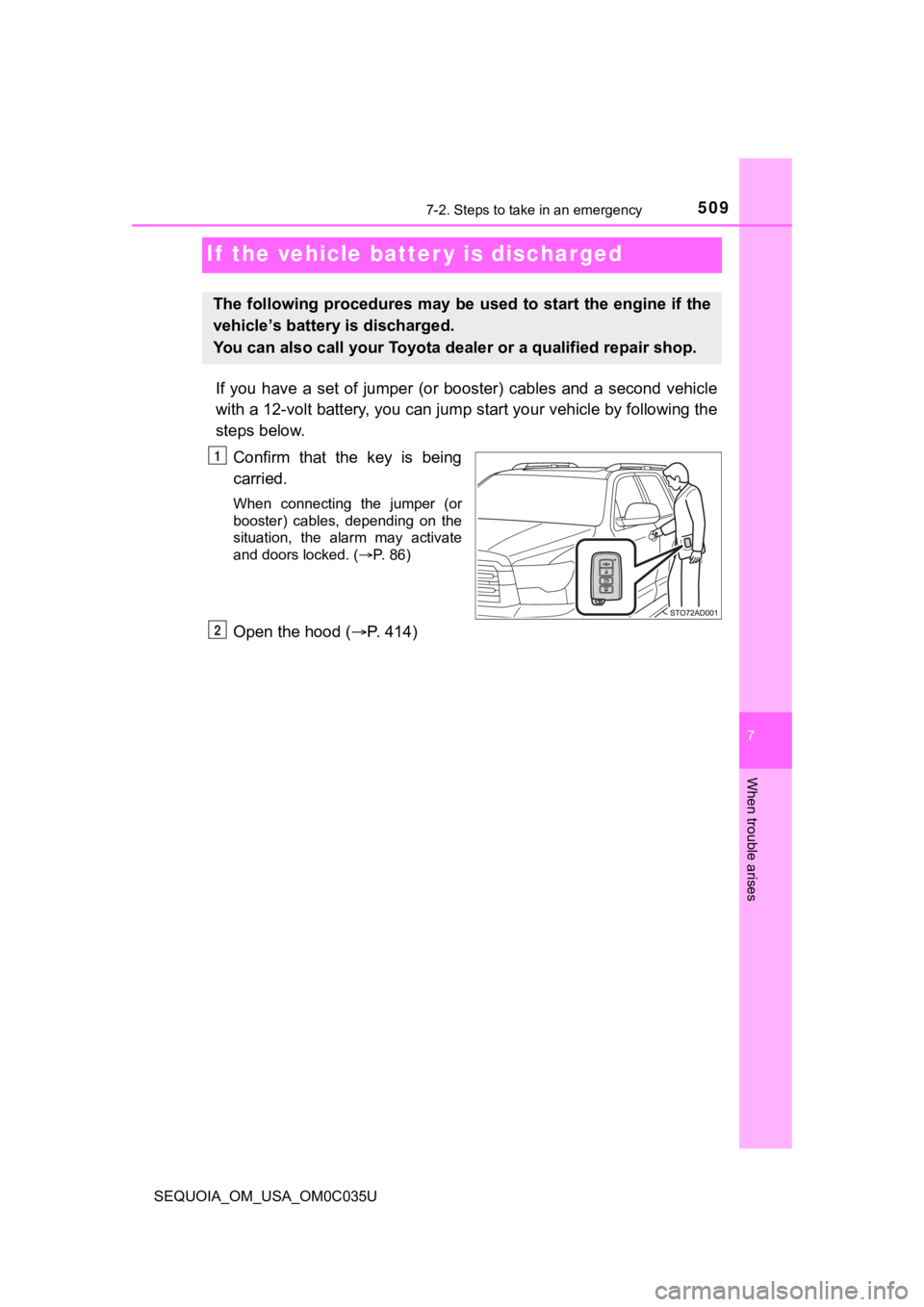
Confirm that the key is being
carried.
When connecting the jumper (or
booster) cables, depending on the
situation, the alarm may activate
and doors locked. ( P. 86)
Open the hood ( P. 414)
The following procedures may be used to start the engine if the
vehicle’s battery is discharged.
You can also call your Toyota de aler or a qualified repair shop.
1
2
Page 511 of 588
5117-2. Steps to take in an emergency
7
When trouble arises
SEQUOIA_OM_USA_OM0C035U
■Starting the engine when t he battery is discharged
The engine cannot be started by push-starting.
■ To prevent battery discharge
●Turn off the headlights and the audio system while the engine is off.
● Turn off any unnecessary electrical components when the vehicle is running
at a low speed for an extended period, such as in heavy traffic .
■ Charging the battery
The electricity stored in the battery will discharge gradually even when the
vehicle is not in use, due to natural discharge and the draining effects of cer-
tain electrical appliances. If the vehicle is left for a long t ime, the battery may
discharge, and the engine may be unable to start. (The battery recharges
automatically during driving.)
■ When recharging or replacing the battery
●In some cases, it may not be possible to unlock the doors using the smart
key system when the battery is discharged. Use the wireless rem ote control
or the mechanical key to lock or unlock the doors.
● The engine may not start on the first attempt after the battery has recharged
but will start normally after the second attempt. This is not a malfunction.
● The engine switch mode is memorized by the vehicle. When the ba ttery is
reconnected, the system will return to the mode it was in befor e the battery
was discharged. Before disconnecting the battery, turn the engine switch off.
If you are unsure what mode the engine switch was in before the battery dis-
charged, be especially careful when reconnecting the battery.