headlights TOYOTA SEQUOIA 2022 User Guide
[x] Cancel search | Manufacturer: TOYOTA, Model Year: 2022, Model line: SEQUOIA, Model: TOYOTA SEQUOIA 2022Pages: 592, PDF Size: 10.82 MB
Page 237 of 592
2374-3. Operating the lights and wipers
4
Driving
SEQUOIA_OM_USA_OM0C047U
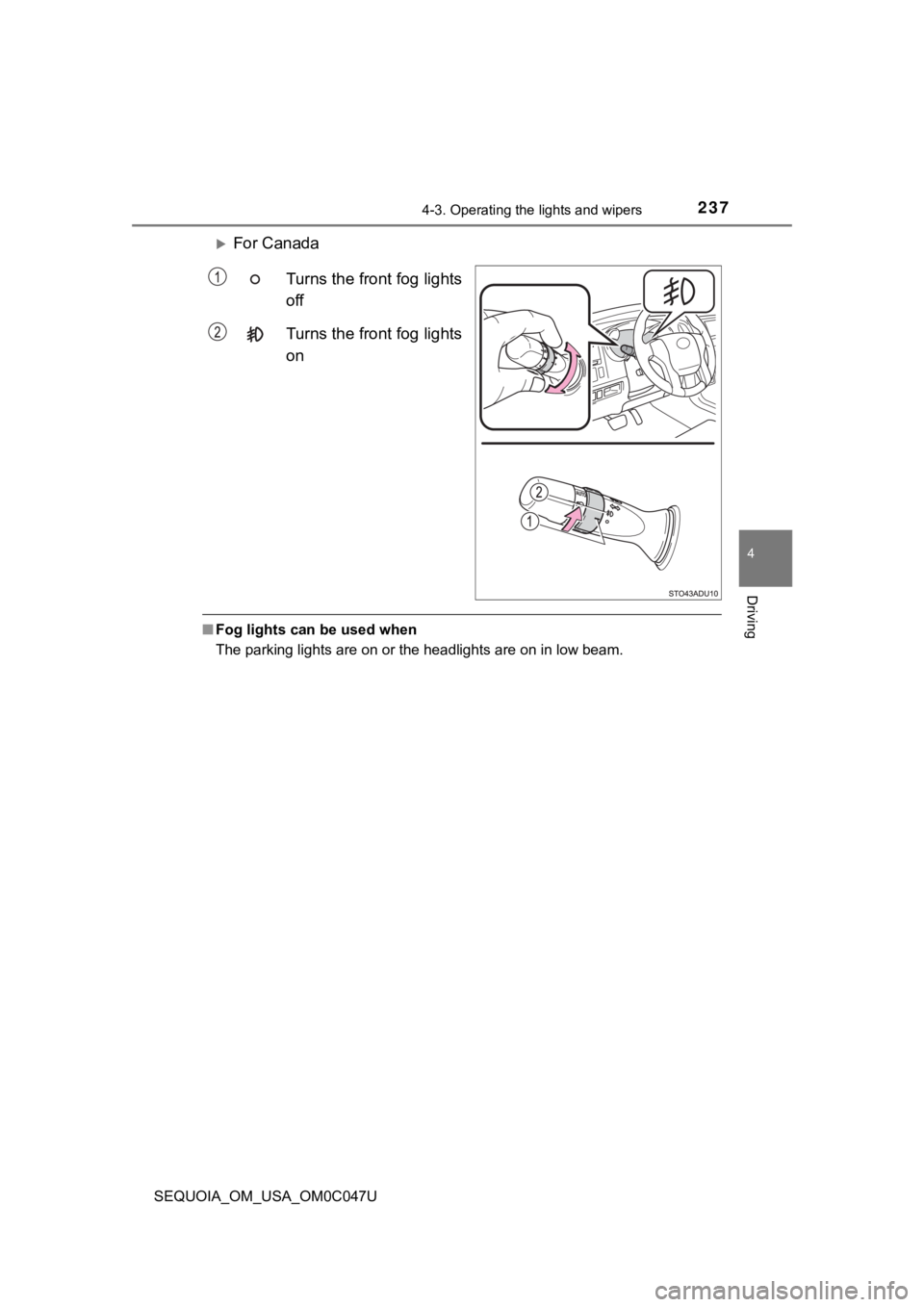
For Canada
Turns the front fog lights
off
Turns the front fog lights
on
■Fog lights can be used when
The parking lights are on or the headlights are on in low beam.
Page 250 of 592
2504-5. Using the driving support systems
SEQUOIA_OM_USA_OM0C047U
WARNING
●If the part of the windshield in front of the front camera is fogged up or cov-
ered with condensation, or ice, use the windshield defogger to remove the
fog, condensation, or ice. ( P. 345)
● If water droplets cannot be properly removed from the area of t he wind-
shield in front of the front camera by the windshield wipers, replace the
wiper insert or wiper blade
● Do not attach window tint to the windshield.
● Replace the windshield if it is damaged or cracked.
After replacing the windshield, the front camera must be recali brated. Con-
tact your Toyota dealer for details.
● Do not allow liquids to contact the front camera.
● Do not allow bright lights to shine into the front camera.
● Do not dirty or damage the front camera.
When cleaning the inside of the windshield, do not allow glass cleaner to
contact the lens of the front camera. Also, do not touch the lens.
If the lens is dirty or damaged, contact your Toyota dealer.
● Do not subject the front camera to a strong impact.
● Do not change the installation position or direction of the front camera or
remove it.
● Do not disassemble the front camera.
● Do not modify any components of the vehicle around the front ca mera
(inside rear view mirror, etc.) or ceiling.
● Do not attach any accessories to the hood, front grille or front bumper that
may obstruct the front camera. Contact your Toyota dealer for details.
● If a surfboard or other long object is to be mounted on the roo f, make sure
that it will not obstruct the front camera.
● Do not modify the headlights or other lights.
Page 266 of 592
2664-5. Using the driving support systems
SEQUOIA_OM_USA_OM0C047U• When driving in inclement weather such as heavy rain, fog, snow or a
sandstorm
• When the vehicle is hit by water, snow, dust, etc., from a vehicle ahead
• When driving through steam or smoke
• When driving in a place where the surrounding brightness changes sud- denly, such as at the entrance or exit of a tunnel
• When a very bright light, such as the sun or the headlights of oncoming
traffic, shines directly into the front camera
• When the surrounding area is dim, such as at dawn or dusk, or while at
night or in a tunnel
• After the engine has started the vehicle has not been driven for a certain amount of time
• While making a left/right turn and for a few seconds after mak ing a left/
right turn
• While driving on a curve and for a few seconds after driving o n a curve
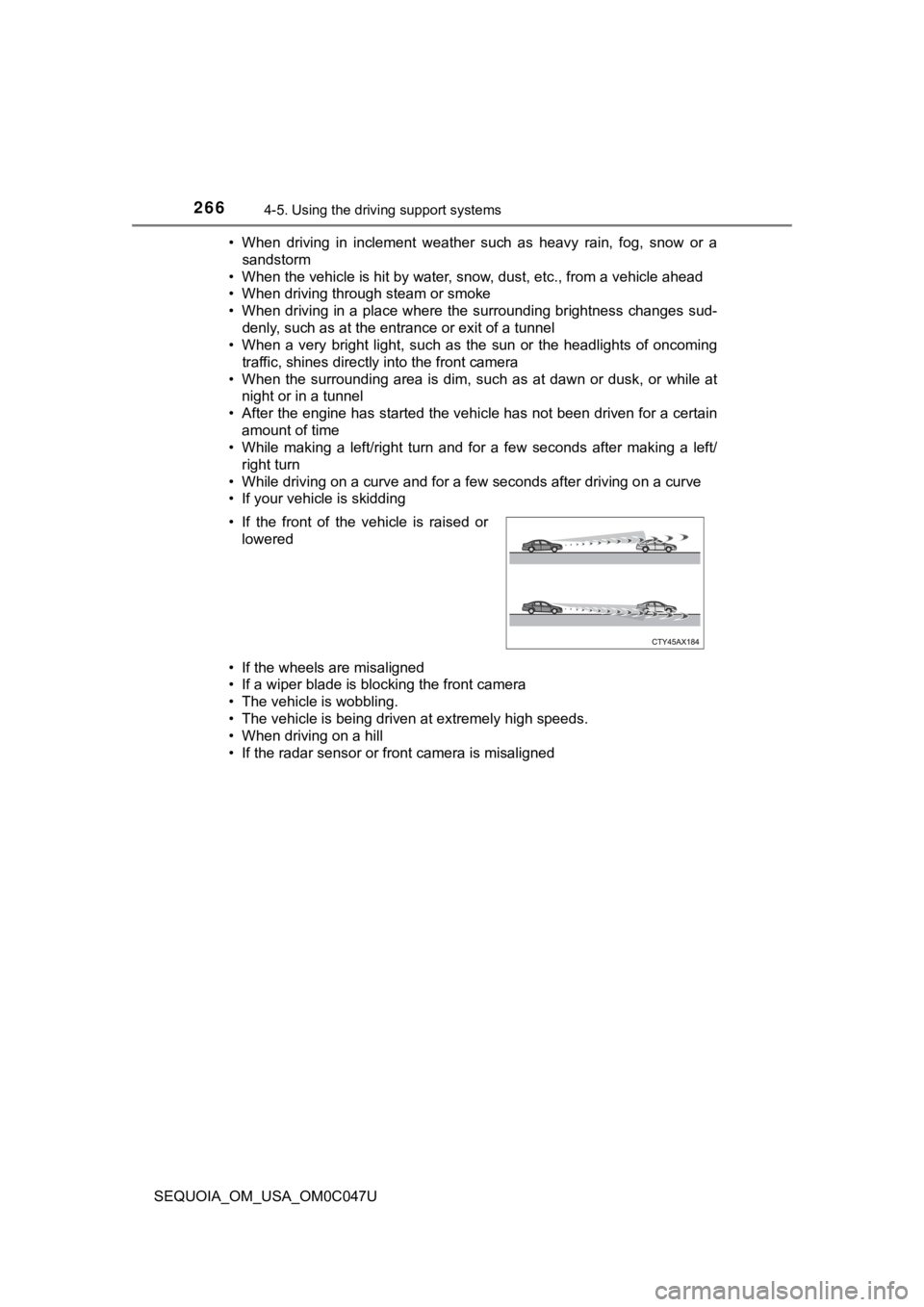
• If your vehicle is skidding
• If the wheels are misaligned
• If a wiper blade is blocking the front camera
• The vehicle is wobbling.
• The vehicle is being driven at extremely high speeds.
• When driving on a hill
• If the radar sensor or front camera is misaligned • If the front of the vehicle is raised or
lowered
Page 271 of 592
2714-5. Using the driving support systems
4
Driving
SEQUOIA_OM_USA_OM0C047U
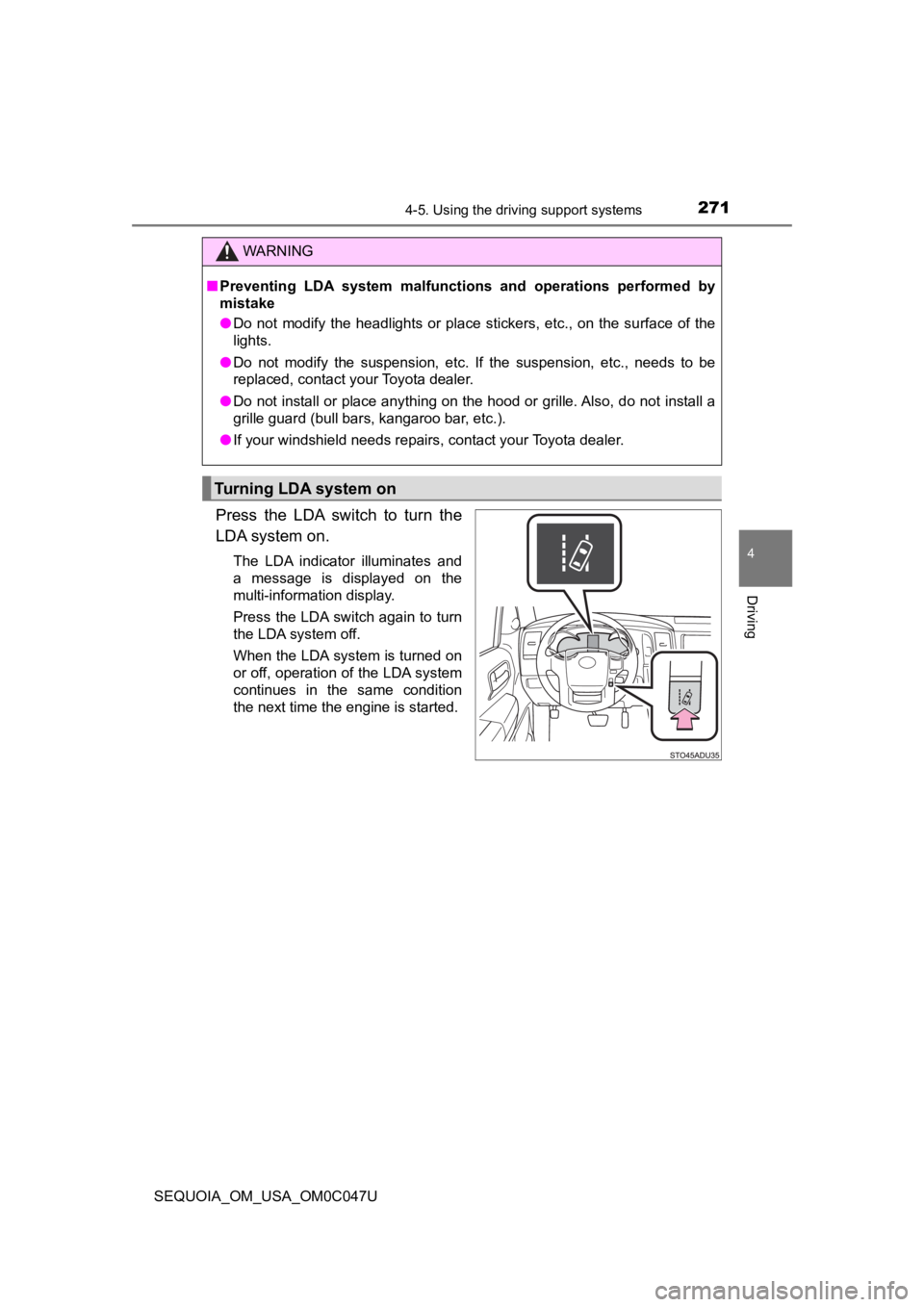
Press the LDA switch to turn the
LDA system on.
The LDA indicator illuminates and
a message is displayed on the
multi-information display.
Press the LDA switch again to turn
the LDA system off.
When the LDA system is turned on
or off, operation of the LDA system
continues in the same condition
the next time the engine is started.
WARNING
■Preventing LDA system malfunctions and operations performed by
mistake
● Do not modify the headlights or place stickers, etc., on the su rface of the
lights.
● Do not modify the suspension, etc. If the suspension, etc., needs to be
replaced, contact your Toyota dealer.
● Do not install or place anything on the hood or grille. Also, d o not install a
grille guard (bull bars, kangaroo bar, etc.).
● If your windshield needs repairs, contact your Toyota dealer.
Turning LDA system on
Page 274 of 592
2744-5. Using the driving support systems
SEQUOIA_OM_USA_OM0C047U■
Conditions in which functions may not operate properly
In the following situations, the front camera may not detect wh ite (yellow)
lines and various functions may not operate normally.
● There are shadows on the road that run parallel with, or cover, the white
(yellow) lines.
● The vehicle is driven in an area without white (yellow) lines, such as in front
of a tollgate or checkpoint, or at an intersection, etc.
● The white (yellow) lines are cracked, “Botts’ dots”, “Raised pa vement
marker” or stones are present.
● The white (yellow) lines cannot be seen or are difficult to see due to sand,
etc.
● The vehicle is driven on a road surface that is wet due to rain , puddles, etc.
● The traffic lines are yellow (which may be more difficult to re cognize than
lines that are white).
● The white (yellow) lines cross over a curb, etc.
● The vehicle is driven on a bright surface, such as concrete.
● The vehicle is driven on a surface that is bright due to reflec ted light, etc.
● The vehicle is driven in an area where the brightness changes s uddenly,
such as at the entrances and exits of tunnels, etc.
● Light from the headlights of an oncoming vehicle, the sun, etc. , enters the
camera.
● The vehicle is driven where the road diverges, merges, etc.
● The vehicle is driven on a slope.
● The vehicle is driven on a road which tilts left or right, or a winding road.
● The vehicle is driven on an unpaved or rough road.
● The vehicle is driven around a sharp curve.
● The traffic lane is excessively narrow or wide.
● The vehicle is extremely tilted due to carrying heavy luggage or having
improper tire pressure.
● The distance to the preceding vehicle is extremely short.
● The vehicle is moving up and down a large amount due to road co nditions
during driving (poor roads or road seams).
● The headlight lenses are dirty and emit a faint amount of light at night, or the
beam axis has deviated.
● The vehicle has just changed lanes or crossed an intersection.
Page 460 of 592
4606-3. Do-it-yourself maintenance
SEQUOIA_OM_USA_OM0C047U
WARNING
■Replacing light bulbs
● Turn off the lights. Do not attempt to replace the bulb immediately after
turning off the lights.
The bulbs become very hot and may cause burns.
● Do not touch the glass portion of the light bulb with bare hand s. When it is
unavoidable to hold the glass portion, use and hold with a clea n dry cloth
to avoid getting moisture and oils on the bulb.
Also, if the bulb is scratched or dropped, it may blow out or crack.
● Fully install light bulbs and any parts used to secure them. Failure to do so
may result in heat damage, fire, or water entering the headligh t unit. This
may damage the headlights or cause condensation to build up on the lens.
● Do not attempt to repair or disassemble light bulbs, connectors , electric
circuits or component parts.
Doing so may result in death or serious injury due to electric shock.
■ To prevent damage or fire
● Make sure bulbs are fully seated and locked.
● Check the wattage of the bulb before installing to prevent heat damage.
Page 487 of 592
4877-2. Steps to take in an emergency
7
When trouble arises
SEQUOIA_OM_USA_OM0C047U
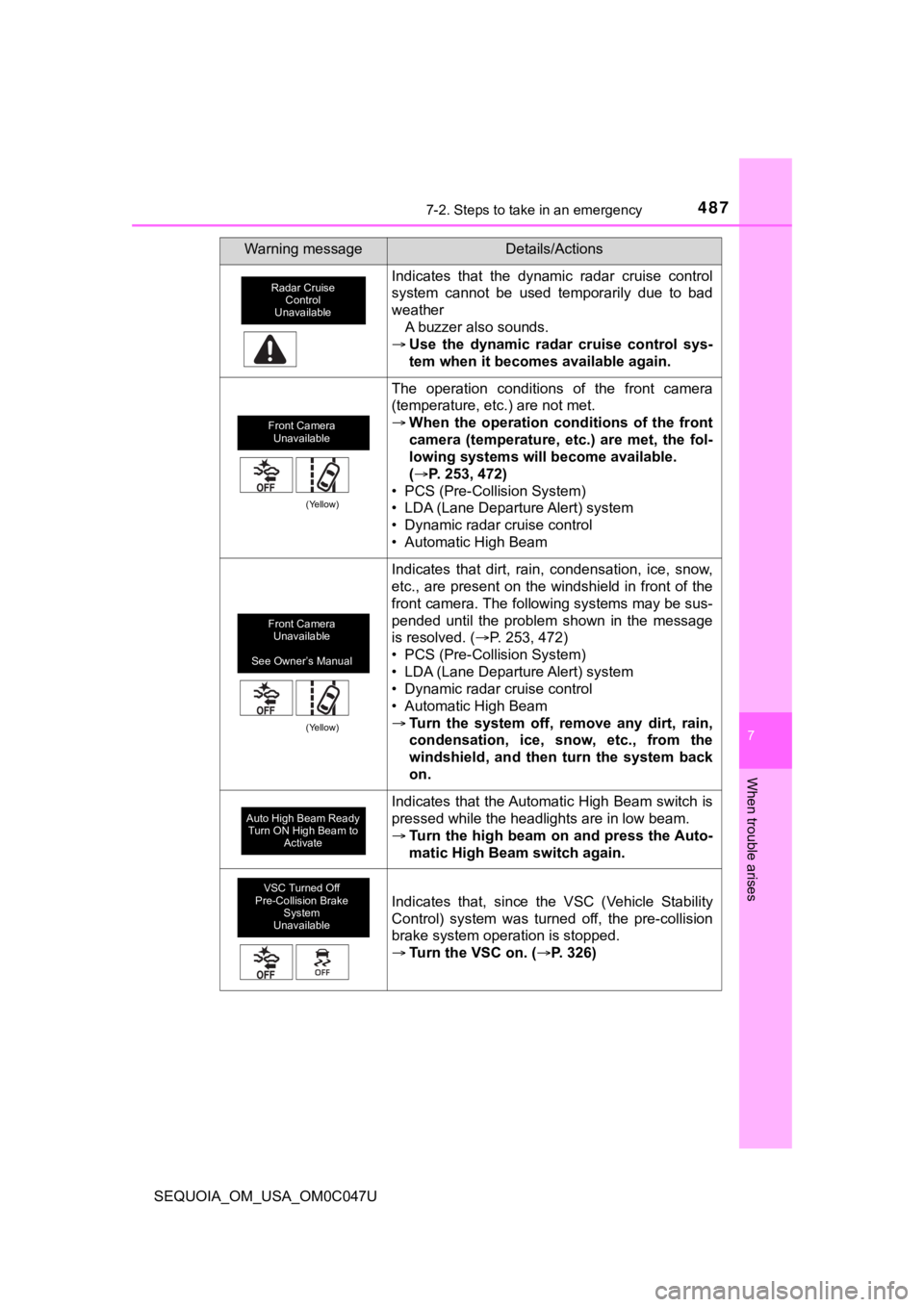
Indicates that the dynamic radar cruise control
system cannot be used temporarily due to bad
weatherA buzzer also sounds.
Use the dynamic radar cruise control sys-
tem when it becomes available again.
The operation conditions of the front camera
(temperature, etc.) are not met.
When the operation conditions of the front
camera (temperature, etc.) are met, the fol-
lowing systems will become available.
(P. 253, 472)
• PCS (Pre-Collision System)
• LDA (Lane Departure Alert) system
• Dynamic radar cruise control
• Automatic High Beam
Indicates that dirt, rain, condensation, ice, snow,
etc., are present on the windshield in front of the
front camera. The following systems may be sus-
pended until the problem shown in the message
is resolved. ( P. 253, 472)
• PCS (Pre-Collision System)
• LDA (Lane Departure Alert) system
• Dynamic radar cruise control
• Automatic High Beam
Turn the system off, remove any dirt, rain,
condensation, ice, snow, etc., from the
windshield, and then turn the system back
on.
Indicates that the Automatic High Beam switch is
pressed while the headlights are in low beam.
Turn the high beam on and press the Auto-
matic High Beam switch again.
Indicates that, since the VSC (Vehicle Stability
Control) system was turned off, the pre-collision
brake system operation is stopped.
Turn the VSC on. ( P. 326)
Warning messageDetails/Actions
Radar Cruise
Control
Unavailable
Front Camera Unavailable
(Yellow)
Front Camera Unavailable
See Owner’s Manual
(Yellow)
Auto High Beam Ready Turn ON High Beam to Activate
VSC Turned Off
Pre-Collision Brake
System
Unavailable
Page 513 of 592
5137-2. Steps to take in an emergency
7
When trouble arises
SEQUOIA_OM_USA_OM0C047U
■Starting the engine when t he battery is discharged
The engine cannot be started by push-starting.
■ To prevent battery discharge
●Turn off the headlights and the audio system while the engine is off.
● Turn off any unnecessary electrical components when the vehicle is running
at a low speed for an extended period, such as in heavy traffic .
■ Charging the battery
The electricity stored in the battery will discharge gradually even when the
vehicle is not in use, due to natural discharge and the draining effects of cer-
tain electrical appliances. If the vehicle is left for a long t ime, the battery may
discharge, and the engine may be unable to start. (The battery recharges
automatically during driving.)
■ When recharging or replacing the battery
●In some cases, it may not be possible to unlock the doors using the smart
key system when the battery is discharged. Use the wireless rem ote control
or the mechanical key to lock or unlock the doors.
● The engine may not start on the first attempt after the battery has recharged
but will start normally after the second attempt. This is not a malfunction.
● The engine switch mode is memorized by the vehicle. When the ba ttery is
reconnected, the system will return to the mode it was in befor e the battery
was discharged. Before disconnecting the battery, turn the engine switch off.
If you are unsure what mode the engine switch was in before the battery dis-
charged, be especially careful when reconnecting the battery.
Page 556 of 592
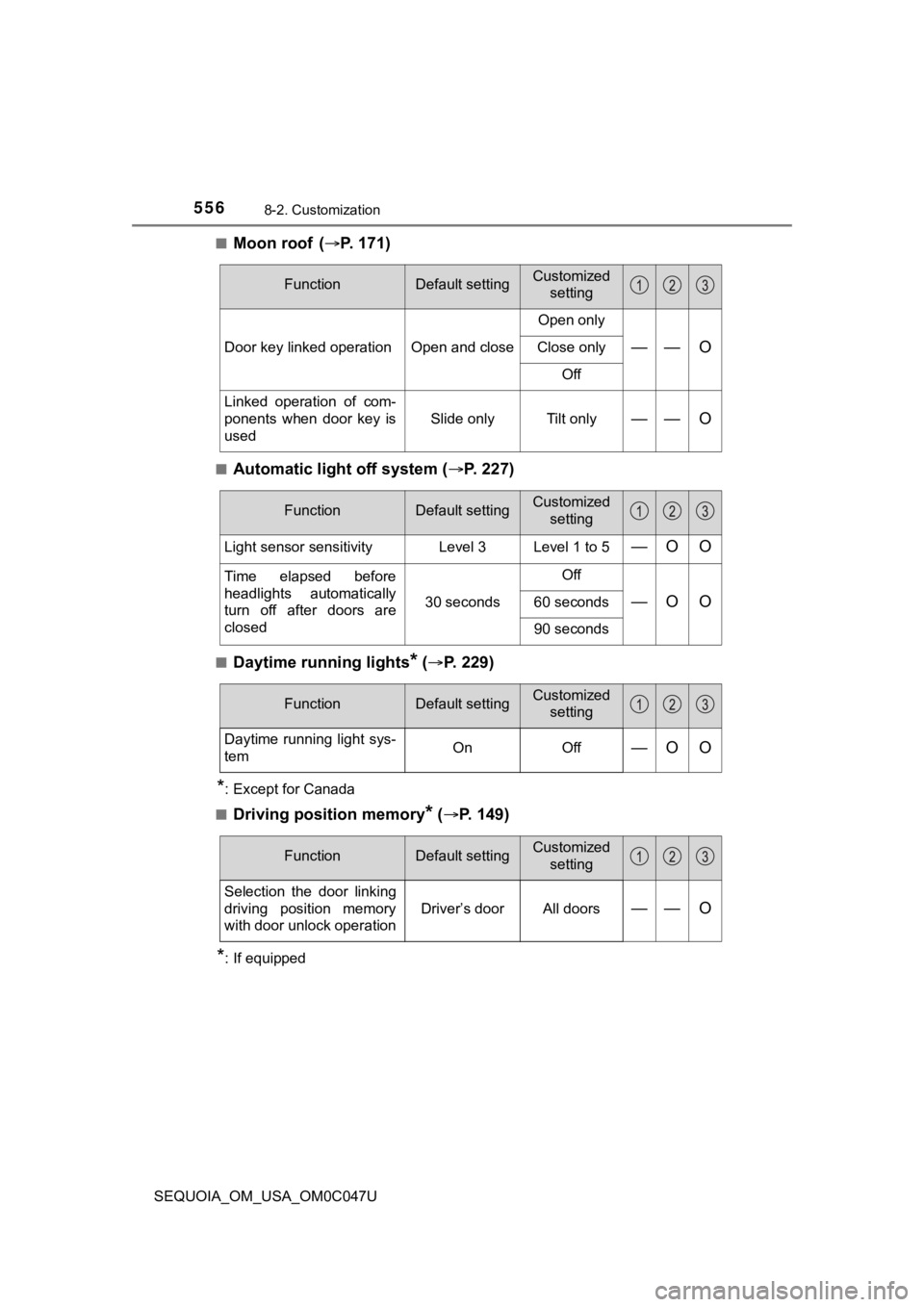
5568-2. Customization
SEQUOIA_OM_USA_OM0C047U■
Moon roof (
P. 1 7 1 )
■Automatic light off system ( P. 227)
■Daytime running lights* ( P. 229)
*: Except for Canada
■
Driving position memory* ( P. 149)
*: If equipped
FunctionDefault settingCustomized
setting
Door key linked operation Open and close Open only—— OClose only
Off
Linked operation of com-
ponents when door key is
used Slide only Tilt only
—— O
FunctionDefault settingCustomized
setting
Light sensor sensitivity Level 3 Level 1 to 5—O O
Time elapsed before
headlights automatically
turn off after doors are
closed 30 secondsOff
—O O60 seconds
90 seconds
FunctionDefault settingCustomized
setting
Daytime running light sys-
temOnOff—O O
FunctionDefault settingCustomized
setting
Selection the door linking
driving position memory
with door unlock operation
Driver’s doorAll doors—— O
Page 582 of 592
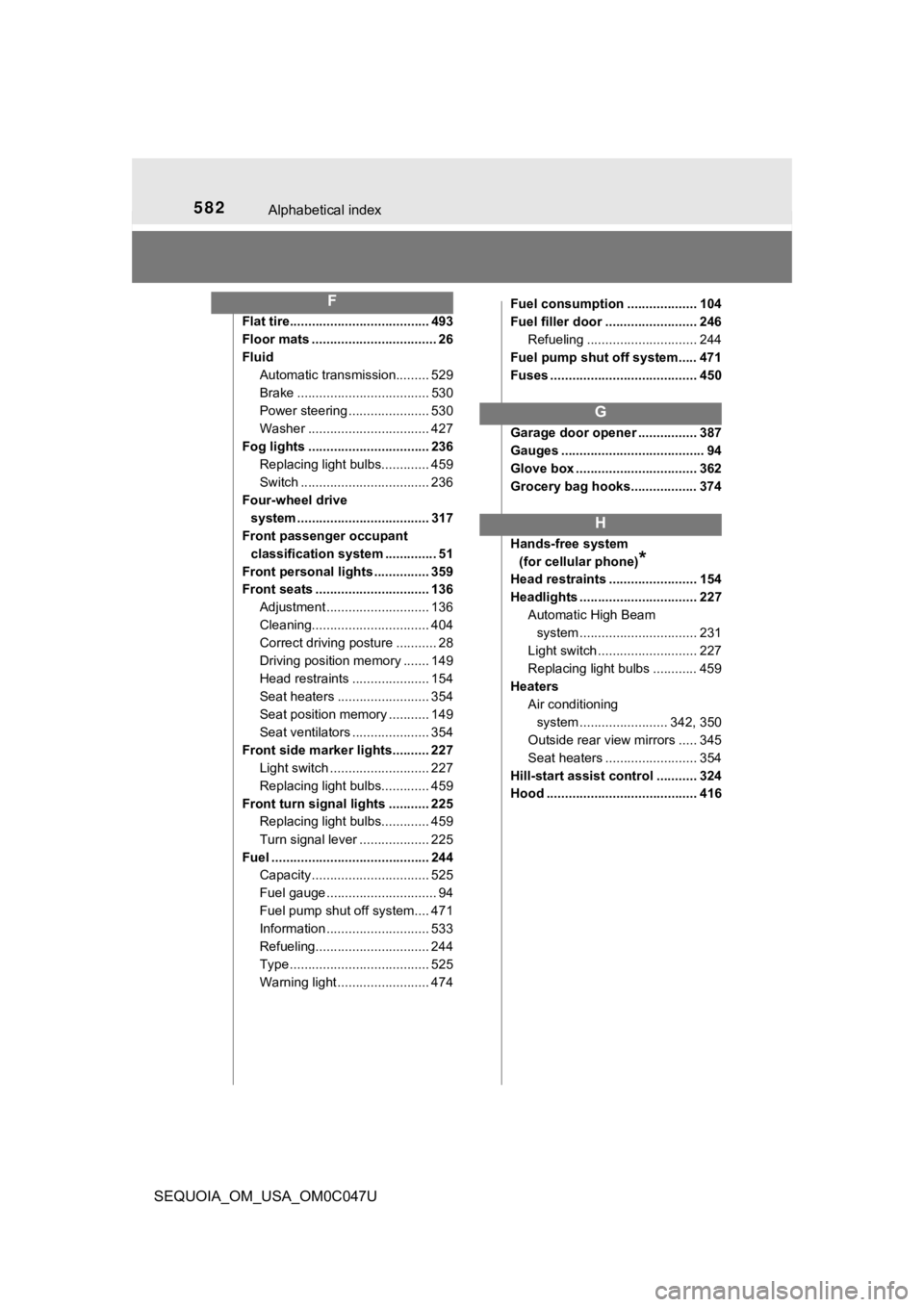
582Alphabetical index
SEQUOIA_OM_USA_OM0C047U
Flat tire...................................... 493
Floor mats .................................. 26
FluidAutomatic transmission......... 529
Brake .................................... 530
Power steering ...................... 530
Washer ................................. 427
Fog lights ................................. 236 Replacing light bulbs............. 459
Switch ................................... 236
Four-wheel drive system .................................... 317
Front passenger occupant
classification system .............. 51
Front personal lights ............... 359
Front seats ............................... 136 Adjustment ............................ 136
Cleaning................................ 404
Correct driving posture ........... 28
Driving position memory ....... 149
Head restraints ..................... 154
Seat heaters ......................... 354
Seat position memory ........... 149
Seat ventilators ..................... 354
Front side marker lights.......... 227 Light switch ........................... 227
Replacing light bulbs............. 459
Front turn signal lights ........... 225 Replacing light bulbs............. 459
Turn signal lever ................... 225
Fuel ........................................... 244 Capacity ................................ 525
Fuel gauge .............................. 94
Fuel pump shut off system.... 471
Information ............................ 533
Refueling............................... 244
Type ...................................... 525
Warning light ......................... 474 Fuel consumption ................... 104
Fuel filler door ......................... 246
Refueling .............................. 244
Fuel pump shut off system..... 471
Fuses ........................................ 450
Garage door opener ................ 387
Gauges ....................................... 94
Glove box ................................. 362
Grocery bag hooks.................. 374
Hands-free system (for cellular phone)
*
Head restraints ........................ 154
Headlights ................................ 227 Automatic High Beam
system .......... ...................... 231
Light switch ........................... 227
Replacing light bulbs ............ 459
Heaters Air conditioning system ....... ................. 342, 350
Outside rear view mirrors ..... 345
Seat heaters ......................... 354
Hill-start assist control ........... 324
Hood ......................................... 416
F
G
H