lights TOYOTA SEQUOIA 2022 Workshop Manual
[x] Cancel search | Manufacturer: TOYOTA, Model Year: 2022, Model line: SEQUOIA, Model: TOYOTA SEQUOIA 2022Pages: 592, PDF Size: 10.82 MB
Page 337 of 592
3374-6. Driving tips
4
Driving
SEQUOIA_OM_USA_OM0C047U
Perform the following according to the driving conditions:
● Do not try to forcibly open a window or move a wiper that is fr ozen.
Pour warm water over the frozen area to melt the ice. Wipe away
the water immediately to prevent it from freezing.
● To ensure proper operation of the climate control system fan,
remove any snow that has accumulated on the air inlet vents in
front of the windshield.
● Check for and remove any excess ic e or snow that may have accu-
mulated on the exterior lights, vehicle’s roof, chassis, around the
tires or on the brakes.
● Remove any snow or mud from the bottom of your shoes before
getting in the vehicle.
Accelerate the vehicle slowly, keep a safe distance between you and
the vehicle ahead, and drive at a reduced speed suitable to roa d con-
ditions.
● Park the vehicle and move the shift lever to P without setting the
parking brake. The parking brake may freeze up, preventing it from
being released. If the vehicle is parked without setting the pa rking
brake, make sure t o block the wheels.
Failure to do so may be dangerou s because it may cause the vehi-
cle to move unexpectedly, pos sibly leading to an accident.
● If the vehicle is parked without setting the parking brake, confirm
that the shift lever c annot be moved out of P
*.
*: The shift lever will be locked if it is attempted to be shifte d from P to any
other position without depressing the brake pedal. If the shift lever can be
shifted from P, there may be a problem with the shift lock syst em. Have the
vehicle inspected by your Toyota dealer immediately.
Before driving the vehicle
When driving the vehicle
When parking the vehicle
Page 341 of 592

341
Interior features5
SEQUOIA_OM_USA_OM0C047U5-1. Using the
air conditioning system
and defogger
Front air conditioning system............................. 342
Rear air conditioning system............................. 350
Seat heaters/ seat ventilators ................ 354
5-2. Using the interior lights Interior lights list ................ 357
• Personal/interior light main switch ................... 358
• Personal/interior lights ............................. 359
• Interior light ................... 360
5-3. Using the storage features
List of storage features ..... 361
• Glove boxes .................. 362
• Front console box ......... 363
• Card holder ................... 364
• Map holder (center console) ............ 365
• Rear console box .......... 365
• Overhead console......... 367
• Cup holders .................. 368
• Bottle holders ................ 371
• Auxiliary boxes.............. 372
Luggage compartment features ........................... 373 5-4. Other interior features
Other interior features ....... 377
• Sun visors ..................... 377
• Vanity mirrors................ 378
• Power outlets ................ 379
• USB charging ports....... 382
• Armrest (second seats) .............. 384
• Rear side sunshades .... 385
• Assist grips ................... 386
Garage door opener.......... 387
Compass ........................... 395
Page 357 of 592
3575-2. Using the interior lights
5
Interior features
SEQUOIA_OM_USA_OM0C047U
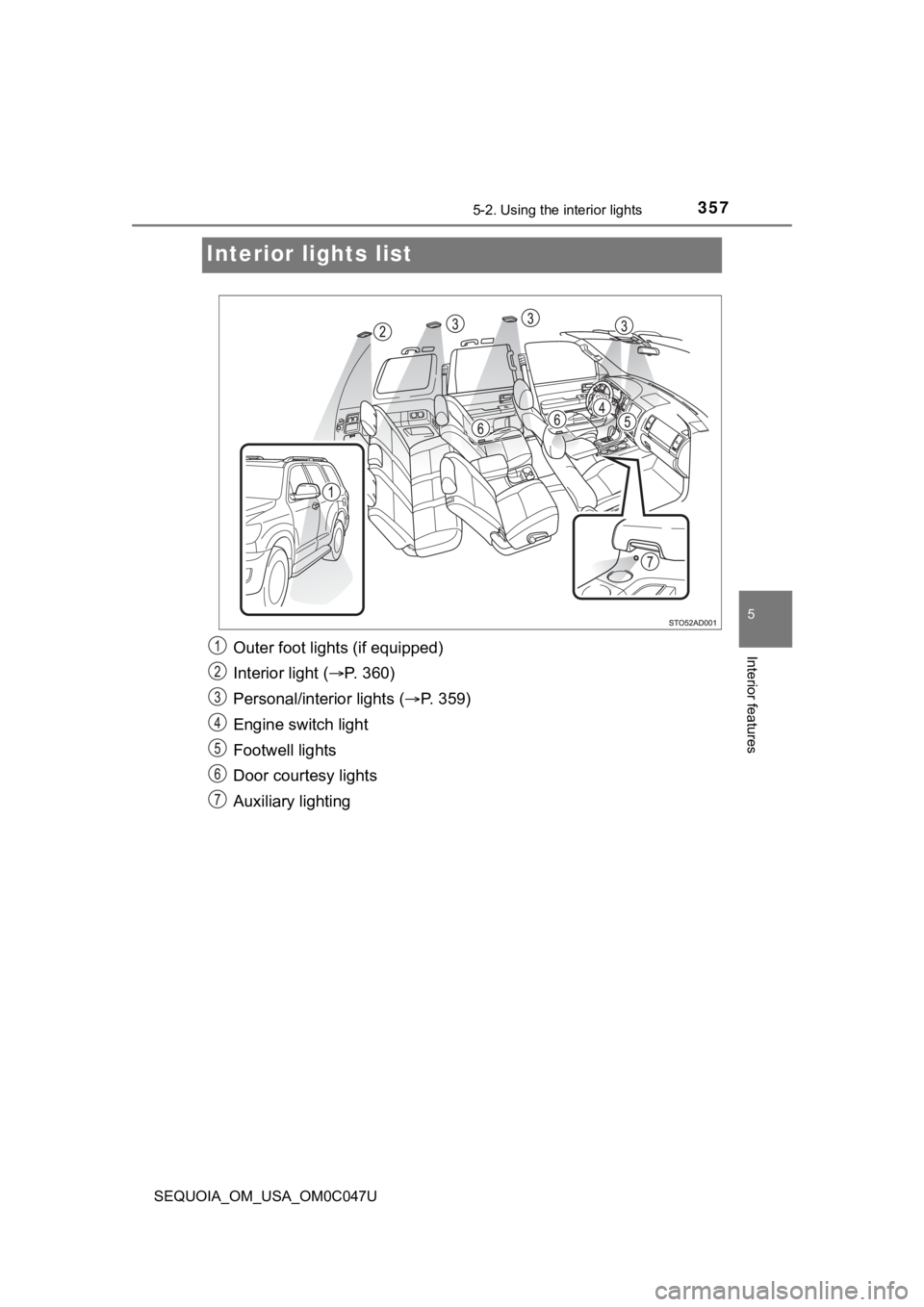
Interior lights list
Outer foot lights (if equipped)
Interior light ( P. 360)
Personal/interior lights ( P. 3 5 9 )
Engine switch light
Footwell lights
Door courtesy lights
Auxiliary lighting
Page 358 of 592
3585-2. Using the interior lights
SEQUOIA_OM_USA_OM0C047U
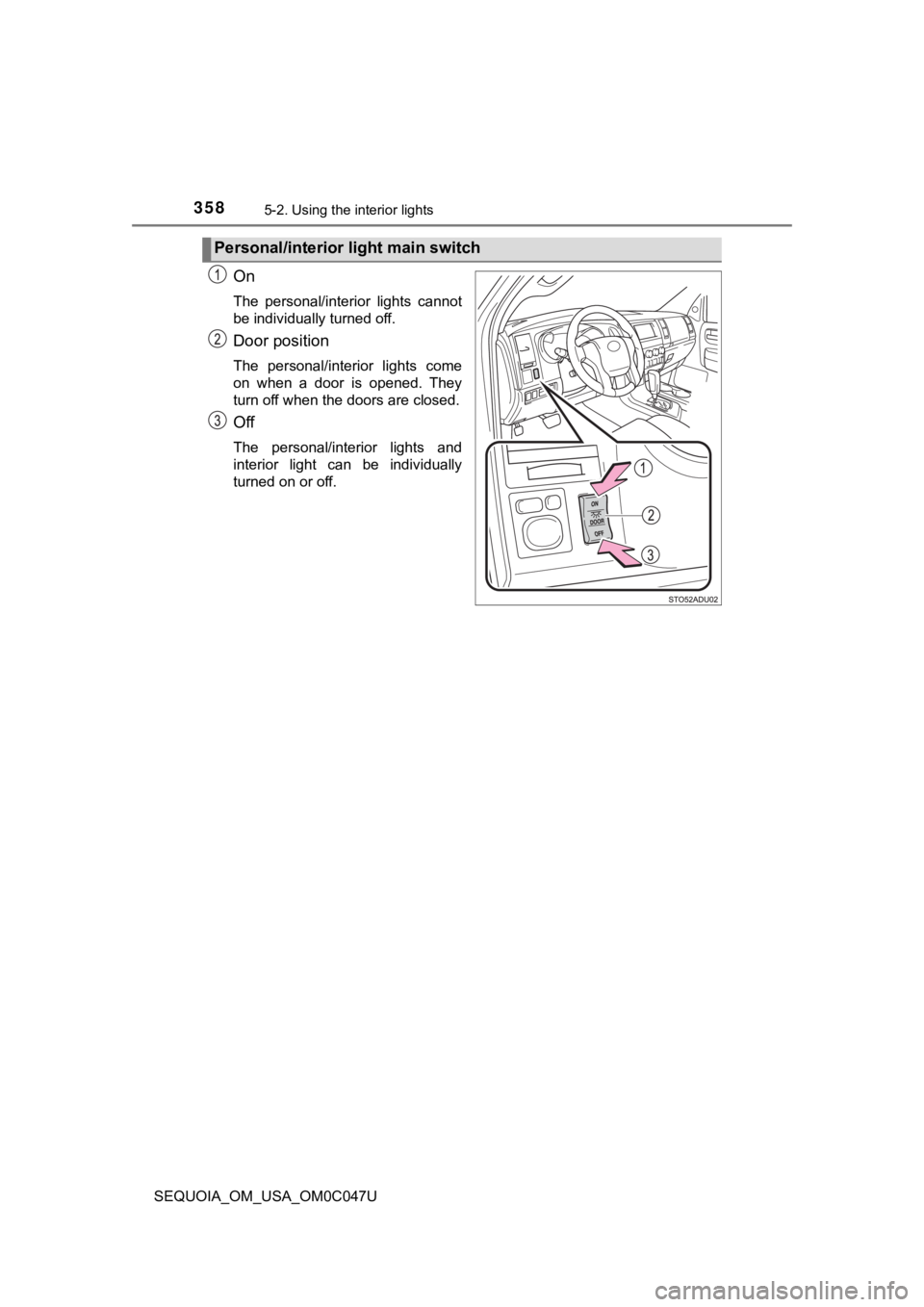
On
The personal/interior lights cannot
be individually turned off.
Door position
The personal/interior lights come
on when a door is opened. They
turn off when the doors are closed.
Off
The personal/interior lights and
interior light can be individually
turned on or off.
Personal/interior light main switch
Page 359 of 592
3595-2. Using the interior lights
5
Interior features
SEQUOIA_OM_USA_OM0C047U■
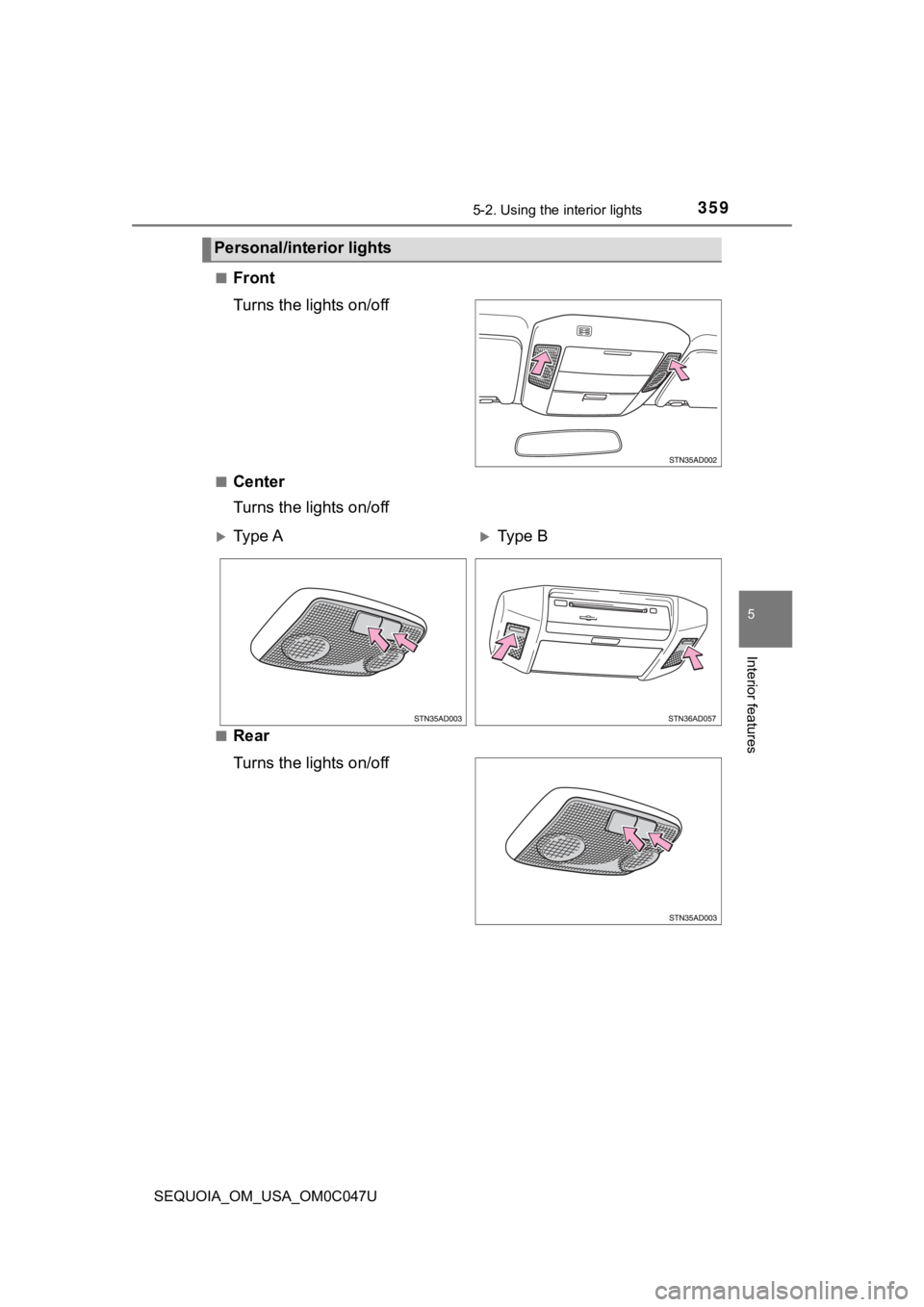
Front
Turns the lights on/off
■Center
Turns the lights on/off
■Rear
Turns the lights on/off
Personal/interior lights
Ty p e AType B
Page 360 of 592
3605-2. Using the interior lights
SEQUOIA_OM_USA_OM0C047U
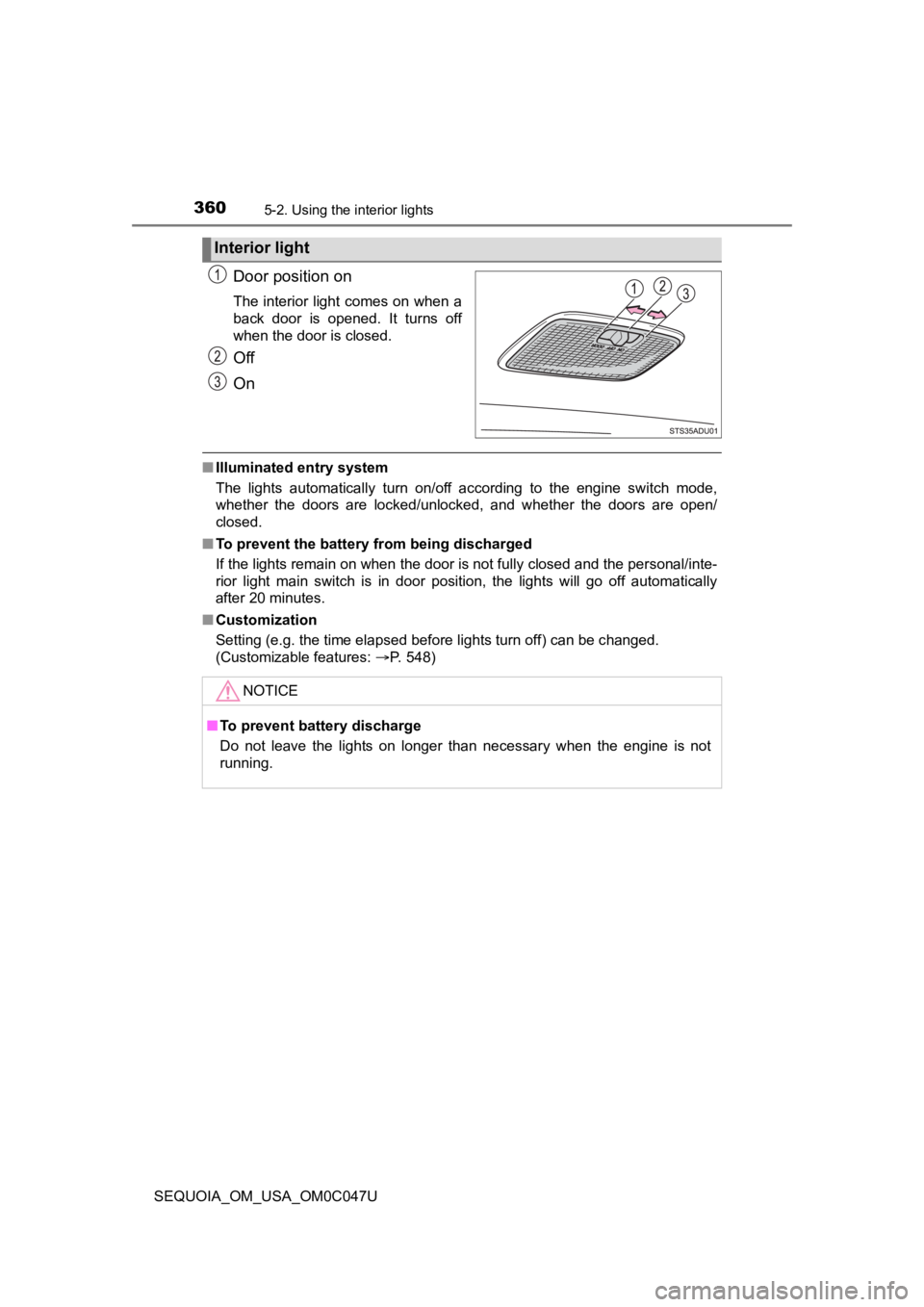
Door position on
The interior light comes on when a
back door is opened. It turns off
when the door is closed.
Off
On
■Illuminated entry system
The lights automatically turn on/off according to the engine switch mode,
whether the doors are locked/unlocked, and whether the doors ar e open/
closed.
■ To prevent the battery from being discharged
If the lights remain on when the door is not fully closed and the personal/inte-
rior light main switch is in door position, the lights will go off automatically
after 20 minutes.
■ Customization
Setting (e.g. the time elapsed before lights turn off) can be c hanged.
(Customizable features: P. 548)
Interior light
NOTICE
■To prevent battery discharge
Do not leave the lights on longer than necessary when the engin e is not
running.
Page 378 of 592
3785-4. Other interior features
SEQUOIA_OM_USA_OM0C047U
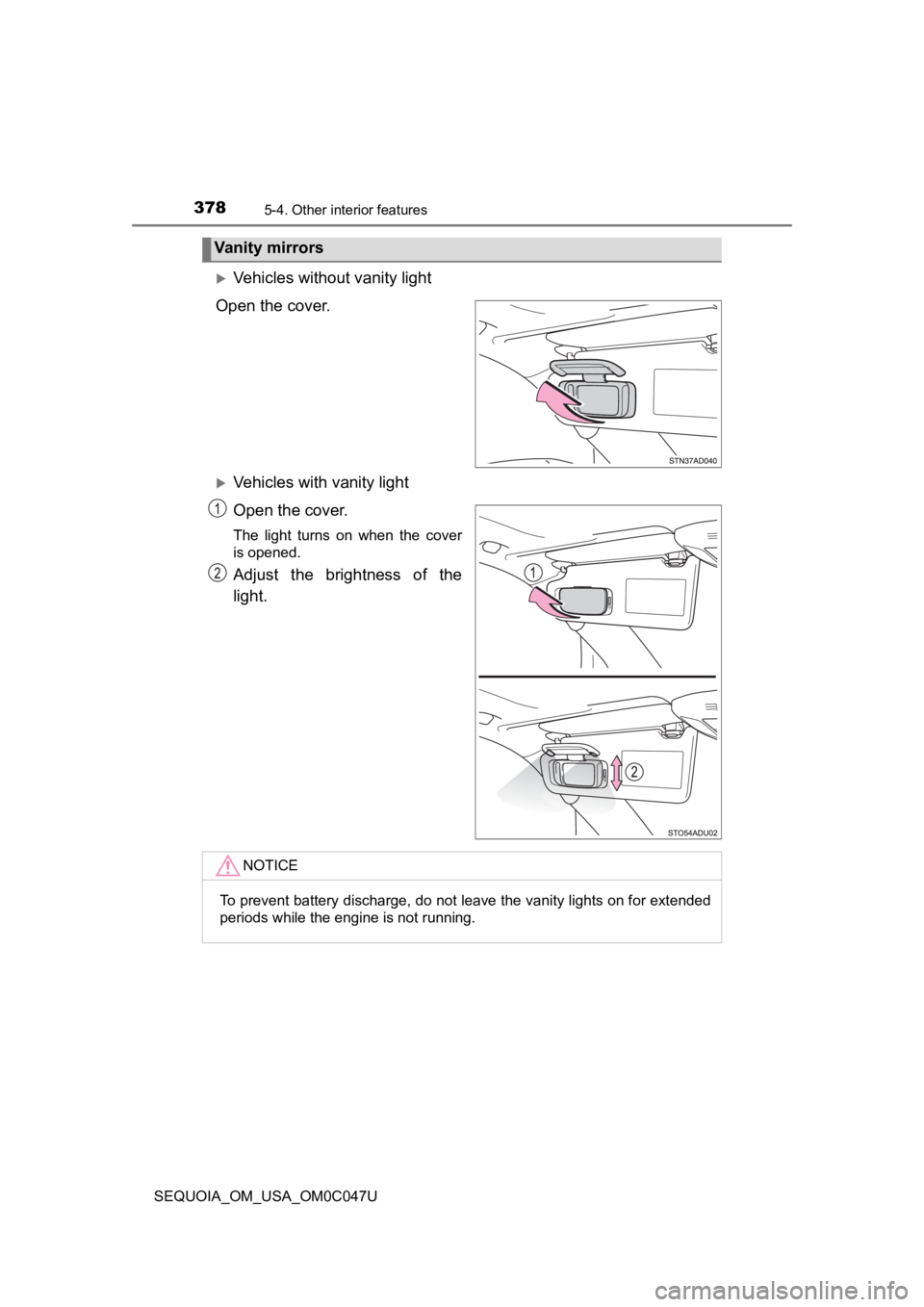
Vehicles without vanity light
Open the cover.
Vehicles with vanity light
Open the cover.
The light turns on when the cover
is opened.
Adjust the brightness of the
light.
Vanity mirrors
NOTICE
To prevent battery discharge, do not leave the vanity lights on for extended
periods while the engine is not running.
Page 402 of 592
4026-1. Maintenance and care
SEQUOIA_OM_USA_OM0C047U
NOTICE
■To prevent paint deterioration an d corrosion on the body and compo-
nents (aluminum wheels, etc.)
● Wash the vehicle immediately in the following cases:
• After driving near the sea coast
• After driving on salted roads
• If coal tar or tree sap is present on the paint surface
• If dead insects, insect droppings or bird droppings are present on the
paint surface
• After driving in an area contaminated with soot, oily smoke, mine dust, iron powder or chemical substances
• If the vehicle becomes heavily soiled with dust or mud
• If liquids such as benzene and gasoline are spilled on the pai nt surface
● If the paint is chipped or scratched, have it repaired immediately.
● To prevent the wheels from corroding, remove any dirt and store in a place
with low humidity when storing the wheels.
■ Cleaning the exterior lights
● Wash carefully. Do not use organic substances or scrub with a h ard brush.
This may damage the surfaces of the lights.
● Do not apply wax to the surfaces of the lights.
Wax may cause damage to the lenses.
Page 410 of 592
4106-2. Maintenance
SEQUOIA_OM_USA_OM0C047U
Vehicle interior
ItemsCheck points
Accelerator pedal• The accelerator pedal should move smoothly(without uneven pedal effort or catching).
Automatic transmis-
sion “Park” mecha-
nism• When parked on a slope and the shift lever is in P,is the vehicle securely stopped?
Brake pedal
• Does the brake pedal move smoothly?
• Does the brake pedal have appropriate clearancefrom the floor? ( P. 530)
• Does the brake pedal have the correct amount of
free play? ( P. 530)
Brakes
• The vehicle should not pull to one side when the
brakes are applied.
• The brakes should work effectively.
• The brake pedal should not feel spongy.
• The brake pedal should not get too close to the floor when the brakes are applied.
Head restraints• Do the head restraints move smoothly and locksecurely?
Indicators/buzzers• Do the indicators and buzzers function properly?
Lights • Do all the lights come on?
Parking brake
• Does the parking brake pedal move smoothly?
• When parked on a slope and the parking brake is
on, is the vehicle securely stopped?
Seat belts• Do the seat belts operate smoothly?
• The seat belts should not be damaged.
Seats• Do the seat controls operate properly?
Steering wheel
• Does the steering wheel rotate smoothly?
• Does the steering wheel have the correct amountof free play?
• There should not be any strange sounds coming
from the steering wheel.
Page 431 of 592
4316-3. Do-it-yourself maintenance
6
Maintenance and care
SEQUOIA_OM_USA_OM0C047U
Drive straight (with occasional left and right turns) at approxi-
mately 25 mph (40 km/h) or more for approximately 10 to 30 min-
utes.
Initialization is complete when the position of each tire is determined
and the inflation pressure of ea ch tire is displayed on the multi-infor-
mation display.
Initialization may take longer than approximately 30 minutes in cer-
tain situations, such as when the vehicle is stopped for a long time at
traffic lights, etc. ( P. 435)
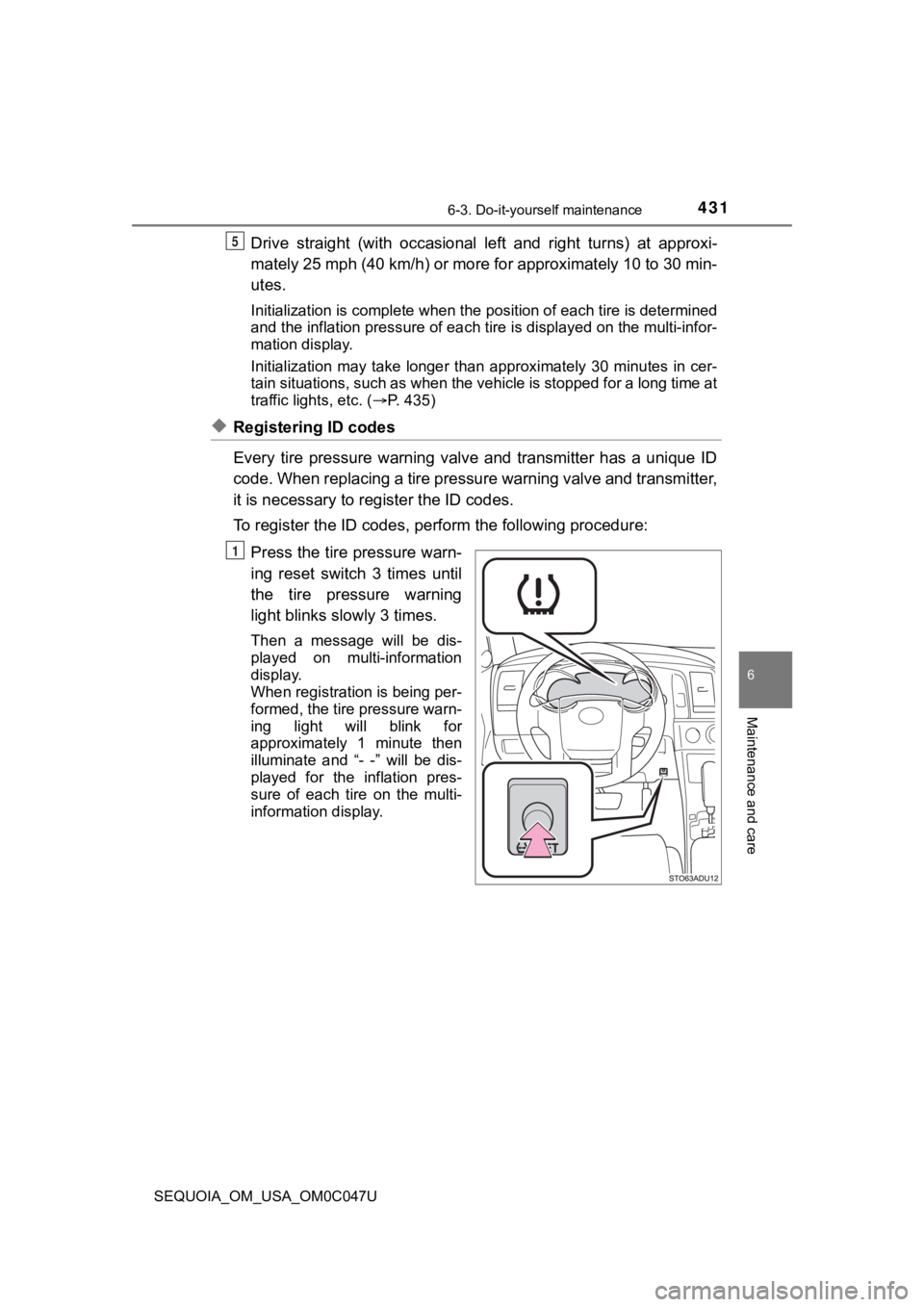
◆Registering ID codes
Every tire pressure warning valve and transmitter has a unique ID
code. When replacing a tire pressure warning valve and transmit ter,
it is necessary to register the ID codes.
To register the ID codes, perf orm the following procedure:
Press the tire pressure warn-
ing reset switch 3 times until
the tire pressure warning
light blinks slowly 3 times.
Then a message will be dis-
played on multi-information
display.
When registration is being per-
formed, the tire pressure warn-
ing light will blink for
approximately 1 minute then
illuminate and “- -” will be dis-
played for the inflation pres-
sure of each tire on the multi-
information display.
5
1