air conditioning TOYOTA SEQUOIA HYBRID 2023 User Guide
[x] Cancel search | Manufacturer: TOYOTA, Model Year: 2023, Model line: SEQUOIA HYBRID, Model: TOYOTA SEQUOIA HYBRID 2023Pages: 628, PDF Size: 14.27 MB
Page 405 of 628
405
Owners Manual_USA_M0C043_en
5
5
Interior features
Interior features
5-1. Using the air conditioning system and defogger
Automatic air conditioning system ....................... 406
Rear automatic air condi- tioning system ........... 413
Heated steering wheel/seat heaters/seat ventilators.................................. 415
5-2. Using the interior lights Interior lights list .......... 418
5-3. Using the storage features List of storage features 421
Luggage compartment fea- tures .......................... 425
5-4. Using the other interior features
Other interior features . 428
Garage door opener.... 441
Page 406 of 628
4065-1. Using the air conditioning system and defogger
Owners Manual_USA_M0C043_en
5-1.Using the air conditioning system and defogger
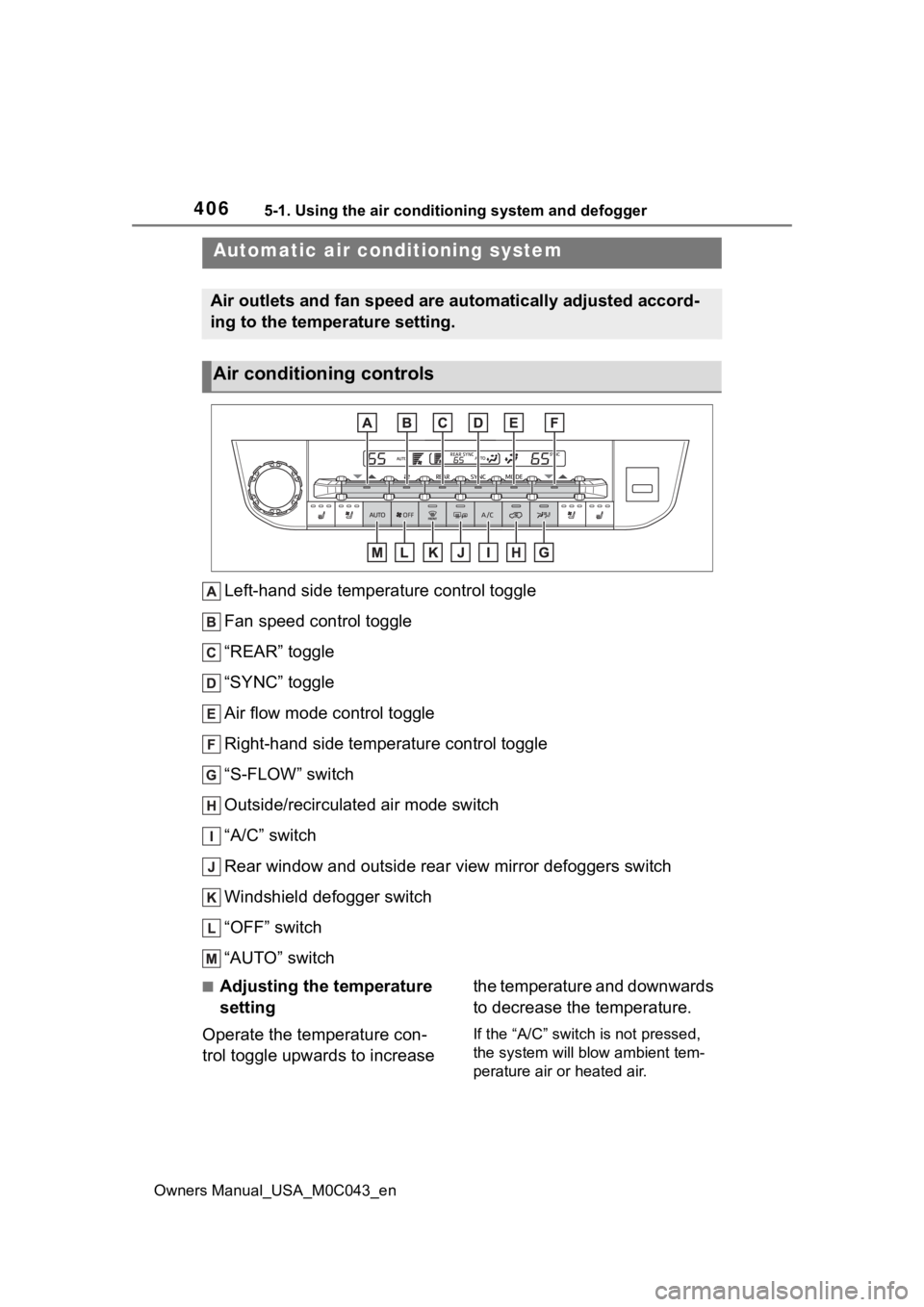
Left-hand side temperature control toggle
Fan speed control toggle
“REAR” toggle
“SYNC” toggle
Air flow mode control toggle
Right-hand side temperature control toggle
“S-FLOW” switch
Outside/recirculated air mode switch
“A/C” switch
Rear window and outside rear view mirror defoggers switch
Windshield defogger switch
“OFF” switch
“AUTO” switch
■Adjusting the temperature
setting
Operate the temperature con-
trol toggle upwards to increase the temperature and downwards
to decrease the temperature.
If the “A/C” switch is not pressed,
the system will blow ambient tem-
perature air or heated air.
Automatic air conditioning system
Air outlets and fan speed are automatically adjusted accord-
ing to the temperature setting.
Air conditioning controls
Page 407 of 628
4075-1. Using the air conditioning system and defogger
Owners Manual_USA_M0C043_en
5
Interior features
■Setting the fan speed
Operate the fan speed control
toggle upwards to increase the
fan speed and downwards to
decrease the fan speed.
Press the “OFF” switch to turn the
fan off.
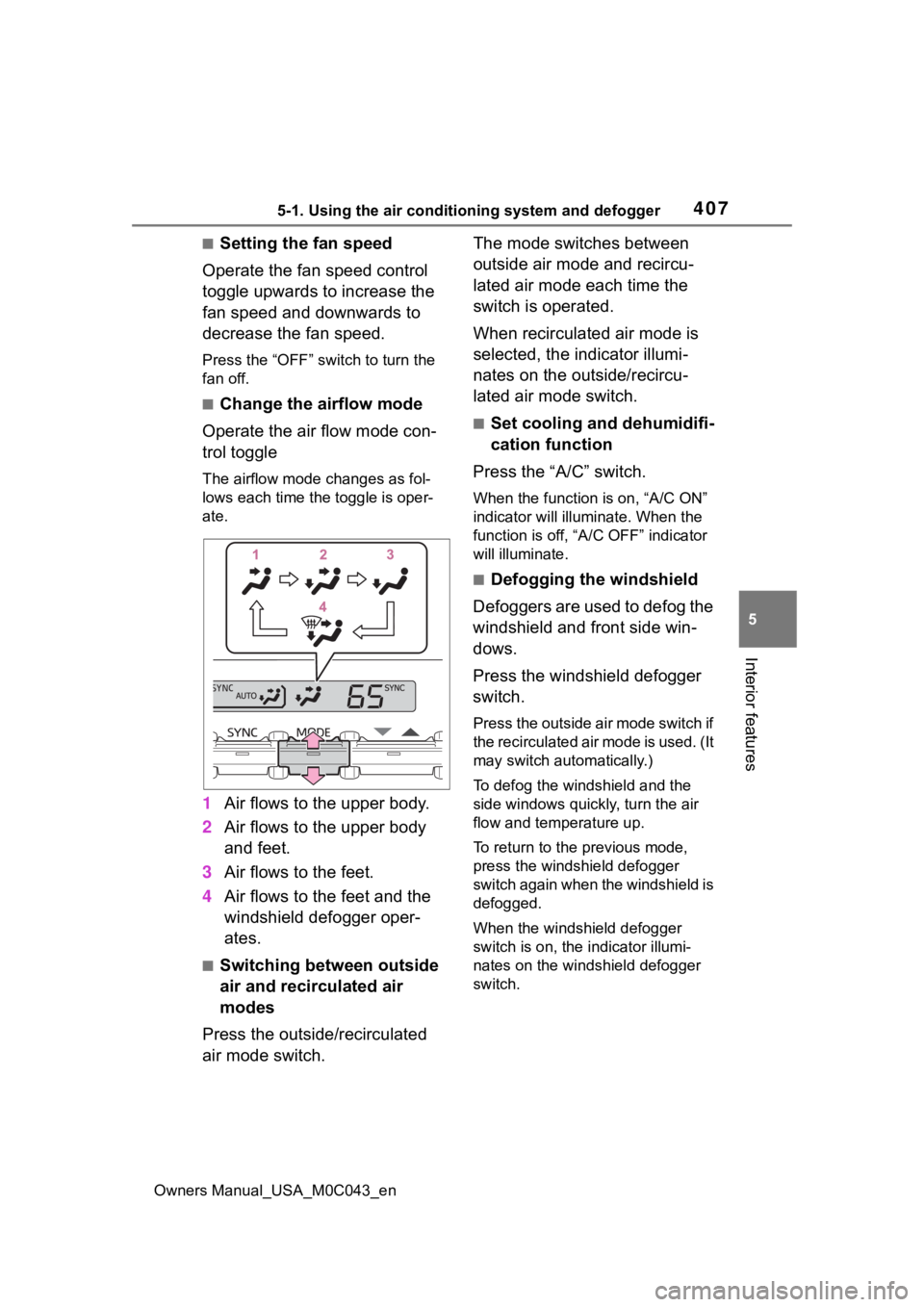
■Change the airflow mode
Operate the air flow mode con-
trol toggle
The airflow mode changes as fol-
lows each time the toggle is oper-
ate.
1 Air flows to the upper body.
2 Air flows to the upper body
and feet.
3 Air flows to the feet.
4 Air flows to the feet and the
windshield defogger oper-
ates.
■Switching between outside
air and recirculated air
modes
Press the outside/recirculated
air mode switch. The mode switches between
outside air mode and recircu-
lated air mode each time the
switch is operated.
When recirculated air mode is
selected, the indicator illumi-
nates on the outside/recircu-
lated air mode switch.
■Set cooling and dehumidifi-
cation function
Press the “A/C” switch.
When the function is on, “A/C ON”
indicator will illumi nate. When the
function is off, “A/ C OFF” indicator
will illuminate.
■Defogging the windshield
Defoggers are used to defog the
windshield and front side win-
dows.
Press the windshield defogger
switch.
Press the outside air mode switch if
the recirculated air mode is used. (It
may switch automatically.)
To defog the windshield and the
side windows quickly, turn the air
flow and temperature up.
To return to the previous mode,
press the windshield defogger
switch again when the windshield is
defogged.
When the windshield defogger
switch is on, the indicator illumi-
nates on the windshield defogger
switch.
Page 408 of 628
4085-1. Using the air conditioning system and defogger
Owners Manual_USA_M0C043_en
■Defogging the rear window
and outside rear view mir-
rors
Defoggers are used to defog the
rear window and to remove rain-
drops, dew and frost from the
outside rear view mirrors.
Press the rear window and out-
side rear view mirror defoggers
switch.
The defoggers will automatically
turn off after 15 minutes.
When the rear window and outside
rear view mirror defoggers switch is
on, the indicator illuminates on the
rear window and ou tside rear view
mirror defoggers switch.
■When the outside temperature
exceeds 75°F (24°C) and the air
conditioning system is on
●In order to reduce the air condi-
tioning power consumption, the air
conditioning system may switch to
recirculated air mode automati-
cally.
This may also reduce fuel con-
sumption.
●Recirculated air mode is selected
as a default mode when the power
switch is turned to ON.
It is possible to switch to outside air
mode at any time by pressing the
outside air mode switch.
■Fogging up of the windows
●The windows will easily fog up
when the humidity in the vehicle is
high. Turning the cooling and
dehumidification function on will
dehumidify the air from the outlets
and defog the windshield effec-
tively.
●If you turn the cooling and dehu-
midification function off, the win-
dows may fog up more easily.
●The windows may fog up if the
recirculated air mode is used.
■When driving on dusty roads
Close all windows. If dust thrown up
by the vehicle is still drawn into the
vehicle after closing the windows, it
is recommended that the air intake
mode be set to outside air mode and
the fan speed to a ny setting except
off.
■Outside/recirculated air mode
●Setting to the recirculated air
mode temporarily is recom-
mended in preventing dirty air
from entering the vehicle interior
and helping to c ool the vehicle
when the outside air temperature
is high.
●Outside/recirculated air mode may
automatically switch depending on
the temperature setting or the
inside temperature.
■When the outside temperature
falls to nearly 32°F (0°C)
The dehumidification function may
not operate even when “A/C” switch
is pressed.
■Ventilation and air conditioning
odors
●To let fresh air in, set the air condi-
tioning system to the outside air
mode.
●During use, various odors from
inside and outside the vehicle may
enter into and accumulate in the
air conditioning system. This may
then cause odor to be emitted
from the vents.
●In order to suppr ess odors that
occur when the air conditioning
system starts, the air flow mode
may change to blow air to the feet
or air may stop blowing for a short
period of time immediately after
the air conditioning system is
started in automatic mode.
●When parking, the system auto-
matically switches to outside air
mode to encourage better air cir-
Page 409 of 628
4095-1. Using the air conditioning system and defogger
Owners Manual_USA_M0C043_en
5
Interior features
culation throughout the vehicle,
helping to reduce odors that occur
when starting the vehicle.
■Air conditioning filter
P. 4 8 7
■Air conditioning system refrig-
erant
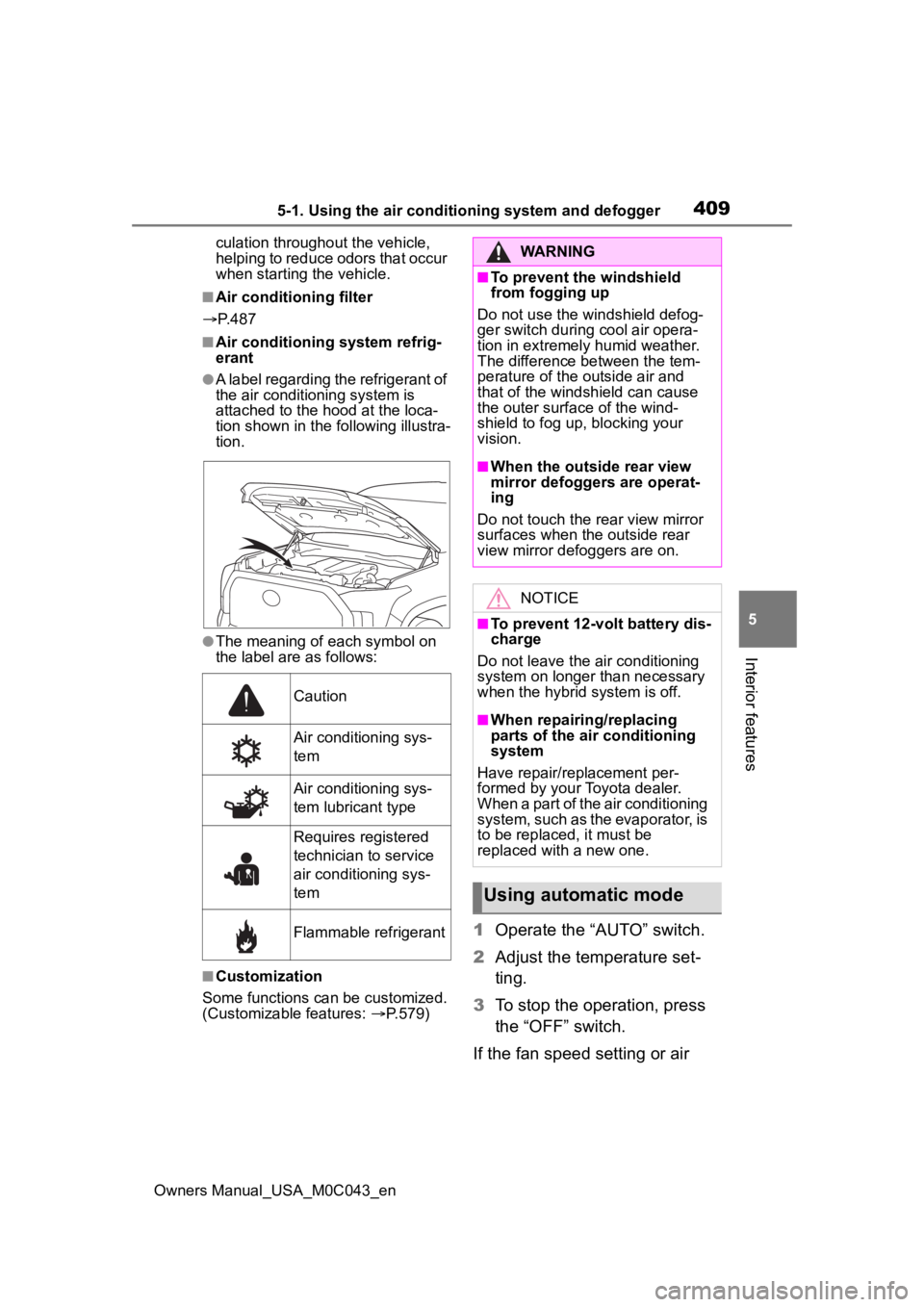
●A label regarding the refrigerant of
the air conditioning system is
attached to the ho od at the loca-
tion shown in the f ollowing illustra-
tion.
●The meaning of each symbol on
the label are as follows:
■Customization
Some functions can be customized.
(Customizable features: P.579)
1 Operate the “AUTO” switch.
2 Adjust the temperature set-
ting.
3 To stop the operation, press
the “OFF” switch.
If the fan speed setting or air
Caution
Air conditioning sys-
tem
Air conditioning sys-
tem lubricant type
Requires registered
technician to service
air conditioning sys-
tem
Flammable refrigerant
WARNING
■To prevent the windshield
from fogging up
Do not use the windshield defog-
ger switch during cool air opera-
tion in extremely humid weather.
The difference between the tem-
perature of the outside air and
that of the windshield can cause
the outer surface of the wind-
shield to fog up, blocking your
vision.
■When the outside rear view
mirror defoggers are operat-
ing
Do not touch the rear view mirror
surfaces when the outside rear
view mirror def oggers are on.
NOTICE
■To prevent 12-volt battery dis-
charge
Do not leave the air conditioning
system on longer than necessary
when the hybrid system is off.
■When repairing/replacing
parts of the air conditioning
system
Have repair/replacement per-
formed by your Toyota dealer.
When a part of the air conditioning
system, such as the evaporator, is
to be replaced, it must be
replaced with a new one.
Using automatic mode
Page 410 of 628
4105-1. Using the air conditioning system and defogger
Owners Manual_USA_M0C043_en
flow modes are operated, the
automatic mode indicator goes
off. However, automatic mode
for functions other than that
operated is maintained.
■Using automatic mode
Fan speed is adjusted automati-
cally according to the temperature
setting and the ambient conditions.
Therefore, the fan may stop for a
while until warm or cool air is ready
to flow immediately after the auto-
matic mode switch is pressed.
This function automatically con-
trols the air conditioning airflow
so that priority is given to the
front seats. Unnecessary air
conditioning is suppressed, con-
tributing to increased fuel effi-
ciency.
Front seat concentrated airflow
mode operates in the following
situations.
No passengers are detected
in the rear seats
The windshield defogger is
not operating
While operating, illuminates.
■Manually turning front seat
concentrated airflow mode
on/off
In front seat concentrated air-
flow mode, directing airflow to
the front seats only and to all seats can be switched via switch
operation. When the mode has
been switched manually, auto-
matic airflow control stops oper-
ating.
Press on the air conditioning
operation panel and switch the
airflow.
Indicator illuminated: Airflow
to the front seats only
Indicator off: Airflow to the all
seats
■Operation of automatic airflow
control
●In order to maintain a comfortable
interior, airflow may be directed to
seats without passengers immedi-
ately after the hybrid system is
started and at other times depend-
ing on the outside temperature.
●After the hybrid system is started,
if passengers move around inside
or enter/exit the vehicle, the sys-
tem cannot accura tely detect the
presence of passengers and auto-
matic airflow co ntrol will not oper-
ate.
■Operation of manual airflow
control
Even if the funct ion is manually
switched to directing airflow to only
the front seats, w hen a rear seat is
occupied, it may automatically direct
airflow to all seats.
■To return to automatic airflow
control
1 With the indicator off, turn the
power switch off.
2 After 60 minutes or more elapse,
turn the power switch to ON.
Front seat concentrated
airflow mode (S-FLOW)
Page 411 of 628
4115-1. Using the air conditioning system and defogger
Owners Manual_USA_M0C043_en
5
Interior features
To turn on the “SYNC” mode,
operate the “SYNC” toggle
upwards or downwards.
The driver’s side temperature con-
trol toggle can be used to adjust the
temperature for the driver’s and
front passenger’s side. To enter
individual mode, operate the front
passenger’s side temperature con-
trol toggle or press the “SYNC” tog-
gle again.
When the “SYNC” mode is on, the
“SYNC” indicator is illuminate.
This feature is used to prevent
ice from building up on the wind-
shield and wiper blades.
Press the rear window and out-
side rear view mirror defoggers
switch.
The windshield wiper de-icer will
automatically turn off after 15 min-
utes.
Turning the rear window and out-
side rear view mirror defoggers on
will turn the windshield wiper de-
icer on.
When the rear window and outside
rear view mirror defoggers switch is
on, the indicator illuminates on the
rear window and ou tside rear view
mirror defoggers switch.
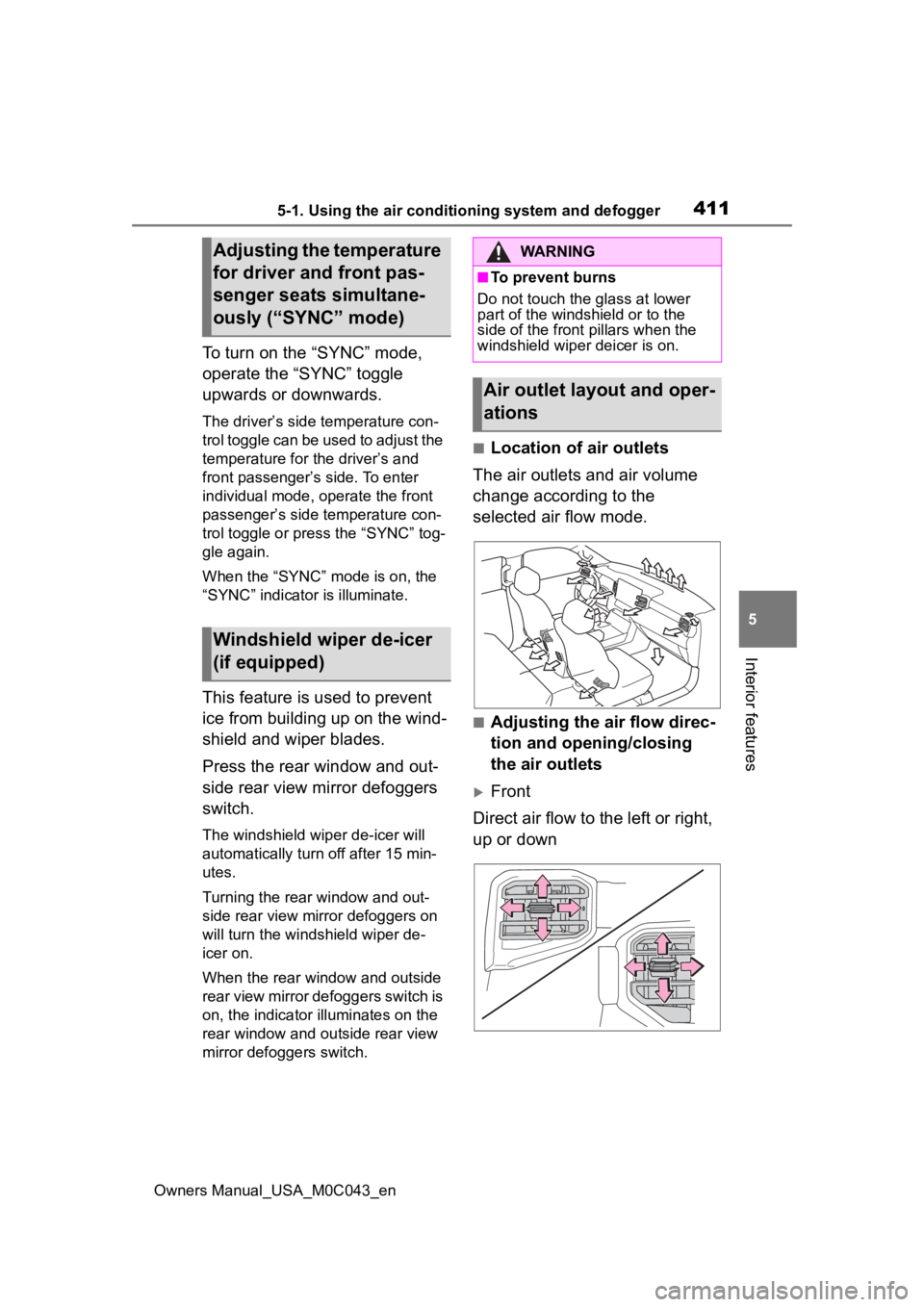
■Location of air outlets
The air outlets and air volume
change according to the
selected air flow mode.
■Adjusting the air flow direc-
tion and opening/closing
the air outlets
Front
Direct air flow to the left or right,
up or down
Adjusting the temperature
for driver and front pas-
senger seats simultane-
ously (“SYNC” mode)
Windshield wiper de-icer
(if equipped)
WARNING
■To prevent burns
Do not touch the glass at lower
part of the windshield or to the
side of the front p illars when the
windshield wiper deicer is on.
Air outlet layout and oper-
ations
Page 412 of 628
4125-1. Using the air conditioning system and defogger
Owners Manual_USA_M0C043_en
1Open the vent
2 Close the vent
Rear
Direct air flow to the left or right,
up or down
1 Open the vent
2 Close the vent
■Adjusting the temperature
setting
1 Operate “REAR” toggle
2 Operate to temperature con-
trol toggle increase the tem-
perature and to decrease it.
The air conditioning system
switches between individual and
simultaneous modes each time
“SYNC” toggle is operated.
WARNING
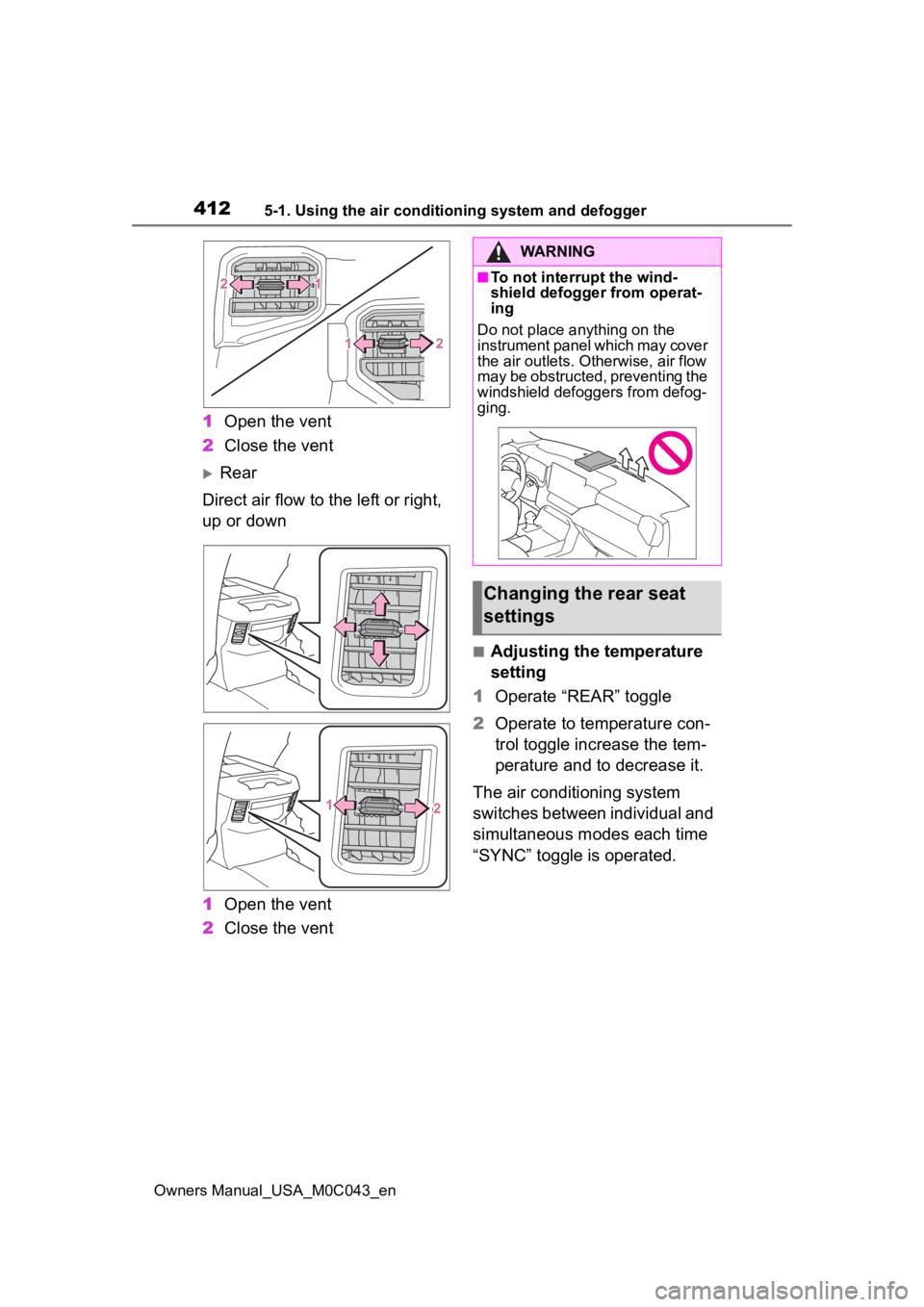
■To not interrupt the wind-
shield defogger from operat-
ing
Do not place anything on the
instrument panel which may cover
the air outlets. Otherwise, air flow
may be obstructed, preventing the
windshield defoggers from defog-
ging.
Changing the rear seat
settings
Page 413 of 628
4135-1. Using the air conditioning system and defogger
Owners Manual_USA_M0C043_en
5
Interior features
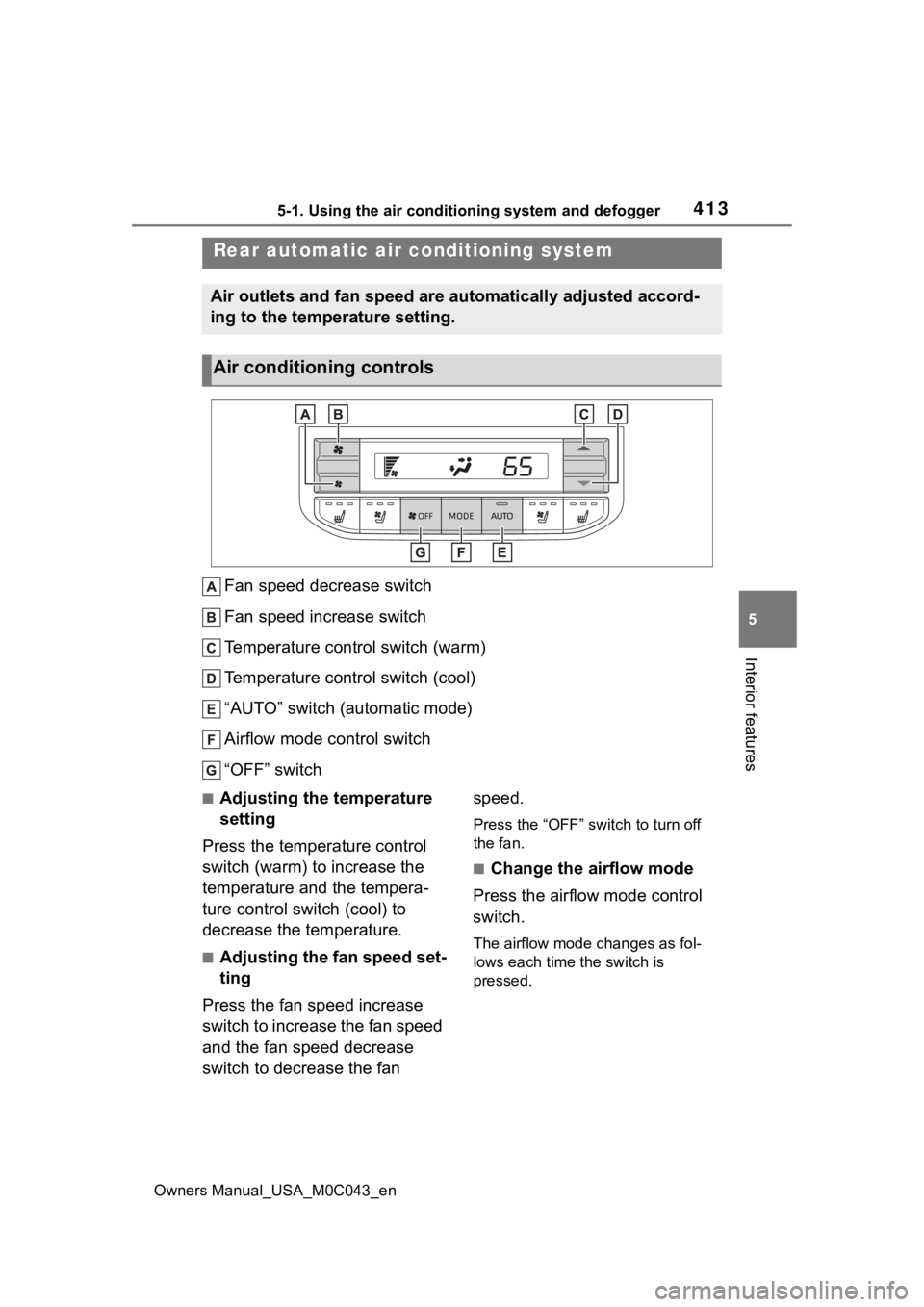
Fan speed decrease switch
Fan speed increase switch
Temperature control switch (warm)
Temperature control switch (cool)
“AUTO” switch (automatic mode)
Airflow mode control switch
“OFF” switch
■Adjusting the temperature
setting
Press the temperature control
switch (warm) to increase the
temperature and the tempera-
ture control switch (cool) to
decrease the temperature.
■Adjusting the fan speed set-
ting
Press the fan speed increase
switch to increase the fan speed
and the fan speed decrease
switch to decrease the fan speed.
Press the “OFF” switch to turn off
the fan.
■Change the airflow mode
Press the airflow mode control
switch.
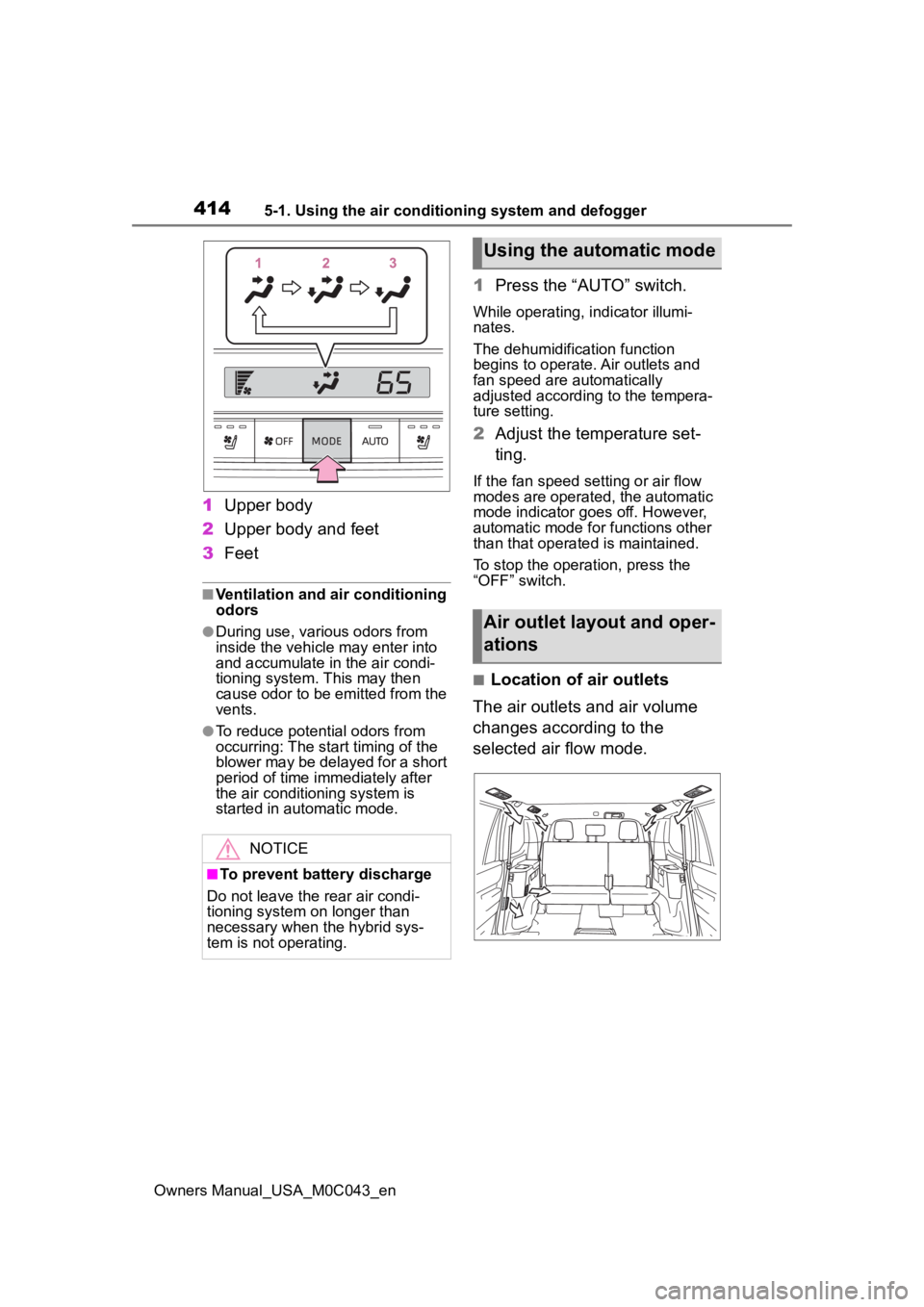
The airflow mode changes as fol-
lows each time the switch is
pressed.
Rear automatic ai r conditioning system
Air outlets and fan speed are automatically adjusted accord-
ing to the temperature setting.
Air conditioning controls
Page 414 of 628
4145-1. Using the air conditioning system and defogger
Owners Manual_USA_M0C043_en
1Upper body
2 Upper body and feet
3 Feet
■Ventilation and air conditioning
odors
●During use, various odors from
inside the vehicle may enter into
and accumulate in the air condi-
tioning system. This may then
cause odor to be emitted from the
vents.
●To reduce potential odors from
occurring: The start timing of the
blower may be delayed for a short
period of time immediately after
the air conditioning system is
started in automatic mode.
1Press the “AUTO” switch.
While operating, indicator illumi-
nates.
The dehumidification function
begins to operate. Air outlets and
fan speed are automatically
adjusted according to the tempera-
ture setting.
2Adjust the temperature set-
ting.
If the fan speed se tting or air flow
modes are operated, the automatic
mode indicator goes off. However,
automatic mode for functions other
than that operated is maintained.
To stop the operation, press the
“OFF” switch.
■Location of air outlets
The air outlets and air volume
changes according to the
selected air flow mode.
NOTICE
■To prevent battery discharge
Do not leave the rear air condi-
tioning system on longer than
necessary when the hybrid sys-
tem is not operating.
Using the automatic mode
Air outlet layout and oper-
ations