tires TOYOTA SEQUOIA HYBRID 2023 Owner's Manual
[x] Cancel search | Manufacturer: TOYOTA, Model Year: 2023, Model line: SEQUOIA HYBRID, Model: TOYOTA SEQUOIA HYBRID 2023Pages: 628, PDF Size: 14.27 MB
Page 356 of 628
3564-5. Using the driving support systems
Owners Manual_USA_M0C043_en
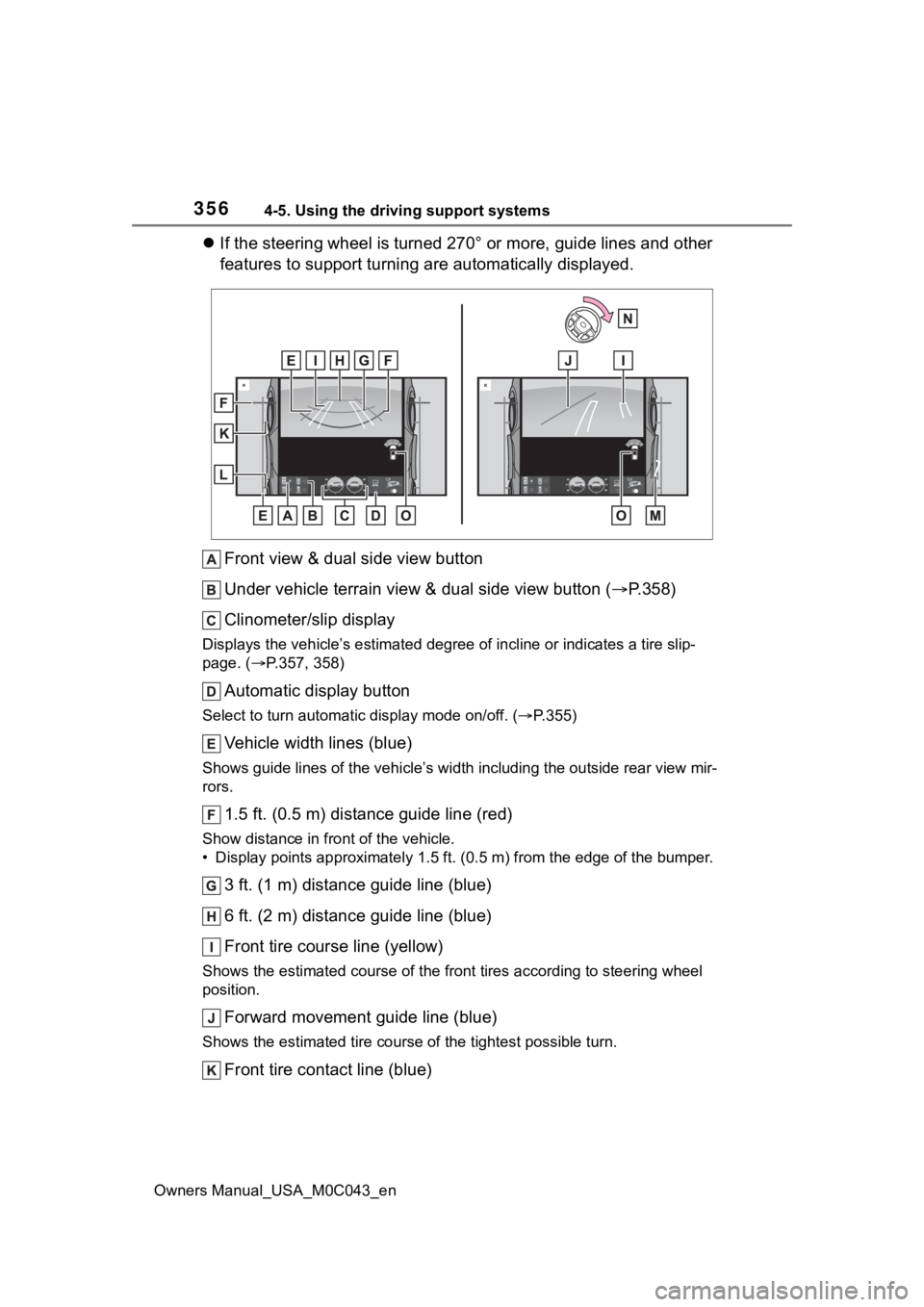
If the steering wheel is turned 270° or more, guide lines and o ther
features to support turning are automatically displayed.
Front view & dual side view button
Under vehicle terrain view & dual side view button ( P.358)
Clinometer/slip display
Displays the vehicle’s estimate d degree of incline or indicates a tire slip-
page. ( P.357, 358)
Automatic display button
Select to turn automatic display mode on/off. (P.355)
Vehicle width lines (blue)
Shows guide lines of the vehicle’ s width including the outside rear view mir-
rors.
1.5 ft. (0.5 m) distance guide line (red)
Show distance in front of the vehicle.
• Display points approximately 1 .5 ft. (0.5 m) from the edge of the bumper.
3 ft. (1 m) distance guide line (blue)
6 ft. (2 m) distance guide line (blue)
Front tire course line (yellow)
Shows the estimated course of the front tires according to steering wheel
position.
Forward movement guide line (blue)
Shows the estimated tire cours e of the tightest possible turn.
Front tire contact line (blue)
Page 357 of 628
3574-5. Using the driving support systems
Owners Manual_USA_M0C043_en
4
Driving
Shows guide lines of where the f ront tire touches the ground.
Rear tire contact line (blue)
Shows guide lines of where the rear tire touches the ground.
Rear tire course line (yellow)
Shows the estimated course of the rear tires.
When the steering wheel is turned by 270° or more
Intuitive parking assist
When a sensor detects an obstacle, the direction of and the app roximate
distance to the obsta cle are displayed and the buzzer sounds.
●The screen can be displayed when the shift lever is in a positi on other
than R.
●When the intuitive parking assist detects an obstacle or anothe r vehicle, a
warning message pops up in the clinometer/slip display area.
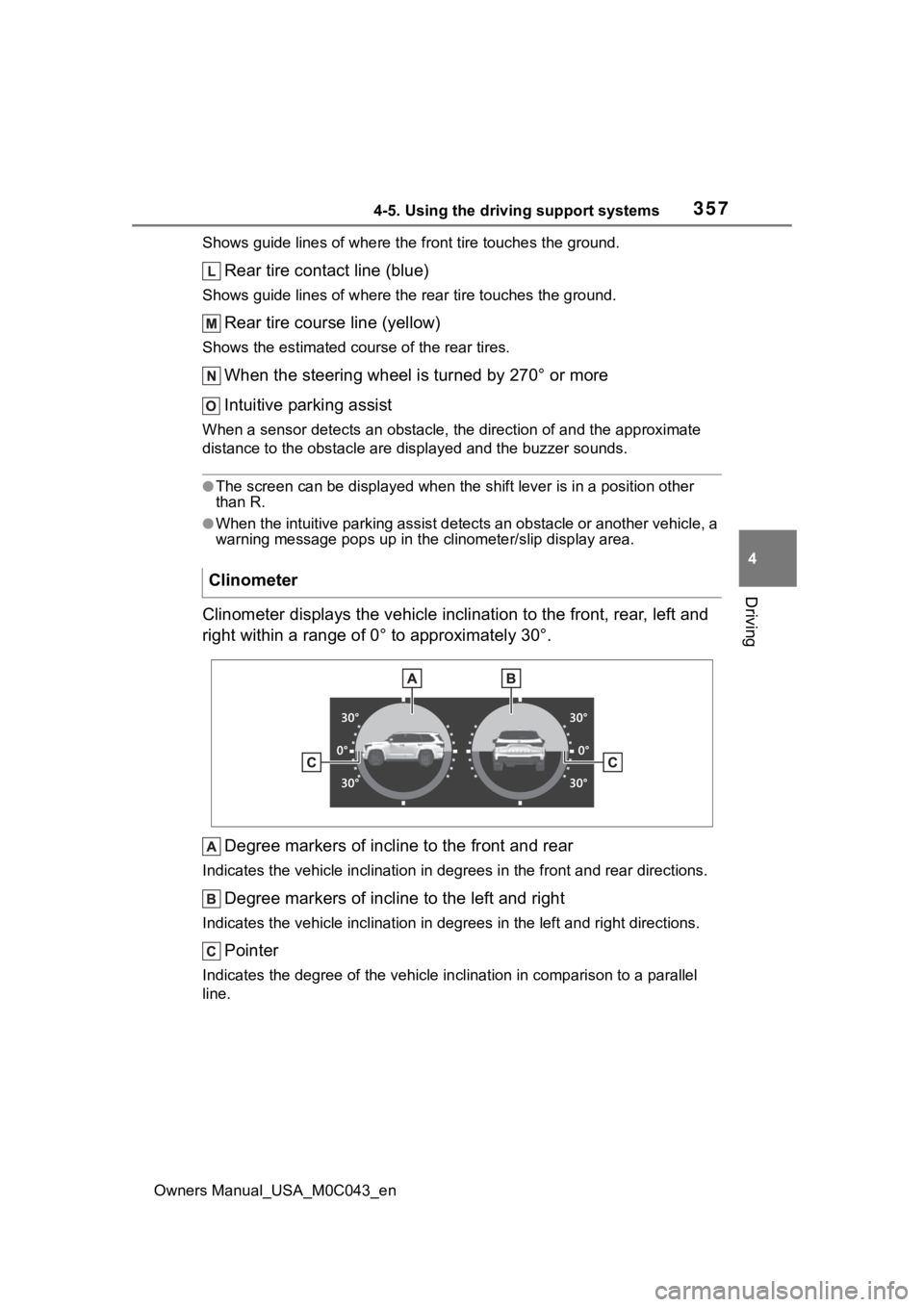
Clinometer displays the vehicle inclination to the front, rear, left and
right within a range of 0° to approximately 30°.
Degree markers of incline to the front and rear
Indicates the vehicle inclination in degrees in the front and r ear directions.
Degree markers of incline to the left and right
Indicates the vehicle inclination in degrees in the left and ri ght directions.
Pointer
Indicates the degree of the veh icle inclination in comparison to a parallel
line.
Clinometer
Page 358 of 628
3584-5. Using the driving support systems
Owners Manual_USA_M0C043_en
●The display indicates the incline of the veh icle in degrees shown by the
movement of the pointer and the rotation o f the vehicle image.
●The color of the degree markers of incline to the front, rear, left and right
changes according to the current incline of the vehicle.
●After the power switch is in ON, the degree of incline is not d isplayed until
such information is determined.
●The degree of incline showed on the clinometer is only an approximate
indication, and may differ from the degree of incline measured using other
equipment.
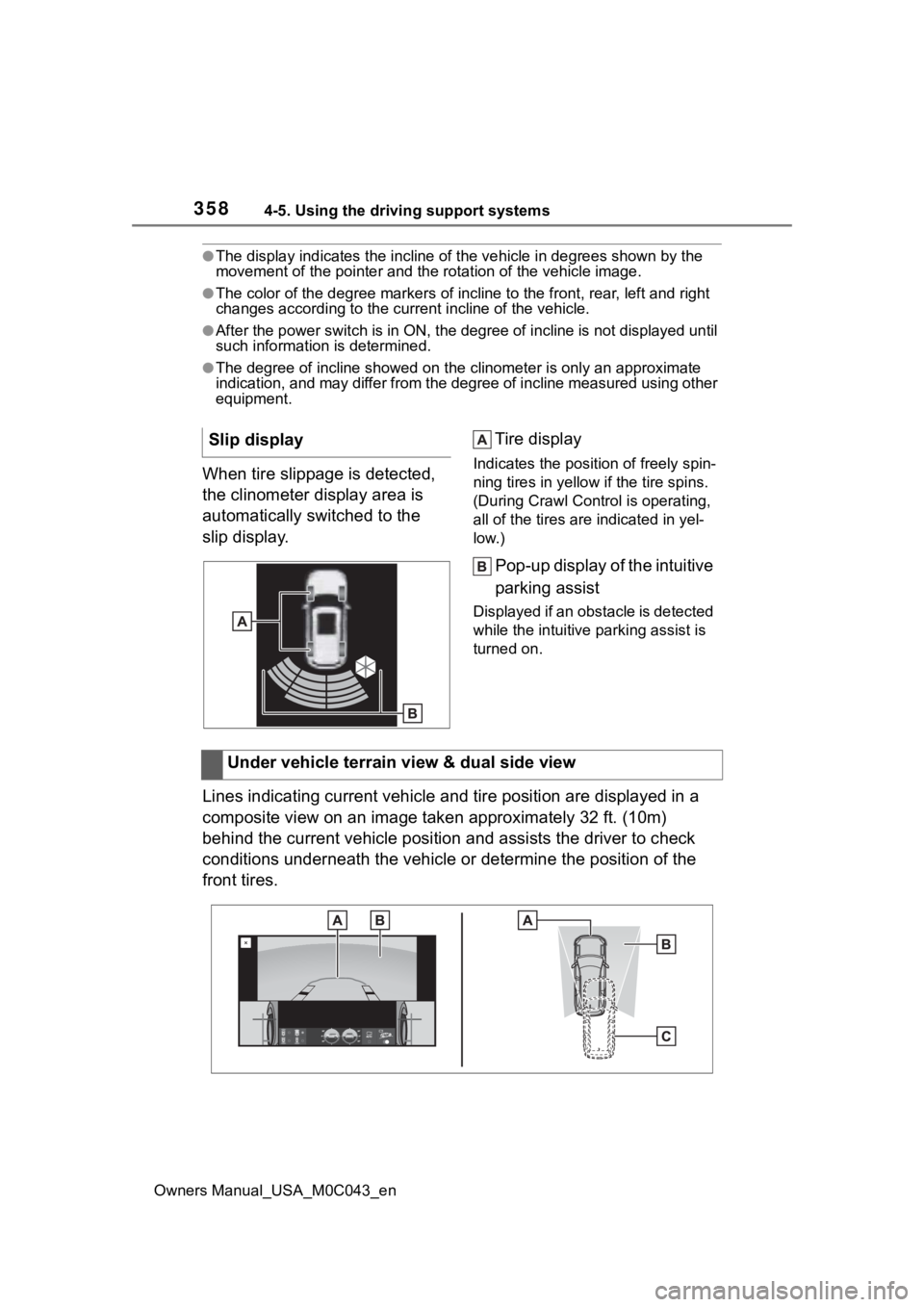
When tire slippage is detected,
the clinometer display area is
automatically switched to the
slip display. Tire displayIndicates the position of freely spin-
ning tires in yellow
if the tire spins.
(During Crawl Cont rol is operating,
all of the tires are indicated in yel-
low.)
Pop-up display of the intuitive
parking assist
Displayed if an obstacle is detected
while the intuitive parking assist is
turned on.
Lines indicating current vehicle and tire position are displayed in a
composite view on an image taken approximately 32 ft. (10m)
behind the current vehicle position and assists the driver to c heck
conditions underneath the vehicle or determine the position of the
front tires. Slip display
Under vehicle terrain view & dual side view
Page 359 of 628
3594-5. Using the driving support systems
Owners Manual_USA_M0C043_en
4
Driving
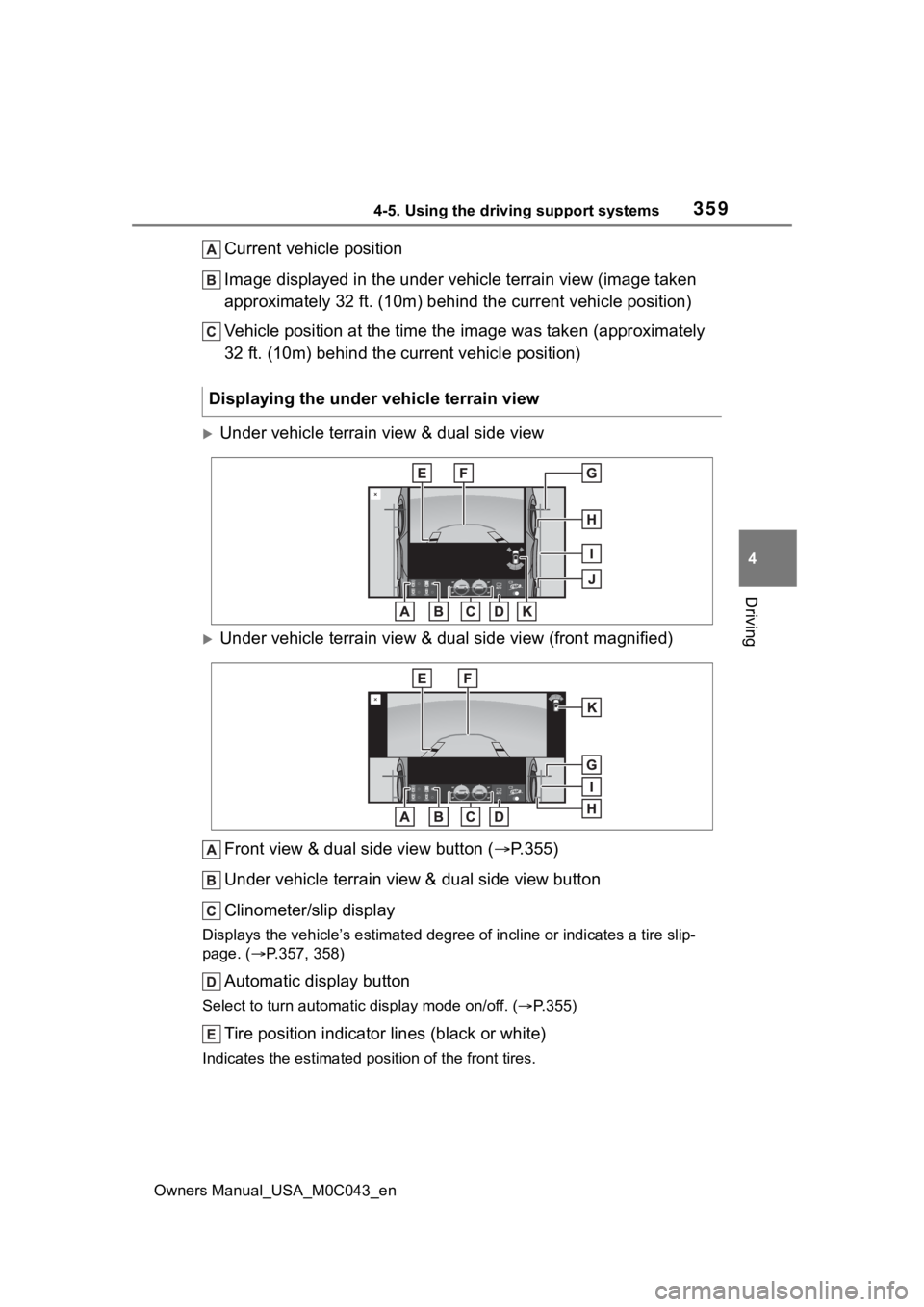
Current vehicle position
Image displayed in the under vehicle terrain view (image taken
approximately 32 ft. (10m) behind the current vehicle position)
Vehicle position at the time the image was taken (approximately
32 ft. (10m) behind the current vehicle position)
Under vehicle terrain view & dual side view
Under vehicle terrain view & dual side view (front magnified)
Front view & dual side view button ( P.355)
Under vehicle terrain view & dual side view button
Clinometer/slip display
Displays the vehicle’s estimate d degree of incline or indicates a tire slip-
page. ( P.357, 358)
Automatic display button
Select to turn automatic display mode on/off. (P.355)
Tire position indicator lines (black or white)
Indicates the estimated po sition of the front tires.
Displaying the under vehicle terrain view
Page 369 of 628
3694-5. Using the driving support systems
Owners Manual_USA_M0C043_en
4
Driving
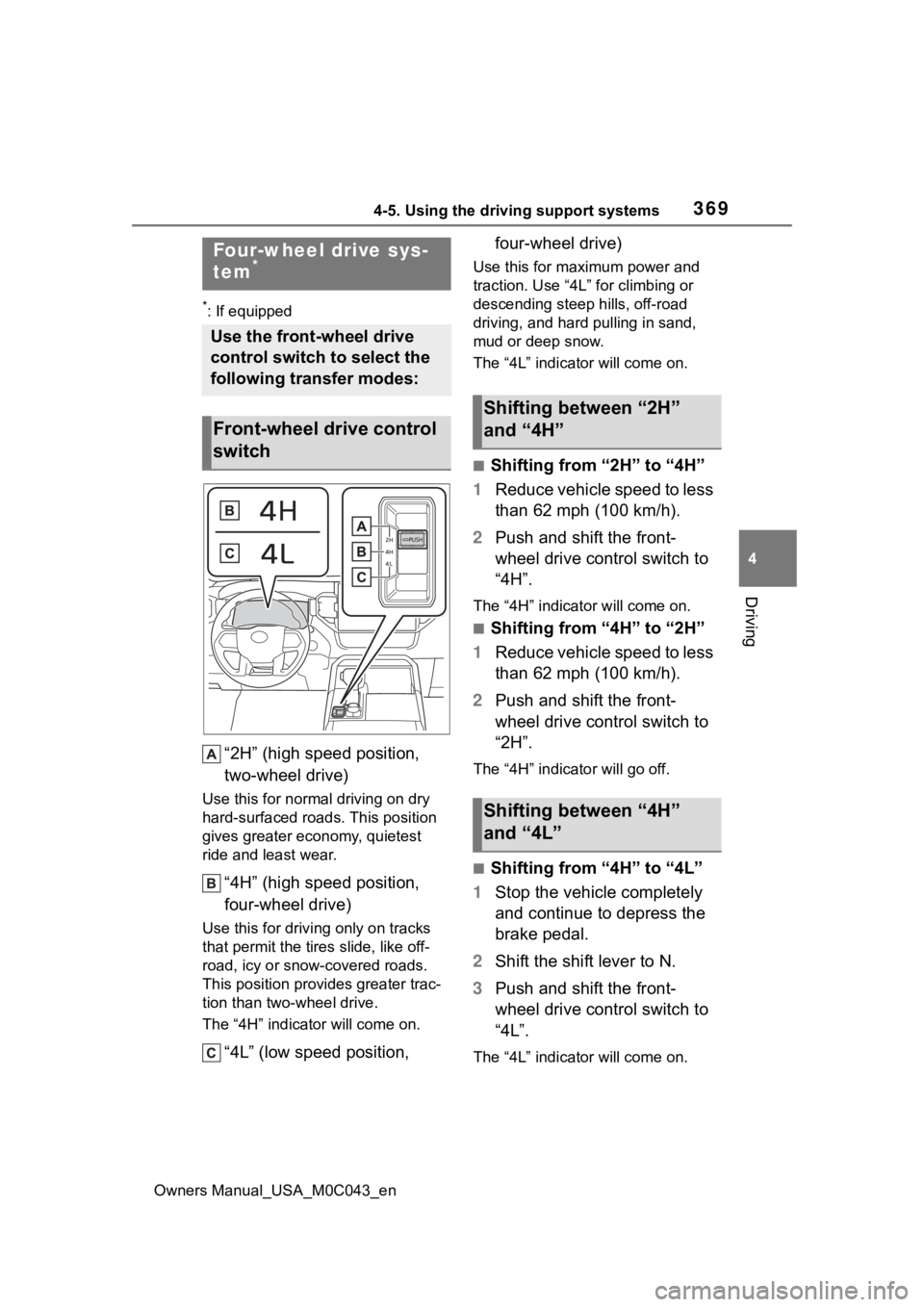
*: If equipped
“2H” (high speed position,
two-wheel drive)
Use this for norma l driving on dry
hard-surfaced roads. This position
gives greater economy, quietest
ride and least wear.
“4H” (high speed position,
four-wheel drive)
Use this for drivi ng only on tracks
that permit the tires slide, like off-
road, icy or snow-covered roads.
This position prov ides greater trac-
tion than two-wheel drive.
The “4H” indicat or will come on.
“4L” (low speed position, four-wheel drive)
Use this for maximum power and
traction. Use “4L” for climbing or
descending steep hills, off-road
driving, and hard
pulling in sand,
mud or deep snow.
The “4L” indicat or will come on.
■Shifting from “2H” to “4H”
1 Reduce vehicle speed to less
than 62 mph (100 km/h).
2 Push and shift the front-
wheel drive control switch to
“4H”.
The “4H” indicat or will come on.
■Shifting from “4H” to “2H”
1 Reduce vehicle speed to less
than 62 mph (100 km/h).
2 Push and shift the front-
wheel drive control switch to
“2H”.
The “4H” indicator will go off.
■Shifting from “4H” to “4L”
1 Stop the vehicle completely
and continue to depress the
brake pedal.
2 Shift the shift lever to N.
3 Push and shift the front-
wheel drive control switch to
“4L”.
The “4L” indicat or will come on.
Four-wheel drive sys-
tem*
Use the front-wheel drive
control switch to select the
following transfer modes:
Front-wheel drive control
switch
Shifting between “2H”
and “4H”
Shifting between “4H”
and “4L”
Page 386 of 628

3864-5. Using the driving support systems
Owners Manual_USA_M0C043_en
●The accelerator pedal is
depressed a large amount
WARNING
■The ABS does not operate
effectively when
●The limits of tire gripping perfor-
mance have been exceeded
(such as excessively worn tires
on a snow covered road).
●The vehicle hydroplanes while
driving at high speed on wet or
slick roads.
■Stopping distance when the
ABS is operating may exceed
that of normal conditions
The ABS is not designed to
shorten the vehicle’s stopping dis-
tance. Always maintain a safe dis-
tance from the vehicle in front of
you, especially in the following sit-
uations:
●When driving on d irt, gravel or
snow-covered roads
●When driving with tire chains
●When driving over bumps in the
road
●When driving over roads with
potholes or uneven surfaces
■TRAC/VSC may not operate
effectively when
Directional control and power may
not be achievable while driving on
slippery road surfaces, even if the
TRAC/VSC system is operating.
Drive the vehicle carefully in con-
ditions where stability and power
may be lost.
■Hill-start assist control does
not operate effectively when
●Do not overly rely on hill-start
assist control. Hill-start assist
control may not operate effec-
tively on steep inclines and
roads covered with ice.
●Unlike the parking brake, hill-
start assist control is not
intended to hold the vehicle sta-
tionary for an extended period
of time. Do not attempt to use
hill-start assist control to hold
the vehicle on an incline, as
doing so may lead to an acci-
dent.
■When the TRAC/VSC/Trailer
Sway Control is activated
The slip indicator light flashes.
Always drive carefully. Reckless
driving may cause an accident.
Exercise particula r care when the
indicator light flashes.
■When the TRAC/VSC/Trailer
Sway Control systems are
turned off
Be especially careful and drive at
a speed appropriate to the road
conditions. As these are the sys-
tems to help ensure vehicle stabil-
ity and driving force, do not turn
the TRAC/VSC/Trailer Sway Con-
trol systems off unless necessary.
Trailer Sway Control is part of the
VSC system and will not operate
if VSC is turned off or experiences
a malfunction.
Page 387 of 628
3874-5. Using the driving support systems
Owners Manual_USA_M0C043_en
4
Driving
WARNING
■Replacing tires
Make sure that all tires are of the
specified size, brand, tread pat-
tern and total load capacity. In
addition, make sure that the tires
are inflated to the recommended
tire inflation pressure level.
The ABS, TRAC, Trailer Sway
Control and VSC systems will not
function correctly if different tires
are installed on the vehicle.
Contact your Toyota dealer for fur-
ther information when replacing
tires or wheels.
■Handling of tires and the sus-
pension
Using tires with any kind of prob-
lem or modifying the suspension
will affect the driving assist sys-
tems, and may cause a system to
malfunction.
■Trailer Sway Control precau-
tion
The Trailer Sway Control system
is not able to reduce trailer sway
in all situations . Depending on
many factors such as the condi-
tions of the vehicle, trailer, road
surface and driving environment,
the Trailer Sway Control system
may not be effec tive. Refer to
your trailer owner’s manual for
information on how to tow your
trailer properly.
■If trailer sway occurs
Observe the following precau-
tions.
Failing to do so may cause death
or serious injury.
●Firmly grip the steering wheel.
Steer straight ahead. Do not try
to control trailer sway by turning
the steering wheel.
●Begin releasing the accelerator
pedal immediately but very
gradually to reduce speed.
Do not increase speed. Do not
apply vehicle brakes.
If you make no extreme correction
with the steering or brakes, your
vehicle and traile r should stabi-
lize. ( P.198)
■Secondary Collision Brake
Do not rely solely upon the Sec-
ondary Collision Brake. This sys-
tem is designed to help reduce
the possibility of further damage
due to a secondary collision, how-
ever, that effect changes accord-
ing to various conditions. Overly
relying on the system may result
in death or serious injury.
Page 397 of 628
3974-6. Driving tips
Owners Manual_USA_M0C043_en
4
Driving
overuse of the accelerator
pedal. Doing so can help control
excessive gasoline consump-
tion.
Control and maintain the vehicle
at a constant speed. Before
stopping at a toll booth or simi-
lar, allow plenty of time to
release the accelerator and gen-
tly apply the brakes. A greater
amount of electrical energy can
be regenerated when slowing
down.
Use the air conditioning only
when necessary. Doing so can
help reduce excessive gasoline
consumption.
In summer: When the ambient
temperature is high, use the
recirculated air mode. Doing so
will help to reduce the burden on
the air conditioning system and
reduce fuel consumption as
well.
In winter: Because the gasoline
engine will not automatically cut
out until it and the interior of the
vehicle are warm, it will con-
sume fuel. Also, fuel consump-
tion can be improved by
avoiding overuse of the heater. Make sure to check the tire infla-
tion pressure frequently.
Improper tire inflation pressure
can cause poor fuel economy.
Also, as snow tires can cause
large amounts of friction, their
use on dry roads can lead to
poor fuel economy. Use tires
that are appropriate for the sea-
son.
Carrying heavy luggage will lead
to poor fuel economy. Avoid car-
rying unnecessary luggage.
Installing a large roof rack will
also cause poor fuel economy.
Since the gasoline engine starts
up and cuts out automatically
when cold, warming up the
engine is unnecessary. More-
over, frequently driving short
distances will cause the engine
to repeatedly warm up, which
can lead to excess fuel con-
sumption.
Highway driving
Air conditioning
Checking tire inflation
pressure
Luggage
Warming up before driv-
ing
Page 401 of 628
4014-6. Driving tips
Owners Manual_USA_M0C043_en
4
Driving
Use fluids that are appropriate
to the prevailing outside tem-
peratures.
• Engine oil
• Engine/power control unit coolant
• Washer fluid
Have a service technician
inspect the condition of the
12-volt battery.
Have the vehicle fitted with
four snow tires or purchase a
set of tire chains for the rear
tires
*.
*: Tire chains cannot be mounted
on 285/65R18 tires.
Ensure that all tires are the same
size and brand, and that chains
match the size of the tires.
Winter driving tips
Carry out the necessary
preparations and inspec-
tions before driving the
vehicle in winter. Always
drive the vehicle in a man-
ner appropriate to the pre-
vailing weather conditions.
Preparation for winter
WARNING
■Driving with snow tires
Observe the following precautions
to reduce the risk of accidents.
Failure to do so m ay result in a
loss of vehicle control and cause
death or serious injury.
●Use tires of the specified size.
●Maintain the recommended
level of air pressure.
●Do not drive in excess of 75
mph (120 km/h), regardless of
the type of snow tires being
used.
●Use snow tires on all, not just
some wheels.
●4WD models: Do not mix tires of
different makes, models, tread
patterns or treadwear.
■Driving with tire chains (vehi-
cles without 285/65R18 tires)
Observe the following precautions
to reduce the risk of accidents.
Failure to do so may result in the
vehicle being unable to be driven
safely, and may cause death or
serious injury.
●Do not drive in excess of the
speed limit specifi ed for the tire
chains being used, or 30 mph
(50 km/h), whichever is lower.
●Avoid driving on bumpy road
surfaces or over potholes.
●Avoid sudden acceleration,
abrupt steering, sudden brak-
ing and shifting operations that
cause sudden engine braking.
●Slow down sufficiently before
entering a curve to ensure that
vehicle control is maintained.
●Do not use LTA (Lane Tracing
Assist) (if equipped) system.
Page 402 of 628
4024-6. Driving tips
Owners Manual_USA_M0C043_en
Perform the following according
to the driving conditions:
Do not try to forcibly open a
window or move a wiper that
is frozen. Pour warm water
over the frozen area to melt
the ice. Wipe away the water
immediately to prevent it from
freezing.
To ensure proper operation of
the climate control system
fan, remove any snow that
has accumulated on the air
inlet vents in front of the wind-
shield.
Check for and remove any
excess ice or snow that may
have accumulated on the
exterior lights, vehicle’s roof,
chassis, around the tires or on
the brakes.
Remove any snow or mud
from the bottom of your shoes
before getting in the vehicle. Accelerate the vehicle slowly,
keep a safe distance between
you and the vehicle ahead, and
drive at a reduced speed suit-
able to road conditions.
Turn automatic mode of the
parking brake off.
Otherwise, the parking brake
may freeze and not be able to
be released automatically.
Also, avoid using the following
as the parking brake may
operate automatically, even if
automatic mode is off.
• Brake hold system
Park the vehicle and move
the shift lever to P without set-
ting the parking brake. The
parking brake may freeze up,
preventing it from being
released. If the vehicle is
parked without setting the
parking brake, make sure to
block the wheels.
Failure to do so may be dan-
gerous because it may cause
the vehicle to move unexpect-
edly, possibly leading to an
accident.
When the parking brake is in
automatic mode, release the
parking brake after shifting
the shift lever to P.( P.223)
NOTICE
■Repairing or replacing snow
tires
Request repairs or replacement of
snow tires from Toyota dealers or
legitimate tire retailers.
This is because the removal and
attachment of snow tires affects
the operation of the tire pressure
warning valves and transmitters.
Before driving the vehicle
When driving the vehicle
When parking the vehicle