lte TOYOTA SEQUOIA HYBRID 2023 Owners Manual
[x] Cancel search | Manufacturer: TOYOTA, Model Year: 2023, Model line: SEQUOIA HYBRID, Model: TOYOTA SEQUOIA HYBRID 2023Pages: 628, PDF Size: 14.27 MB
Page 4 of 628
4TABLE OF CONTENTS
Owners Manual_USA_M0C043_en
Downhill assist control sys-tem .............................. 380
Driving assist systems .. 382
Trailer brake controller .. 388
Trailer Backup Guide .... 391
4-6. Driving tips Hybrid Electric Vehicle driving tips............................... 396
Off-road precautions ..... 398
Winter driving tips ......... 401
5-1. Using the air conditioning
system and defogger
Automatic air conditioning system ......................... 406
Rear automatic air condition- ing system ................... 413
Heated steering wheel/seat heaters/seat ventilators 415
5-2. Using the interior lights Interior lights list ............ 418
5-3. Using the storage features List of storage features . 421
Luggage compartment fea- tures ............................ 425
5-4. Using the other interior fea- tures
Other interior features ... 428
Garage door opener...... 4416-1. Maintenance and care
Cleaning and protecting the vehicle exterior ............ 450
Cleaning and protecting the vehicle interior ............. 453
6-2. Maintenance Maintenance requirements.................................... 456
General maintenance .... 457
Emission inspection and maintenance (I/M) programs.................................... 460
6-3. Do-it-yourself maintenance Do-it-yourself service precau-tions ............................. 462
Hood .............................. 464
Engine compartment ..... 465
12-volt battery................ 471
Tires .............................. 474
Tire inflation pressure .... 484
Wheels .......................... 486
Air conditioning filter ...... 487
Cleaning the hybrid battery (traction battery) air intake
vent and filter ............... 489
Electronic key battery .... 493
Checking and replacing fuses .................................... 495
Light bulbs ..................... 498
5Interior features
6Maintenance and care
Page 81 of 628
811-4. Hybrid system
Owners Manual_USA_M0C043_en
1
For safety and security
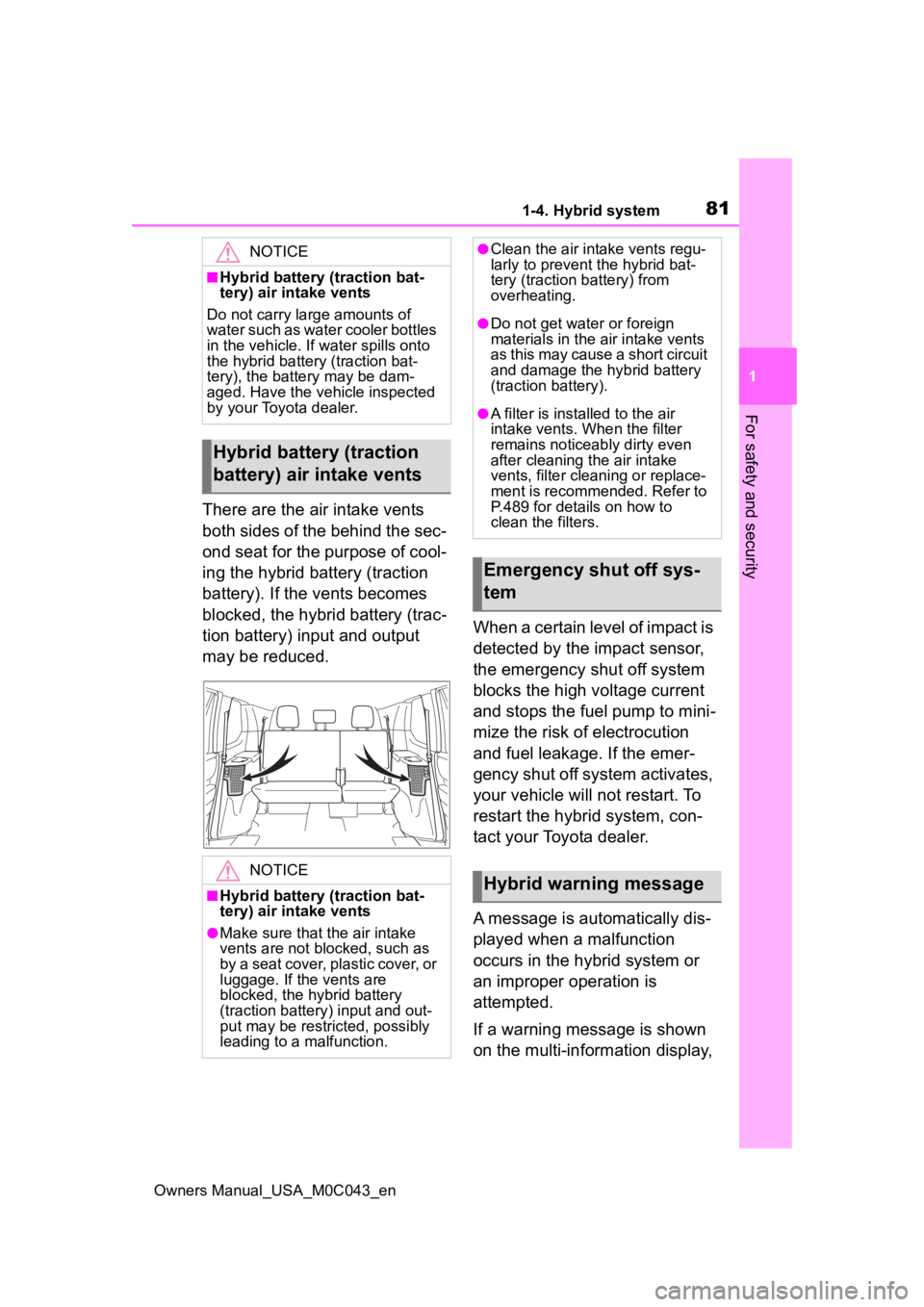
There are the air intake vents
both sides of the behind the sec-
ond seat for the purpose of cool-
ing the hybrid battery (traction
battery). If the vents becomes
blocked, the hybrid battery (trac-
tion battery) input and output
may be reduced. When a certain level of impact is
detected by the impact sensor,
the emergency shut off system
blocks the high voltage current
and stops the fuel pump to mini-
mize the risk of electrocution
and fuel leakage. If the emer-
gency shut off system activates,
your vehicle will not restart. To
restart the hybrid system, con-
tact your Toyota dealer.
A message is automatically dis-
played when a malfunction
occurs in the hybrid system or
an improper operation is
attempted.
If a warning message is shown
on the multi-information display,
NOTICE
■Hybrid battery (traction bat-
tery) air intake vents
Do not carry large amounts of
water such as water cooler bottles
in the vehicle. If water spills onto
the hybrid battery (traction bat-
tery), the batte ry may be dam-
aged. Have the vehicle inspected
by your Toyota dealer.
Hybrid battery (traction
battery) air intake vents
NOTICE
■Hybrid battery (traction bat-
tery) air intake vents
●Make sure that the air intake
vents are not blocked, such as
by a seat cover, plastic cover, or
luggage. If the vents are
blocked, the hybrid battery
(traction battery) input and out-
put may be restricted, possibly
leading to a malfunction.
●Clean the air intake vents regu-
larly to prevent the hybrid bat-
tery (traction b attery) from
overheating.
●Do not get water or foreign
materials in the air intake vents
as this may cause a short circuit
and damage the hybrid battery
(traction battery).
●A filter is installed to the air
intake vents. When the filter
remains noticeably dirty even
after cleaning the air intake
vents, filter cleaning or replace-
ment is recommended. Refer to
P.489 for details on how to
clean the filters.
Emergency shut off sys-
tem
Hybrid warning message
Page 126 of 628
1263-2. Opening, closing and locking the doors
Owners Manual_USA_M0C043_en
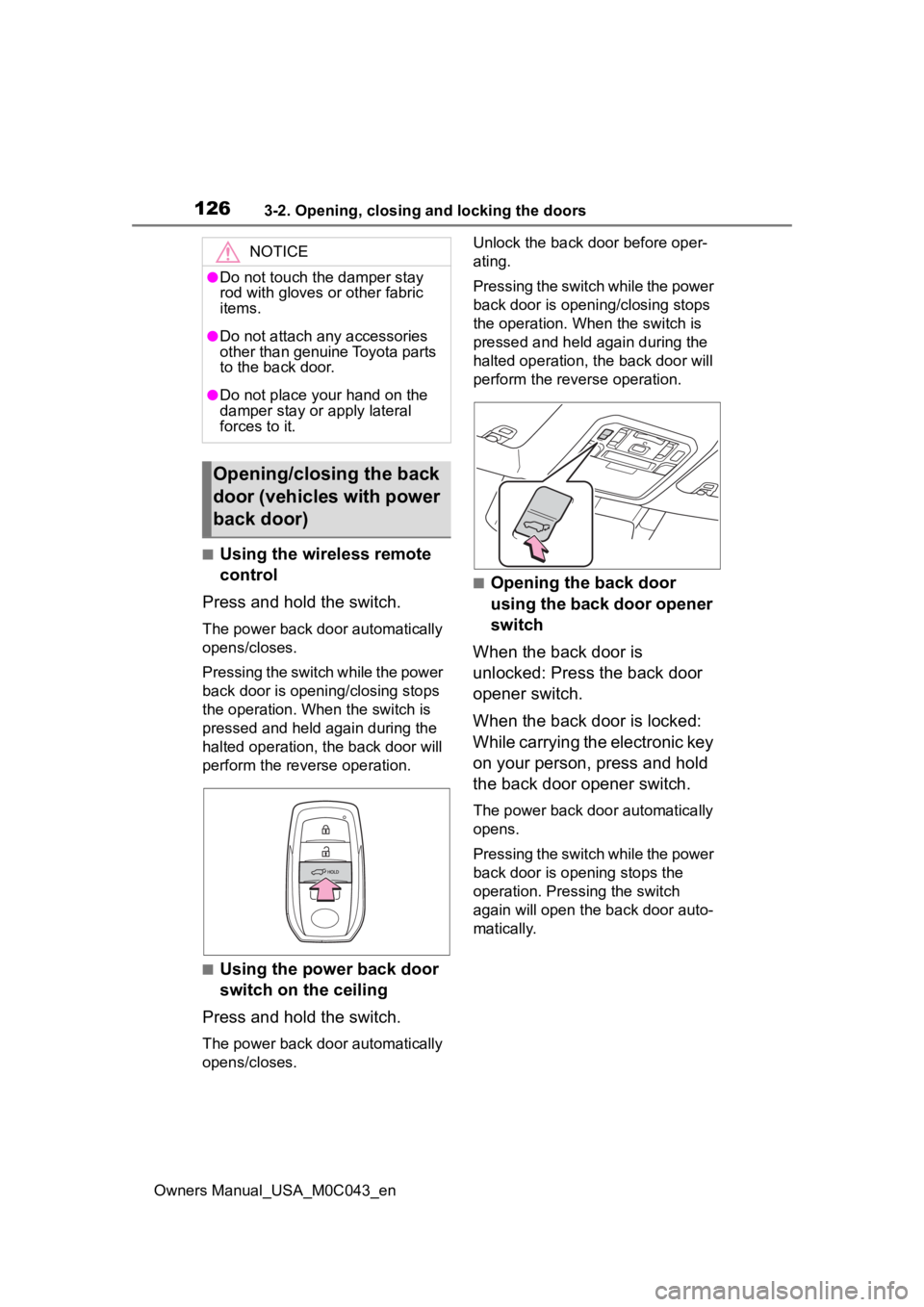
■Using the wireless remote
control
Press and hold the switch.
The power back door automatically
opens/closes.
Pressing the switch while the power
back door is opening/closing stops
the operation. When the switch is
pressed and held again during the
halted operation, the back door will
perform the reverse operation.
■Using the power back door
switch on the ceiling
Press and hold the switch.
The power back door automatically
opens/closes. Unlock the back door before oper-
ating.
Pressing the switch while the power
back door is opening/closing stops
the operation. When the switch is
pressed and held again during the
halted operation, the back door will
perform the reve
rse operation.
■Opening the back door
using the back door opener
switch
When the back door is
unlocked: Press the back door
opener switch.
When the back door is locked:
While carrying the electronic key
on your person, press and hold
the back door opener switch.
The power back door automatically
opens.
Pressing the switch while the power
back door is opening stops the
operation. Pressing the switch
again will open the back door auto-
matically.
NOTICE
●Do not touch the damper stay
rod with gloves or other fabric
items.
●Do not attach any accessories
other than genuine Toyota parts
to the back door.
●Do not place your hand on the
damper stay or apply lateral
forces to it.
Opening/closing the back
door (vehicles with power
back door)
Page 127 of 628
1273-2. Opening, closing and locking the doors
Owners Manual_USA_M0C043_en
3
Before driving
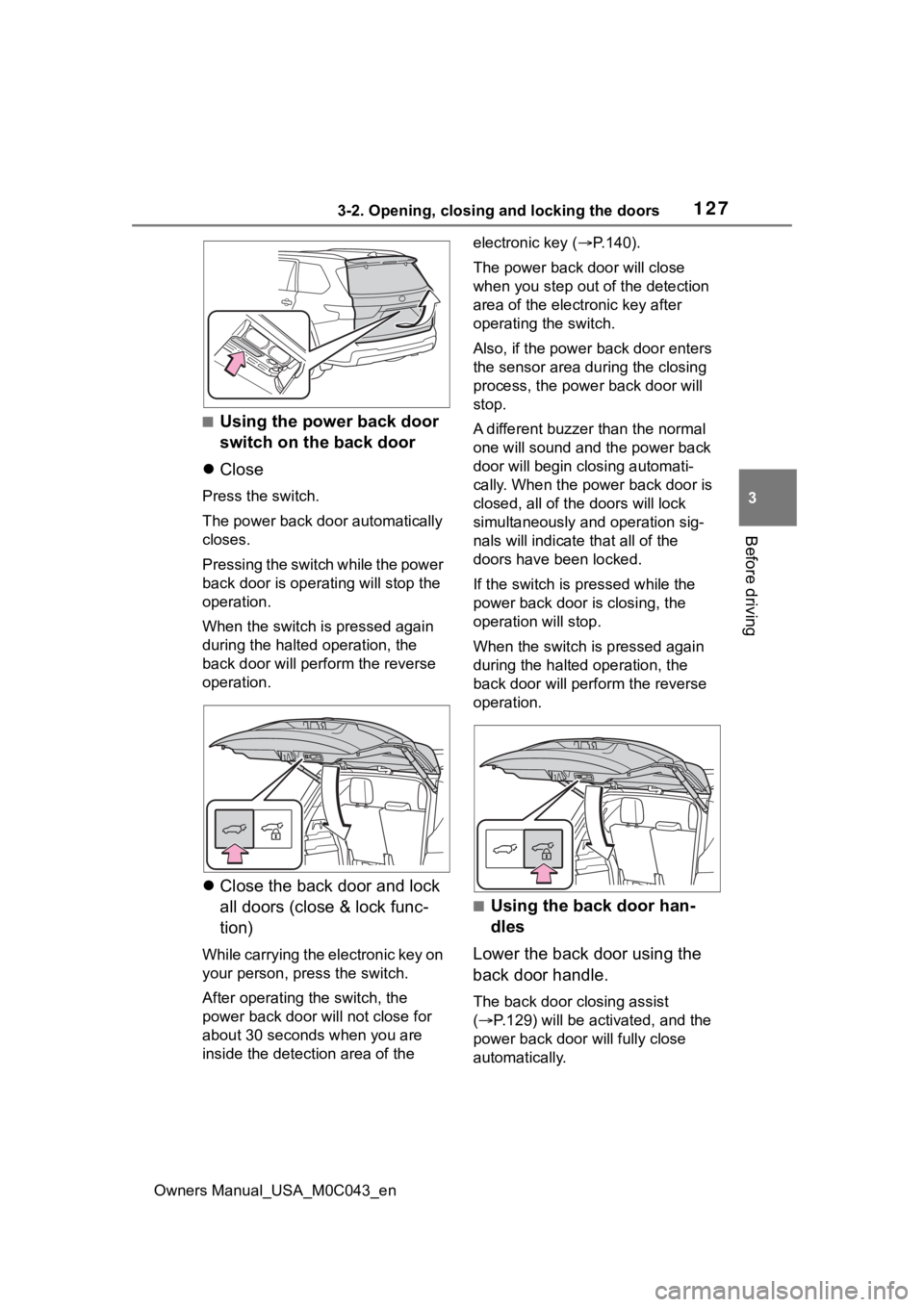
■Using the power back door
switch on the back door
Close
Press the switch.
The power back door automatically
closes.
P r e s s i n g t h e s w i t c h w h i l e t h e p o w e r
back door is operat ing will stop the
operation.
When the switch is pressed again
during the halted operation, the
back door will perf orm the reverse
operation.
Close the back door and lock
all doors (close & lock func-
tion)
While carrying the electronic key on
your person, press the switch.
After operating the switch, the
power back door will not close for
about 30 seconds when you are
inside the detection area of the electronic key (
P.140).
The power back door will close
when you step out of the detection
area of the electronic key after
operating the switch.
Also, if the power back door enters
the sensor area during the closing
process, the powe r back door will
stop.
A different buzzer than the normal
one will sound and the power back
door will begin cl osing automati-
cally. When the power back door is
closed, all of the doors will lock
simultaneously an d operation sig-
nals will indicate that all of the
doors have been locked.
If the switch is pressed while the
power back door is closing, the
operation will stop.
When the switch is pressed again
during the halted operation, the
back door will perfo rm the reverse
operation.
■Using the back door han-
dles
Lower the back door using the
back door handle.
The back door closing assist
( P.129) will be act ivated, and the
power back door will fully close
automatically.
Page 128 of 628
1283-2. Opening, closing and locking the doors
Owners Manual_USA_M0C043_en
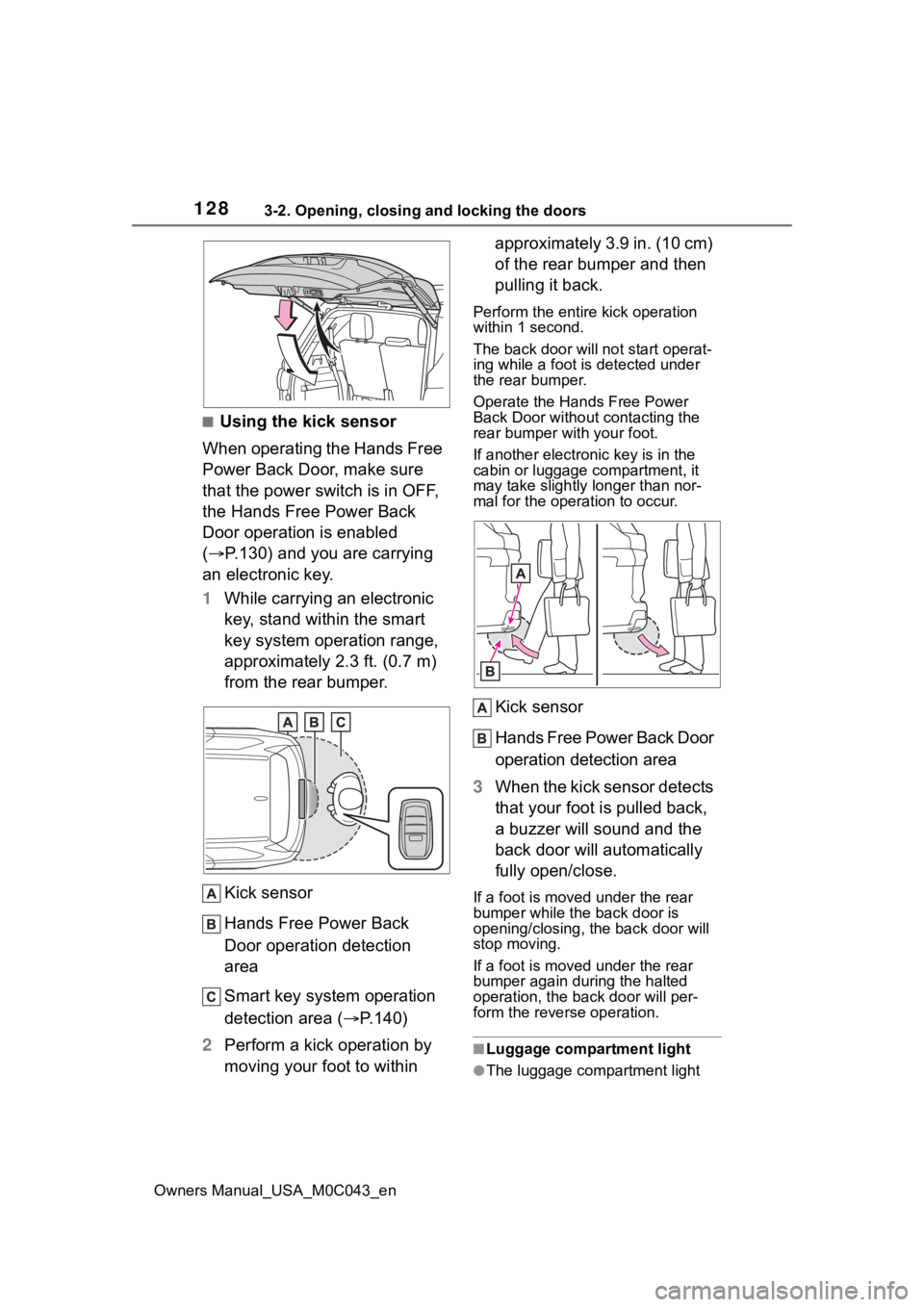
■Using the kick sensor
When operating the Hands Free
Power Back Door, make sure
that the power switch is in OFF,
the Hands Free Power Back
Door operation is enabled
( P.130) and you are carrying
an electronic key.
1 While carrying an electronic
key, stand within the smart
key system operation range,
approximately 2.3 ft. (0.7 m)
from the rear bumper.
Kick sensor
Hands Free Power Back
Door operation detection
area
Smart key system operation
detection area ( P.140)
2 Perform a kick operation by
moving your foot to within approximately 3.9 in. (10 cm)
of the rear bumper and then
pulling it back.
Perform the entire kick operation
within 1 second.
The back door will not start operat-
ing while a foot is detected under
the rear bumper.
Operate the Hand
s Free Power
Back Door without contacting the
rear bumper with your foot.
If another electronic key is in the
cabin or luggage compartment, it
may take slightly l onger than nor-
mal for the operation to occur.
Kick sensor
Hands Free Power Back Door
operation detection area
3 When the kick sensor detects
that your foot is pulled back,
a buzzer will sound and the
back door will automatically
fully open/close.
If a foot is moved under the rear
bumper while the back door is
opening/closing, the back door will
stop moving.
If a foot is moved under the rear
bumper again during the halted
operation, the ba ck door will per-
form the rever se operation.
■Luggage compartment light
●The luggage compartment light
Page 180 of 628
1803-5. Opening, closing the windows and moon roof
Owners Manual_USA_M0C043_en
*: If equipped
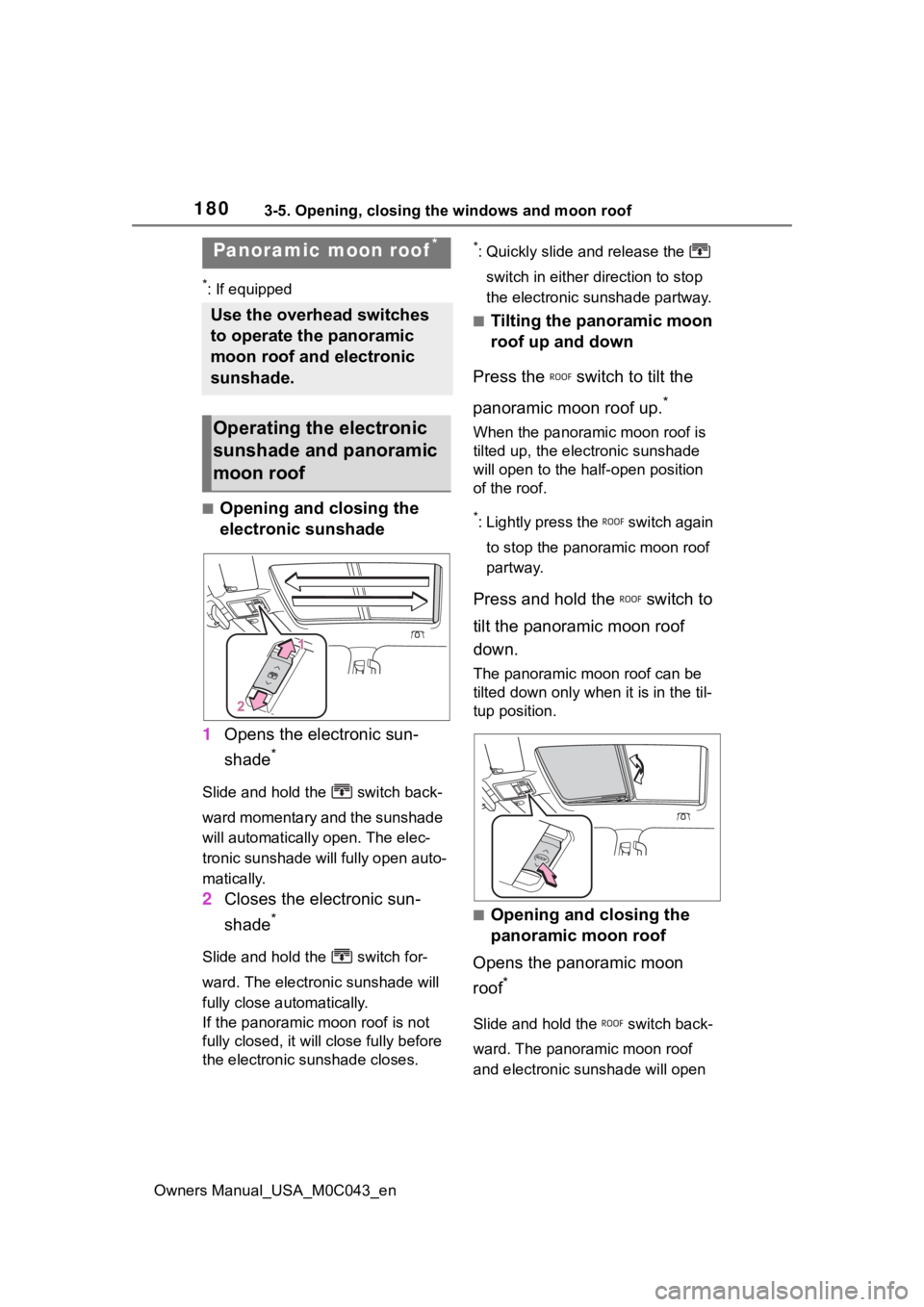
■Opening and closing the
electronic sunshade
1 Opens the electronic sun-
shade
*
Slide and hold the switch back-
ward momentary and the sunshade
will automatically open. The elec-
tronic sunshade will fully open auto-
matically.
2 Closes the electronic sun-
shade
*
Slide and hold the switch for-
ward. The electr onic sunshade will
fully close automatically.
If the panoramic moon roof is not
fully closed, it will close fully before
the electronic sunshade closes.
*: Quickly slide and release the
switch in either direction to stop
the electronic sunshade partway.
■Tilting the panoramic moon
roof up and down
Press the switch to tilt the
panoramic moon roof up.
*
When the panoramic moon roof is
tilted up, the electronic sunshade
will open to the hal f-open position
of the roof.
*: Lightly press the switch again
to stop the panoramic moon roof
partway.
Press and hold the switch to
tilt the panoramic moon roof
down.
The panoramic moo n roof can be
tilted down only wh en it is in the til-
tup position.
■Opening and closing the
panoramic moon roof
Opens the panoramic moon
roof
*
Slide and hold the switch back-
ward. The panoramic moon roof
and electronic sunshade will open
Panoramic moon roof*
Use the overhead switches
to operate the panoramic
moon roof and electronic
sunshade.
Operating the electronic
sunshade and panoramic
moon roof
Page 264 of 628
2644-5. Using the driving support systems
Owners Manual_USA_M0C043_en
WARNING
●The vehicle is driven in an area
without white (yellow) lines,
such as in front of a tollgate or
checkpoint, or at an intersec-
tion, etc.
●The white (yellow) lines are
cracked, “Botts’ dots”, “Raised
pavement marker” or stones are
present.
●The white (yellow) lines cannot
be seen or are difficult to see
due to sand, etc.
●The vehicle is driven on a road
surface that is wet due to rain,
puddles, etc.
●The traffic li nes are yellow
(which may be more difficult to
recognize than lines that are
white).
●The white (yellow) lines cross
over a curb, etc.
●The vehicle is driven on a bright
surface, such as concrete.
●The vehicle is driven on a sur-
face that is bright due to
reflected light, etc.
●The vehicle is driven in an area
where the brightness changes
suddenly, such as at the
entrances and exits of tunnels,
etc.
●Light from the h eadlights of an
oncoming vehicle, the sun, etc.,
enters the camera.
●The vehicle is driven on a slope.
●The vehicle is driven on a road
which tilts left or right, or a wind-
ing road.
●The vehicle is driven on an
unpaved or rough road.
●The traffic lane is excessively
narrow or wide.
●The vehicle is extremely tilted
due to carrying heavy luggage
or having improper tire pres-
sure.
●The distance to the preceding
vehicle is extremely short.
●The vehicle is moving up and
down a large amount due to
road conditions during driving
(poor roads or road seams).
●When driving in a tunnel or at
night with the headlights off or
when a headlight is dim due to
its lens being dir ty or it being
misaligned.
●The vehicle is struck by a cross-
wind.
●The vehicle is affected by wind
from a vehicle driven in a
nearby lane.
●The vehicle has just changed
lanes or crossed an intersec-
tion.
●Tires which differ by structure,
manufacturer, brand or tread
pattern are used.
●When tires of a size other than
specified are installed.
●Snow tires, etc., are equipped.
●The vehicle is b eing driven at
extremely high speeds.
●When your vehicles is towing a
trailer or another vehicle, except
when the followin g condition is
met.
• When the other vehicle is a trailer properly attached and
connected to Toyota’s official
TBC ECU. ( P.198)
Page 274 of 628

2744-5. Using the driving support systems
Owners Manual_USA_M0C043_en
●Dirt, snow, stickers, etc., are on
the windshield near the front cam-
era.
●In inclement weather such as
heavy rain, fog, snow or sand
storms
●Light from an oncoming vehicle,
the sun, etc., enters the front cam-
era.
●The sign is dirty, faded, tilted or
bent.
●The contrast of electronic sign is
low.
●All or part of the sign is hidden by
the leaves of a tree, a pole, etc.
●The sign is only visible to the front
camera for a short amount of time.
●The driving scene (turning, lane
change, etc.) is judged incorrectly.
●If a sign not appropriate for the
currently traveled lane, but the
sign exists directly after a freeway
branches, or in an adjacent lane
just before merging.
●Stickers are attached to the rear of
the preceding vehicle.
●A sign resembling a system com-
patible sign is recognized.
●Side road speed signs may be
detected and displayed (if posi-
tioned in sight of the front camera)
while the vehicle is traveling on
the main road.
●Roundabout exit road speed signs
may be detected and displayed (if
positioned in sight of the front
camera) while traveling on a
roundabout.
●The front of the vehicle is raised or
lowered due to the carried load.
●The surrounding brightness is not
sufficient or changes suddenly.
●When a sign intended for trucks,
etc., is recognized.
●The navigation system map data
is outdated.
●The navigation system is not oper-
ating.
●The speed information displayed
on the meter and on the naviga-
tion system may be different due
to the navigation system using
map data.
■Speed limit sign display
If the power switch was last turned
off while a speed limit sign was dis-
played on the multi-information dis-
play, the same sig n displays again
when the power switch is turned to
ON.
■If “RSA Malfunction Visit Your
Dealer” is shown
The system may be malfunctioning.
Have the vehicle inspected by your
Toyota dealer.
■Customization
Some functions can be customized.
(Customizable features: P.578)
Page 351 of 628
3514-5. Using the driving support systems
Owners Manual_USA_M0C043_en
4
Driving
The guide lines are very
far out of alignment
The camera position is
out of alignment.Have the vehicle
inspected by your Toy-
ota dealer.
The vehicle is tilted.
(There is a heavy load
on the vehicle, tire
pressure is low due to
a tire puncture, etc.)
The vehicle is used on
an incline.If this happens due to
these causes, it does
not indicate a malfunc-
tion.
Back up while visually
checking the vehicle’s
surroundings.
The estimated course
lines move even though
the steering wheel is
straightThere is a malfunction
in the signals being out-
put by the steering sen-
sor.Have the vehicle
inspected by your Toy-
ota dealer.
Guide lines are not dis-
playedThe back door is open.
Close the back door.
If this does not resolve
the symptom, have the
vehicle inspected by
your Toyota dealer.
is displayed
12-volt battery has
been reinstalled.
The steering wheel
has been moved while
the 12-volt battery
was being reinstalled.
12-volt battery power
is low.
The steering sensor
has been reinstalled.
There is a malfunction
in the signals being
output by the steering
sensor.
Have the vehicle
inspected by your Toy-
ota dealer.
The panoramic view dis-
play cannot be magni-
fied
The intuitive parking
assist may be malfunc-
tioning or dirty.Follow the correction
procedures for malfunc-
tions of the intuitive
parking assist. ( P.294)
The see-through
view/moving view can-
not be displayed
SymptomLikely causeSolution
Page 398 of 628
3984-6. Driving tips
Owners Manual_USA_M0C043_en
Specific design characteris-
tics give it a higher center of
gravity than ordinary passen-
ger cars. This vehicle design
feature causes this type of
vehicle to be more likely to
rollover. And, utility vehicles
have a significantly higher
rollover rate than other types
of vehicles.
An advantage of the higher
ground clearance is a better
view of the road allowing you
to anticipate problems.
It is not designed for corner-
ing at the same speeds as
ordinary passenger cars any
more than low-slung sports
cars are designed to perform
satisfactorily under off-road
conditions. Therefore, sharp
turns at excessive speeds
may cause the vehicle to roll-
over. When driving your vehicle off-
road, please observe the follow-
ing precautions to ensure your
driving enjoyment and to help
prevent the closure of areas to
Off-road precautions
This vehicle belongs to the
utility vehicle class, which
has higher ground clear-
ance and narrower tread in
relation to the height of its
center of gravity to make it
capable of performing in a
wide variety of off-road
applications.
Off-road vehicle features
WARNING
■Off-road vehicle precautions
Always observe t he following pre-
cautions to minim ize the risk of
death, serious injury or damage to
your vehicle:
●In a rollover crash, an unbelted
person is significantly more
likely to die than a person wear-
ing a seat belt. Therefore, the
driver and all passengers
should always fasten their seat
belts.
●Avoid sharp turns or abrupt
maneuvers, if at all possible.
Failure to operat e this vehicle
correctly may result in loss of
control or vehicle rollover caus-
ing death or serious injury.
●Avoid loading any items on the
roof that will raise the vehicle’s
center of gravity.
●Always slow down in gusty
crosswinds. Because of its pro-
file and higher ce nter of gravity,
your vehicle is more sensitive to
side winds than an ordinary
passenger car.
Slowing down will allow you to
have better control.
●Do not drive horizontally across
steep slopes. Driving straight up
or straight down is preferred.
Your vehicle (or any similar off-
road vehicle) can tip over side-
ways much more easily than
forward or backward.
Off-road driving