park assist TOYOTA SEQUOIA HYBRID 2023 Owners Manual
[x] Cancel search | Manufacturer: TOYOTA, Model Year: 2023, Model line: SEQUOIA HYBRID, Model: TOYOTA SEQUOIA HYBRID 2023Pages: 628, PDF Size: 14.27 MB
Page 3 of 628
3TABLE OF CONTENTS
Owners Manual_USA_M0C043_en
1
2
3
4
5
6
7
8
9
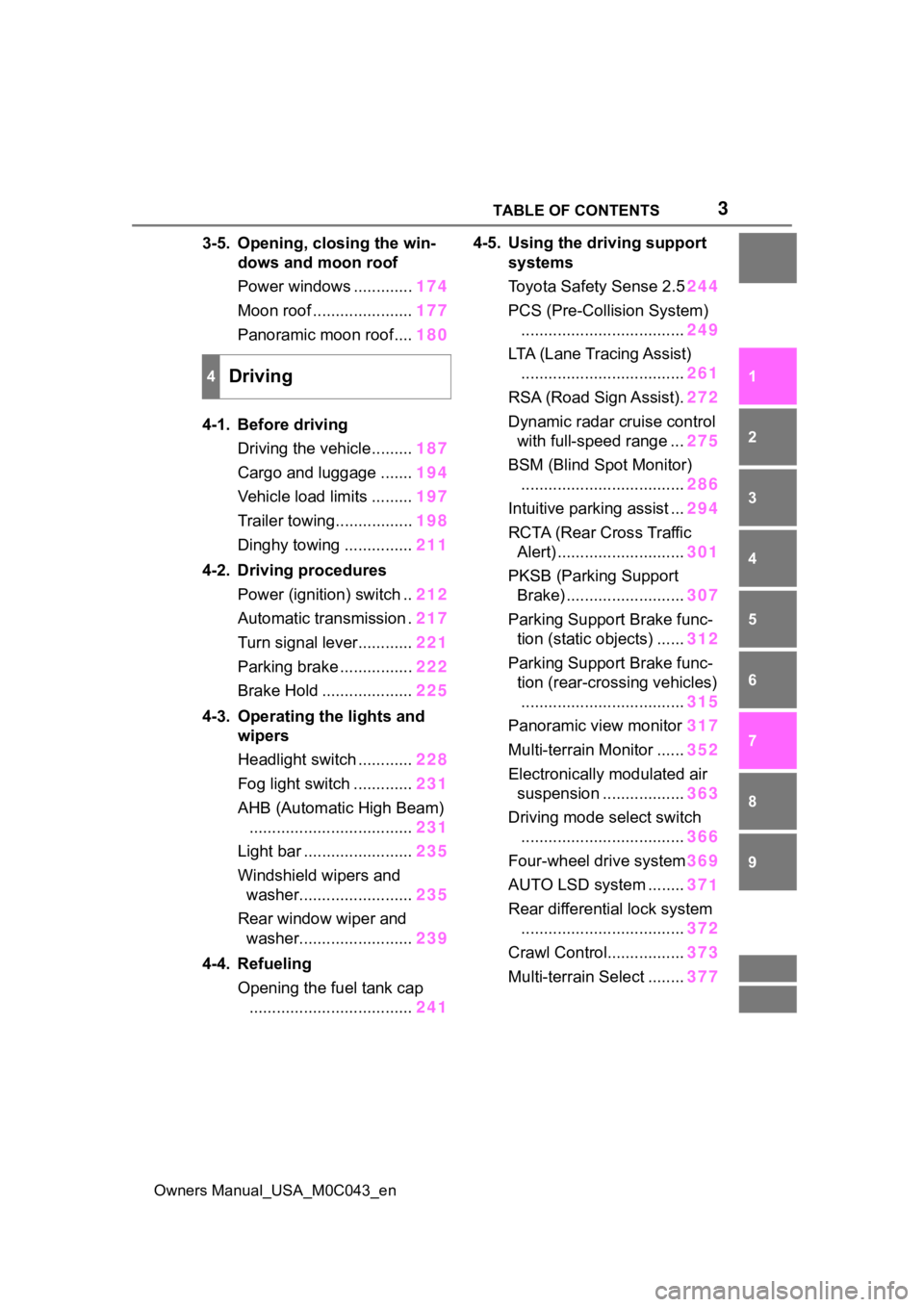
3-5. Opening, closing the win- dows and moon roof
Power windows ............. 174
Moon roof ...................... 177
Panoramic moon roof.... 180
4-1. Before driving Driving the vehicle......... 187
Cargo and luggage ....... 194
Vehicle load limits ......... 197
Trailer towing................. 198
Dinghy towing ............... 211
4-2. Driving procedures Power (ignition) switch .. 212
Automatic transmission . 217
Turn signal lever............ 221
Parking brake ................ 222
Brake Hold .................... 225
4-3. Operating the lights and wipers
Headlight switch ............ 228
Fog light switch ............. 231
AHB (Automatic High Beam) .................................... 231
Light bar ........................ 235
Windshield wipers and washer......................... 235
Rear window wiper and washer......................... 239
4-4. Refueling Opening the fuel tank cap.................................... 2414-5. Using the driving support
systems
Toyota Safet y Sense 2.5244
PCS (Pre-Collision System) .................................... 249
LTA (Lane Tracing Assist) .................................... 261
RSA (Road Sign Assist). 272
Dynamic radar cruise control with full-speed range ... 275
BSM (Blind Spot Monitor) .................................... 286
Intuitive parking assist ... 294
RCTA (Rear Cross Traffic Alert) ............................ 301
PKSB (Parking Support Brake) .......................... 307
Parking Support Brake func- tion (static objects) ...... 312
Parking Support Brake func- tion (rear-crossing vehicles)
.................................... 315
Panoramic view monitor 317
Multi-terrain Monitor ...... 352
Electronically modulated air suspension .................. 363
Driving mode s elect switch
.................................... 366
Four-wheel drive system 369
AUTO LSD system ........ 37
1
Re ar dif
ferential lock system
.................................... 372
Crawl Control................. 373
Multi-terrain Select ........ 377
4Driving
Page 89 of 628
892-1. Instrument cluster
Owners Manual_USA_M0C043_en
2
Vehicle status information and indicators
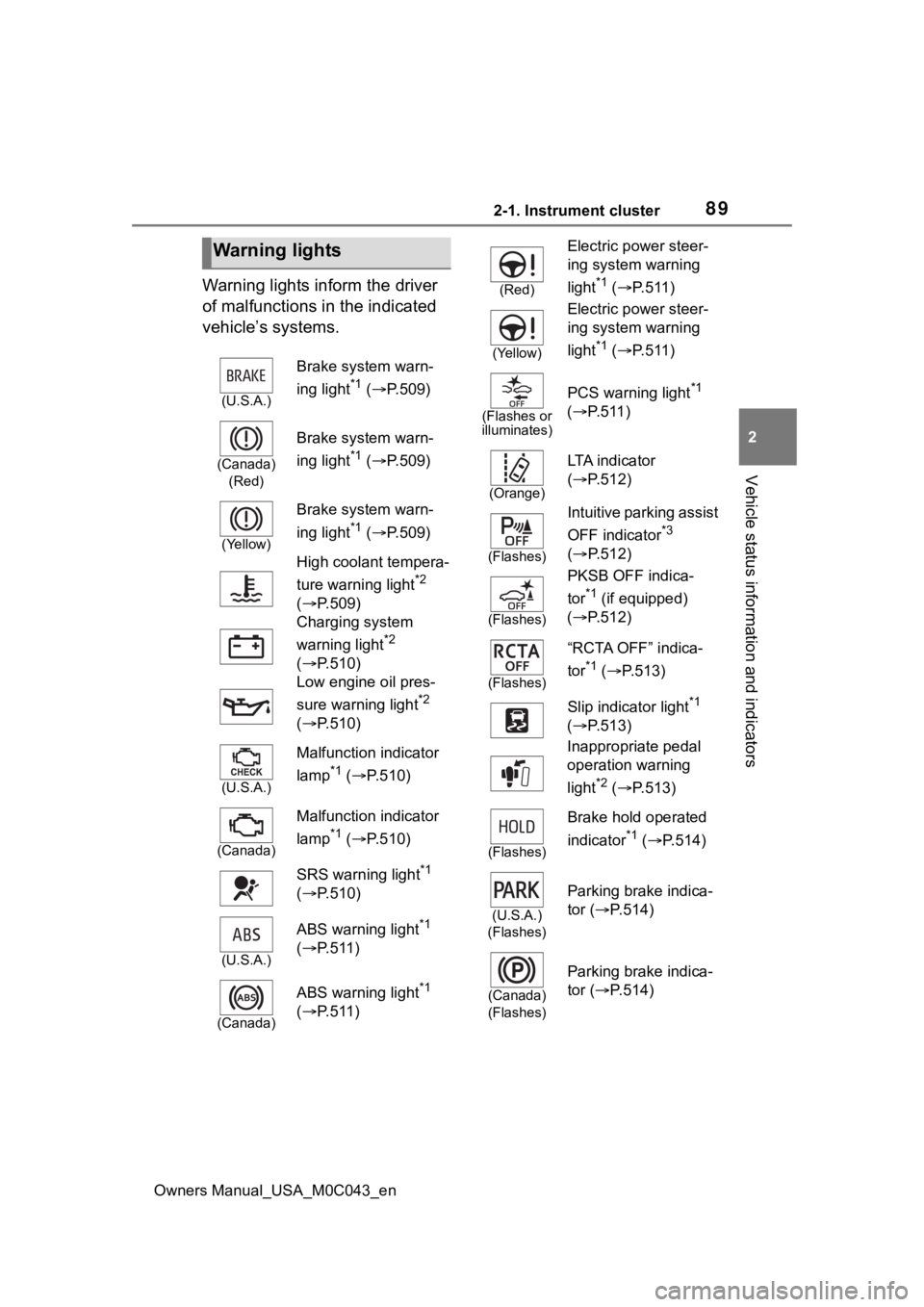
Warning lights inform the driver
of malfunctions in the indicated
vehicle’s systems.
Warning lights
(U.S.A.)
Brake system warn-
ing light
*1 ( P.509)
(Canada)
(Red)
Brake system warn-
ing light
*1 ( P.509)
(Yellow)
Brake system warn-
ing light
*1 ( P.509)
High coolant tempera-
ture warning light
*2
( P.509)
Charging system
warning light
*2
( P.510)
Low engine oil pres-
sure warning light
*2
( P.510)
(U.S.A.)
Malfunction indicator
lamp
*1 ( P.510)
(Canada)
Malfunction indicator
lamp
*1 ( P.510)
SRS warning light
*1
( P.510)
(U.S.A.)
ABS warning light*1
( P.511)
(Canada)
ABS warning light*1
( P.511)
(Red)
Electric power steer-
ing system warning
light
*1 ( P.511)
(Yellow)
Electric power steer-
ing system warning
light
*1 ( P.511)
(Flashes or
illuminates)
PCS warning light*1
( P.511)
(Orange)
LTA i n d i c a t o r
( P.512)
(Flashes)
Intuitive parking assist
OFF indicator
*3
( P.512)
(Flashes)
PKSB OFF indica-
tor
*1 (if equipped)
( P.512)
(Flashes)
“RCTA OFF” indica-
tor
*1 ( P.513)
Slip indicator light
*1
( P.513)
Inappropriate pedal
operation warning
light
*2 ( P.513)
(Flashes)
Brake hold operated
indicator
*1 ( P.514)
(U.S.A.)
(Flashes)
Parking brake indica-
tor ( P.514)
(Canada)
(Flashes)
Parking brake indica-
tor ( P.514)
Page 90 of 628
902-1. Instrument cluster
Owners Manual_USA_M0C043_en
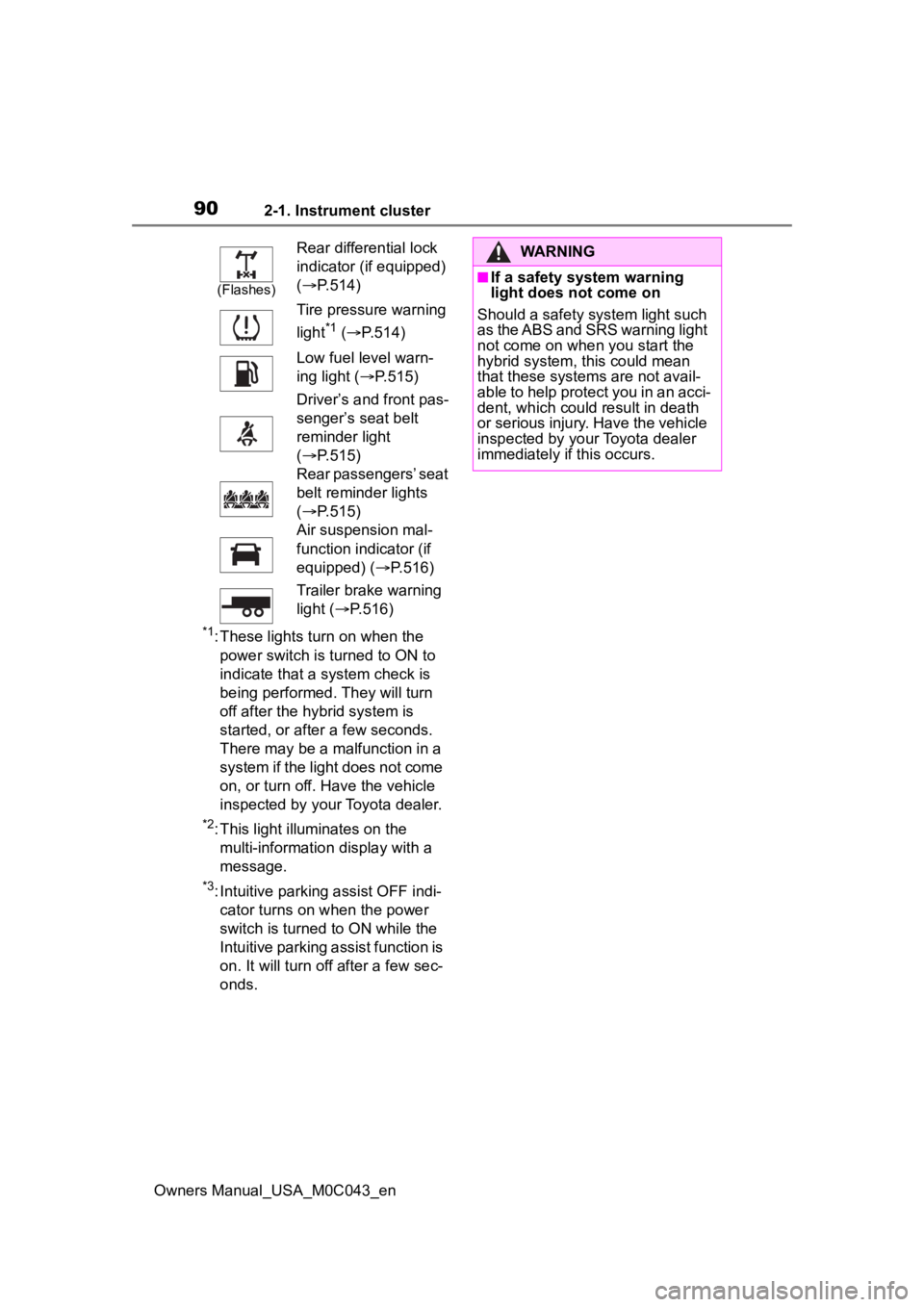
*1: These lights turn on when the power switch is turned to ON to
indicate that a system check is
being performed. They will turn
off after the hybrid system is
started, or after a few seconds.
There may be a malfunction in a
system if the light does not come
on, or turn off. Have the vehicle
inspected by your Toyota dealer.
*2: This light illuminates on the multi-informatio n display with a
message.
*3: Intuitive parking assist OFF indi- cator turns on when the power
switch is turned to ON while the
Intuitive parking assist function is
on. It will turn off after a few sec-
onds.
(Flashes)
Rear differential lock
indicator (if equipped)
( P.514)
Tire pressure warning
light
*1 ( P.514)
Low fuel level warn-
ing light ( P.515)
Driver’s and front pas-
senger’s seat belt
reminder light
( P.515)
Rear passengers’ seat
belt reminder lights
( P.515)
Air suspension mal-
function indicator (if
equipped) ( P.516)
Trailer brake warning
light ( P.516)
WARNING
■If a safety system warning
light does not come on
Should a safety system light such
as the ABS and SRS warning light
not come on when you start the
hybrid system, this could mean
that these system s are not avail-
able to help protect you in an acci-
dent, which could result in death
or serious injury. Have the vehicle
inspected by you r Toyota dealer
immediately if this occurs.
Page 91 of 628
912-1. Instrument cluster
Owners Manual_USA_M0C043_en
2
Vehicle status information and indicators
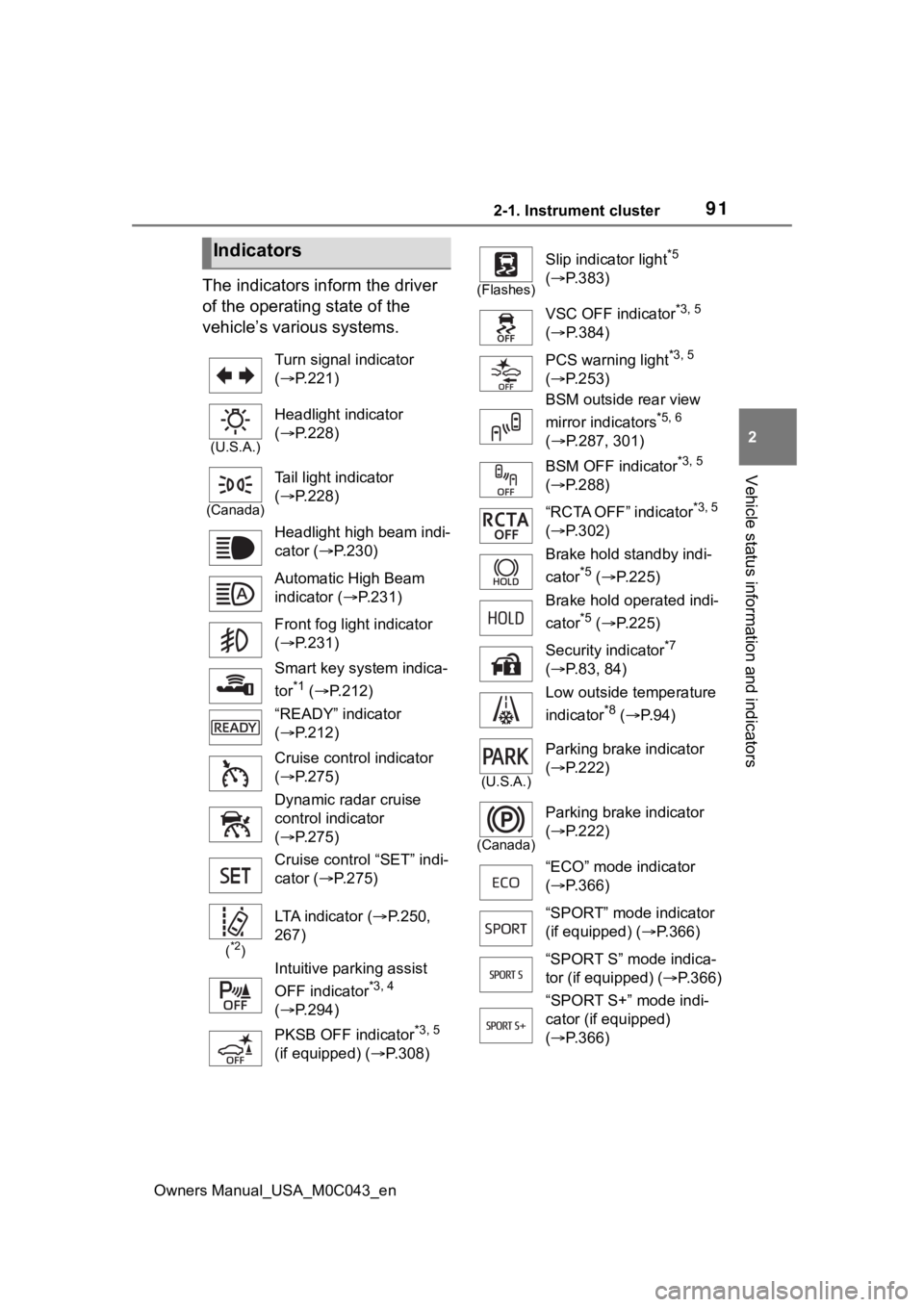
The indicators inform the driver
of the operating state of the
vehicle’s various systems.
Indicators
Turn signal indicator
( P.221)
(U.S.A.)
Headlight indicator
( P.228)
(Canada)
Tail light indicator
( P.228)
Headlight high beam indi-
cator ( P.230)
Automatic High Beam
indicator ( P.231)
Front fog light indicator
( P.231)
Smart key system indica-
tor
*1 ( P.212)
“READY” indicator
( P.212)
Cruise control indicator
( P.275)
Dynamic radar cruise
control indicator
( P.275)
Cruise control “SET” indi-
cator ( P.275)
(*2)
LTA indicator ( P.250,
267)
Intuitive parking assist
OFF indicator
*3, 4
( P.294)
PKSB OFF indicator
*3, 5
(if equipped) ( P.308)
(Flashes)
Slip indicator light*5
( P.383)
VSC OFF indicator
*3, 5
( P.384)
PCS warning light
*3, 5
( P.253)
BSM outside rear view
mirror indicators
*5, 6
( P.287, 301)
BSM OFF indicator
*3, 5
( P.288)
“RCTA OFF” indicator
*3, 5
( P.302)
Brake hold standby indi-
cator
*5 ( P.225)
Brake hold operated indi-
cator
*5 ( P.225)
Security indicator
*7
( P.83, 84)
Low outside temperature
indicator
*8 ( P. 9 4 )
(U.S.A.)
Parking brake indicator
( P.222)
(Canada)
Parking brake indicator
( P.222)
“ECO” mode indicator
( P.366)
“SPORT” mode indicator
(if equipped) ( P.366)
“SPORT S” mode indica-
tor (if equipped) ( P.366)
“SPORT S+” mode indi-
cator (if equipped)
( P.366)
Page 92 of 628
922-1. Instrument cluster
Owners Manual_USA_M0C043_en
*1: This light illuminates on the multi-information display with a
message.
*2: Depending on the operating con-ditions of the system, the color
and state (illuminat ed/blinking) of
the indicator change.
*3: The light comes on when the system is turned off.
*4: Intuitive parking assist OFF indi-cator turns on wh en the power
switch is turned t o ON while the
Intuitive parking assist function is
on. It will turn off after a few sec-
onds.
*5: These lights tu rn on when the
power switch is turned to ON to
indicate that a system check is
being performed. They will turn
off after the hybrid system is
started, or after a few seconds.
There may be a malfunction in a
system if the lights do not turn
on, or turn off. Have the vehicle
inspected by your Toyota dealer.
*6: This light illuminates on the out- side rear view mirrors.
*7: This light illuminates on the over-head console.
*8: When the outside temperature is approximately 37°F (3°C) or
lower, the indicator will flash for
approximately 10 seconds, then
stay on.
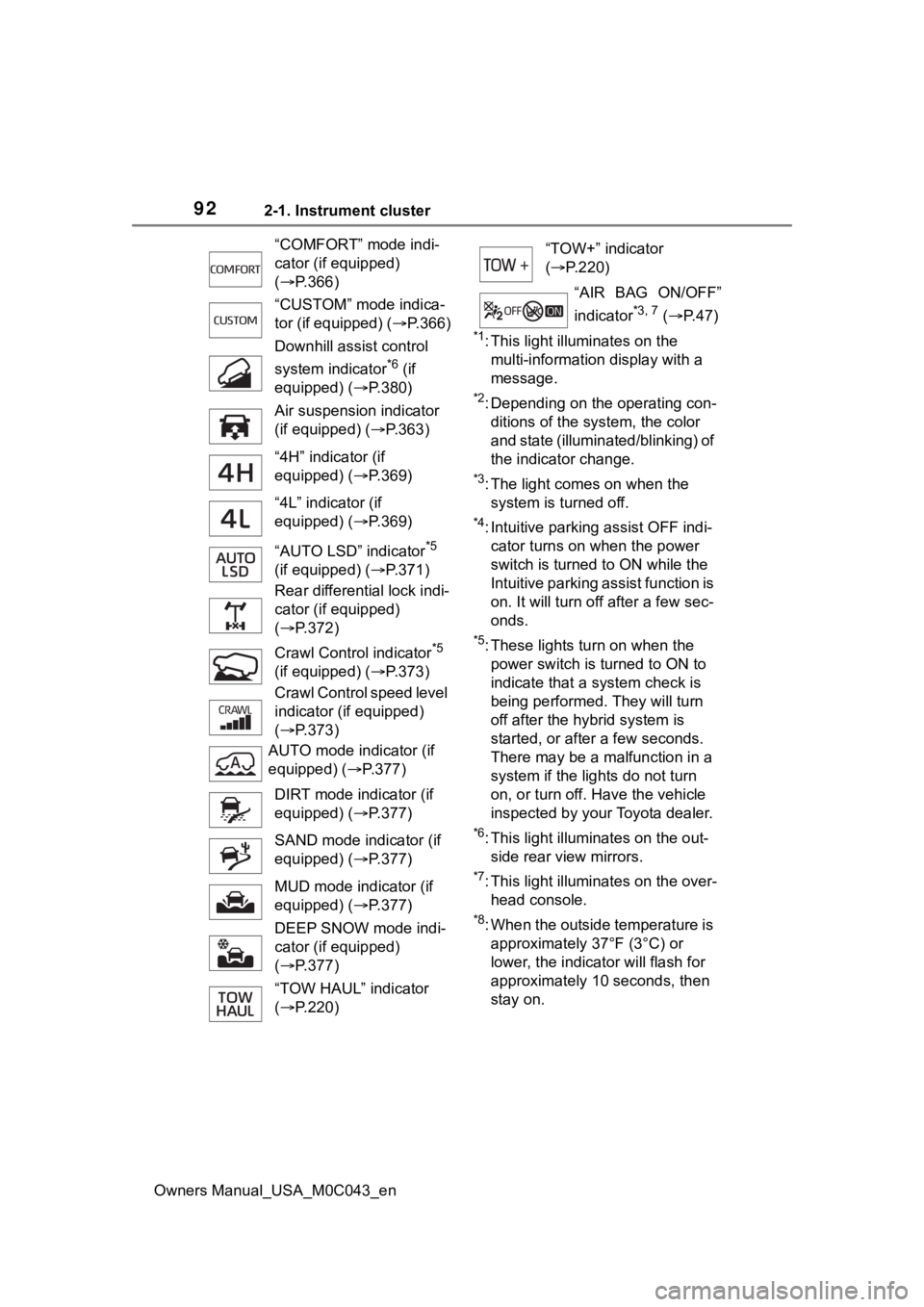
“COMFORT” mode indi-
cator (if equipped)
(
P.366)
“CUSTOM” mode indica-
tor (if equipped) ( P.366)
Downhill assist control
system indicator
*6 (if
equipped) ( P.380)
Air suspension indicator
(if equipped) ( P.363)
“4H” indicator (if
equipped) ( P.369)
“4L” indicator (if
equipped) ( P.369)
“AUTO LSD” indicator
*5
(if equipped) ( P.371)
Rear differential lock indi-
cator (if equipped)
( P.372)
Crawl Contro l indicator
*5
(if equipped) ( P.373)
Crawl Control speed level
indicator (if equipped)
( P.373)
AUTO mode indicator (if
equipped) ( P.377)
DIRT mode indicator (if
equipped) ( P.377)
SAND mode indicator (if
equipped) ( P.377)
MUD mode indicator (if
equipped) ( P.377)
DEEP SNOW mode indi-
cator (if equipped)
( P.377)
“TOW HAUL” indicator
( P.220)
“TOW+” indicator
( P.220)
“AIR BAG ON/OFF”
indicator
*3, 7 ( P. 4 7 )
Page 106 of 628
1062-1. Instrument cluster
Owners Manual_USA_M0C043_en
■Enabling/disabling of the head-
up display
If the head-up display is disabled, it
will remain disabled when the power
switch is turned off then back to ON.
■Display brightness
The brightness of the head-up dis-
play can be adjusted on of the
multi-information display. Also, it is
automatically adjusted according to
the ambient brightness.
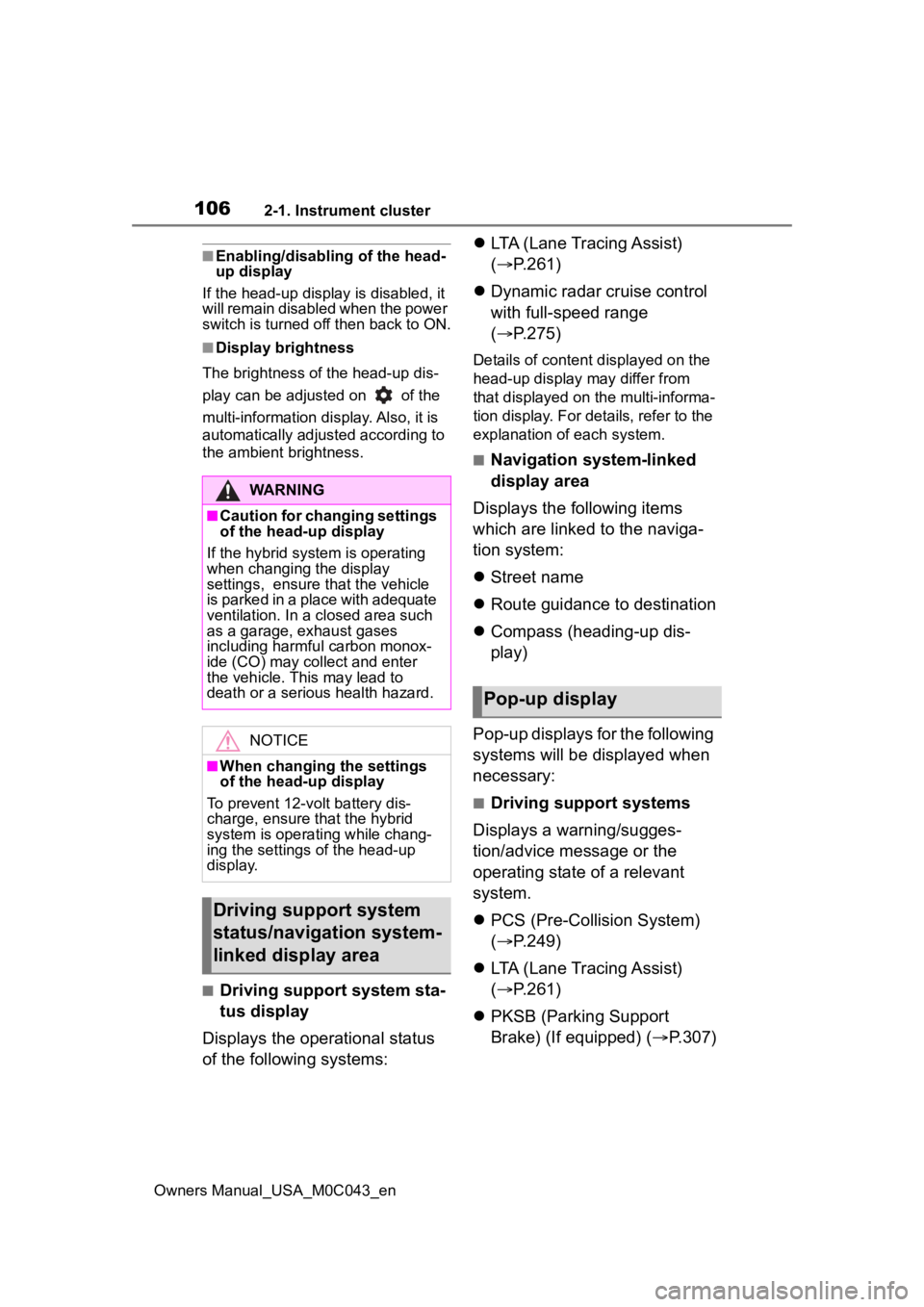
■Driving support system sta-
tus display
Displays the operational status
of the following systems:
LTA (Lane Tracing Assist)
( P.261)
Dynamic radar cruise control
with full-speed range
( P.275)
Details of content d isplayed on the
head-up display may differ from
that displayed on the multi-informa-
tion display. For details, refer to the
explanation of each system.
■Navigation system-linked
display area
Displays the following items
which are linked to the naviga-
tion system:
Street name
Route guidance to destination
Compass (heading-up dis-
play)
Pop-up displays for the following
systems will be displayed when
necessary:
■Driving support systems
Displays a warning/sugges-
tion/advice message or the
operating state of a relevant
system.
PCS (Pre-Colli sion System)
( P.249)
LTA (Lane Tracing Assist)
( P.261)
PKSB (Parking Support
Brake) (If equipped) ( P.307)
WARNING
■Caution for changing settings
of the head-up display
If the hybrid system is operating
when changing the display
settings, ensure t hat the vehicle
is parked in a place with adequate
ventilation. In a closed area such
as a garage, exhaust gases
including harmful carbon monox-
ide (CO) may collect and enter
the vehicle. This may lead to
death or a seri ous health hazard.
NOTICE
■When changing the settings
of the head-up display
To prevent 12-volt battery dis-
charge, ensure that the hybrid
system is operating while chang-
ing the settings of the head-up
display.
Driving support system
status/navigation system-
linked display area
Pop-up display
Page 129 of 628
1293-2. Opening, closing and locking the doors
Owners Manual_USA_M0C043_en
3
Before driving
turns on when the back door is
opened.
●When the power switch is turned
to OFF, the ligh t will go off auto-
matically after 20 minutes.
■Back door closer
In the event that the back door is left
slightly open, the back door closer
will automatically close it to the fully
closed position.
Whatever the state of the power
switch, the back door closer oper-
ates.
■Power back door operating con-
ditions
The power back door can automati-
cally open and close under the fol-
lowing conditions:
●When the power back door sys-
tem is enabled. ( P.135)
●When the power switch is in ON,
in addition to the above for the
opening operations, the back door
operates for any of the following
conditions:
• Parking brake is engaged
• The brake pedal is depressed
• The shift position is in P.
■Operation of the power back
door
●A buzzer sounds and the emer-
gency flashers flash twice to indi-
cate that the back door is
opening/closing.
●When the power back door sys-
tem is disabled, the power back
door does not ope rate but it can
be opened and closed by hand.
●When the power back door auto-
matically opens, if an abnormality
due to people or objects is
detected, oper ation will stop.
■Jam protection function
Sensors are equipped on both sides
of the power back door. If anything
obstructs the power back door while
it is closing, the b ack door will auto-
matically operate in the opposite direction or stop.
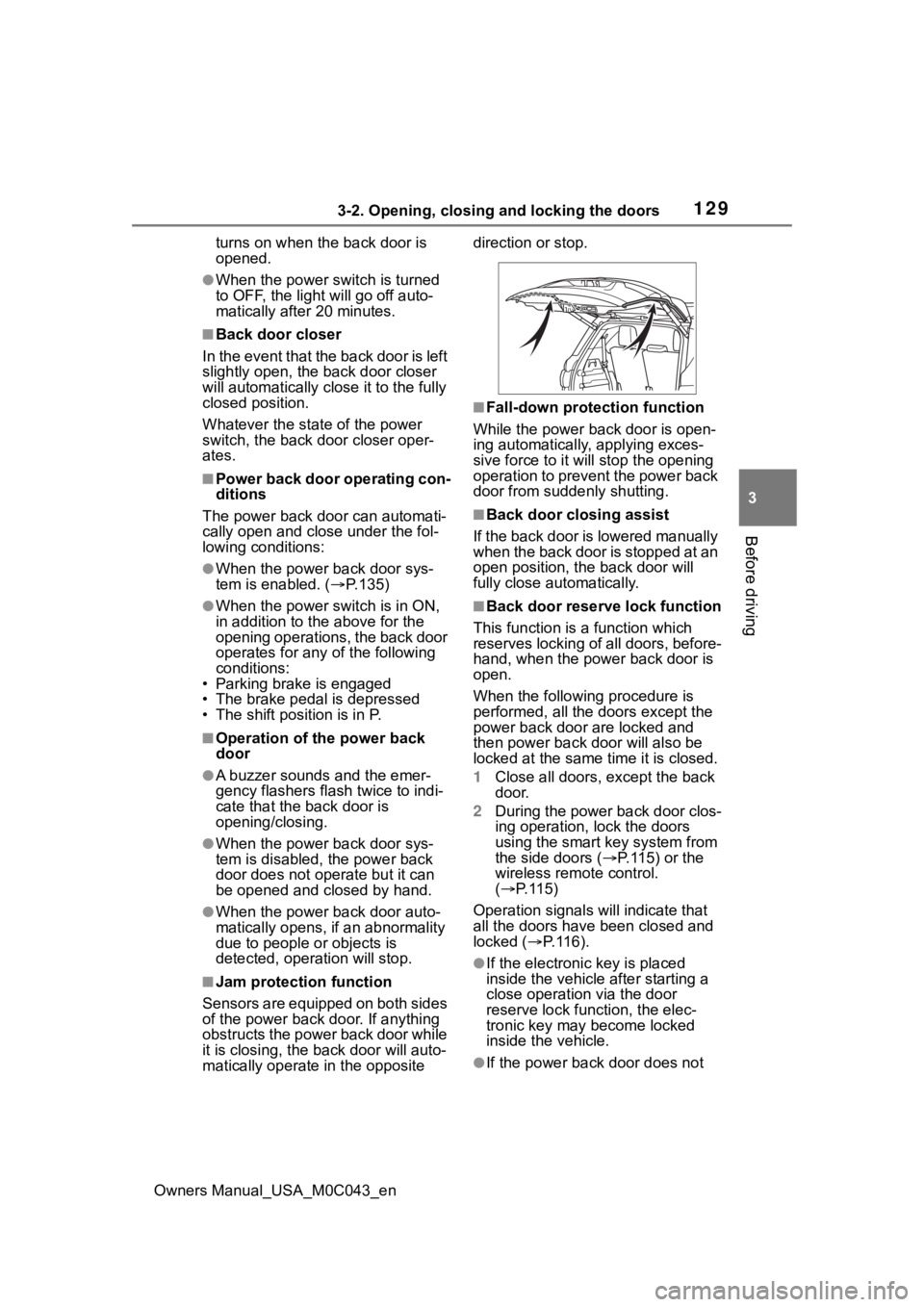
■Fall-down protection function
While the power back door is open-
ing automatically, applying exces-
sive force to it will stop the opening
operation to prevent the power back
door from suddenly shutting.
■Back door closing assist
If the back door is lowered manually
when the back door is stopped at an
open position, the back door will
fully close automatically.
■Back door reserve lock function
This function is a function which
reserves locking of all doors, before-
hand, when the power back door is
open.
When the following procedure is
performed, all the doors except the
power back door are locked and
then power back door will also be
locked at the same time it is closed.
1 Close all doors, except the back
door.
2 During the power back door clos-
ing operation, lock the doors
using the smart key system from
the side doors ( P. 1 1 5 ) o r t h e
wireless remote control.
( P.115)
Operation signals will indicate that
all the doors have been closed and
locked ( P. 1 1 6 ) .
●If the electronic key is placed
inside the vehicle after starting a
close operation via the door
reserve lock function, the elec-
tronic key may become locked
inside the vehicle.
●If the power back door does not
Page 185 of 628
185
Owners Manual_USA_M0C043_en
4
4
Driving
Driving
4-1. Before drivingDriving the vehicle....... 187
Cargo and luggage ..... 194
Vehicle load limits ....... 197
Trailer towing............... 198
Dinghy towing ............. 211
4-2. Driving procedures Power (ignition) switch 212
Automatic transmission 217
Turn signal lever.......... 221
Parking brake .............. 222
Brake Hold .................. 225
4-3. Operating the lights and wipers
Headlight switch .......... 228
Fog light switch ........... 231
AHB (Automatic High Beam)........................ 231
Light bar ...................... 235
Windshield wipers and washer....................... 235
Rear window wiper and washer....................... 239
4-4. Refueling Opening the fuel tank cap.................................. 2414-5. Using the dr
iving support
systems
Toyota Safety Sense 2.5 .................................. 244
PCS (Pre-Collision System) .................................. 249
LTA (Lane Tracing Assist) .................................. 261
RSA (Road Sign Assist) .................................. 272
Dynamic radar cruise con- trol with full-speed range
.................................. 275
BSM (Blind Spot Monitor) .................................. 286
Intuitive parking assist . 294
RCTA (Rear Cross Traffic Alert) .......................... 301
PKSB (Parking Support Brake) ........................ 307
Parking Support Brake func- tion (static objects) .... 312
Parking Support Brake func- tion (rear-crossing vehi-
cles) ........................... 315
Panoramic view monitor .................................. 317
Multi-terrain Monitor .... 352
Electronically modulated air suspension ................ 363
Page 187 of 628
1874-1. Before driving
Owners Manual_USA_M0C043_en
4
Driving
4-1.Before driving
■Starting the hybrid system
P. 2 1 2
■Driving
1 With the brake pedal
depressed, shift the shift
lever to D.
2 If the parking brake is set,
release the parking brake.
( P.222)
If the parking brake is in automatic
mode, the parking brake is release
automatically when shifting the shift
lever to any position other than P.
( P.223)
3 Gradually release the brake
pedal and gently depress the
accelerator pedal to acceler-
ate the vehicle.
■Stopping
1 With the shift lever in D,
depress the brake pedal.
2 If necessary, set the parking
brake.
If the vehicle is to be stopped for an
extended period of time, shift the
shift lever to P. ( P.217)
■Parking the vehicle
1 With the shift lever in D,
depress the brake pedal to
stop the vehicle completely. 2
Set the parking brake
( P.222), and shift the shift
lever to P. ( P.217)
Check the parking brake indicator
is illuminated.
3 Turn the power switch to OFF
to stop the hybrid system.
4 Lock the door, making sure
that you have the electronic
key on your person.
If parking on a hill, block the wheels
as needed.
■Starting off on a steep
uphill
1 With the brake pedal
depressed, shift the shift
lever to D.
The hill-start assist control will be
activated.
2Pull the parking brake switch
and parking brake is set man-
ually. ( P.222)
3 Release the brake pedal and
gently depress the accelera-
tor pedal to accelerate the
vehicle.
4 Press the parking brake
switch and parking brake is
released manually. ( P.222)
Parking brake automatic release
function. (P.224)
■For fuel-efficient driving
Keep in mind that Hybrid Electric
Vehicle are similar to conventional
vehicles, and it is necessary to
refrain from activities such as sud-
den acceleration. ( P.396)
Driving the vehicle
The following procedures
should be observed to
ensure safe driving:
Driving procedure
Page 214 of 628
2144-2. Driving procedures
Owners Manual_USA_M0C043_en
1Stop the vehicle completely.
2 Set the parking brake
( P.222), and shift the shift
lever to P.
Check the parking brake indicator
is illuminated.
3 Press the power switch
shortly and firmly.
The hybrid system will stop, and the
meter display will be extinguished.
4Release the brake pedal and
check that “ACCESSORY” or
“IGNITION ON” is not shown
on the meter.
■Automatic hybrid system shut
off feature
●The vehicle is equipped with a
feature that automatically shuts off
the hybrid system when the shift
lever is in P with the hybrid system
operating for an extended period.
●The hybrid system will automati-
cally shut off after approximately 1
hour if it has been left running
while the shift lever is in P.
●The timer for the automatic hybrid
system shut off feature will reset if
the brake pedal is depressed or if
the shift lever is in a position other than P.
●After the vehicle
is parked, if the
door is locked with the door lock
switch ( P.118) from the inside or
the mechanical key ( P.114) from
the outside, the automatic hybrid
system shut off feature will be dis-
abled. The timer for the automatic
hybrid syste m shut off feature will
be re-enabled if the driver’s door
is opened.NOTICE
■Symptoms indicating a mal-
function with the power
switch
If the power switch seems to be
operating somewh at differently
than usual, such as the switch
sticking slightly, there may be a
malfunction. Contact your Toyota
dealer immediately.
Stopping the hybrid sys-
temWARNING
■Stopping the hybrid system
in an emergency
●If you want to stop the hybrid
system in an emergency while
driving the vehicle, press and
hold the power s witch for more
than 2 seconds, or press it
briefly 3 times or more in suc-
cession. ( P.502)
However, do not touch the
power switch while driving
except in an emergency. Turn-
ing the hybrid s ystem off while
driving will not cause loss of
steering or braking control, but
the power assist to these sys-
tems will be lost. This will make
it more difficult to steer and
brake, so you should pull over
and stop the vehicle as soon as
it is safe to do so.
●If the power switch is operated
while the vehicle is running, a
warning message will be shown
on the multi-information display
and a buzzer sounds.
●To restart the hybrid system
after performing an emergency
shutdown, shift the shift lever to
N and then pre ss the power
switch.