USB TOYOTA SIENNA 2013 XL30 / 3.G User Guide
[x] Cancel search | Manufacturer: TOYOTA, Model Year: 2013, Model line: SIENNA, Model: TOYOTA SIENNA 2013 XL30 / 3.GPages: 876, PDF Size: 15.9 MB
Page 477 of 876
477
3-2. Using the audio system
3
Interior features
SIENNA_OM_OM45472U_(U)
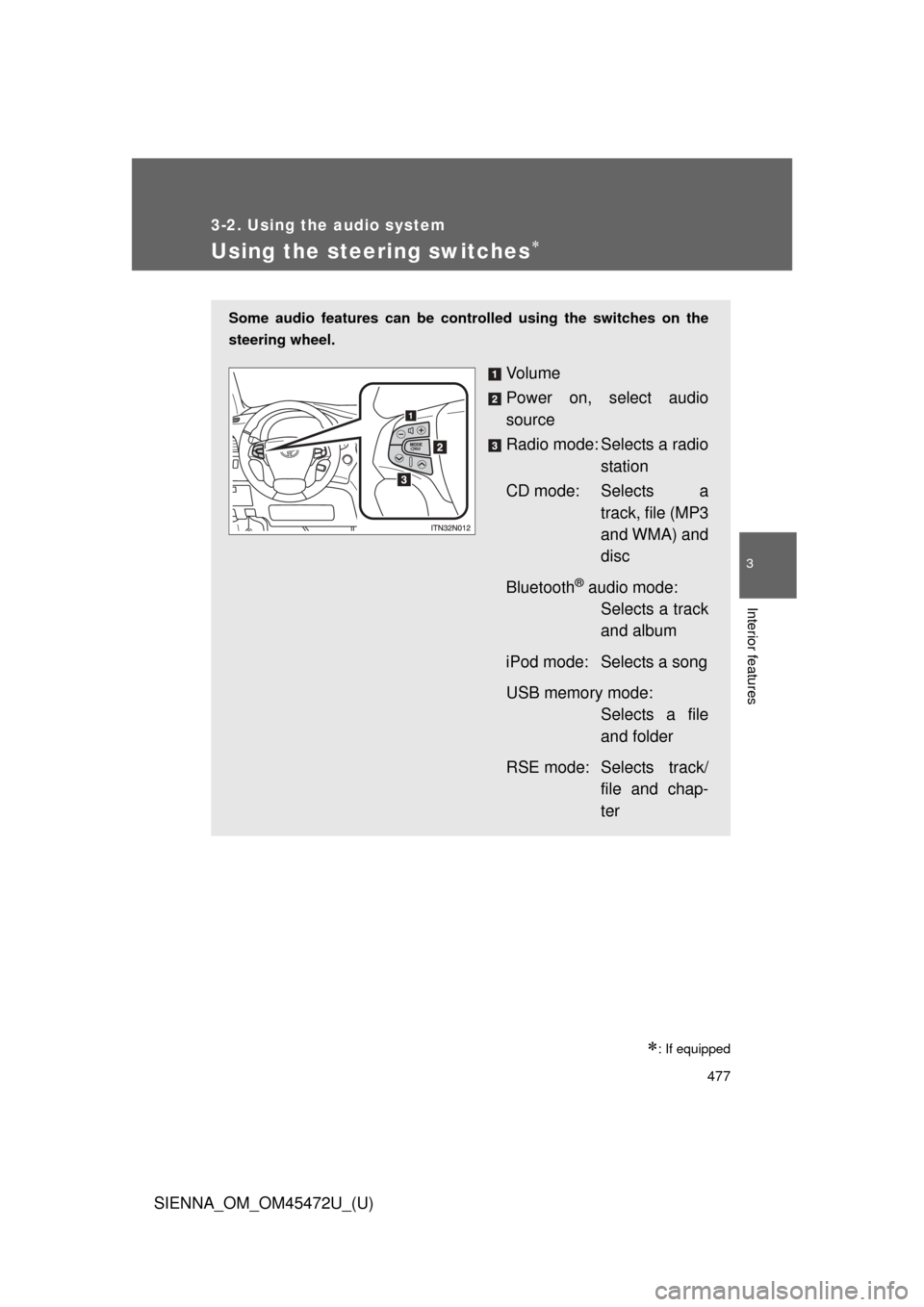
Using the steering switches
: If equipped
Some audio features can be controlled using the switches on the
steering wheel.
Vo l u m e
Power on, select audio
source
Radio mode: Selects a radio station
CD mode: Selects a track, file (MP3
and WMA) and
disc
Bluetooth
® audio mode: Selects a track
and album
iPod mode: Selects a song
USB memory mode: Selects a file
and folder
RSE mode: Selects track/ file and chap-
ter
Page 478 of 876
478 3-2. Using the audio system
SIENNA_OM_OM45472U_(U)
Turning on the powerPress when the audio system is turned off.
The audio system can be turned off by holding the switch down until you
hear a beep.
Changing the audio source
Press when the audio system is turned on. The audio source
changes as follows each time the button is pressed. If a mode cannot
be used, it will be skipped.
Type A:
FM (1, 2) CD player AUX AM SAT (1, 2, 3)
Type B and C:
FM SAT CD player (type B) or CD changer (type C)
RSE
* Bluetooth® audio AUX iPod or USB memory AM
*: If equipped
Adjusting the volume
Press “+” on to increase the volume and “-” to decrease the
volume.
Hold down the button to continue increasing or decreasing the volume.
Page 479 of 876
479
3-2. Using the audio system
3
Interior features
SIENNA_OM_OM45472U_(U)
Selecting a radio station
Press to select the radio mode.
Press “” or “ ” on to select a radio station.
To scan for receivable stations, press and hold the switch until you
hear a beep.
Selecting a track/file or song
Press to select CD, RSE, Bluetooth
® audio, iPod or
USB memory mode.
Press “ ” or “ ” on to select the desired track/file or
song.
Selecting an album
Press to select Bluetooth
® audio mode.
Press and hold “ ” or “ ” on until you hear a beep.
Selecting a folder
Press to select USB memory mode.
Press and hold “ ” or “ ” on until you hear a beep.
STEP1
STEP2
STEP1
STEP2
STEP1
STEP2
STEP1
STEP2
Page 860 of 876

860
SIENNA_OM_OM45472U_(U)
Alphabetical index
Alphabetical index
A/C .....................394, 402, 412, 415
ABS ...........................................329
Active head restraint ................. 98
Active Torque Control 4WD system ...........................330
Air conditioning filter............... 706
Air conditioning system Air conditioning filter ..............706
Front automatic air
conditioning system ............402
Front manual air conditioning system ............394
Rear automatic air conditioning system ............415
Rear manual air
conditioning system ............412
Airbags Airbag operating
conditions............................ 173
Airbag precautions for your child ....................... 177
Airbag warning light............... 746
Curtain shield airbag operating conditions............173
Curtain shield airbag precautions .........................177
Front passenger occupant
classification system ...........183
General airbag precautions .........................177
Locations of airbags ..............168
Modification and disposal of airbags ..............182
Proper driving posture ........................166, 177
Side and curtain shield
airbags operating
conditions............................ 173
Side and curtain shield
airbags precautions ............177
SRS airbags .......................... 168 Alarm......................................... 162
Antenna ............................ 432, 481
Anti-lock brake system ........... 329
Armrest ..................................... 614
Assist grips .............................. 616
Audio input ............................... 476
Audio system
A/V input port ........................ 530
Antenna................................. 432
Audio input ............................ 476
Audio visual input .................. 530
AUX port ............................... 476
CD player/changer ................ 436
DVD player.... 513, 523, 527, 528
iPod ....................................... 456
MP3/WMA disc ..................... 445
Optimal use ........................... 471
Portable music player ........... 476
Radio..................................... 426
Rear seat entertainment system ......... 502
Steering wheel audio switch.................................. 477
Type ...................................... 421
USB memory......................... 463
Audio visual input.................... 476
Automatic light control system .................................... 268
Automatic transaxle Automatic transaxle .............. 236
If the shift lever cannot be
shifted from P ..................... 780
S mode.................................. 238
Auxiliary box ........................... 599
AUX port ................................... 476
A/V input port ........................... 476A