electronic key battery TOYOTA SIENNA 2013 XL30 / 3.G Owners Manual
[x] Cancel search | Manufacturer: TOYOTA, Model Year: 2013, Model line: SIENNA, Model: TOYOTA SIENNA 2013 XL30 / 3.GPages: 876, PDF Size: 15.9 MB
Page 6 of 876

TABLE OF CONTENTSIndex
6
SIENNA_OM_OM45472U_(U)
4-1. Maintenance and careCleaning and protecting the vehicle exterior ........... 646
Cleaning and protecting the vehicle interior ............ 651
4-2. Maintenance Maintenance requirements .................... 655
General maintenance ......... 658
Emission inspection and maintenance (I/M)
programs .......................... 662
4-3. Do-it-yourself maintenance Do-it-yourself service precautions ...................... 663
Hood................................... 667
Positioning a floor jack ....... 669
Engine compartment .......... 671
Tires ................................... 688
Tire inflation pressure......... 699
Wheels ............................... 703
Air conditioning filter ........... 706
Wireless remote control/ electronic key battery ....... 709
Checking and replacing fuses ................................ 712
Light bulbs .......................... 725 5-1. Essential information
Emergency flashers ............ 738
If your vehicle needs to be towed ....................... 739
If you think something is wrong ............................ 743
Fuel pump shut off system .............................. 744
5-2. Steps to take in an emergency If a warning light turns on or a warning
buzzer sounds... ............... 745
If a warning message is displayed ....................... 760
If you have a flat tire (vehicles with
run-flat tires) ..................... 761
If you have a flat tire (vehicles with
standard tires) .................. 763
If the engine will not start .... 778
If the shift lever cannot be shifted from P ................... 780
If you lose your keys ........... 782
If the electronic key does not operate properly ......... 783
If the battery is discharged ........................ 786
If your vehicle overheats..... 791
If the vehicle becomes stuck ................................. 794
If your vehicle has to be stopped in
an emergency ................... 796
4Maintenance and care5When trouble arises
Page 33 of 876
33
1-1. Key information
1
Before driving
SIENNA_OM_OM45472U_(U)
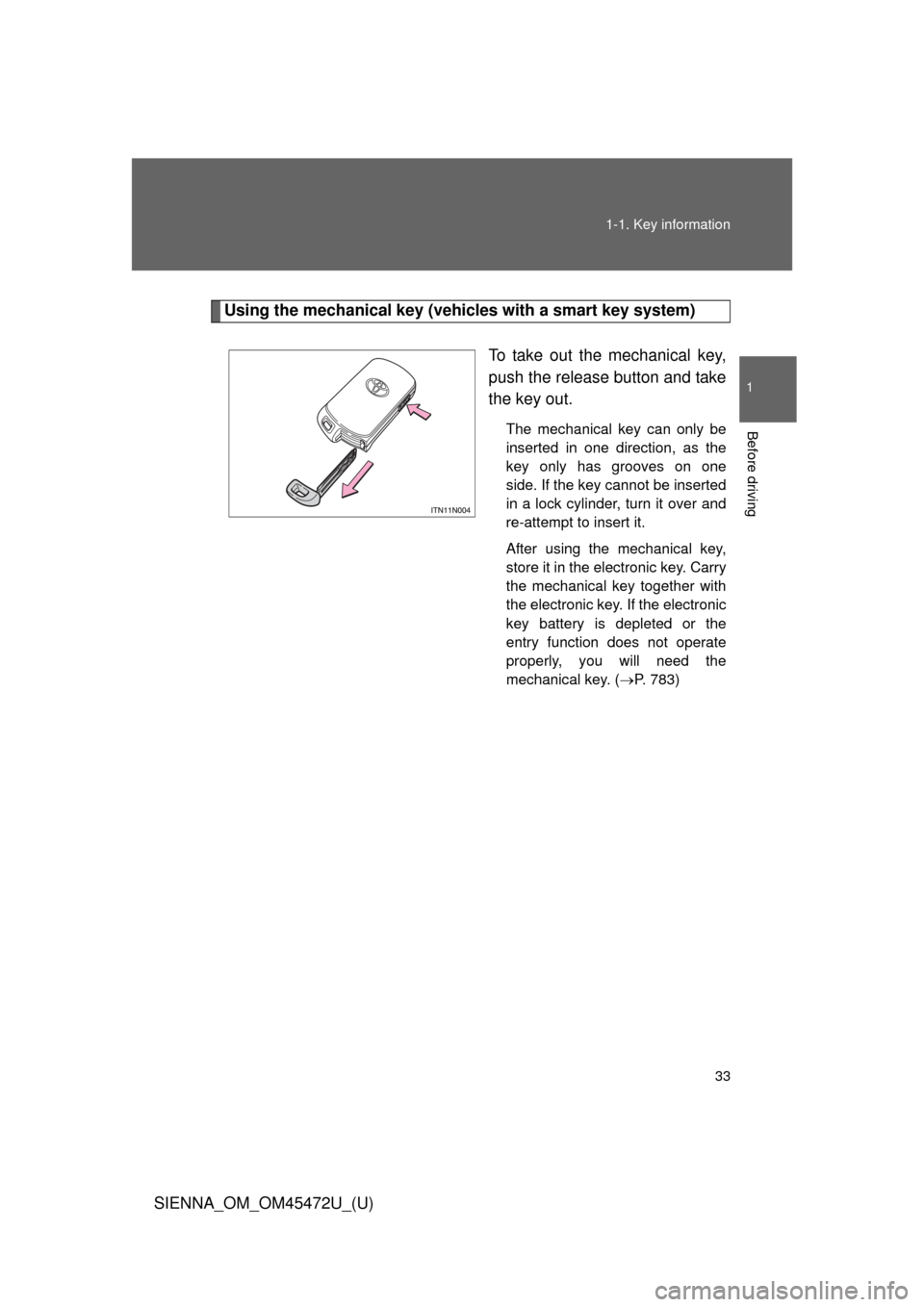
Using the mechanical key (vehicles with a smart key system)
To take out the mechanical key,
push the release button and take
the key out.
The mechanical key can only be
inserted in one direction, as the
key only has grooves on one
side. If the key cannot be inserted
in a lock cylinder, turn it over and
re-attempt to insert it.
After using the mechanical key,
store it in the electronic key. Carry
the mechanical key together with
the electronic key. If the electronic
key battery is depleted or the
entry function does not operate
properly, you will need the
mechanical key. (P. 783)
Page 43 of 876
43
1-2. Opening, closing and locking the doors
1
Before driving
SIENNA_OM_OM45472U_(U)
*1: A message will be shown on the multi-information display in the instru-
ment cluster.
*2: If the engine does not start when the electronic key is inside the vehicle,the electronic key battery may be depleted or there may be difficulties
receiving signal from the key. ( P. 709)
■ Security feature
If a door is not opened within approximately 60 seconds after the vehicle is
unlocked, the security feature automatically locks the vehicle again.
AlarmSituationCorrection procedure
Interior alarm
pings once
*1
The electronic key has a
low battery Replace the electronic
key battery
An attempt was made to
start the engine without the
electronic key being
present, or the electronic
key was not functioning
normally Start the engine with
the electronic key
present
*2
Interior alarm
pings once and
exterior alarm
sounds 3 times
*1
The driver’s door was
closed after the key was
carried outside the vehicle,
and the “ENGINE START
STOP” switch was not
turned offTurn the “ENGINE
START STOP” switch
OFF and close the
driver’s door again
An occupant carried the
electronic key outside the
vehicle and closed the
door while the “ENGINE
START STOP” switch was
not off Bring the electronic
key back into the vehi-
cle
Page 45 of 876

45
1-2. Opening, closing and locking the doors
1
Before driving
SIENNA_OM_OM45472U_(U)
■
Battery-saving function
In the following circumstances, the entry function is disabled in order to pre-
vent the vehicle battery from discharging and the electronic key battery from
discharging.
● When the entry function has not been used for 5 days or more
● When the electronic key has been left within approximately 6 ft. (2 m) of
the vehicle for 10 minutes or more
● If the entry function has not been used for 14 days or more, the vehicle
cannot be unlocked by a door other than the driver’s door. To unlock the
vehicle, grip the driver’s door handle or use the wireless remote control
or the mechanical key.
The system will resume operation when...
● The vehicle is locked using the lock sensor when carrying the electronic
key on your person.
● The vehicle is locked/unlocked using the wireless remote control.
(P. 5 3 )
● The vehicle is locked/unlocked using the mechanical key. ( P. 783)
Page 46 of 876

46 1-2. Opening, closing and locking the doors
SIENNA_OM_OM45472U_(U)
■Conditions affecting operation
The smart key system uses weak radio waves. In the following situations,
the communication between the electronic key and the vehicle may be
affected, preventing the smart key system and wireless remote control from
operating properly. (Way of coping P. 783)
● When the electronic key battery is depleted
● Near a TV tower, electric power plant, gas station, radio station, large dis-
play, airport or other facility that generates strong radio waves or electri-
cal noise
● When carrying a portable radio, ce llular phone, cordless phone or other
wireless communication devices
● When the electronic key is in contact with, or is covered by the following
objects
• Cards to which aluminum foil is attached
• Cigarette boxes that have aluminum foil inside
• Metallic wallets or bags
• Coins
• Hand warmers made of metal
• Media such as CDs and DVDs
● When multiple electronic keys are in the vicinity
● When another wireless key (that emits radio waves) is being used nearby
● When carrying or using the electronic key together with the following
devices that emit radio waves
• Another vehicle’s electronic key
• A wireless key that emits radio waves
• Personal computers or personal digital assistants (PDAs)
• Digital audio players
• Portable game systems
Page 50 of 876

50 1-2. Opening, closing and locking the doors
SIENNA_OM_OM45472U_(U)
■Electronic key battery depletion
● The standard battery life is 1 to 2 years.
● If the battery becomes low, an alarm will sound in the cabin when the
engine stops. ( P. 41)
● As the electronic key always receives radio waves, the battery will
become depleted even if the electronic key is not used. The following
symptoms indicate that the electronic key battery may be depleted.
Replace the battery when necessary. ( P. 709)
• The smart key system or the wireless remote control does not operate.
• The detection area becomes smaller.
• The LED indicator on the key surface does not turn on.
● To avoid serious deterioration, do not leave the electronic key within 3 ft.
(1 m) of the following electrical appliances that produce a magnetic field.
•TVs
• Personal computers
• Recharging cellular phones or cordless phones
• Cellular phones, cordless phones and battery chargers
• Induction cookers
• Table lamps
■ When the electronic key battery is fully depleted
P. 709
■ Customization that can be co nfigured at Toyota dealer
Settings (e.g. smart key system) can be changed.
(Customizable features P. 831)
Page 59 of 876

59
1-2. Opening, closing and locking the doors
1
Before driving
SIENNA_OM_OM45472U_(U)
■
When the electronic key battery is fully depleted
P. 709
■ Customization that can be co nfigured at Toyota dealer
Settings (e.g. operation signal) can be changed.
(Customizable features P. 831)
■ Certification for wireless remote co ntrol (vehicles without a smart key
system)
This device complies with Part 15 of the FCC Rules and with RSS-210 of
Industry Canada. Operation is subject to the following two conditions: (1) this
device may not cause harmful interference, and (2) this device must accept
any interference received, including interference that may cause undesired
operation.
■ Certification for wireless remote control (vehicles with a smart key sys-
tem)
U.S.A.
FCC ID: HYQ14ADR FCC ID: HYQ14AEH
FCC ID: HYQ13CZM FCC ID: HYQ13CZN
FCC ID: NI4TMLF8-20
NOTE:
This device complies with part 15 of the FCC Rules. Operation is subject to
the following two conditions: (1) This device may not cause harmful interfer-
ence, and (2) this device must accept any interference received, including
interference that may cause undesired operation.
FCC WARNING:
Changes or modifications not expressly approved by the party responsible
for compliance could void the user’s authority to operate the equipment.
Canada
NOTE:
Operation is subject to the following two conditions: (1) this device may not
cause interference, and (2) this device must accept any interference, includ-
ing interference that may cause undesired operation of the device.
Page 233 of 876
233
2-1. Driving procedures
2
When driving
SIENNA_OM_OM45472U_(U)
■
Electronic key battery depletion
P. 5 0
■ Conditions aff ecting operation
P. 4 6
■ Note for the entry function
P. 4 7
■ If the engine does not start
The engine immobilizer system may not have been deactivated. ( P. 159)
■ Steering lock
After turning the “ENGINE START STOP” switch off and opening and closing
the doors, the steering wheel will be locked due to the steering lock function.
Operating the “ENGINE START STOP” switch again automatically cancels
the steering lock.
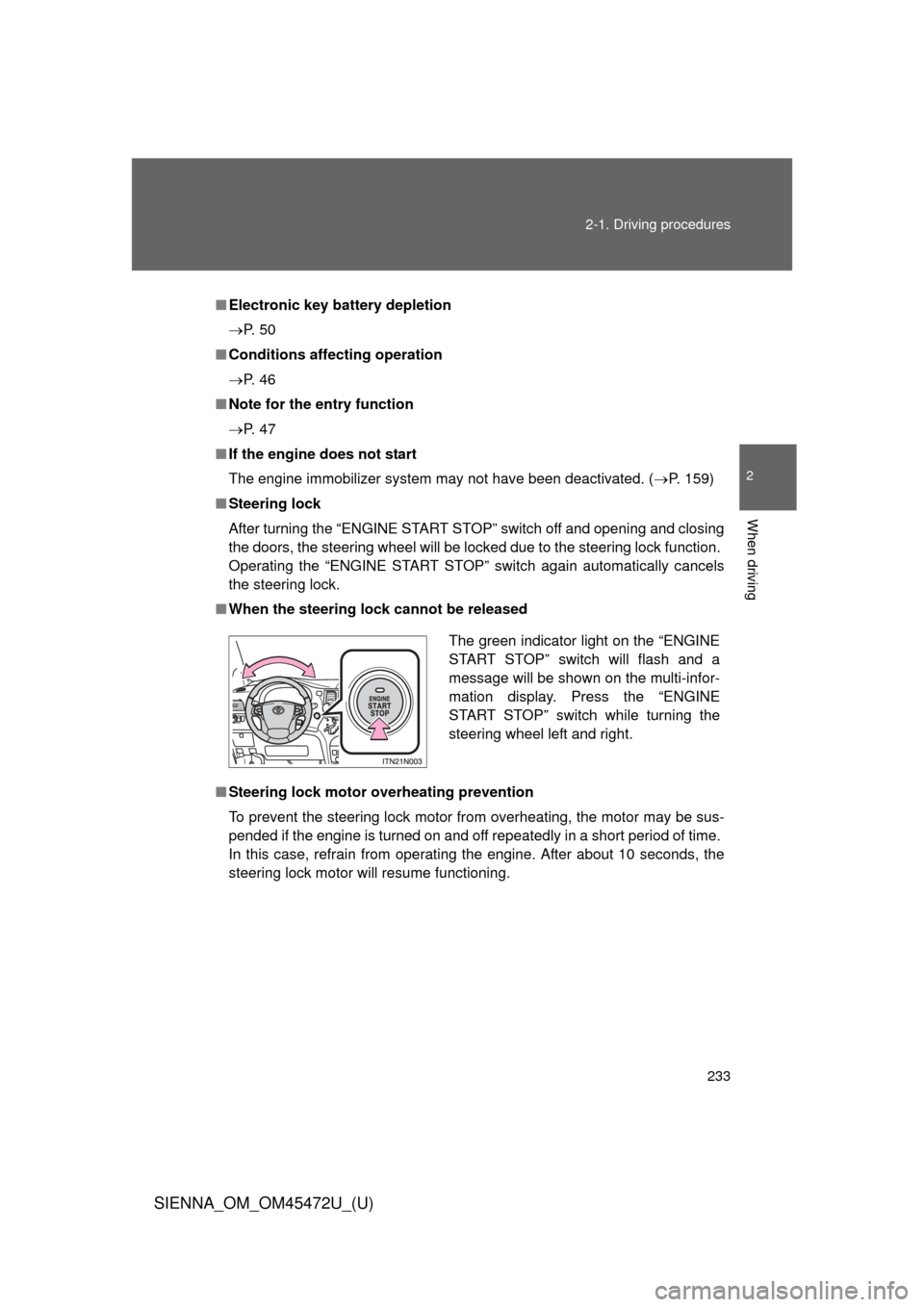
■ When the steering lock cannot be released
■ Steering lock motor overheating prevention
To prevent the steering lock motor from overheating, the motor may be sus-
pended if the engine is turned on and off repeatedly in a short period of time.
In this case, refrain from operating the engine. After about 10 seconds, the
steering lock motor will resume functioning.
The green indicator light on the “ENGINE
START STOP” switch will flash and a
message will be shown on the multi-infor-
mation display. Press the “ENGINE
START STOP” switch while turning the
steering wheel left and right.
Page 234 of 876

234 2-1. Driving procedures
SIENNA_OM_OM45472U_(U)
■When the “ENGINE START STOP” switch indicator flashes in amber
The system may be malfunctioning. Have the vehicle inspected by your
Toyota dealer immediately.
■ If the electronic key battery is depleted
P. 709
CAUTION
■When starting the engine
Always start the engine while sitting in the driver’s seat. Do not depress the
accelerator pedal while starting the engine under any circumstances.
Doing so may cause an accident resulting in death or serious injury.
■ Caution while driving
If the vehicle begins to slide due to engine failure or other circumstances, do
not lock or open the doors until the vehicle reaches a safe and complete
stop. Activation of the steering lock in this circumstance may lead to an acci-
dent, resulting in death or serious injury.
■ Stopping the engine in an emergency
If you want to stop the engine in an emergency while driving the vehicle,
press and hold the “ENGINE START STOP” switch for more than 2 seconds,
or press it briefly 3 times or more in succession. ( P. 796)
However, do not touch the “ENGINE START STOP” switch while driving
except in an emergency. Turning the engine off while driving will not cause
loss of steering or braking control, but the power assist to these systems will
be lost. This will make it more difficult to steer and brake, so you should pull
over and stop the vehicle as soon as it is safe to do so.
Page 585 of 876
585
3-6. Using the interior lights
3
Interior features
SIENNA_OM_OM45472U_(U)
■
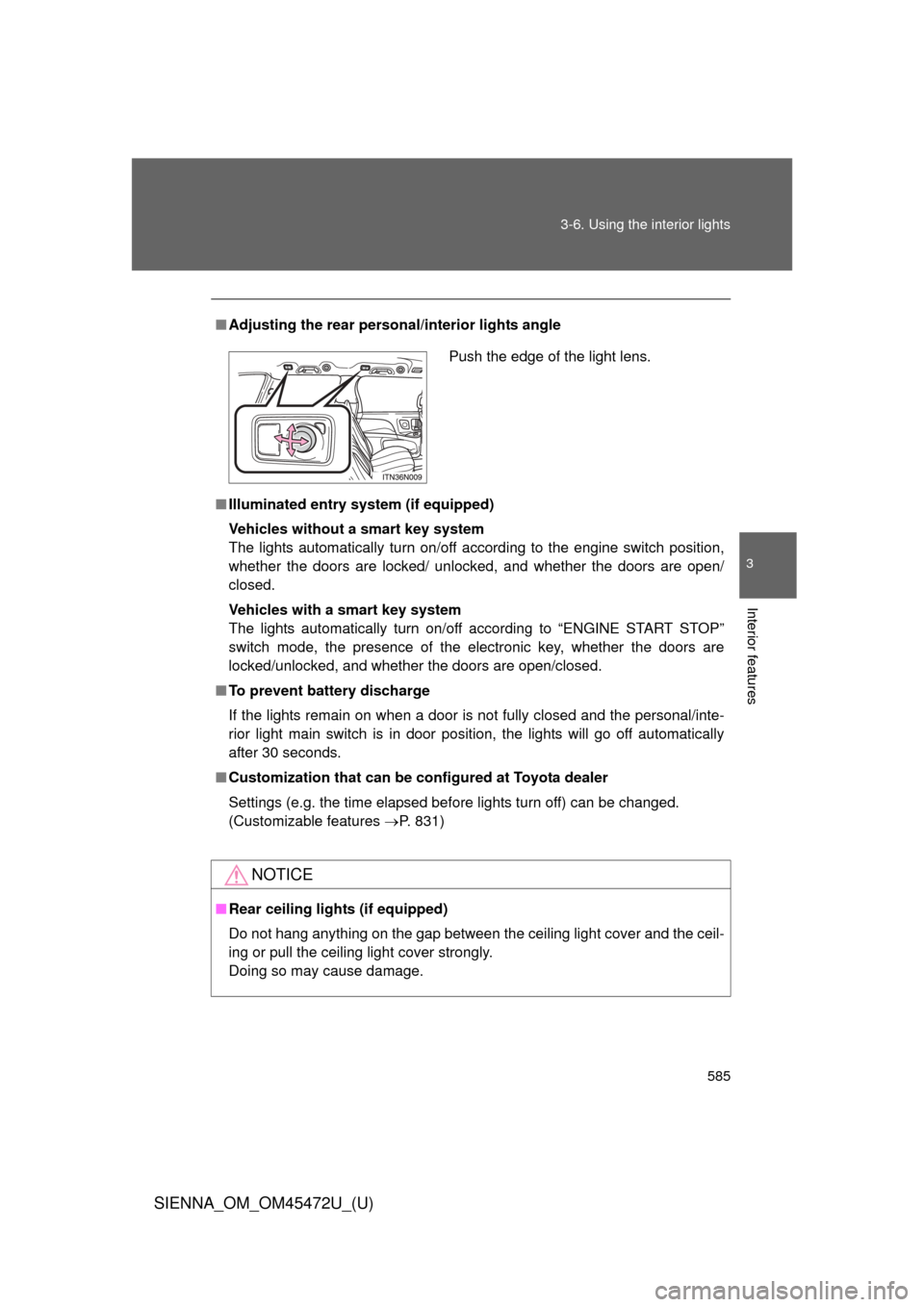
Adjusting the rear person al/interior lights angle
■ Illuminated entry system (if equipped)
Vehicles without a smart key system
The lights automatically turn on/off according to the engine switch position,
whether the doors are locked/ unlocked, and whether the doors are open/
closed.
Vehicles with a smart key system
The lights automatically turn on/off according to “ENGINE START STOP”
switch mode, the presence of the electronic key, whether the doors are
locked/unlocked, and whether the doors are open/closed.
■ To prevent battery discharge
If the lights remain on when a door is not fully closed and the personal/inte-
rior light main switch is in door position, the lights will go off automatically
after 30 seconds.
■ Customization that can be co nfigured at Toyota dealer
Settings (e.g. the time elapsed before lights turn off) can be changed.
(Customizable features P. 831)
NOTICE
■Rear ceiling lights (if equipped)
Do not hang anything on the gap between the ceiling light cover and the ceil-
ing or pull the ceiling light cover strongly.
Doing so may cause damage.
Push the edge of the light lens.