reset TOYOTA SIENNA 2014 XL30 / 3.G User Guide
[x] Cancel search | Manufacturer: TOYOTA, Model Year: 2014, Model line: SIENNA, Model: TOYOTA SIENNA 2014 XL30 / 3.GPages: 872, PDF Size: 15.99 MB
Page 262 of 872
262 2-2. Instrument cluster and information display
SIENNA_OM_OM45483U_(U)●
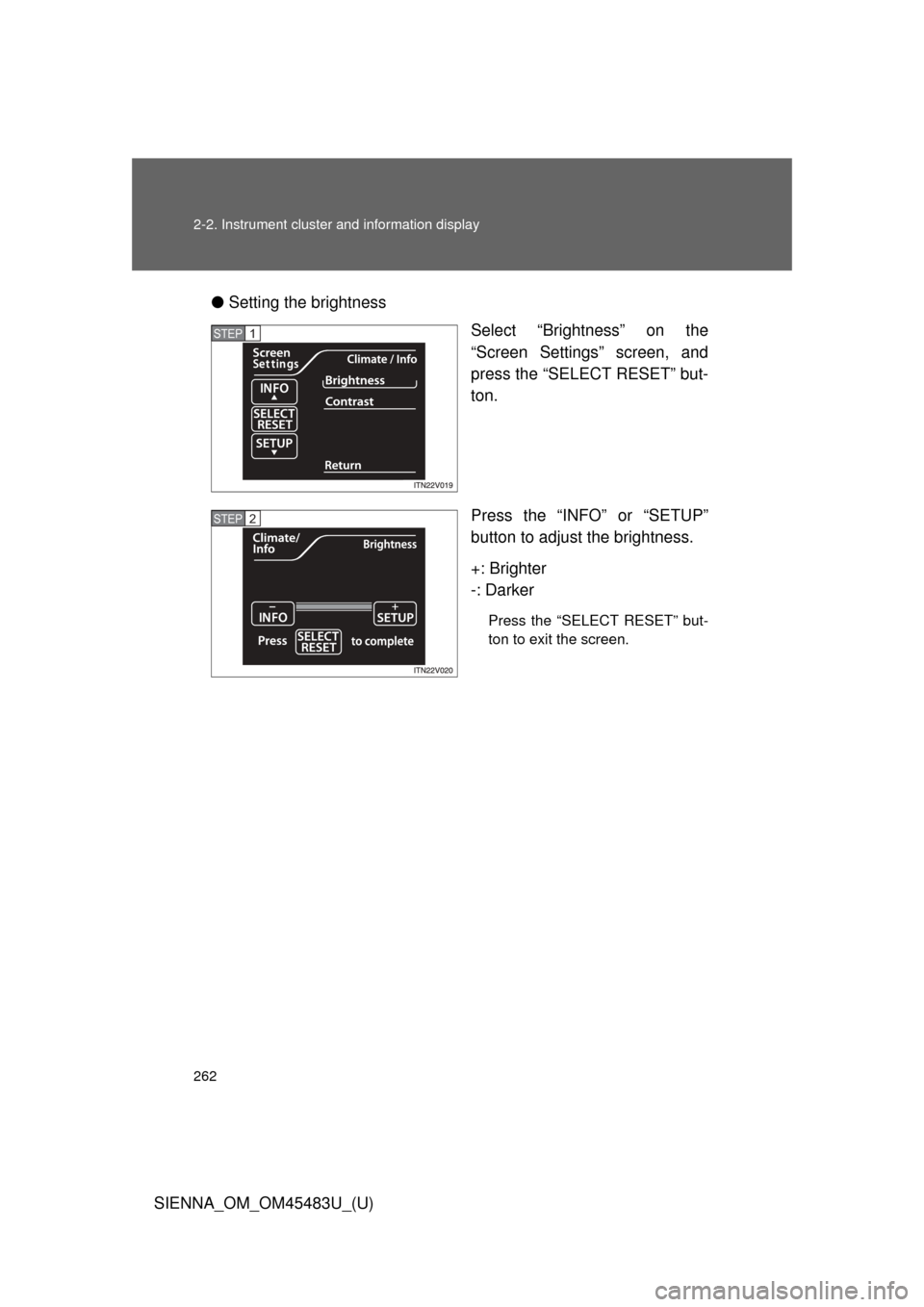
Setting the brightness
Select “Brightness” on the
“Screen Settings” screen, and
press the “SELECT RESET” but-
ton.
Press the “INFO” or “SETUP”
button to adjust the brightness.
+: Brighter
-: Darker
Press the “SELECT RESET” but-
ton to exit the screen.
STEP1
STEP2
Page 263 of 872
263
2-2. Instrument cluster and information display
2
When driving
SIENNA_OM_OM45483U_(U)
●
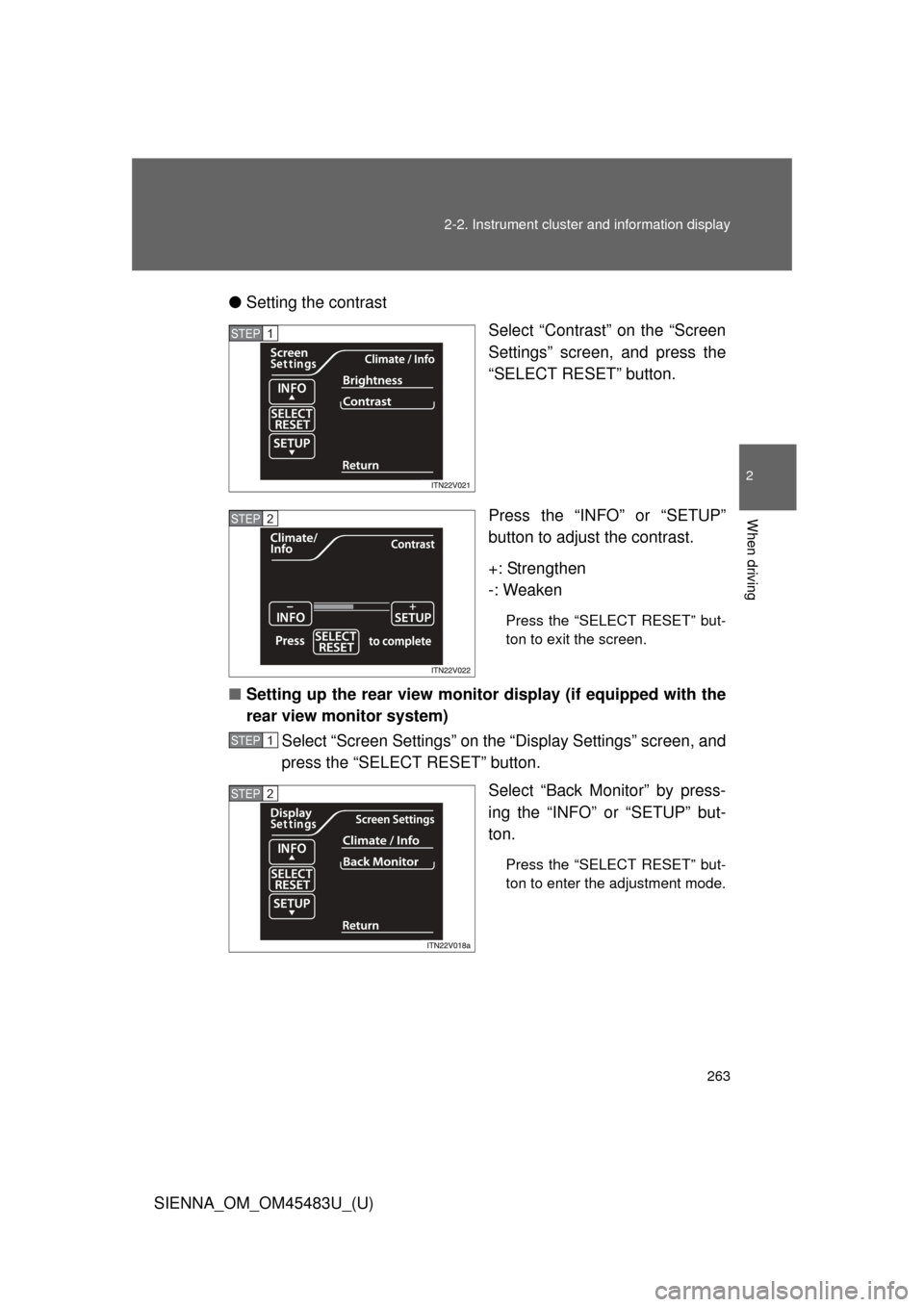
Setting the contrast
Select “Contrast” on the “Screen
Settings” screen, and press the
“SELECT RESET” button.
Press the “INFO” or “SETUP”
button to adjust the contrast.
+: Strengthen
-: Weaken
Press the “SELECT RESET” but-
ton to exit the screen.
■ Setting up the rear view monitor display (if equipped with the
rear view monitor system)
Select “Screen Settings” on the “Display Settings” screen, and
press the “SELECT RESET” button.
Select “Back Monitor” by press-
ing the “INFO” or “SETUP” but-
ton.
Press the “SELECT RESET” but-
ton to enter the adjustment mode.
STEP1
STEP2
STEP1
STEP2
Page 264 of 872
264 2-2. Instrument cluster and information display
SIENNA_OM_OM45483U_(U)●
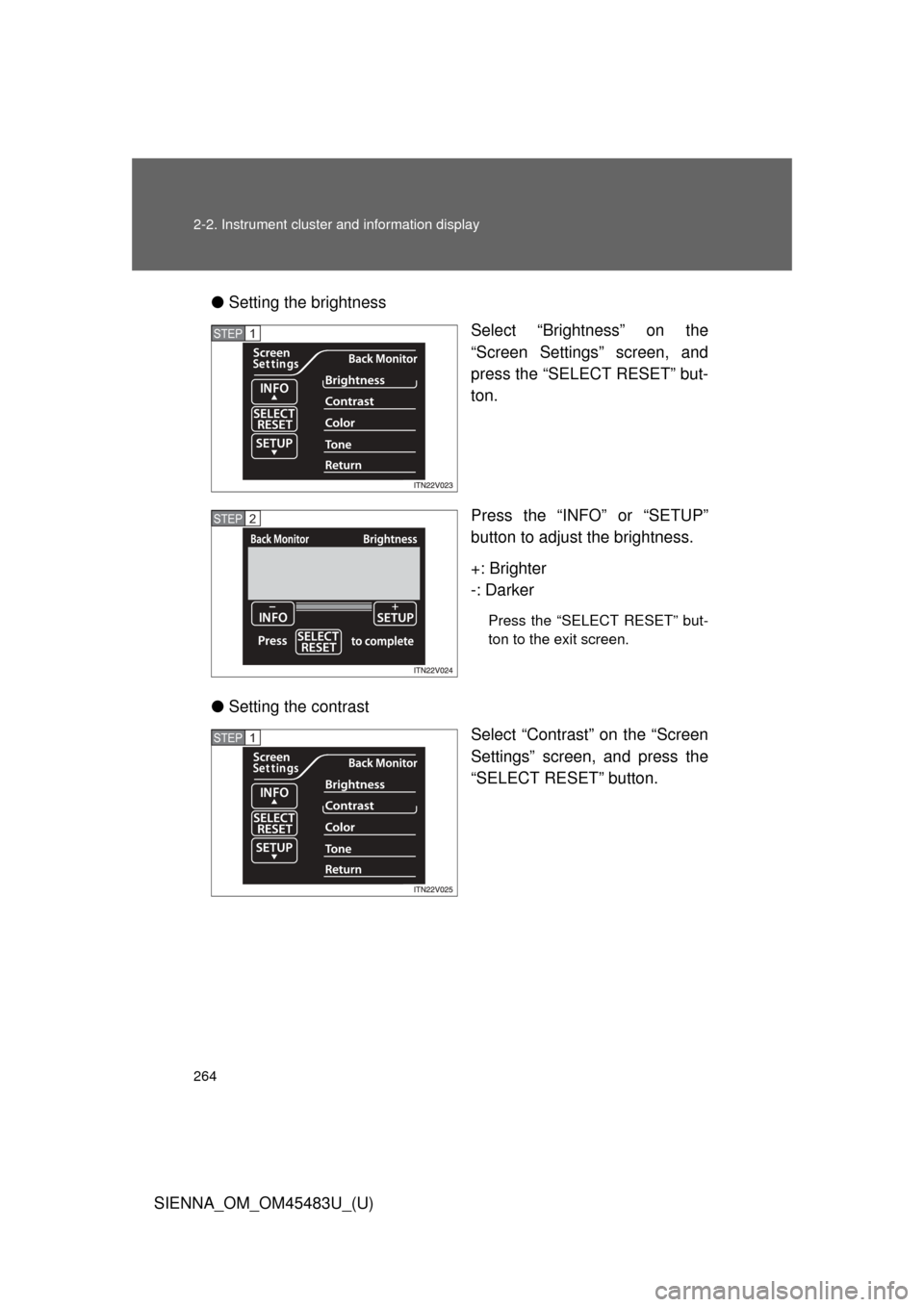
Setting the brightness
Select “Brightness” on the
“Screen Settings” screen, and
press the “SELECT RESET” but-
ton.
Press the “INFO” or “SETUP”
button to adjust the brightness.
+: Brighter
-: Darker
Press the “SELECT RESET” but-
ton to the exit screen.
● Setting the contrast
Select “Contrast” on the “Screen
Settings” screen, and press the
“SELECT RESET” button.
STEP1
STEP2
STEP1
Page 265 of 872
265
2-2. Instrument cluster and information display
2
When driving
SIENNA_OM_OM45483U_(U)
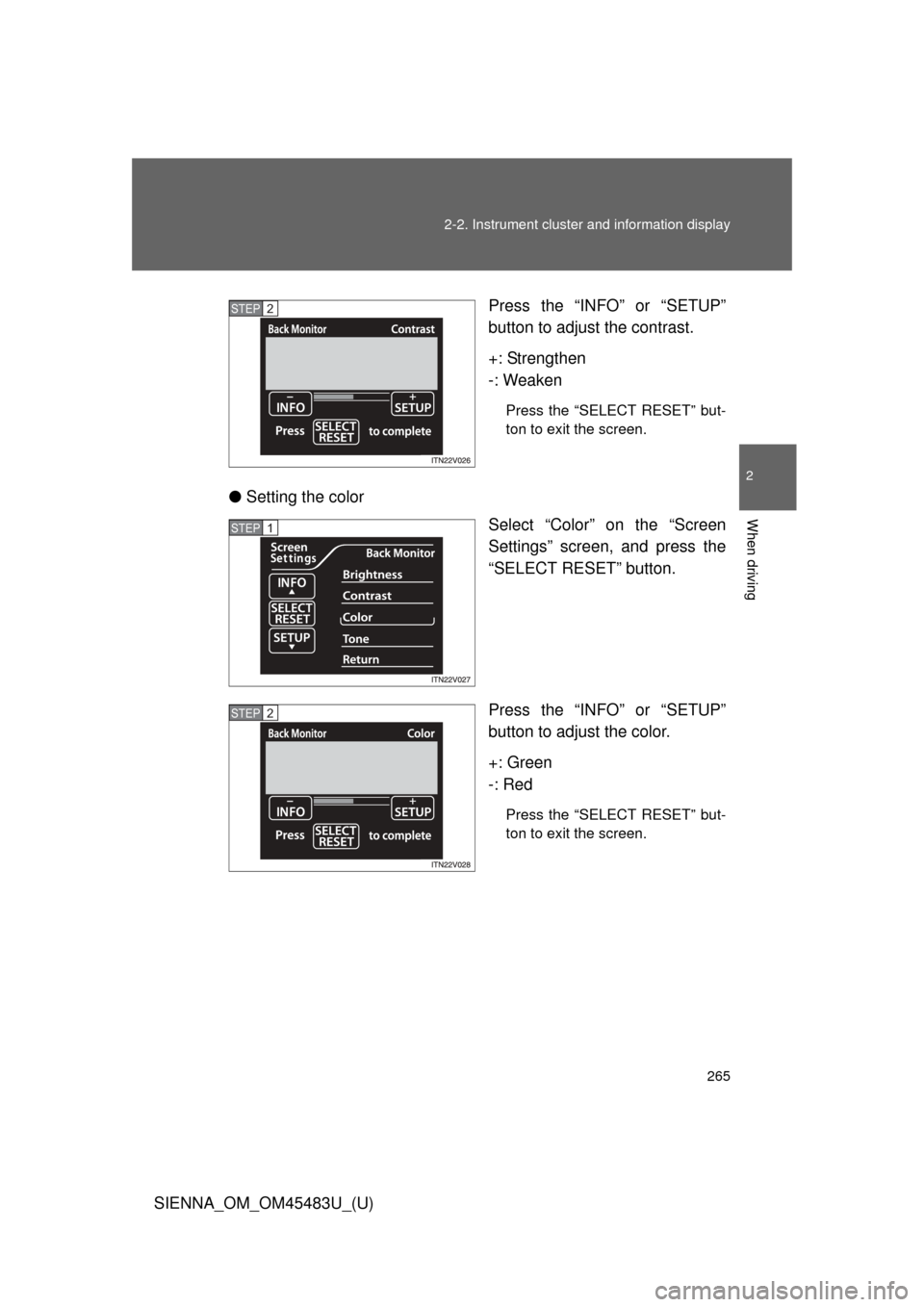
Press the “INFO”
or “SETUP”
button to adjust the contrast.
+: Strengthen
-: Weaken
Press the “SELECT RESET” but-
ton to exit the screen.
● Setting the color
Select “Color” on the “Screen
Settings” screen, and press the
“SELECT RESET” button.
Press the “INFO” or “SETUP”
button to adjust the color.
+: Green
-: Red
Press the “SELECT RESET” but-
ton to exit the screen.
STEP2
STEP1
STEP2
Page 266 of 872
266 2-2. Instrument cluster and information display
SIENNA_OM_OM45483U_(U)●
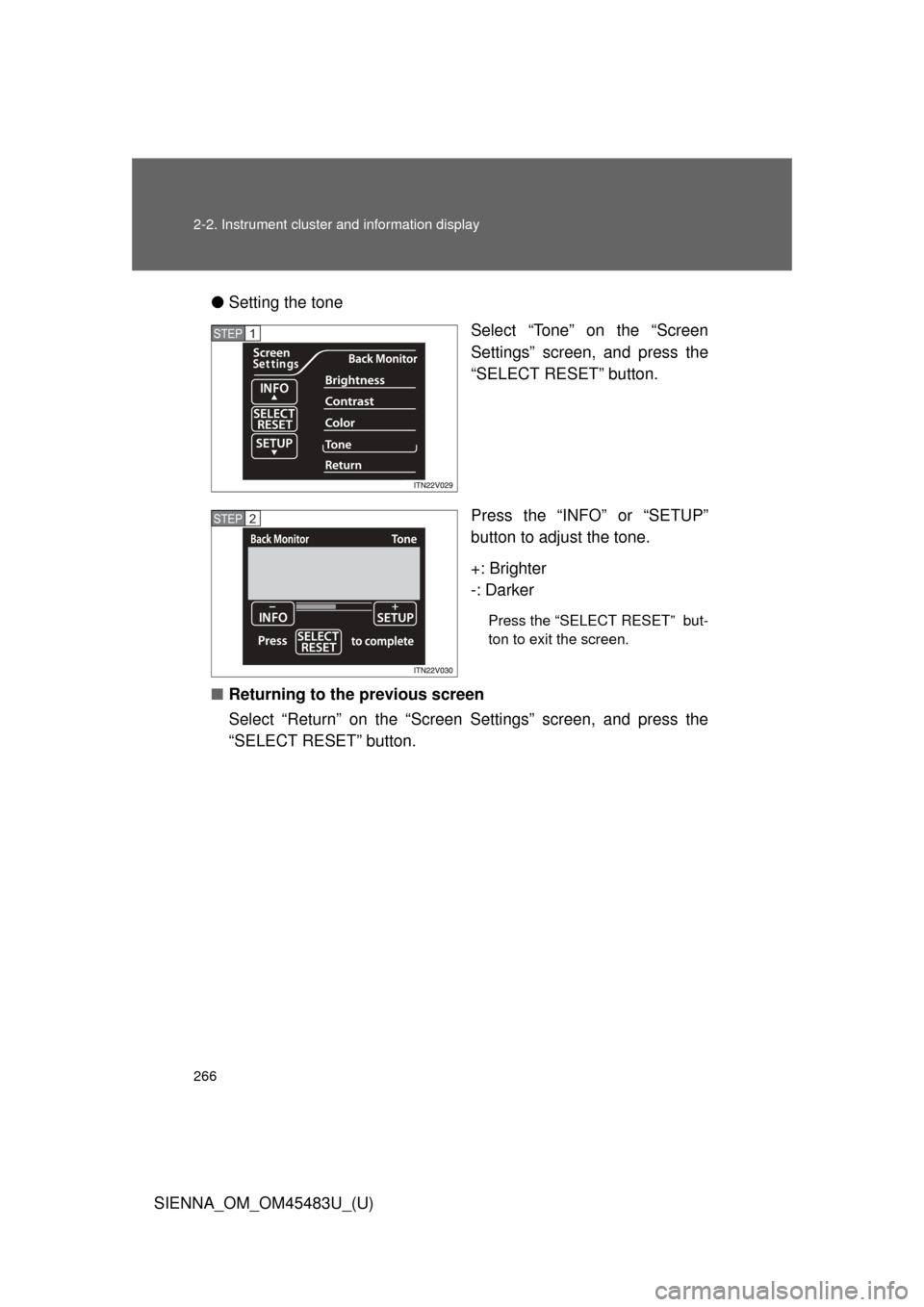
Setting the tone
Select “Tone” on the “Screen
Settings” screen, and press the
“SELECT RESET” button.
Press the “INFO” or “SETUP”
button to adjust the tone.
+: Brighter
-: Darker
Press the “SELECT RESET” but-
ton to exit the screen.
■ Returning to the previous screen
Select “Return” on the “Screen Settings” screen, and press the
“SELECT RESET” button.
STEP1
STEP2
Page 300 of 872
300 2-4. Using other driving systems
SIENNA_OM_OM45483U_(U)
■Cruise control can be set when
●The shift lever is in D or more than range 4 of S has been selected.
● Vehicle speed is above approximately 25 mph (40 km/h).
■ Accelerating after setting the vehicle speed
●The vehicle can be accelerated normally. After acceleration, the set
speed resumes.
● Even without canceling the cruise control, the set speed can be
increased by first accelerating the vehicle to the desired speed and then
pushing the lever down to set the new speed.
■ Automatic cruise control cancelation
Cruise control will stop maintaining the vehicle speed in any of the following
situations.
●Actual vehicle speed falls more than approximately 10 mph (16 km/h)
below the preset vehicle speed.
At this time, the memorized set speed is not retained.
● Actual vehicle speed is below approximately 25 mph (40 km/h).
● Enhanced VSC is activated.
■ If the cruise control indicator light flashes
Press the “ON-OFF” button once to deactivate the system, and then press
the button again to reactivate the system.
If the cruise control speed cannot be set or if the cruise control cancels
immediately after being activated, there may be a malfunction in the cruise
control system. Have the vehicle inspected by your Toyota dealer.
Page 429 of 872
429
3-2. Using the audio system
3
Interior features
SIENNA_OM_OM45483U_(U)
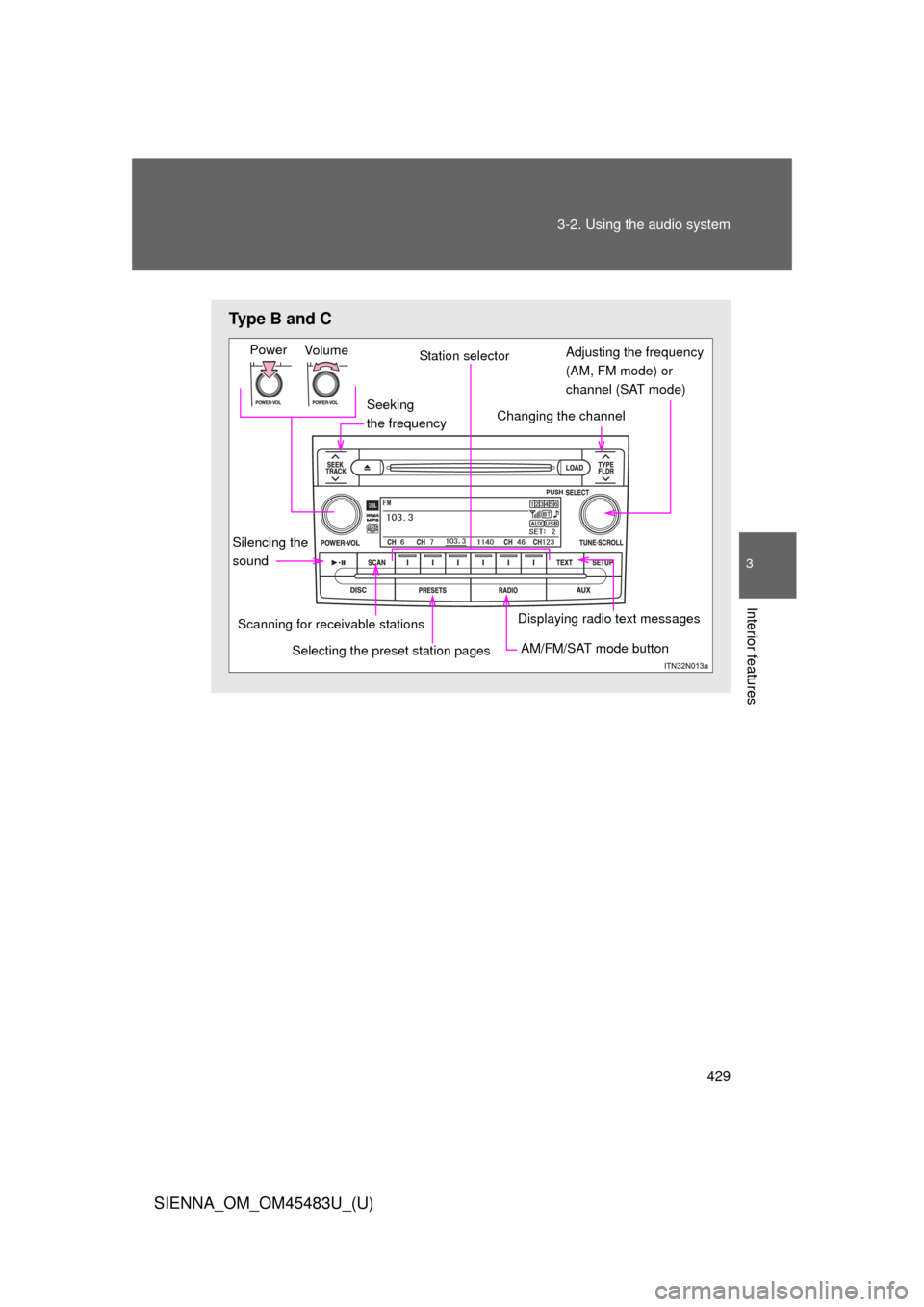
Type B and C
Seeking
the frequency
Vo lu m e
Power
Station selector
Changing the channel
AM/FM/SAT mode button
Scanning for receivable stations
Displaying radio text messages
Adjusting the frequency
(AM, FM mode) or
channel (SAT mode)
Selecting the preset station pages
Silencing the
sound
Page 430 of 872
430 3-2. Using the audio system
SIENNA_OM_OM45483U_(U)
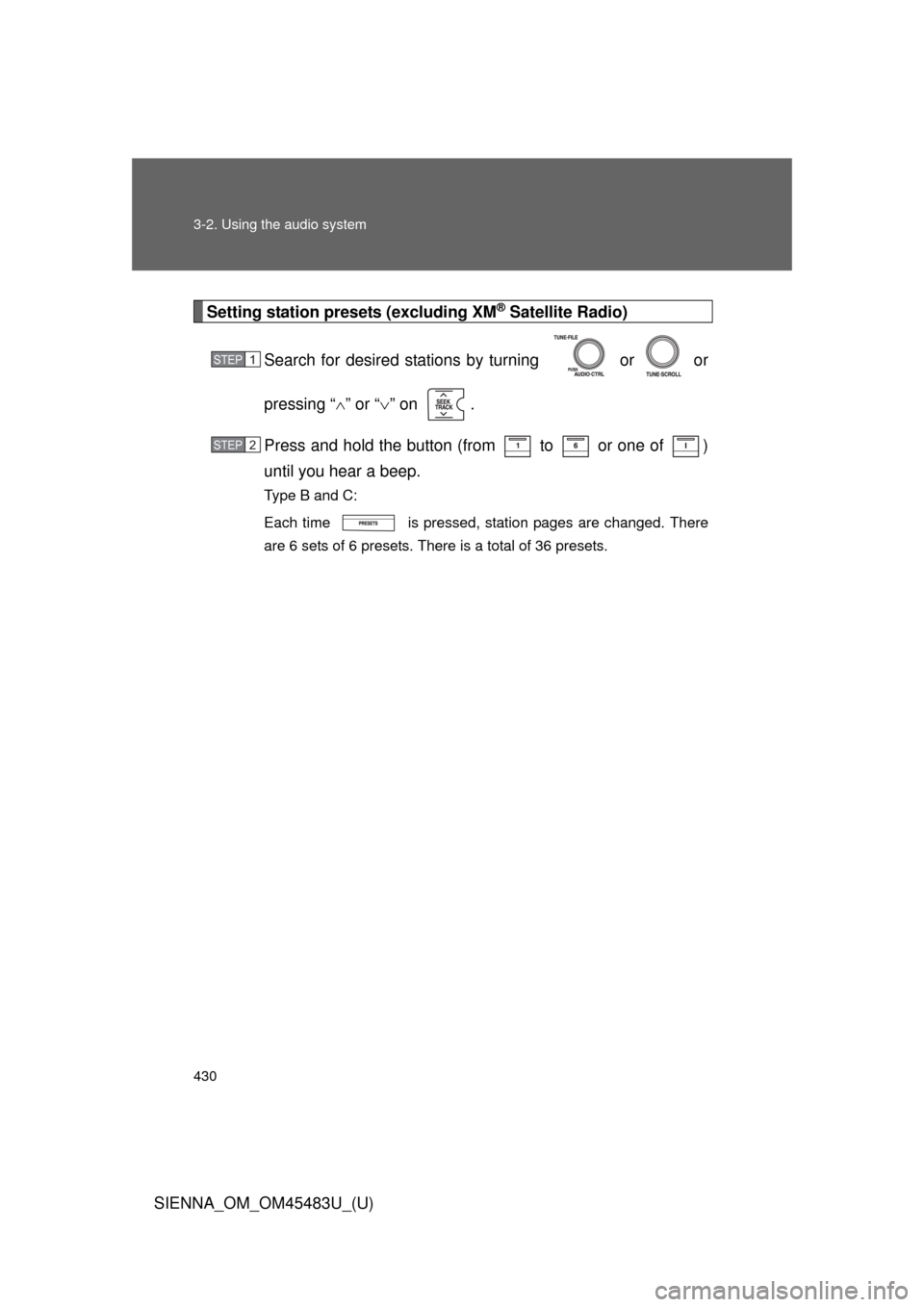
Setting station presets (excluding XM® Satellite Radio)
Search for desired stations by turning or or
pressing “ ” or “ ” on .
Press and hold the button (from to or one of )
until you hear a beep.
Type B and C:
Each time is pressed, station pages are changed. There
are 6 sets of 6 presets. There is a total of 36 presets.
STEP1
STEP2
Page 431 of 872
431
3-2. Using the audio system
3
Interior features
SIENNA_OM_OM45483U_(U)
Scanning radio stations (excluding XM® Satellite Radio)
■ Scanning the preset radio stations
Press and hold until you hear a beep.
Preset stations will be played for 5 seconds each.
When the desired station is reached, press once
again.
■ Scanning all radio stations within range
Press .
All stations with reception w ill be played for 5 seconds each.
When the desired station is reached, press once
again.
■ Displaying radio text messages (for type B and C, FM mode
only)
When a new radio text message is received, “MSG” is shown on
the display. To display the message, press .
If the text continues past the end of the display, “ ” is displayed.
Press and hold until you hear a beep.
Text messages are not displayed while driving.
STEP1
STEP2
STEP1
STEP2
Page 432 of 872
432 3-2. Using the audio system
SIENNA_OM_OM45483U_(U)
XM® Satellite Radio (if equipped)
■ Receiving XM
® Satellite Radio
Press or .
The display changes as follows each time the button is pressed.
Ty p e A
AM SAT1 SAT2 SAT3
Ty p e B a n d C
AM FM SAT
Turn or to select a desired channel in all the
categories or press “ ” or “” on to select the desired
channel in the current category.
■ Setting XM
® Satellite Radio channel presets
Select the desired channel. Press and hold a button (from to
or one of ) until you hear a beep.
Type B and C:
Each time is pressed, station pages are changed. There is a
total of 6 sets of 6 presets.
STEP1
STEP2