navigation TOYOTA SIENNA 2014 XL30 / 3.G Owners Manual
[x] Cancel search | Manufacturer: TOYOTA, Model Year: 2014, Model line: SIENNA, Model: TOYOTA SIENNA 2014 XL30 / 3.GPages: 872, PDF Size: 15.99 MB
Page 16 of 872
SIENNA_OM_OM45483U_(U)
16
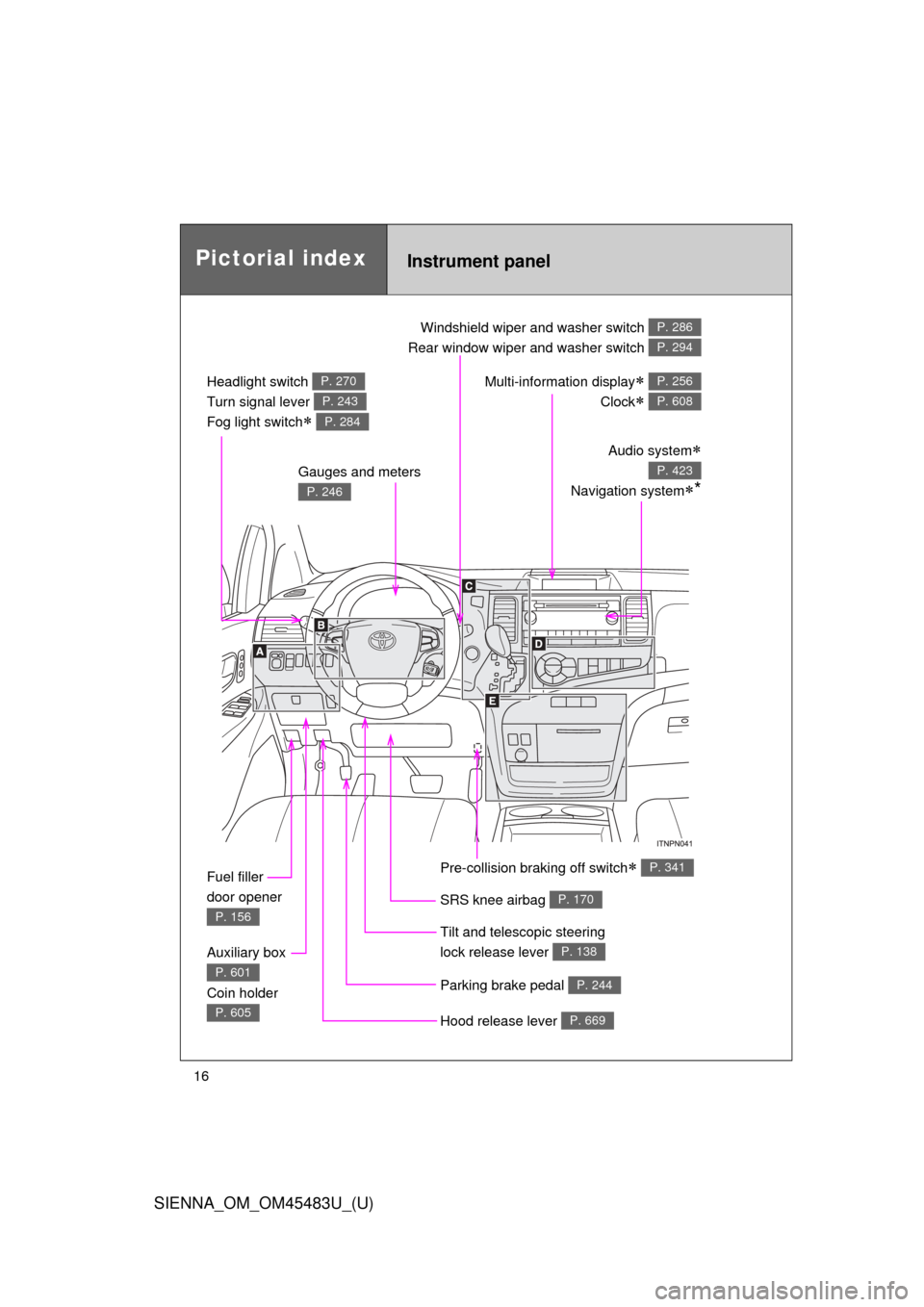
Pictorial indexInstrument panel
Headlight switch
Turn signal lever
Fog light switch
P. 270
P. 243
P. 284
Windshield wiper and washer switch
Rear window wiper and washer switch P. 286
P. 294
Gauges and meters
P. 246
Audio system
Navigation system*
P. 423
Multi-information display
Clock
P. 256
P. 608
Fuel filler
door opener
P. 156
Auxiliary box
Coin holder
P. 601
P. 605Hood release lever P. 669
Parking brake pedal P. 244
Tilt and telescopic steering
lock release lever
P. 138
SRS knee airbag P. 170
Pre-collision braking off switch P. 341
Page 17 of 872
SIENNA_OM_OM45483U_(U)
17
A
: If equipped
*: Refer to “NAVIGATION SYSTEM OWNER’S MANUAL”.
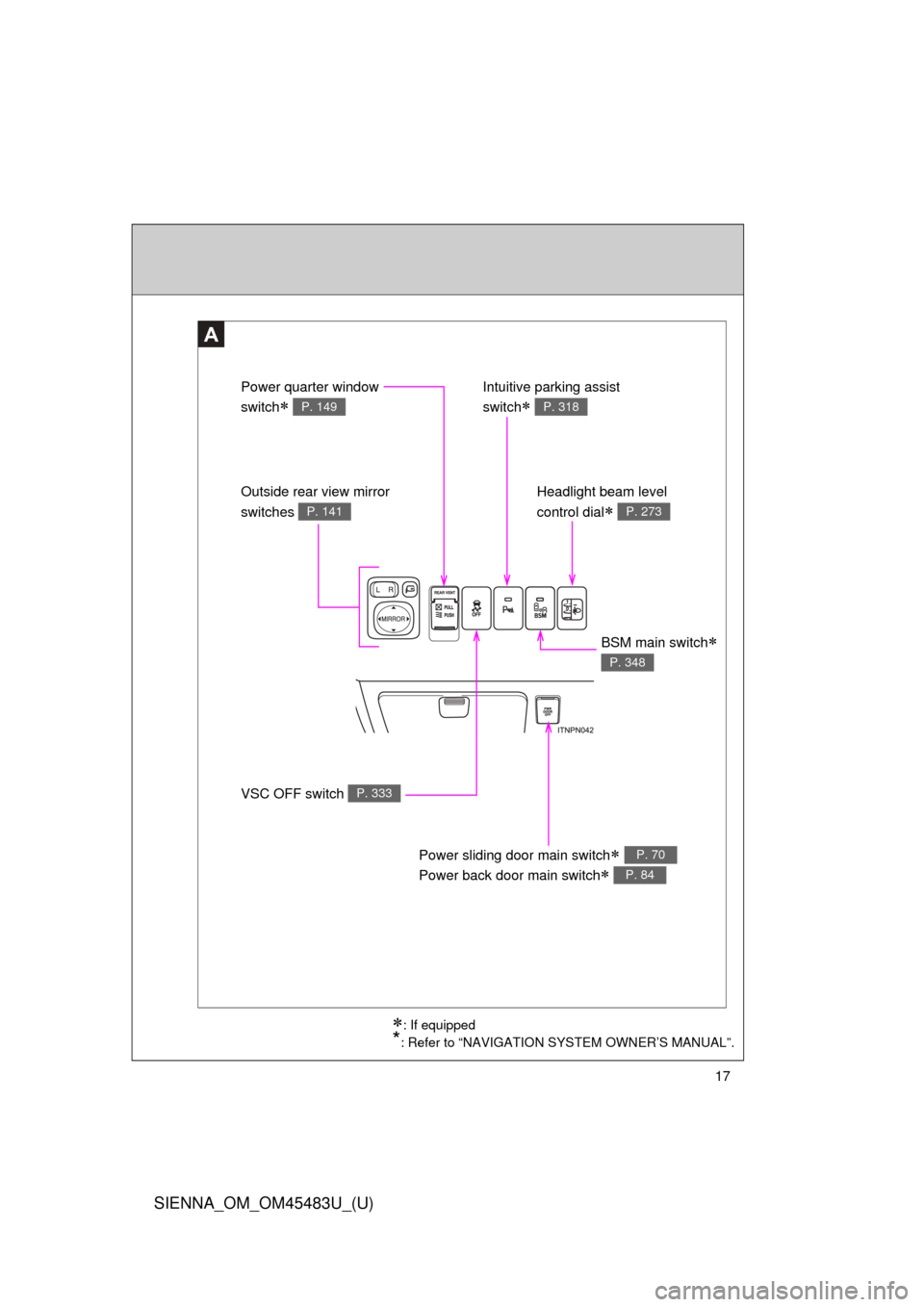
VSC OFF switch P. 333
Outside rear view mirror
switches
P. 141
Power quarter window
switch
P. 149
Intuitive parking assist
switch
P. 318
Headlight beam level
control dial
P. 273
Power sliding door main switch
Power back door main switch
P. 70
P. 84
BSM main switch
P. 348
Page 19 of 872
SIENNA_OM_OM45483U_(U)
19
C
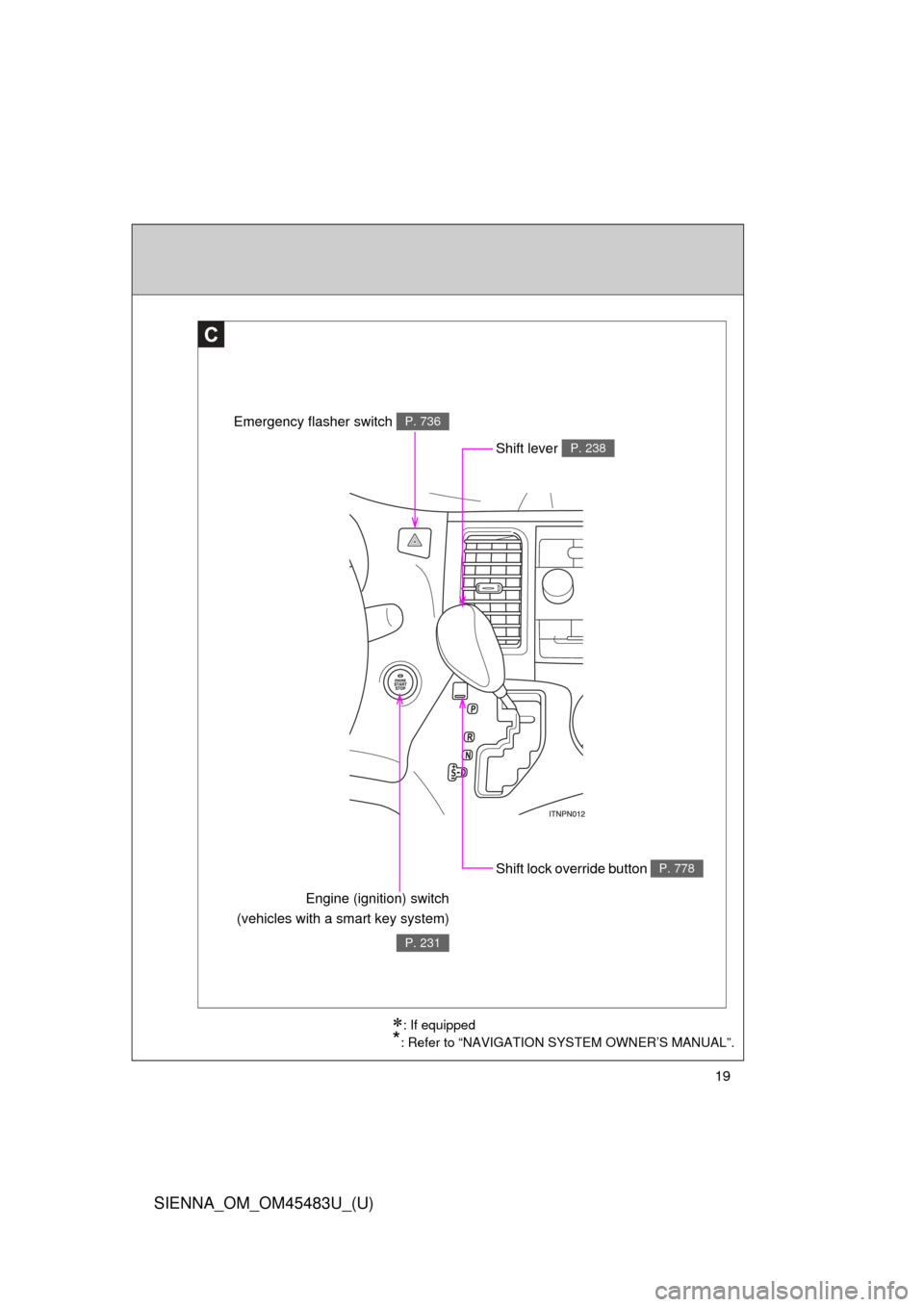
Shift lock override button P. 778
Engine (ignition) switch
(vehicles with a smart key system)
P. 231
Shift lever P. 238
Emergency flasher switch P. 736
: If equipped
*: Refer to “NAVIGATION SYSTEM OWNER’S MANUAL”.
Page 261 of 872
261
2-2. Instrument cluster and information display
2
When driving
SIENNA_OM_OM45483U_(U)
■
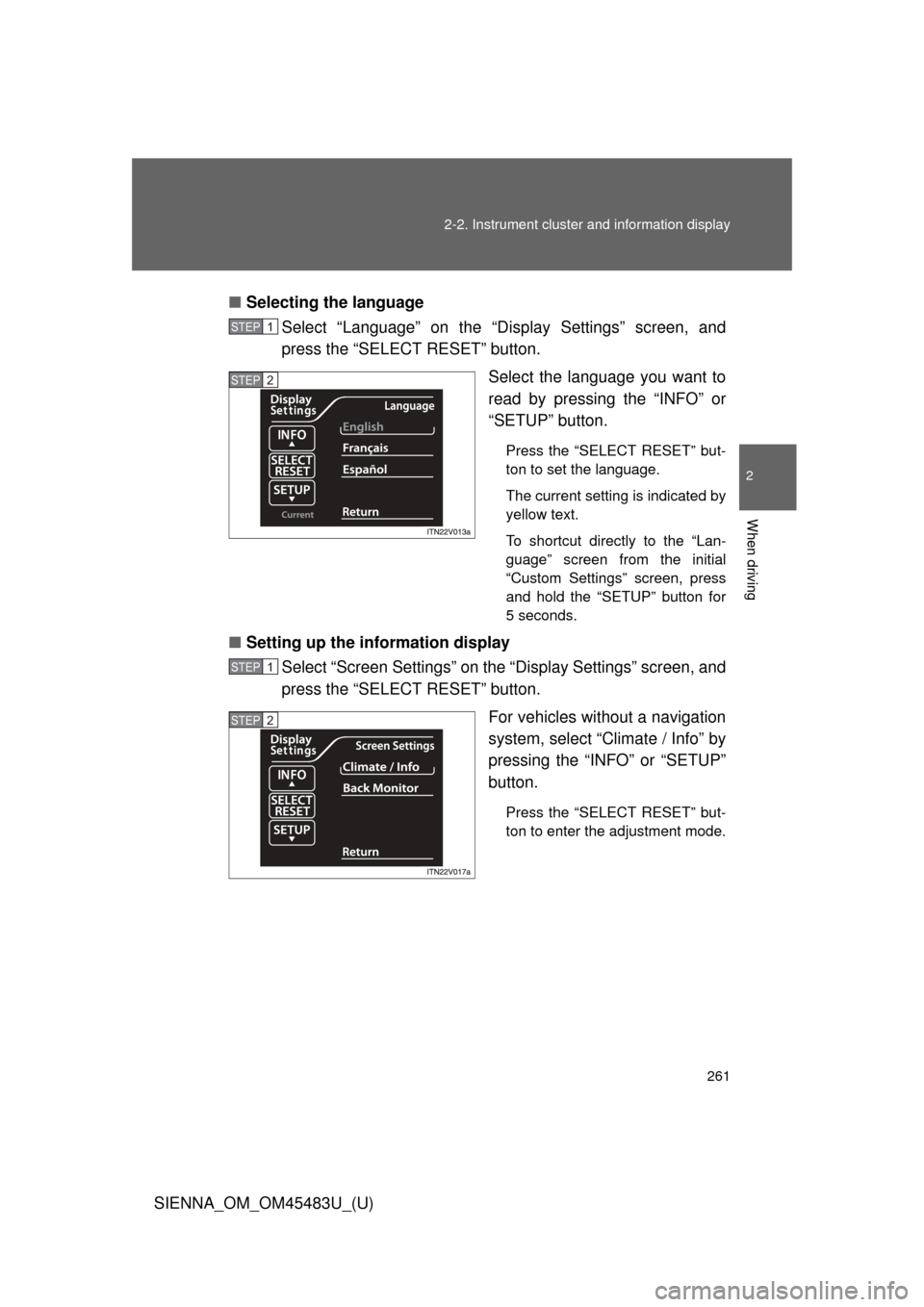
Selecting the language
Select “Language” on the “Display Settings” screen, and
press the “SELECT RESET” button.
Select the language you want to
read by pressing the “INFO” or
“SETUP” button.
Press the “SELECT RESET” but-
ton to set the language.
The current setting is indicated by
yellow text.
To shortcut directly to the “Lan-
guage” screen from the initial
“Custom Settings” screen, press
and hold the “SETUP” button for
5 seconds.
■Setting up the information display
Select “Screen Settings” on the “Display Settings” screen, and
press the “SELECT RESET” button.
For vehicles without a navigation
system, select “Climate / Info” by
pressing the “INFO” or “SETUP”
button.
Press the “SELECT RESET” but-
ton to enter the adjustment mode.
STEP1
STEP2
STEP1
STEP2
Page 319 of 872

319
2-4. Using other
driving systems
2
When driving
SIENNA_OM_OM45483U_(U)
Display
When the sensors detect an obstacle, a graphic is shown on the multi
information display or touch screen depending on the position and
distance to the obstacle.
Multi-information display
Touch screen (with navigation system)
*
*
: Depending on the type of navigation system.
Page 329 of 872
329
2-4. Using other
driving systems
2
When driving
SIENNA_OM_OM45483U_(U)
■Setting the rear view monitor system displays
Vehicles without navigation system:
P. 263
Vehicles with navigation system:
“NAVIGATION SYSTEM OWNER’S MANUAL”
CAUTION
■ When using the rear view monitor system
Observe the following precautions to avoid an accident that could result in
death or serious injuries:
●Never depend solely on the monitor system when reversing.
● Always check visually and with the mirrors to confirm your intended path is
clear.
● Depicted distances between objects and flat surfaces differ from actual
distances.
● Do not use the system if the back door is open.
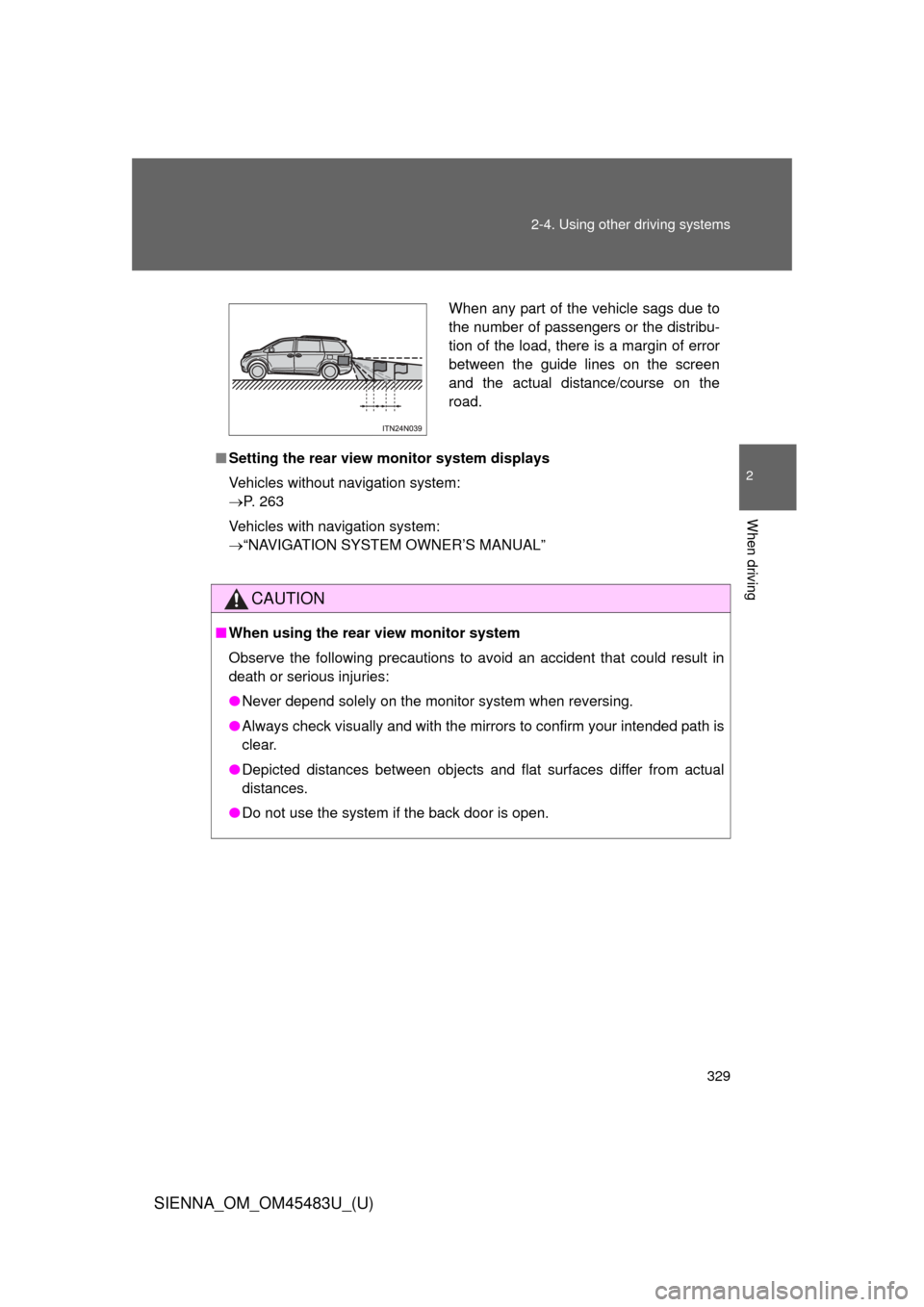
When any part of the vehicle sags due to
the number of passengers or the distribu-
tion of the load, there is a margin of error
between the guide lines on the screen
and the actual distance/course on the
road.
Page 423 of 872
423
3
Interior features
SIENNA_OM_OM45483U_(U)
3-2. Using the audio system
Audio system type
: If equipped
With navigation systemOwners of models equipped with a navigation system should
refer to the “NAVIGATION SYSTEM OWNER’S MANUAL”.
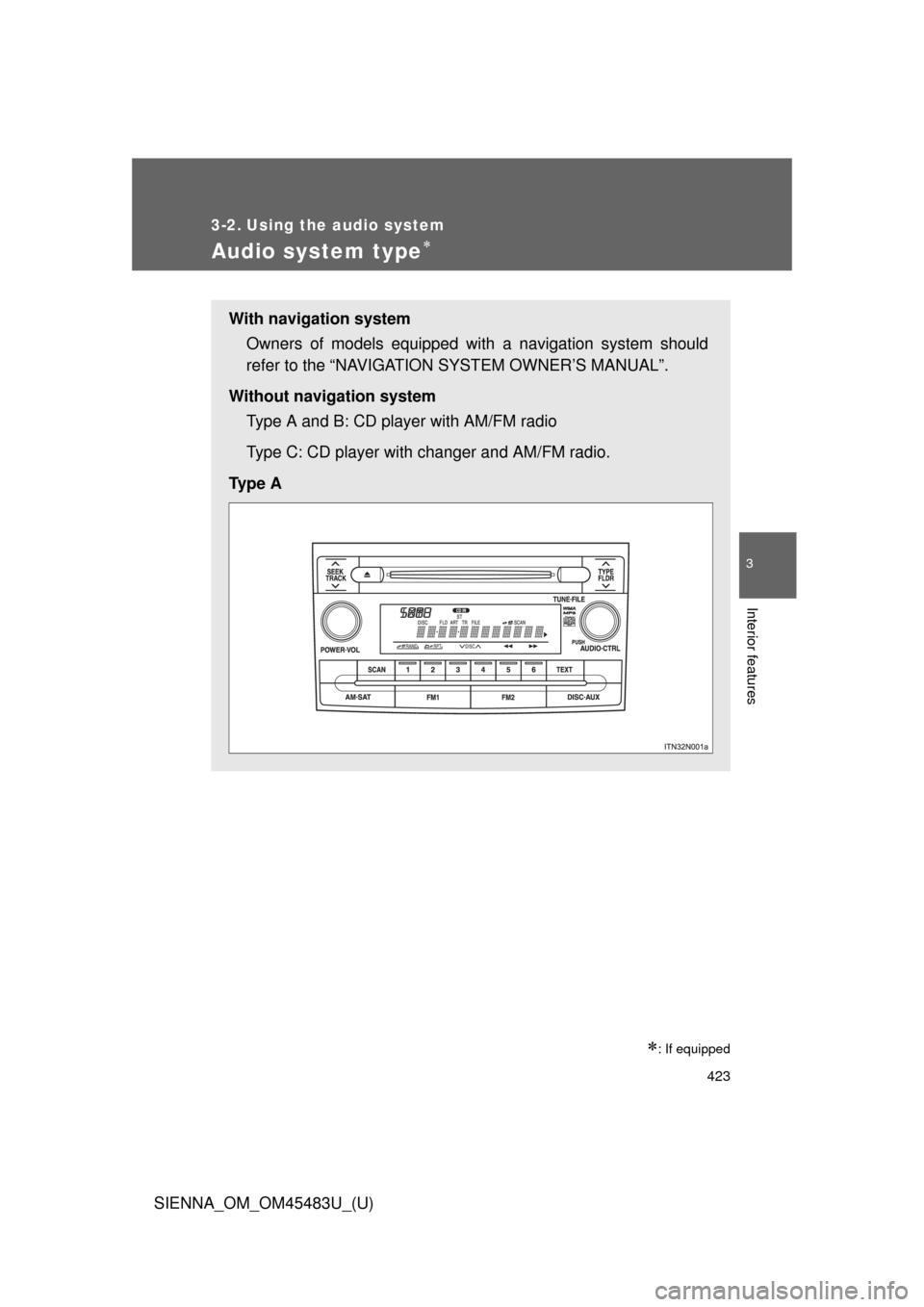
Without navigation system Type A and B: CD player with AM/FM radio
Type C: CD player with changer and AM/FM radio.
Ty p e A
Page 479 of 872
479
3-2. Using the audio system
3
Interior features
SIENNA_OM_OM45483U_(U)
Using the steering switches
: If equipped
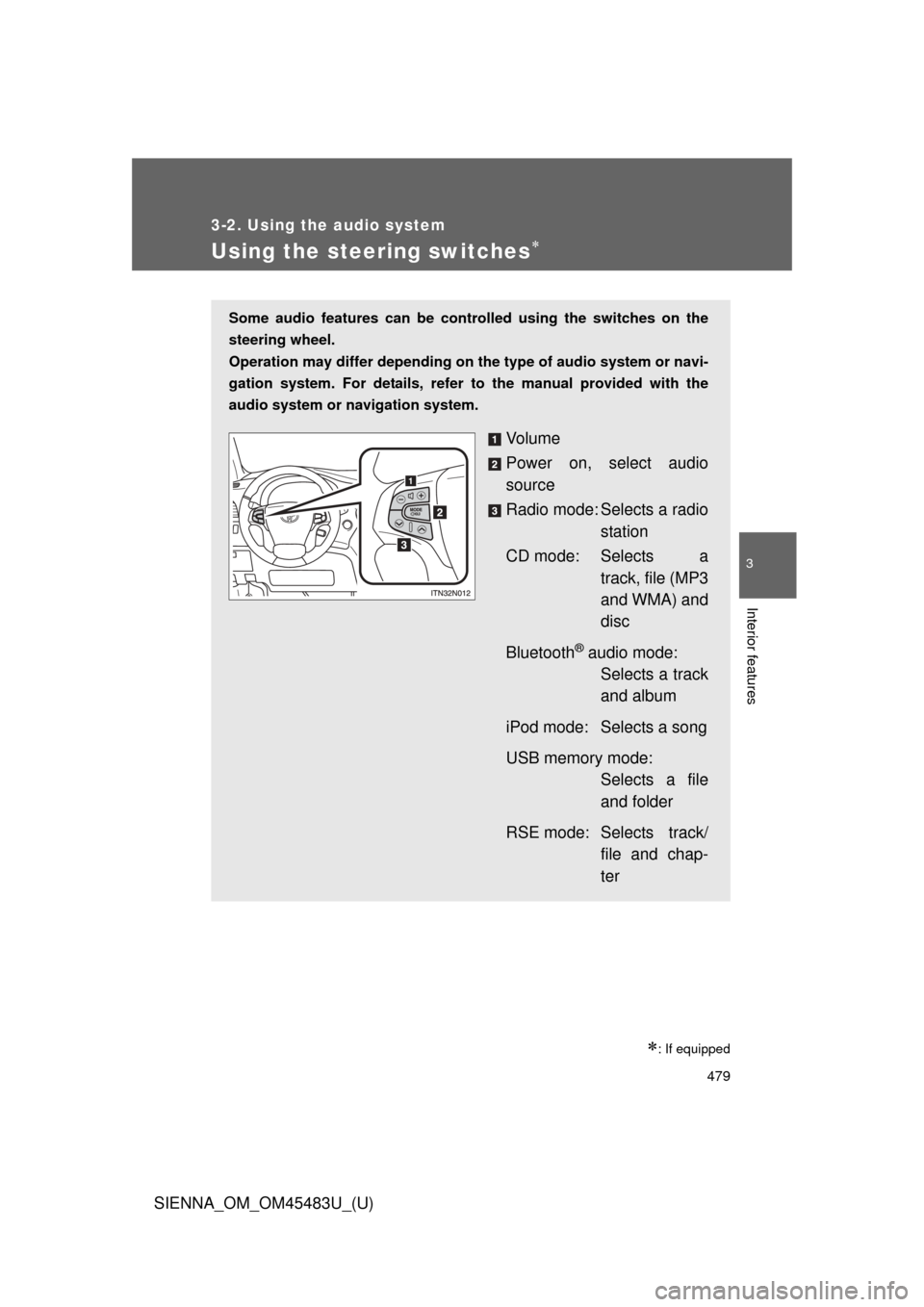
Some audio features can be controlled using the switches on the
steering wheel.
Operation may differ depending on the type of audio system or navi-
gation system. For details, refer to the manual provided with the
audio system or navigation system.
Vo l u m e
Power on, select audio
source
Radio mode: Selects a radio station
CD mode: Selects a track, file (MP3
and WMA) and
disc
Bluetooth
® audio mode: Selects a track
and album
iPod mode: Selects a song
USB memory mode: Selects a file
and folder
RSE mode: Selects track/ file and chap-
ter
Page 486 of 872
486
SIENNA_OM_OM45483U_(U)
3-3. Using the Bluetooth® audio system
Bluetooth® audio system
: If equipped
The Bluetooth® audio system enables you to enjoy music played on
a portable digital audio player (portable player) from the vehicle
speakers via wireless communication.
This audio system supports Bluetooth
®, a wireless data system
capable of playing portable audio music without cables. If your por-
table player does not support Bluetooth
®, the Bluetooth® audio sys-
tem will not function.
Vehicles with a navigation system
Owners of models equipped with a navigation system should
refer to the “NAVIGATION SYSTEM OWNER’S MANUAL”.
Vehicles without a navigation system
TitlePage
Using the Bluetooth® audio systemP. 490
Operating a Bluetooth® enabled portable playerP. 496
Setting up a Bluetooth® enabled portable playerP. 498
Bluetooth® audio system setupP. 503
Page 505 of 872
505
3-4. Using the rear audio system
3
Interior features
SIENNA_OM_OM45483U_(U)
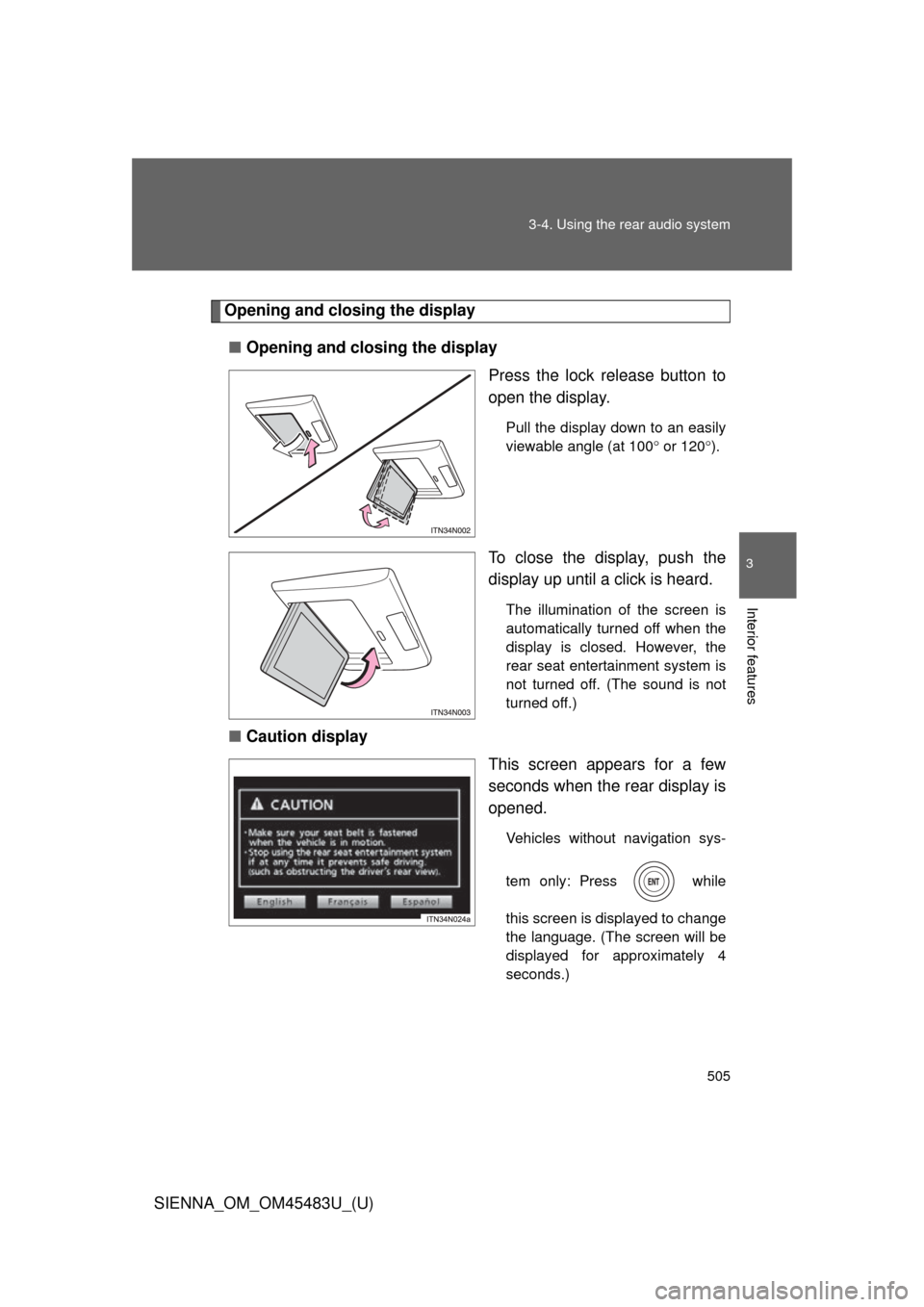
Opening and closing the display
■ Opening and closing the display
Press the lock release button to
open the display.
Pull the display down to an easily
viewable angle (at 100 or 120 ).
To close the display, push the
display up until a click is heard.
The illumination of the screen is
automatically turned off when the
display is closed. However, the
rear seat entertainment system is
not turned off. (The sound is not
turned off.)
■ Caution display
This screen appears for a few
seconds when the rear display is
opened.
Vehicles without navigation sys-
tem only: Press while
this screen is displayed to change
the language. (The screen will be
displayed for approximately 4
seconds.)