ad blue TOYOTA SIENNA 2015 XL30 / 3.G Owners Manual
[x] Cancel search | Manufacturer: TOYOTA, Model Year: 2015, Model line: SIENNA, Model: TOYOTA SIENNA 2015 XL30 / 3.GPages: 664, PDF Size: 12.66 MB
Page 4 of 664

TABLE OF CONTENTS4
SIENNA_OM_01999-08001_(U)5-1. Basic Operations
Audio system types ........... 316
Audio system..................... 317
Steering wheel audio switches .......................... 320
AUX Port/USB Port ........... 322
Basic audio operations ...... 323
5-2. Setup Setup menu ....................... 325
General settings ................ 326
Audio settings.................... 328
Display settings ................. 329
Voice settings .................... 330
5-3. Using the Multimedia system
Selecting the audio source ............................. 331
List screen operation ......... 332
Optimal use of the audio system............................. 334
5-4. Using the radio Radio operation ................. 335 5-5. Playing an audio CD and
MP3/WMA/AAC discs
CD player operation........... 337
5-6. Using an external device Listening to an iPod ........... 343
Listening to a USB memory device........ 347
Using the AUX port ............ 352
5-7. Connecting Bluetooth
®
Preparations to use wireless
communication ................ 353
Registering a Bluetooth
®
audio player for the
first time ........................... 356
Registering a Bluetooth
®
phone for the
first time ........................... 357
Registering a Bluetooth
®
device .............................. 358
Connecting a Bluetooth
®
device .............................. 360
Displaying a Bluetooth
®
device details................... 362
Detailed Bluetooth
®
system settings................ 363
5Audio system
Page 5 of 664
5
1
9 8
7
6 4 3
2
SIENNA_OM_01999-08001_(U)
10
5
5-8. Bluetooth® Audio
Listening to Bluetooth®
Audio ............................... 364
5-9. Bluetooth
® phone
Using a Bluetooth®
Phone.............................. 366
Making a call ..................... 368
Receiving a call ................. 371
Speaking on the phone ..... 372
Bluetooth
® phone
message function ............ 375
Using the steering wheel switches ................ 379
Bluetooth
® phone
settings............................ 380
Contact/Call History Settings ........................... 381
What to do if... (Troubleshooting) ............ 390
5-10. Bluetooth
®
Bluetooth®......................... 394
5-11. Using the voice command system
Voice command system .... 400 6-1. Using the air conditioning
system and defogger
Front automatic air conditioning system ......... 404
Rear automatic air conditioning system ......... 413
Heated steering wheel/seat heaters .......... 416
• Heated steering wheel ............................. 417
• Seat heaters .................. 418
6-2. Using the interior lights Interior lights list................. 419• Personal/interior light
main switch ................... 420
• Personal/interior lights .............................. 420
• Rear ceiling lights .......... 421
6-3. Using the storage features List of storage features ...... 422• Glove boxes .................. 423
• Console box .................. 424
• Cup holders ................... 426
• Bottle holders ................ 428
• Door pockets ................. 429
• Auxiliary boxes .............. 430
Luggage compartment features ........................... 433
6Interior features
Page 282 of 664
282
SIENNA_OM_01999-08001_(U)
4-5. Using the driving support systems
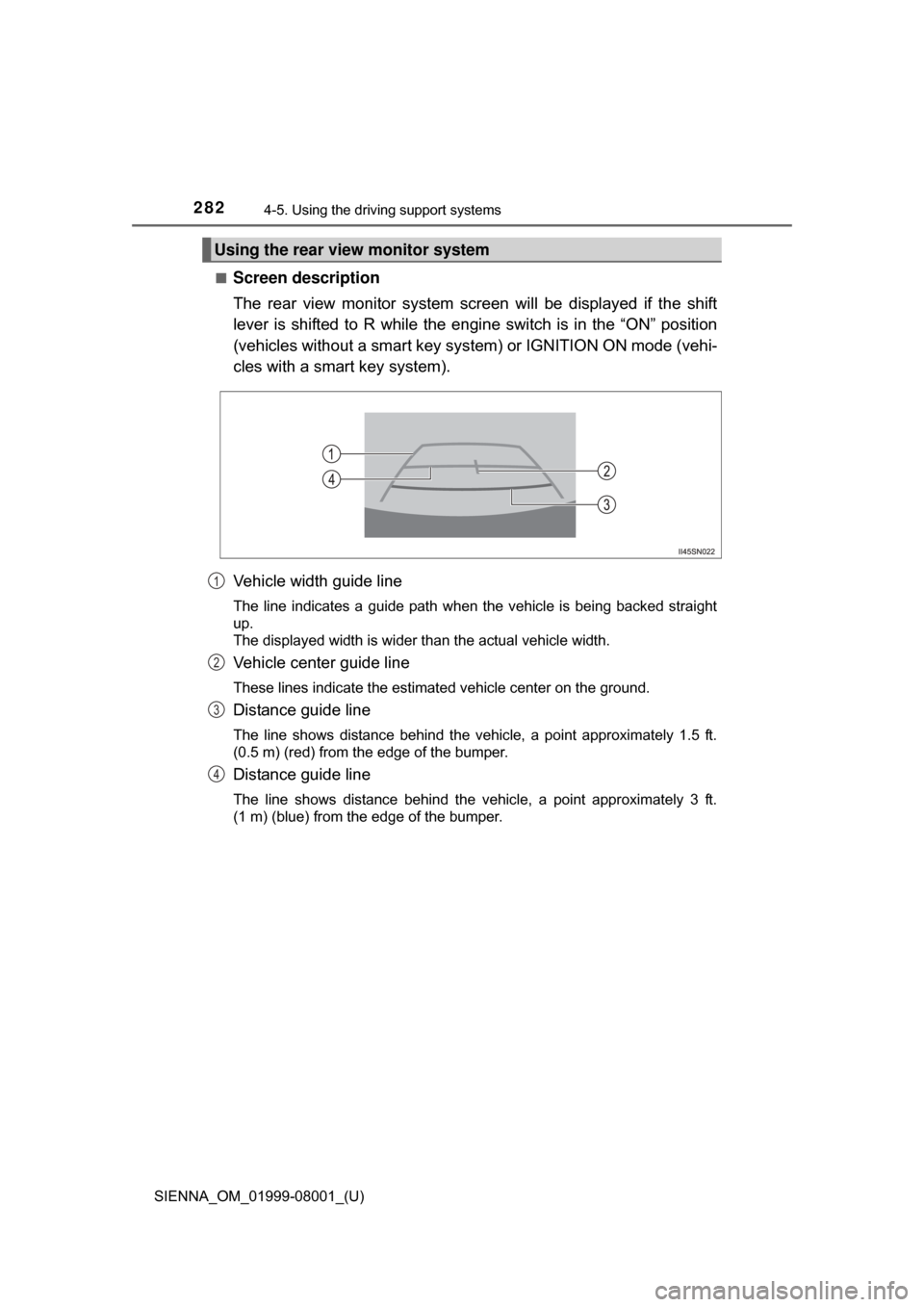
■Screen description
The rear view monitor system screen will be displayed if the shift
lever is shifted to R while the engi ne switch is in the “ON” position
(vehicles without a smart key syst em) or IGNITION ON mode (vehi-
cles with a smart key system).
Vehicle width guide line
The line indicates a guide path when the vehicle is being backed straight
up.
The displayed width is wider than the actual vehicle width.
Vehicle center guide line
These lines indicate the estimated vehicle center on the ground.
Distance guide line
The line shows distance behind the vehicle, a point approximately 1.5 ft.
(0.5 m) (red) from the edge of the bumper.
Distance guide line
The line shows distance behind the vehicle, a point approximately 3 ft.
(1 m) (blue) from the edge of the bumper.
Using the rear view monitor system
1
2
3
4
Page 315 of 664

315
SIENNA_OM_01999-08001_(U)
5Audio system
5-5. Playing an audio CD and MP3/WMA/AAC discs
CD player operation .......... 337
5-6. Using an external device Listening to an iPod .......... 343
Listening to a USB memory device ....... 347
Using the AUX port ........... 352
5-7. Connecting Bluetooth
®
Preparations to use wireless
communication ................ 353
Registering a Bluetooth
®
audio player for the
first time .......................... 356
Registering a Bluetooth
®
phone for the
first time .......................... 357
Registering a Bluetooth
®
device.............................. 358
Connecting a Bluetooth
®
device.............................. 360
Displaying a Bluetooth
®
device details .................. 362
Detailed Bluetooth
®
system settings ............... 363 5-8. Bluetooth
® Audio
Listening to Bluetooth®
Audio............................... 364
5-9. Bluetooth
® phone
Using a Bluetooth®
Phone ............................. 366
Making a call ..................... 368
Receiving a call ................. 371
Speaking on the phone ..... 372
Bluetooth
® phone
message function ............ 375
Using the steering wheel switches ................ 379
Bluetooth
® phone
settings ........................... 380
Contact/Call History Settings ........................... 381
What to do if... (Troubleshooting) ............ 390
5-10. Bluetooth
®
Bluetooth®......................... 394
5-11. Using the voice command system
Voice command system .... 400
Page 317 of 664
317
SIENNA_OM_01999-08001_(U)
5-1. Basic Operations
5
Audio system
Audio system
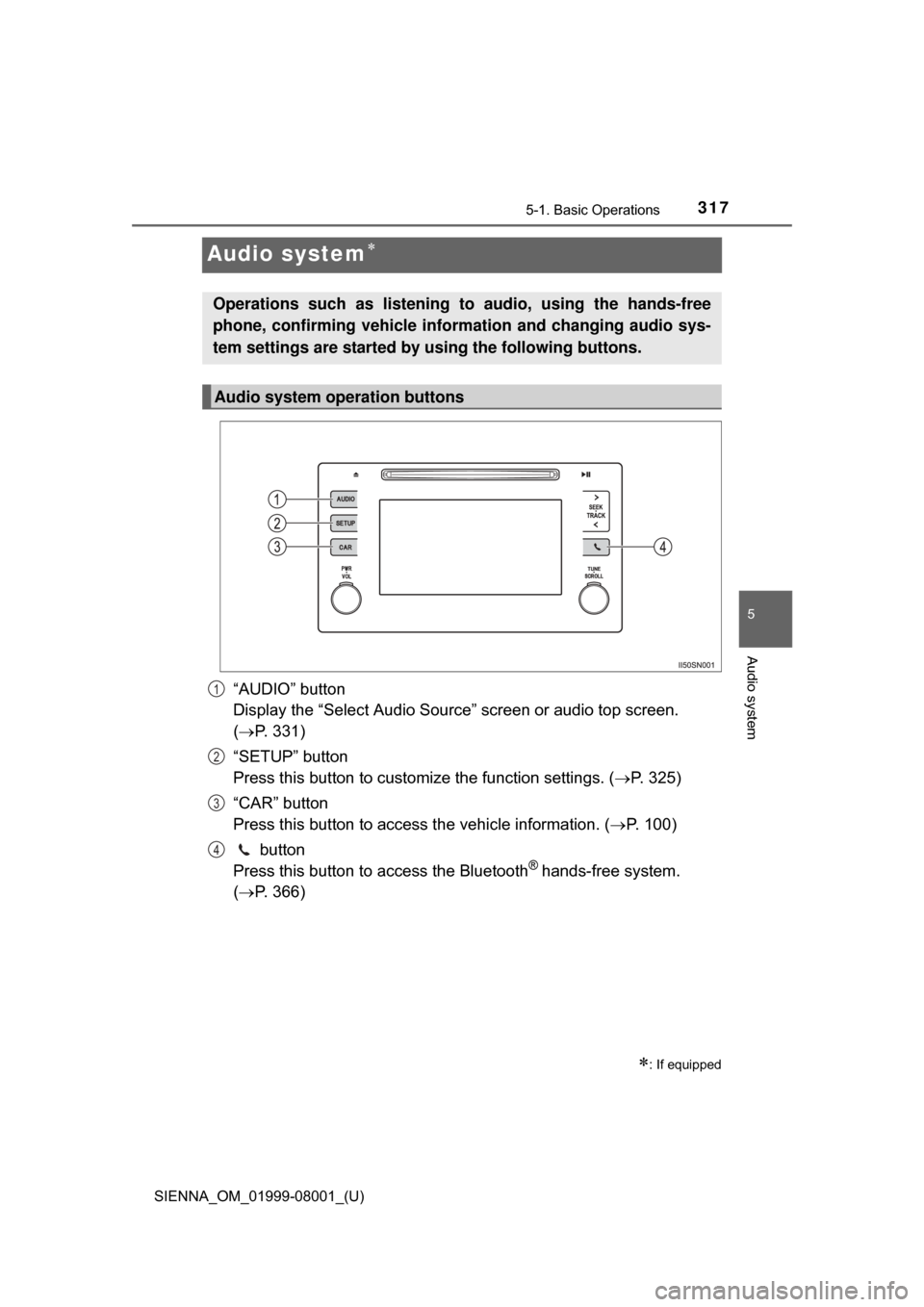
“AUDIO” button
Display the “Select Audio Source” screen or audio top screen.
( P. 331)
“SETUP” button
Press this button to customize the function settings. ( P. 325)
“CAR” button
Press this button to access the vehicle information. ( P. 100)
button
Press this button to access the Bluetooth
® hands-free system.
( P. 366)
: If equipped
Operations such as listening to audio, using the hands-free
phone, confirming vehicle inform ation and changing audio sys-
tem settings are started by using the following buttons.
Audio system operation buttons
1
2
3
4
Page 325 of 664
325
SIENNA_OM_01999-08001_(U)
5-2. Setup
5
Audio system
Setup menu
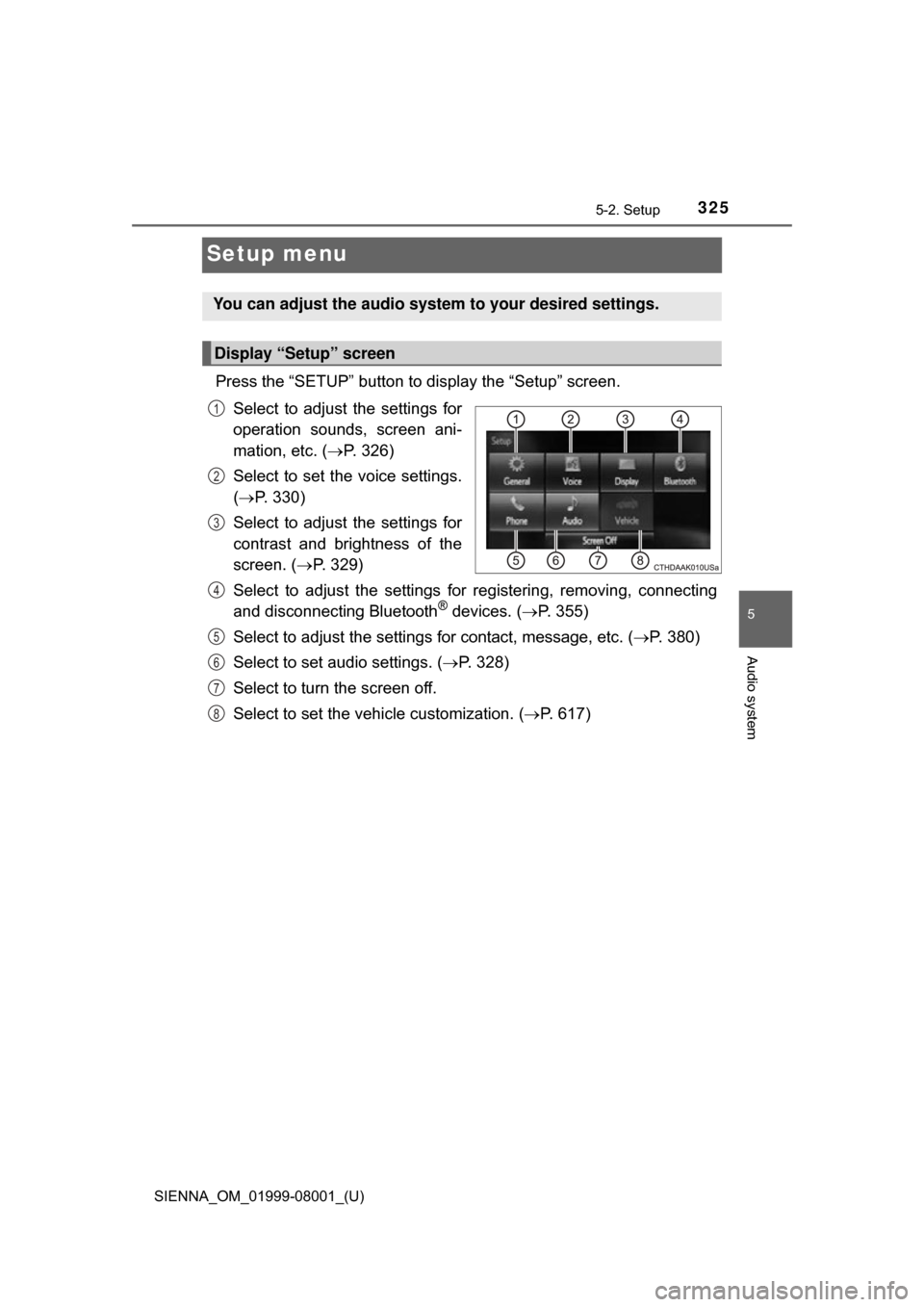
Press the “SETUP” button to display the “Setup” screen.Select to adjust the settings for
operation sounds, screen ani-
mation, etc. ( P. 326)
Select to set the voice settings.
( P. 330)
Select to adjust the settings for
contrast and brightness of the
screen. ( P. 329)
Select to adjust the settings for registering, removing, connecting
and disconnecting Bluetooth
® devices. ( P. 355)
Select to adjust the settings for contact, message, etc. (P. 380)
Select to set audio settings. ( P. 328)
Select to turn the screen off.
Select to set the vehicle customization. ( P. 617)
You can adjust the audio system to your desired settings.
Display “Setup” screen
1
2
3
4
5
6
7
8
Page 333 of 664
SIENNA_OM_01999-08001_(U)
3335-3. Using the Multimedia system
5
Audio system
■Selecting a track/file/song
Press the “” or “” button on “SEEK•TRACK” or turn the
“TUNE•SCROLL” knob to select the desired track/file/song number.
To fast-forward or reverse, press and hold the “ ” or “” button on
“SEEK•TRACK”.
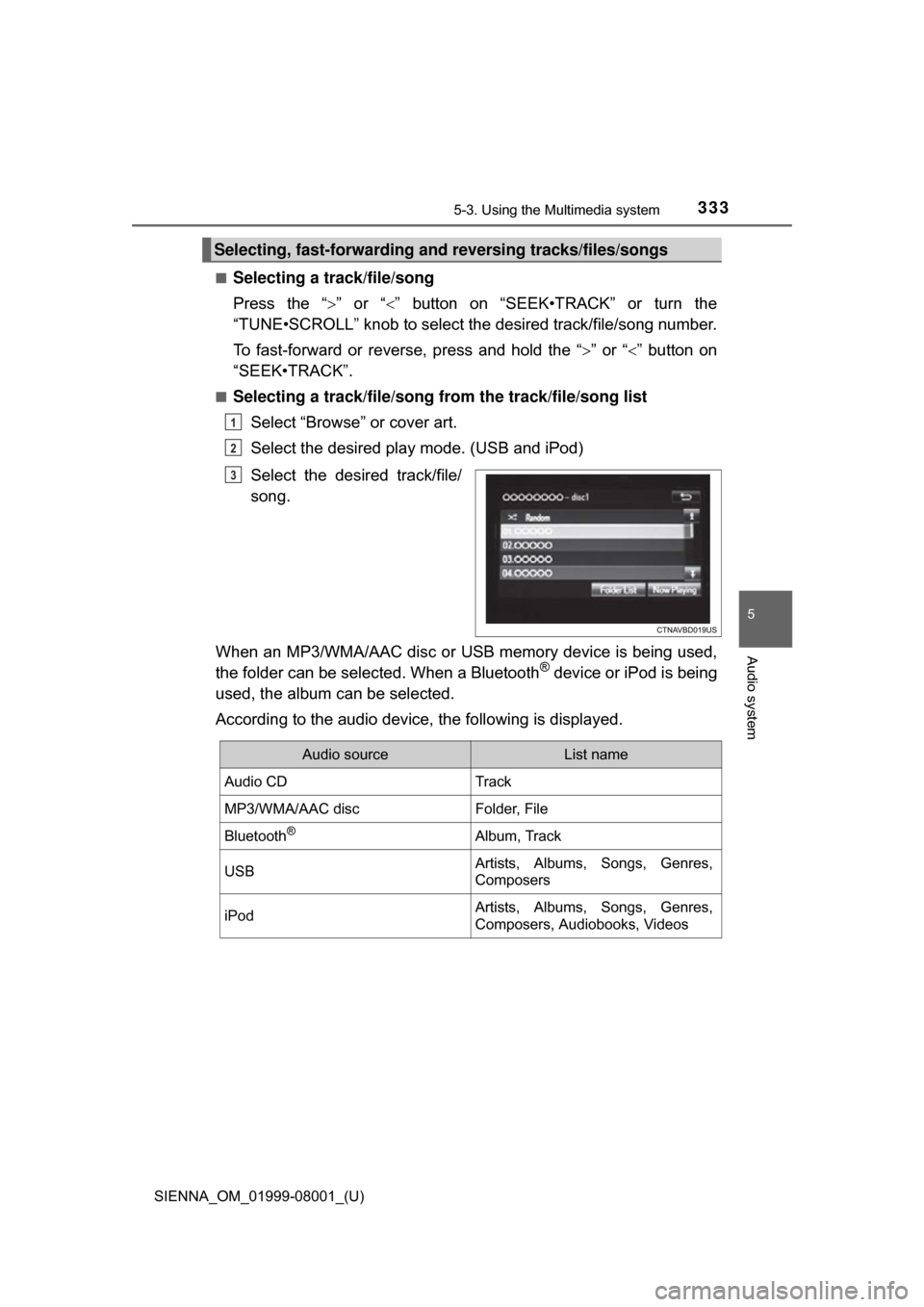
■Selecting a track/file/song from the track/file/song list
Select “Browse” or cover art.
Select the desired play mode. (USB and iPod)
Select the desired track/file/
song.
When an MP3/WMA/AAC disc or USB memory device is being used,
the folder can be selected. When a Bluetooth
® device or iPod is being
used, the album can be selected.
According to the audio device, the following is displayed.
Selecting, fast-forwarding a nd reversing tracks/files/songs
1
2
3
Audio sourceList name
Audio CDTrack
MP3/WMA/AAC discFolder, File
Bluetooth®Album, Track
USBArtists, Albums, Songs, Genres,
Composers
iPodArtists, Albums, Songs, Genres,
Composers, Audiobooks, Videos
Page 353 of 664
353
SIENNA_OM_01999-08001_(U)
5-7. Connecting Bluetooth®
5
Audio system
Preparations to use wireless communication
The following can be performed using Bluetooth® wireless com-
munication:
■A portable audio player can be operated and listened to via
audio system
■Hands-free phone calls can be made via a cellular phone
In order to use wireless communication, register and connect a
Bluetooth
® device by performing the following procedures.
Page 354 of 664

3545-7. Connecting Bluetooth®
SIENNA_OM_01999-08001_(U)
Device registration/connection flow
1. Register the Bluetooth® device to be used with audio sys-
tem ( P. 356, 357, 358)
2. Connect the Bluetooth® device to be used
( P. 360)
To be used for audio To be used for hands-free
phone
3. Start Bluetooth® connec-
tion ( P. 360)3. Start Bluetooth® connec-
tion ( P. 360)
4. Check connection status
( P. 364)4. Check connection status
( P. 367)
5. Use Bluetooth® audio
( P. 364)5. Use Bluetooth® phone
( P. 368)
Page 355 of 664
SIENNA_OM_01999-08001_(U)
3555-7. Connecting Bluetooth®
5
Audio system
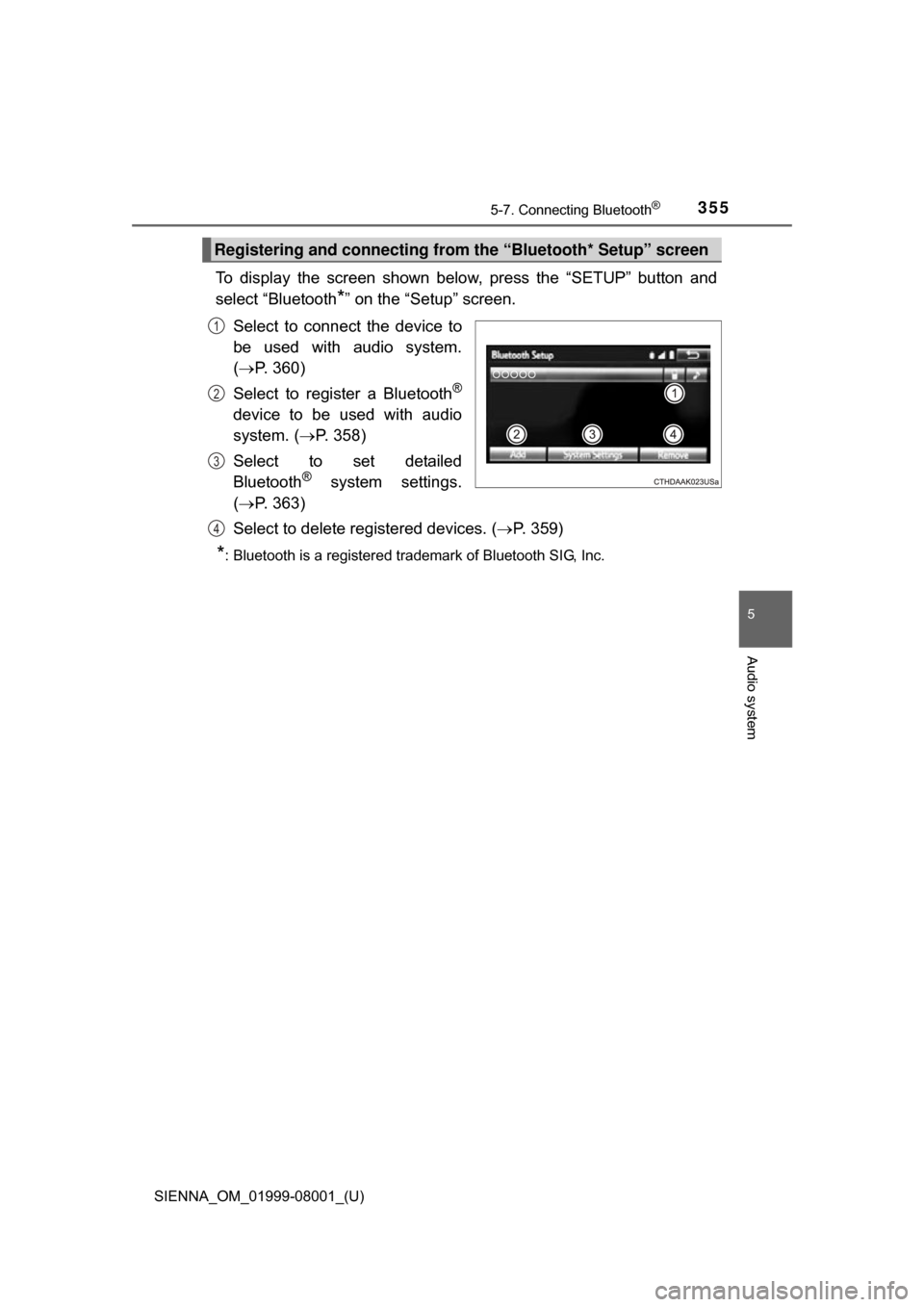
To display the screen shown below, press the “SETUP” button and
select “Bluetooth
*” on the “Setup” screen.
Select to connect the device to
be used with audio system.
( P. 360)
Select to register a Bluetooth
®
device to be used with audio
system. ( P. 358)
Select to set detailed
Bluetooth
® system settings.
( P. 363)
Select to delete registered devices. ( P. 359)
*: Bluetooth is a registered trademark of Bluetooth SIG, Inc.
Registering and connecting from the “Bluetooth* Setup” screen
1
2
3
4