remote control TOYOTA SIENNA 2016 XL30 / 3.G User Guide
[x] Cancel search | Manufacturer: TOYOTA, Model Year: 2016, Model line: SIENNA, Model: TOYOTA SIENNA 2016 XL30 / 3.GPages: 668, PDF Size: 16.35 MB
Page 113 of 668
SIENNA_OM_OM08013U_(U)
1133-2. Opening, closing and locking the doors
3
Operation of each component
■Operation signals
A buzzer sounds and the emergency flashers flash to indicate that the doors
have been locked/unlocked. (Locked: Once; Unlocked: Twice)
■ Security feature
If a door is not opened within approximately 60 seconds after the vehicle is
unlocked, the security feature automatically locks the vehicle again.
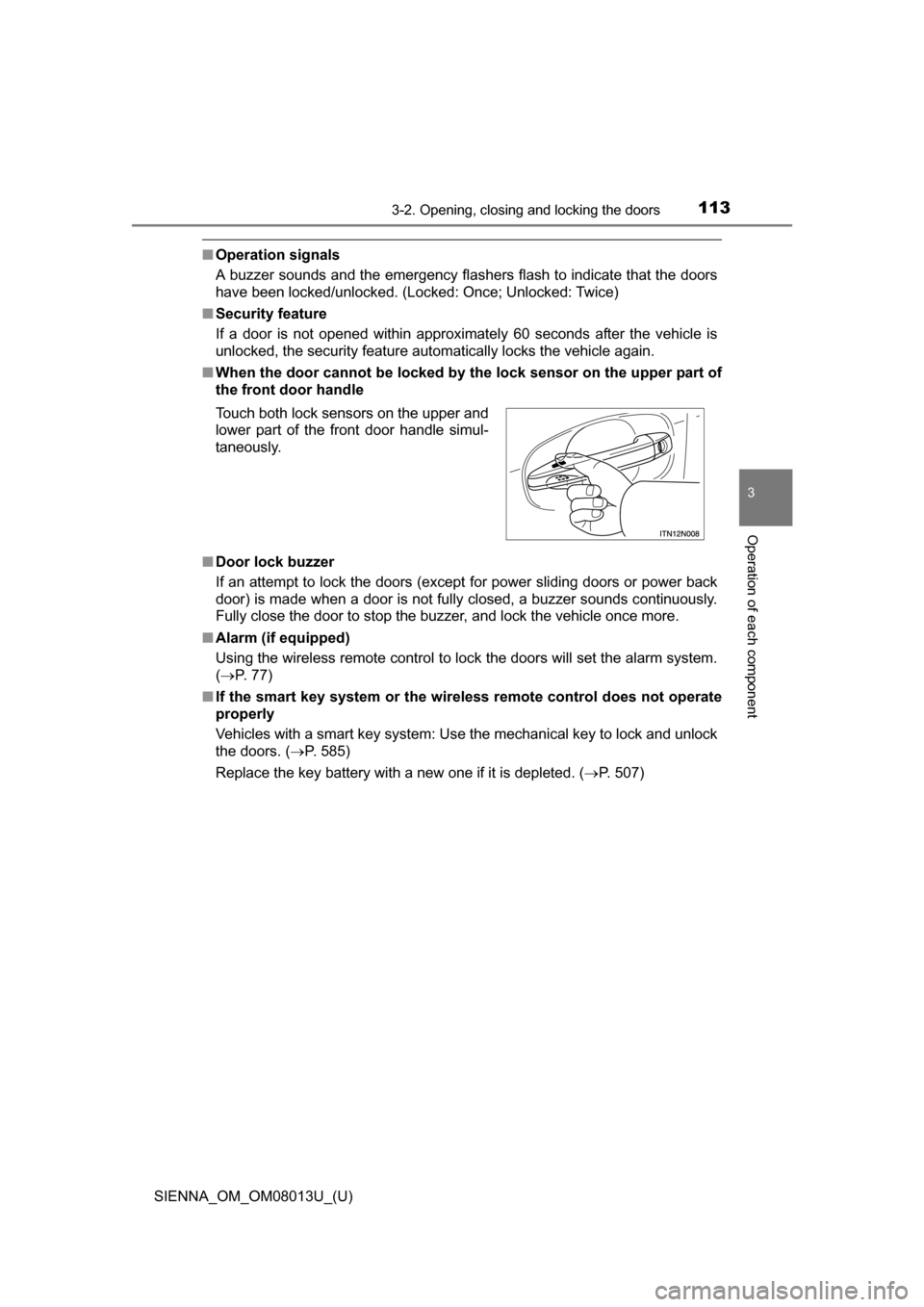
■ When the door cannot be locked by the lock sensor on the upper part of
the front door handle
■ Door lock buzzer
If an attempt to lock the doors (except for power sliding doors or power back
door) is made when a door is not fully closed, a buzzer sounds continuously.
Fully close the door to stop the buzzer, and lock the vehicle once more.
■ Alarm (if equipped)
Using the wireless remote control to lock the doors will set the alarm system.
( P. 77)
■ If the smart key system or the wireless remote control does not operate
properly
Vehicles with a smart key system: Use the mechanical key to lock and unlock
the doors. ( P. 585)
Replace the key battery with a new one if it is depleted. ( P. 507)
Touch both lock sensors on the upper and
lower part of the front door handle simul-
taneously.
Page 117 of 668
SIENNA_OM_OM08013U_(U)
1173-2. Opening, closing and locking the doors
3
Operation of each component
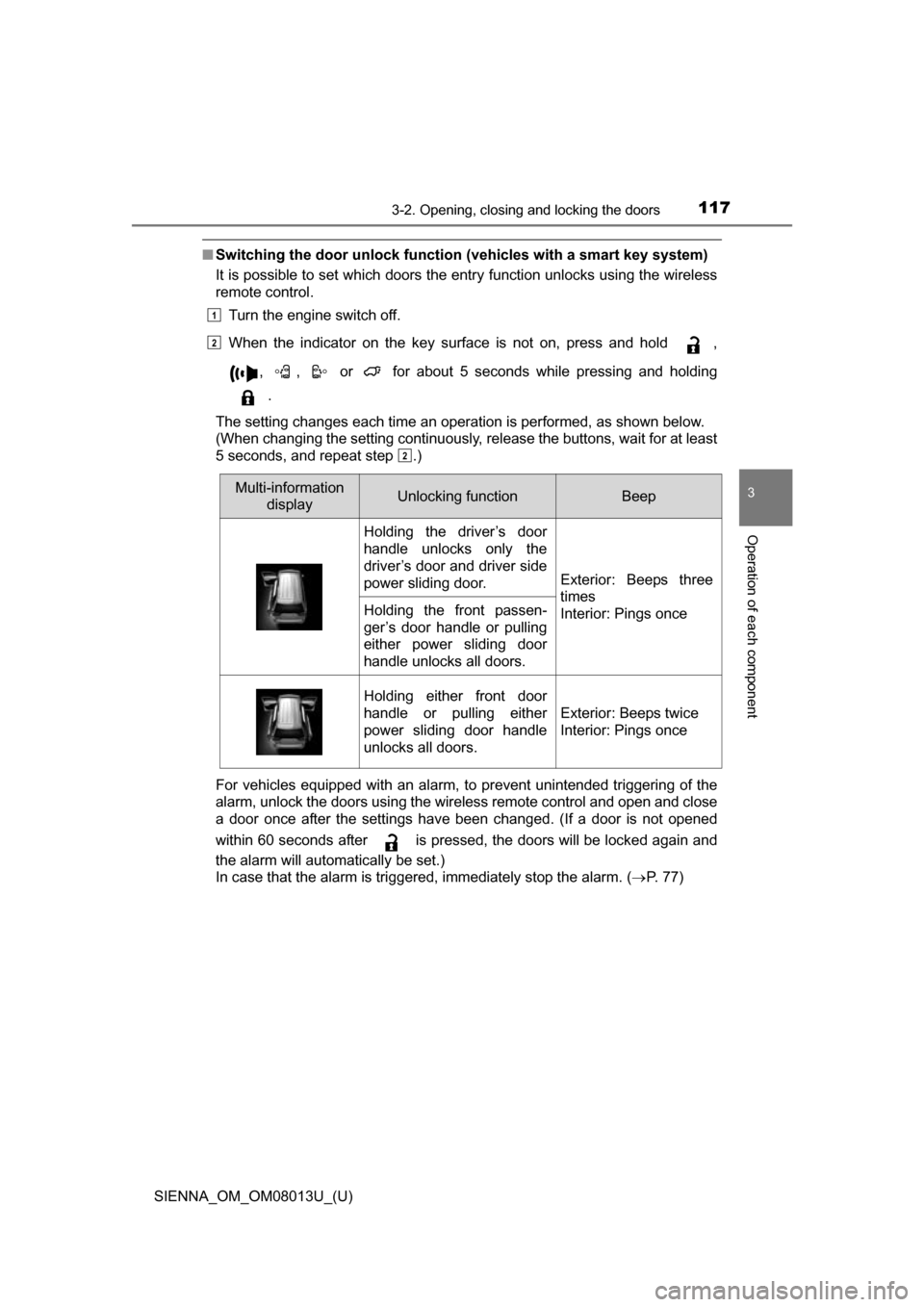
■Switching the door unlock functi on (vehicles with a smart key system)
It is possible to set which doors the entry function unlocks using the wireless
remote control.
Turn the engine switch off.
When the indicator on the key surface is not on, press and hold ,
, , or for about 5 seconds while pressing and holding.
The setting changes each time an operation is performed, as shown below.
(When changing the setting continuously, release the buttons, wait for at least
5 seconds, and repeat step .)
For vehicles equipped with an alarm, to prevent unintended triggering of the
alarm, unlock the doors using the wireless remote control and open and close
a door once after the settings have been changed. (If a door is not opened
within 60 seconds after is pressed, the doors will be locked again and
the alarm will automatically be set.)
In case that the alarm is triggered, immediately stop the alarm. ( P. 7 7 )
1
2
2
Multi-information
display Unlocking functionBeep
Holding the driver’s door
handle unlocks only the
driver’s door and driver side
power sliding door.
Exterior: Beeps three
times
Interior: Pings once
Holding the front passen-
ger’s door handle or pulling
either power sliding door
handle unlocks all doors.
Holding either front door
handle or pulling either
power sliding door handle
unlocks all doors.
Exterior: Beeps twice
Interior: Pings once
Page 118 of 668
118
SIENNA_OM_OM08013U_(U)
3-2. Opening, closing and locking the doors
■When all the doors are locked with the wireless remote control or key
The doors cannot be unlocked with the door lock switch.
The door lock switch can be reset by unlocking all the doors with the wireless
remote control or key.
■ Using the mechanical key (vehicles with a smart key system)
The doors can also be locked and unlocked with the mechanical key.
( P. 585)
■ Conditions affecting the operation of the smart key system or wireless
remote control
Vehicles without a smart key system
The wireless remote control function may not operate normally in the follow-
ing situations:
● Near a TV tower, radio station, electric power plant, airport or other facility
that generates strong radio waves
● When carrying a portable radio, cellular phone or other wireless communi-
cation devices
● When multiple wireless keys are in the vicinity
● When the wireless key is in contact with, or is covered by, a metallic object
● When a wireless key (that emits radio waves) is being used nearby
● When the wireless key has been left near an electrical appliance such as a
personal computer
● If window tint with a metallic content or metallic objects is attached to the
rear window
● Vehicles with AUTO ACCESS SEAT: If the wireless remote control of the
AUTO ACCESS SEAT is operated simultaneously, the AUTO ACCESS
SEAT may not operate properly.
For details, refer to “AUTO A CCESS SEAT OWNER’S MANUAL”.
Page 119 of 668
SIENNA_OM_OM08013U_(U)
1193-2. Opening, closing and locking the doors
3
Operation of each component
Vehicles with a smart key system
The smart key system uses weak radio waves. In the following situations, the
communication between the electronic key and the vehicle may be affected,
preventing the smart key system and wireless remote control from operating
properly. (Way of coping P. 585)
● When the electronic key battery is depleted
● Near a TV tower, electric power plant, gas station, radio station, large dis-
play, airport or other facility that generates strong radio waves or electrical
noise
● When carrying a portable radio, cellular phone, cordless phone or other
wireless communication devices
● When the electronic key is in contact with, or is covered by the following
objects
• Cards to which aluminum foil is attached
• Cigarette boxes that have aluminum foil inside
• Metallic wallets or bags
• Coins
• Hand warmers made of metal
• Media such as CDs and DVDs
● When multiple electronic keys are in the vicinity
● When another wireless key (that emits radio waves) is being used nearby
● When carrying or using the electronic key together with the following
devices that emit radio waves
• Another vehicle’s electronic key
• A wireless key that emits radio waves
• Personal computers or personal digital assistants (PDAs)
• Digital audio players
• Portable game systems
● If window tint with a metallic content or metallic objects are attached to the
rear window
● Vehicles with AUTO ACCESS SEAT: If the wireless remote control of the
AUTO ACCESS SEAT is operated simultaneously, the AUTO ACCESS
SEAT may not operate properly.
For details, refer to “AUTO A CCESS SEAT OWNER’S MANUAL”.
■ Customization
Settings (e.g. unlocking function using a key) can be changed.
(Customizable features: P. 626)
Page 121 of 668
121
SIENNA_OM_OM08013U_(U)
3-2. Opening, closing and locking the doors
3
Operation of each component
Sliding doors
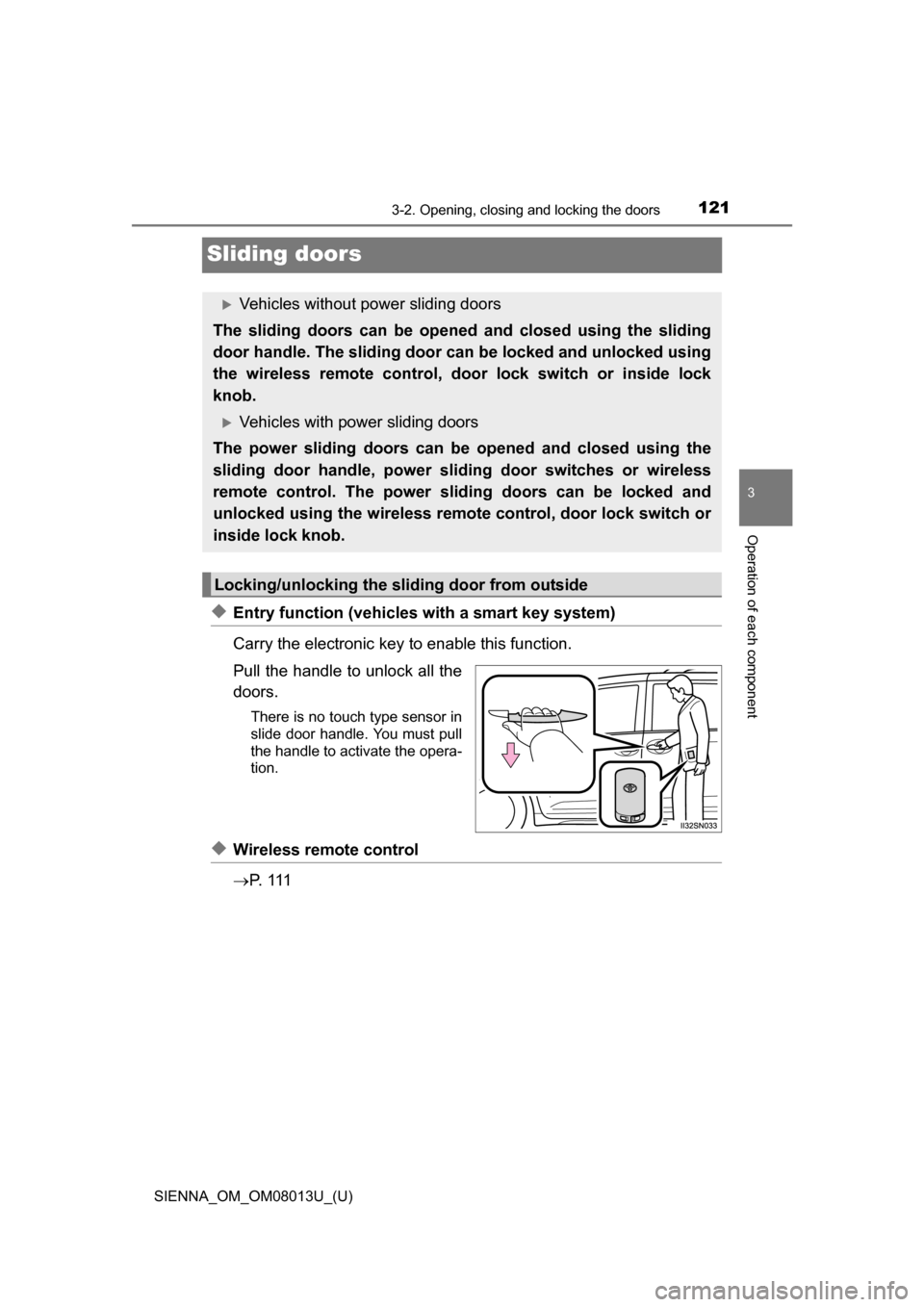
◆Entry function (vehicles with a smart key system)
Carry the electronic key to enable this function.
Pull the handle to unlock all the
doors.
There is no touch type sensor in
slide door handle. You must pull
the handle to activate the opera-
tion.
◆Wireless remote control
P. 1 1 1
Vehicles without power sliding doors
The sliding doors can be opened and closed using the sliding
door handle. The sliding door can be locked and unlocked using
the wireless remote control, door lock switch or inside lock
knob.
Vehicles with power sliding doors
The power sliding doors can be opened and closed using the
sliding door handle, power slid ing door switches or wireless
remote control. The power sliding doors can be locked and
unlocked using the wireless remo te control, door lock switch or
inside lock knob.
Locking/unlocking the sliding door from outside
Page 124 of 668
124
SIENNA_OM_OM08013U_(U)
3-2. Opening, closing and locking the doors
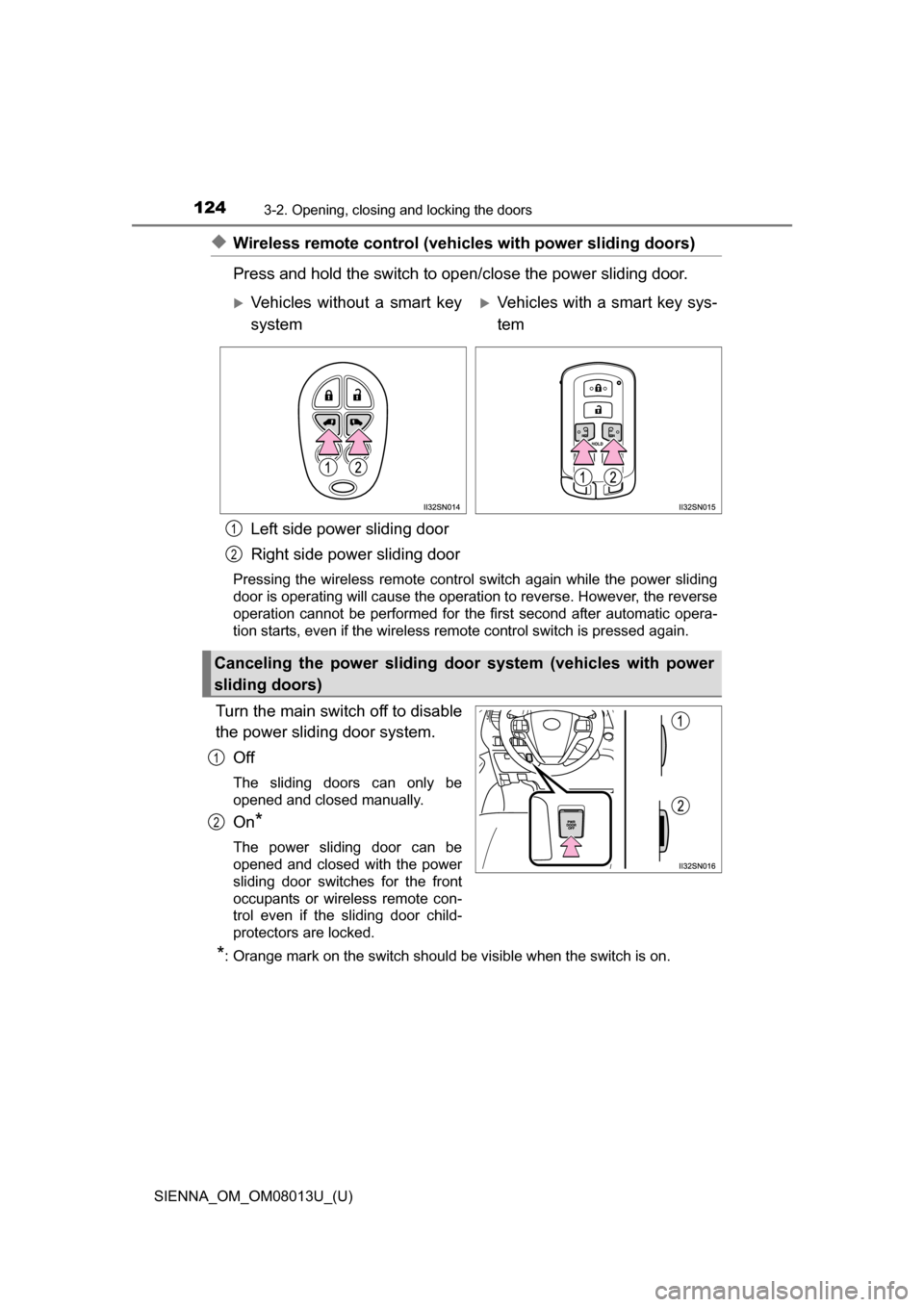
◆Wireless remote control (vehicles with power sliding doors)
Press and hold the switch to open/close the power sliding door.
Left side power sliding door
Right side power sliding door
Pressing the wireless remote control switch again while the power sliding
door is operating will cause the operation to reverse. However, the reverse
operation cannot be performed for the first second after automatic opera-
tion starts, even if the wireless remote control switch is pressed again.
Turn the main switch off to disable
the power sliding door system. Off
The sliding doors can only be
opened and closed manually.
On*
The power sliding door can be
opened and closed with the power
sliding door switches for the front
occupants or wireless remote con-
trol even if the sliding door child-
protectors are locked.
*: Orange mark on the switch should be visible when the switch is on.
Vehicles without a smart key
systemVehicles with a smart key sys-
tem
Canceling the power sliding door system (vehicles with power
sliding doors)
1
2
1
2
Page 125 of 668
SIENNA_OM_OM08013U_(U)
1253-2. Opening, closing and locking the doors
3
Operation of each component
Move the inside lock knob to the lock position.
Close the sliding door.
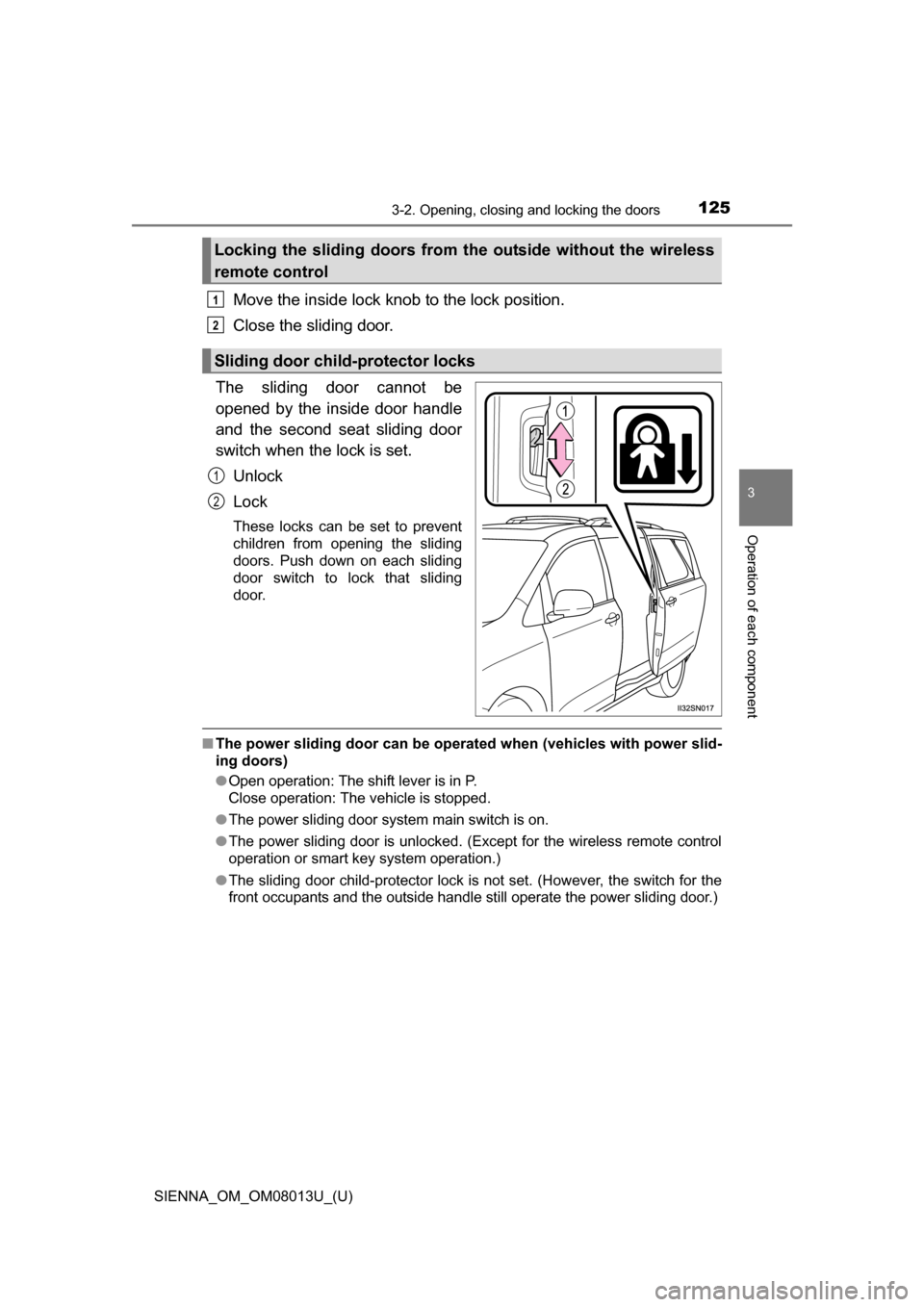
The sliding door cannot be
opened by the inside door handle
and the second seat sliding door
switch when the lock is set. Unlock
Lock
These locks can be set to prevent
children from opening the sliding
doors. Push down on each sliding
door switch to lock that sliding
door.
■The power sliding door can be operate d when (vehicles with power slid-
ing doors)
● Open operation: The shift lever is in P.
Close operation: The vehicle is stopped.
● The power sliding door system main switch is on.
● The power sliding door is unlocked. (Except for the wireless remote control
operation or smart key system operation.)
● The sliding door child-protector lock is not set. (However, the switch for the
front occupants and the outside handle still operate the power sliding door.)
Locking the sliding doors from th e outside without the wireless
remote control
Sliding door child-protector locks
1
2
1
2
Page 126 of 668
126
SIENNA_OM_OM08013U_(U)
3-2. Opening, closing and locking the doors
■Power sliding doors
●If the power sliding door outside handle is pulled while the power sliding
door is opening or closing, the door will reverse the operation direction.
● During opening operation:
Stroking the power sliding door handle forward will reverse the direction and
start closing.
Stroking the handle backward will continue opening.
During closing operation:
Stroking the power sliding door handle backward will reverse the direction
and start opening.
Stroking the handle forward will continue closing.
● The power sliding doors can be opened/closed manually when the power
sliding door function is canceled with the main switch.
● A buzzer sounds if you put the shift lever out of P with the engine switch in
the “ON” position (vehicles without a smart key system) or IGNITION ON
mode (vehicles with a smart key system) and the sliding door not completely
closed.
● Vehicles with AUTO ACCESS SEAT: If the AUTO ACCESS SEAT has not
been locked in place after being stowed, the right-hand sliding door will not
close and a beep will sound twice.
For details, refer to “AUTO A CCESS SEAT OWNER’S MANUAL”.
● In an emergency, power slide door operation can be stopped by any of the
following:
• Pulling the outside handle three consecutive times
• During opening operation, sliding the inside handle forward three consec-
utive times
• During closing operation, sliding the inside handle backward three con- secutive times
• Pressing the power sliding door switch three consecutive times
• Pressing the power sliding door button on wireless remote control three consecutive times ( P. 124)
After stopping, power sliding door brake function will be activated ( P. 127)
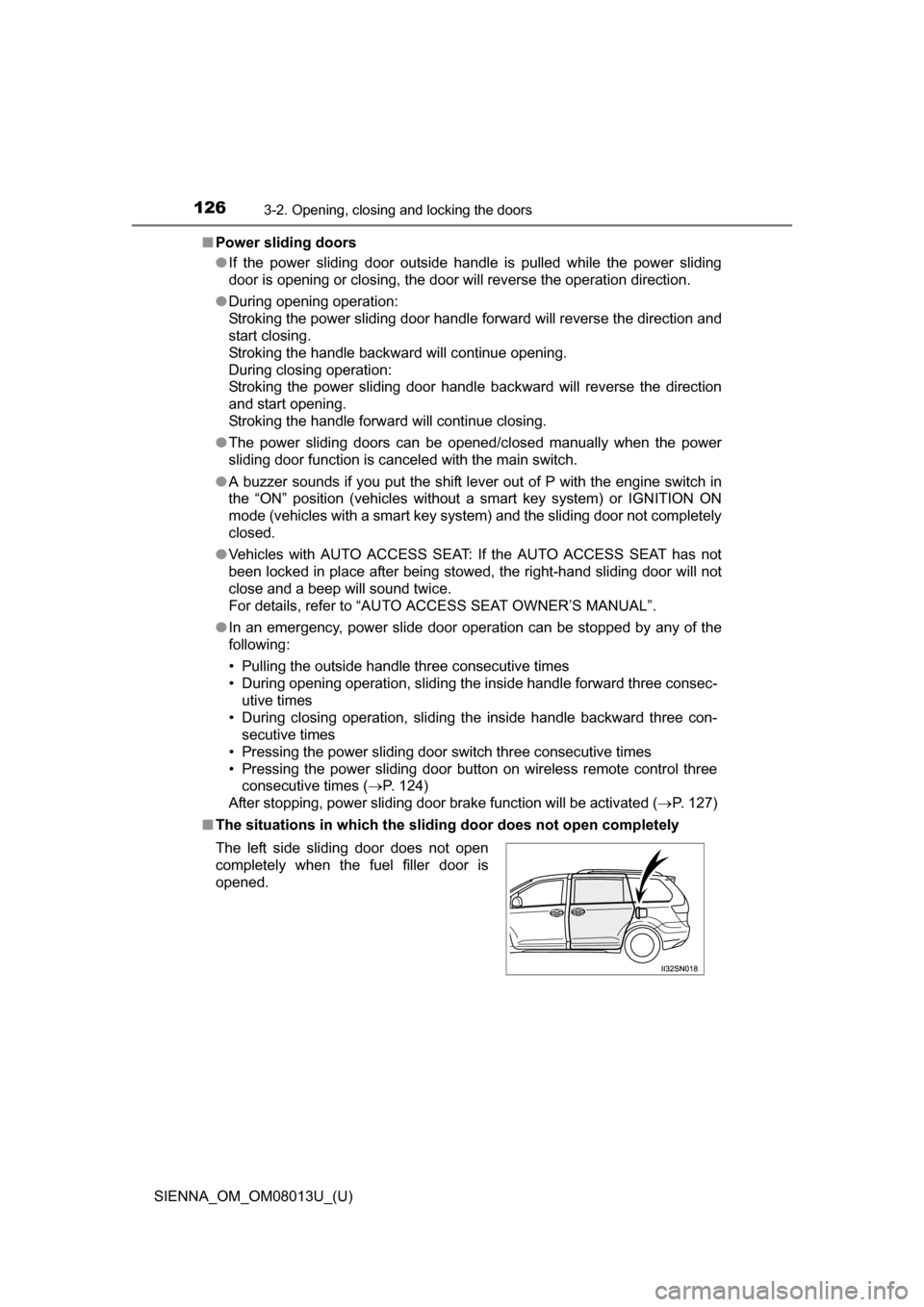
■ The situations in which the sliding door does not open completely
The left side sliding door does not open
completely when the fuel filler door is
opened.
Page 127 of 668
SIENNA_OM_OM08013U_(U)
1273-2. Opening, closing and locking the doors
3
Operation of each component
■Jam protection function (vehic les with power sliding doors)
● If anything obstructs the power sliding door while it is closing or opening, the
power sliding door will automatically operate in the opposite direction.
● If the jam protection function operates during two consecutive operations,
the power sliding door will be stopped at that position and the power sliding
door system will be canceled.
■ Power sliding door brake function (vehicles with power sliding doors)
When the power sliding door detects an abnormality and stops operating,
power sliding door brake function may be activated. When brake function is
activated, door movement is restricted by the brake and motion may appear
to be not smooth. This is not malfunction. Move the door to fully closed posi-
tion to reset the system and normal power sliding door function will resume.
■ Sliding door closer (if equipped)
In the event that the sliding door is left slightly open, the sliding door closer
will automatically close it to the fully closed position.
■ Power sliding door operation (veh icles with power sliding door)
Wireless remote control: Even if the door is locked, pressing and holding the
sliding door buttons will unlock all doors and start open operation.
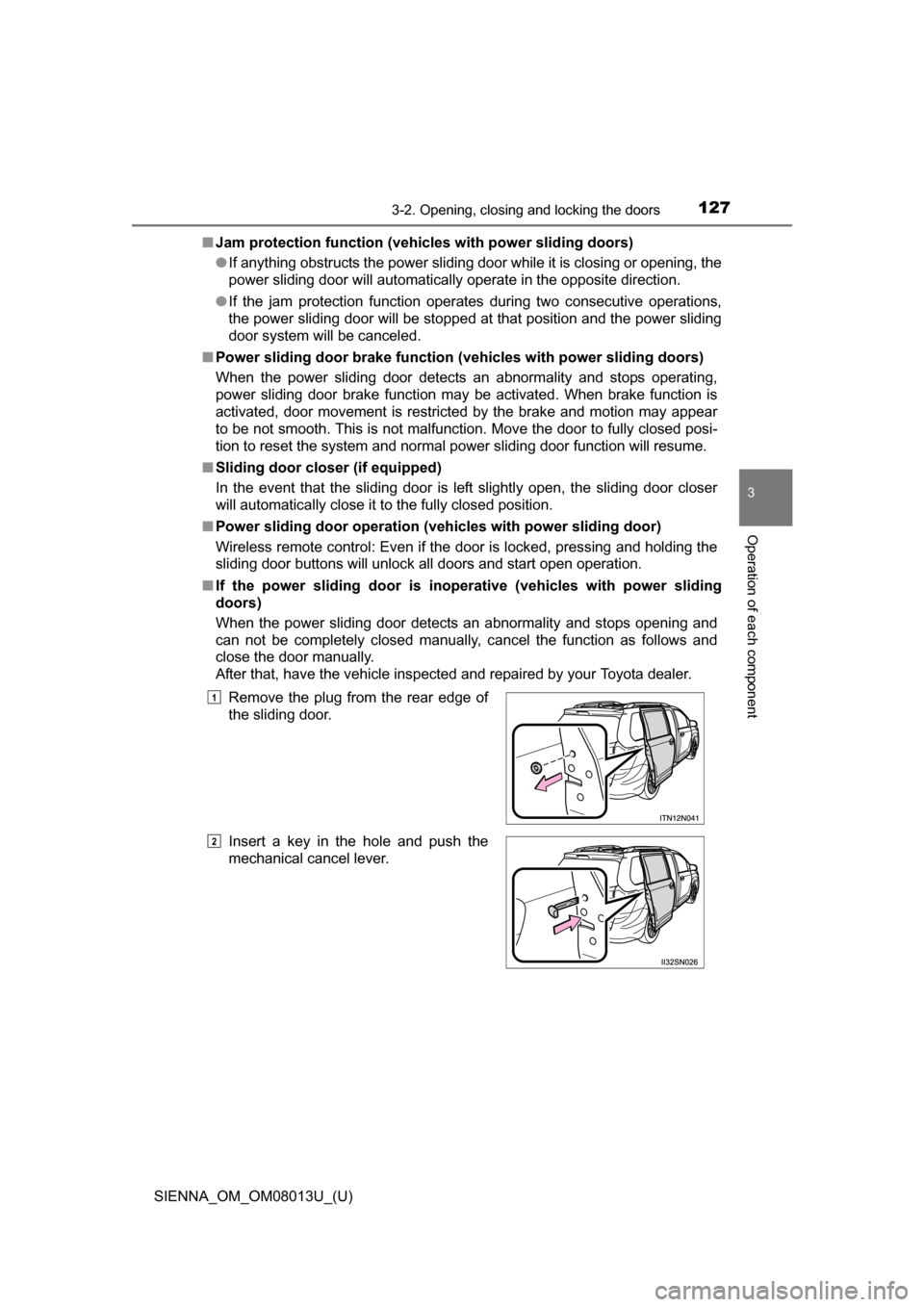
■ If the power sliding door is inoper ative (vehicles with power sliding
doors)
When the power sliding door detects an abnormality and stops opening and
can not be completely closed manually, cancel the function as follows and
close the door manually.
After that, have the vehicle inspected and repaired by your Toyota dealer.
Remove the plug from the rear edge of
the sliding door.
Insert a key in the hole and push the
mechanical cancel lever.
1
2
Page 128 of 668
128
SIENNA_OM_OM08013U_(U)
3-2. Opening, closing and locking the doors
■When the battery is disconnected (vehicles with power sliding doors)
The power sliding door system must be initialized in order to ensure proper
operation. To initialize it, close the sliding doors completely by hand.
■ Conditions affecting the operation of the smart key system or wireless
remote control
P. 1 1 8
■ Customization
Settings (e.g. opening and closing operation) can be changed.
(Customizable features: P. 628)
WARNING
■To prevent an accident
Observe the following precautions while driving.
Failure to do so may cause a door to open unexpectedly and an occupant to
fall out of the vehicle, resulting in death or serious injury.
●Ensure that all doors are properly closed and locked.
● Set the sliding door child-protector locks when children are seated in the
vehicle.
● Do not operate the inside handle of the doors while driving.
■ When children are in the vehicle
Observe the following precautions.
Failure to do so may result in death or serious injury.
●Do not leave children alone in the vehicle.
If a child is accidentally locked in the vehicle, they could have heat
exhaustion or other injuries.
● Do not allow a child to open or close the sliding door.
Doing so may cause the sliding door to move unexpectedly, or cause the
child’s hands, head, or neck to be caught by the moving sliding door.
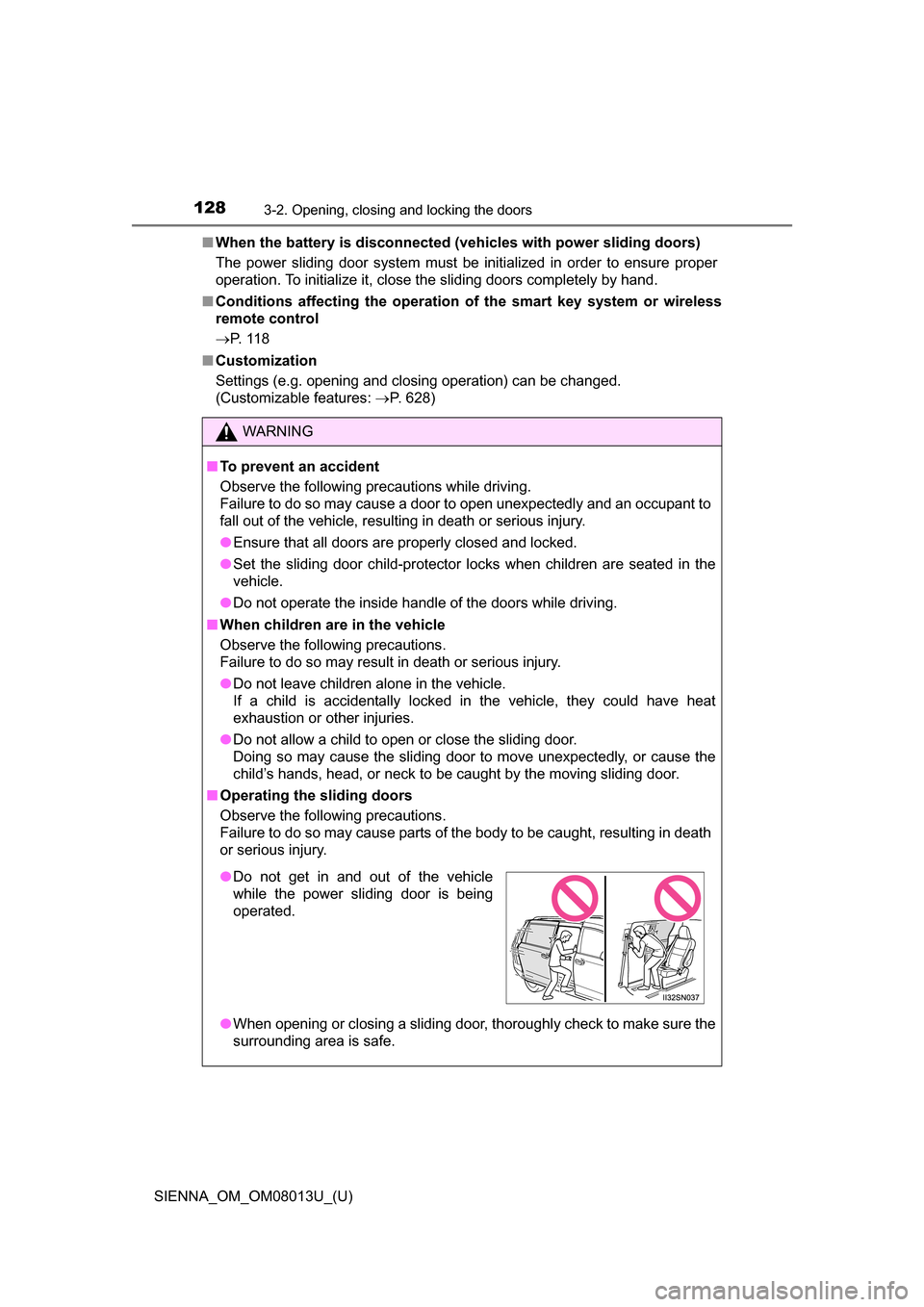
■ Operating the sliding doors
Observe the following precautions.
Failure to do so may cause parts of the body to be caught, resulting in death
or serious injury.
●When opening or closing a sliding door, thoroughly check to make sure the
surrounding area is safe.
●Do not get in and out of the vehicle
while the power sliding door is being
operated.