bluetooth TOYOTA SIENNA 2016 XL30 / 3.G Owners Manual
[x] Cancel search | Manufacturer: TOYOTA, Model Year: 2016, Model line: SIENNA, Model: TOYOTA SIENNA 2016 XL30 / 3.GPages: 668, PDF Size: 16.35 MB
Page 4 of 668
TABLE OF CONTENTS4
SIENNA_OM_OM08013U_(U)5-1. Basic Operations
Audio system types ........... 318
Audio system..................... 319
Steering wheel audio switches .......................... 321
AUX Port/USB Port ........... 323
Basic audio operations ...... 324
5-2. Setup Setup menu ....................... 326
General settings ................ 327
Audio settings.................... 329
Display settings ................. 330
Voice settings .................... 331
5-3. Using the Multimedia system
Selecting the audio source ............................. 332
List screen operation ......... 333
Optimal use of the audio system............................. 335
5-4. Using the radio Radio operation ................. 336 5-5. Playing an audio CD and
MP3/WMA/AAC discs
CD player operation........... 338
5-6. Using an external device Listening to an iPod ........... 344
Listening to a USB memory device........ 348
Using the AUX port ............ 353
5-7. Connecting Bluetooth
®
Preparations to use wireless
communication ................ 354
Registering a Bluetooth
®
audio player for the
first time ........................... 357
Registering a Bluetooth
®
phone for the
first time ........................... 358
Registering a Bluetooth
®
device .............................. 359
Connecting a Bluetooth
®
device .............................. 361
Displaying a Bluetooth
®
device details................... 363
Detailed Bluetooth
®
system settings................ 364
5Audio system
Page 5 of 668
5
1
9 8
7
6 4 3
2
SIENNA_OM_OM08013U_(U)
10
5
5-8. Bluetooth® Audio
Listening to Bluetooth®
Audio ............................... 365
5-9. Bluetooth
® phone
Using a Bluetooth®
Phone.............................. 367
Making a call ..................... 369
Receiving a call ................. 372
Speaking on the phone ..... 373
Bluetooth
® phone
message function ............ 376
Using the steering wheel switches ................ 380
Bluetooth
® phone
settings............................ 381
Contact/Call History Settings ........................... 382
What to do if... (Troubleshooting) ............ 391
5-10. Bluetooth
®
Bluetooth®......................... 395
5-11. Using the voice command system
Voice command system .... 401 6-1. Using the air conditioning
system and defogger
Front automatic air conditioning system ......... 408
Rear automatic air conditioning system ......... 417
Heated steering wheel/seat heaters .......... 420
• Heated steering wheel ............................. 421
• Seat heaters .................. 422
6-2. Using the interior lights Interior lights list................. 423• Personal/interior light
main switch ................... 424
• Personal/interior lights .............................. 424
• Rear ceiling lights .......... 425
6-3. Using the storage features List of storage features ...... 426• Glove boxes .................. 427
• Console box .................. 428
• Cup holders ................... 430
• Bottle holders ................ 432
• Door pockets ................. 433
• Auxiliary boxes .............. 434
Luggage compartment features ........................... 437
6Interior features
Page 317 of 668
317
SIENNA_OM_OM08013U_(U)
5Audio system
5-5. Playing an audio CD and MP3/WMA/AAC discs
CD player operation .......... 338
5-6. Using an external device Listening to an iPod .......... 344
Listening to a USB memory device ....... 348
Using the AUX port ........... 353
5-7. Connecting Bluetooth
®
Preparations to use wireless
communication ................ 354
Registering a Bluetooth
®
audio player for the
first time .......................... 357
Registering a Bluetooth
®
phone for the
first time .......................... 358
Registering a Bluetooth
®
device.............................. 359
Connecting a Bluetooth
®
device.............................. 361
Displaying a Bluetooth
®
device details .................. 363
Detailed Bluetooth
®
system settings ............... 364 5-8. Bluetooth
® Audio
Listening to Bluetooth®
Audio ............................... 365
5-9. Bluetooth
® phone
Using a Bluetooth®
Phone ............................. 367
Making a call ..................... 369
Receiving a call ................. 372
Speaking on the phone ..... 373
Bluetooth
® phone
message function ............ 376
Using the steering wheel switches ................ 380
Bluetooth
® phone
settings ........................... 381
Contact/Call History Settings ........................... 382
What to do if... (Troubleshooting) ............ 391
5-10. Bluetooth
®
Bluetooth®......................... 395
5-11. Using the voice command system
Voice command system .... 401
Page 319 of 668
319
SIENNA_OM_OM08013U_(U)
5-1. Basic Operations
5
Audio system
Audio system
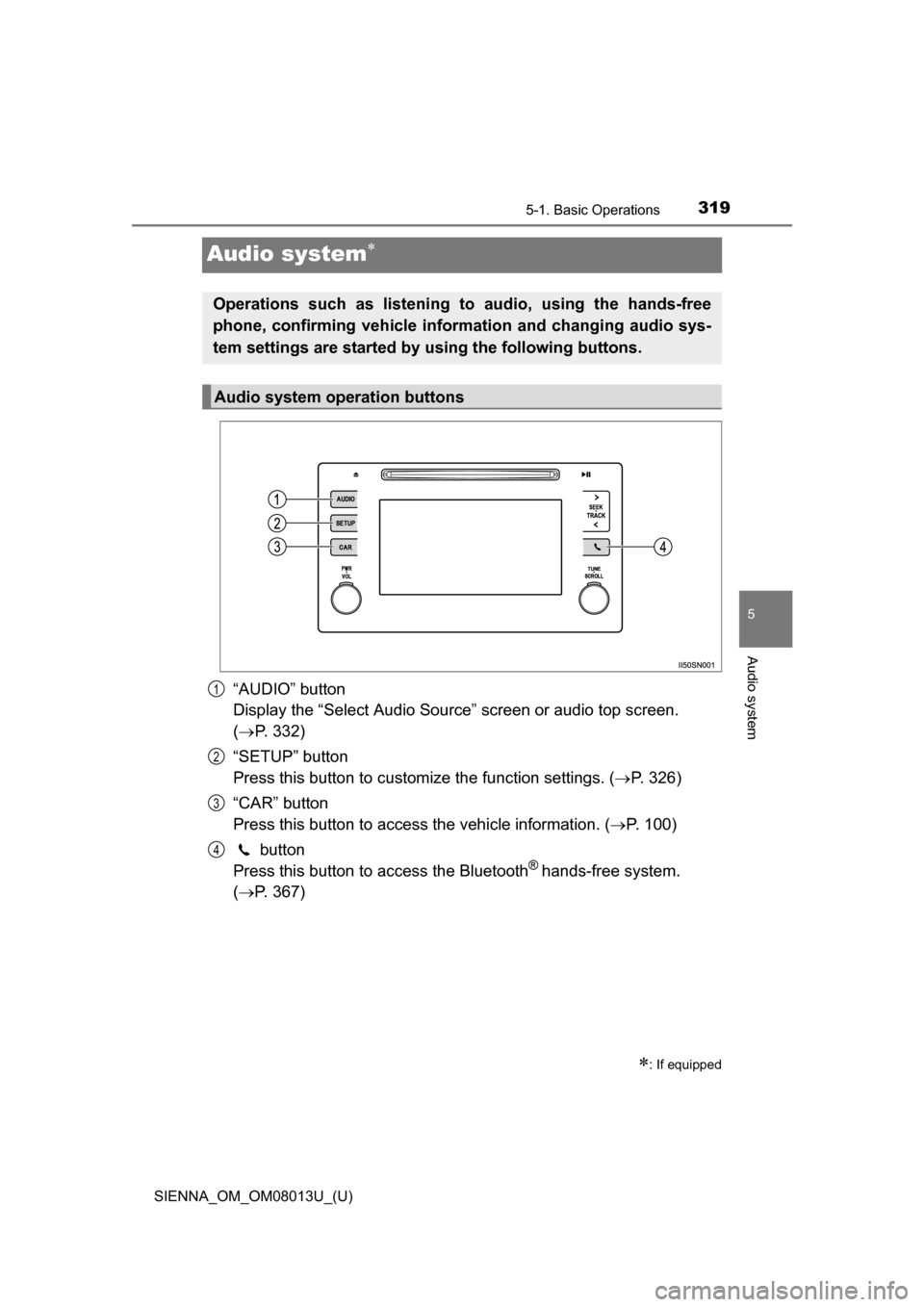
“AUDIO” button
Display the “Select Audio Source” screen or audio top screen.
( P. 332)
“SETUP” button
Press this button to customize the function settings. ( P. 326)
“CAR” button
Press this button to access the vehicle information. ( P. 100)
button
Press this button to access the Bluetooth
® hands-free system.
( P. 367)
: If equipped
Operations such as listening to audio, using the hands-free
phone, confirming vehicle inform ation and changing audio sys-
tem settings are started by using the following buttons.
Audio system operation buttons
1
2
3
4
Page 326 of 668
326
SIENNA_OM_OM08013U_(U)
5-2. Setup
Setup menu
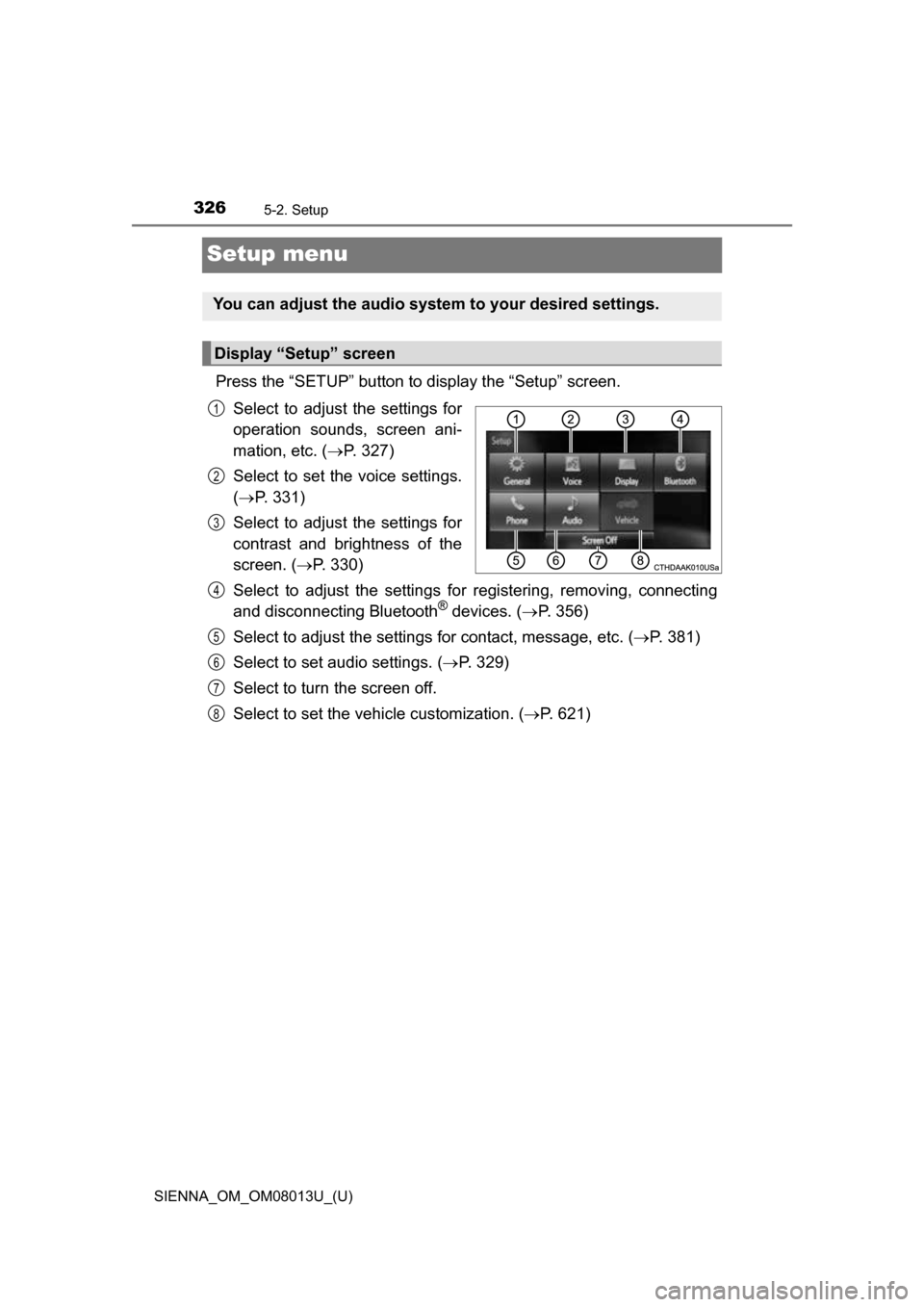
Press the “SETUP” button to display the “Setup” screen.Select to adjust the settings for
operation sounds, screen ani-
mation, etc. ( P. 327)
Select to set the voice settings.
( P. 331)
Select to adjust the settings for
contrast and brightness of the
screen. ( P. 330)
Select to adjust the settings for registering, removing, connecting
and disconnecting Bluetooth
® devices. ( P. 356)
Select to adjust the settings for contact, message, etc. (P. 381)
Select to set audio settings. ( P. 329)
Select to turn the screen off.
Select to set the vehicle customization. ( P. 621)
You can adjust the audio system to your desired settings.
Display “Setup” screen
1
2
3
4
5
6
7
8
Page 334 of 668
3345-3. Using the Multimedia system
SIENNA_OM_OM08013U_(U)■
Selecting a track/file/song
Press the “
” or “” button on “SEEK•TRACK” or turn the
“TUNE•SCROLL” knob to select the desired track/file/song number.
To fast-forward or reverse, press and hold the “ ” or “” button on
“SEEK•TRACK”.
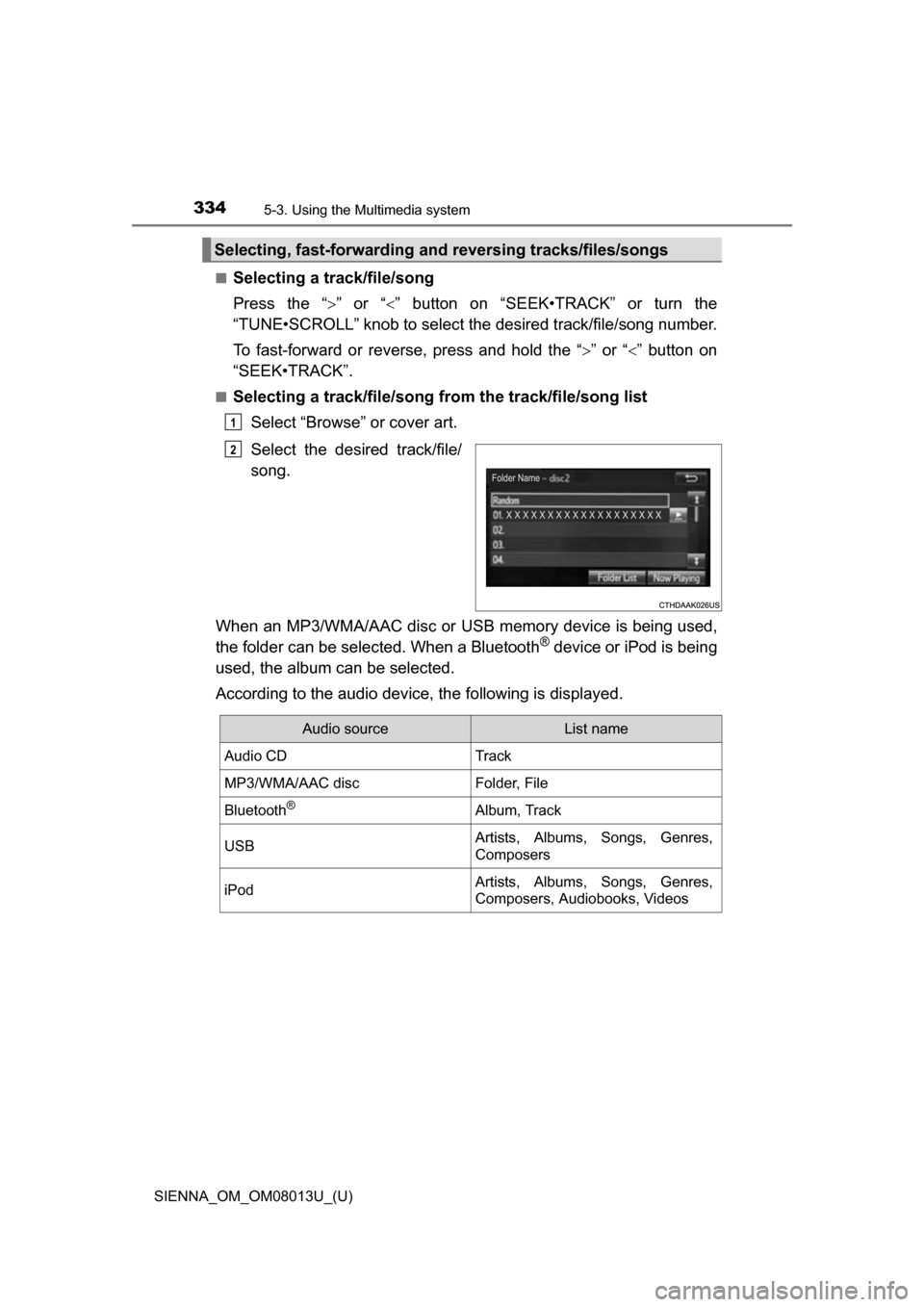
■Selecting a track/file/song from the track/file/song list
Select “Browse” or cover art.
Select the desired track/file/
song.
When an MP3/WMA/AAC disc or USB memory device is being used,
the folder can be selected. When a Bluetooth
® device or iPod is being
used, the album can be selected.
According to the audio device, the following is displayed.
Selecting, fast-forwarding a nd reversing tracks/files/songs
1
2
Audio sourceList name
Audio CDTrack
MP3/WMA/AAC discFolder, File
Bluetooth®Album, Track
USBArtists, Albums, Songs, Genres,
Composers
iPodArtists, Albums, Songs, Genres,
Composers, Audiobooks, Videos
Page 354 of 668
354
SIENNA_OM_OM08013U_(U)
5-7. Connecting Bluetooth®
Preparations to use wireless communication
The following can be performed using Bluetooth® wireless com-
munication:
■A portable audio player can be operated and listened to via
audio system
■Hands-free phone calls can be made via a cellular phone
In order to use wireless communication, register and connect a
Bluetooth
® device by performing the following procedures.
Page 355 of 668
SIENNA_OM_OM08013U_(U)
3555-7. Connecting Bluetooth®
5
Audio system
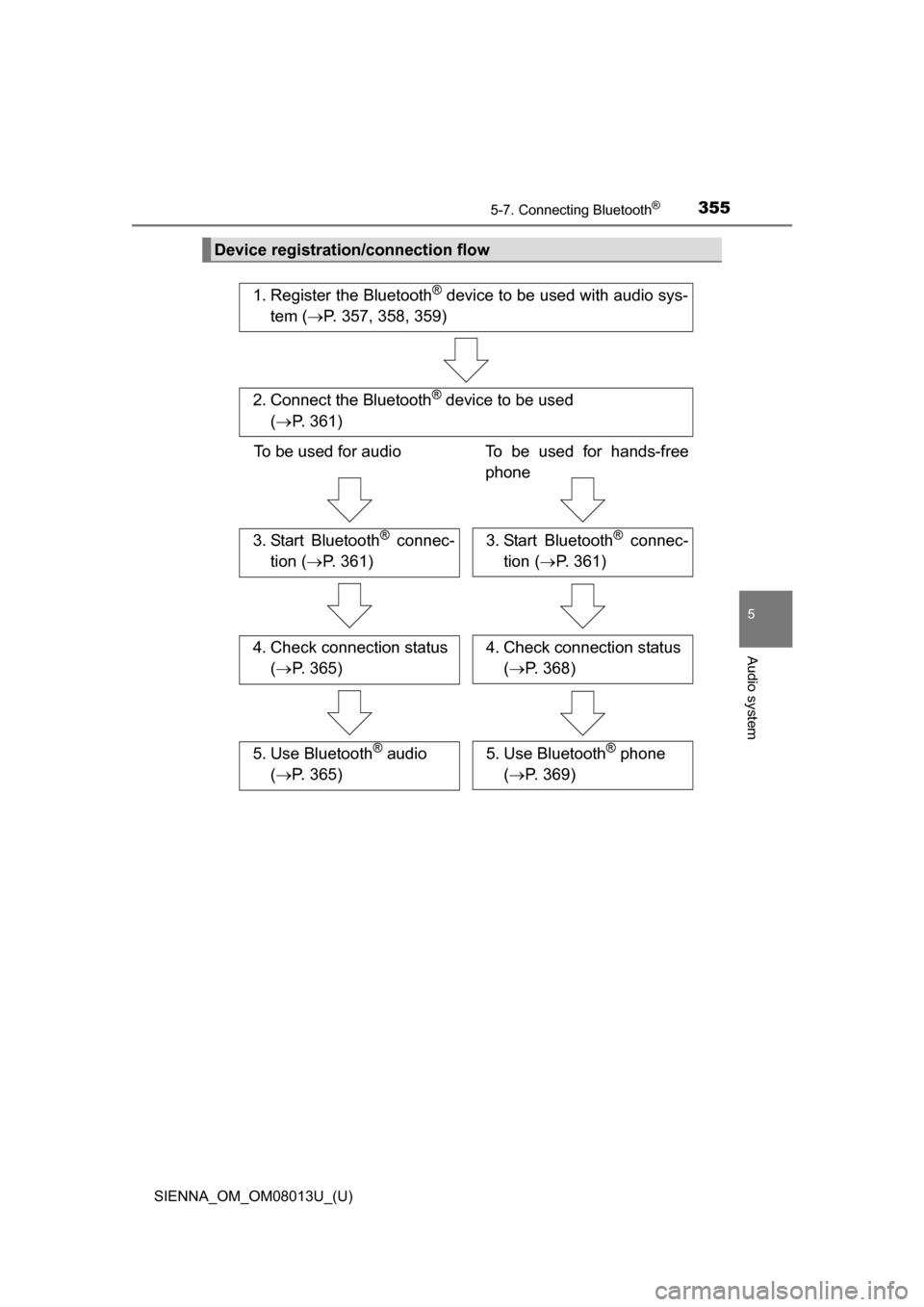
Device registration/connection flow
1. Register the Bluetooth® device to be used with audio sys-
tem ( P. 357, 358, 359)
2. Connect the Bluetooth® device to be used
( P. 361)
To be used for audio To be used for hands-free
phone
3. Start Bluetooth® connec-
tion ( P. 361)3. Start Bluetooth® connec-
tion ( P. 361)
4. Check connection status
( P. 365)4. Check connection status
( P. 368)
5. Use Bluetooth® audio
( P. 365)5. Use Bluetooth® phone
( P. 369)
Page 356 of 668
3565-7. Connecting Bluetooth®
SIENNA_OM_OM08013U_(U)
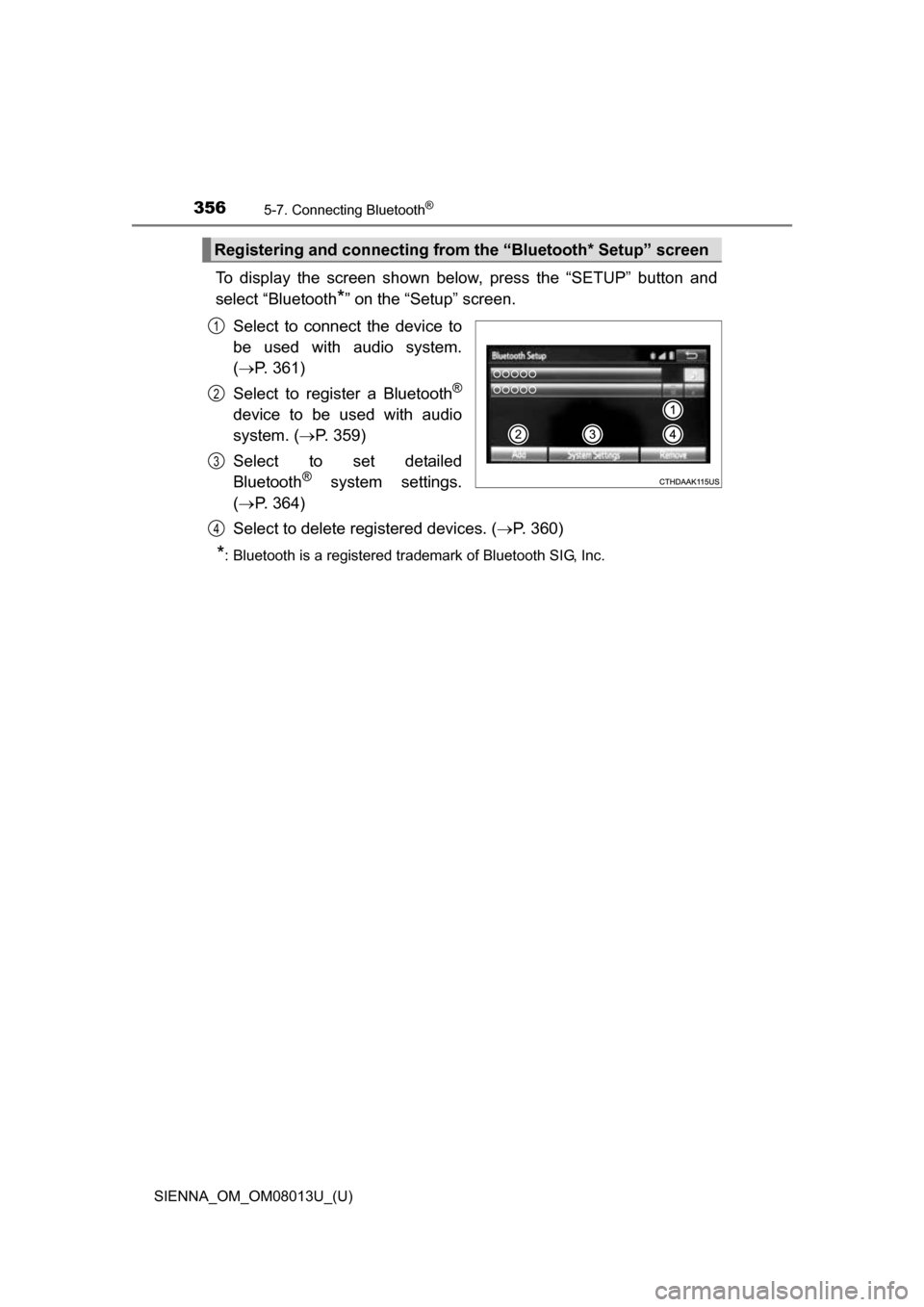
To display the screen shown below, press the “SETUP” button and
select “Bluetooth
*” on the “Setup” screen.
Select to connect the device to
be used with audio system.
( P. 361)
Select to register a Bluetooth
®
device to be used with audio
system. ( P. 359)
Select to set detailed
Bluetooth
® system settings.
( P. 364)
Select to delete registered devices. ( P. 360)
*: Bluetooth is a registered trademark of Bluetooth SIG, Inc.
Registering and connecting from the “Bluetooth* Setup” screen
1
2
3
4
Page 357 of 668
357
SIENNA_OM_OM08013U_(U)
5-7. Connecting Bluetooth®
5
Audio system
Registering a Bluetooth® audio player for
the first time
Turn the Bluetooth® connection setting of your audio player on.
Press the “AUDIO” button.
Select “ Audio”.
Select “Select Device”.
Follow the steps in “How to register a Bluetooth
® device” from step
. ( P. 359)
To use the Bluetooth® Audio, it is necessary to register an audio
player with the system.
Once the player has been registered, it is possible to use the
Bluetooth
® Audio.
For details about registering a Bluetooth
® device ( P. 359)
1
2
3
4
5
2