ad blue TOYOTA SIENNA 2017 XL30 / 3.G Navigation Manual
[x] Cancel search | Manufacturer: TOYOTA, Model Year: 2017, Model line: SIENNA, Model: TOYOTA SIENNA 2017 XL30 / 3.GPages: 366, PDF Size: 10.33 MB
Page 89 of 366
89
2. RADIO OPERATION
SIENNA_Navi+MM_OM08009U_(U)
16.01.25 16:40
AUDIO/VISUAL SYSTEM
3
1Select “Station List” .
2FM radio only: Select a desired genre
of station and select a desired station.
The genre list is in the following order:
• Classical
• Country
• EasyLis (Easy Listening)
• Inform (Information)
•Jazz
•News
•Oldies
•Other
•Pop Music
• Religion
•Rock
• R&B (Rhythm and Blues)
•Sports
•Talk
• Traffic (Not available when “HD Radio™”
indicator is off.)
• Alert (Emergency Alert)1Select “Station List” .
2Select the desired traffic program sta-
tion.
SELECTING A DESIRED
GENRETRAFFIC ANNOUNCEMENT
(FM RADIO)
A station that regularly broadcasts traf-
fic information is automatically located.
INFORMATION
●If a traffic program station is found, the
name of the traffic program station will
be displayed for a while.
Page 111 of 366
111
3. MEDIA OPERATION
SIENNA_Navi+MM_OM08009U_(U)
16.01.25 16:40
AUDIO/VISUAL SYSTEM
3
WA R N I N G
●Do not operate the player’s controls or connect the iPod while driving.
NOTICE
●Do not leave your portable player in the car. In particular, high temperatures inside the
vehicle may damage the portable player.
● Do not push down on or apply unnecessary pressure to the portable player while it is con-
nected as this may damage the portable player or its terminal.
● Do not insert foreign objects into the port as this may damage the portable player or its
terminal.
INFORMATION
●When an iPod is connected using a genuine iPod cable, the iPod starts charging its bat-
tery.
● Depending on the iPod, the video sound may not be able to be heard.
● Depending on the iPod and the songs in the iPod, iPod cover art may be displayed. This
function can be changed to on/off. ( P.123) It may take time to display iPod cover art,
and the iPod may not be operated while the cover art display is in process.
● When an iPod is connected and the audio source is changed to iPod mode, the iPod will
resume playing from the same point it was last used.
● Depending on the iPod that is connected to the system, certain functions may not be
available.
● Files/tracks selected by operating a connected iPod may not be recognized or displayed
properly.
● If an iPhone is connected via Bluetooth
® and USB at the same time, system operation
may become unstable.
For known phone compatibility information, refer to http://www.toyota.com/entune/
.
Page 113 of 366
113
3. MEDIA OPERATION
SIENNA_Navi+MM_OM08009U_(U)
16.01.25 16:40
AUDIO/VISUAL SYSTEM
3
4. Bluetooth® AUDIO
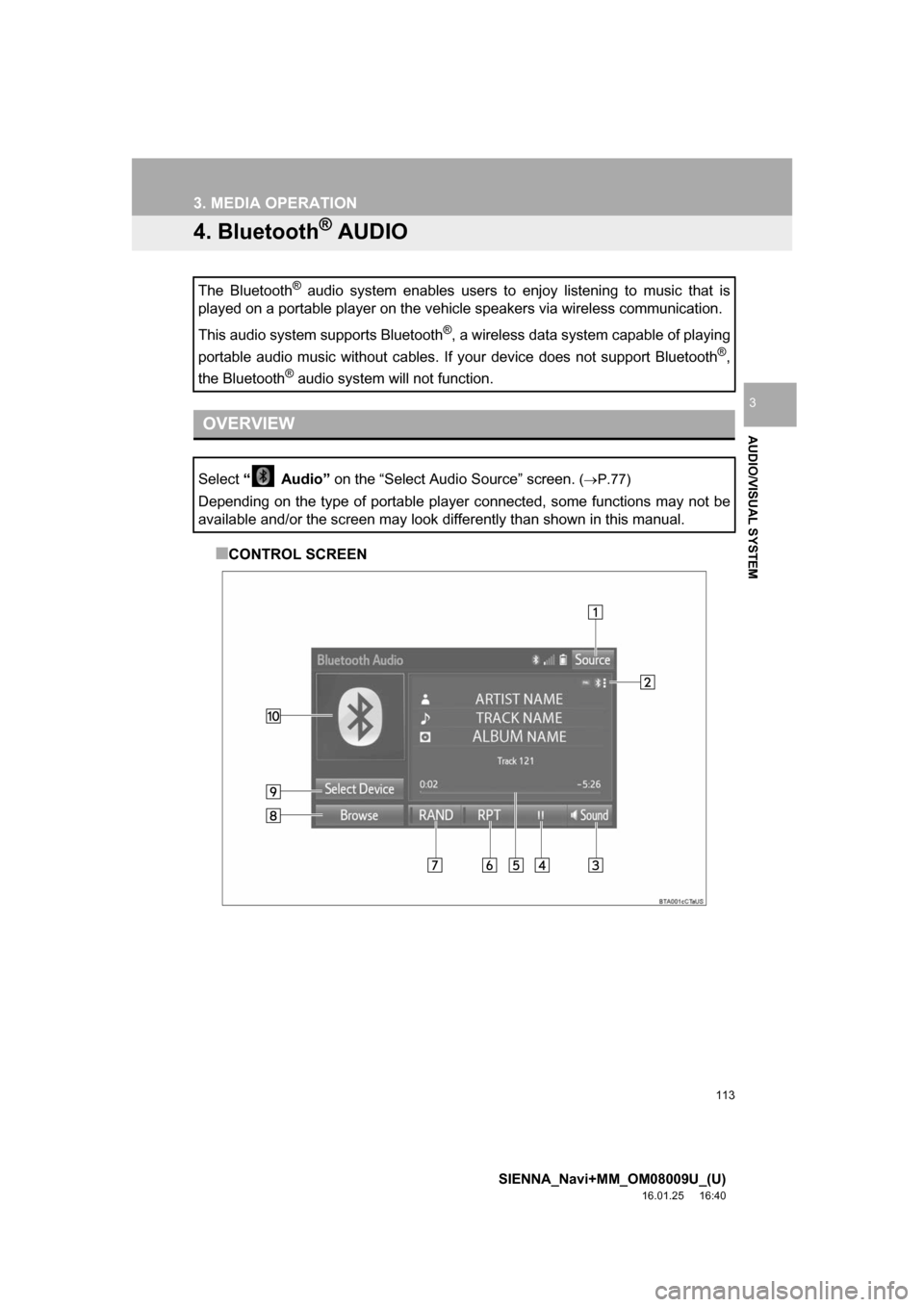
■CONTROL SCREEN
The Bluetooth
® audio system enables users to enjoy listening to music that is
played on a portable player on the vehicle speakers via wireless communi\
cation.
This audio system supports Bluetooth
®, a wireless data system capable of playing
portable audio music without cables. If your device does not support Bluetooth
®,
the Bluetooth
® audio system will not function.
OVERVIEW
Select “ Audio” on the “Select Audio Source” screen. (P.77)
Depending on the type of portable player connected, some functions may not be
available and/or the screen may look differently than shown in this manual.
Page 114 of 366
114
3. MEDIA OPERATION
SIENNA_Navi+MM_OM08009U_(U)
16.01.25 16:40
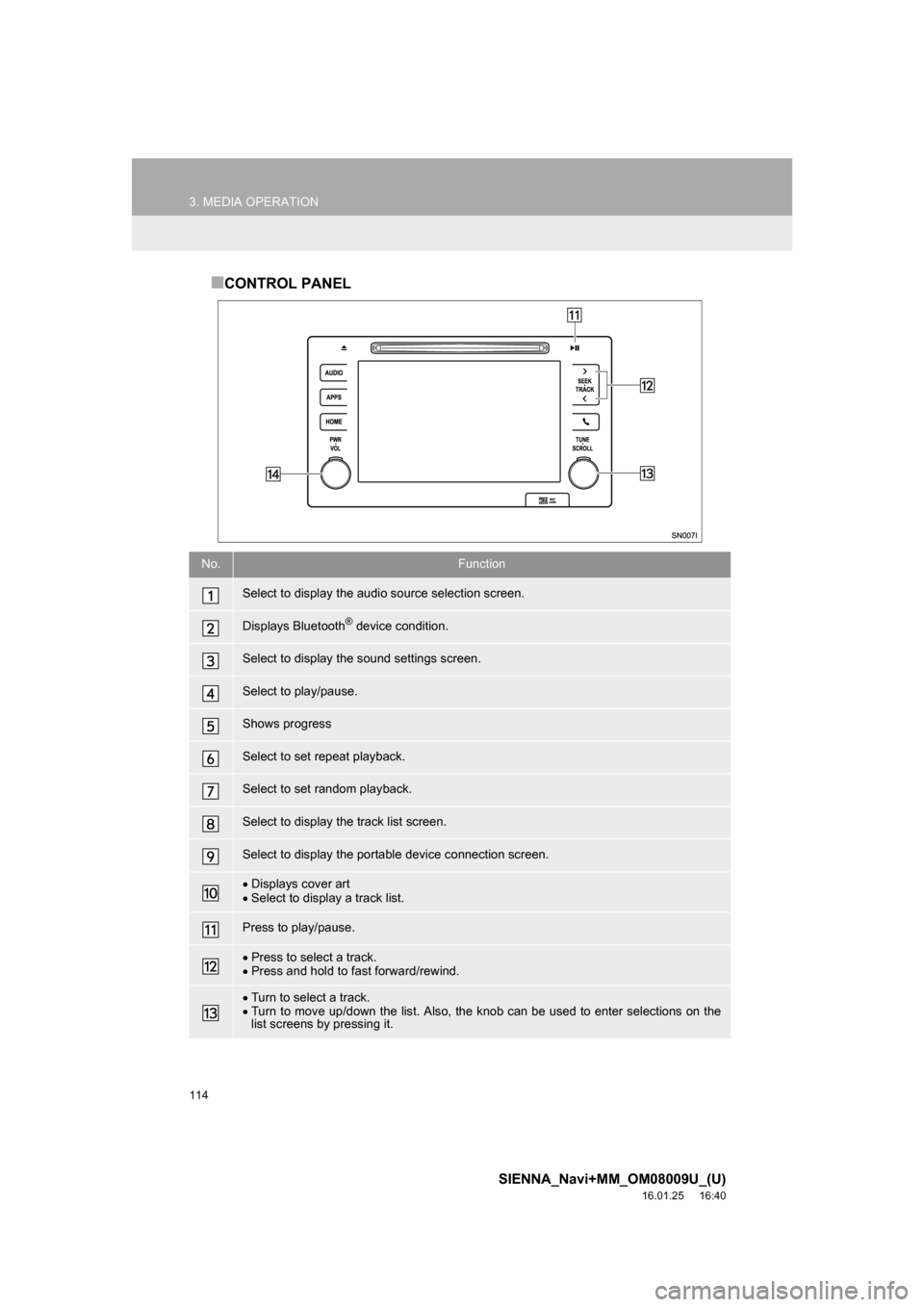
■CONTROL PANEL
No.Function
Select to display the audio source selection screen.
Displays Bluetooth® device condition.
Select to display the sound settings screen.
Select to play/pause.
Shows progress
Select to set repeat playback.
Select to set random playback.
Select to display the track list screen.
Select to display the portable device connection screen.
Displays cover art
Select to display a track list.
Press to play/pause.
Press to select a track.
Press and hold to fast forward/rewind.
Turn to select a track.
Turn to move up/down the list. Also, the knob can be used to enter selections on the
list screens by pressing it.
Page 115 of 366
115
3. MEDIA OPERATION
SIENNA_Navi+MM_OM08009U_(U)
16.01.25 16:40
AUDIO/VISUAL SYSTEM
3
Turn to adjust volume.
Press to turn the audio system on/off.
Press and hold to restart the audio system.
WA R N I N G
● Do not operate the player’s controls or connect to the Bluetooth® audio system while driv-
ing.
● Your audio unit is fitted with Bluetooth
® antennas. People with implantable cardiac pace-
makers, cardiac resynchronization therapy-pacemakers or implantable cardioverter
defibrillators should maintain a reasonable distance between themselves and the
Bluetooth
® antennas. The radio waves may affect the operation of such devices.
● Before using Bluetooth
® devices, users of any electrical medical device other than
implantable cardiac pacemakers, cardiac resynchronization therapy-pacemakers or
implantable cardioverter defibrillators should consult the manufacturer of the device for
information about its operation under the influence of radio waves. Radio waves could
have unexpected effects on the operation of such medical devices.
NOTICE
● Do not leave your portable player in the vehicle. In particular, high temperatures inside
the vehicle may damage the portable player.
No.Function
Page 116 of 366
116
3. MEDIA OPERATION
SIENNA_Navi+MM_OM08009U_(U)
16.01.25 16:40
INFORMATION
●Depending on the Bluetooth® device that is connected to the system, the music may start
playing when selecting while it is paused. Conversely, the music may pause when
selecting while it is playing.
● In the following conditions, the system may not function:
• The Bluetooth
® device is turned off.
• The Bluetooth
® device is not connected.
• The Bluetooth
® device has a low battery.
● It may take time to connect the phone when Bluetooth
® audio is being played.
● For operating the portable player, see the instruction manual that comes with it.
● If the Bluetooth
® device is disconnected due to poor reception from the Bluetooth® net-
work when the engine switch is in the follow ing, the system will automatically reconnect
to the portable player.
Vehicles without a smart key system
The engine switch is turned to the “ACC” or “ON” position.
Vehicles with a smart key system
The engine switch is turned to ACCESSORY or IGNITION ON mode.
●If the Bluetooth® device is disconnected on purpose, such as it was turned off, this does
not happen. Reconnect the portable player manually.
● Bluetooth
® device information is registered when the Bluetooth® device is connected to
the Bluetooth® audio system. When selling or disposing of the vehicle, remove the
Bluetooth® audio information from the system. ( P. 6 5 )
Page 117 of 366
117
3. MEDIA OPERATION
SIENNA_Navi+MM_OM08009U_(U)
16.01.25 16:40
AUDIO/VISUAL SYSTEM
3
Registering an additional device
1Select “Select Device” on the
Bluetooth
® audio control screen.
2For more information: P.52
Selecting a registered device
1Select “Select Device” on the
Bluetooth
® audio control screen.
2For more information: P.54
1Select the repeat button to change on/
off.
1Select the random button to change
on/off.
CONNECTING A Bluetooth®
DEVICE
To use the Bluetooth® audio system, it
is necessary to register a Bluetooth
®
device with the system.
LISTENING TO Bluetooth®
AUDIO
REPEATING
The track currently being listened to
can be repeated.
RANDOM ORDER
Tracks can be automatically and ran-
domly selected.
Page 196 of 366
196
SIENNA_Navi+MM_OM08009U_(U)
16.01.25 16:40
2. MOBILE ASSISTANT OPERATION
1. MOBILE ASSISTANT
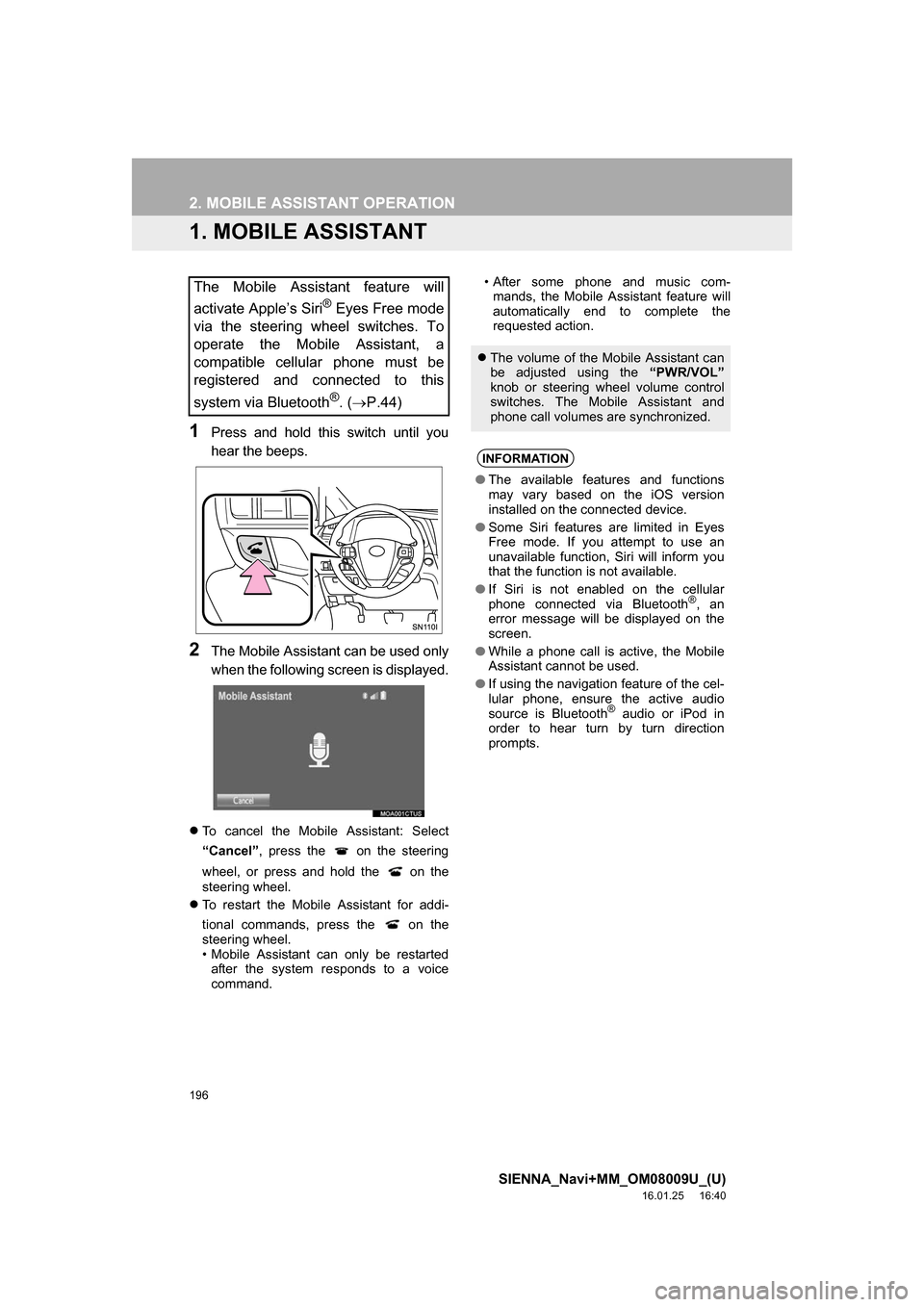
1Press and hold this switch until you
hear the beeps.
2The Mobile Assistant can be used only
when the following screen is displayed.
To cancel the Mobile Assistant: Select
“Cancel” , press the on the steering
wheel, or press and hold the on the
steering wheel.
To restart the Mobile Assistant for addi-
tional commands, press the on the
steering wheel.
• Mobile Assistant can only be restarted
after the system responds to a voice
command. • After some phone and music com-
mands, the Mobile Assistant feature will
automatically end to complete the
requested action.
The Mobile Assistant feature will
activate Apple’s Siri
® Eyes Free mode
via the steering wheel switches. To
operate the Mobile Assistant, a
compatible cellular phone must be
registered and connected to this
system via Bluetooth
®. ( P.44)
The volume of the Mobile Assistant can
be adjusted using the “PWR/VOL”
knob or steering wheel volume control
switches. The Mobile Assistant and
phone call volumes are synchronized.
INFORMATION
● The available features and functions
may vary based on the iOS version
installed on the connected device.
● Some Siri features are limited in Eyes
Free mode. If you attempt to use an
unavailable function, Siri will inform you
that the function is not available.
● If Siri is not enabled on the cellular
phone connected via Bluetooth
®, an
error message will be displayed on the
screen.
● While a phone call is active, the Mobile
Assistant cannot be used.
● If using the navigation feature of the cel-
lular phone, ensure the active audio
source is Bluetooth
® audio or iPod in
order to hear turn by turn direction
prompts.
Page 200 of 366
200
SIENNA_Navi+MM_OM08009U_(U)
16.01.25 16:40
1. USEFUL INFORMATION
1. RECEIVING WEATHER INFORMATION
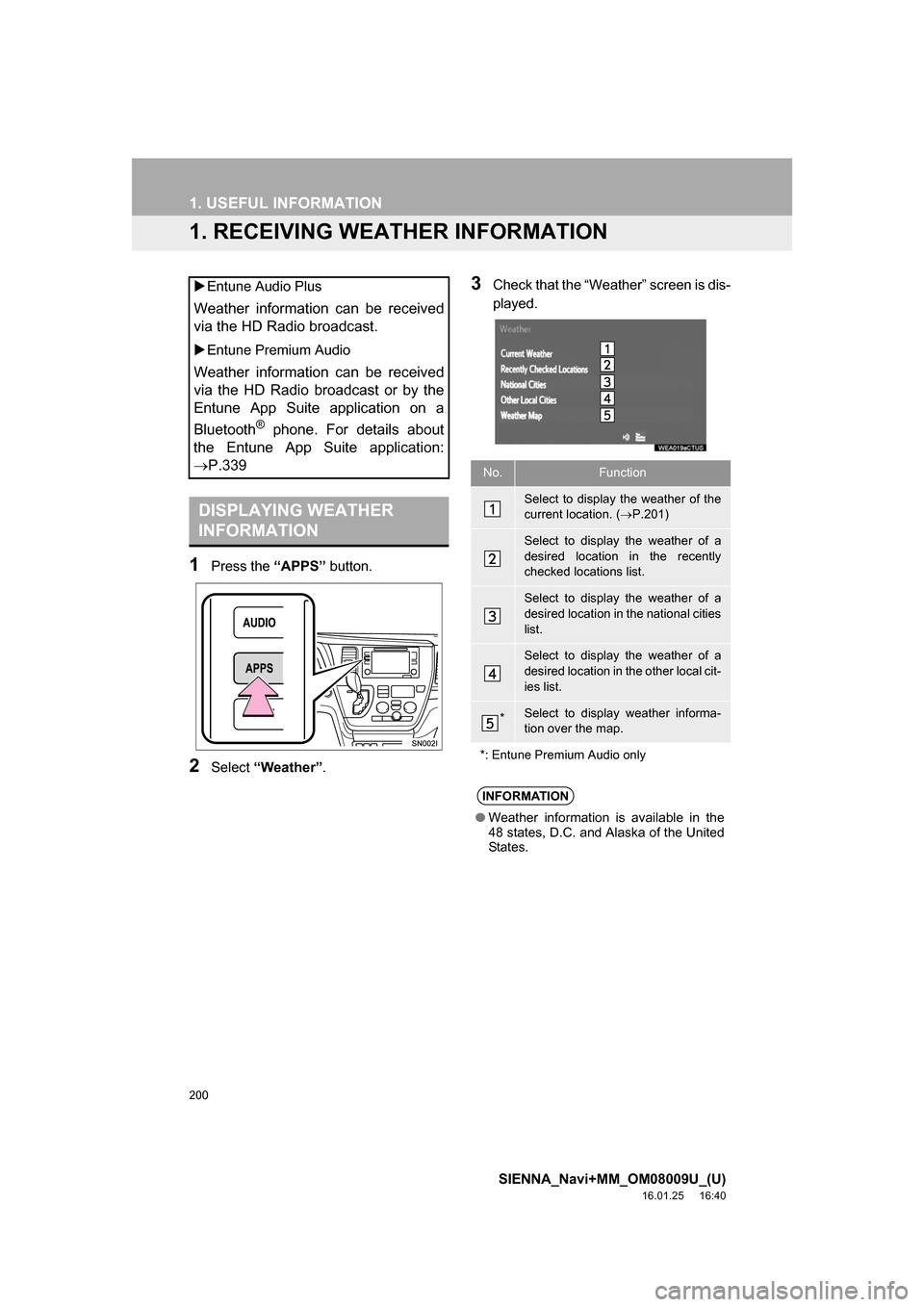
1Press the “APPS” button.
2Select “Weather” .
3Check that the “Weather” screen is dis-
played.
Entune Audio Plus
Weather information can be received
via the HD Radio broadcast.
Entune Premium Audio
Weather information can be received
via the HD Radio broadcast or by the
Entune App Suite application on a
Bluetooth
® phone. For details about
the Entune App Suite application:
P.339
DISPLAYING WEATHER
INFORMATION
No.Function
Select to display the weather of the
current location. ( P.201)
Select to display the weather of a
desired location in the recently
checked locations list.
Select to display the weather of a
desired location in the national cities
list.
Select to display the weather of a
desired location in the other local cit-
ies list.
*Select to display weather informa-
tion over the map.
*: Entune Premium Audio only
INFORMATION
● Weather information is available in the
48 states, D.C. and Alaska of the United
States.
Page 203 of 366
203
1. USEFUL INFORMATION
SIENNA_Navi+MM_OM08009U_(U)
16.01.25 16:40
INFORMATION
5
3. DATA SERVICES SETTINGS*
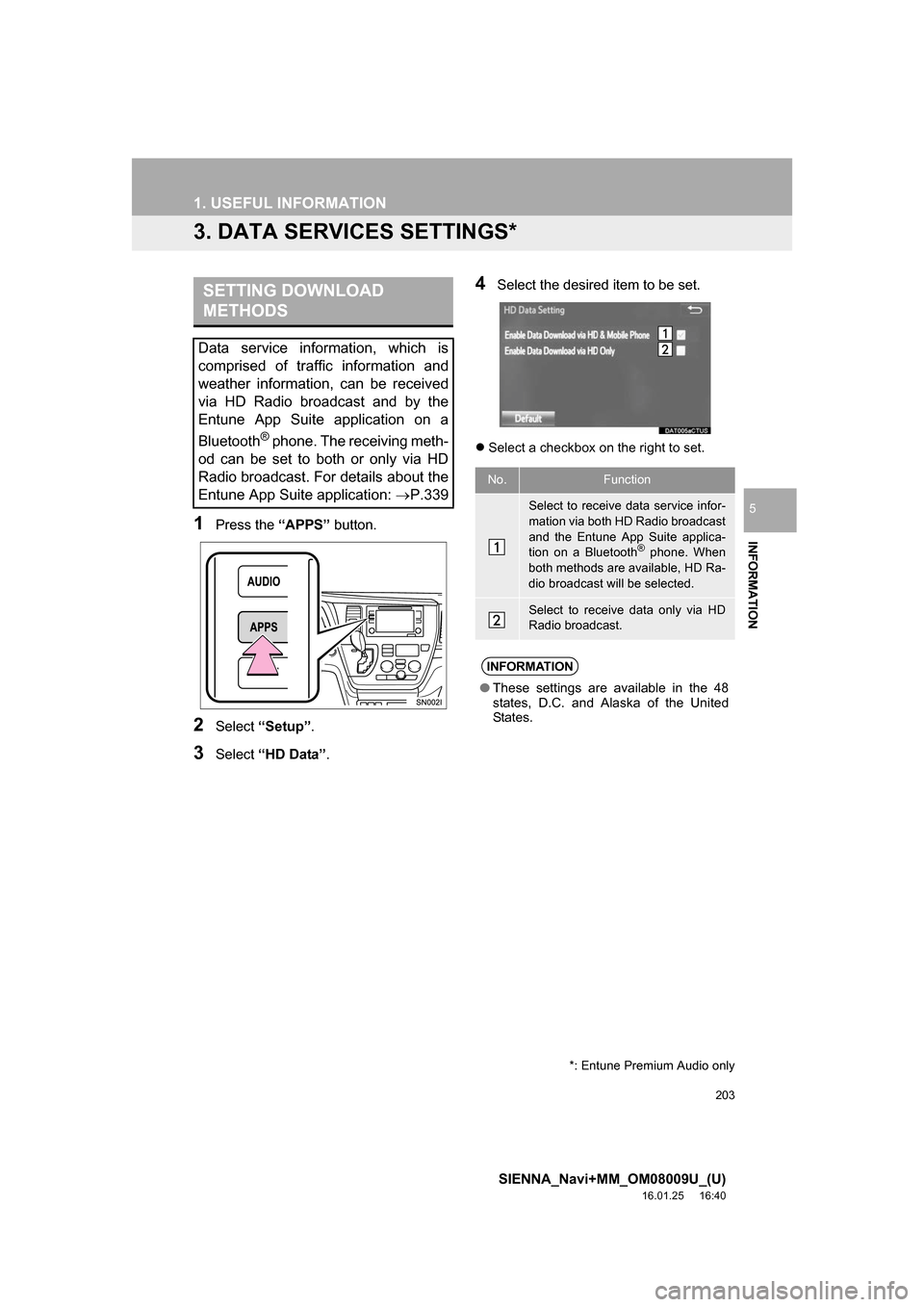
1Press the “APPS” button.
2Select “Setup” .
3Select “HD Data” .
4Select the desired item to be set.
Select a checkbox on the right to set.
SETTING DOWNLOAD
METHODS
Data service information, which is
comprised of traffic information and
weather information, can be received
via HD Radio broadcast and by the
Entune App Suite application on a
Bluetooth
® phone. The receiving meth-
od can be set to both or only via HD
Radio broadcast. For details about the
Entune App Suite application: P.339
No.Function
Select to receive data service infor-
mation via both HD Radio broadcast
and the Entune App Suite applica-
tion on a Bluetooth
® phone. When
both methods are available, HD Ra-
dio broadcast will be selected.
Select to receive data only via HD
Radio broadcast.
INFORMATION
● These settings are available in the 48
states, D.C. and Alaska of the United
States.
*: Entune Premium Audio only