check engine TOYOTA SIENNA 2017 XL30 / 3.G Owner's Manual
[x] Cancel search | Manufacturer: TOYOTA, Model Year: 2017, Model line: SIENNA, Model: TOYOTA SIENNA 2017 XL30 / 3.GPages: 672, PDF Size: 17.01 MB
Page 227 of 672
SIENNA_OM_OM08007U_(U)
2274-2. Driving procedures
4
Driving
NOTICE
■To prevent battery discharge
Do not leave the engine switch in the “ACC” or “ON” position for long peri-
ods of time without the engine running.
■ When starting the engine
●Do not crank the engine for more than 30 seconds at a time. This may
overheat the starter and wiring system.
● Do not race a cold engine.
● If the engine becomes difficult to start or stalls frequently, have the engine
checked immediately.
Page 228 of 672
228
SIENNA_OM_OM08007U_(U)
4-2. Driving procedures
Engine (ignition) switch (vehicles with a
smart key system)
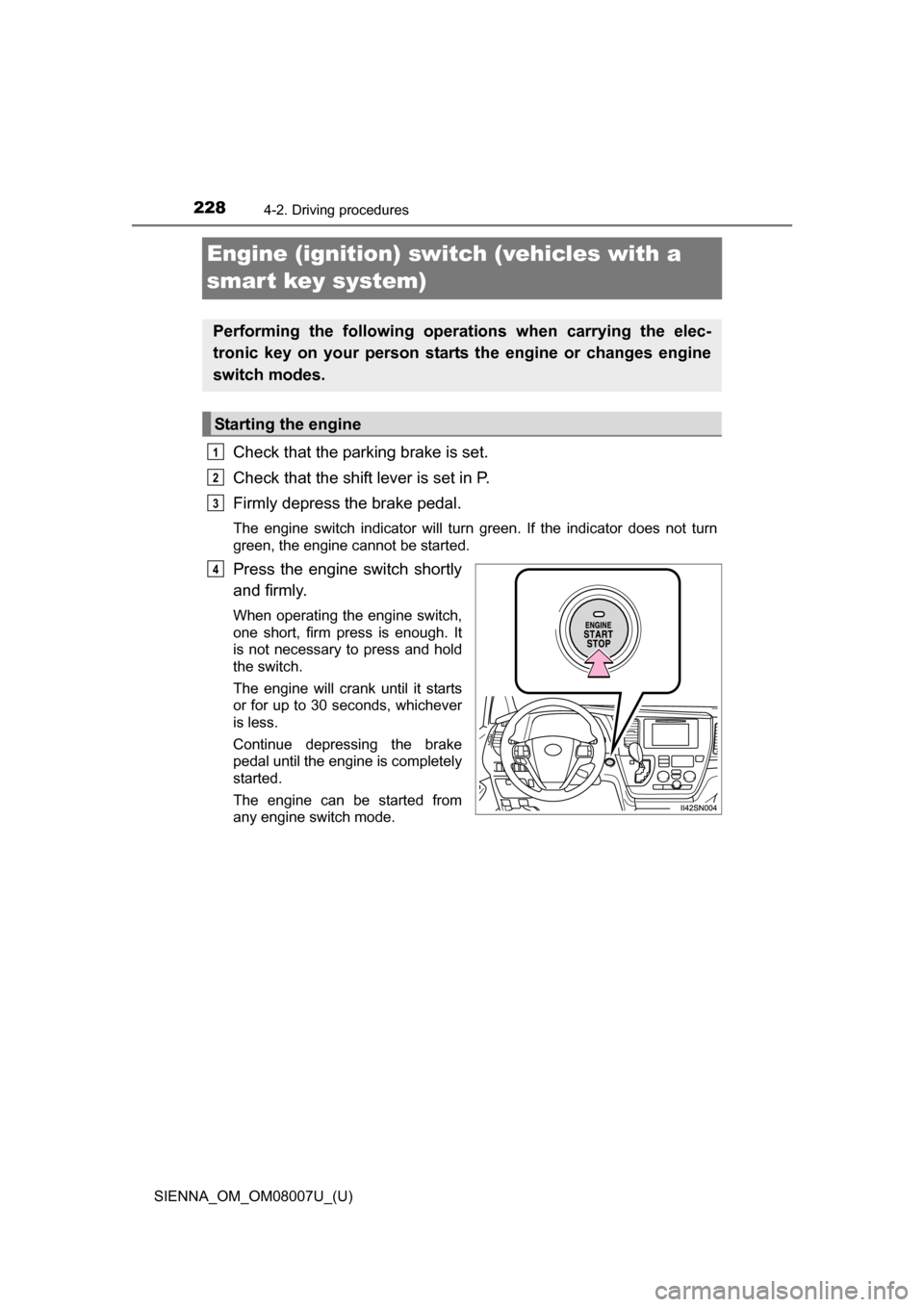
Check that the parking brake is set.
Check that the shift lever is set in P.
Firmly depress the brake pedal.
The engine switch indicator will turn green. If the indicator does not turn
green, the engine cannot be started.
Press the engine switch shortly
and firmly.
When operating the engine switch,
one short, firm press is enough. It
is not necessary to press and hold
the switch.
The engine will crank until it starts
or for up to 30 seconds, whichever
is less.
Continue depressing the brake
pedal until the engine is completely
started.
The engine can be started from
any engine switch mode.
Performing the following operations when carrying the elec-
tronic key on your person starts the engine or changes engine
switch modes.
Starting the engine
1
2
3
4
Page 229 of 672
SIENNA_OM_OM08007U_(U)
2294-2. Driving procedures
4
Driving
Stop the vehicle.
Set the parking brake. (P. 241), and shift the shift lever to P.
Press the engine switch.
Release the brake pedal and check t hat the indicator on the engine
switch is off.
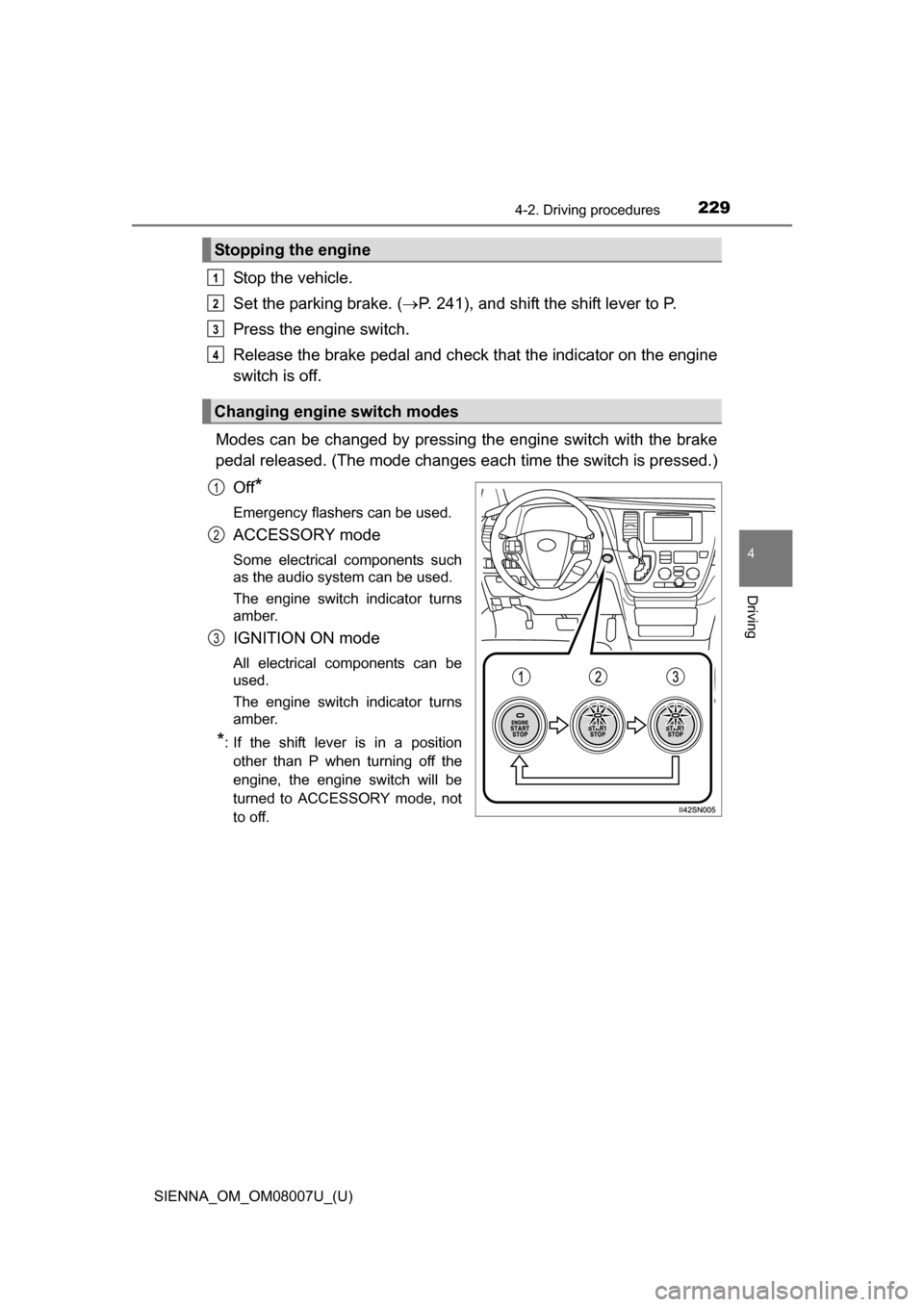
Modes can be changed by pressing th e engine switch with the brake
pedal released. (The mode changes ea ch time the switch is pressed.)
Off
*
Emergency flashers can be used.
ACCESSORY mode
Some electrical components such
as the audio system can be used.
The engine switch indicator turns
amber.
IGNITION ON mode
All electrical components can be
used.
The engine switch indicator turns
amber.
*: If the shift lever is in a position other than P when turning off the
engine, the engine switch will be
turned to ACCESSORY mode, not
to off.
Stopping the engine
Changing engine switch modes
1
2
3
4
1
2
3
Page 230 of 672
230
SIENNA_OM_OM08007U_(U)
4-2. Driving procedures
If the engine is stopped with the shift lever in a position other than P,
the engine switch will not be turned off but instead be turned to
ACCESSORY mode. Perform the following procedure to turn the
switch off:
Check that the parking brake is set.
Shift the shift lever to P.
Check that the indicator on th e engine switch is illuminated in
amber and then press the engine switch once.
Check that the indicator on the engine switch is off.
■Auto power off function
If the vehicle is left in ACCESSORY mode for more than 20 minutes or
IGNITION ON mode (the engine is not running) for more than an hour with
the shift lever in P, the engine switch will automatically turn off. However, this
function cannot entirely prevent battery discharge. Do not leave the vehicle
with the engine switch in ACCESSORY or IGNITION ON mode for long peri-
ods of time when the engine is not running.
■ Electronic key battery depletion
P. 107
■ Conditions affecting operation
P. 1 1 9
■ Note for the entry function
P. 145
■ If the engine does not start
The engine immobilizer system may not have been deactivated. ( P. 75)
Contact your Toyota dealer.
When stopping the engine with the shift lever in a position other
than P
1
2
3
4
Page 232 of 672
232
SIENNA_OM_OM08007U_(U)
4-2. Driving procedures
WARNING
■When starting the engine
Always start the engine while sitting in the driver’s seat. Do not depress the
accelerator pedal while starting the engine under any circumstances.
Doing so may cause an accident resulting in death or serious injury.
■ Caution while driving
If the vehicle begins to slide due to engine failure or other circumstances, do
not lock or open the doors until the vehicle reaches a safe and complete
stop. Activation of the steering lock in this circumstance may lead to an
accident, resulting in death or serious injury.
■ Stopping the engine in an emergency
If you want to stop the engine in an emergency while driving the vehicle,
press and hold the engine switch for more than 2 seconds, or press it briefly
3 times or more in succession. ( P. 537)
However, do not touch the engine switch while driving except in an emer-
gency. Turning the engine off while driving will not cause loss of steering or
braking control, but the power assist to these systems will be lost. This will
make it more difficult to steer and brake, so you should pull over and stop
the vehicle as soon as it is safe to do so.
NOTICE
■ To prevent battery discharge
●Do not leave the engine switch in ACCESSORY or IGNITION ON mode
for long periods of time without the engine running.
● If the indicator on the engine switch is illuminated, the engine switch is not
off. When exiting the vehicle, always check that the engine switch is off.
● Do not stop the engine when the shift lever is in a position other than P. If
the engine is stopped in another shift lever position, the engine switch will
not be turned off but instead be turned to ACCESSORY mode. If the vehi-
cle is left in ACCESSORY mode, battery discharge may occur.
■ When starting the engine
●Do not race a cold engine.
● If the engine becomes difficult to start or stalls frequently, have the engine
checked immediately.
■ Symptoms indicating a malfunction with the engine switch
If the engine switch seems to be operating somewhat differently than usual,
such as the switch sticking slightly, there may be a malfunction.
Contact your Toyota dealer immediately.
Page 238 of 672
238
SIENNA_OM_OM08007U_(U)
4-2. Driving procedures
■If the shift lever cannot be shifted from P
●First, check whether the brake pedal is being depressed.
If the shift lever cannot be shifted with your foot on the brake pedal, there
may be a problem with the shift lock system. Have the vehicle inspected by
your Toyota dealer immediately.
The following steps may be used as an emergency measure to ensure that
the shift lever can be shifted.
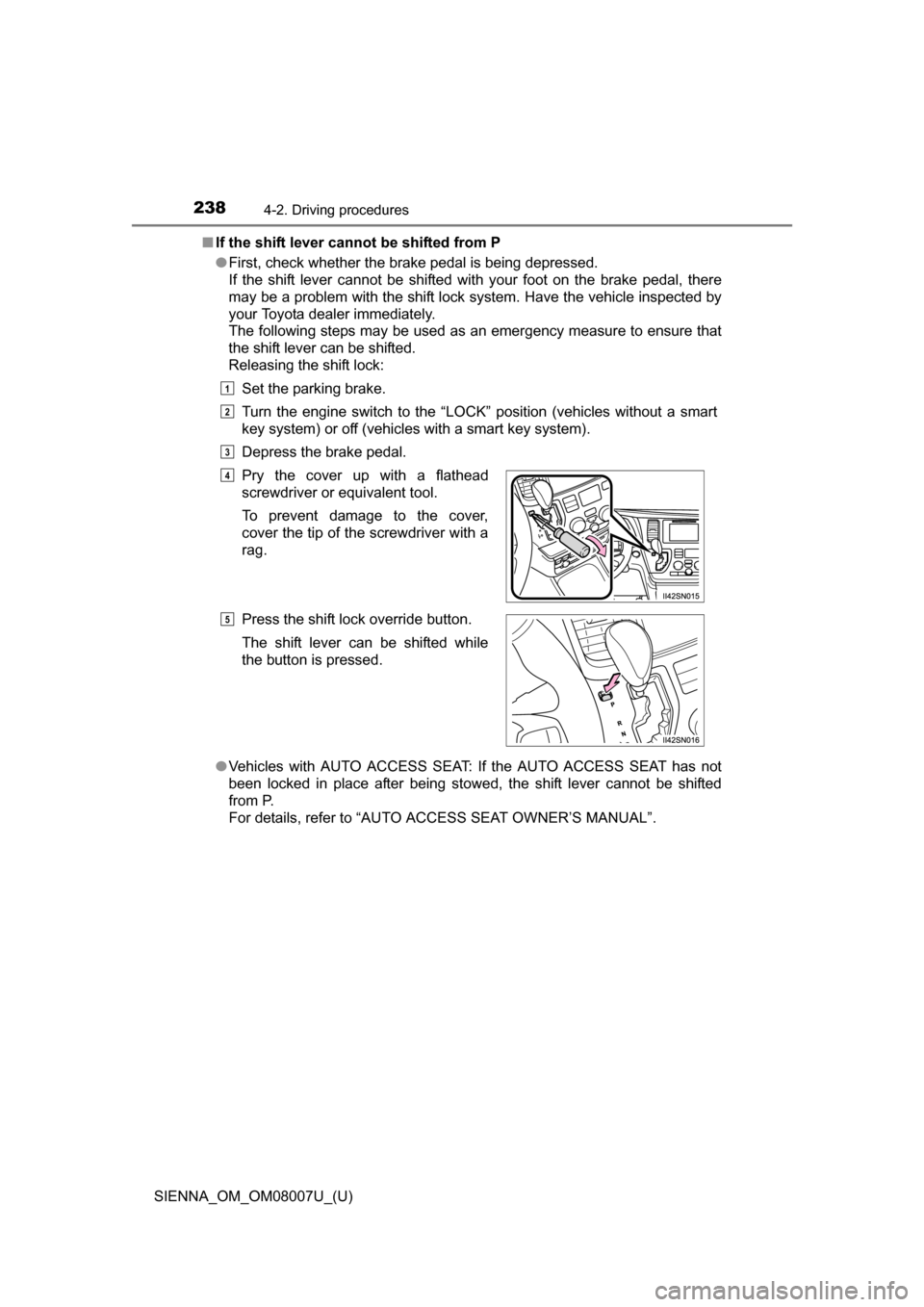
Releasing the shift lock:
Set the parking brake.
Turn the engine switch to the “LOCK” position (vehicles without a smart
key system) or off (vehicles with a smart key system).
Depress the brake pedal.
● Vehicles with AUTO ACCESS SEAT: If the AUTO ACCESS SEAT has not
been locked in place after being stowed, the shift lever cannot be shifted
from P.
For details, refer to “AUTO A CCESS SEAT OWNER’S MANUAL”.
Pry the cover up with a flathead
screwdriver or equivalent tool.
To prevent damage to the cover,
cover the tip of the screwdriver with a
rag.
Press the shift lock override button.
The shift lever can be shifted while
the button is pressed.
1
2
3
4
5
Page 240 of 672
240
SIENNA_OM_OM08007U_(U)
4-2. Driving procedures
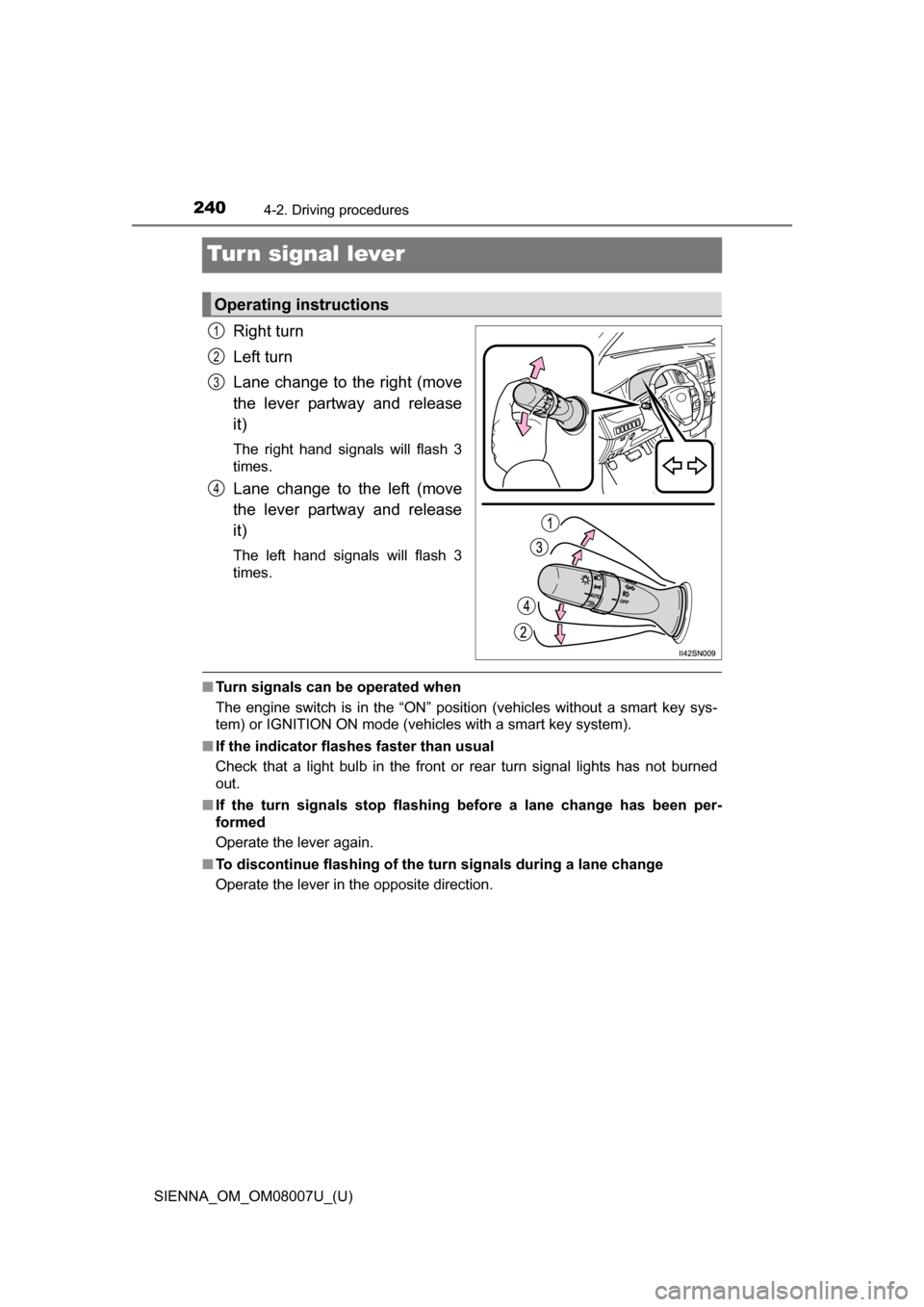
Turn signal lever
Right turn
Left turn
Lane change to the right (move
the lever partway and release
it)
The right hand signals will flash 3
times.
Lane change to the left (move
the lever partway and release
it)
The left hand signals will flash 3
times.
■Turn signals can be operated when
The engine switch is in the “ON” position (vehicles without a smart key sys-
tem) or IGNITION ON mode (vehicles with a smart key system).
■ If the indicator flashes faster than usual
Check that a light bulb in the front or rear turn signal lights has not burned
out.
■ If the turn signals stop flashing before a lane change has been per-
formed
Operate the lever again.
■ To discontinue flashing of the turn signals during a lane change
Operate the lever in the opposite direction.
Operating instructions
1
2
3
4
Page 255 of 672
SIENNA_OM_OM08007U_(U)
2554-3. Operating the lights and wipers
4
Driving
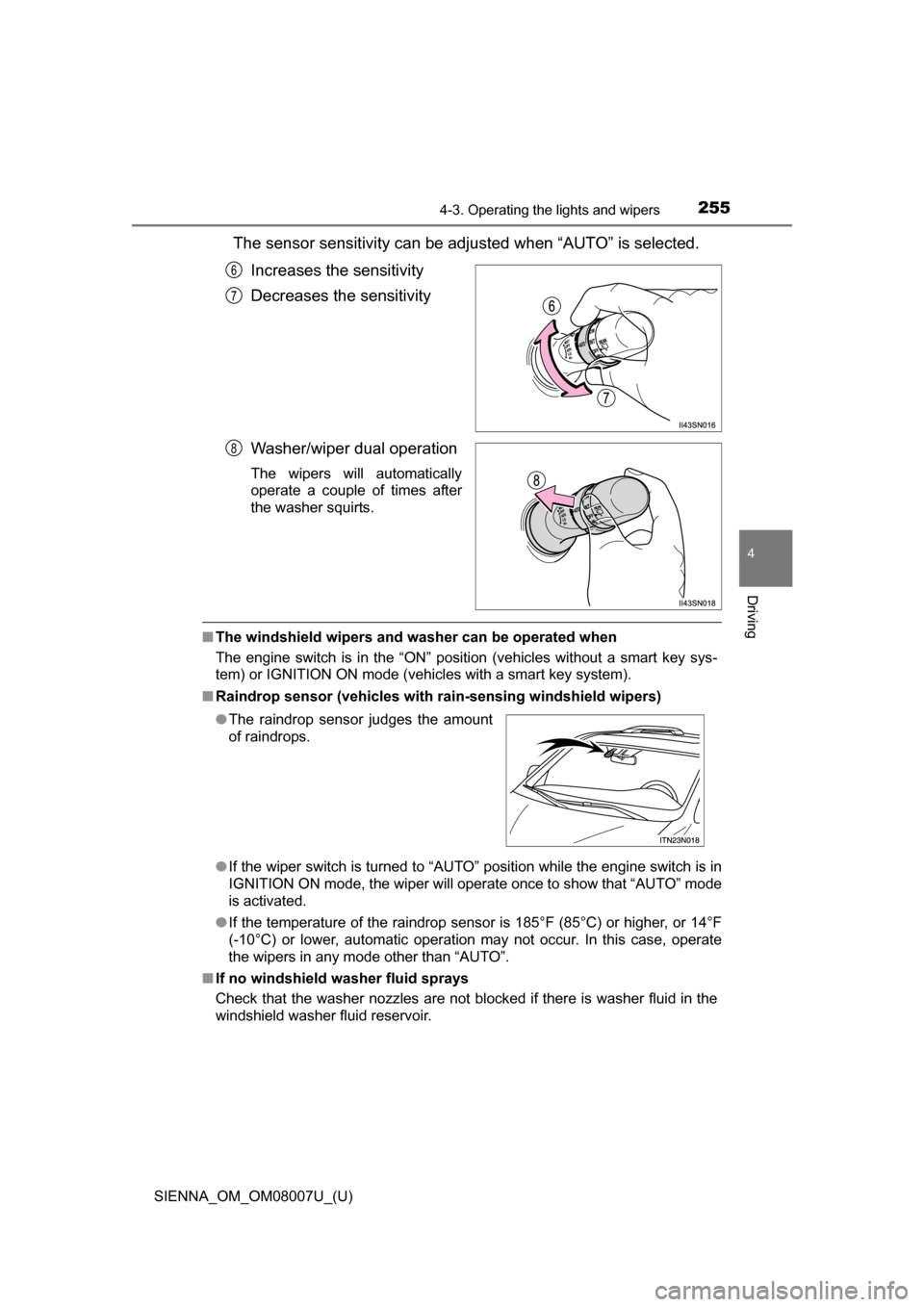
The sensor sensitivity can be adjusted when “AUTO” is selected.Increases the sensitivity
Decreases the sensitivity
Washer/wiper dual operation
The wipers will automatically
operate a couple of times after
the washer squirts.
■The windshield wipers and washer can be operated when
The engine switch is in the “ON” position (vehicles without a smart key sys-
tem) or IGNITION ON mode (vehicles with a smart key system).
■ Raindrop sensor (vehicles with ra in-sensing windshield wipers)
● If the wiper switch is turned to “AUTO” position while the engine switch is in
IGNITION ON mode, the wiper will operate once to show that “AUTO” mode
is activated.
● If the temperature of the raindrop sensor is 185°F (85°C) or higher, or 14°F
(-10°C) or lower, automatic operation may not occur. In this case, operate
the wipers in any mode other than “AUTO”.
■ If no windshield washer fluid sprays
Check that the washer nozzles are not blocked if there is washer fluid in the
windshield washer fluid reservoir.
6
7
8
●The raindrop sensor judges the amount
of raindrops.
Page 257 of 672
257
SIENNA_OM_OM08007U_(U)
4-3. Operating the lights and wipers
4
Driving
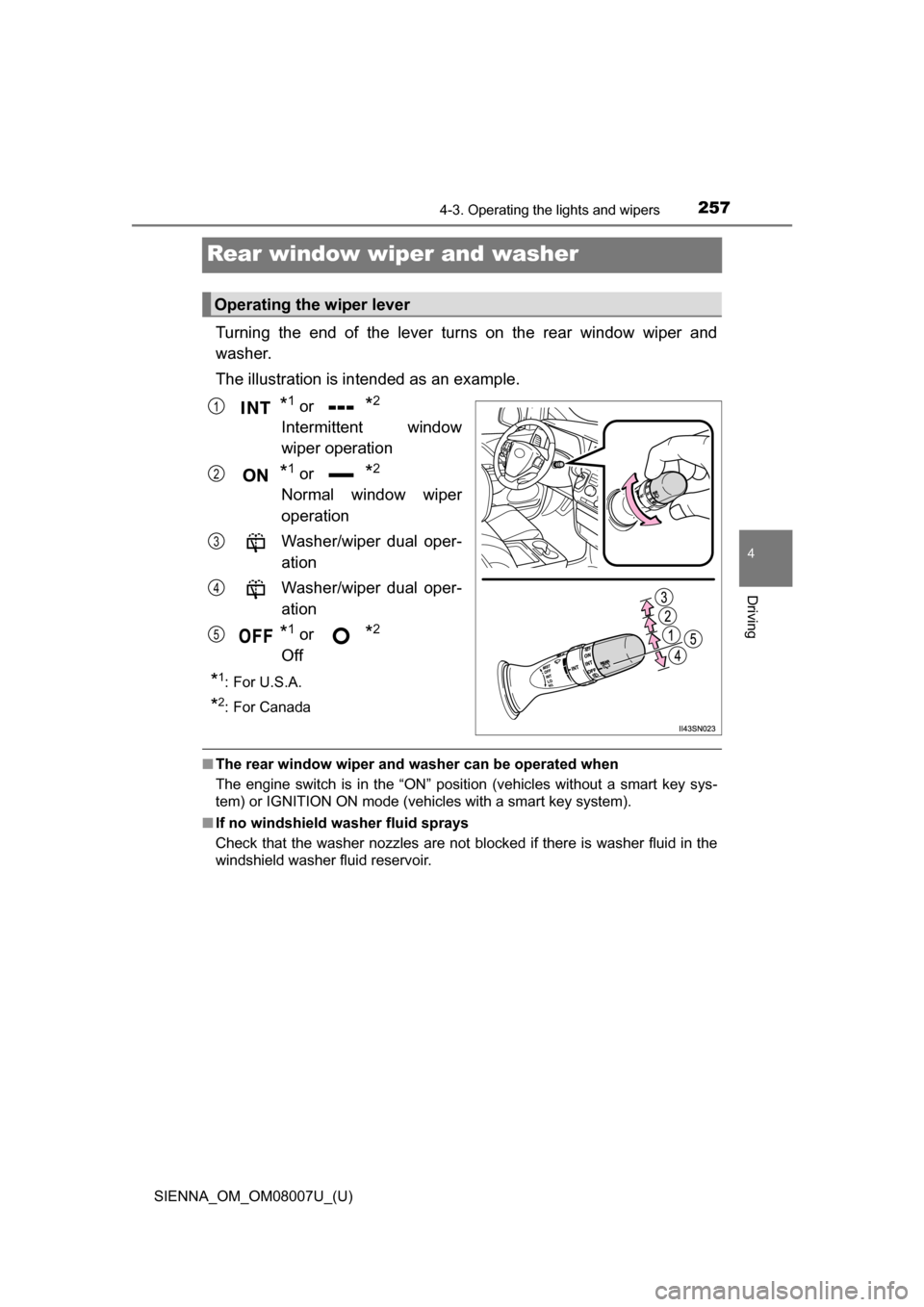
Rear window wiper and washer
Turning the end of the lever turns on the rear window wiper and
washer.
The illustration is intended as an example.
*1 or *2
Intermittent window
wiper operation
*1 or *2
Normal window wiper
operation
Washer/wiper dual oper-
ation
Washer/wiper dual oper-
ation
*1 or *2
Off
*1:For U.S.A.
*2: For Canada
■ The rear window wiper and w asher can be operated when
The engine switch is in the “ON” position (vehicles without a smart key sys-
tem) or IGNITION ON mode (vehicles with a smart key system).
■ If no windshield washer fluid sprays
Check that the washer nozzles are not blocked if there is washer fluid in the
windshield washer fluid reservoir.
Operating the wiper lever
1
2
3
4
5
Page 317 of 672
317
SIENNA_OM_OM08007U_(U)
4-6. Driving tips
4
Driving
Winter driving tips
●Use fluids that are appropriate to the prevailing outside tempera-
tures.
• Engine oil
• Engine coolant
• Washer fluid
● Have a service technician ins pect the condition of the battery.
● Have the vehicle fitted with four snow tires or purchase a set of tire
chains for the front tires.
Ensure that all tires are the same size and brand, and that chains match
the size of the tires.
Perform the following accordin g to the driving conditions:
● Do not try to forcibly open a window or move a wiper that is frozen.
Pour warm water over the frozen area to melt the ice. Wipe away
the water immediately to prevent it from freezing.
● To ensure proper operation of the climate control system fan,
remove any snow that has accumulated on the air inlet vents in
front of the windshield.
● Check for and remove any excess ice or snow that may have accu-
mulated on the exterior lights, ve hicle’s roof, chassis, around the
tires or on the brakes.
● Remove any snow or mud from the bottom of your shoes before
getting in the vehicle.
Carry out the necessary preparations and inspections before
driving the vehicle in winter. Always drive the vehicle in a man-
ner appropriate to the prevailing weather conditions.
Preparation for winter
Before driving the vehicle