key battery TOYOTA SIENNA 2017 XL30 / 3.G Owners Manual
[x] Cancel search | Manufacturer: TOYOTA, Model Year: 2017, Model line: SIENNA, Model: TOYOTA SIENNA 2017 XL30 / 3.GPages: 672, PDF Size: 17.01 MB
Page 6 of 672
TABLE OF CONTENTS6
SIENNA_OM_OM08007U_(U)6-4. Using the other interior
features
Other interior features ....... 443 • Sun visors ..................... 443
• Vanity mirrors................ 443
• Clock ............................. 444
• Conversation mirror ...... 444
• Power outlets ................ 445
• Armrests ....................... 448
• Assist grips ................... 449
• Rear side sunshades .... 450
• Grocery bag hooks ....... 451
Garage door opener .......... 452
Compass ........................... 457
Safety Connect.................. 461
7-1. Maintenance and care Cleaning and protecting the vehicle exterior .......... 468
Cleaning and protecting the vehicle interior ........... 471
7-2. Maintenance Maintenance requirements ................... 474
General maintenance ........ 477
Emission inspection and maintenance (I/M)
programs ......................... 480 7-3. Do-it-yourself maintenance
Do-it-yourself service precautions ...................... 481
Hood .................................. 483
Positioning a floor jack....... 485
Engine compartment ......... 486
Tires................................... 496
Tire inflation pressure ........ 504
Wheels............................... 507
Air conditioning filter .......... 509
Wireless remote control/ electronic key battery ...... 511
Checking and replacing fuses ................................ 514
Light bulbs ......................... 517
8-1. Essential information Emergency flashers ........... 536
If your vehicle has to be stopped in an
emergency....................... 537
8-2. Steps to take in an emergency
If your vehicle needs to be towed .......................... 539
If you think something is wrong............................... 543
Fuel pump shut off system ............................. 544
If a warning light turns on or a warning buzzer
sounds ............................. 545
If a warning message is displayed ......................... 554
If you have a flat tire (vehicles with
run-flat tires) .................... 570
7Maintenance and care
8When trouble arises
Page 7 of 672
7
1
9 8
7
6 4 3
2
SIENNA_OM_OM08007U_(U)
10
5
If you have a flat tire (vehicles with a compact
spare tire) ........................ 572
If the engine will not start ................................. 586
If the electronic key does not operate properly
(vehicles with a smart
key system) ..................... 588
If the battery is discharged ...................... 590
If your vehicle overheats ........................ 594
If the vehicle becomes stuck................................ 597
9-1. Specifications Maintenance data (fuel, oil level, etc.) .......... 600
Fuel information ................ 609
Tire information ................. 612
9-2. Customization Customizable features ...... 623
9-3. Initialization Items to initialize................ 634 Reporting safety defects
for U.S. owners ........................ 636
Seat belt instructions for Canadian owners
(in French)................................ 637
SRS airbag instructions for Canadian owners
(in French)................................ 639
What to do if... (Troubleshooting) ..................... 650
Alphabetical index ...................... 655
9Vehicle specifications
10For owners
Index
For vehicles with an Entune Audio Plus or Entune Premium Audio
with Navigation, refer to th e “ N AV I G AT I O N A N D M U LT I M E D I A
SYSTEM OWNER’S MANUAL” for information regarding the equip-
ment listed below.
• Navigation system
• Rear view monitor system (with guide function)• Audio system
For details about AUTO ACCESS SEAT, refer to the “AUTO
ACCESS SEAT Owner’s Manual”.
Page 78 of 672
781-2. Theft deterrent system
SIENNA_OM_OM08007U_(U)
■System maintenance
The vehicle has a maintenance-free type alarm system.
■ Items to check before locking the vehicle
To prevent unexpected triggering of the alarm and vehicle theft, make sure of
the following:
●Nobody is in the vehicle.
● The windows and moon roof (if equipped) are closed before the alarm is set.
● No valuables or other personal items are left in the vehicle.
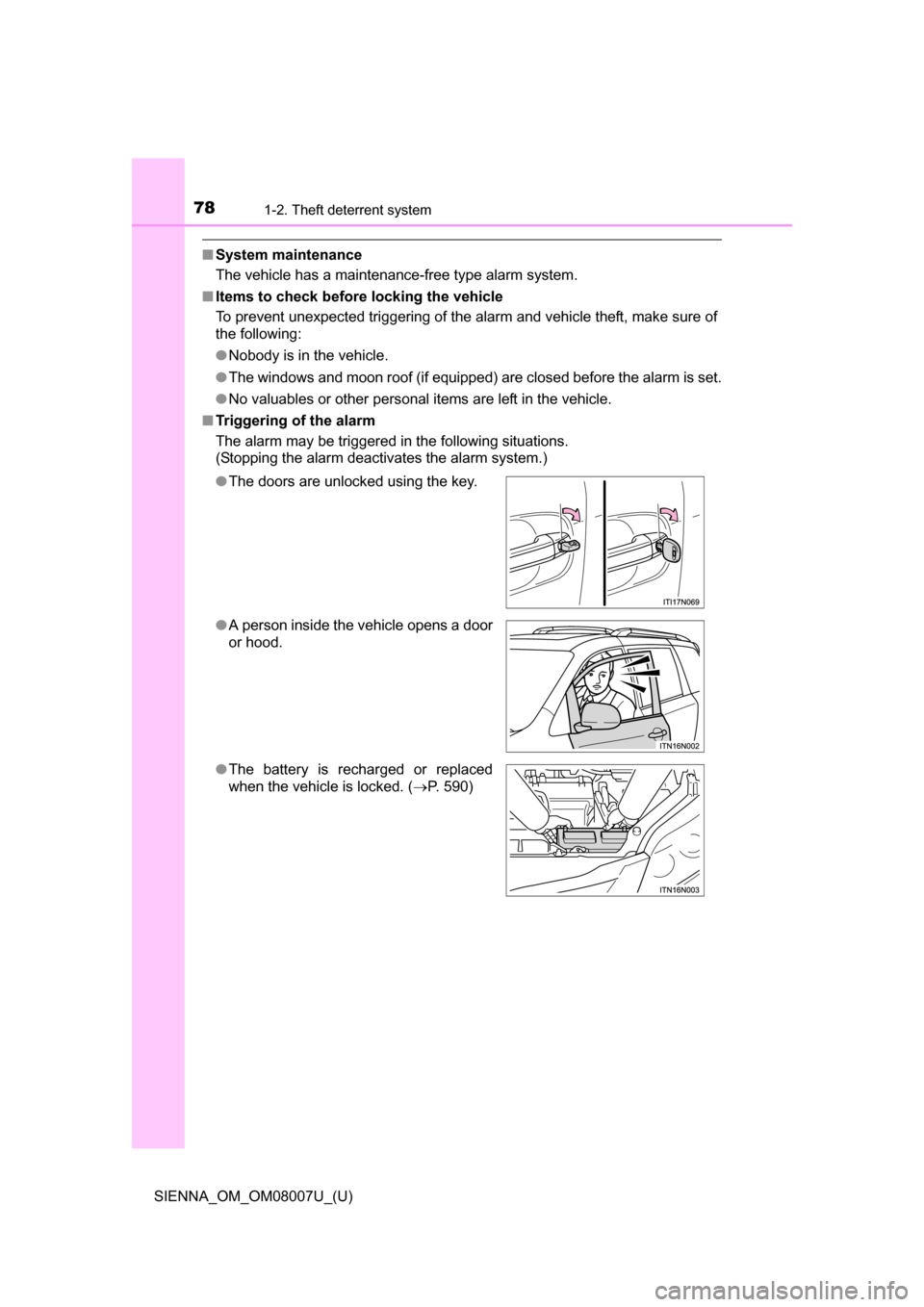
■ Triggering of the alarm
The alarm may be triggered in the following situations.
(Stopping the alarm deactivates the alarm system.)
●The doors are unlocked using the key.
● A person inside the vehicle opens a door
or hood.
● The battery is recharged or replaced
when the vehicle is locked. ( P. 590)
Page 107 of 672
SIENNA_OM_OM08007U_(U)
1073-1. Key information
3
Operation of each component
■When required to leave the vehicle’s key with a parking attendant
Lock the glove box as circumstances demand. ( P. 431)
On vehicles without the smart key system, provide the attendant with the
valet key.
On vehicles with the smart key system, remove the mechanical key for your
own use and provide the attendant with the electronic key only.
■ If you lose your keys
New genuine keys can be made by your Toyota dealer using a master key
(vehicles without a smart key system) or the other key (vehicles with a smart
key system) and the key number stam ped on your key number plate. Keep
the plate in a safe place such as your wallet, not in the vehicle.
■ When riding in an aircraft
When bringing a key with wireless remote control function onto an aircraft,
make sure you do not press any buttons on the key while inside the aircraft
cabin. If you are carrying the key in your bag etc., ensure that the buttons are
not likely to be pressed accidentally. Pressing a button may cause the key to
emit radio waves that could interfere with the operation of the aircraft.
■ Conditions affecting the operation of the smart key system or wireless
remote control
P. 1 1 8
■ Key battery depletion
Vehicles without a smart key system
If the wireless remote control function does not operate, the battery may be
depleted. Replace the battery when necessary. (P. 511)
Vehicles with a smart key system
● The standard battery life is 1 to 2 years.
● If the battery becomes low, an alarm will sound in the cabin when the engine
stops. ( P. 569)
● As the electronic key always receives radio waves, the battery will become
depleted even if the electronic key is not used. The following symptoms indi-
cate that the electronic key battery may be depleted. Replace the battery
when necessary. ( P. 511)
• The smart key system or the wireless remote control does not operate.
• The detection area becomes smaller.
• The LED indicator on the key surface does not turn on.
● To avoid serious deterioration, do not leave the electronic key within 3 ft.
(1 m) of the following electrical appliances that produce a magnetic field.
•TVs
• Personal computers
• Cellular phones, cordless phones and battery chargers
• Recharging cellular phones or cordless phones
• Induction cookers
• Table lamps
Page 108 of 672
108
SIENNA_OM_OM08007U_(U)
3-1. Key information
■When the key battery is fully depleted
P. 5 1 1
■ Confirmation of the registered key number
The number of keys already registered to the vehicle can be confirmed. Ask
your Toyota dealer for details.
■ Certification for wireless remote co ntrol (vehicles without a smart key
system)
This device complies with Part 15 of the FCC Rules and with RSS-210 of
Industry Canada. Operation is subject to the following two conditions: (1) this
device may not cause harmful interference, and (2) this device must accept
any interference received, including interference that may cause undesired
operation.
■ Certification for wireless remote c ontrol (vehicles with a smart key sys-
tem)
For vehicles sold in the U.S.A.
FCC ID: HYQ14ADR FCC ID: HYQ14AEH
FCC ID: HYQ13CZM FCC ID: HYQ13CZN
FCC ID: NI4TMLF8-20
NOTE:
This device complies with part 15 of the FCC Rules. Operation is subject to
the following two conditions: (1) This device may not cause harmful interfer-
ence, and (2) this device must accept any interference received, including
interference that may cause undesired operation.
FCC WARNING:
Changes or modifications not expressly approved by the party responsible for
compliance could void the user’s authority to operate the equipment.
For vehicles sold in Canada
NOTE:
Operation is subject to the following two conditions: (1) this device may not
cause interference, and (2) this device must accept any interference, includ-
ing interference that may cause undesired operation of the device.
This device complies with Industry Canada licence-exempt RSS standard(s).
Operation is subject to the following two conditions: (1) this device may not
cause interference, and (2) this device must accept any interference, includ-
ing interference that may cause undesired operation of the device.
■ Customization
Settings (e.g. wireless remote control system) can be changed.
(Customizable features: P. 628, 629)
Page 113 of 672
SIENNA_OM_OM08007U_(U)
1133-2. Opening, closing and locking the doors
3
Operation of each component
■Operation signals
A buzzer sounds and the emergency flashers flash to indicate that the doors
have been locked/unlocked. (Locked: Once; Unlocked: Twice)
■ Security feature
If a door is not opened within approximately 60 seconds after the vehicle is
unlocked, the security feature automatically locks the vehicle again.
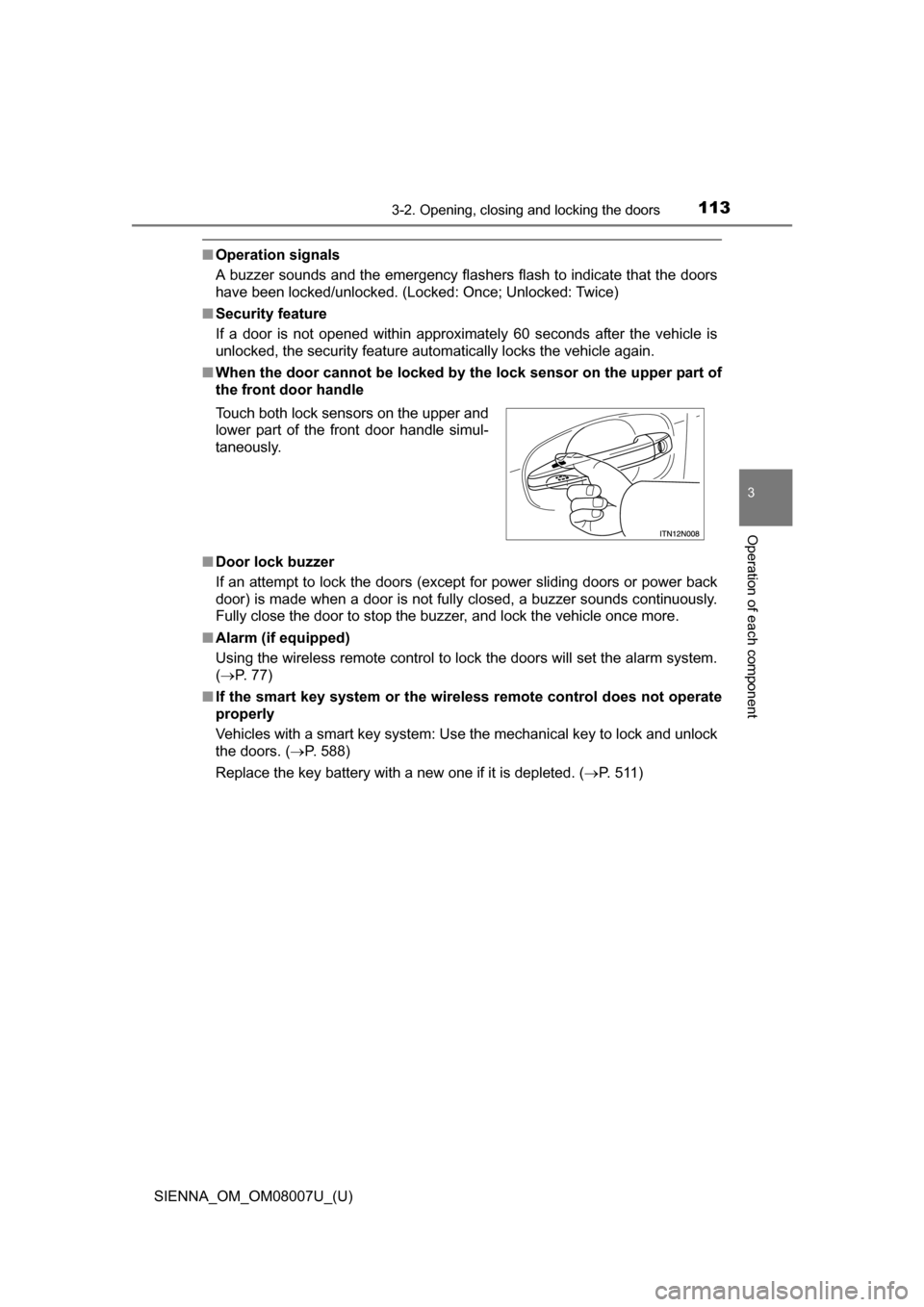
■ When the door cannot be locked by the lock sensor on the upper part of
the front door handle
■ Door lock buzzer
If an attempt to lock the doors (except for power sliding doors or power back
door) is made when a door is not fully closed, a buzzer sounds continuously.
Fully close the door to stop the buzzer, and lock the vehicle once more.
■ Alarm (if equipped)
Using the wireless remote control to lock the doors will set the alarm system.
( P. 77)
■ If the smart key system or the wireless remote control does not operate
properly
Vehicles with a smart key system: Use the mechanical key to lock and unlock
the doors. ( P. 588)
Replace the key battery with a new one if it is depleted. ( P. 511)
Touch both lock sensors on the upper and
lower part of the front door handle simul-
taneously.
Page 119 of 672
SIENNA_OM_OM08007U_(U)
1193-2. Opening, closing and locking the doors
3
Operation of each component
Vehicles with a smart key system
The smart key system uses weak radio waves. In the following situations, the
communication between the electronic key and the vehicle may be affected,
preventing the smart key system and wireless remote control from operating
properly. (Way of coping P. 588)
● When the electronic key battery is depleted
● Near a TV tower, electric power plant, gas station, radio station, large dis-
play, airport or other facility that generates strong radio waves or electrical
noise
● When carrying a portable radio, cellular phone, cordless phone or other
wireless communication devices
● When the electronic key is in contact with, or is covered by the following
objects
• Cards to which aluminum foil is attached
• Cigarette boxes that have aluminum foil inside
• Metallic wallets or bags
• Coins
• Hand warmers made of metal
• Media such as CDs and DVDs
● When multiple electronic keys are in the vicinity
● When another wireless key (that emits radio waves) is being used nearby
● When carrying or using the electronic key together with the following
devices that emit radio waves
• Another vehicle’s electronic key
• A wireless key that emits radio waves
• Personal computers or personal digital assistants (PDAs)
• Digital audio players
• Portable game systems
● If window tint with a metallic content or metallic objects are attached to the
rear window
● Vehicles with AUTO ACCESS SEAT: If the wireless remote control of the
AUTO ACCESS SEAT is operated simultaneously, the AUTO ACCESS
SEAT may not operate properly.
For details, refer to “AUTO A CCESS SEAT OWNER’S MANUAL”.
■ Customization
Settings (e.g. unlocking function using a key) can be changed.
(Customizable features: P. 628)
Page 128 of 672
128
SIENNA_OM_OM08007U_(U)
3-2. Opening, closing and locking the doors
■When the battery is disconnected (vehicles with power sliding doors)
The power sliding door system must be initialized in order to ensure proper
operation. To initialize it, close the sliding doors completely by hand.
■ Conditions affecting the operation of the smart key system or wireless
remote control
P. 1 1 8
■ Customization
Settings (e.g. opening and closing operation) can be changed.
(Customizable features: P. 630)
WARNING
■To prevent an accident
Observe the following precautions while driving.
Failure to do so may cause a door to open unexpectedly and an occupant to
fall out of the vehicle, resulting in death or serious injury.
●Ensure that all doors are properly closed and locked.
● Set the sliding door child-protector locks when children are seated in the
vehicle.
● Do not operate the inside handle of the doors while driving.
■ When children are in the vehicle
Observe the following precautions.
Failure to do so may result in death or serious injury.
●Do not leave children alone in the vehicle.
If a child is accidentally locked in the vehicle, they could have heat
exhaustion or other injuries.
● Do not allow a child to open or close the sliding door.
Doing so may cause the sliding door to move unexpectedly, or cause the
child’s hands, head, or neck to be caught by the moving sliding door.
■ Operating the sliding doors
Observe the following precautions.
Failure to do so may cause parts of the body to be caught, resulting in death
or serious injury.
●When opening or closing a sliding door, thoroughly check to make sure the
surrounding area is safe.
Page 131 of 672
SIENNA_OM_OM08007U_(U)
1313-2. Opening, closing and locking the doors
3
Operation of each component
WARNING
●If the power sliding door system is turned off with the main switch while the
sliding door is operating automatica lly, the automatic operation is stopped.
The sliding door then has to be operated manually. Take extra care when
on an incline, as the sliding door may open or close unexpectedly.
● If the operating conditions of the power sliding door are no longer met, a
buzzer may sound and the sliding door may stop opening or closing. The
sliding door then has to be operated manually. Take extra care when on an
incline, as the sliding door may open or close abruptly.
● On an incline, a sliding door may close by itself after it opens automati-
cally. Make sure the sliding door is fully open and secure.
● In the following situations, the power sliding door may detect an abnormal-
ity and automatic operation may be stopped. In this case, the sliding door
has to be operated manually. Take extra care when on an incline, as the
sliding door may open or close abruptly.
• When the sliding door contacts an obstacle
• When the battery voltage suddenly drops, such as when the engine
switch is turned to the “ON” position (vehicles without a smart key sys-
tem) or IGNITION ON mode (vehicles with a smart key system) or the
engine is started during automatic operation
● Do not attach any accessories other than genuine Toyota parts to the
power sliding door. The power sliding door may not operate, causing itself
to malfunction, or the power sliding door may close again after it is
opened.
● When the child-protector locks are set, make sure to turn off the power
sliding door system with the main switch in order to totally disable the sys-
tem.
■ Jam protection function (vehic les with power sliding doors)
Observe the following precautions.
Failure to do so may cause death or serious injury.
● Never use any part of your body to intentionally activate the jam protection
function.
● The jam protection function may not work if something gets caught just
before the power sliding door fully closes. Be careful not to catch fingers or
anything else.
● The jam protection function may not work depending on the shape of the
object that is caught. Be careful not to catch fingers or anything else.
Page 138 of 672
138
SIENNA_OM_OM08007U_(U)
3-2. Opening, closing and locking the doors
■The power back door can be operated when (vehicles with power back
door)
●The shift lever is in P.
● The back door is unlocked.
■ Power back door operation ( vehicles with power back door)
● A buzzer sounds and the emergency flashers flash twice to indicate that the
back door is opening/closing.
● The back door can be opened and closed manually even when the power
back door main switch is off.
■ Jam protection function (veh icles with power back door)
● If anything obstructs the power back door while it is closing or opening, the
back door will automatically operate in the opposite direction.
● If the jam protection function operates during two consecutive closing oper-
ations, the back door will be stopped at that position.
■ Back door closer (if equipped)
In the event that the back door is left slightly open, the back door closer will
automatically close it to the fully closed position.
■ When the battery is disconnected
●The back door will be automatically locked after the battery is reconnected.
● The power back door (if equipped) must be initialized in order to ensure
proper operation.
Unlock the back door with the wireless remote control or door lock switch.
Close the back door completely by hand.
■ Conditions affecting the operation of the smart key system or wireless
remote control
P. 1 1 8
1
2