battery TOYOTA SIENNA HYBRID 2022 Workshop Manual
[x] Cancel search | Manufacturer: TOYOTA, Model Year: 2022, Model line: SIENNA HYBRID, Model: TOYOTA SIENNA HYBRID 2022Pages: 600, PDF Size: 21.11 MB
Page 375 of 600
3755-4. Using the other interior features
5
Interior features
Please use as a power supply
for electronic devices that use
less than 120 VAC (power con-
sumption of 1500 W).
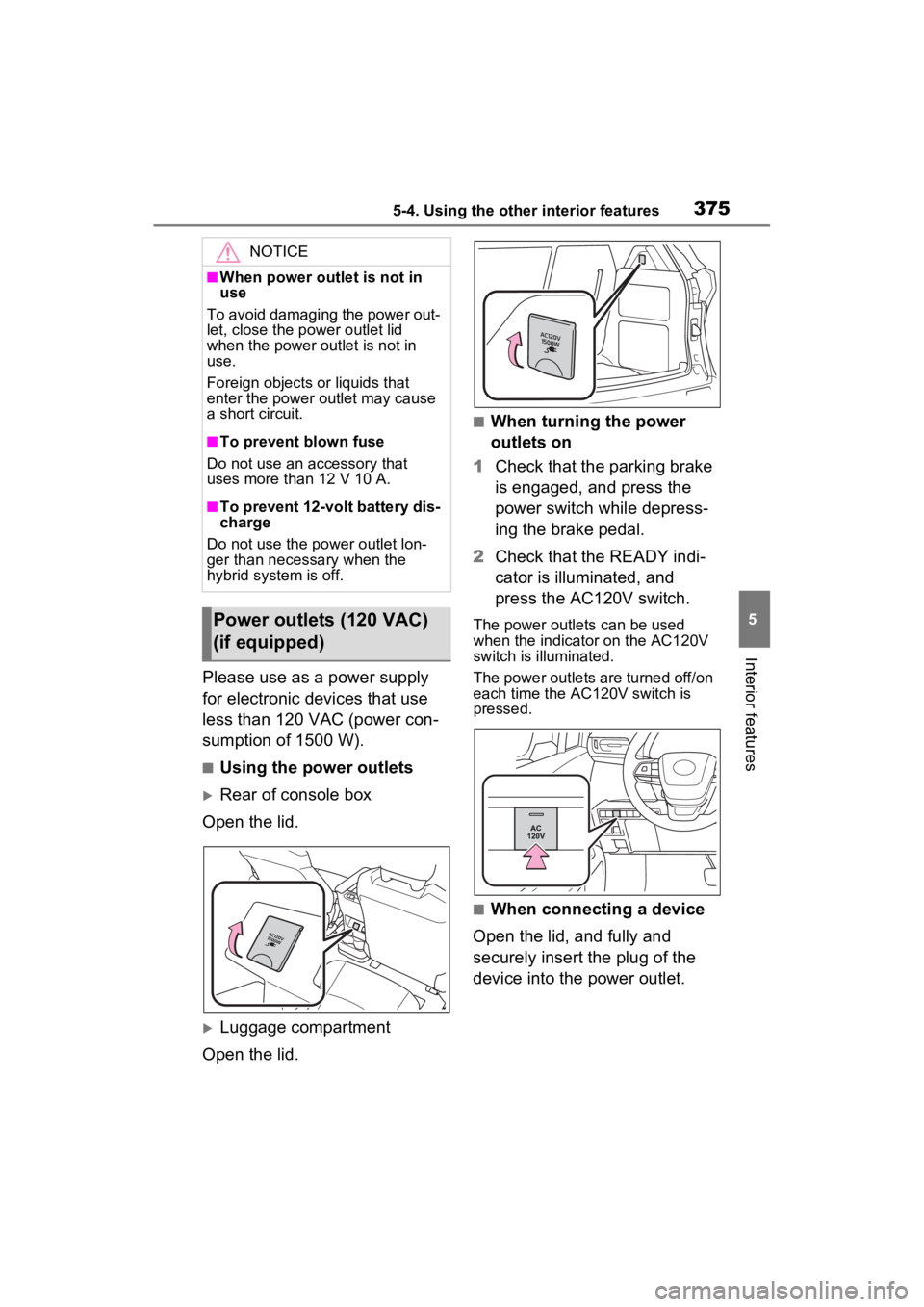
■Using the power outlets
Rear of console box
Open the lid.
Luggage compartment
Open the lid.
■When turning the power
outlets on
1 Check that the parking brake
is engaged, and press the
power switch while depress-
ing the brake pedal.
2 Check that the READY indi-
cator is illuminated, and
press the AC120V switch.
The power outlets can be used
when the indicator on the AC120V
switch is illuminated.
The power outlets are turned off/on
each time the AC120V switch is
pressed.
■When connecting a device
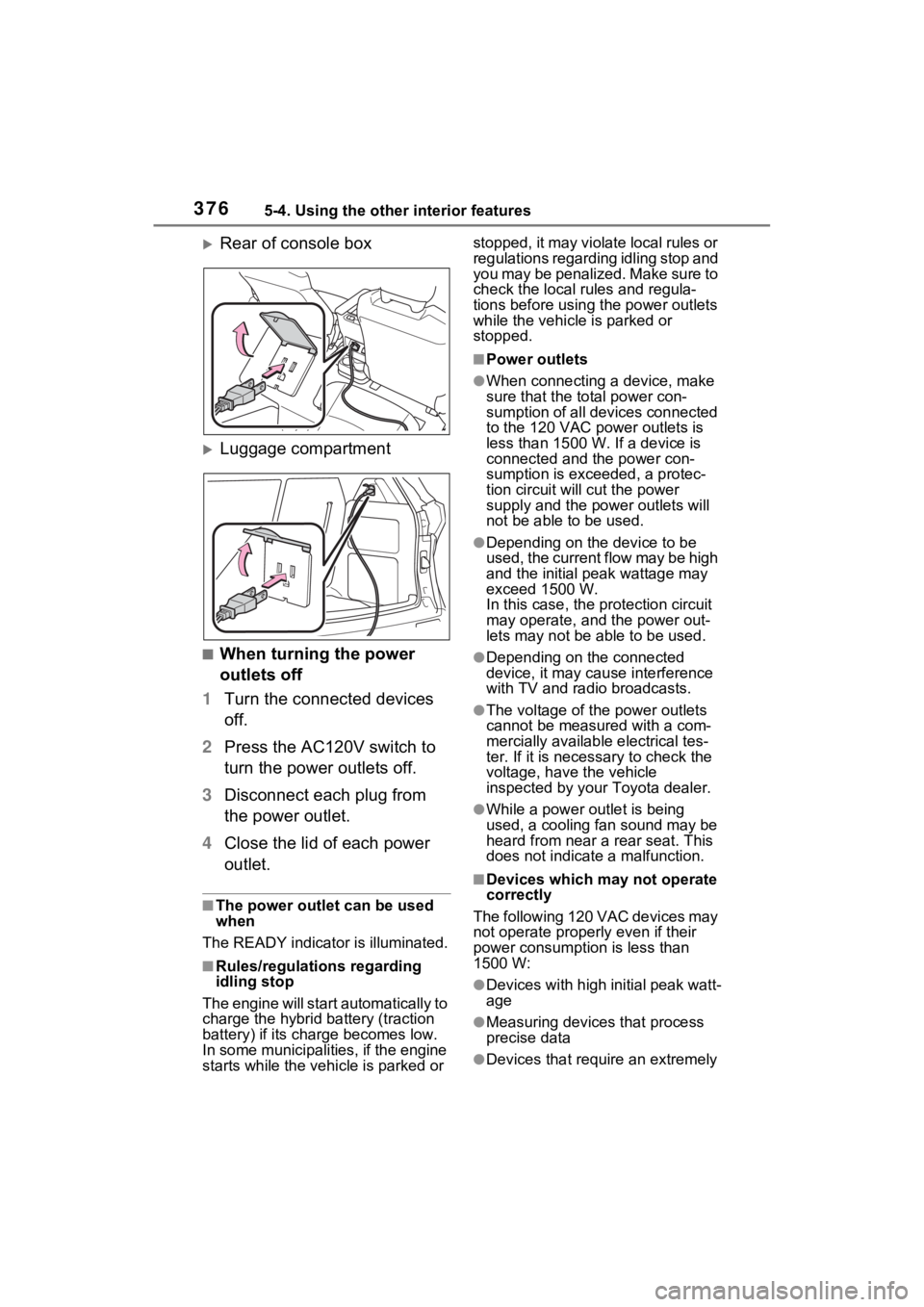
Open the lid, and fully and
securely insert the plug of the
device into the power outlet.
NOTICE
■When power outlet is not in
use
To avoid damaging the power out-
let, close the p ower outlet lid
when the power outlet is not in
use.
Foreign objects or liquids that
enter the power outlet may cause
a short circuit.
■To prevent blown fuse
Do not use an accessory that
uses more than 12 V 10 A.
■To prevent 12-volt battery dis-
charge
Do not use the power outlet lon-
ger than necessary when the
hybrid system is off.
Power outlets (120 VAC)
(if equipped)
Page 376 of 600
3765-4. Using the other interior features
Rear of console box
Luggage compartment
■When turning the power
outlets off
1 Turn the connected devices
off.
2 Press the AC120V switch to
turn the power outlets off.
3 Disconnect each plug from
the power outlet.
4 Close the lid of each power
outlet.
■The power outlet can be used
when
The READY indicato r is illuminated.
■Rules/regulations regarding
idling stop
The engine will start automatically to
charge the hybrid battery (traction
battery) if its charge becomes low.
In some municipalities, if the engine
starts while the vehicle is parked or stopped, it may violate local rules or
regulations regarding idling stop and
you may be penalized. Make sure to
check the local rules and regula-
tions before using the power outlets
while the vehicle is parked or
stopped.
■Power outlets
●When connecting a device, make
sure that the to
tal power con-
sumption of all devices connected
to the 120 VAC power outlets is
less than 1500 W. If a device is
connected and the power con-
sumption is exce eded, a protec-
tion circuit will cut the power
supply and the p ower outlets will
not be able to be used.
●Depending on the device to be
used, the current flow may be high
and the initial peak wattage may
exceed 1500 W.
In this case, the protection circuit
may operate, and the power out-
lets may not be able to be used.
●Depending on the connected
device, it may cause interference
with TV and radio broadcasts.
●The voltage of the power outlets
cannot be measured with a com-
mercially available electrical tes-
ter. If it is necessary to check the
voltage, have the vehicle
inspected by your Toyota dealer.
●While a power outlet is being
used, a cooling fan sound may be
heard from near a rear seat. This
does not indicate a malfunction.
■Devices which may not operate
correctly
The following 120 VAC devices may
not operate properly even if their
power consumption is less than
1500 W:
●Devices with high initial peak watt-
age
●Measuring devices that process
precise data
●Devices that require an extremely
Page 377 of 600
3775-4. Using the other interior features
5
Interior features
stable power supply
●Devices that require a constant
power supply from the power out-
let, such as a device with a timer.
■When the 120 VAC power out-
lets cannot be used
If the AC120V switch is pressed but
the switch indicator does not illumi-
nate, the protection circuit may have
operated.
In this case, perform the appropriate
procedures as follows.
●Disconnect the plug of each
device from the p ower outlets,
check that the total power con-
sumption of all devices to be con-
nected to the power outlets is less
than 1500 W and check that the
devices are not malfunctioning,
reconnect the devices and then
press the AC120V switch again.
●Check the charge of the hybrid
battery (traction battery)
( P.122). If the charge is low,
shift the shift lever to P, allow the
engine to run to charge the hybrid
battery (traction battery), and then
press the AC120V switch again.
●If the temperature inside the vehi-
cle is high, such as after the vehi-
cle has been park ed in the sun,
use the air conditioning system to
sufficiently ventilate or cool the
interior, and then press the
AC120V switch again.
●If the vehicle has been stopped in
a cold area, to pro tect the hybrid
battery (traction battery), the
power outlets may not be able to
be used. In this case, drive the
vehicle for a while to warm up the
hybrid battery (traction battery),
and then press the AC120V
switch again.
If the power outlets cannot be used
even after performing the appropri-
ate procedures above, have the
vehicle inspected by your Toyota
dealer.
WARNING
■For safe use
Observe the following precau-
tions.
Failure to do so may lead to an
accident, resulting in death or
serious injury.
●Do not use devices such as the
following when driving:
• Devices which cannot be prop- erly secured within the vehicle.
• Devices which may distract the driver and be a hinderance to
safe driving, such as a TV, DVD
player, etc.
• Unsecured devices which gen- erate heat, such as a toaster,
microwave, electric heater,
electric kettle, coffee maker,
etc., as they may cause burns
or a fire in the case of sudden
braking or an accident.
• Devices which may fall under the pedals and prevent the
brake pedal from being
depressed.
●Do not use devices which pro-
duce steam while the windows
are closed. Doing so may cause
the windows to fog up, reducing
visibility and making it difficult to
drive safely. Also, the steam
may damage or negatively
affect other devices.
●Do not connect a malfunctioning
device to a power outlet, as
doing so may cause the power
outlets to become inoperable.
●Do not disconnect the plug of a
device while your hands are wet
or insert a pin or other object
into the power ou tlet. Also, if a
liquid or snow is on the power
outlet, dry the outlet before
using it.
Page 379 of 600
3795-4. Using the other interior features
5
Interior features
The USB charging ports are
used to supply 2.5A (USB Type-
A) or 3.0A (USB Type-C) of
electricity at 5 V to external
devices. Use the appropriate
terminal for each charging port
type.
The USB charging ports are for
charging only. They are not
designed for data transfer or
other purposes.
Depending on the external
device, it may not charge prop-
erly. Refer to the manual
included with the device before
using a USB charging port.
■Using the USB charging
ports
In the console box
Open the console box lid.
NOTICE
Observe the following precau-
tions.
Failure to do so m ay lead to the
power outlets not operating cor-
rectly or damage to the vehicle or
a connected device.
■To avoid short circuit or mal-
function
●Do not set a device which gen-
erates heat near the interior
components or on a seat. Heat
may cause these parts to melt
or burn.
●Do not use devices which are
sensitive to vibration or heat in
the vehicle.
These devices may malfunction
due to vibration while driving or
heat while the vehicle is parked
in the sun.
●When not using a power outlet,
make sure to close the cover. If
foreign matter or a liquid enters
the power outlet, it may cause a
malfunction or short circuit.
●Do not use a multi-point outlet
adapter as doing so may over-
load the power outlet.
■When the ambie nt tempera-
ture is high
If the temperature inside the vehi-
cle is high, such as after the vehi-
cle has been parked in the sun,
the power outlets may not be able
to be used. Sufficiently ventilate
the interior or use the air condi-
tioning system to c ool the interior
before attempting to use the
power outlets.
■When the ambient tempera-
ture is low
If the vehicle has been stopped in
a cold area, to pro tect the hybrid
battery (traction battery), the
power outlets may not be able to
be used. In this case, drive the
vehicle for a while to warm up the
hybrid battery (traction battery).
■To prevent 12-volt battery dis-
charge
Do not use the pow er outlets lon-
ger than necessary when the
hybrid system is not running.
USB charging ports
Page 381 of 600
3815-4. Using the other interior features
5
Interior features
A portable device can be
charged by just placing Qi stan-
dard wireless charge compatible
portable devices according to
the Wireless Power Consortium,
such as smartphones and
mobile batteries, etc., on the
charge area.This function cannot be used
with portable devices that are
larger than the charging area.
Also, depending on the portable
device, it may not operate as
normal. Please read the opera-
tion manual for portable devices
to be used.
■The “Qi” symbol
The “Qi” symbol is a trademark
of the Wireless Power Consor-
tium.
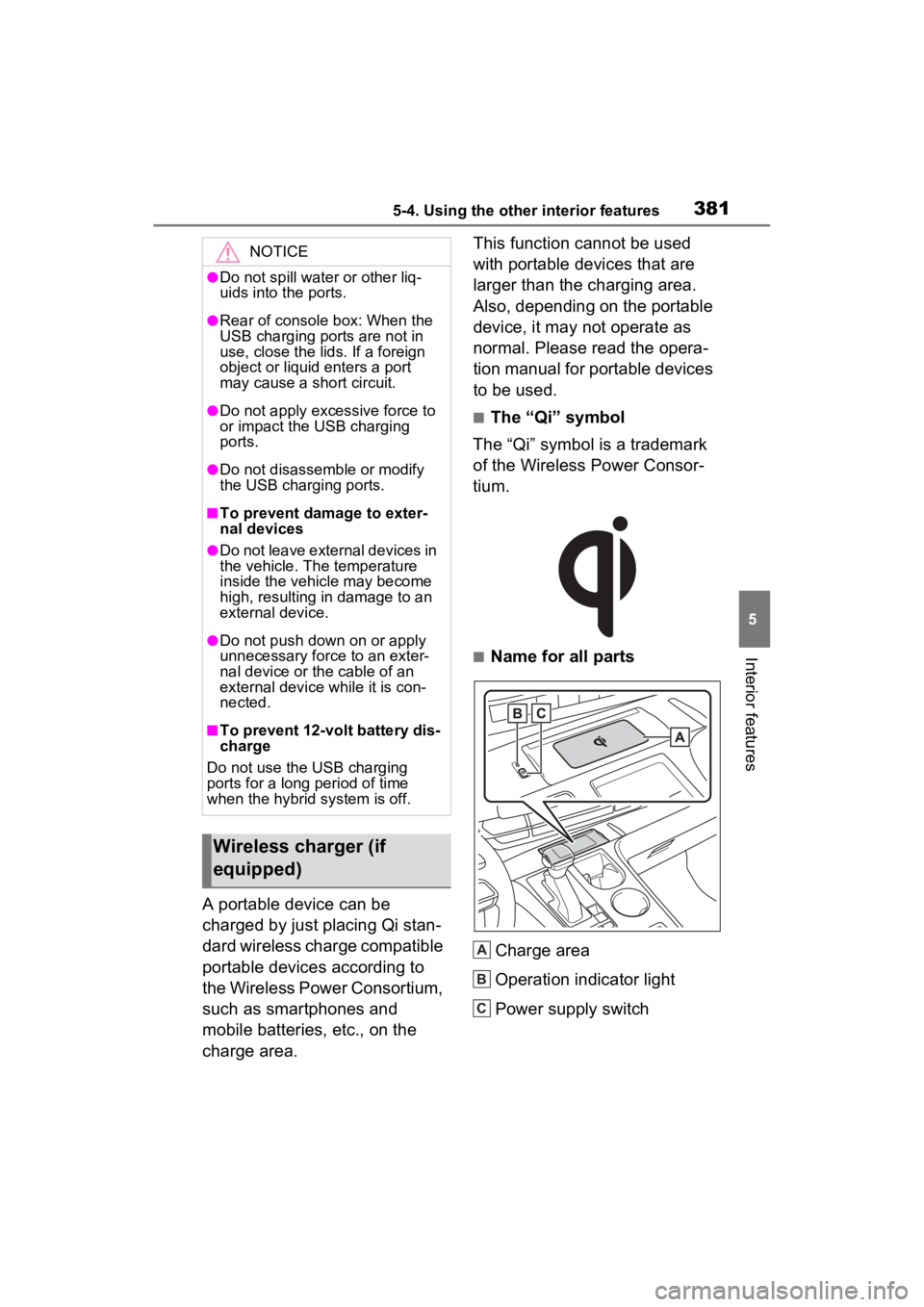
■Name for all parts
Charge area
Operation indicator light
Power supply switch
NOTICE
●Do not spill water or other liq-
uids into the ports.
●Rear of console box: When the
USB charging ports are not in
use, close the lids. If a foreign
object or liquid enters a port
may cause a short circuit.
●Do not apply excessive force to
or impact the USB charging
ports.
●Do not disassemble or modify
the USB charging ports.
■To prevent damage to exter-
nal devices
●Do not leave external devices in
the vehicle. The temperature
inside the vehicle may become
high, resulting in damage to an
external device.
●Do not push down on or apply
unnecessary force to an exter-
nal device or the cable of an
external device while it is con-
nected.
■To prevent 12-volt battery dis-
charge
Do not use the USB charging
ports for a long period of time
when the hybrid system is off.
Wireless charger (if
equipped)
A
B
C
Page 385 of 600
3855-4. Using the other interior features
5
Interior features
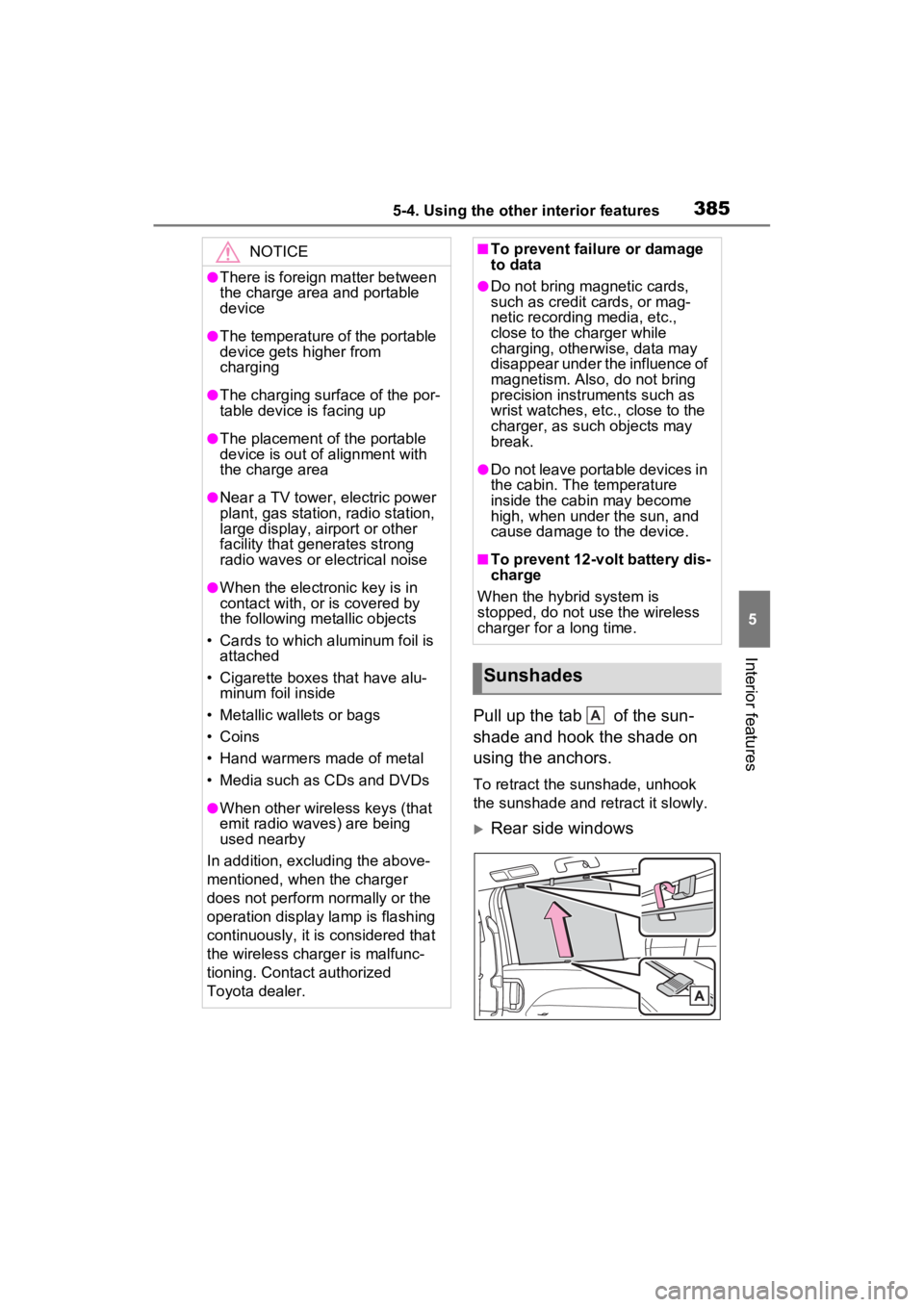
Pull up the tab of the sun-
shade and hook the shade on
using the anchors.
To retract the sunshade, unhook
the sunshade and retract it slowly.
Rear side windows
NOTICE
●There is foreign matter between
the charge area and portable
device
●The temperature of the portable
device gets higher from
charging
●The charging surface of the por-
table device is facing up
●The placement of the portable
device is out of alignment with
the charge area
●Near a TV tower, electric power
plant, gas station, radio station,
large display, airport or other
facility that generates strong
radio waves or electrical noise
●When the electronic key is in
contact with, or is covered by
the following metallic objects
• Cards to which aluminum foil is attached
• Cigarette boxes that have alu- minum foil inside
• Metallic wallets or bags
• Coins
• Hand warmers made of metal
• Media such as CDs and DVDs
●When other wireless keys (that
emit radio waves) are being
used nearby
In addition, excl uding the above-
mentioned, when the charger
does not perform normally or the
operation display lamp is flashing
continuously, it is considered that
the wireless charger is malfunc-
tioning. Contact authorized
Toyota dealer.
■To prevent failure or damage
to data
●Do not bring magnetic cards,
such as credit cards, or mag-
netic recording media, etc.,
close to the charger while
charging, otherwise, data may
disappear under the influence of
magnetism. Also, do not bring
precision instruments such as
wrist watches, etc., close to the
charger, as such objects may
break.
●Do not leave portable devices in
the cabin. The temperature
inside the cabin may become
high, when under the sun, and
cause damage to the device.
■To prevent 12-volt battery dis-
charge
When the hybrid system is
stopped, do not use the wireless
charger for a long time.
Sunshades
A
Page 389 of 600
3895-4. Using the other interior features
5
Interior features
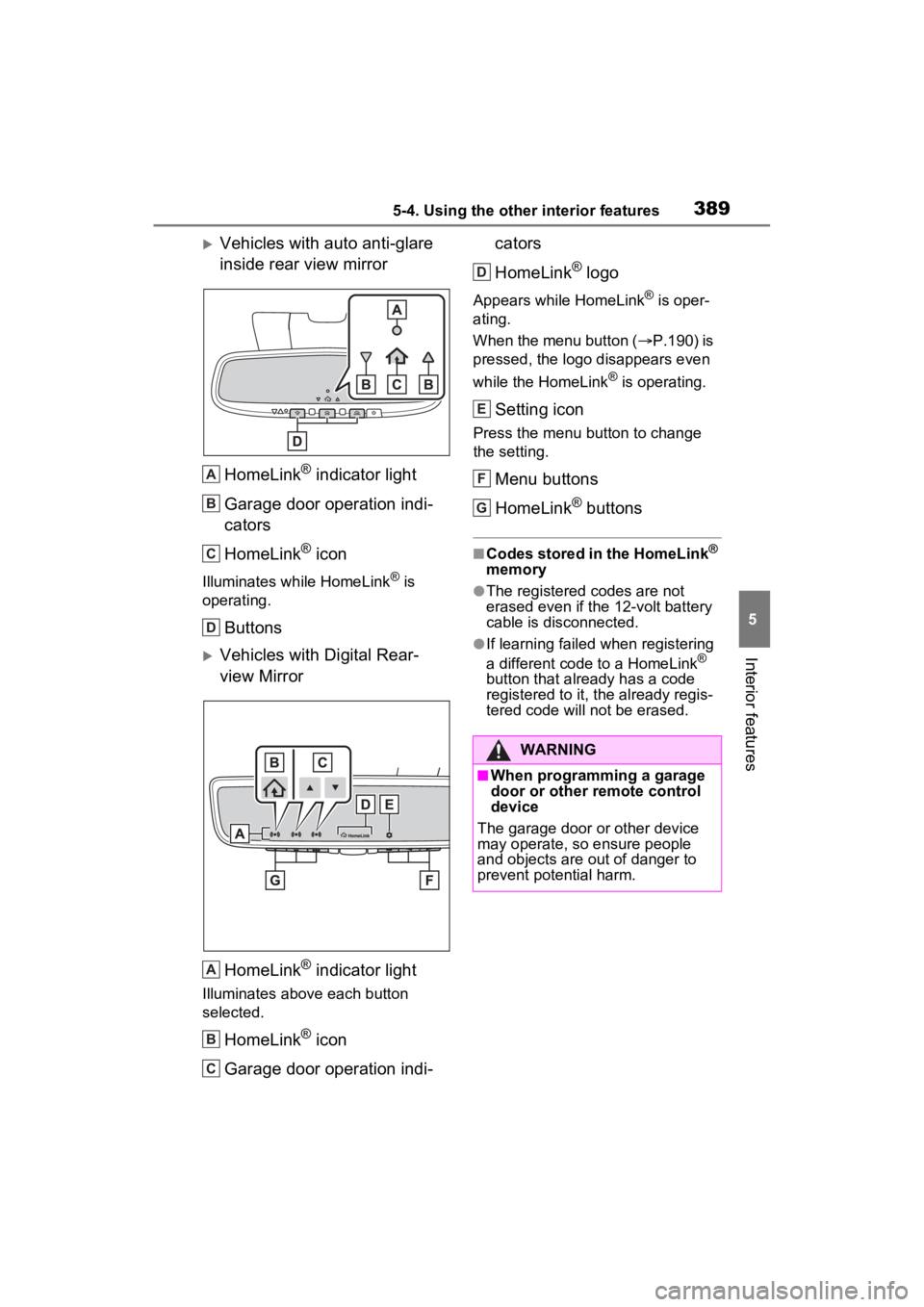
Vehicles with auto anti-glare
inside rear view mirrorHomeLink
® indicator light
Garage door operation indi-
cators
HomeLink
® icon
Illuminates while HomeLink® is
operating.
Buttons
Vehicles with Digital Rear-
view Mirror
HomeLink
® indicator light
Illuminates above each button
selected.
HomeLink® icon
Garage door operation indi- cators
HomeLink
® logo
Appears while HomeLink® is oper-
ating.
When the menu button ( P.190) is
pressed, the logo disappears even
while the HomeLink
® is operating.
Setting icon
Press the menu button to change
the setting.
Menu buttons
HomeLink
® buttons
■Codes stored in the HomeLink®
memory
●The registered codes are not
erased even if the 12-volt battery
cable is disconnected.
●If learning failed when registering
a different code to a HomeLink®
button that already has a code
registered to it, the already regis-
tered code will not be erased.
A
B
C
D
A
B
C
WARNING
■When programming a garage
door or other remote control
device
The garage door or other device
may operate, so ensure people
and objects are out of danger to
prevent potential harm.
D
E
F
G
Page 390 of 600
3905-4. Using the other interior features
■Before programming
HomeLink
®
During programming, it is pos-
sible that garage doors,
gates, or other devices may
operate. For this reason,
make sure that people and
objects are clear of the
garage door or other devices
to prevent injury or other
potential harm.
It is recommended that a new
battery be placed in the
remote control transmitter for
successful programming.
Garage door opener motors
manufactured after 1995 may
be equipped with rolling code
protection. If this is the case, you may need a stepladder or
other sturdy, safe device to
reach the “Learn” or “Smart”
button on the garage door
opener motor.
■Programming HomeLink®
Steps
2 through 4 must be per-
formed within 60 seconds, oth-
erwise the HomeLink
® indicator
light will stop flashing and pro-
gramming will not be success-
fully completed.
1 Vehicles with Digital Rear
view Mirror: Press the
HomeLink
® button or menu
button When the HomeLink
®
button is pressed: Home-
link
® Training Tutorial will be
displayed to assist you pro-
gramming the HomeLink
®.
When the menu button is pressed:
Press the menu button and
select the “SET UP”. Homelink
®
Training Tutorial will be displayed
to assist you programming the
HomeLink
®.
2 Press and release the
HomeLink
® button you want
to program and check that
the HomeLink
® indicator light
flashes (orange).
3 Point the remote control
transmitter for the device at
the rear view mirror, 1 to 3 in.
(25 to 75 mm) from the
HomeLink
® buttons.
WARNING
■Conforming to federal safety
standards
Do not use the HomeLink
® com-
patible transceiver with any
garage door opener or device that
lacks safety stop and reverse fea-
tures as required by federal safety
standards.
This includes any garage door
that cannot detect an interfering
object. A door or device without
these features increases the risk
of death or se rious injury.
■When operating or program-
ming HomeLink®
Never allow a child to operate or
play with the HomeLink® buttons.
Programming HomeLink®
Page 393 of 600
3935-4. Using the other interior features
5
Interior features
opener motor will blink twice,
indicating that 2-way commu-
nication is enabled.
If the indicators do not flash, per-
form 2 and 3 within the first 10
presses of the HomeLink
® button
after programming has been com-
pleted.
2 Press a programmed
HomeLink
® button to oper-
ate a garage door.
3 Within 1 minute of pressing
the HomeLink
® button, after
the garage door operation
has stopped, press the
“Learn” or “Smart” button on
the garage door opener
motor. Within 5 seconds of
the establishment of 2-way
communication with the
garage door opener, both
garage door operation indica-
tors in the vehicle will flash
rapidly (green) and the light
on the garage door opener
motor will blink twice, indicat-
ing that 2-way communica-
tion is enabled.
■Reprogramming a single
HomeLink
® button
When the following procedure is
performed, buttons which
already have devices registered
to them can be overwritten:
1 Press and hold the desired
HomeLink
® button.
2 When the HomeLink
® indica-
tor starts flashing orange, release the HomeLink
® but-
ton and perform “Program-
ming HomeLink
®” 1 (it takes
20 seconds for the
HomeLink
® indicator to start
flashing).
■Before programming
●Install a new battery in the trans-
mitter.
●The battery side of the transmitter
must be pointed away from the
HomeLink
® buttons.
Press the appropriate
HomeLink
® button. The
HomeLink
® indicator light
should turn on.
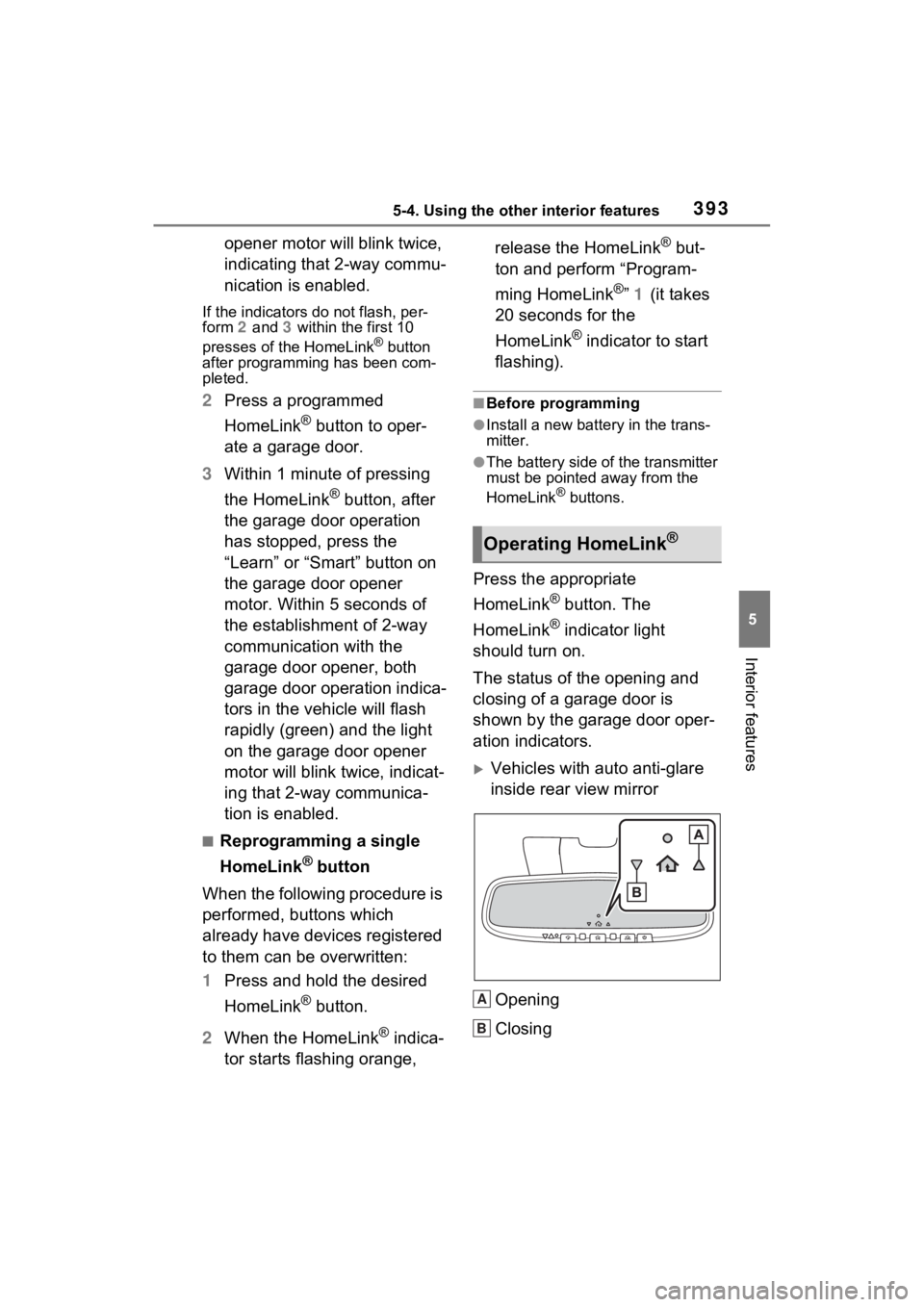
The status of the opening and
closing of a garage door is
shown by the garage door oper-
ation indicators.
Vehicles with auto anti-glare
inside rear view mirror
Opening
Closing
Operating HomeLink®
A
B
Page 395 of 600
395
6
6
Maintenance and care
Maintenance and care
6-1. Maintenance and careCleaning and protecting the vehicle exterior .......... 396
Cleaning and protecting the vehicle interior ........... 399
6-2. Maintenance Maintenance requirements.................................. 402
General maintenance.. 404
Emission inspection and maintenance (I/M) pro-
grams ........................ 406
6-3. Do-it-yourself mainte- nance
Do-it-yourself service pre- cautions ..................... 408
Hood ........................... 410
Positioning a floor jack 412
Engine compartment ... 413
12-volt battery ............. 419
Tires ............................ 421
Tire inflation pressure . 435
Wheels ......... ...............437
Air conditioning filter .... 438
Cleaning the hybrid battery (traction battery) air intake
vents and filters ......... 440
Electronic key battery.. 444
Checking and replacing fuses.......................... 446
Light bulbs................... 448