reset TOYOTA T100 1998 User Guide
[x] Cancel search | Manufacturer: TOYOTA, Model Year: 1998, Model line: T100, Model: TOYOTA T100 1998Pages: 214, PDF Size: 4.72 MB
Page 95 of 214
T100(U)95
1 2 3 4 5 6 (Preset buttons)
These buttons are used to preset and
tune in radio stations.
To preset a station to a button: Tune in
the desired station (see ”TUNE” or ”SEEK”
button). Push and hold down the button
until you hear a beep
this will set the
station to the button. The button number
will appear on the display.
To tune in to a preset station: Push the
button for the station you want. The but-
ton number and station frequency will ap-
pear on the display.
These systems can store one AM and two
FM stations for each button (The display
will show ”AM”, ”FM1” or ”FM2” when you
push ”AM” or ”FM”).
(Eject button)
Push this button to eject a cassette.
After you turn the ignition to ”LOCK”, you
will be able to eject a cassette but you
will not be able to reinsert it.
(Reverse/Fast forward buttons)
Cassette Player
Push the fast forward button to fast for-
ward a cassette tape. ”FF” will appear on
the display. Push the reverse button to
rewind a tape. ”REW” will appear on the
display.
To stop the tape while it is fast forward-
ing, push the fast forward button or
”TAPE”; to stop the tape while it is re-
winding, push the reverse button or
”TAPE”.
If a tape side rewinds completely, the cas-
sette player will stop and then play that
same side. If a tape fast forwards com-
pletely, the cassette player will play the
other side of the tape, using the auto −re-
verse feature.
Compact Disc Player
If you want to fast forward or reverse
through a compact disc track, push and
hold in the fast forward or reverse button.
When you release the button, the compact
disc player will resume playing. AM
Push ”AM” to switch the AM band. ”AM”
will appear on the display.
If the audio system is off, you can turn
on the radio by pushing ”AM”. Also, push
”AM” to switch from cassette or compact
disc operation to radio operation.
AUDIO CONTROL / MODE
Manual tone adjustment function—
This knob is used to adjust the tone
manually.
For low
−pitch tone adjustment, push
”AUDIO CONTROL / MODE” repeatedly
until ”BAS” appears on the display. Then
turn the knob to suit your preference.
The display will show the range from
”BAS −5” to ”BAS 5”.
For middle −pitch tone adjustment, push
”AUDIO CONTROL / MODE” repeatedly
until ”MId” appears on the display. Then
turn the knob to suit your preference.
The display will show the range from
”MId −5” to ”MId 5”.
Page 98 of 214

T100(U)
98
RPT (Repeat)
Cassette Player
Push ”RPT” while the track is playing.
”RPT” will appear on the display. When
the track ends, it will automatically be
rewound and replayed. This process will
be continued until you push the button
again to turn off the repeat feature.
There must be at least 3 seconds of blank
space between tracks in order for the re-
peat feature to work correctly.
Compact Disc Player
There are two repeat features—you can
either replay a disc track or a whole com-
pact disc.
Repeating a track:
Quickly push and release ”RPT” while the
track is playing. ”RPT” will appear on the
display. If you hear a beep, you held the
button too long, and the player will repeat
the whole disc. When the track ends, it
will automatically be replayed. This pro-
cess will be continued until you push the
button again to turn off the repeat feature.
Compact disc auto changer only—
Repeating a disc:
Push and hold ”RPT” until you hear a
beep. ”D·RPT” will appear on the display.
The player will repeat all the tracks on the
disc you are listening to. When the disc
ends, the player will automatically go back
to the top track of the disc and replay.
This process will be continued until you
push the button again to turn off the re-
peat feature. SCAN
Radio
You can either scan all the frequencies on
a band or scan only the preset stations
for that band.
To scan all the frequencies:
Quickly push and release ”SCAN”. If you
hear a beep, you held the button too long,
and the radio will scan the preset sta-
tions. The radio will find the next station
up the station band, stay there for a few
seconds, and then scan again. To select
a station, push ”SCAN” a second time.
To scan the preset stations:
Push and hold ”SCAN” until you hear a
beep. The radio will tune in the next pres-
et station up the band, stay there for a
few seconds, and then move to the next
preset station. To select a station, push
”SCAN” a second time.
Compact disc player
There are two scan features—you can ei-
ther scan the tracks on a specific disc or
scan the first tracks of all the discs in the
magazine.
Scanning for the tracks on a disc:
Quickly push and release ”SCAN”. ”SCAN”
will appear on the display and the player
will scan all the tracks on the disc you
are listening to. If you hear a beep, you
held the button too long, and the player
will scan the first tracks of all the discs
in the magazine. To select a track, push
the ”SCAN” a second time. If the player
scanned all the tracks on the disc, it will
stop scanning.
Page 111 of 214
T100(U)111
Part 1
OPERATION OF
INSTRUMENTS
AND CONTROLS—
Chapter 1
−8
Other equipment
Clock
Cigarette lighter and ashtray
Glovebox
Auxiliary box
Cup holder
Floor mat
Clock
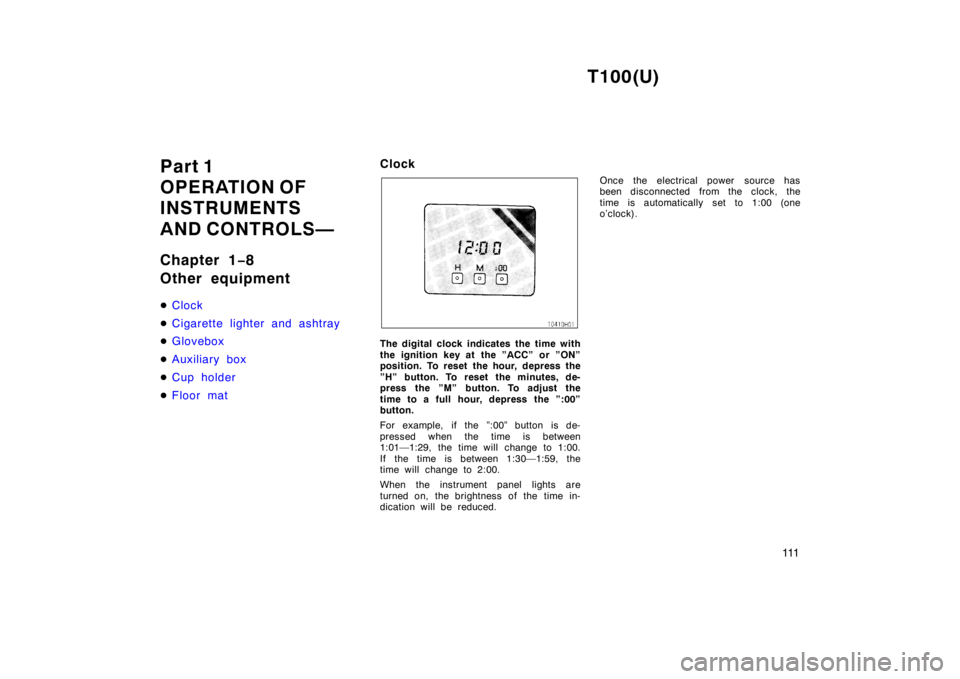
The digital clock indicates the time with
the ignition key at the ”ACC” or ”ON”
position. To reset the hour, depress the
”H” button. To reset the minutes, de-
press the ”M” button. To adjust the
time to a full hour, depress the ”:00”
button.
For example, if the ”:00” button is de-
pressed when the time is between
1:01—1:29, the time will change to 1:00.
If the time is between 1:30—1:59, the
time will change to 2:00.
When the instrument panel lights are
turned on, the brightness of the time in-
dication will be reduced. Once the electrical power source has
been disconnected from the clock, the
time is automatically set to 1:00 (one
o’clock).