light TOYOTA TACOMA 1999 Owner's Guide
[x] Cancel search | Manufacturer: TOYOTA, Model Year: 1999, Model line: TACOMA, Model: TOYOTA TACOMA 1999Pages: 247, PDF Size: 4.17 MB
Page 68 of 247

'99 Tacoma (U)
68
High- Low beamsÐ For high beams, turn
the headlights on and push the lever away
from you (position 1). Pull the lever to-
ward you (position 2) for low beams.
The headlight high beam indicator light
(blue light) on the instrument panel will
tell you that the high beams are on.
Flashing the high beam headlights
(position 3)ÐPull the lever all the way
back. The high beam headlights turn off
when you release the lever.
You can flash the high beam headlights
with the knob turned to ºOFFº. TURN SIGNALS
To signal a turn, push the headlight/
turn signal lever up or down to position 1.
The key must be in the ºONº position.
The lever automatically returns after you
make a turn, but you may have to return
it by hand after you change lanes.
To signal a lane change, move the lever
up or down to the pressure point (position
2) and hold it.
If the turn signal indicator lights (green
lights) on the instrument panel flash faster
than normal, a front or rear turn signal
bulb is burned out. Emergency flashersTo turn on the emergency flashers,
push the switch.
All the turn signal lights will flash. To turn
them off, push the switch once again.
Turn on the emergency flashers to warn
other drivers if your vehicle must be
stopped where it might be a traffic hazard.
Always pull as far off the road as pos-
sible.
The turn signal light switch will not work
when the emergency flashers are operat-
ing.
Page 69 of 247
'99 Tacoma (U)
69
NOTICE
To prevent the battery from being dis-charged, do not leave the switch onlonger than necessary when the en-gine is not running.
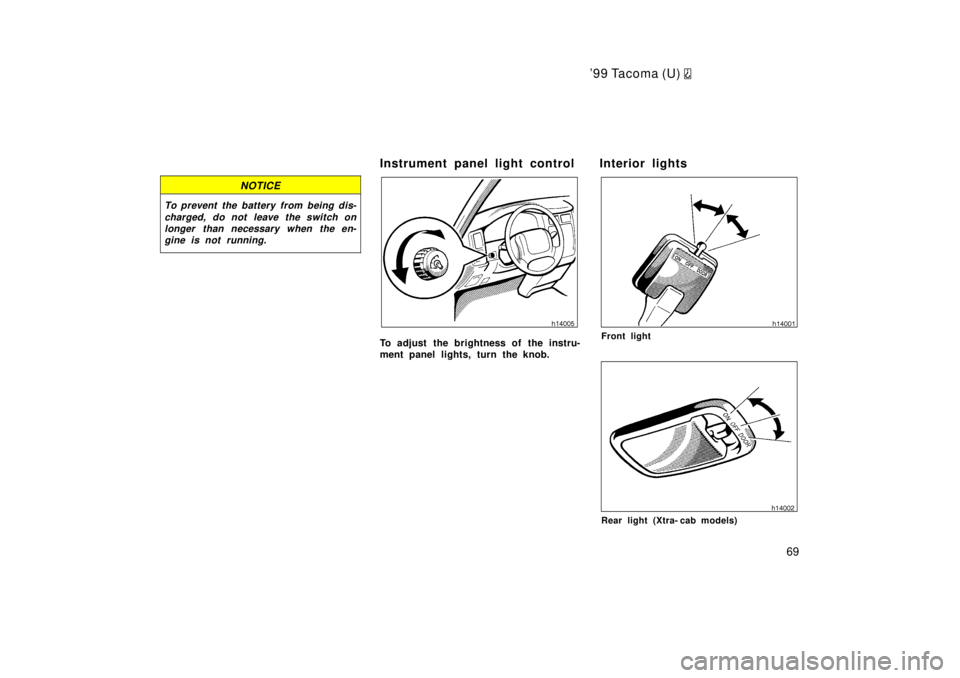
Instrument panel light control
To adjust the brightness of the instru-
ment panel lights, turn the knob. Interior lightsFront light
Rear light (Xtra- cab models)
Page 70 of 247

'99 Tacoma (U)
70
To turn on the interior light, slide the
switch.
The interior light switch has the following
positions:
ºONºÐKeeps the light on all the time.
ºOFFºÐTurns the light off.
ºDOORºÐTurns the light on when either
door is opened. The light goes off when
both doors are closed.
Personal lights
The personal lights operate separately
with each outer switch.
To turn on the light, push the switch on
your side. To turn the light off, push the
switch once again.
The center switch has the following posi-
tions:
Position 1ÐTurns both lights on when ei-
ther door is opened. The lights go off
when both doors are closed.
Position 2ÐThe lights are off unless you
operate either outer switch.Ignition switch lightFor easy access to the ignition switch,
the ignition switch light comes on when
either door is opened.
The light remains on for some time after
both doors are closed.
Page 73 of 247
'9 9 Ta co ma (U)
73
Part 1
OPERATION OF
INSTRUMENTS AND
CONTROLSÐ
Chapter 1- 5
Gauges, Meters and
Service reminder indicators
Fuel gauge
Engine coolant temperature gauge
Tachometer
Odometer and two trip meters
Service reminder indicators and
warning buzzers
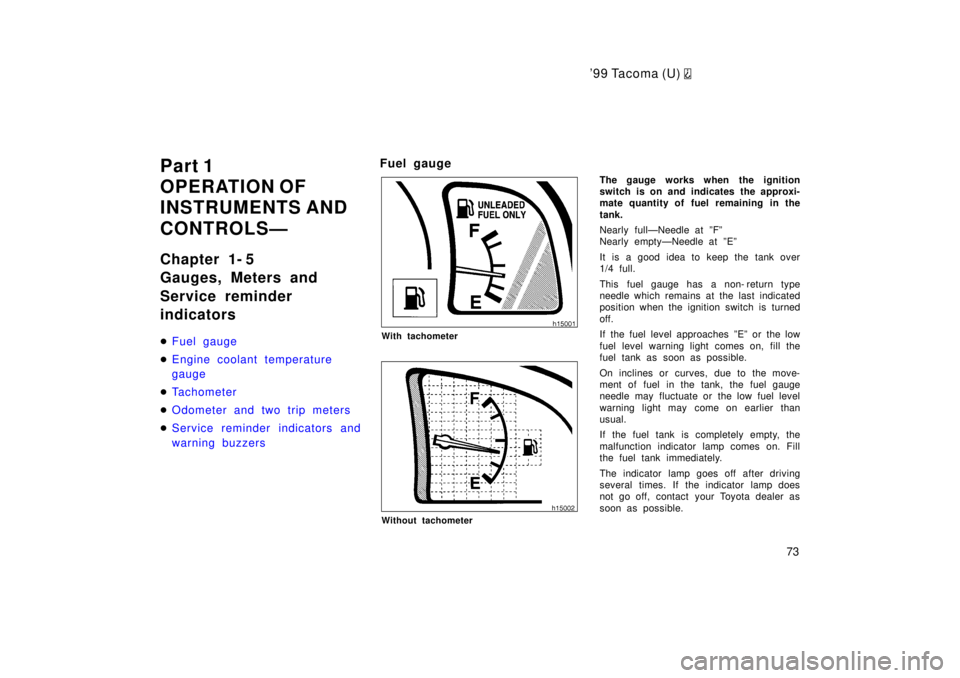
Fuel gauge
With tachometer
Without tachometer
The gauge works when the ignition
switch is on and indicates the approxi-
mate quantity of fuel remaining in the
tank.
Nearly fullÐNeedle at ºFº
Nearly emptyÐNeedle at ºEº
It is a good idea to keep the tank over
1/4 full.
This fuel gauge has a non- return type
needle which remains at the last indicated
position when the ignition switch is turned
off.
If the fuel level approaches ºEº or the low
fuel level warning light comes on, fill the
fuel tank as soon as possible.
On inclines or curves, due to the move-
ment of fuel in the tank, the fuel gauge
needle may fluctuate or the low fuel level
warning light may come on earlier than
usual.
If the fuel tank is completely empty, the
malfunction indicator lamp comes on. Fill
the fuel tank immediately.
The indicator lamp goes off after driving
several times. If the indicator lamp does
not go off, contact your Toyota dealer as
soon as possible.
Page 76 of 247

'99 Tacoma (U)
76
(d) Stop and check.
(a) If parking brake is
off, stop and
check.
(b) Fasten seat belts.
(c) Stop and check.
(f) Fill up tank.
(e) Take vehicle to
Toyota dealer.
(Indicator and buzzer)
If the indicator or
buzzer comes on...
Do this.
(h) Take vehicle to
To y o t a
d ealer
immediately.
(g) Take vehicle to
Toyota dealer.
(i) Shift front drive control lever out of
ºNº.
(j) Stop and check.
(k) Add washer fluid.
If the indicator or
buzzer comes on...
Do this.
(type B)
(type A)
If the indicator or
buzzer comes on...
(l) Turn off lights.
(m) Remove key. Key reminder
buzzer
Light reminder
buzzer
Do this.
Service reminder indicators
an d warn in g bu zzers
Page 77 of 247
'99 Tacoma (U)
77
(a) Brake System Warning Light
This light has the following functions:
Parking brake reminder
If this light is on, make sure the parking
brake is fully released. The light should
go off.
Low brake fluid level warning
If this light comes on and stays on while
you are driving, slow down and pull off
the road. Then stop the vehicle carefully.
Remember that stopping distance and ped-
al effort may be increased. There may be
a problem somewhere in the brake sys-
tem. Check the fluid level of the see-
through reservoir.
To make sure the parking brake has not
caused the warning light to come on,
check to see that the parking brake is
fully released.
If the brake fluid level is low...
At a safe place, test your brakes by start-
ing and stopping.
If you judge that the brakes still work
adequately, drive cautiously to your
nearest dealer or shop for repairs.
If the brakes are not working, have the
vehicle towed in for repairs. (For tow-
ing information, see Part 4.)
CAUTION
It is dangerous to continue driving
normally when the brake fluid level is
low.
If the brake fluid level is correct...
Have the warning system checked by your
Toyota dealer.
(b) Seat Belt Reminder Light and Buzz-
er
Once the ignition key is turned to ºONº or
ºSTARTº, the reminder light flashes and
buzzer comes on if the driver's seat belt
is not fastened. Unless the driver fastens
the belt, the light stays on and the buzzer
sounds for about 4 to 8 seconds.
(c) Discharge Warning Light
This light warns that the battery is being
discharged.
If it comes on while you are driving, there
is a problem somewhere in the charging
system. The engine ignition will continue to oper-
ate, however, until the battery is dis-
charged. Turn off the air conditioning,
blower, radio, etc., and drive directly to
the nearest Toyota dealer or repair shop.
NOTICE
Do not continue driving if the engine
drive belt is broken or loose.
(d) Low Oil Pressure Warning Light
This light warns that the engine oil pres-
sure is too low.
If it flickers or stays on while you are
driving, pull off the road to a safe place
and stop the engine immediately. Call a
Toyota dealer or qualified repair shop for
assistance.
The light may occasionally flicker when
the engine is idling or it may come on
briefly after a hard stop. There is no
cause for concern if it then goes out when
the engine is accelerated slightly.
The light may come on when the oil level
is extremely low. It is not designed to
indicate low oil level, and the oil level
must be checked using the level dipstick.
Page 78 of 247
'99 Tacoma (U)
78
NOTICE
Do not drive the vehicle with the warning light onÐeven for one block.It may ruin the engine.
(e) Malfunction indicator lamp
This lamp comes on in the following
cases.
a. The fuel tank is completely empty. (See
ºFuel gaugeº in Chapter 1- 5 for instruc-
tions.)
b. The fuel tank cap is not tightened se-
curely. (See ºFuel tank capº in Chapter
1- 2 for instructions.)
c. There is a problem somewhere in your
engine or automatic transmission electrical
system.
If it comes on while you are driving in
case c, have your vehicle checked/re-
paired by your Toyota dealer as soon as
possible. (f) Low Fuel Level Warning Light
This light comes on when the fuel level
in the tank becomes nearly empty. Fill up
the tank as soon as possible.
On inclines or curves, due to the move-
ment of fuel in the tank, the low fuel level
warning light may come on earlier than
usual.
(g) ºABSº Warning Light
This light warns that there is a problem
somewhere in your anti- lock brake sys-
tem.
If the light comes on while you are driv-
ing, have your vehicle checked by your
Toyota dealer as soon as possible.
The light will come on when the ignition
key is turned to the ºONº position. After
a few seconds, the light will go off.
When the ºABSº warning light is on (and
the brake system warning light is off), the
brake system operates conventionally but
anti- lock brake system is not assisting
brake performance so that the wheels can
lock- up during sudden braking or braking
on slippery road surfaces.Vehicles with rear differential lock sys-
temÐ
The anti- lock brake system does not oper-
ate when the rear differential is locked. It
is normal operation for the ºABSº warning
light to be on at this time.
(h) SRS Airbag Warning Light
This light will come on when the igni-
tion key is turned to the ºACCº or
ºONº position. After about 6 seconds,
the light will go off. This means the
system of the airbag and front seat belt
pretensioners are operating properly.
The warning light system monitors the air-
bag sensor assembly, seat belt pretension-
er assembly, inflators, warning light, inter-
connecting wiring and power sources.
If either of the following conditions occurs,
this indicates a malfunction somewhere in
the parts monitored by the warning light
system. Contact your Toyota dealer as
soon as possible to service the vehicle.
The light does not come on when the
ignition key is turned to the ºACCº or
ºONº position or remains on.
The light comes on or flashes while
driving.
Page 79 of 247
'99 Tacoma (U)
79
(i) Unengaged ºParkº Warning Light
(vehicles with automatic transmis-
sion)
This light warns that the transmission
ºParkº mechanism is not engaged. If the
front drive control lever is in the ºNº posi-
tion while the selector lever is in the ºPº
position, the transmission will disengage
and the wheels will not lock.
CAUTION
To restore the park function, shift the
front drive control lever out of ºNº,
or the vehicle can move.
(j) Automatic Transmission Fluid Tem- perature Warning Light
This light warns that the automatic trans-
mission fluid temperature is too high.
If this light comes on while you are driv-
ing, slow down and pull off the road. Stop
the vehicle at a safe place and put the
selector lever in ºPº. With the engine id-
ling, wait until the light goes off. If the
light goes off, you may start the vehicle
again. If the light does not go off, call a
Toyota dealer or qualified repair shop for
assistance. (k) Low Windshield Washer Fluid Level
Warning Light (Canada)
The light warns that the windshield washer
fluid level is too low. Add washer fluid at
your earliest opportunity. (For instructions,
see ºAdding washer fluidº in Chapter 7- 3.)
(l) Light Reminder Buzzer
This buzzer will sound if the driver 's door
is opened while the ignition switch is
turned to the ºLOCKº position with the
headlight switch on. Removing the key will
not stop the buzzer as long as the head-
light switch is on.
(m) Key Reminder Buzzer
This buzzer reminds you to remove the
key when you open the driver 's door with
the ignition key in the ºACCº or ºLOCKº
position. CHECKING SERVICE REMINDER INDICA-
TORS (except the low fuel level warning
light and low windshield washer fluid
level warning light)
1. Apply the parking brake.
2. Turn the ignition key to ºACCº. The SRS airbag warning light should
come on. It goes off after about 6 se-
conds.
3. Turn the ignition key to ºONº, but do not start the engine.
All the service reminder indicators ex-
cept the SRS airbag warning light
should come on. The ºABSº warning
light goes off after a few seconds.
If any service reminder indicator or warn-
ing buzzer does not function as described
above, either the bulb is burned out or the
circuit is in need of repair. Have it
checked by your Toyota dealer as soon as
possible.
Page 81 of 247
'9 9 Ta co ma (U)
81
Part 1
OPERATION OF
INSTRUMENTS AND
CONTROLSÐ
Chapter 1- 6
Ignition switch,
Transmission and
Parking brake
Ignition switch with steering lock
Automatic transmission
Manual transmission
Four- wheel drive system
Rear differential lock system
P ar k ing br ak e
Cruise control
Clutch start cancel switch
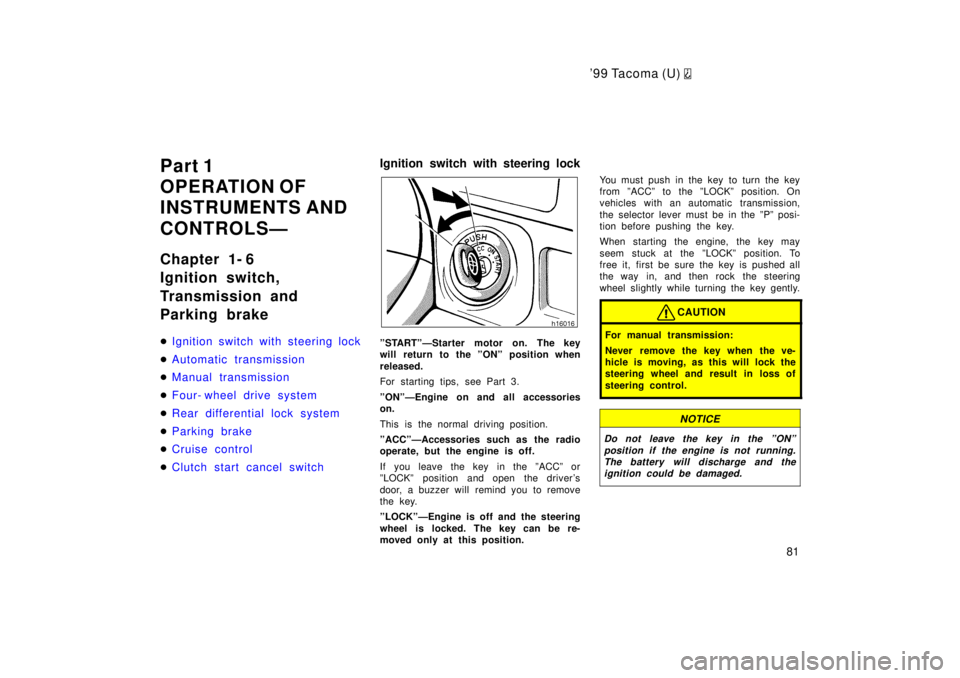
Ignition switch with steering lock
ºSTARTºÐStarter motor on. The key
will return to the ºONº position when
released.
For starting tips, see Part 3.
ºONºÐEngine on and all accessories on.
This is the normal driving position.
ºACCºÐAccessories such as the radio
operate, but the engine is off.
If you leave the key in the ºACCº or
ºLOCKº position and open the driver's
door, a buzzer will remind you to remove
the key.
ºLOCKºÐEngine is off and the steering
wheel is locked. The key can be re-
moved only at this position.
You must push in the key to turn the key
from ºACCº to the ºLOCKº position. On
vehicles with an automatic transmission,
the selector lever must be in the ºPº posi-
tion before pushing the key.
When starting the engine, the key may
seem stuck at the ºLOCKº position. To
free it, first be sure the key is pushed all
the way in, and then rock the steering
wheel slightly while turning the key gently.
CAUTION
For manual transmission:
Never remove the key when the ve-
hicle is moving, as this will lock the
steering wheel and result in loss of
steering control.
NOTICE
Do not leave the key in the ºONº
position if the engine is not running.The battery will discharge and the ignition could be damaged.
Page 82 of 247
'99 Tacoma (U)
82
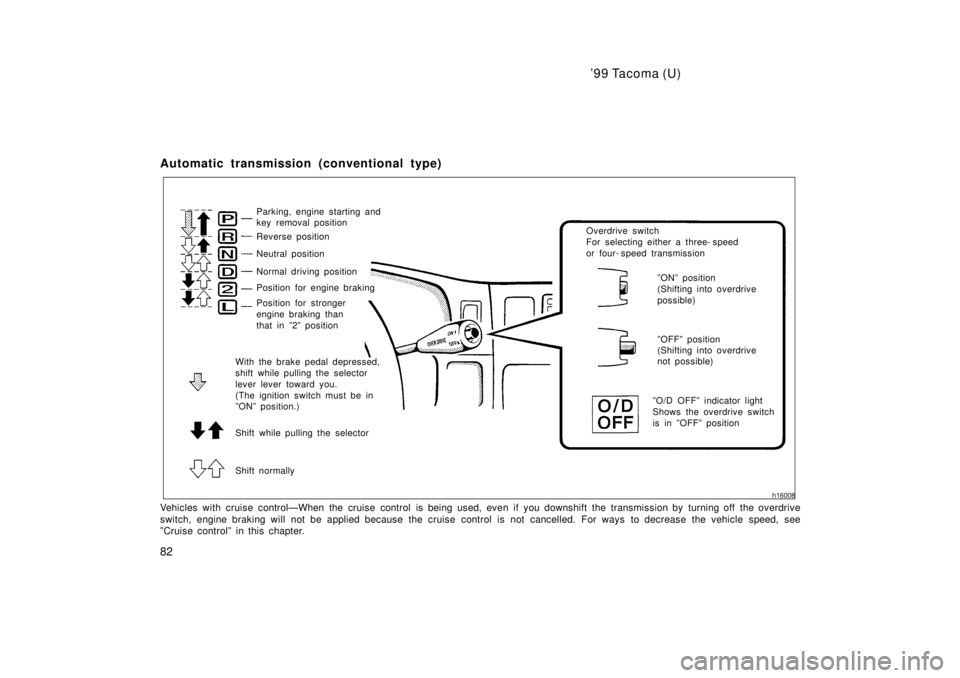
Automatic transmission (conventional type)
Parking, engine starting and
key removal position
Reverse position
Neutral position
Normal driving position
Shift normally Overdrive switch
For selecting either a three- speed
or four- speed transmission
ºOFFº position
(Shifting into overdrive
not possible)
ºONº position
(Shifting into overdrive
possible)
ºO/D OFFº indicator light
Shows the overdrive switch
is in ºOFFº position
Position for stronger
engine braking than
that in º2º position
With the brake pedal depressed,
shift while pulling the selector
lever lever toward you.
(The ignition switch must be in
ºONº position.)
Shift while pulling the selector
Position for engine braking
Vehicles with cruise controlÐWhen the cruise control is being used, eve n if you downshift the transmission by turning off the overdrive
switch, engine braking will not be applied because the cruise cont rol is not cancelled. For ways to decrease the vehicle speed, see
ºCruise controlº in this chapter.