steering wheel TOYOTA TACOMA 2014 Accessories, Audio & Navigation (in English)
[x] Cancel search | Manufacturer: TOYOTA, Model Year: 2014, Model line: TACOMA, Model: TOYOTA TACOMA 2014Pages: 276, PDF Size: 19.59 MB
Page 41 of 276
41
2
BASIC FUNCTION
2. Bluetooth® SETTINGS
1. REGISTERING/CONNECTING Bluetooth® DEVICE
1Turn the Bluetooth® connection setting
of your cellular phone on.
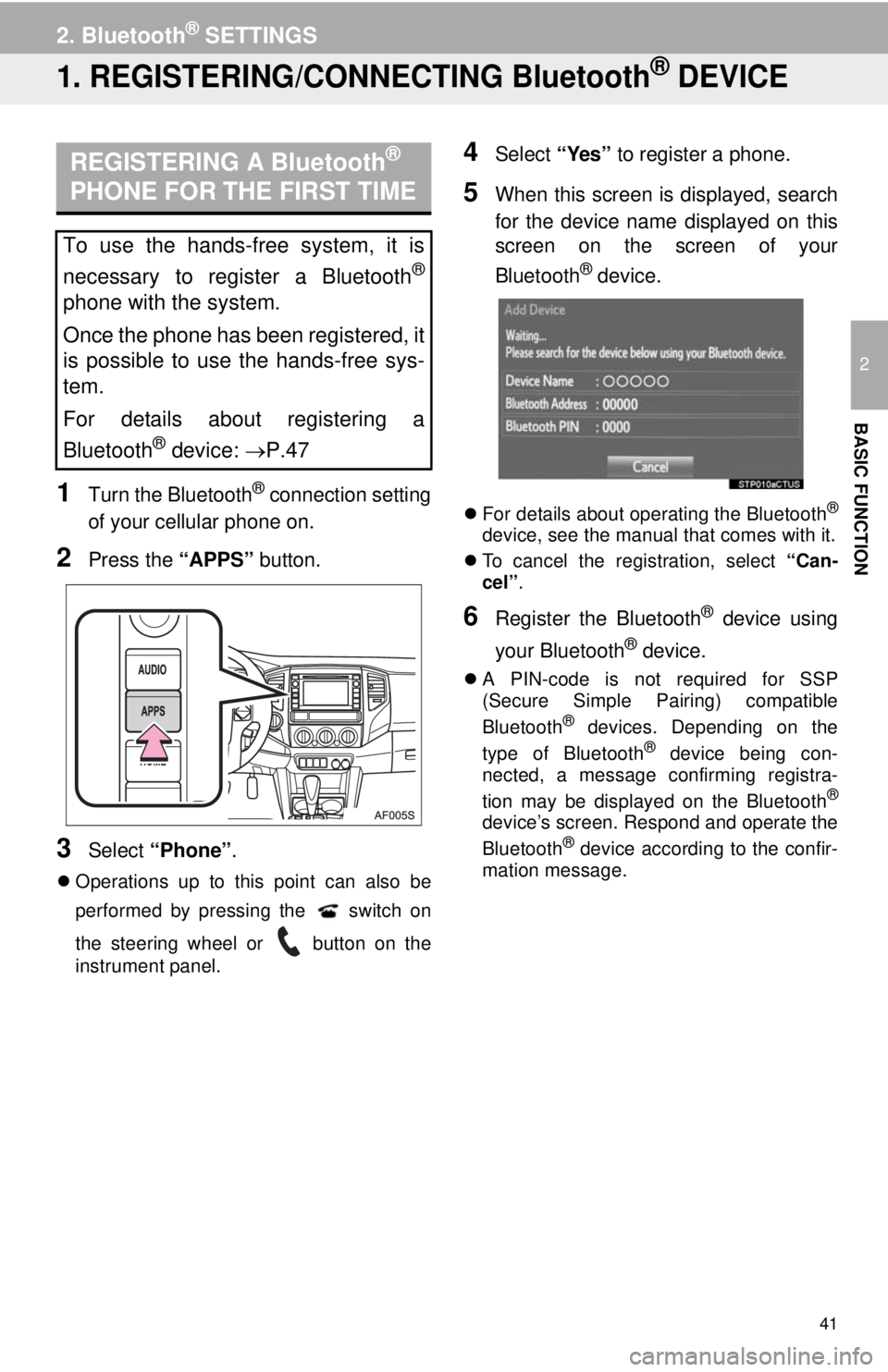
2Press the “APPS” button.
3Select “Phone”.
Operations up to this point can also be
performed by pressing the switch on
the steering wheel or button on the
instrument panel.
4Select “Yes” to register a phone.
5When this screen is displayed, search
for the device name displayed on this
screen on the screen of your
Bluetooth
® device.
For details about operating the Bluetooth®
device, see the manual that comes with it.
To cancel the registration, select “Can-
cel”.
6Register the Bluetooth® device using
your Bluetooth
® device.
A PIN-code is not required for SSP
(Secure Simple Pairing) compatible
Bluetooth
® devices. Depending on the
type of Bluetooth® device being con-
nected, a message confirming registra-
tion may be displayed on the Bluetooth
®
device’s screen. Respond and operate the
Bluetooth® device according to the confir-
mation message.
REGISTERING A Bluetooth®
PHONE FOR THE FIRST TIME
To use the hands-free system, it is
necessary to register a Bluetooth
®
phone with the system.
Once the phone has been registered, it
is possible to use the hands-free sys-
tem.
For details about registering a
Bluetooth
® device: P.47
Page 67 of 276
67
1. BASIC OPERATION
3
AUDIO SYSTEM
FunctionPage
Using the radio73
Playing an audio CD or MP3/WMA/AAC disc89
Playing a USB memory92
Playing an iPod®96
Playing a Bluetooth® device100
Using the AUX port104
Using the steering wheel audio switches106
Audio system settings107
Page 88 of 276
88
2. RADIO OPERATION
3. INTERNET RADIO*
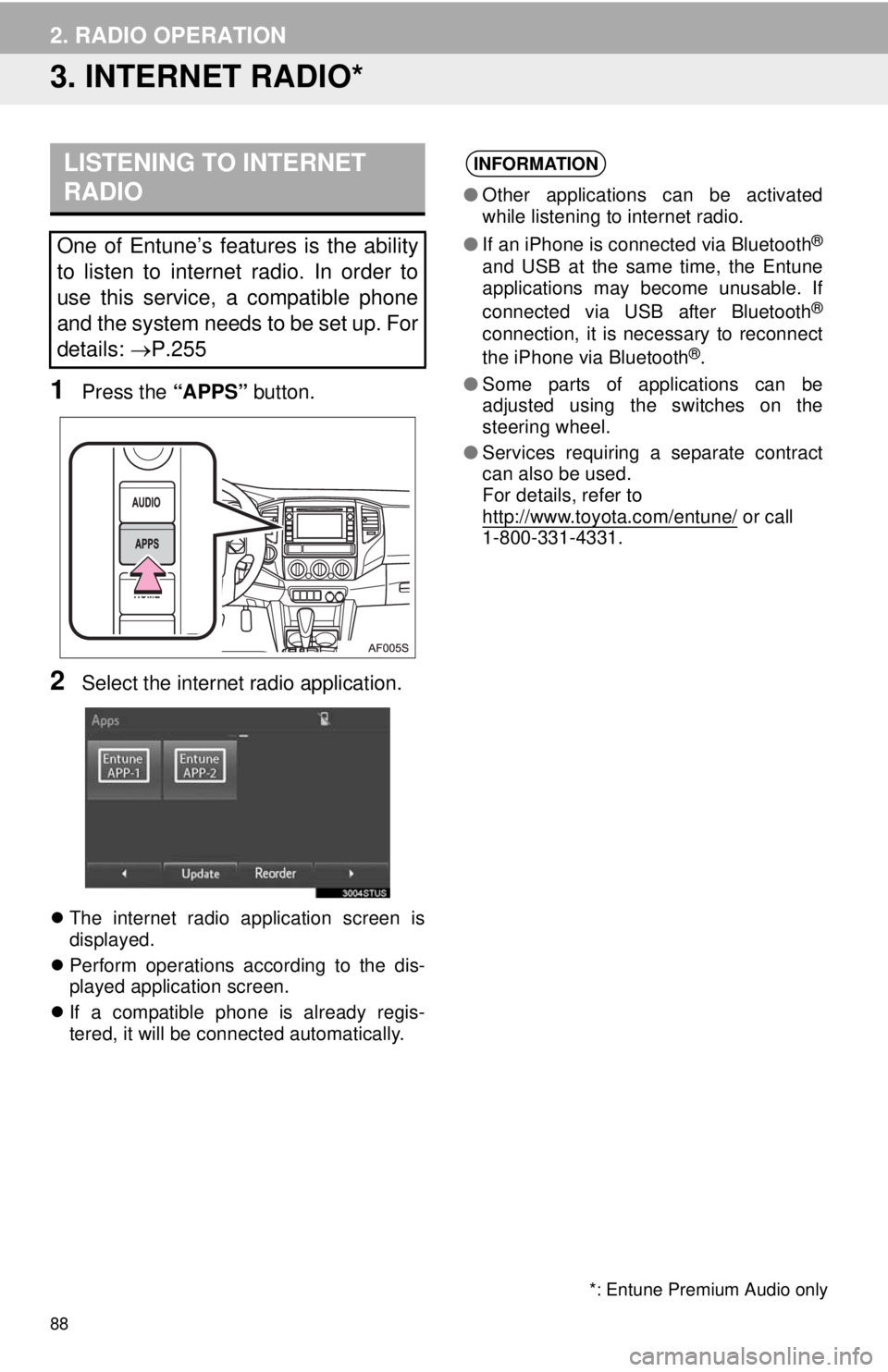
1Press the “APPS” button.
2Select the internet radio application.
The internet radio application screen is
displayed.
Perform operations according to the dis-
played application screen.
If a compatible phone is already regis-
tered, it will be connected automatically.
LISTENING TO INTERNET
RADIO
One of Entune’s features is the ability
to listen to internet radio. In order to
use this service, a compatible phone
and the system needs to be set up. For
details: P.255
INFORMATION
●Other applications can be activated
while listening to internet radio.
●If an iPhone is connected via Bluetooth
®
and USB at the same time, the Entune
applications may become unusable. If
connected via USB after Bluetooth
®
connection, it is necessary to reconnect
the iPhone via Bluetooth®.
●Some parts of applications can be
adjusted using the switches on the
steering wheel.
●Services requiring a separate contract
can also be used.
For details, refer to
http://www.toyota.com/entune/
or call
1-800-331-4331.
*: Entune Premium Audio only
Page 106 of 276
106
4. AUDIO REMOTE CONTROLS
1. STEERING SWITCHES
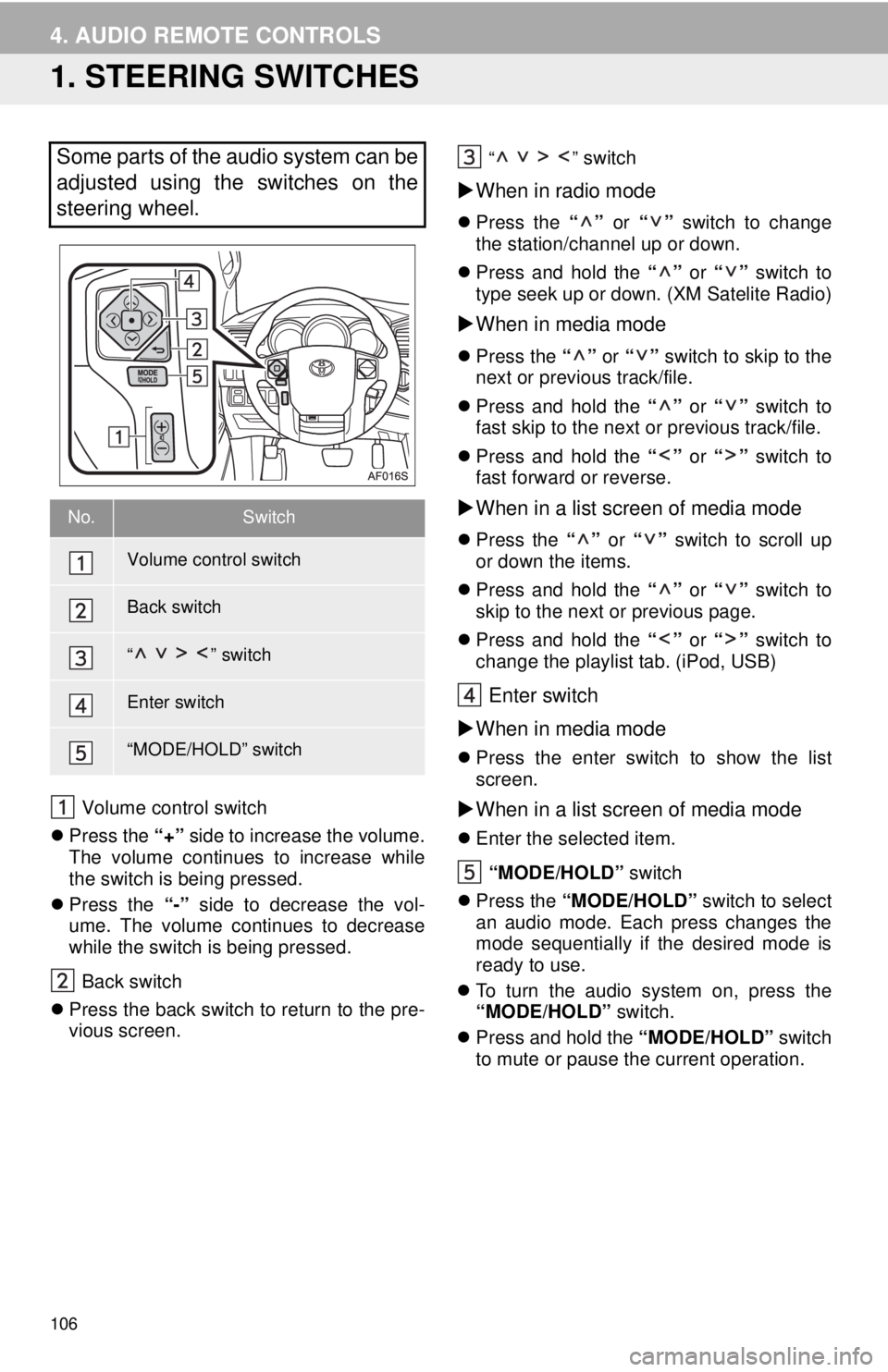
Volume control switch
Press the “+” side to increase the volume.
The volume continues to increase while
the switch is being pressed.
Press the “-” side to decrease the vol-
ume. The volume continues to decrease
while the switch is being pressed.
Back switch
Press the back switch to return to the pre-
vious screen.
“” switch
When in radio mode
Press the “” or “” switch to change
the station/channel up or down.
Press and hold the “” or “” switch to
type seek up or down. (XM Satelite Radio)
When in media mode
Press the “” or “” switch to skip to the
next or previous track/file.
Press and hold the “” or “” switch to
fast skip to the next or previous track/file.
Press and hold the “” or “” switch to
fast forward or reverse.
When in a list screen of media mode
Press the “” or “” switch to scroll up
or down the items.
Press and hold the “” or “” switch to
skip to the next or previous page.
Press and hold the “” or “” switch to
change the playlist tab. (iPod, USB)
Enter switch
When in media mode
Press the enter switch to show the list
screen.
When in a list screen of media mode
Enter the selected item.
“MODE/HOLD” switch
Press the “MODE/HOLD” switch to select
an audio mode. Each press changes the
mode sequentially if the desired mode is
ready to use.
To turn the audio system on, press the
“MODE/HOLD” switch.
Press and hold the “MODE/HOLD” switch
to mute or pause the current operation.
Some parts of the audio system can be
adjusted using the switches on the
steering wheel.
No.Switch
Volume control switch
Back switch
“” switch
Enter switch
“MODE/HOLD” switch
Page 124 of 276
124
1. VOICE COMMAND SYSTEM OPERATION
1Press the talk switch.
2Say “Call
A confirmation screen will be displayed
showing the recognition results. If multiple
matching items are found, a selection
screen will be displayed. Say “
1Press the talk switch.
2Say the phone number.
In the same manner as it is displayed on
the screen, “Dial
“Dial a number” say the phone number.
Say the phone number one digit at a time.
For example, if the phone number is
2345678:
Say “two three four five six seven
eight”
Do not say “twenty three forty five sixty
seven eight”
Calling to the following phone numbers
• 3 digit numbers (911, 411, 611)
• 7 digit numbers (Local phone numbers)
• 10 digit numbers (Area code + Local
phone number)
• 11 digit phone numbers (1 + Area code +
Local phone number)
As the system cannot recognize additional
numbers, say the complete number with-
out stopping.
3Say “Call” or press the switch on
steering wheel.
VOICE COMMAND EXAMPLE:
CALL NAME
INFORMATION
●In the same manner as it is displayed on
the screen, “Call
say the name, or the name and type of
phone, of a contact.
For example: “Call a contact”, “John
Smith” or “Call a contact”, “Mary
Davis”, “Mobile”
●There are 4 types of phones: Home,
Mobile, Work and Other.
●Short or abbreviated names in the con-
tacts list may not be recognized. Change
names in the contacts list to full names.
●Sometimes a voice recognition result
confirmation screen will be displayed.
After confirming the result, say “Yes” or
“No”.
●When the system recognizes multiple
names from the contacts list, a name
candidate list will be displayed on the
screen. If the desired name is not dis-
played on the top of the screen, say or
select the number of the name from the
candidate list (number 1 and number 2,
etc.) to select a name from the candi-
date list.
●When a contact has multiple phone
numbers registered in the contacts list, a
candidate list will be displayed. If the
desired phone number is not displayed
on the top of the screen, say or select
the number of the desired phone num-
ber from the candidate list (number 1
and number 2, etc.) to select a phone
number from the candidate list.
VOICE COMMAND EXAMPLE:
DIAL NUMBER
When the system recognizes multiple
phone numbers, a phone number candi-
date list will be displayed on the screen.
Pressing the
switch on the steering
wheel makes a call to the top entry on
the list. If the desired phone number is
not displayed on the top of the screen,
say the number of the desired phone
number from the candidate list to select
a phone number from the candidate list.
Page 134 of 276
134
1. REAR VIEW MONITOR SYSTEM
1. REAR VIEW MONITOR SYSTEM OPERATION
The rear view monitor system assists
the driver by displaying an image of the
view behind the vehicle with fixed
guide lines on the screen while backing
up, for example while parking.
INFORMATION
●The screen illustrations used in this text
are intended as examples, and may dif-
fer from the image that is actually dis-
played on the screen.
DRIVING PRECAUTIONS
The rear view monitor system is a sup-
plemental device intended to assist the
driver when backing up. When backing
up, be sure to visually check all around
the vehicle both directly and using the
mirrors before proceeding. If you do
not, you may hit another vehicle, and
could possibly cause an accident.
Pay attention to the following precau-
tions when using the rear view monitor
system.
CAUTION
●Never depend on the rear view monitor
system entirely when backing up. The
image and the position of the guide lines
displayed on the screen may differ from
the actual state.
Use caution, just as you would when
backing up any vehicle.
●Be sure to back up slowly, depressing
the brake pedal to control vehicle speed.
●The instructions given are only guide-
lines. When and how much to turn the
steering wheel will vary according to
traffic conditions, road surface condi-
tions, vehicle condition, etc. when park-
ing. It is necessary to be fully aware of
this before using the rear view monitor
system.
●When parking, be sure to check that the
parking space will accommodate your
vehicle before maneuvering into it.
●Do not use the rear view monitor system
in the following cases:
• On icy or slick road surfaces, or in
snow
• When using tire chains or emergency
tires
• When the trunk is not closed com-
pletely
• On roads that are not flat or straight,
such as curves or slopes.
●In low temperatures, the screen may
darken or the image may become faint.
The image could distort when the vehi-
cle is moving, or you may become
unable to see the image on the screen.
Be sure to visually check all around the
vehicle both directly and using the mir-
rors before proceeding.
●If the tire sizes are changed, the position
of the fixed guide lines displayed on the
screen may change.
●The camera uses a special lens. The
distances between objects and pedestri-
ans that appear in the image displayed
on the screen will differ from the actual
distances.(P.137)
Page 144 of 276
144
1. PHONE OPERATION (HANDS-FREE SYSTEM FOR CELLULAR PHONES)
1. QUICK REFERENCE
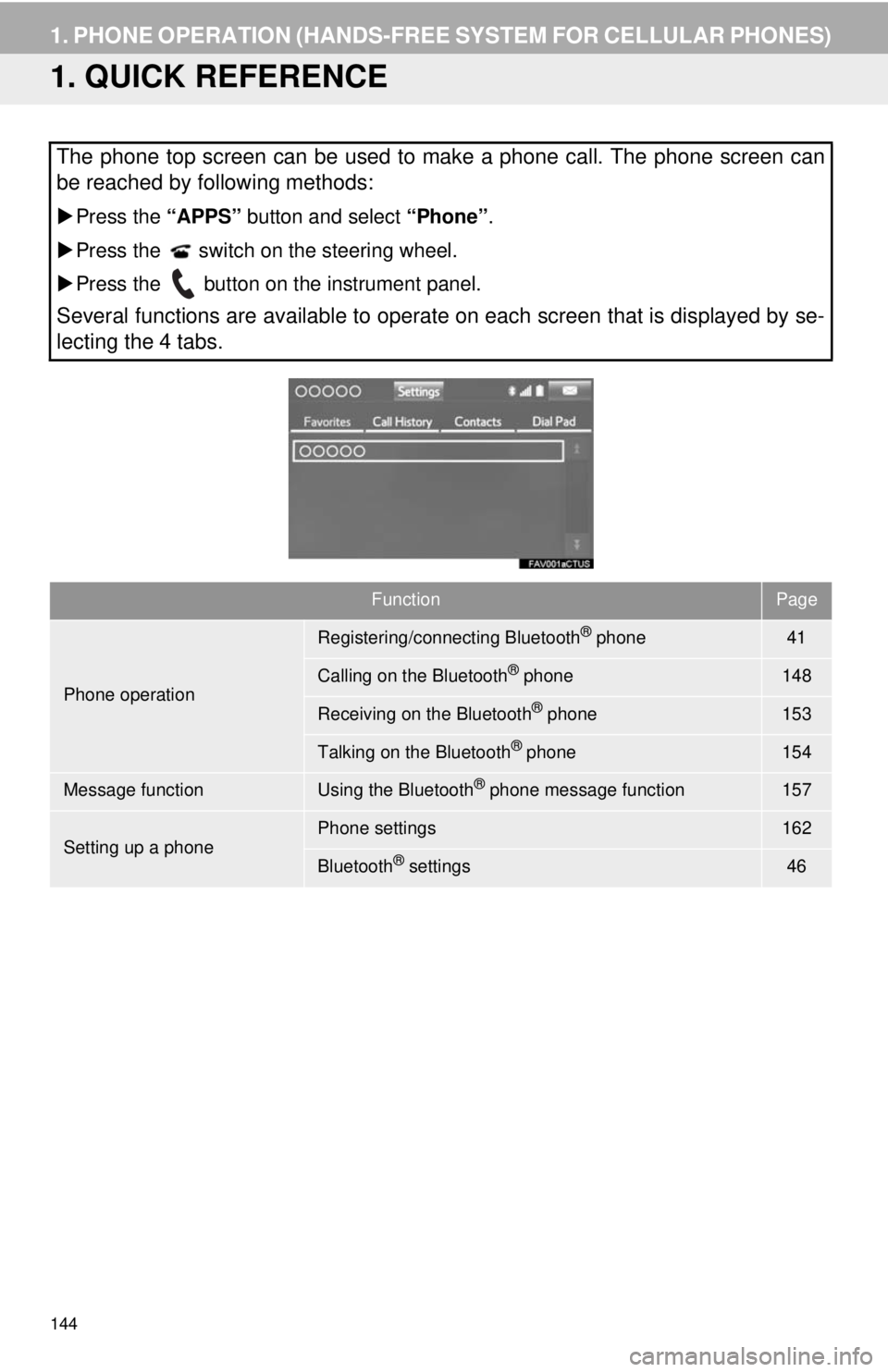
The phone top screen can be used to make a phone call. The phone screen can
be reached by following methods:
Press the “APPS” button and select “Phone”.
Press the switch on the steering wheel.
Press the button on the instrument panel.
Several functions are available to operate on each screen that is displayed by se-
lecting the 4 tabs.
FunctionPage
Phone operation
Registering/connecting Bluetooth® phone41
Calling on the Bluetooth® phone148
Receiving on the Bluetooth® phone153
Talking on the Bluetooth® phone154
Message functionUsing the Bluetooth® phone message function157
Setting up a phonePhone settings162
Bluetooth® settings46
Page 145 of 276
145
1. PHONE OPERATION (HANDS-FREE SYSTEM FOR CELLULAR PHONES)
7
PHONE
2. SOME BASICS
The hands-free system enables calls
to be made and received without hav-
ing to take your hands off the steering
wheel.
This system supports Bluetooth
®.
Bluetooth® is a wireless data system
that enables cellular phones to be used
without being connected by a cable or
placed in a cradle.
The operating procedure of the phone
is explained here.
CAUTION
●While driving, do not use a cellular
phone or connect the Bluetooth® phone.
●Your audio unit is fitted with Bluetooth
®
antennas. People with implanted pace-
makers or cardiac defibrillators should
maintain a reasonable distance between
themselves and the Bluetooth
® anten-
nas. The radio waves may affect the
operation of such devices.
●Before using Bluetooth
® devices, users
of any electrical medical device other
than implanted pacemakers and
implanted cardiac defibrillators should
consult the manufacturer of the device
for information about its operation under
the influence of radio waves. Radio
waves could have unexpected effects on
the operation of such medical devices.
NOTICE
●Do not leave your cellular phone in the
vehicle. The temperature inside may rise
to a level that could damage the phone.
INFORMATION
●If your cellular phone does not support
Bluetooth®, this system cannot function.
●In the following conditions, the system
may not function:
• The cellular phone is turned off.
• The current position is outside the
communication area.
• The cellular phone is not connected.
• The cellular phone has a low battery.
●When using Bluetooth
® audio and
hands-free at the same time, the follow-
ing problems may occur:
• The Bluetooth
® connection may be
cut.
• Noise may be heard on the Bluetooth
®
audio playback.
REGISTERING/CONNECTING
A Bluetooth® PHONE
To use the hands-free system for cellu-
lar phones, it is necessary to register a
cellular phone with the system.
(P.41)
Bluetooth® PHONE CONDITION
DISPLAY
The condition of the Bluetooth
® phone
appears on the upper right side of the
screen. (P.18)
Page 146 of 276
146
1. PHONE OPERATION (HANDS-FREE SYSTEM FOR CELLULAR PHONES)
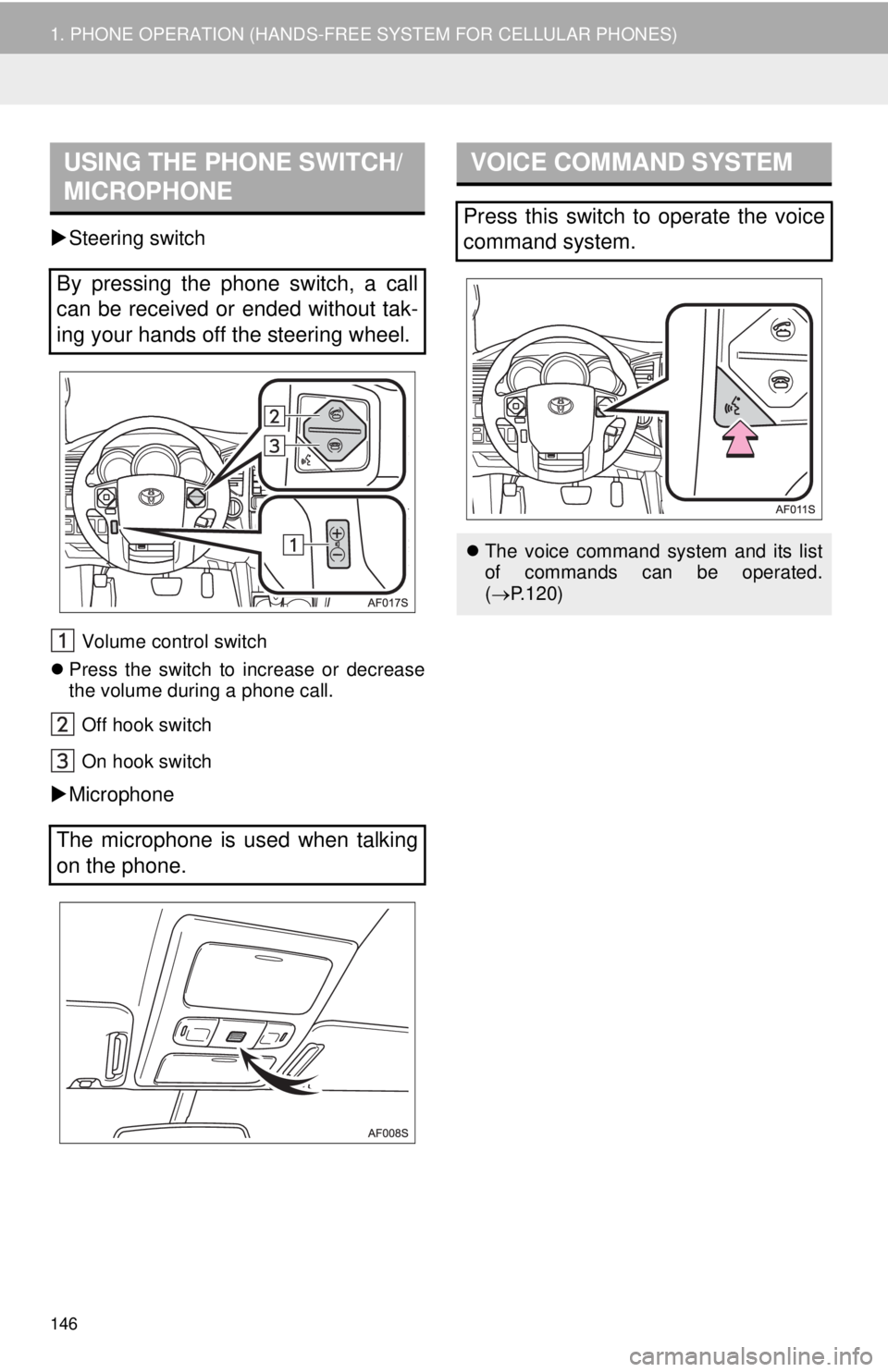
Steering switch
Volume control switch
Press the switch to increase or decrease
the volume during a phone call.
Off hook switch
On hook switch
Microphone
USING THE PHONE SWITCH/
MICROPHONE
By pressing the phone switch, a call
can be received or ended without tak-
ing your hands off the steering wheel.
The microphone is used when talking
on the phone.
VOICE COMMAND SYSTEM
Press this switch to operate the voice
command system.
The voice command system and its list
of commands can be operated.
(P.120)
Page 148 of 276
148
1. PHONE OPERATION (HANDS-FREE SYSTEM FOR CELLULAR PHONES)
3. CALLING ON THE Bluetooth® PHONE
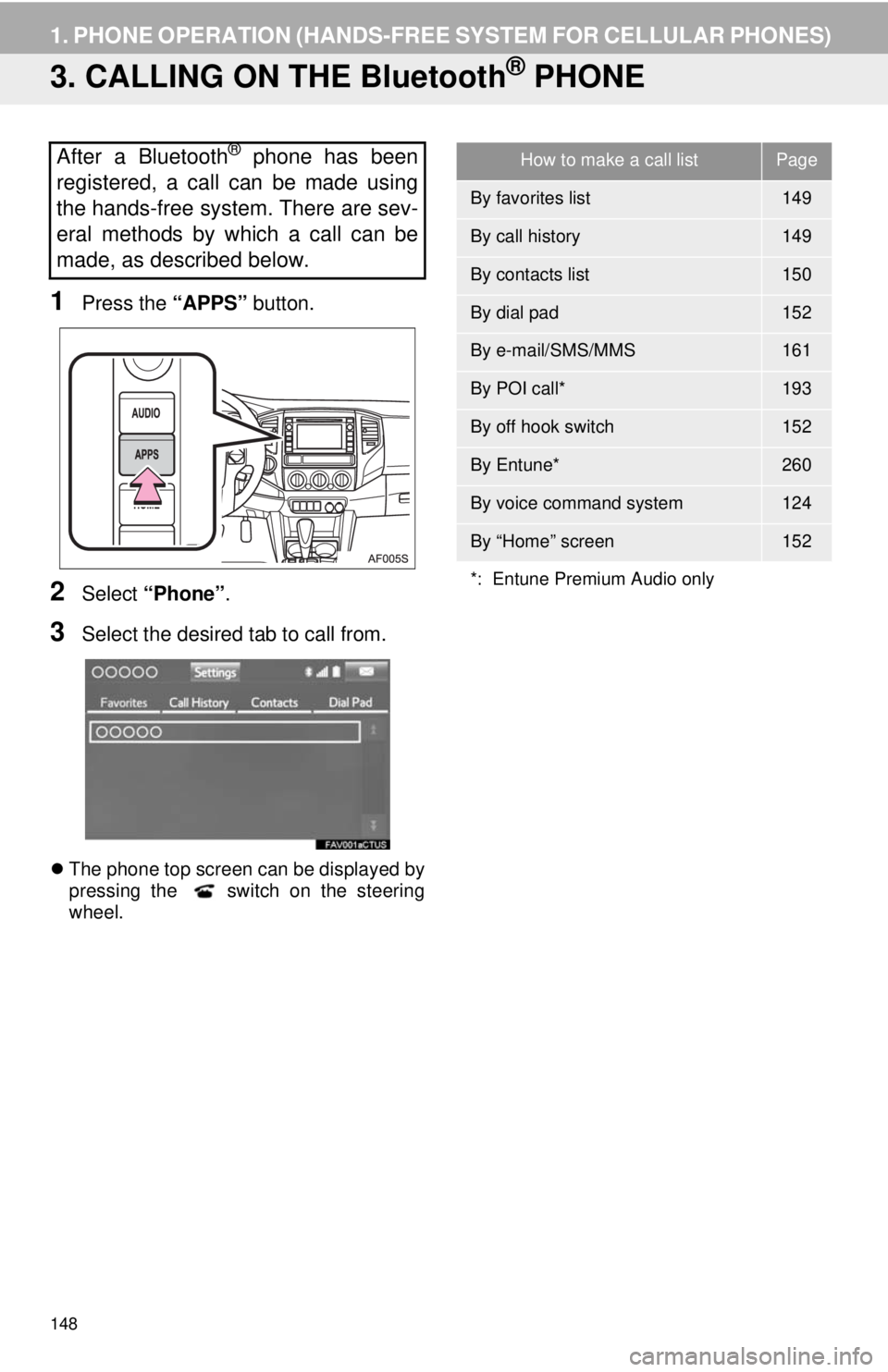
1Press the “APPS” button.
2Select “Phone”.
3Select the desired tab to call from.
The phone top screen can be displayed by
pressing the switch on the steering
wheel.
After a Bluetooth® phone has been
registered, a call can be made using
the hands-free system. There are sev-
eral methods by which a call can be
made, as described below.How to make a call listPage
By favorites list149
By call history149
By contacts list150
By dial pad152
By e-mail/SMS/MMS161
By POI call*193
By off hook switch152
By Entune*260
By voice command system124
By “Home” screen152
*: Entune Premium Audio only