tailgate TOYOTA TACOMA 2015 Owners Manual (in English)
[x] Cancel search | Manufacturer: TOYOTA, Model Year: 2015, Model line: TACOMA, Model: TOYOTA TACOMA 2015Pages: 590, PDF Size: 10.76 MB
Page 2 of 590

TABLE OF CONTENTSIndex
2
1-1. Key informationKeys ..................................... 30
1-2. Opening, closing and locking the doors
Wireless remote control ....... 32
Side doors ............................ 35
Access doors (Access Cab models only) ....................... 39
Tailgate ................................ 40
1-3. Adjustable components (seats, mirrors, steering
wheel)
Front seats ........................... 45
Rear seats ............................ 49
Head restraints ..................... 53
Seat belts ............................. 57
Steering wheel ..................... 63
Anti-glare inside rear view mirror .................................. 64
Outside rear view mirrors ..... 68
1-4. Opening and closing the windows
Power windows .................... 71
Back window (vehicles with sliding type) ........................ 73 1-5. Refueling
Opening the fuel tank cap..... 74
1-6. Theft deterrent system Engine immobilizer system ... 77
1-7. Safety information Correct driving posture ......... 80
SRS airbags ......................... 82
Front passenger occupant classification system ........... 95
Child restraint systems ....... 100
Installing child restraints ..... 104
2-1. Driving procedures Driving the vehicle .............. 120
Engine (ignition) switch....... 131
Automatic transmission ...... 134
Manual transmission........... 138
Turn signal lever ................. 141
Parking brake ..................... 142
Horn .................................... 144
2-2. Gauges and meters Gauges and meters ............ 145
Indicators and warning lights ................................. 148
1Before driving
2When driving
Page 7 of 590
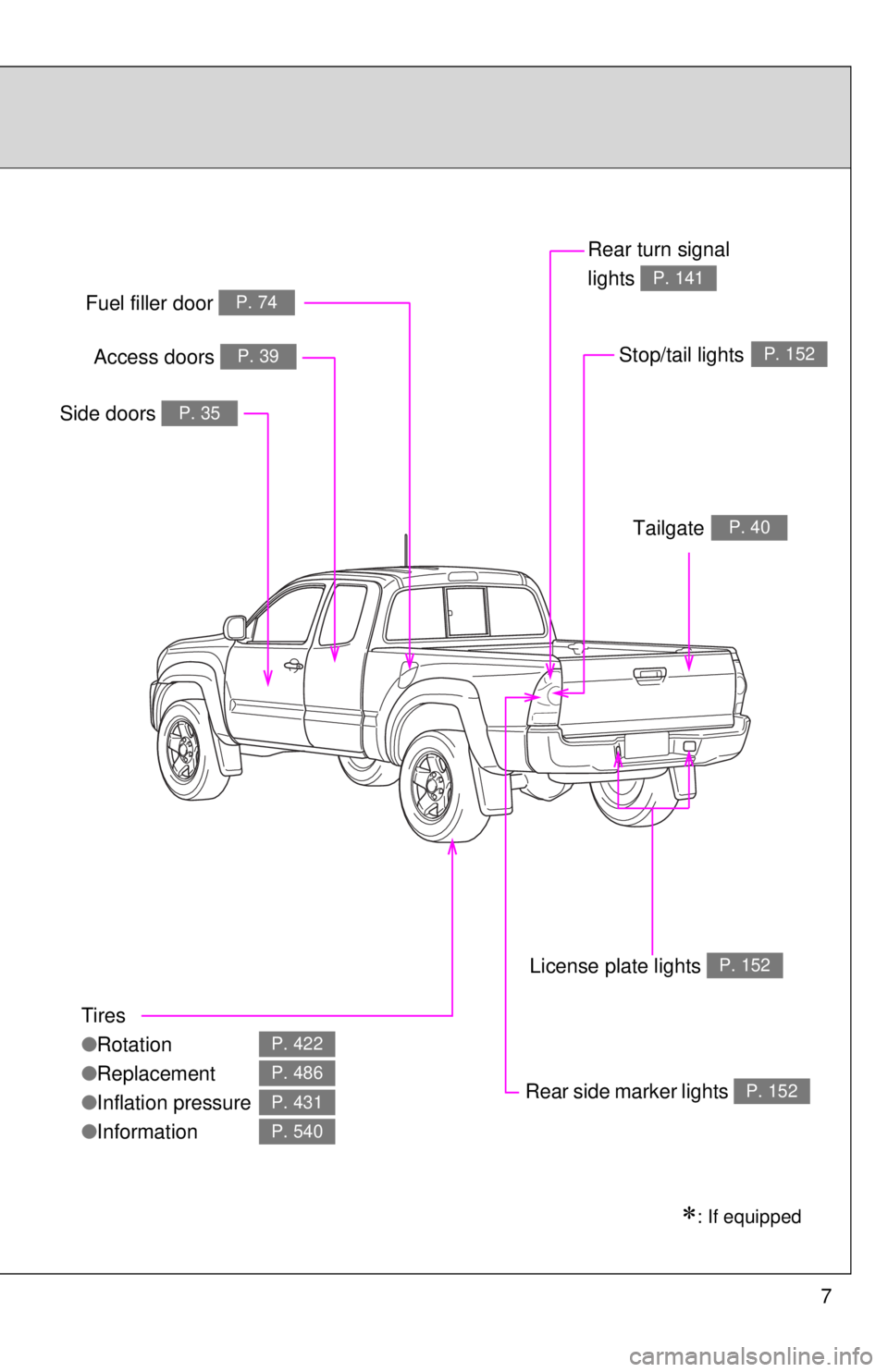
7
Tires
●Rotation
● Replacement
● Inflation pressure
● Information
P. 422
P. 486
P. 431
P. 540
Fuel filler door P. 74
Rear turn signal
lights
P. 141
Rear side marker lightsP. 152
Side doors P. 35
: If equipped
Stop/tail lightsP. 152
TailgateP. 40
License plate lights P. 152
Access doors P. 39
Page 9 of 590
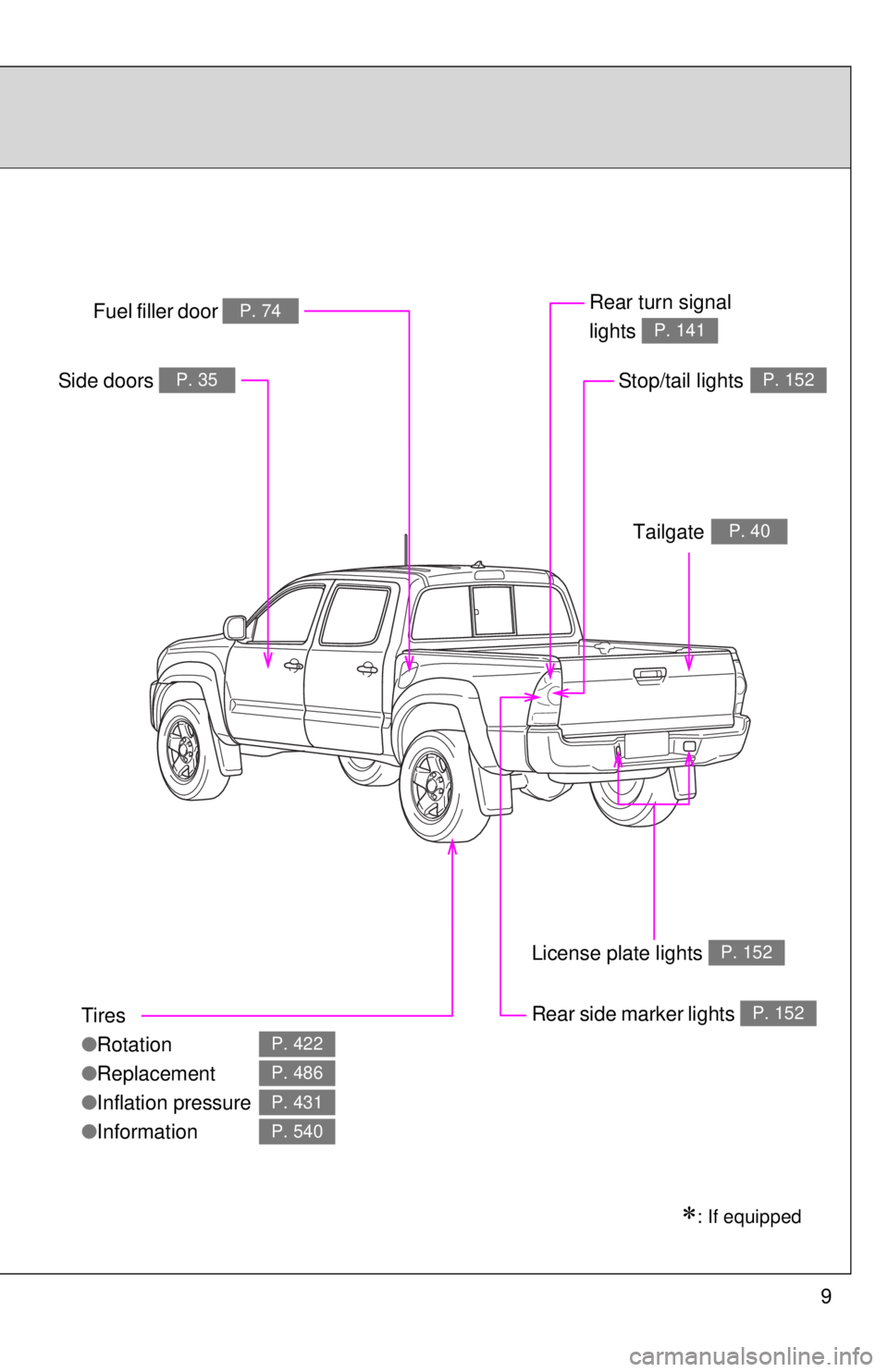
9
Tires
●Rotation
● Replacement
● Inflation pressure
● Information
P. 422
P. 486
P. 431
P. 540
Fuel filler door P. 74Rear turn signal
lights
P. 141
Rear side marker lightsP. 152
Side doors P. 35
: If equipped
Stop/tail lightsP. 152
TailgateP. 40
License plate lights P. 152
Page 29 of 590
Before driving1
29
1-1. Key informationKeys ................................... 30
1-2. Opening, closing and locking the doors
Wireless remote control ..... 32
Side doors .......................... 35
Access doors (Access Cab models only) .................... 39
Tailgate .............................. 40
1-3. Adjustable components (seats, mirrors, steering
wheel)
Front seats ......................... 45
Rear seats.......................... 49
Head restraints................... 53
Seat belts ........................... 57
Steering wheel ................... 63
Anti-glare inside rear view mirror ....................... 64
Outside rear view mirrors ... 68 1-4. Opening and closing
the windows
Power windows .................. 71
Back window (vehicles with sliding type) .............. 73
1-5. Refueling Opening the fuel tank cap ................................... 74
1-6. Theft deterrent system Engine immobilizer system ............................. 77
1-7. Safety information Correct driving posture....... 80
SRS airbags ....................... 82
Front passenger occupant classification system ........ 95
Child restraint systems..... 100
Installing child restraints... 104
Page 40 of 590
40
1-2. Opening, closing and locking the doors
Tailgate
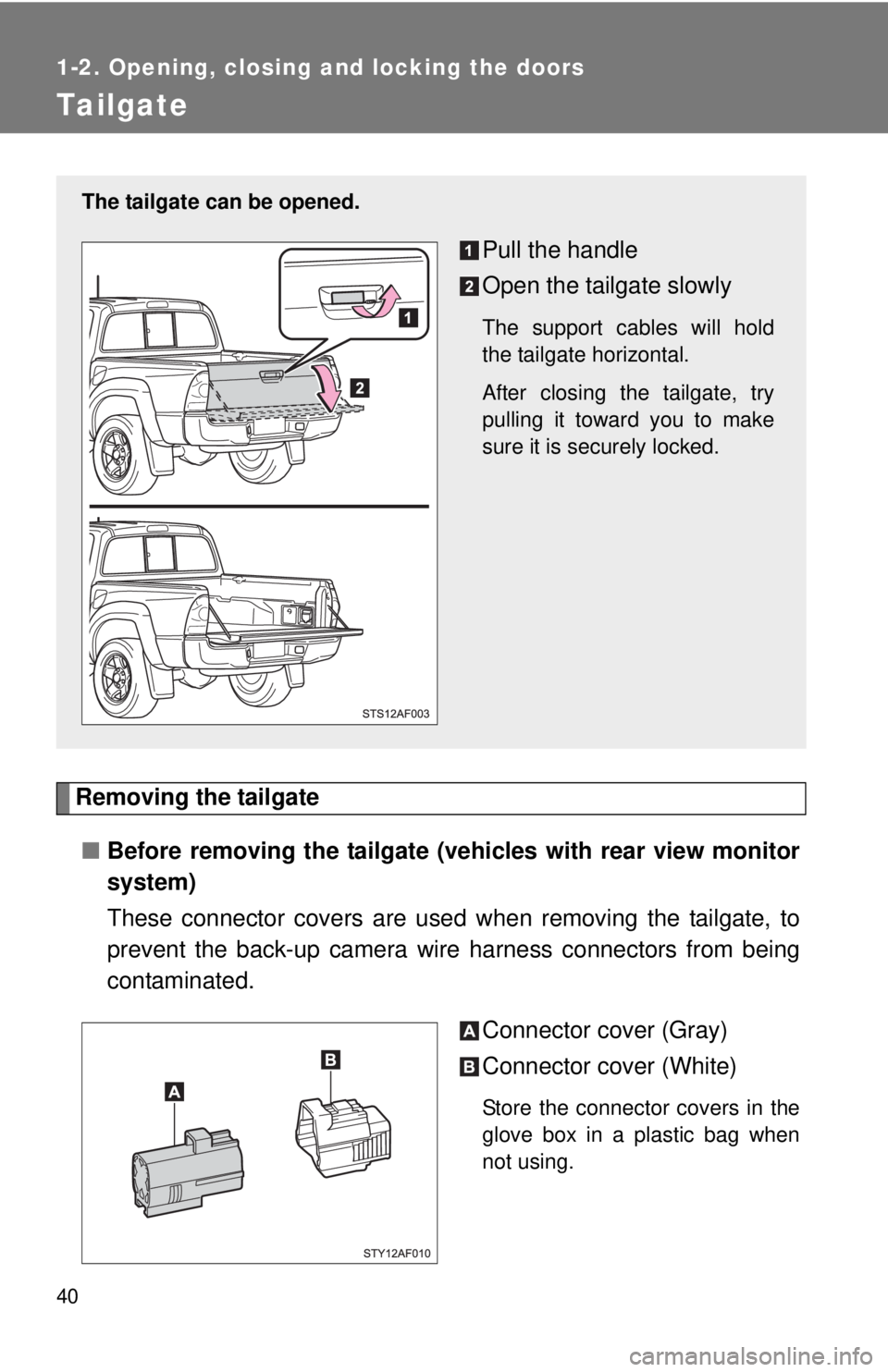
Removing the tailgate■ Before removing the tailgate (vehicles with rear view monitor
system)
These connector covers are used when removing the tailgate, to
prevent the back-up camera wire harness connectors from being
contaminated.
Connector cover (Gray)
Connector cover (White)
Store the connector covers in the
glove box in a plastic bag when
not using.
The tailgate can be opened.
Pull the handle
Open the tailgate slowly
The support cables will hold
the tailgate horizontal.
After closing the tailgate, try
pulling it toward you to make
sure it is securely locked.
Page 41 of 590
41
1-2. Opening, closing and locking the doors
1
Before driving
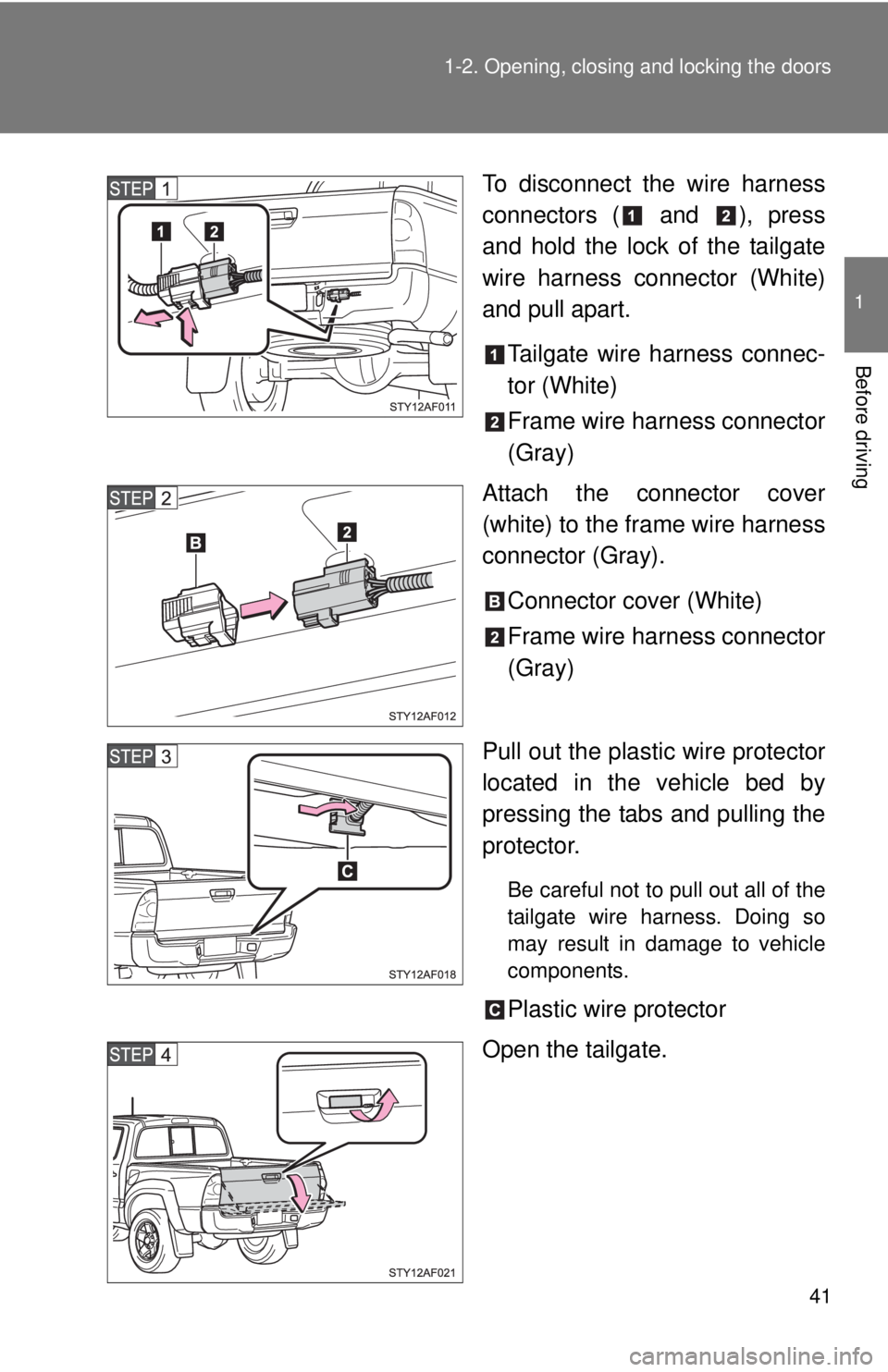
To disconnect the wire harness
connectors ( and ), press
and hold the lock of the tailgate
wire harness connector (White)
and pull apart.
Tailgate wire harness connec-
tor (White)
Frame wire harness connector
(Gray)
Attach the connector cover
(white) to the frame wire harness
connector (Gray).
Connector cover (White)
Frame wire harness connector
(Gray)
Pull out the plastic wire protector
located in the vehicle bed by
pressing the tabs and pulling the
protector.
Be careful not to pull out all of the
tailgate wire harness. Doing so
may result in damage to vehicle
components.
Plastic wire protector
Open the tailgate.
Page 42 of 590
42 1-2. Opening, closing and locking the doors
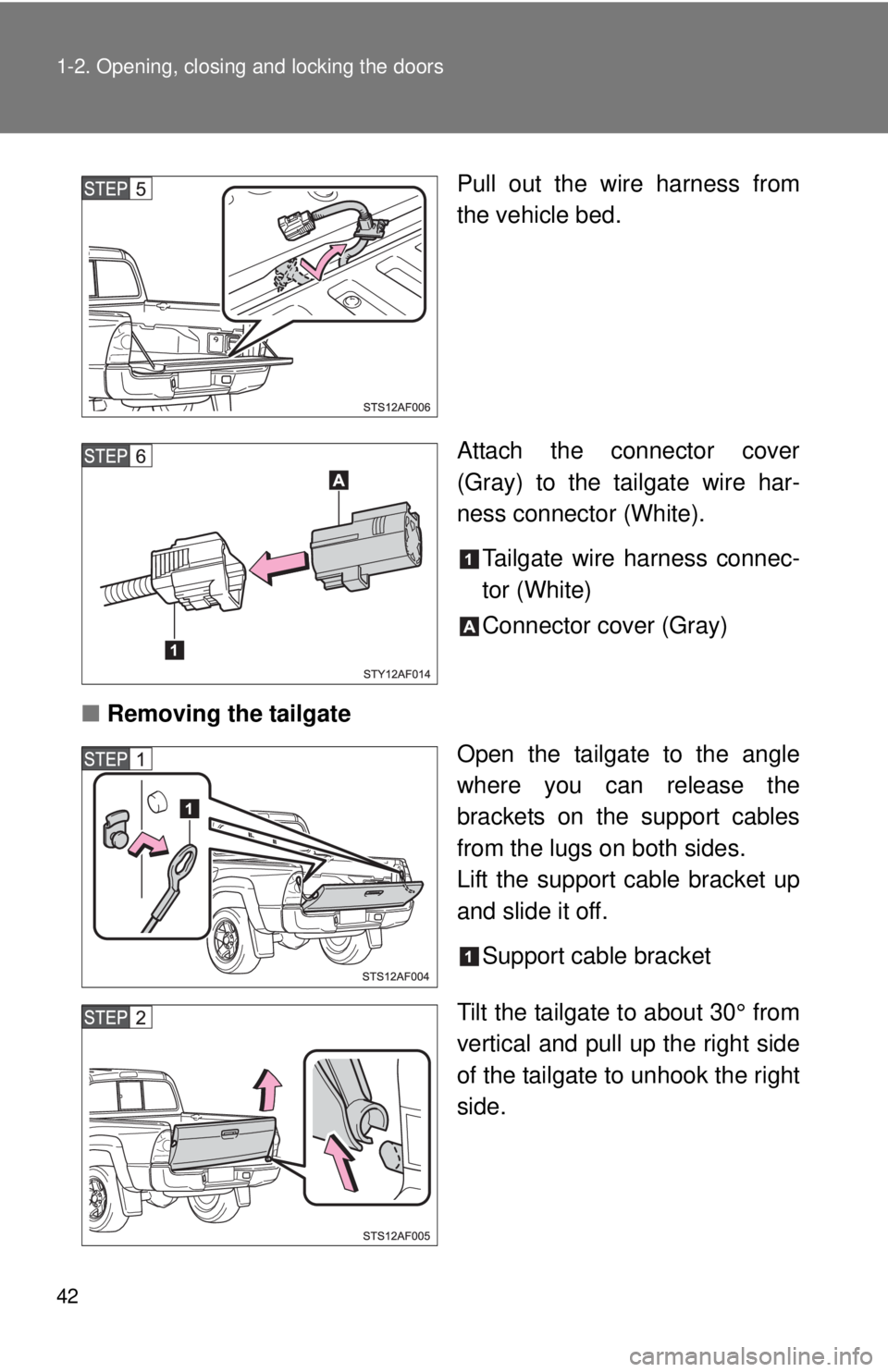
Pull out the wire harness from
the vehicle bed.
Attach the connector cover
(Gray) to the tailgate wire har-
ness connector (White).Tailgate wire harness connec-
tor (White)
Connector cover (Gray)
■ Removing the tailgate
Open the tailgate to the angle
where you can release the
brackets on the support cables
from the lugs on both sides.
Lift the support cable bracket up
and slide it off.
Support cable bracket
Tilt the tailgate to about 30° from
vertical and pull up the right side
of the tailgate to unhook the right
side.
Page 43 of 590
43
1-2. Opening, closing and locking the doors
1
Before driving
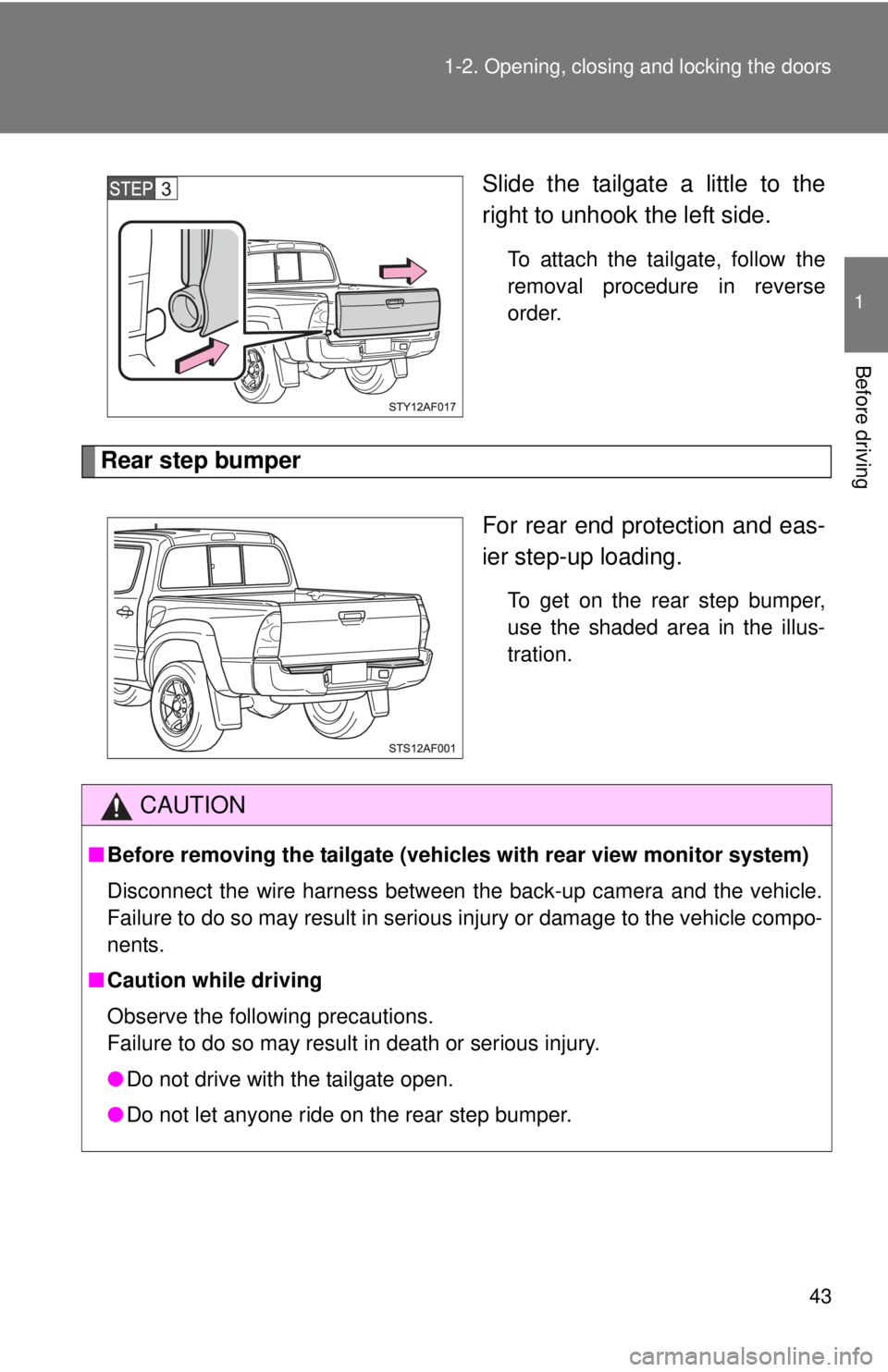
Slide the tailgate a little to the
right to unhook the left side.
To attach the tailgate, follow the
removal procedure in reverse
order.
Rear step bumper
For rear end protection and eas-
ier step-up loading.
To get on the rear step bumper,
use the shaded area in the illus-
tration.
CAUTION
■Before removing the tailgate (vehic les with rear view monitor system)
Disconnect the wire harness between the back-up camera and the vehicle.
Failure to do so may result in serious injury or damage to the vehicle compo-
nents.
■ Caution while driving
Observe the following precautions.
Failure to do so may result in death or serious injury.
●Do not drive with the tailgate open.
● Do not let anyone ride on the rear step bumper.
Page 44 of 590

44 1-2. Opening, closing and locking the doors
NOTICE
■To prevent damage to the tailgate wire harness (vehicles with rear view
monitor system)
Do not pull out all of the tailgate wire harness before open the tailgate.
■ To prevent damage to the camera lens (vehicles with rear view monitor
system)
Store the removed tailgate with the back-up camera lens facing upward.
■ After closing the tailgate
Try pulling it toward you to make sure it is securely locked.
■ To prevent damage to the rear step bumper
Do not allow more than one person to get on the rear step bumper at a time.
Page 175 of 590

175
2-4. Using other
driving systems
2
When driving
CAUTION
■When using the rear view monitor system
The rear view monitor system is a supplemental device intended to assist
the driver when backing up. When backing up, be sure to check visually
behind and all around the vehicle before proceeding.
Observe the following precautions to avoid an accident that could result in
death or serious injuries.
● Never depend on the rear view monitor system entirely when backing up.
The image and the position of the guide lines displayed on the screen may
differ from the actual state.
Use caution, just as you would when backing up any vehicle.
● Be sure to back up slowly, depressing the brake pedal to control vehicle
speed.
● The instructions given are only guidelines.
When and how much to turn the steering wheel will vary according to traf-
fic conditions, road surface conditions, vehicle condition, etc., when park-
ing. It is necessary to be fully aware of this before using the rear view
monitor system.
● When parking, be sure to check that the parking space will accommodate
your vehicle before maneuvering into it.
● Do not use the rear view monitor system in the following cases:
• On icy or slick road surfaces, or in snow
• When using tire chains or the compact spare tire
• When the tailgate is not closed completely
• On roads that are not flat or straight, such as curves or slopes.
● In low temperatures, the screen may darken or the image may become
faint. The image could distort when the vehicle is moving, or you may
become unable to see the image on the screen. Be sure to directly check
visually and with the mirrors all around the vehicle before proceeding.
● If the tire sizes are changed, the position of the fixed guide lines displayed
on the screen may change.
● The camera uses a special lens. The distances between objects and
pedestrians that appear in the image displayed on the screen will differ
from the actual distances. ( P. 170)