turn signal TOYOTA TACOMA 2018 Accessories, Audio & Navigation (in English)
[x] Cancel search | Manufacturer: TOYOTA, Model Year: 2018, Model line: TACOMA, Model: TOYOTA TACOMA 2018Pages: 296, PDF Size: 6.03 MB
Page 3 of 296
3
The Navigation System is one of the most technologically advanced vehicle ac-
cessories ever developed. The system receives satellite signals from the Global
Positioning System (GPS) operated by the U.S. Department of Defense. Using
these signals and other vehicle sensors, the system indicates your present po-
sition and assists in locating a desired destination.
The navigation system is designed to select efficient routes from your present
starting location to your destination. The system is also designed to direct you
to a destination that is unfamiliar to you in an efficient manner. Map database is
made based on AISIN AW maps, whose information source comes from HERE
maps. The calculated routes may not be the shortest nor the least traffic con-
gested. Your own personal local knowledge or “short cut” may at times be faster
than the calculated routes.
The navigation system’s database includes Point of Interest categories to allow
you to easily select destinations such as restaurants and hotels. If a destination
is not in the database, you can enter the street address or a major intersection
close to it and the system will guide you there.
The system will provide both a visual map and audio instructions. The audio in-
structions will announce the distance remaining and the direction to turn in when
approaching an intersection. These voice instructions will help you keep your
eyes on the road and are timed to provide enough time to allow you to maneu-
ver, change lanes or slow down.
Please be aware that all current vehicle navigation systems have certain limita-
tions that may affect their ability to perform properly. The accuracy of the vehi-
cle’s position depends on satellite conditions, road configuration, vehicle
condition or other circumstances. For more information on the limitations of the
system, refer to page 261.
NAVIGATION SYSTEM
Page 82 of 296
82
2. RADIO OPERATION
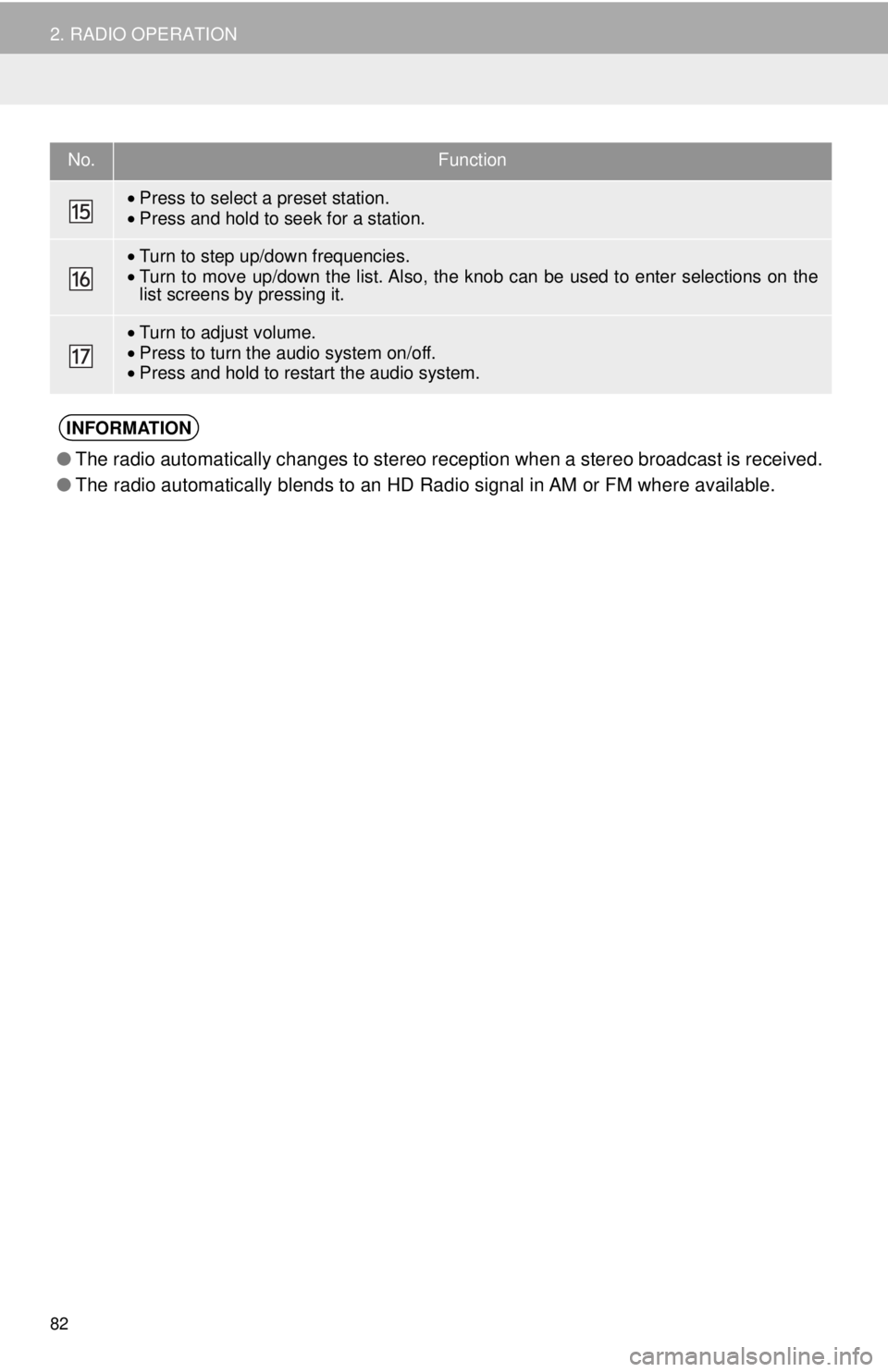
•Press to select a preset station.
• Press and hold to seek for a station.
•Turn to step up/down frequencies.
• Turn to move up/down the list. Also, the k nob can be used to enter selections on the
list screens by pressing it.
• Turn to adjust volume.
• Press to turn the audio system on/off.
• Press and hold to restart the audio system.
INFORMATION
● The radio automatically changes to stereo reception when a stereo broadcast is received.
● The radio automatically blends to an HD Radio signal in AM or FM where available.
No.Function
Page 85 of 296
85
2. RADIO OPERATION
AUDIO SYSTEM
3
1Select “Station List” .
2FM radio only: Select a desired genre
of station and select a desired station.
The genre list is in the following order:
• Classical
• Country
• EasyLis (Easy Listening)
• Inform (Information)
•Jazz
•News
• Oldies
•Other
• Pop Music
•Religion
•Rock
• R&B (Rhythm and Blues)
• Sports
•Talk
• Traffic (Not available when “HD Radio”
indicator is off.)
• Alert (Emergency Alert)
AUTOMATIC PLAYBACK OF
THE CACHE
If the radio broadcast is interrupted by
another audio output, such as an
incoming phone call, the system will
automatically cache the interrupted
portion and perform time-shift
playback when the interruption ends.
To manually operate the cache
operation: ( →P.84)
INFORMATION
●The system can store up to 20 minutes.
Cached data will be erased when the
radio mode or station is changed or
when the audio system is turned off.
● If noise or silence occurs during the
caching process, cache writing will con-
tinue, with the noise or silence recorded
as is. In this case, the cached broadcast
will contain the noise or silence when
played back.
RADIO BROADCAST DATA
SYSTEM
This audio system is equipped with Ra-
dio Broadcast Data Systems (RBDS).
RBDS mode allows text messages to
be received from radio stations that uti-
lize RBDS transmitters.
When RBDS is on, the radio can
— only select stations of a particular
program type,
— display messages from radio sta-
tions,
— search for a stronger signal station.
RBDS features are available only
when listening to an FM station that
broadcasts RBDS information and the
“FM Info” indicator is on.
SELECTING A DESIRED
GENRE
Page 89 of 296
89
2. RADIO OPERATION
AUDIO SYSTEM
3
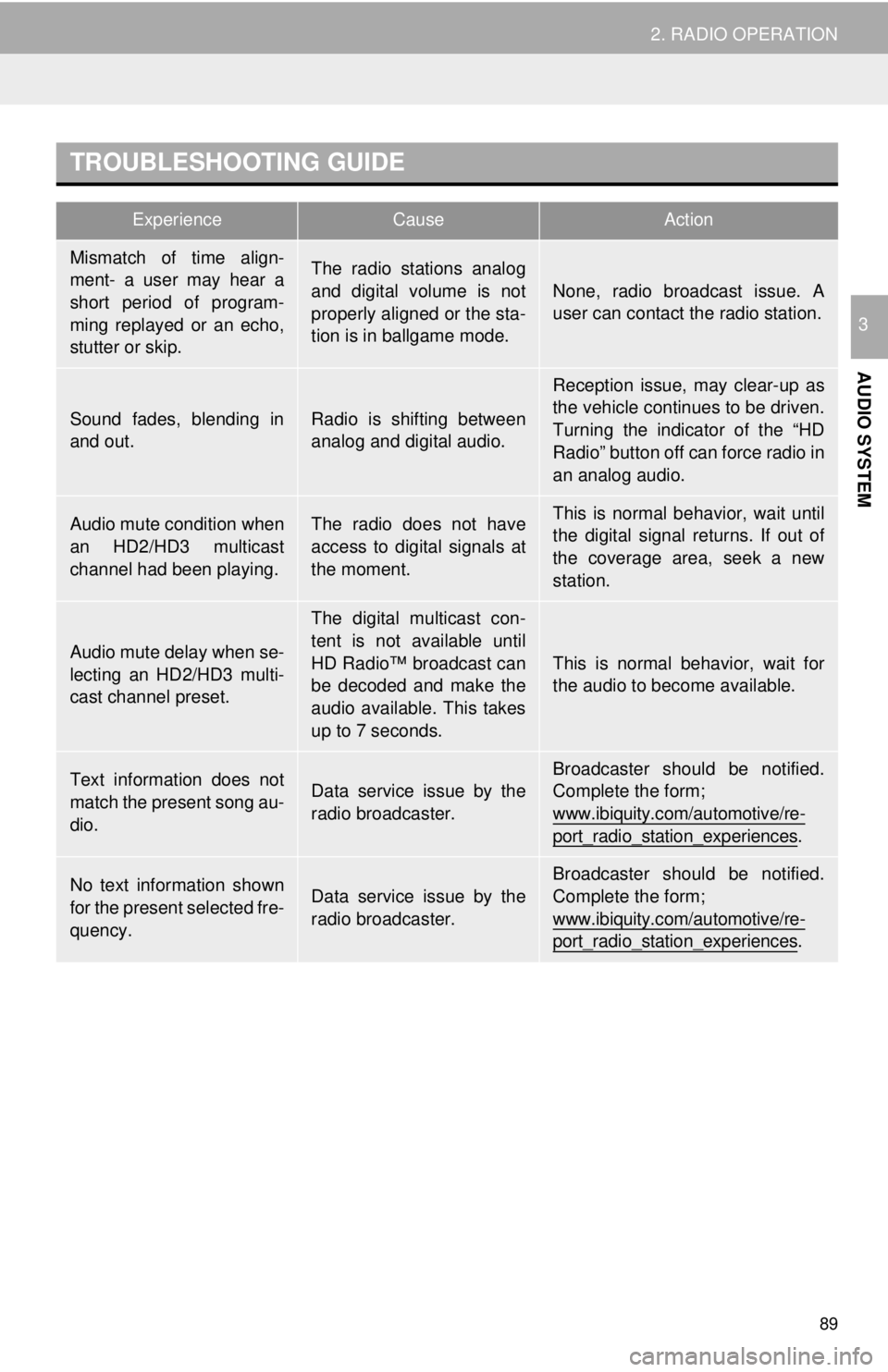
TROUBLESHOOTING GUIDE
ExperienceCauseAction
Mismatch of time align-
ment- a user may hear a
short period of program-
ming replayed or an echo,
stutter or skip.The radio stations analog
and digital volume is not
properly aligned or the sta-
tion is in ballgame mode.
None, radio broadcast issue. A
user can contact the radio station.
Sound fades, blending in
and out.Radio is shifting between
analog and digital audio.
Reception issue, may clear-up as
the vehicle continues to be driven.
Turning the indicator of the “HD
Radio” button off can force radio in
an analog audio.
Audio mute condition when
an HD2/HD3 multicast
channel had been playing.The radio does not have
access to digital signals at
the moment.This is normal behavior, wait until
the digital signal returns. If out of
the coverage area, seek a new
station.
Audio mute delay when se-
lecting an HD2/HD3 multi-
cast channel preset.
The digital multicast con-
tent is not available until
HD Radio™ broadcast can
be decoded and make the
audio available. This takes
up to 7 seconds.
This is normal behavior, wait for
the audio to become available.
Text information does not
match the present song au-
dio.Data service issue by the
radio broadcaster.
Broadcaster should be notified.
Complete the form;
www.ibiquity.com/automotive/re-
port_radio_station_experiences.
No text information shown
for the present selected fre-
quency.Data service issue by the
radio broadcaster.
Broadcaster should be notified.
Complete the form;
www.ibiquity.com/automotive/re-
port_radio_station_experiences.
Page 96 of 296
96
2. RADIO OPERATION
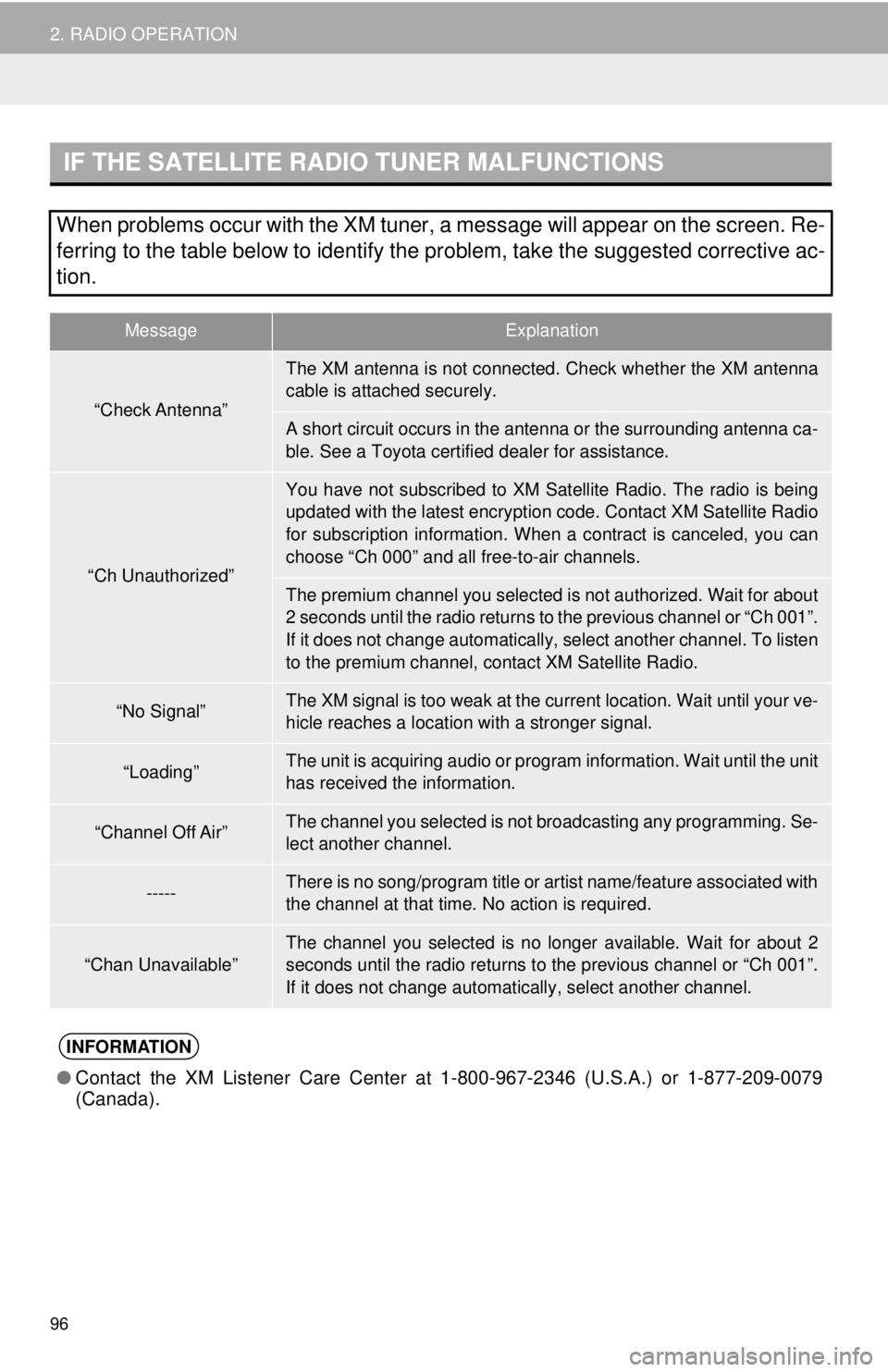
IF THE SATELLITE RADIO TUNER MALFUNCTIONS
When problems occur with the XM tuner, a message will appear on the screen. Re-
ferring to the table below to identify the problem, take the suggested c\
orrective ac-
tion.
MessageExplanation
“Check Antenna”
The XM antenna is not connected. Check whether the XM antenna
cable is attached securely.
A short circuit occurs in the antenna or the surrounding antenna ca-
ble. See a Toyota certified dealer for assistance.
“Ch Unauthorized”
You have not subscribed to XM Satellite Radio. The radio is being
updated with the latest encryption code. Contact XM Satellite Radio
for subscription information. When a contract is canceled, you can
choose “Ch 000” and all free-to-air channels.
The premium channel you selected is not authorized. Wait for about
2 seconds until the radio returns to the previous channel or “Ch 001”.
If it does not change automatically, select another channel. To listen
to the premium channel, contact XM Satellite Radio.
“No Signal”The XM signal is too weak at the current location. Wait until your ve-
hicle reaches a location with a stronger signal.
“Loading”The unit is acquiring audio or program information. Wait until the unit
has received the information.
“Channel Off Air”The channel you selected is not br oadcasting any programming. Se-
lect another channel.
-----There is no song/program title or artist name/feature associated with
the channel at that time. No action is required.
“Chan Unavailable”The channel you selected is no longer available. Wait for about 2
seconds until the radio returns to the previous channel or “Ch 001”.
If it does not change automatically, select another channel.
INFORMATION
● Contact the XM Listener Care Center at 1-800-967-2346 (U.S.A.) or 1-877-209-0079
(Canada).
Page 230 of 296
230
2. DESTINATION SEARCH
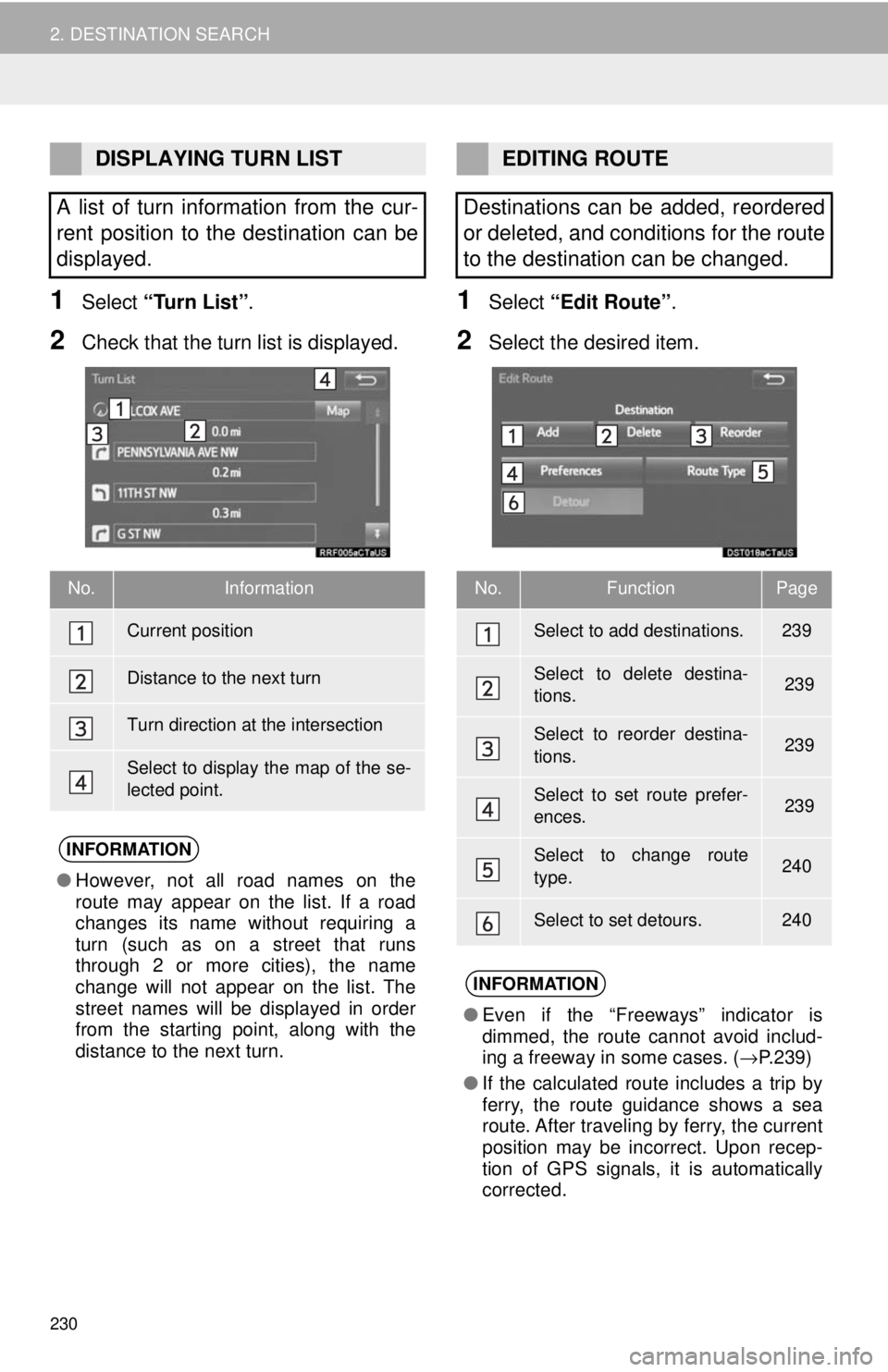
1Select “Turn List” .
2Check that the turn list is displayed.
1Select “Edit Route” .
2Select the desired item.
DISPLAYING TURN LIST
A list of turn information from the cur-
rent position to the destination can be
displayed.
No.Information
Current position
Distance to the next turn
Turn direction at the intersection
Select to display the map of the se-
lected point.
INFORMATION
● However, not all road names on the
route may appear on the list. If a road
changes its name without requiring a
turn (such as on a street that runs
through 2 or more cities), the name
change will not appear on the list. The
street names will be displayed in order
from the starting point, along with the
distance to the next turn.
EDITING ROUTE
Destinations can be added, reordered
or deleted, and conditions for the route
to the destination can be changed.
No.FunctionPage
Select to add destinations.239
Select to delete destina-
tions. 239
Select to reorder destina-
tions. 239
Select to set route prefer-
ences. 239
Select to change route
type.240
Select to set detours.240
INFORMATION
● Even if the “Freeways” indicator is
dimmed, the route cannot avoid includ-
ing a freeway in some cases. ( →P.239)
● If the calculated route includes a trip by
ferry, the route guidance shows a sea
route. After traveling by ferry, the current
position may be incorrect. Upon recep-
tion of GPS signals, it is automatically
corrected.