turn signal TOYOTA TACOMA 2018 Owners Manual (in English)
[x] Cancel search | Manufacturer: TOYOTA, Model Year: 2018, Model line: TACOMA, Model: TOYOTA TACOMA 2018Pages: 696, PDF Size: 11.72 MB
Page 3 of 696

3
1
9 8
7 5 4
3
2
10
6
4-1. Before drivingDriving the vehicle ............. 160
Cargo and luggage............ 170
Vehicle load limits ............. 174
Trailer towing..................... 175
Dinghy towing.................... 192
4-2. Driving procedures Engine (ignition) switch (vehicles without
a smart key system) ........ 193
Engine (ignition) switch (vehicles with a smart
key system) ..................... 196
Automatic transmission ..... 201
Manual transmission ......... 207
Turn signal lever................ 209
Parking brake .................... 210
4-3. Operating the lights and wipers
Headlight switch ................ 211
Automatic High Beam ....... 215
Fog light switch ................. 220
Windshield wipers and washer ............................ 221
4-4. Refueling Opening the fuel tank cap .................................. 224 4-5. Using the driving support
systems
Toyota Safety Sense P ...... 228
PCS (Pre-Collision System)..... 235
LDA (Lane Departure Alert)..... 249
Dynamic radar cruise control ................... 257
Cruise control .................... 271
Intuitive parking assist ....... 275
Rear view monitor system ............................. 281
BSM (Blind Spot Monitor)......... 291
• T he Blind Spot Monitor
function .......................... 293
• T he Rear Cross Traffic
Alert function ................. 296
Four-wheel drive system ... 299
AUTO LSD system ............ 303
Rear differential lock system ............................. 305
Active traction control system ............................. 308
Multi-terrain Select............. 310
Crawl Control ..................... 314
Clutch start cancel switch .............................. 318
Driving assist systems ....... 319
4-6. Driving tips Winter driving tips .............. 325
Off-road precautions .......... 329
4Driving
Page 15 of 696
15Pictorial index
Fuel filler door . . . . . . . . . . . . . . . . . . . . . . . . . . . . . . . . . . . . P. 224
Refueling method . . . . . . . . . . . . . . . . . . . . . . . . . . . . . . . . . . . P. 224
Fuel type/fuel tank capacity . . . . . . . . . . . . . . . . . . . . . . . . . . . P. 626
Tires . . . . . . . . . . . . . . . . . . . . . . . . . . . . . . . . . . . . . . . . . . . . P. 519
Tire size/inflation pressure . . . . . . . . . . . . . . . . . . . . . . . . . . . . P. 633
Winter tires/tire chain . . . . . . . . . . . . . . . . . . . . . . . . . . . . . . . . P. 325
Checking/rotation/tire pressure warning system
*2 . . . . . . . . . P. 519
Coping with flat tires . . . . . . . . . . . . . . . . . . . . . . . . . . . . . . . . P. 594
Hood . . . . . . . . . . . . . . . . . . . . . . . . . . . . . . . . . . . . . . . . . . . . P. 505
Opening . . . . . . . . . . . . . . . . . . . . . . . . . . . . . . . . . . . . . . . . . . P. 505
Engine oil . . . . . . . . . . . . . . . . . . . . . . . . . . . . . . . . . . . . . . . . . P. 627
Coping with overheat . . . . . . . . . . . . . . . . . . . . . . . . . . . . . . . . P. 617
Camera . . . . . . . . . . . . . . . . . . . . . . . . . . . . . . . . . . . . . . . . . . P. 281
Headlights . . . . . . . . . . . . . . . . . . . . . . . . . . . . . . . . . . . . . . . P. 211
Fog lights
*2 . . . . . . . . . . . . . . . . . . . . . . . . . . . . . . . . . . . . . . P. 220
Front turn signal lights . . . . . . . . . . . . . . . . . . . . . . . . . . . . . P. 209
Parking lights (bulb type)
*2/
daytime running lig hts (bulb type)
*2. . . . . . . . . . . . . . . . . . P. 211
Parking lights (LED type)
*2/
daytime running lights (LED type)
*2 . . . . . . . . . . . . . . . . . . P. 211
Rear turn signal/tail lights . . . . . . . . . . . . . . . . . . . . . . . . . . . P. 209
Stop/tail lights . . . . . . . . . . . . . . . . . . . . . . . . . . . . . . . . . . . . P. 211
Hill-start assist control
*2 . . . . . . . . . . . . . . . . . . . . . . . . . . . . . P. 3 20
License plate lights . . . . . . . . . . . . . . . . . . . . . . . . . . . . . . . . P. 211
Back-up lights
Shifting the shift lever to R . . . . . . . . . . . . . . . . . . . . . . . . P. 201, 207
Side marker lights . . . . . . . . . . . . . . . . . . . . . . . . . . . . . . . . . P. 211
6
7
8
9
Light bulbs of the exter ior lights for driving
(Replacing method: P. 543, Watts: P. 634)
*1: Vehicles with a smart key system
*2: If equipped
10
11
12
13
14
15
16
17
18
Page 17 of 696
17Pictorial index
Parking brake . . . . . . . . . . . . . . . . . . . . . . . . . . . . . . . . . . . . . P. 210
Applying/releasing . . . . . . . . . . . . . . . . . . . . . . . . . . . . . . . . . . P. 210
Precautions against winter season . . . . . . . . . . . . . . . . . . . . . P. 326
Warning light/warning buzzer/warning message . . . . . . . P. 567, 580
Turn signal lever . . . . . . . . . . . . . . . . . . . . . . . . . . . . . . . . . . P. 209
Headlight switch . . . . . . . . . . . . . . . . . . . . . . . . . . . . . . . . . . P. 211
Headlights/parking lights/tail lights/daytime running lights . . . . P. 211
Fog lights
*4 . . . . . . . . . . . . . . . . . . . . . . . . . . . . . . . . . . . . . . . P. 220
Windshield wiper and washer switch . . . . . . . . . . . . . . . . . P. 221
Usage . . . . . . . . . . . . . . . . . . . . . . . . . . . . . . . . . . . . . . . . . . . P. 221
Adding washer fluid . . . . . . . . . . . . . . . . . . . . . . . . . . . . . . . . . P. 518
Warning messages
*5. . . . . . . . . . . . . . . . . . . . . . . . . . . . . . . . P. 577
Hood lock release lever. . . . . . . . . . . . . . . . . . . . . . . . . . . . . P. 505
Tilt and telescopic steering lock release lever . . . . . . . . . . P. 140
Air conditioning system . . . . . . . . . . . . . . . . . . . . . . . . P. 426, 432
Usage (manual type)
*4 . . . . . . . . . . . . . . . . . . . . . . . . . . . . . . P. 426
Usage (automatic type)
*4 . . . . . . . . . . . . . . . . . . . . . . . . . . . . P. 432
Entune Audio system
*6. . . . . . . . . . . . . . . . . . . . . . . . . . . . . P. 33 6
*1: Vehicles without a smart key system
*2: Vehicles with a smart key system
*3: Vehicles with an automatic transmission
*4: If equipped
*5: For Canada only
*6: For vehicles with Entune Audio Plus or Entune Premium Audio, refer to
“NAVIGATION AND MULTIMEDIA SYSTEM OWNER’S MANUAL”.
5
6
7
8
9
10
11
Page 87 of 696
872. Instrument cluster
2
Instrument cluster
*2: The light comes on to indicate a malfunction.
*3: The light flashes to indicate a malfunction.
*4: This light illuminates on the multi-information display.
*5: If equipped
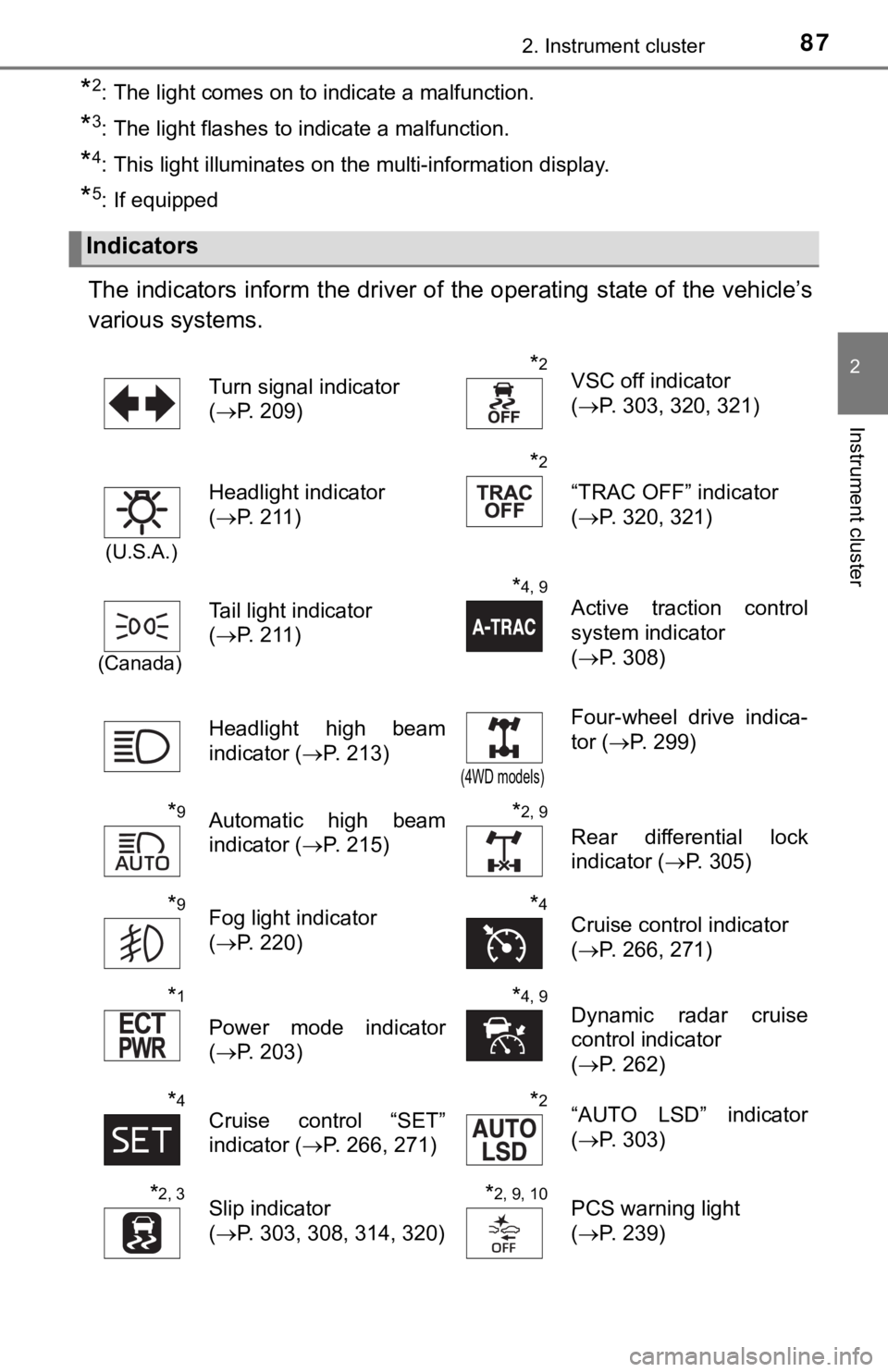
The indicators inform the driver of the operating state of the vehicle’s
various systems.
Indicators
Turn signal indicator
( P. 209)*2VSC off indicator
(P. 303, 320, 321)
(U.S.A.)
Headlight indicator
(P. 211)
*2
“TRAC OFF” indicator
(P. 320, 321)
(Canada)
Tail light indicator
(P. 211)
*4, 9
Active traction control
system indicator
(P. 308)
Headlight high beam
indicator ( P. 213)
(4WD models)
Four-wheel drive indica-
tor (P. 299)
*9Automatic high beam
indicator ( P. 215)*2, 9
Rear differential lock
indicator (P. 305)
*9Fog light indicator
(P. 220)*4Cruise control indicator
(P. 266, 271)
*1
Power mode indicator
(P. 203)
*4, 9Dynamic radar cruise
control indicator
(P. 262)
*4Cruise control “SET”
indicator ( P. 266, 271)*2“AUTO LSD” indicator
(P. 303)
*2, 3Slip indicator
(P. 303, 308, 314, 320)*2, 9, 10PCS warning light
(P. 239)
Page 127 of 696

1273-2. Opening, closing and locking the doors
3
Operation of each component
■Note for the entry function
●Even when the electronic key is within the effective range (detection areas),
the system may not operate properly in the following cases:
• The electronic key is too close to the window or outside door handle, near
the ground, or in a high place when the doors are locked or unl ocked.
• The electronic key is near the ground or in a high place, or t oo close to
the rear bumper center when the trunk is opened.
• The electronic key is on the instrument panel or floor, or in the console
box or glove box when the engine is started or engine switch mo des are
changed.
● Do not leave the electronic key on top of the instrument panel or near the
door pockets when exiting the vehicle. Depending on the radio w ave recep-
tion conditions, it may be detected by the antenna outside the cabin and the
door will become lockable from the outside, possibly trapping the electronic
key inside the vehicle.
● As long as the electronic key is within the effective range, th e doors may be
locked or unlocked by anyone. However, only the doors detecting the elec-
tronic key can be used to unlock the vehicle.
● Even if the electronic key is not inside the vehicle, it may be possible to start
the engine if the electronic key is near the window.
● The doors may unlock or lock if a large amount of water splashes on the
door handle, such as in the rain or in a car wash, when the electronic key is
within the effective range. (The doors will automatically be lo cked after
approximately 60 seconds if the doors are not opened and closed.)
● If the wireless remote control is used to lock the doors when t he electronic
key is near the vehicle, there is a possibility that the door m ay not be
unlocked by the entry function. (Use the wireless remote contro l to unlock
the doors.)
● Touching the door lock or unlock sensor while wearing gloves ma y prevent
lock or unlock operation. Remove the gloves and touch the lock sensor
again.
● When the lock operation is performed using the lock sensor, rec ognition sig-
nals will be shown up to two consecutive times. After this, no recognition
signals will be given.
● If the door handle becomes wet while the electronic key is with in the effec-
tive range, the door may lock and unlock repeatedly. In this case, follow the
following correction procedures to wash the vehicle:
• Place the electronic key in a location 6 ft. (2 m) or more awa y from the
vehicle. (Take care to ensure that the key is not stolen.)
• Set the electronic key to battery-saving mode to disable the s mart key
system. ( P. 125)
● If the electronic key is inside the vehicle and a door handle b ecomes wet
during a car wash, a message may be shown on the multi-informat ion dis-
play and a buzzer will sound outside the vehicle. To turn off t he alarm, lock
all the doors.
Page 158 of 696

158
4-1. Before drivingDriving the vehicle............. 160
Cargo and luggage ........... 170
Vehicle load limits ............. 174
Trailer towing .................... 175
Dinghy towing ................... 192
4-2. Driving procedures Engine (ignition) switch (vehicles without
a smart key system) ........ 193
Engine (ignition) switch (vehicles with a smart
key system)..................... 196
Automatic transmission ..... 201
Manual transmission ......... 207
Turn signal lever ............... 209
Parking brake .................... 210
4-3. Operating the lights and wipers
Headlight switch ................ 211
Automatic High Beam ....... 215
Fog light switch ................. 220
Windshield wipers and washer ............................ 221
Page 209 of 696
2094-2. Driving procedures
4
Driving
Turn signal lever
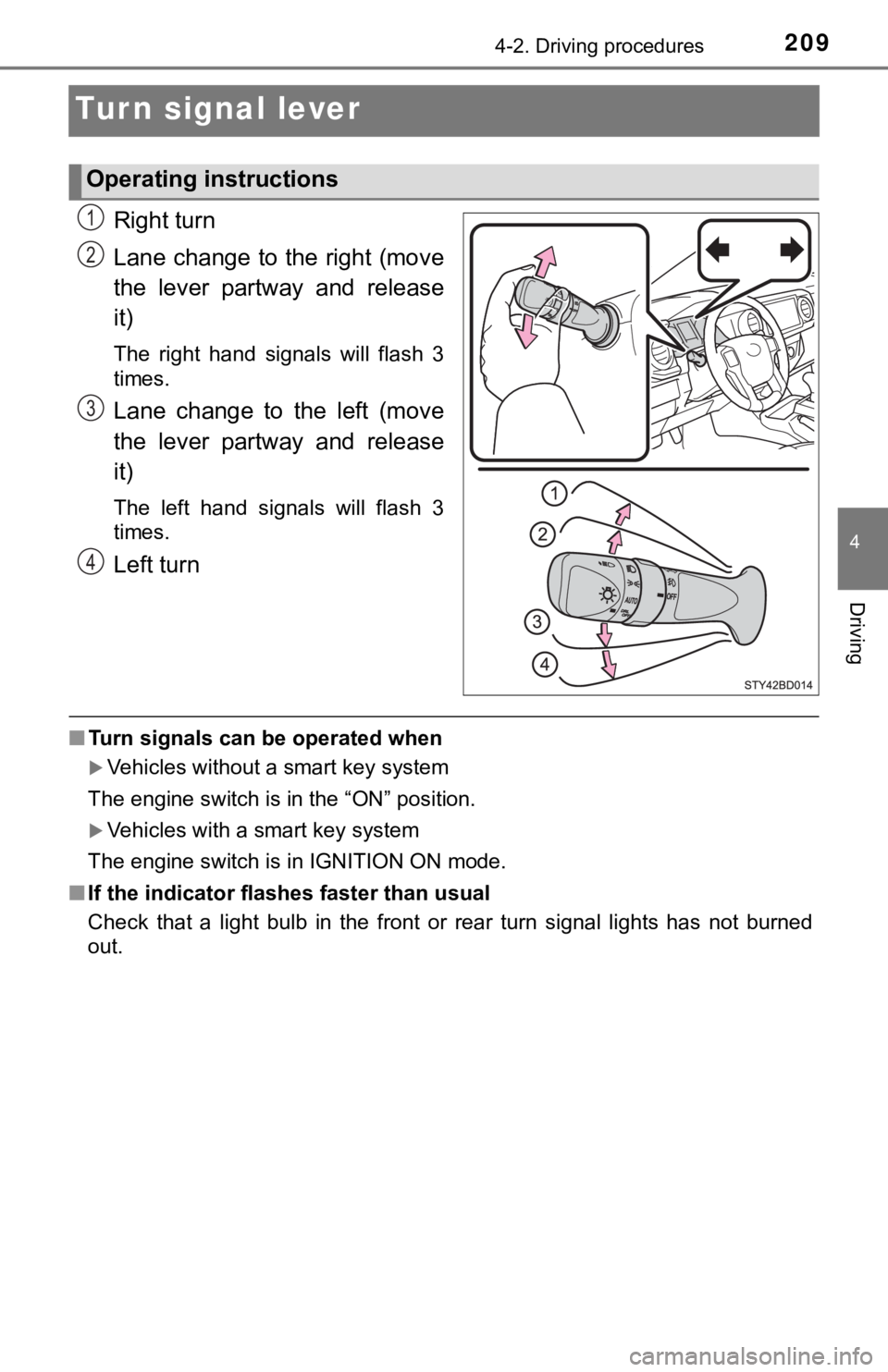
Right turn
Lane change to the right (move
the lever partway and release
it)
The right hand signals will flash 3
times.
Lane change to the left (move
the lever partway and release
it)
The left hand signals will flash 3
times.
Left turn
■Turn signals can be operated when
Vehicles without a smart key system
The engine switch is in the “ON” position.
Vehicles with a smart key system
The engine switch is in IGNITION ON mode.
■ If the indicator flashes faster than usual
Check that a light bulb in the front or rear turn signal lights has not burned
out.
Operating instructions
1
2
3
4
Page 213 of 696
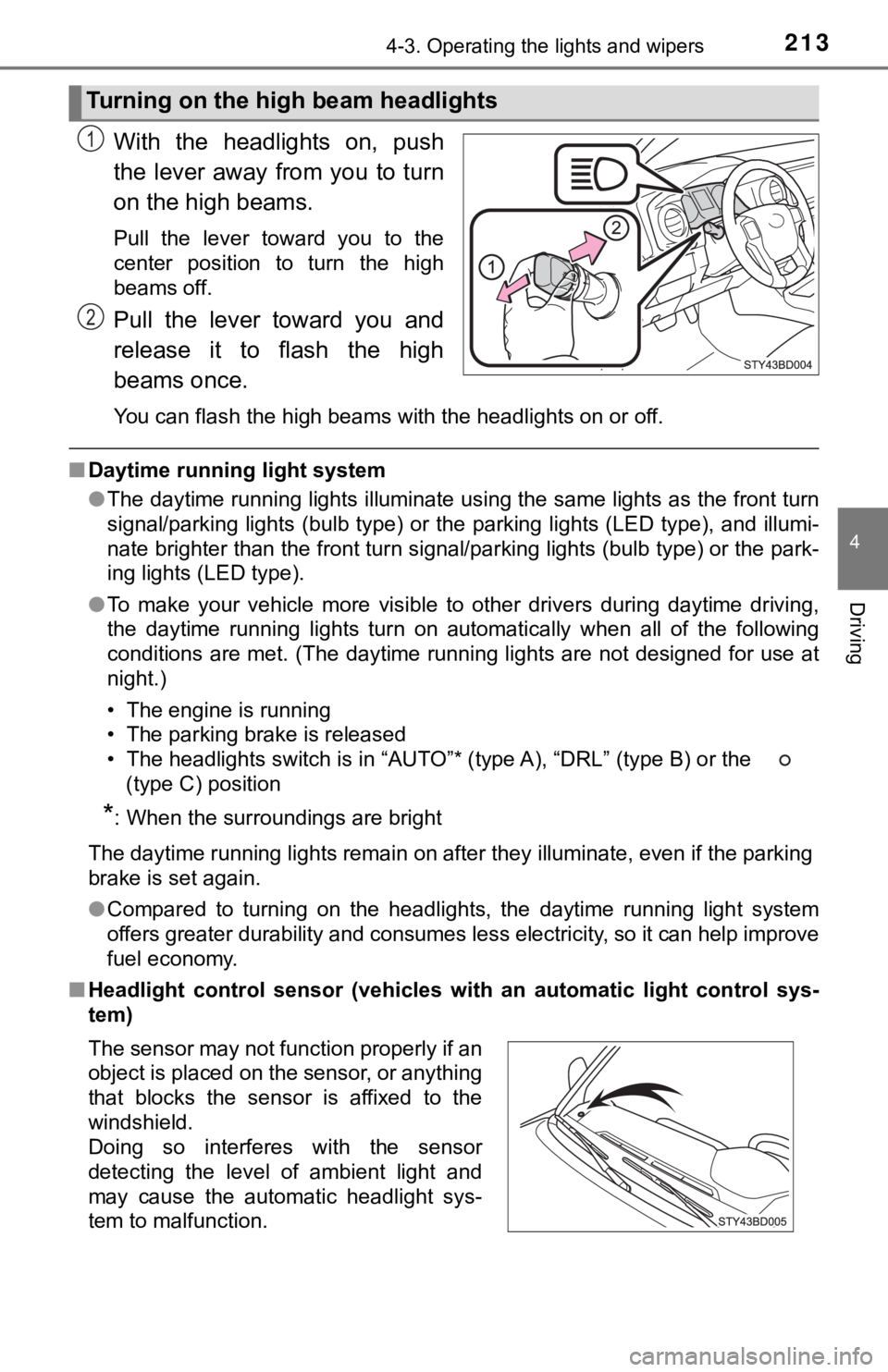
2134-3. Operating the lights and wipers
4
Driving
With the headlights on, push
the lever away from you to turn
on the high beams.
Pull the lever toward you to the
center position to turn the high
beams off.
Pull the lever toward you and
release it to flash the high
beams once.
You can flash the high beams with the headlights on or off.
■Daytime running light system
●The daytime running lights illuminate using the same lights as the front turn
signal/parking lights (bulb type) or the parking lights (LED ty pe), and illumi-
nate brighter than the front turn signal/parking lights (bulb t ype) or the park-
ing lights (LED type).
● To make your vehicle more visible to other drivers during dayti me driving,
the daytime running lights turn on automatically when all of th e following
conditions are met. (The daytime running lights are not designe d for use at
night.)
• The engine is running
• The parking brake is released
• The headlights switch is in “AUTO”* (type A), “DRL” (type B) o r the
(type C) position
*: When the surroundings are bright
The daytime running lights remain on after they illuminate, even if the parking
brake is set again.
● Compared to turning on the headlights, the daytime running ligh t system
offers greater durability and consumes less electricity, so it can help improve
fuel economy.
■ Headlight control sensor (vehicl es with an automatic light control sys-
tem)
Turning on the high beam headlights
1
2
The sensor may not function properly if an
object is placed on the sensor, or anything
that blocks the sensor is affixed to the
windshield.
Doing so interferes with the sensor
detecting the level of ambient light and
may cause the automatic headlight sys-
tem to malfunction.
Page 217 of 696

2174-3. Operating the lights and wipers
4
Driving
■High beam automatic turning on or off conditions
●When all of the following conditions are fulfilled, the high be am will be auto-
matically turned on (after approximately 1 second):
• Vehicle speed is above approximately 21 mph (34 km/h).
• The area ahead of the vehicle is dark.
• There are no vehicles ahead with headlights or tail lights turned on.
• There are few streetlights on the road ahead.
● If any of the following conditions are fulfilled, the high beam will be automat-
ically turned off:
• Vehicle speed drops below approximately 17 mph (27 km/h).
• The area ahead of the vehicle is not dark.
• Vehicles ahead have headlights or tail lights turned on.
• There are many streetlights on the road ahead.
■ Camera sensor detection information
●The high beam may not be automatically turned off in the following situa-
tions:
• When oncoming vehicles suddenly appear from a curve
• When the vehicle is cut off in front of by another vehicle
• When vehicles ahead are hidden from sight due to repeated curv es, road
dividers or roadside trees
• When vehicles ahead appear from the faraway lane on wide road
• When vehicles ahead have no lights
● The high beam may be turned off if a vehicle ahead that is usin g fog lights
without using the headlights is detected.
● House lights, street lights, traffic signals, and illuminated billboards or signs
may cause the high beam to switch to the low beams, or the low beams to
remain on.
● The following factors may affect the amount of time taken to tu rn the high
beam on or off:
• The brightness of headlights, fog lights, and tail lights of v ehicles ahead
• The movement and direction of vehicles ahead
• When a vehicle ahead only has operational lights on one side
• When a vehicle ahead is a two-wheeled vehicle
• The condition of the road (gradient, curve, condition of the r oad surface,
etc.)
• The number of passengers and amount of luggage
Page 254 of 696

2544-5. Using the driving support systems
■Operation conditio ns of each function
● Lane departure alert function
This function operates when all of the following conditions are met.
• LDA is turned on.
• Vehicle speed is approximately 32 mph (50 km/h) or more.
• System recognizes white (yellow) lines.
• Width of traffic lane is approximately 9.8 ft. (3 m) or more.
• Turn signal lever is not operated.
• Vehicle is driven on a straight road or around a gentle curve with a radius
of more than approximately 492 ft. (150 m).
• No system malfunctions are detected. ( P. 566)
● Vehicle sway warning function
This function operates when all of the following conditions are met.
• Setting for “ warning” in screen of the multi-information display is set to on. ( P. 97)
• Vehicle speed is approximately 32 mph (50 km/h) or more.
• Width of traffic lane is approximately 9.8 ft. (3 m) or more.
• No system malfunctions are detected. ( P. 566)
■ Temporary cancellation of functions
When operation conditions are no longer met, a function may be temporarily
canceled. However, when the operation conditions are met again, operation
of the function is automatically restored. ( P. 254)
■ Lane departure alert function
The warning buzzer may be difficult to hear due to external noi se, audio play-
back, etc.
■ White (yellow) lines are on ly on one side of road
The LDA system will not operate for the side on which white (ye llow) lines
could not be recognized.