air condition TOYOTA TACOMA 2021 Owners Manual (in English)
[x] Cancel search | Manufacturer: TOYOTA, Model Year: 2021, Model line: TACOMA, Model: TOYOTA TACOMA 2021Pages: 608, PDF Size: 12.67 MB
Page 4 of 608

TABLE OF CONTENTS4
5-1. Using the air conditioning system
Manual air conditioning system............................. 332
Automatic air conditioning system............................. 338
Seat heaters ...................... 345
5-2. Using the interior lights Interior lights list ................ 347• Interior light ................... 348
• Front personal lights ..... 348
• Cargo lamp main switch ............................ 349
5-3. Using the storage features List of storage features...... 350• Glove box...................... 351
• Front console box ......... 352
• Overhead console ......... 352
• Cup holders .................. 353
• Bottle holders ................ 354
• Storage box .................. 355
Luggage compartment features ........................... 358 5-4. Other interior features
Other interior features........ 368• Sun visors ..................... 368
• Vanity mirrors ................ 368
• Power outlet (12 V DC) ...................... 369
• Power outlet (120 V AC) .................... 370
• USB charging ports ....... 375
• Wireless charger ........... 377
• Assist grips .................... 382
Garage door opener .......... 383
Compass ........................... 390
5Interior features
Page 5 of 608

5
1
8 7 5 4
3
2
9
6
6-1. Maintenance and careCleaning and protecting the vehicle exterior .......... 396
Cleaning and protecting the vehicle interior ........... 400
6-2. Maintenance Maintenance requirements ................... 403
General maintenance ........ 405
Emission inspection and maintenance (I/M)
programs ......................... 408
6-3. Do-it-yourself maintenance Do-it-yourself service precautions ..................... 409
Hood.................................. 411
Engine compartment ......... 413
Tires .................................. 425
Tire inflation pressure........ 436
Wheels .............................. 439
Air conditioning filter .......... 442
Wireless remote control/ electronic key battery ...... 445
Checking and replacing fuses ............................... 448
Light bulbs ......................... 451 7-1. Essential information
Emergency flashers ........... 466
If your vehicle has to be stopped in
an emergency.................. 467
If the vehicle is trapped in rising water .................. 469
7-2. Steps to take in an emergency
If your vehicle needs to be towed .......................... 470
If you think something is wrong............................... 474
Fuel pump shut off system ............................. 475
If a warning light turns on or a warning buzzer
sounds ............................. 476
If a warning message is displayed ......................... 483
If you have a flat tire .......... 505
If the engine will not start ................................. 520
If the electronic key does not operate properly
(vehicles with a smart
key system) .................... 522
If the vehicle battery is discharged ....................... 524
If your vehicle overheats.... 528
If the vehicle becomes stuck ................................ 530
6Maintenance and care7When trouble arises
Page 19 of 608

19Pictorial index
Parking brake . . . . . . . . . . . . . . . . . . . . . . . . . . . . . . . . . . . . . P. 218
Applying/releasing . . . . . . . . . . . . . . . . . . . . . . . . . . . . . . . . . . P. 218
Precautions against winter season . . . . . . . . . . . . . . . . . . . . . P. 324
Warning light/warning buzzer/warning message . . . . . . . P. 477, 490
Turn signal lever . . . . . . . . . . . . . . . . . . . . . . . . . . . . . . . . . . P. 217
Headlight switch . . . . . . . . . . . . . . . . . . . . . . . . . . . . . . . . . . P. 219
Headlights/parking lights/tail lights/daytime running lights . . . . P. 219
Fog lights
*4 . . . . . . . . . . . . . . . . . . . . . . . . . . . . . . . . . . . . . . . P. 228
Windshield wiper and washer switch . . . . . . . . . . . . . . . . . P. 229
Usage . . . . . . . . . . . . . . . . . . . . . . . . . . . . . . . . . . . . . . . . . . . P. 229
Adding washer fluid . . . . . . . . . . . . . . . . . . . . . . . . . . . . . . . . . P. 424
Warning messages
*5. . . . . . . . . . . . . . . . . . . . . . . . . . . . . . . . P. 487
Hood lock release lever. . . . . . . . . . . . . . . . . . . . . . . . . . . . . P. 411
Tilt and telescopic steering lock release lever . . . . . . . . . . P. 149
Air conditioning system . . . . . . . . . . . . . . . . . . . . . . . . P. 332, 338
Usage (manual type)
*4 . . . . . . . . . . . . . . . . . . . . . . . . . . . . . . P. 332
Usage (automatic type)
*4 . . . . . . . . . . . . . . . . . . . . . . . . . . . . P. 338
Audio system
*6
*1: Vehicles without a smart key system
*2: Vehicles with a smart key system
*3: Vehicles with an automatic transmission
*4: If equipped
*5: For Canada only
*6: Refer to “NAVIGATION AND MULTI MEDIA SYSTEM OWNER’S MANUAL”.
5
6
7
8
9
10
11
Page 44 of 608
441-1. For safe use
■SRS airbag deployment conditions (SRS side and curtain shield airbags)
● The SRS side and curtain shield airbags will deploy in the even t of an
impact that exceeds the set threshold level (the level of force corresponding
to the impact force produced by an approximately 3300 lb. [1500 kg] vehicle
colliding with the vehicle cabin from a direction perpendicular to the vehicle
orientation at an approximate speed of 12 - 18 mph [20 - 30 km/ h]).
● The SRS curtain shield airbags will deploy in the event of vehi cle rollover.
● The SRS side and curtain shield airbags will deploy in the even t of a severe
frontal collision.
■ Conditions under which the SRS ai rbags may deploy (inflate), other than
a collision
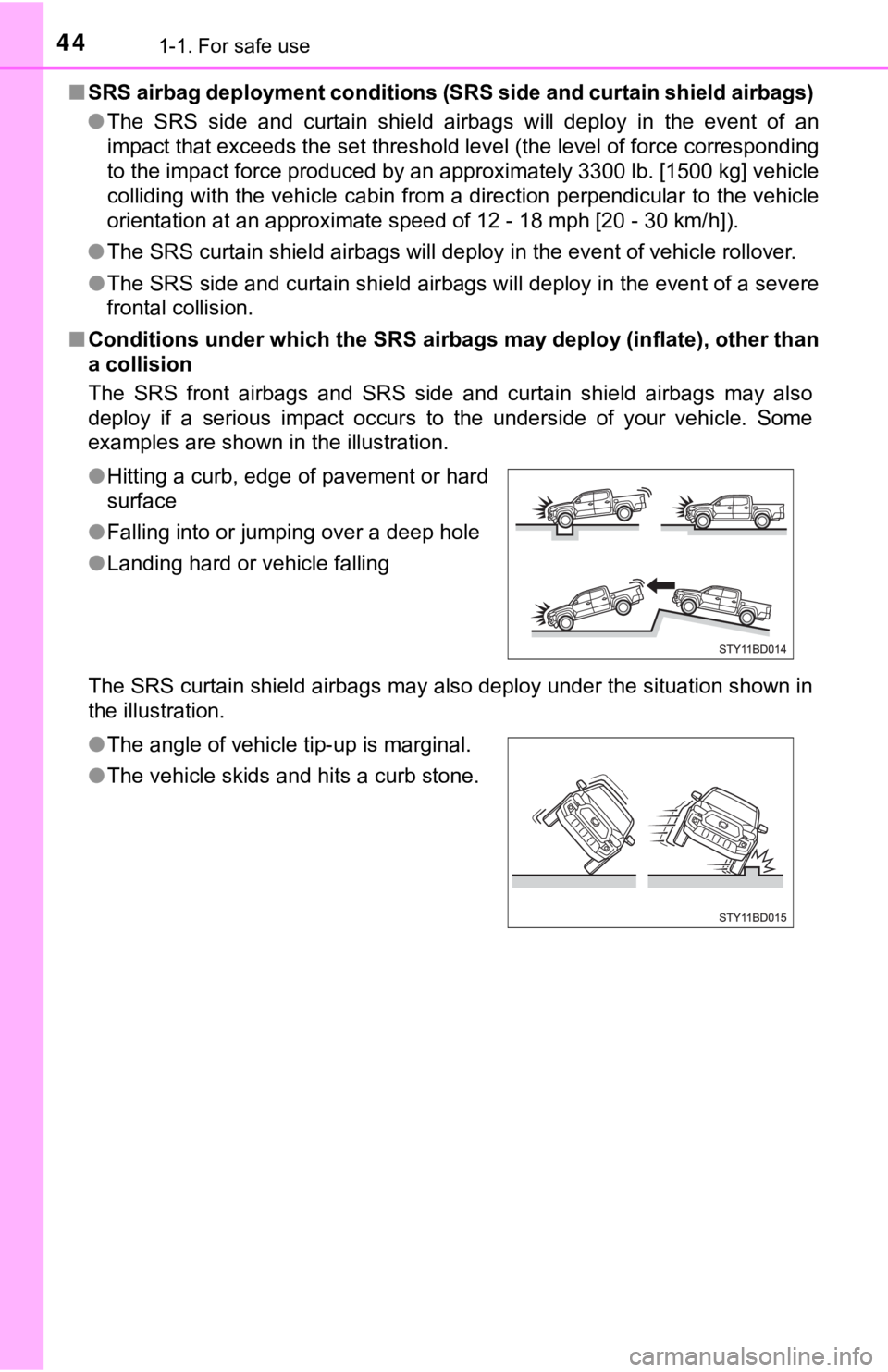
The SRS front airbags and SRS side and curtain shield airbags m ay also
deploy if a serious impact occurs to the underside of your vehi cle. Some
examples are shown in the illustration.
The SRS curtain shield airbags may also deploy under the situation shown in
the illustration. ● Hitting a curb, edge of pavement or hard
surface
● Falling into or jumping over a deep hole
● Landing hard or vehicle falling
● The angle of vehicle tip-up is marginal.
● The vehicle skids and hits a curb stone.
Page 48 of 608
481-1. For safe use
Front passenger occupant classification
system
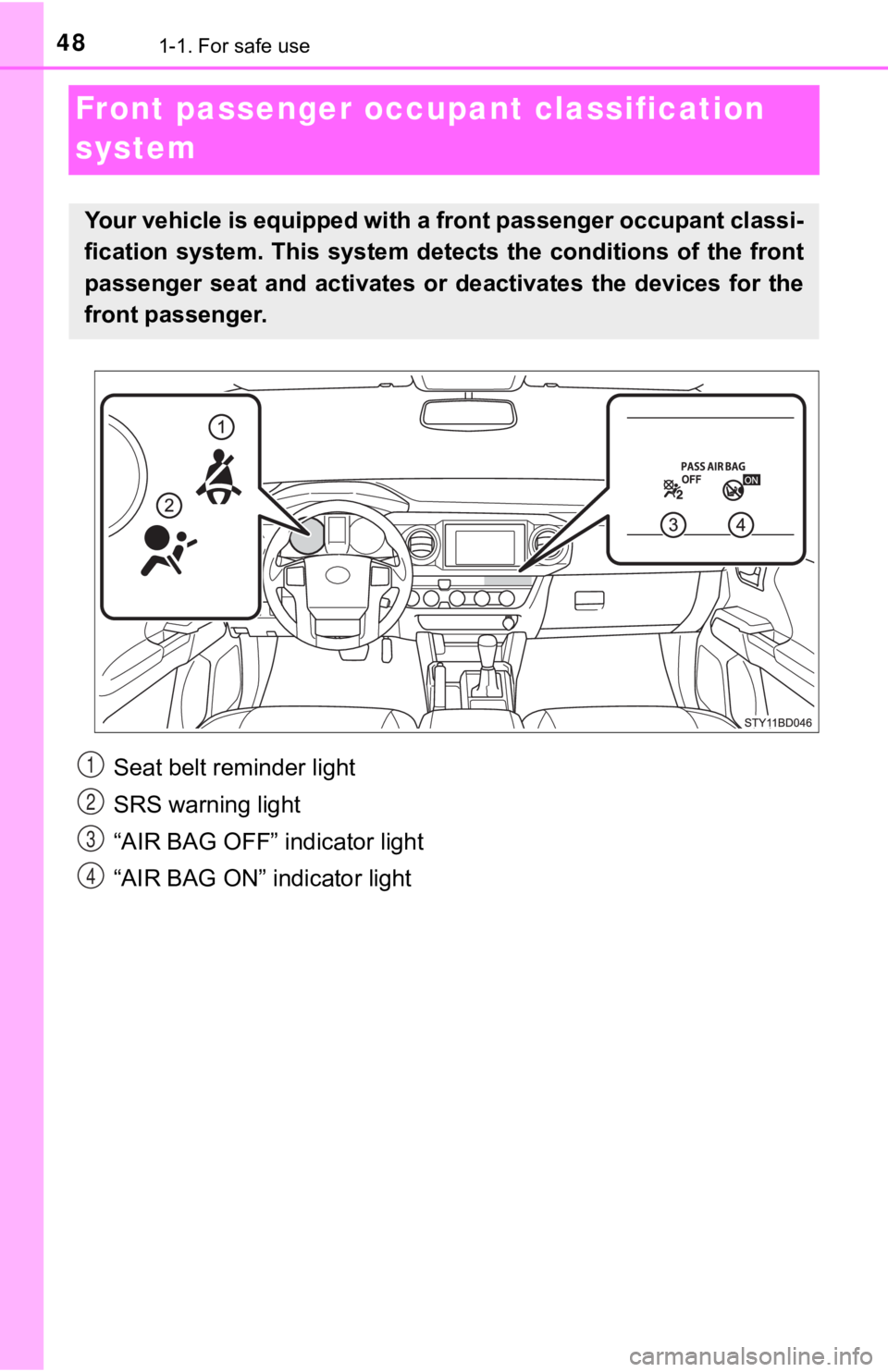
Your vehicle is equipped with a front passenger occupant classi -
fication system. This system det ects the conditions of the front
passenger seat and activates or deactivates the devices for the
front passenger.
Seat belt reminder light
SRS warning light
“AIR BAG OFF” indicator light
“AIR BAG ON” indicator light1
2
3
4
Page 49 of 608
491-1. For safe use
1
For safety and security
■Adult*1
■Child*4 or child restraint system*5
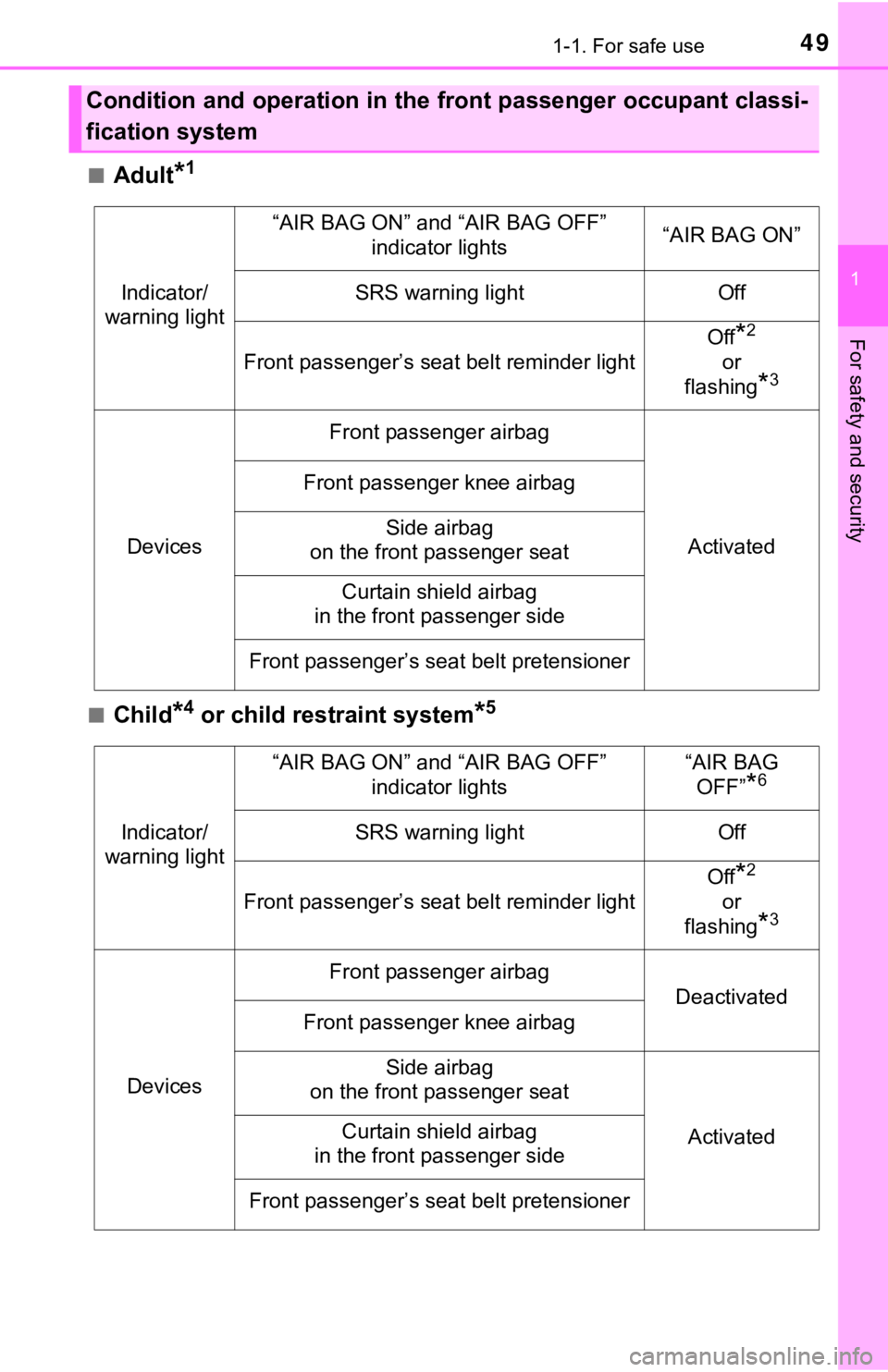
Condition and operation in the front passenger occupant classi-
fication system
Indicator/
warning light
“AIR BAG ON” and “AIR BAG OFF” indicator lights“AIR BAG ON”
SRS warning lightOff
Front passenger’s seat belt reminder light
Off*2
or
flashing
*3
Devices
Front passenger airbag
Activated
Front passenger knee airbag
Side airbag
on the front passenger seat
Curtain shield airbag
in the front passenger side
Front passenger’s seat belt pretensioner
Indicator/
warning light
“AIR BAG ON” and “AIR BAG OFF”
indicator lights“AIR BAG OFF”
*6
SRS warning lightOff
Front passenger’s seat belt reminder light
Off*2
or
flashing
*3
Devices
Front passenger airbag
Deactivated
Front passenger knee airbag
Side airbag
on the front passenger seat
ActivatedCurtain shield airbag
in the front passenger side
Front passenger’s seat belt pretensioner
Page 115 of 608

1153-1. Key information
3
Operation of each component
■When required to leave the vehicle ’s key with a parking attendant (type
D)
Lock the glove box as circumstances demand. ( P. 351)
Remove the mechanical key for your own use and provide the attendant with
the electronic key only.
■ If you lose your keys
Type A, B and C
New genuine key can be made by your Toyota dealer using the other key and
the key number stamped on your key number plate.
Keep the plate in a safe place such as your wallet, not in the vehicle.
Type D
New genuine key can be made by your Toyota dealer.
The following are necessary when making new keys.
Mechanical key:
The key number for the mechanical key stamped on the number pla te and the
other key.
Key:
The key number for key stamped on the key number plate.
Keep the plates in a safe place such as your wallet, not in the vehicle.
There are key number plates for the mechanical key and key resp ectively.
When storing them, keep them in a safe place in a manner to dis tinguish one
from the other (such as markings, etc.).
■ When riding in an aircraft (type C or type D)
When bringing an wireless remote control function onto an aircr aft, make sure
you do not press any button on the key while inside the aircraf t cabin. If you
are carrying the key in your bag, etc., ensure that the buttons are not likely to
be pressed accidentally. Pressing a button may cause the key to emit radio
waves that could interfere with the operation of the aircraft.
■ Conditions affecting operation (type C or type D)
Type C
The wireless remote control function may not operate normally i n the follow-
ing situations:
● Near a TV tower, radio station, electric power plant, airport o r other facility
that generates strong radio waves
● When carrying a portable radio, cellular phone or other wireles s communi-
cation devices
● When multiple wireless keys are in the vicinity
● When the wireless key is in contact with, or is covered by a me tallic object
● When a wireless key (that emits radio waves) is being used near by
● When the wireless key has been left near an electrical applianc e such as a
personal computer
Type D
P. 134
Page 134 of 608

1343-2. Opening, closing and locking the doors
■Conditions affecting operation
The smart key system uses weak radio waves. In the following si tuations, the
communication between the electronic key and the vehicle may be affected,
preventing the smart key system, wireless remote control and en gine immobi-
lizer system from operating properly. (Ways of coping: P. 522)
● When the electronic key battery is depleted
● Near a TV tower, electric power plant, gas station, radio stati on, large dis-
play, airport or other facility that generates strong radio wav es or electrical
noise
● When carrying a portable radio, cellular phone, cordless phone or other
wireless communication device
● When the electronic key is in contact with, or is covered by th e following
metallic objects
• Cards to which aluminum foil is attached
• Cigarette boxes that have aluminum foil inside
• Metallic wallets or bags
• Coins
• Hand warmers made of metal
• Media such as CDs and DVDs
● When multiple electronic keys are in the vicinity
● When other wireless keys (that emit radio waves) are being used nearby
● When carrying the electronic key together with the following devices that
emit radio waves
• Another vehicle’s electronic key or a wireless key that emits radio waves
• Personal computers or personal digital assistants (PDAs)
• Digital audio players
• Portable game systems
● If window tint with a metallic content or metallic objects are attached to the
back window
● When the electronic key is placed near a battery charger or ele ctronic
devices
Page 194 of 608

1944-1. Before driving
●Slow down before making a turn, in crosswinds, on wet or slippe ry
surfaces, etc.
Increasing vehicle speed can destabilize the trailer.
● Take care when passing other vehicles. Passing requires consider-
able distance. After passing a vehicle, do not forget the lengt h of
your trailer, and be sure you have plenty of room before changi ng
lanes.
● Vehicles with an automatic transmission: To maintain engine bra k-
ing efficiency and charging system performance when using engin e
braking, do not use the transmission in D. If in the S mode, th e
transmission shift range posit ion must be in 5 or lower.
● Vehicles with a manual transmiss ion: To maintain engine braking
efficiency and charging system performance when using engine
braking, do not use the sixth gear.
● Instability happens more frequently when descending steep or lo ng
downhill grades. Before descending, slow down and downshift. Do
not make sudden downshifts while descending steep or long down-
hill grades.
● Avoid holding the brake pedal down too long or applying the bra kes
too frequently. This could cause the brakes to overheat and result in
reduced braking efficiency.
● Due to the added load of the trailer, your vehicle’s engine may over-
heat on hot days (at temperatures over 85°F [30°C]) when drivin g
up a long or steep grade. If the engine coolant temperature gau ge
indicates overheating, immediately turn off the air conditionin g (if in
use), pull your vehicle off the road and stop in a safe spot.
( P. 528)
Page 242 of 608
2424-5. Using the driving support systems
■If a warning message is displayed on the multi-information display
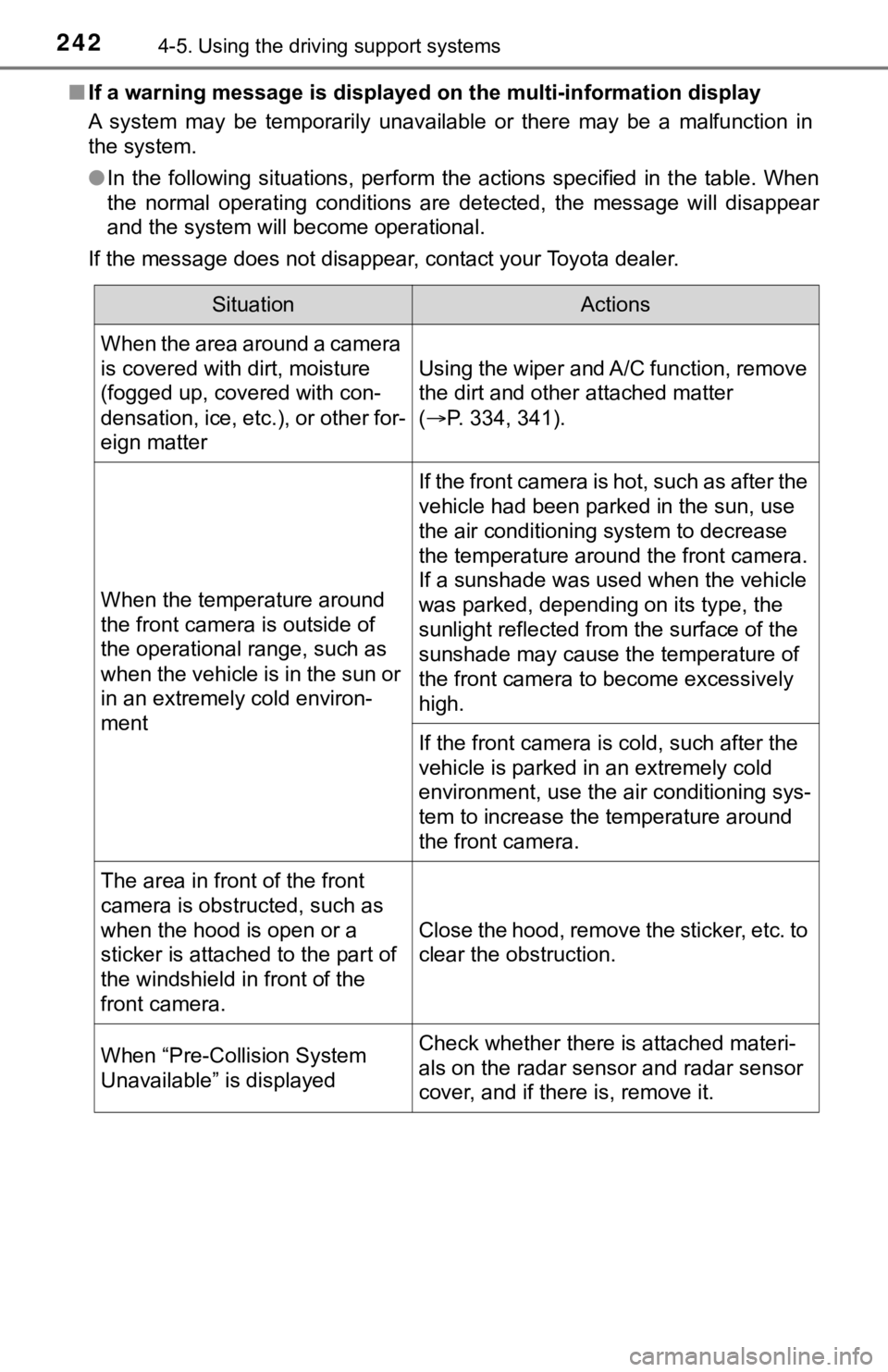
A system may be temporarily unavailable or there may be a malfu nction in
the system.
● In the following situations, perform the actions specified in t he table. When
the normal operating conditions are detected, the message will disappear
and the system will become operational.
If the message does not disappear, contact your Toyota dealer.
SituationActions
When the area around a camera
is covered with dirt, moisture
(fogged up, covered with con-
densation, ice, etc.), or other for-
eign matter
Using the wiper and A/C function, remove
the dirt and other attached matter
( P. 334, 341).
When the temperature around
the front camera is outside of
the operational range, such as
when the vehicle is in the sun or
in an extremely cold environ-
ment
If the front camera is hot, such as after the
vehicle had been parked in the sun, use
the air conditioning system to decrease
the temperature around the front camera.
If a sunshade was used when the vehicle
was parked, depending on its type, the
sunlight reflected from the surface of the
sunshade may cause the temperature of
the front camera to become excessively
high.
If the front camera is cold, such after the
vehicle is parked in an extremely cold
environment, use the air conditioning sys-
tem to increase the temperature around
the front camera.
The area in front of the front
camera is obstructed, such as
when the hood is open or a
sticker is attached to the part of
the windshield in front of the
front camera.
Close the hood, remove the sticker, etc. to
clear the obstruction.
When “Pre-Collision System
Unavailable” is displayedCheck whether there is attached materi-
als on the radar sensor and radar sensor
cover, and if there is, remove it.