garage door opener TOYOTA TACOMA 2021 Owners Manual (in English)
[x] Cancel search | Manufacturer: TOYOTA, Model Year: 2021, Model line: TACOMA, Model: TOYOTA TACOMA 2021Pages: 608, PDF Size: 12.67 MB
Page 4 of 608

TABLE OF CONTENTS4
5-1. Using the air conditioning system
Manual air conditioning system............................. 332
Automatic air conditioning system............................. 338
Seat heaters ...................... 345
5-2. Using the interior lights Interior lights list ................ 347• Interior light ................... 348
• Front personal lights ..... 348
• Cargo lamp main switch ............................ 349
5-3. Using the storage features List of storage features...... 350• Glove box...................... 351
• Front console box ......... 352
• Overhead console ......... 352
• Cup holders .................. 353
• Bottle holders ................ 354
• Storage box .................. 355
Luggage compartment features ........................... 358 5-4. Other interior features
Other interior features........ 368• Sun visors ..................... 368
• Vanity mirrors ................ 368
• Power outlet (12 V DC) ...................... 369
• Power outlet (120 V AC) .................... 370
• USB charging ports ....... 375
• Wireless charger ........... 377
• Assist grips .................... 382
Garage door opener .......... 383
Compass ........................... 390
5Interior features
Page 24 of 608
24Pictorial index
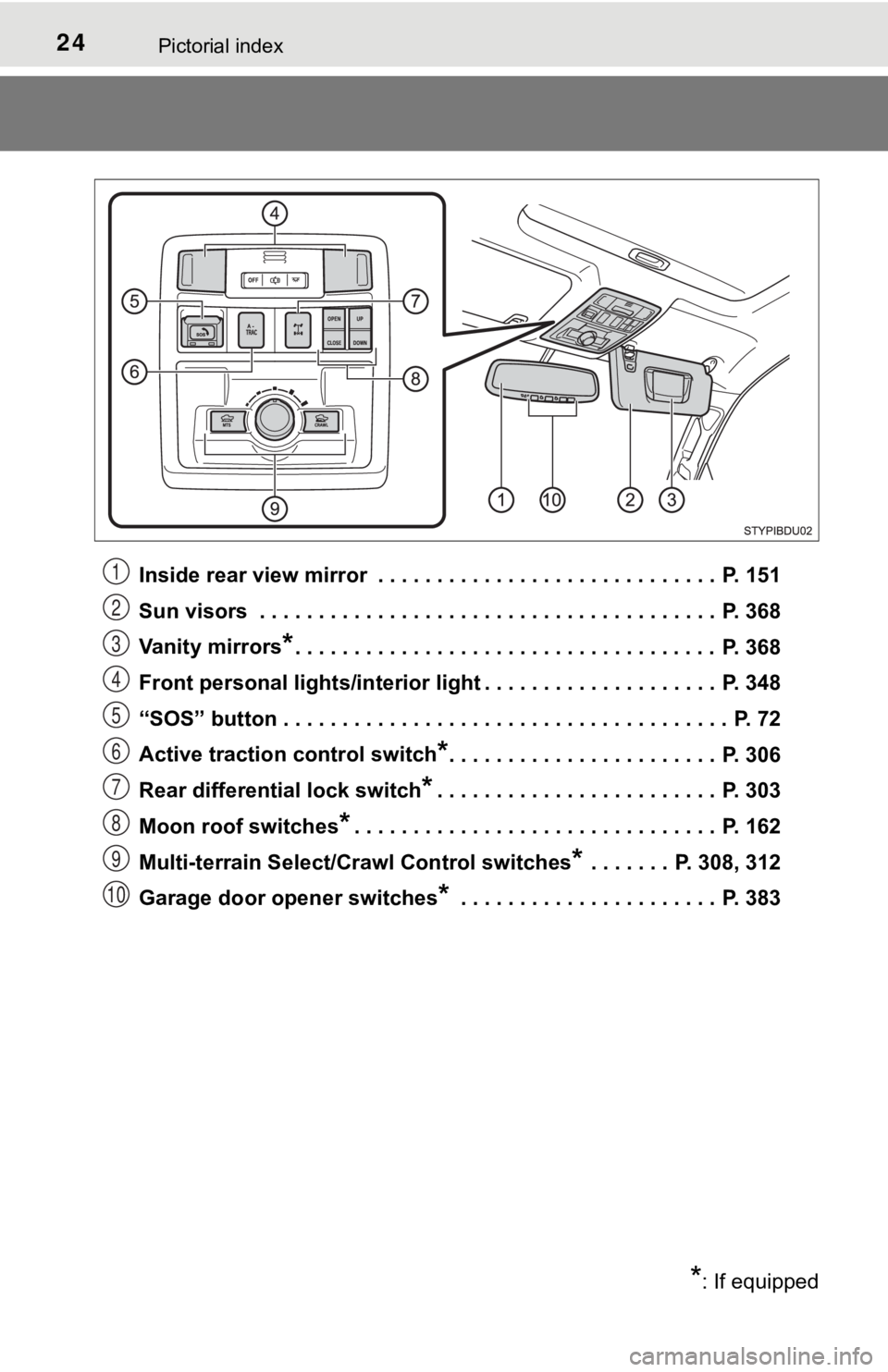
Inside rear view mirror . . . . . . . . . . . . . . . . . . . . . . . . . . . . . P. 151
Sun visors . . . . . . . . . . . . . . . . . . . . . . . . . . . . . . . . . . . . . . . P. 368
Vanity mirrors
*. . . . . . . . . . . . . . . . . . . . . . . . . . . . . . . . . . . . P. 368
Front personal lights/interior light . . . . . . . . . . . . . . . . . . . . P. 348
“SOS” button . . . . . . . . . . . . . . . . . . . . . . . . . . . . . . . . . . . . . . P. 72
Active traction control switch
*. . . . . . . . . . . . . . . . . . . . . . . P. 306
Rear differential lock switch
*. . . . . . . . . . . . . . . . . . . . . . . . P. 303
Moon roof switches
*. . . . . . . . . . . . . . . . . . . . . . . . . . . . . . . P. 162
Multi-terrain Select/Crawl Control switches
* . . . . . . . P. 308, 312
Garage door opener switches
* . . . . . . . . . . . . . . . . . . . . . . P. 383
*: If equipped
1
2
3
4
5
6
7
8
9
10
Page 331 of 608

331
5Interior features
5-1. Using the air conditioning system
Manual air conditioning system............................. 332
Automatic air conditioning system............................. 338
Seat heaters ...................... 345
5-2. Using the interior lights Interior lights list ................ 347• Interior light ................... 348
• Front personal lights ..... 348
• Cargo lamp main switch ............................ 349 5-3. Using the storage features
List of storage features ..... 350• Glove box...................... 351
• Front console box ......... 352
• Overhead console......... 352
• Cup holders .................. 353
• Bottle holders ................ 354
• Storage boxes............... 355
Luggage compartment features ........................... 358
5-4. Other interior features Other interior features ....... 368• Sun visors ..................... 368
• Vanity mirrors................ 368
• Power outlet (12 V DC) ...................... 369
• Power outlet (120 V AC) .................... 370
• USB charging ports....... 375
• Wireless charger ........... 377
• Assist grips ................... 382
Garage door opener.......... 383
Compass ........................... 390
Page 383 of 608
3835-4. Other interior features
5
Interior features
Garage door opener1
The HomeLink® wireless control system in your vehicle has 3 buttons
which can be programmed to operate 3 different devices. Refer to the
programming methods on the following pages to determine the
method which is approp riate for the device.
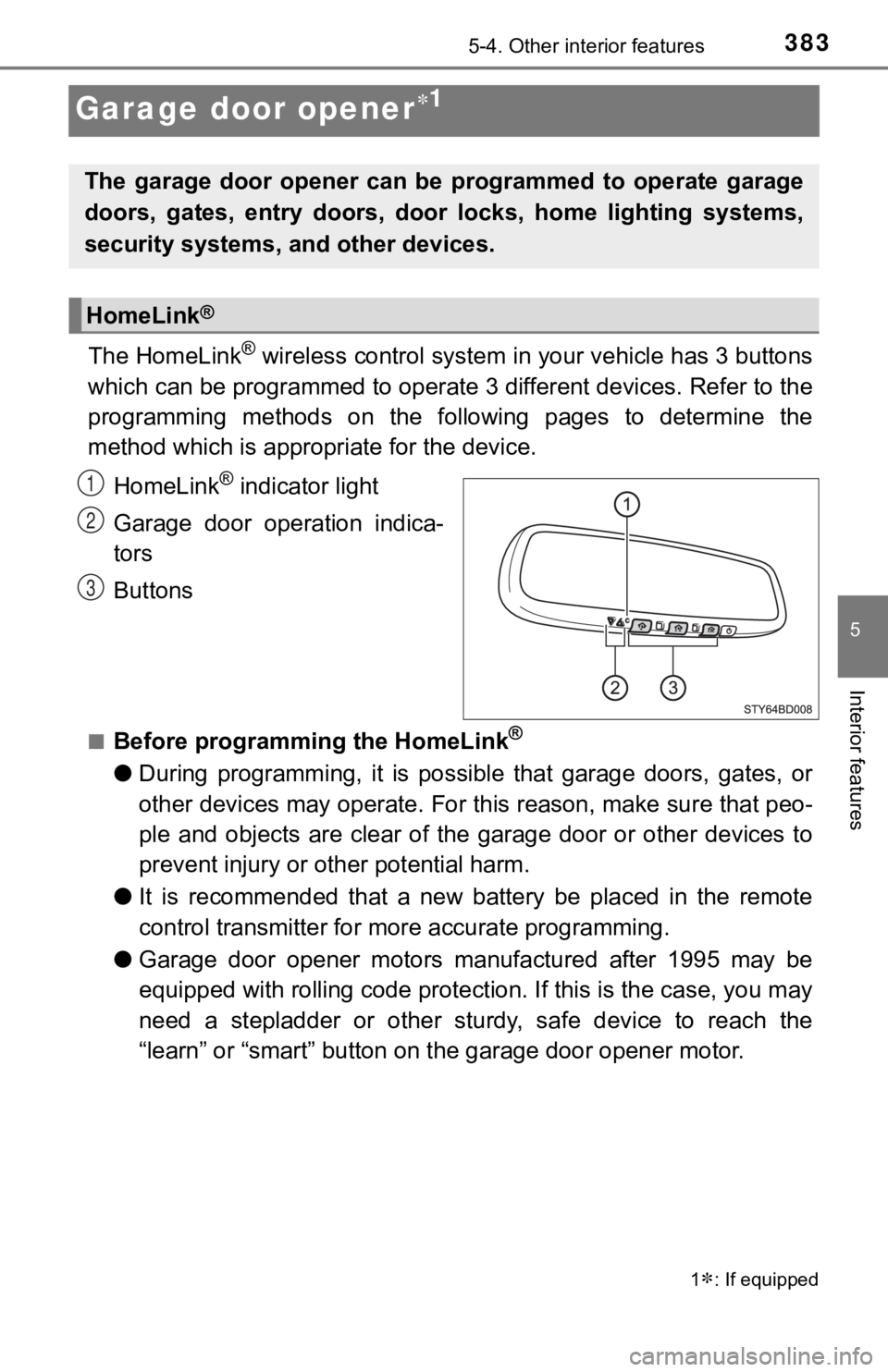
HomeLink
® indicator light
Garage door operation indica-
tors
Buttons
■Before programming the HomeLink®
● During programming, it is possible that garage doors, gates, or
other devices may operate. For this reason, make sure that peo-
ple and objects are clear of the garage door or other devices t o
prevent injury or other potential harm.
● It is recommended that a new battery be placed in the remote
control transmitter for mo re accurate programming.
● Garage door opener motors manufactured after 1995 may be
equipped with rolling code pro tection. If this is the case, you may
need a stepladder or other sturdy, safe device to reach the
“learn” or “smart” button on the garage door opener motor.
1: If equipped
The garage door opener can be programmed to operate garage
doors, gates, entry doors, door locks, home lighting systems,
security systems, and other devices.
HomeLink®
1
2
3
Page 385 of 608

3855-4. Other interior features
5
Interior features
Test the HomeLink® operation by pressing the newly pro-
grammed button and observi ng the indicator light:
● Indicator light illuminates: Progr amming of a fixed code device
has completed. The garage door or other device should oper-
ate when a HomeLink
® button is pressed and released.
● Indicator light flashes rapidly: The garage door opener motor
or other device is equipped with a rolling code. To complete
programming, firmly press and hold the HomeLink
® button for
2 seconds then release it.
● If the garage door or other device does not operate, proceed
to “Programming a rolling code system”.
Repeat the steps above to program another device for any of the
remaining HomeLink
® buttons.
■Programming a rolling code system
2 or more people may be necessary to complete rolling code pro-
gramming.
Locate the “Learn” or “Smart”
button on the garage door
opener motor in the garage.
This button can usually be found
where the hanging antenna wire
is attached to the unit. The
name and color of the button
may vary by manufacturer.
Refer to the Owner’s manual
supplied with the garage door
opener motor for details.
Press and release the
“Learn” or “Smart” button.
Perform within 30 sec-
onds after performing .
4
5
1
2
3
2
Page 386 of 608
3865-4. Other interior features
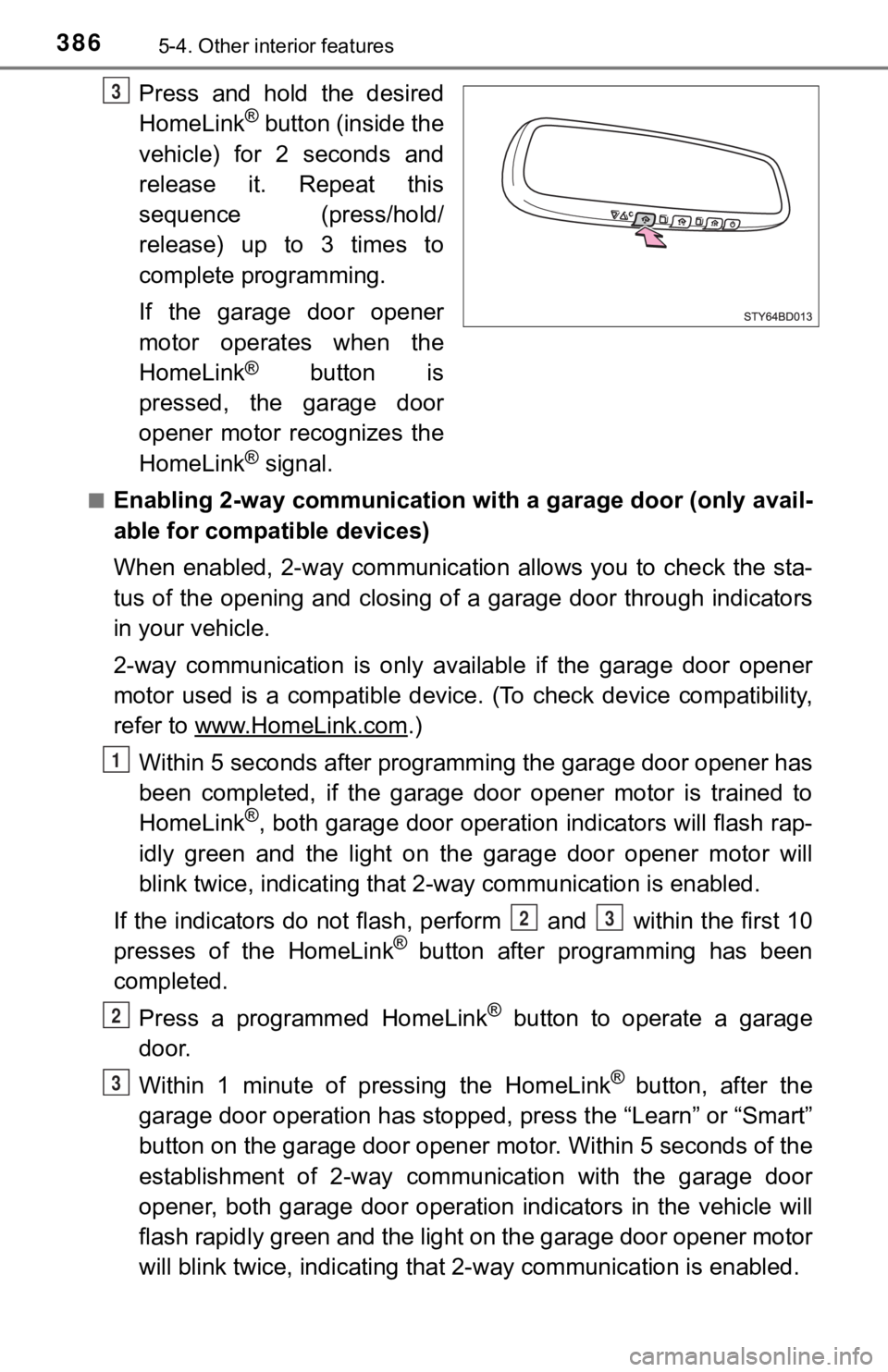
Press and hold the desired
HomeLink® button (inside the
vehicle) for 2 seconds and
release it. Repeat this
sequence (press/hold/
release) up to 3 times to
complete programming.
If the garage door opener
motor operates when the
HomeLink
® button is
pressed, the garage door
opener motor recognizes the
HomeLink
® signal.
■Enabling 2-way communication with a garage door (only avail-
able for compatible devices)
When enabled, 2-way communication allows you to check the sta-
tus of the opening and closing of a garage door through indicat ors
in your vehicle.
2-way communication is only available if the garage door opener
motor used is a compatible device. (To check device compatibility,
refer to www.HomeLink.com
.)
Within 5 seconds after programming the garage door opener has
been completed, if the garage door opener motor is trained to
HomeLink
®, both garage door operation indicators will flash rap-
idly green and the light on the garage door opener motor will
blink twice, indicating that 2 -way communication is enabled.
If the indicators do not flash, perform and within the first 10
presses of the HomeLink
® button after programming has been
completed.
Press a programmed HomeLink
® button to operate a garage
door.
Within 1 minute of pressing the HomeLink
® button, after the
garage door operation has stopped, press the “Learn” or “Smart”
button on the garage door opener motor. Within 5 seconds of the
establishment of 2-way commu nication with the garage door
opener, both garage door operation indicators in the vehicle wi ll
flash rapidly green and the light on the garage door opener mot or
will blink twice, indicating that 2- way communication is enabled.
3
1
23
2
3
Page 387 of 608
3875-4. Other interior features
5
Interior features
■Reprogramming a single HomeLink® button
When the following procedure is performed, buttons which alread y
have devices registered to them can be overwritten:
With one hand, press and hold the desired HomeLink
® button.
When the HomeLink
® indicator starts flas hing orange, release
the HomeLink® button and perform “Programming the Home-
Link®” (it takes 20 seconds for the HomeLink® indicator to
start flashing).
Press the appropriate HomeLink
® button. The HomeLink® indicator
light should turn on.
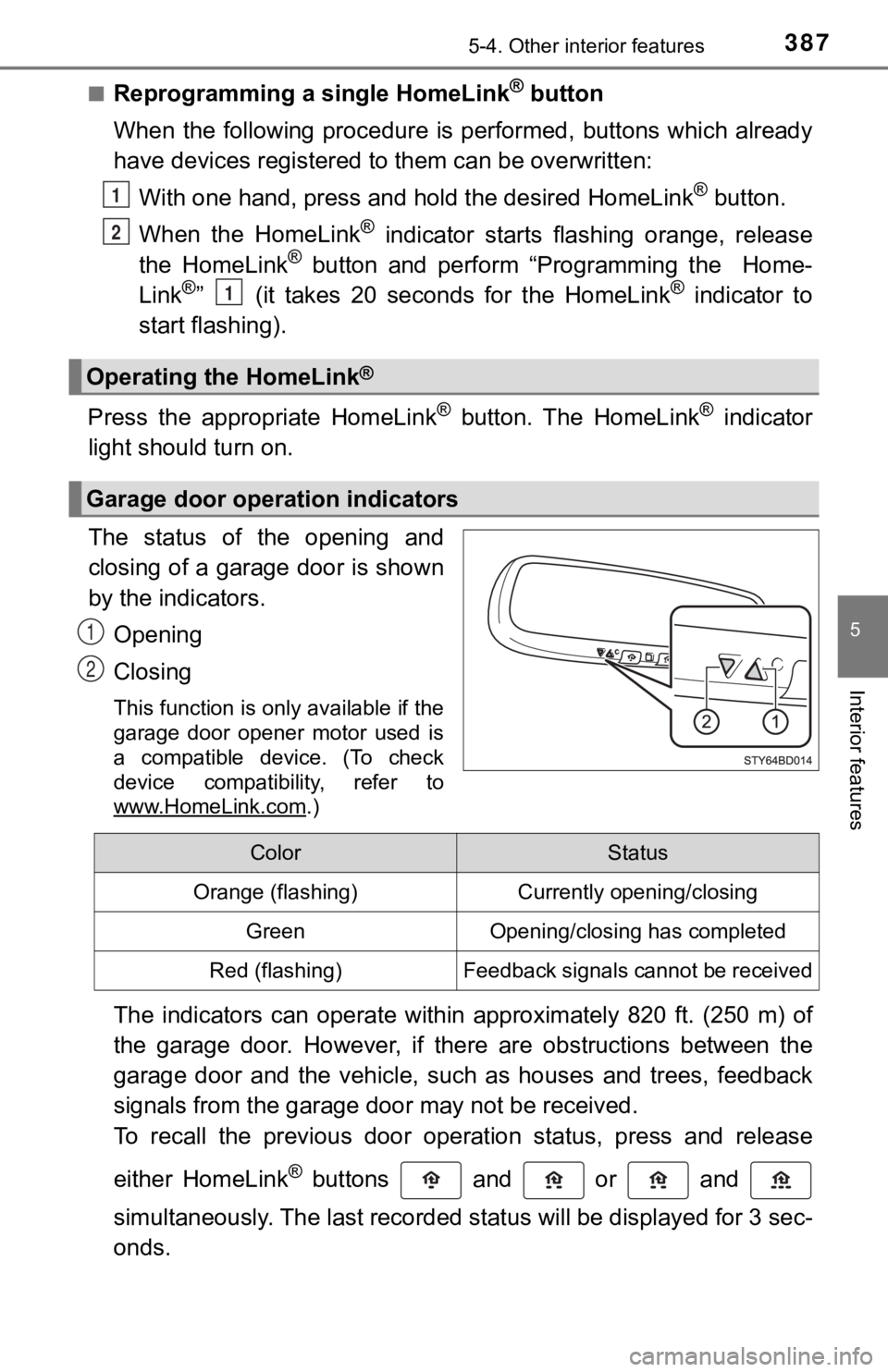
The status of the opening and
closing of a garage door is shown
by the indicators.
Opening
Closing
This function is only available if the
garage door opener motor used is
a compatible device. (To check
device compatibility, refer to
www.HomeLink.com
.)
The indicators can operate within approximately 820 ft. (250 m) of
the garage door. However, if there are obstructions between the
garage door and the vehicle, such as houses and trees, feedback
signals from the garage door may not be received.
To recall the previous door operation status, press and release
either HomeLink
® buttons and or and
simultaneously. The last recorded status will be displayed for 3 sec-
onds.
Operating the HomeLink®
Garage door operation indicators
1
2
1
1
2
ColorStatus
Orange (flashing)Currently opening/closing
GreenOpening/closing has completed
Red (flashing)Feedback signals cannot be received
Page 389 of 608
3895-4. Other interior features
5
Interior features
■Certification for the garage door opener
For vehicles sold in the U.S.A.
FCC ID: NZLAECHL5
NOTE:
This device complies with part 15 of the FCC Rules. Operation is subject to
the following two conditions: (1) This device may not cause har mful interfer-
ence, and (2) this device must accept any interference received, including
interference that may cause undesired operation.
FCC WARNING:
Changes or modifications not expressly approved by the party re sponsible for
compliance could void the user’s authority to operate the equip ment.
For vehicles sold in Canada
NOTE:
This device complies with Industry Canada licence-exempt RSS standard(s).
Operation is subject to the following two conditions: (1) this device may not
cause interference, and (2) this device must accept any interfe rence, includ-
ing interference that may cause undesired operation of the devi ce.
REMARQUE:
Le présent appareil est conforme aux CNR d’Industrie Canada app licables
aux appareils radio exempts de licence. L’exploitation est auto risée aux deux
conditions suivantes: (1) l’appareil ne doit pas produire de brouillage, et (2)
l’utilisateur de l’appareil doit accepter tout brouillage radio électrique subi,
même si le brouillage est susceptible d’en compromettre le fonctionnement.
■ When support is necessary
Visit on the web at www.homelink.com/toyota
or call 1-800-355-3515.
■ About HomeLink
®
HomeLink and the HomeLink house icon are registered trademarks of Gen-
tex Corporation.
WARNING
■ When programming a garage door or other remote control device
The garage door or other device may operate, so ensure people a nd
objects are out of danger to prevent potential harm.
■ Conforming to federal safety standards
Do not use the HomeLink
® compatible transceiver with any garage door
opener or device that lacks safety stop and reverse features as required by
federal safety standards.
This includes any garage door that cannot detect an interfering object. A
door or device without these features increases the risk of dea th or serious
injury.
■ When operating or programming HomeLink
®
Never allow a child to operate or play with the HomeLink® buttons.
Page 598 of 608
598Alphabetical index
Flat tire...................................... 505
Floor mats .................................. 26
FluidAutomatic transmission......... 543
Brake .................................... 544
Power steering ...................... 544
Washer ................................. 424
Fog lights ................................. 228 Replacing light bulbs............. 457
Switch ................................... 228
Wattage ................................ 547
Four-wheel drive system ........ 297
Front passenger occupant classification system .............. 48
Front personal lights ............... 348
Front seats ............................... 139 Adjustment ............................ 139
Cleaning................................ 400
Correct driving posture ........... 28
Head restraints ..................... 145
Seat heaters ......................... 345
Front side marker lights
Light switch ........................... 219
Replacing light bulbs............. 455
Wattage ................................ 547
Front turn signal lights Replacing light bulbs............. 456
Turn signal lever ................... 217
Wattage ................................ 547
Fuel ........................................... 538 Capacity ................................ 538
Fuel gauge .............................. 98
Fuel pump shut off system.... 475
Information ............................ 548
Refueling............................... 232
Type ...................................... 538
Warning light ......................... 477
Warning message ................. 487 Fuel consumption
Average fuel consumption ............... 103, 109
Current fuel consumption ............... 103, 109
Fuel filler door ......................... 234
Fuel pump shut off system..... 475
Fuses ........................................ 448
Garage door opener ................ 383
Gas station information .......... 608
Gauges ....................................... 98
Glove box ................................. 351
Grocery bag hooks.................. 366
Hands-free system (for cellular phone)
*
Head restraints ........................ 145
Headlights ................................ 219 Automatic High Beam ........... 223
Light switch ........................... 219
Replacing light bulbs .... 453, 454
Wattage ................................ 547
Heaters Automatic air conditioning system .......... ...................... 338
Manual air conditioning system .......... ...................... 332
Seat heaters ......................... 345
Outside rear view
mirrors ........................ 334, 341
High mounted stoplight
Replacing.............................. 461
Wattage ................................ 547
Hill-start assist control ........... 318
Hood ......................................... 411
Hooks Deck hooks ........................... 361
Grocery bag hooks ............... 366
Retaining hooks (floor mat) .... 26
Horn .......................................... 149
F
G
H
Page 604 of 608

604Alphabetical index
Side marker lights ................... 219Light switch ........................... 219
Replacing light bulbs..... 455, 459
Wattage ................................ 547
Side mirrors ............................. 154 Adjusting and folding ............ 154
BSM (Blind spot monitor) ...... 289
Side turn signal lights ............. 217 Replacing light bulbs............. 462
Turn signal lever ................... 217
Smart key system .................... 131 Antenna location ................... 131
Entry functions ...................... 120
Starting the engine................ 204
Warning message ................. 499
Snow tires ................................ 325
Spare tire .................................. 505
Inflation pressure .................. 545
Replacing .............................. 505
Storage location .................... 506
Spark plug ................................ 541
Specifications .......................... 534
Speech command system
*
Speedometer .............................. 98
Steering Column lock release ..... 202, 207
Warning message ................. 502
Steering wheel
Adjustment ............................ 149
Audio remote control switches
*
Meter control switches .......... 103 Steering wheel audio
switches
*
Stop lights Replacing light bulbs ............ 459
Wattage ................................ 547
Storage box.............................. 355
Storage feature ........................ 350
Stuck If the vehicle becomes stuck ................................... 530
Sun visors ................................ 368
Switches Active traction control
switch ................................. 306
Audio remote control switches
*
Automatic High Beam ........... 223
BSM (Blind spot monitor) main switch ........................ 289
Cargo lamp main switch ....... 349
“CLUTCH START CANCEL” switch ................ 316
Crawl Control switch ............. 312
Cruise control switch ............ 279
Door lock switches................ 121
Dynamic radar cruise control switch ..................... 265
Emergency flashers switch ... 466
Engine switch ............... 201, 204
Fog light switch ..................... 228
Front-wheel drive control
switch ................................. 297
Garage door opener switches ............................. 383