wheel TOYOTA TACOMA 2022 User Guide
[x] Cancel search | Manufacturer: TOYOTA, Model Year: 2022, Model line: TACOMA, Model: TOYOTA TACOMA 2022Pages: 616, PDF Size: 12.92 MB
Page 93 of 616
932. Instrument cluster
2
Instrument cluster
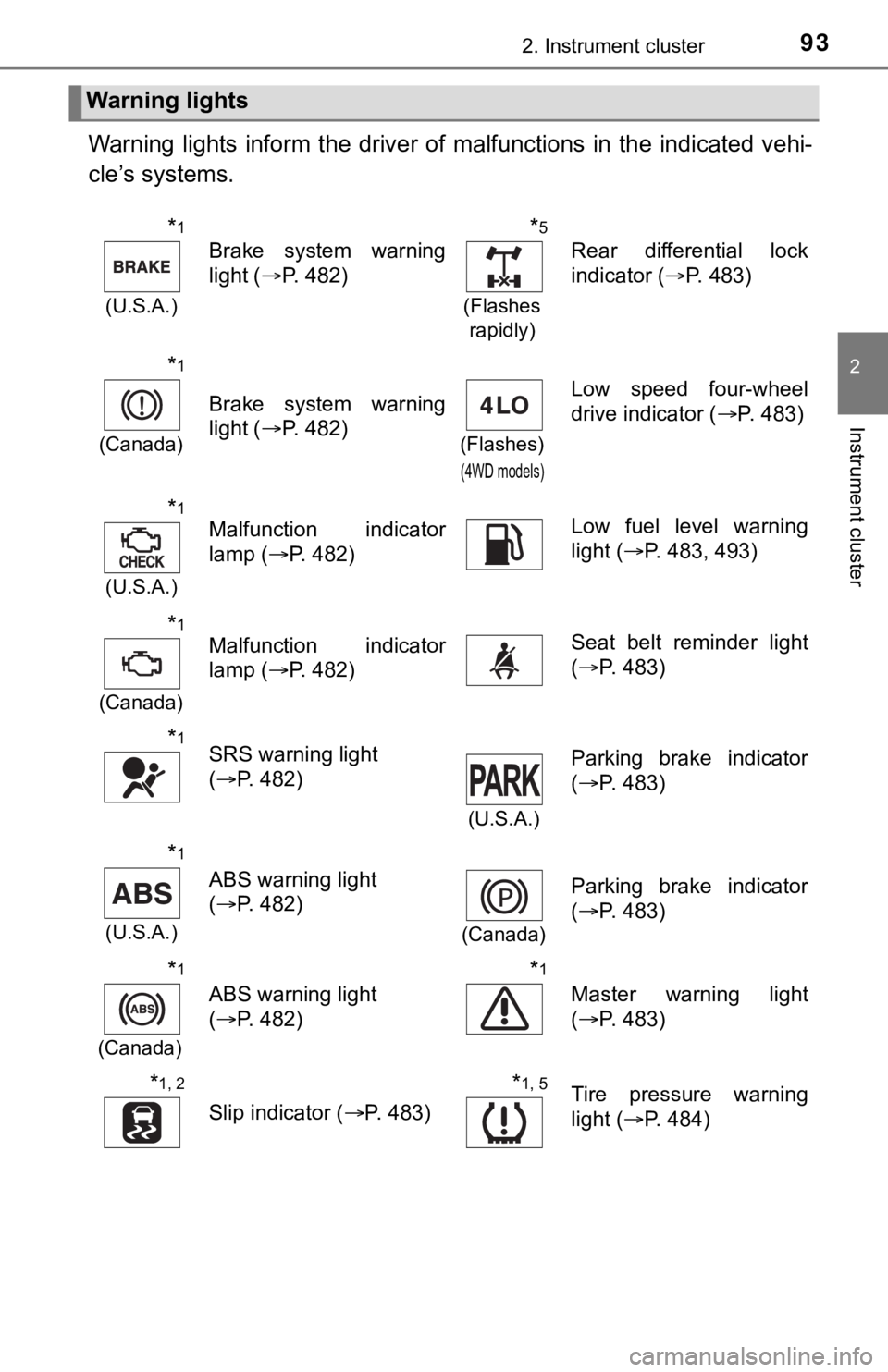
Warning lights inform the driver of malfunctions in the indicated vehi-
cle’s systems.
Warning lights
*1
(U.S.A.)
Brake system warning
light ( P. 482)
*5
(Flashes
rapidly)
Rear differential lock
indicator ( P. 483)
*1
(Canada)
Brake system warning
light ( P. 482)
(Flashes)
(4WD models)
Low speed four-wheel
drive indicator ( P. 483)
*1
(U.S.A.)
Malfunction indicator
lamp (P. 482)Low fuel level warning
light (P. 483, 493)
*1
(Canada)
Malfunction indicator
lamp ( P. 482)Seat belt reminder light
(P. 483)
*1SRS warning light
(P. 482)
(U.S.A.)
Parking brake indicator
(P. 483)
*1
(U.S.A.)
ABS warning light
(P. 482)
(Canada)
Parking brake indicator
(P. 483)
*1
(Canada)
ABS warning light
(P. 482)
*1
Master warning light
(P. 483)
*1, 2
Slip indicator ( P. 483)
*1, 5Tire pressure warning
light (P. 484)
Page 95 of 616
952. Instrument cluster
2
Instrument cluster
*2: The light comes on to indicate a malfunction.
*3: The light flashes to indicate a malfunction.
*4: This light illuminates on the multi-information display.
*5: If equipped
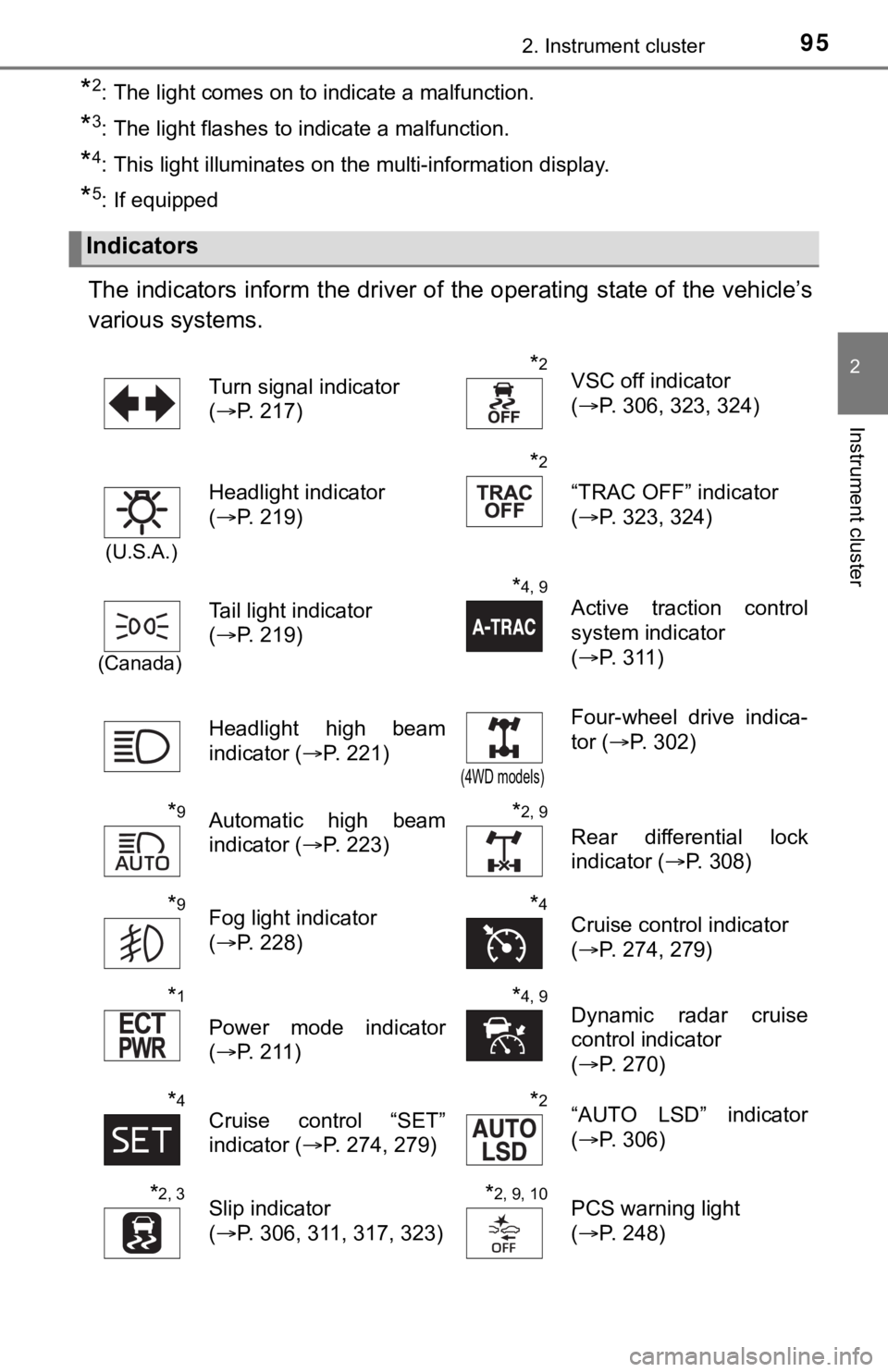
The indicators inform the driver of the operating state of the vehicle’s
various systems.
Indicators
Turn signal indicator
( P. 217)*2VSC off indicator
(P. 306, 323, 324)
(U.S.A.)
Headlight indicator
(P. 219)
*2
“TRAC OFF” indicator
(P. 323, 324)
(Canada)
Tail light indicator
(P. 219)
*4, 9
Active traction control
system indicator
(P. 3 1 1 )
Headlight high beam
indicator ( P. 221)
(4WD models)
Four-wheel drive indica-
tor (P. 302)
*9Automatic high beam
indicator ( P. 223)*2, 9
Rear differential lock
indicator (P. 308)
*9Fog light indicator
(P. 228)*4Cruise control indicator
(P. 274, 279)
*1
Power mode indicator
(P. 211)
*4, 9Dynamic radar cruise
control indicator
(P. 270)
*4Cruise control “SET”
indicator ( P. 274, 279)*2“AUTO LSD” indicator
(P. 306)
*2, 3Slip indicator
(P. 306, 311, 317, 323)*2, 9, 10PCS warning light
(P. 248)
Page 96 of 616
962. Instrument cluster
*1: Vehicles with an automatic transmission.
*2: These lights turn on when the engine switch is turned to the “ON” position(vehicles without a smart key system) or IGNITION ON mode (vehi cles
with a smart key system) to indicate that a system check is being per-
formed. They will turn off after the engine is started, or after a few seconds.
There may be a malfunction in a system if the lights do not com e on, or if
the lights do not turn off. Have the vehicle inspected by your Toyota dealer
for details.
*3: The light flashes to indicate that the system is operating.
*4: This light illuminates on the multi-information display.
*5: When the outside temperature is approximately 37°F (3°C) or lo wer, the
indicator will flash for 10 times, then comes on.
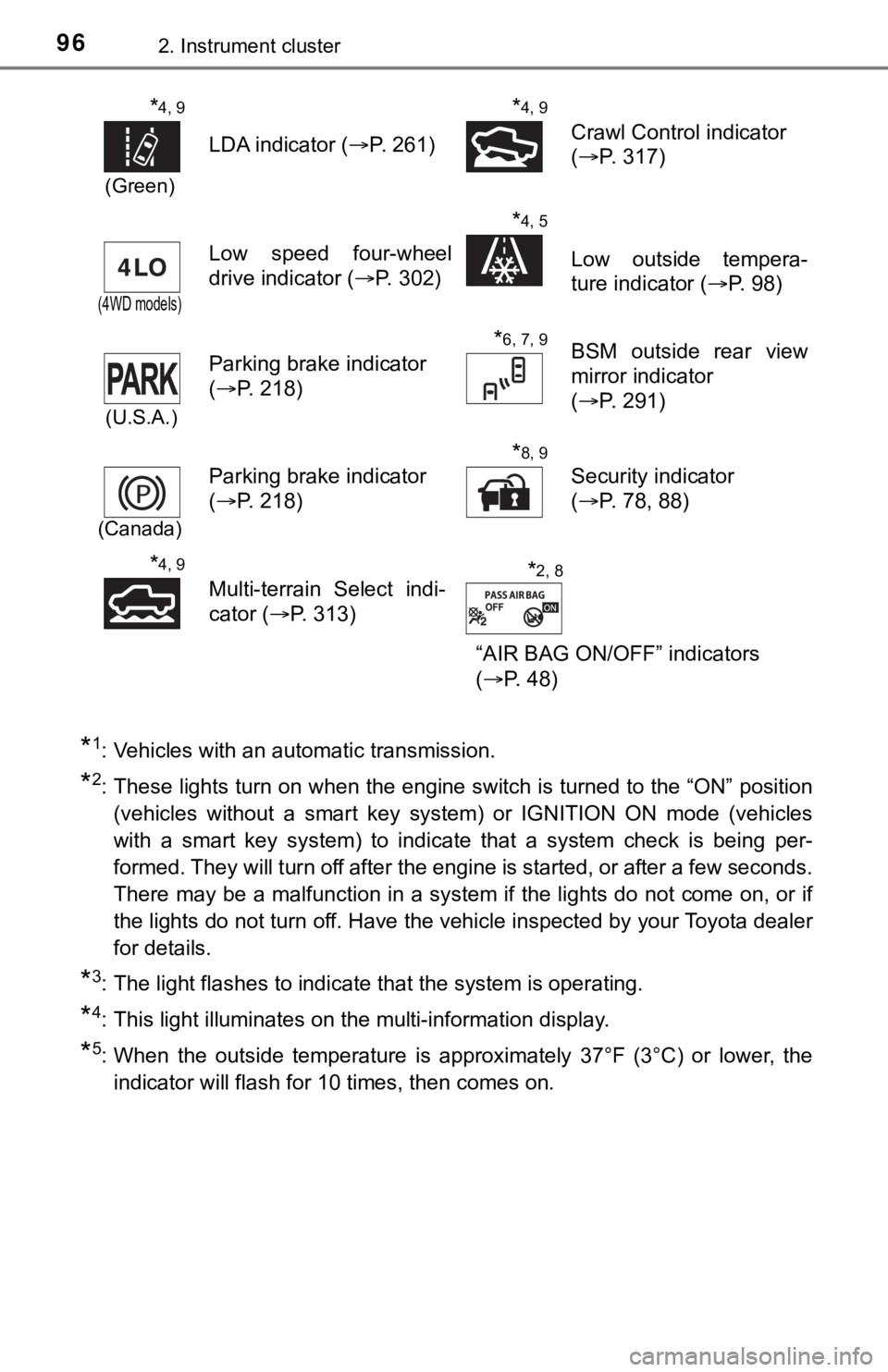
*4, 9
(Green)
LDA indicator ( P. 261)
*4, 9
Crawl Control indicator
(P. 317)
(4WD models)
Low speed four-wheel
drive indicator ( P. 302)
*4, 5
Low outside tempera-
ture indicator (P. 98)
(U.S.A.)
Parking brake indicator
(P. 218)
*6, 7, 9BSM outside rear view
mirror indicator
(P. 291)
(Canada)
Parking brake indicator
(P. 218)
*8, 9
Security indicator
(P. 78, 88)
*4, 9
Multi-terrain Select indi-
cator (P. 313)
“AIR BAG ON/OFF” indicators
(P. 48)*2, 8
Page 111 of 616

111
3
Operation of
each component
3-1. Key information
Keys .................................. 112
3-2. Opening, closing and locking the doors
Doors ................................ 119
Tailgate ............................. 126
Smart key system.............. 131
3-3. Adjusting the seats Front seats ........................ 139
Rear seats ......................... 142
Head restraints .................. 145
3-4. Adjusting the steering wheel and mirrors
Steering wheel .................. 149
Inside rear view mirror....... 151
Outside rear view mirrors ............................. 154 3-5. Opening, closing the
windows and moon roof
Power windows ................. 156
Back window (vehicles with sliding type) ............. 159
Power back window .......... 160
Moon roof .......................... 162
Page 149 of 616
1493-4. Adjusting the steering wheel and mirrors
3
Operation of each component
Steering wheel
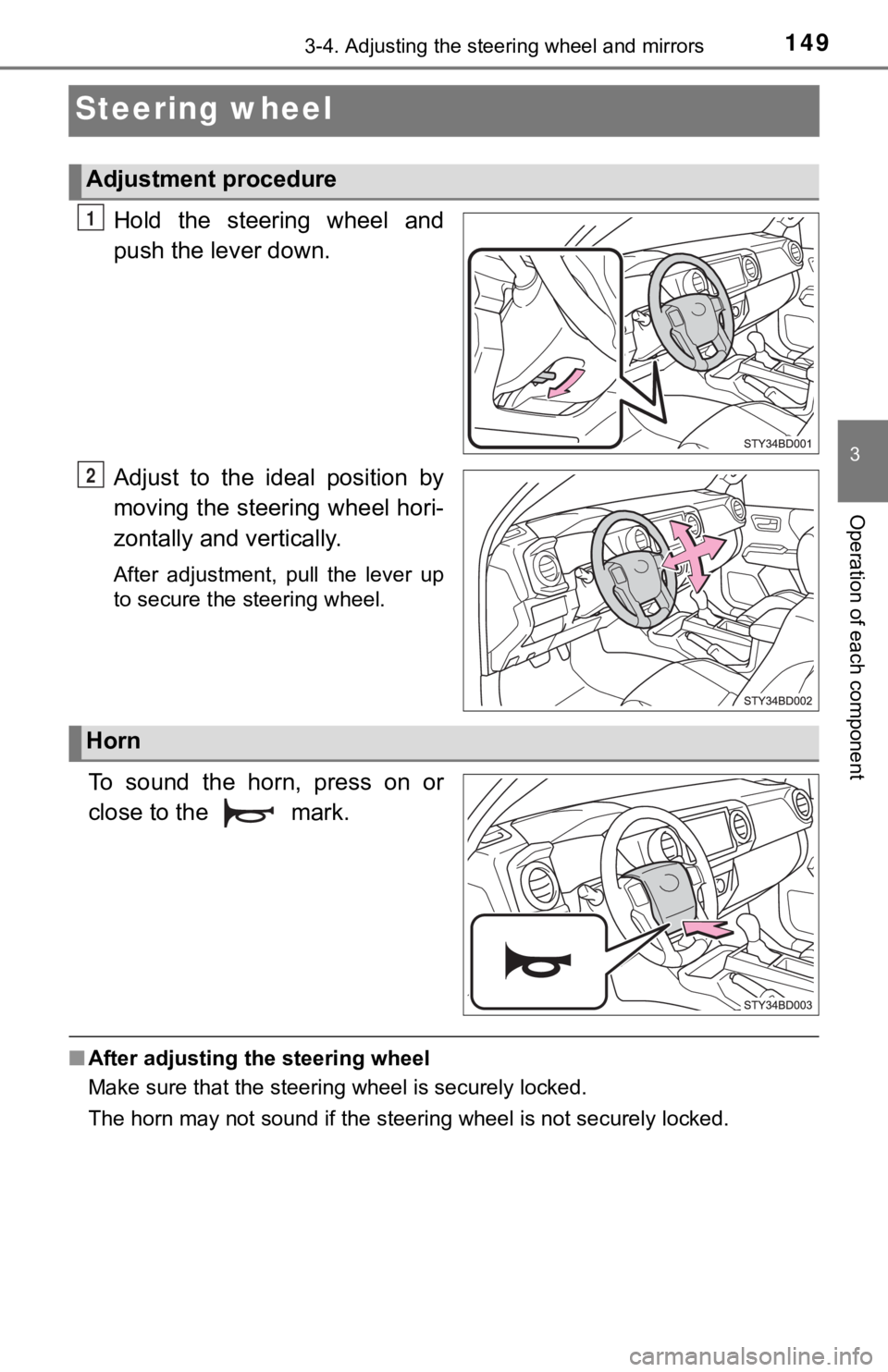
Hold the steering wheel and
push the lever down.
Adjust to the ideal position by
moving the steering wheel hori-
zontally and vertically.
After adjustment, pull the lever up
to secure the steering wheel.
To sound the horn, press on or
close to the mark.
■After adjusting the steering wheel
Make sure that the steering wheel is securely locked.
The horn may not sound if the steer ing wheel is not securely locked.
Adjustment procedure
1
2
Horn
Page 150 of 616

1503-4. Adjusting the steering wheel and mirrors
WARNING
■Caution while driving
Do not adjust the steering wheel while driving.
Doing so may cause the driver to mishandle the vehicle and caus e an acci-
dent, resulting in death or serious injury.
■ After adjusting the steering wheel
Make sure that the steering wheel is securely locked.
Otherwise, the steering wheel may move suddenly, possibly causi ng an
accident and resulting in death or serious injury. Also, the ho rn may not
sound if the steering wheel is not securely locked.
Page 151 of 616
1513-4. Adjusting the steering wheel and mirrors
3
Operation of each component
Inside rear view mirror
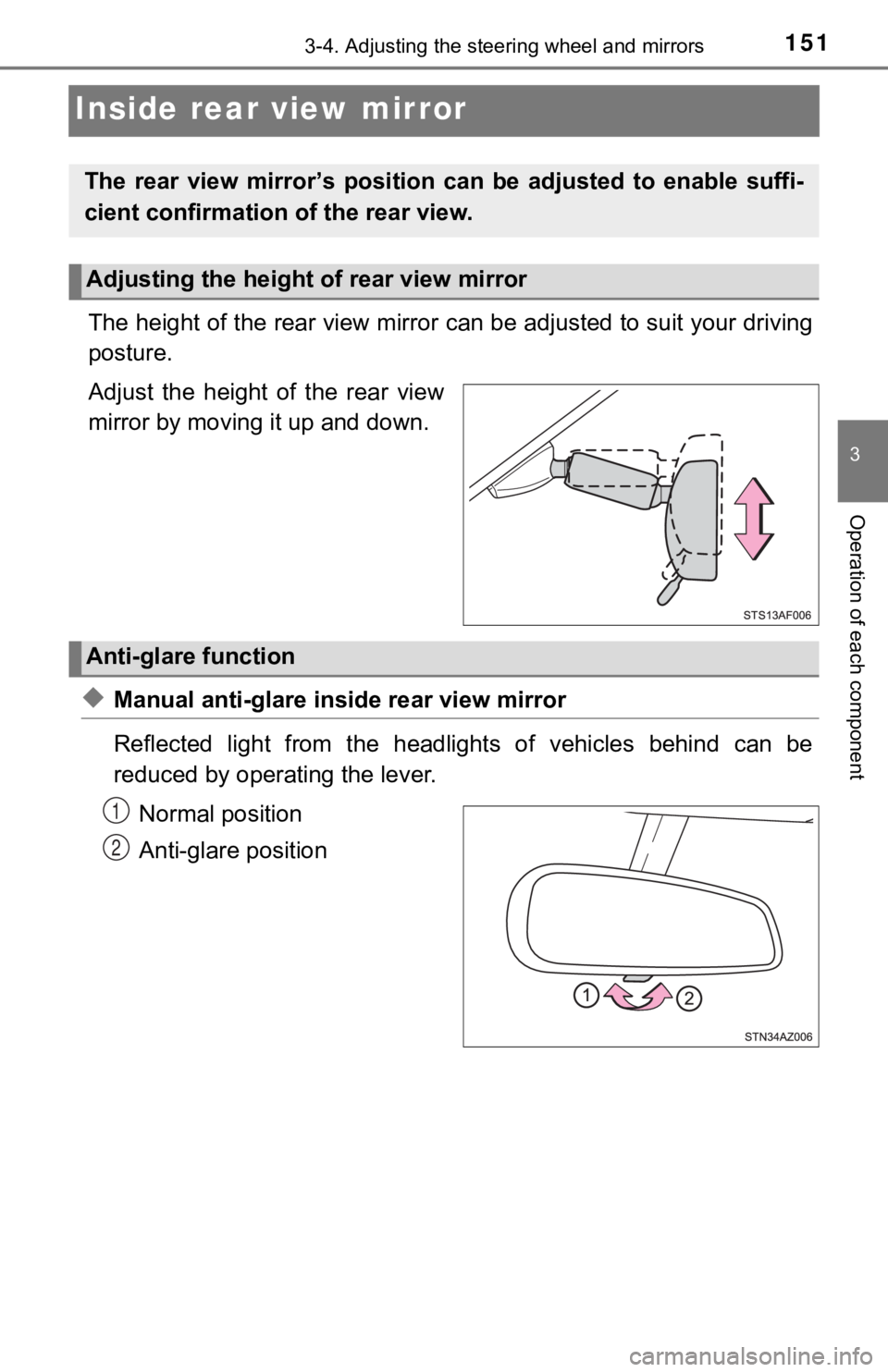
The height of the rear view mirror can be adjusted to suit your driving
posture.
Adjust the height of the rear view
mirror by moving it up and down.
◆Manual anti-glare insi de rear view mirror
Reflected light from the headlights of vehicles behind can be
reduced by operating the lever. Normal position
Anti-glare position
The rear view mirror’s position ca n be adjusted to enable suffi-
cient confirmation of the rear view.
Adjusting the height of rear view mirror
Anti-glare function
1
2
Page 152 of 616
1523-4. Adjusting the steering wheel and mirrors
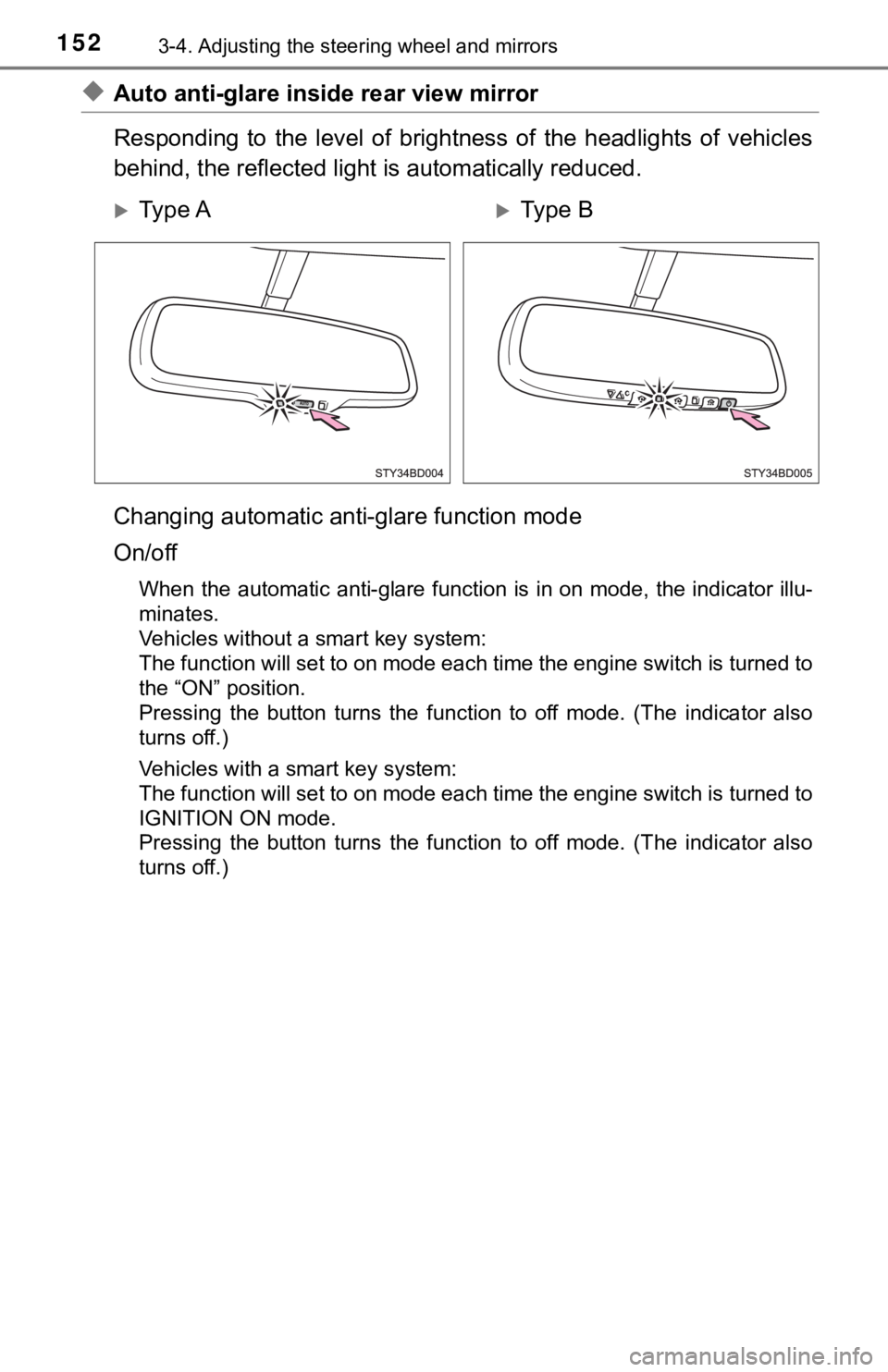
◆Auto anti-glare inside rear view mirror
Responding to the level of brigh tness of the headlights of vehicles
behind, the reflected light is automatically reduced.
Changing automatic anti- glare function mode
On/off
When the automatic anti-glare function is in on mode, the indicator illu-
minates.
Vehicles without a smart key system:
The function will set to on mode each time the engine switch is turned to
the “ON” position.
Pressing the button turns the function to off mode. (The indica tor also
turns off.)
Vehicles with a smart key system:
The function will set to on mode each time the engine switch is turned to
IGNITION ON mode.
Pressing the button turns the function to off mode. (The indica tor also
turns off.)
Ty p e AType B
Page 153 of 616
1533-4. Adjusting the steering wheel and mirrors
3
Operation of each component
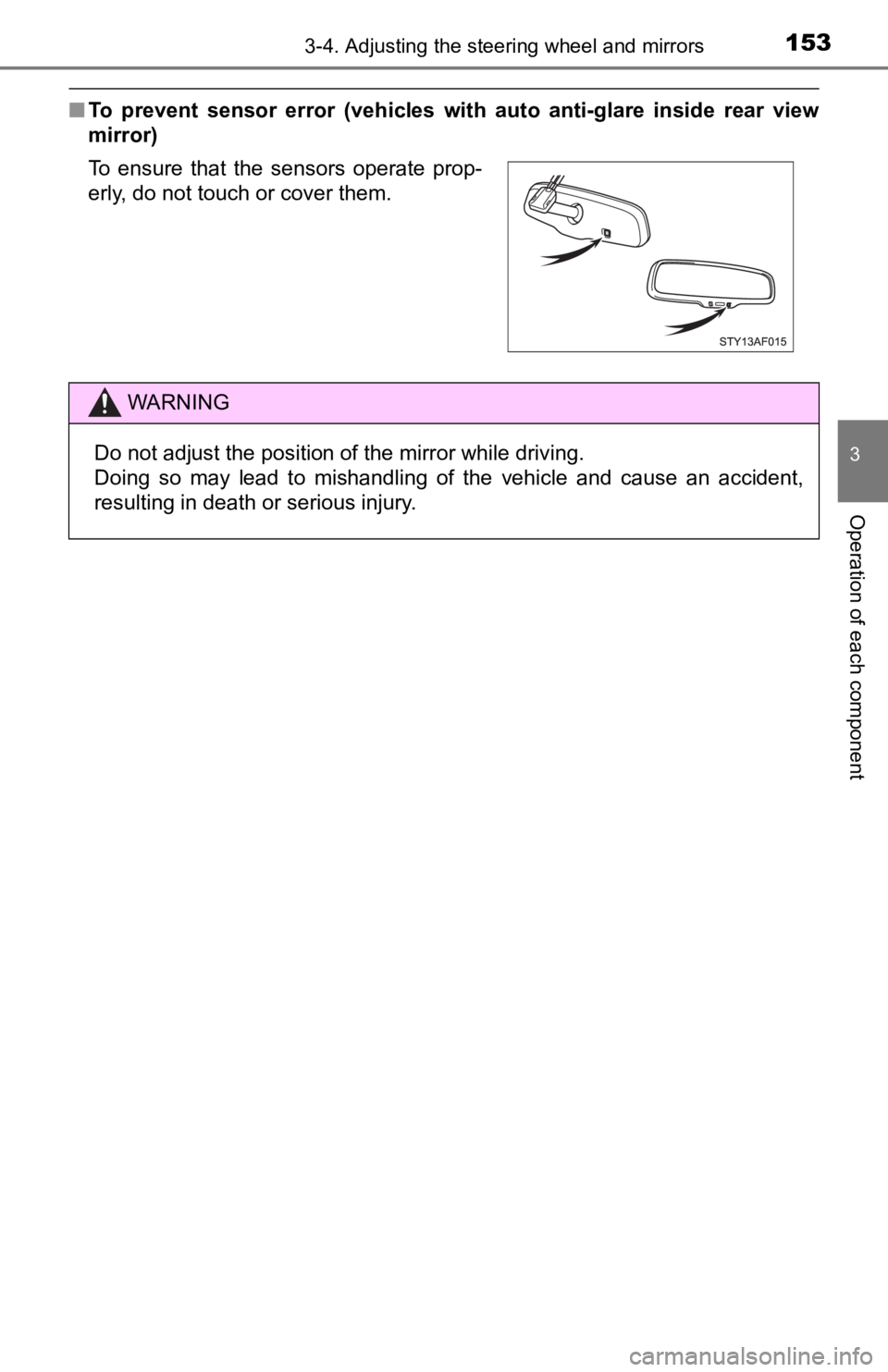
■To prevent sensor error (vehicles with auto anti-glare inside r ear view
mirror)
To ensure that the sensors operate prop-
erly, do not touch or cover them.
WARNING
Do not adjust the position of the mirror while driving.
Doing so may lead to mishandling of the vehicle and cause an accident,
resulting in death or serious injury.
Page 154 of 616
1543-4. Adjusting the steering wheel and mirrors
Outside rear view mirrors
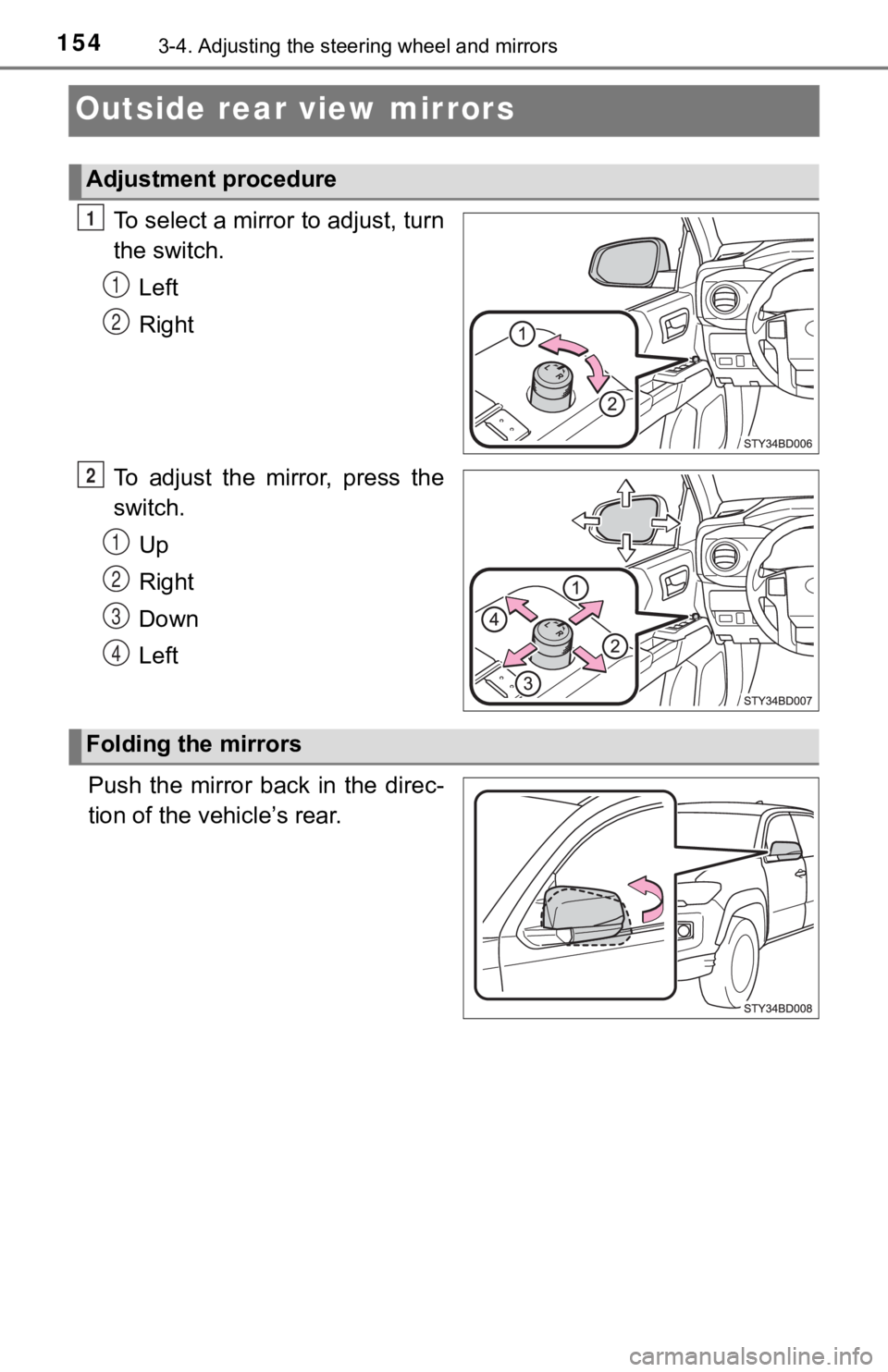
To select a mirror to adjust, turn
the switch.
Left
Right
To adjust the mirror, press the
switch. Up
Right
Down
Left
Push the mirror back in the direc-
tion of the vehicle’s rear.
Adjustment procedure
1
1
2
2
1
2
3
4
Folding the mirrors