steering wheel TOYOTA TACOMA 2022 Owner's Manual
[x] Cancel search | Manufacturer: TOYOTA, Model Year: 2022, Model line: TACOMA, Model: TOYOTA TACOMA 2022Pages: 616, PDF Size: 12.92 MB
Page 197 of 616

1974-1. Before driving
4
Driving
■Break-in schedule
If your vehicle is new or equipped with any new power train com ponents
(such as an engine, transmission, differential or wheel bearing ), Toyota rec-
ommends that you do not tow a trailer until the vehicle has bee n driven for
over 500 miles (800 km).
After the vehicle has been driven for over 500 miles (800 km), you can start
towing. However, for the next 500 miles (800 km), drive the veh icle at a speed
of less than 50 mph (80 km/h) when towing a trailer, and avoid full throttle
acceleration.
■ Maintenance
●If you tow a trailer, your vehicle will require more frequent m aintenance due
to the additional load. (See “Owner’s Warranty Information Book let” or
“Scheduled Maintenance Guide”/“Owner’s Manual Supplement”.)
● Retighten the fixing bolts of the towing ball and bracket after approximately
600 miles (1000 km) of trailer towing.
■ If trailer sway occurs
One or more factors (crosswinds, passing vehicles, rough roads, etc.) can
adversely affect handling of your vehicle and trailer, causing instability.
● If trailer swaying occurs:
• Firmly grip the steering wheel. Steer straight ahead.
Do not try to control trailer swaying by turning the steering wheel.
• Begin releasing the accelerator pedal immediately but very gra dually to
reduce speed.
Do not increase speed. Do not apply vehicle brakes.
If you make no extreme correction with the steering or brakes, your vehicle
and trailer should stabilize. (if enabled, Trailer Sway Control can also help to
stabilize the vehicle and trailer.)
● After the trailer swaying has stopped:
• Stop in a safe place. Get all occupants out of the vehicle.
• Check the tires of the vehicle and the trailer.
• Check the load in the trailer.
Make sure the load has not shifted.
Make sure the tongue weight is appropriate, if possible.
• Check the load in the vehicle. Make sure the vehicle is not overloaded after occupants get in.
If you cannot find any problems, the speed at which trailer swaying occurred
is beyond the limit of your particular vehicle-trailer combinat ion.
Drive at a lower speed to prevent instability. Remember that sw aying of the
towing vehicle-trailer increases as speed increases.
Page 201 of 616
2014-2. Driving procedures
4
Driving
Engine (ignition) switch (vehicles without a
smart key system)
Automatic transmission
Check that the parking brake is set.
Check that the shift lever is set in P.
Firmly depress the brake pedal.
Turn the engine switch to the “S TART” position to start the engine.
Manual transmission
Check that the parking brake is set.
Check that the shift lever is set in N.
Firmly depress the clutch pedal.
Turn the engine switch to the “S TART” position to start the engine.
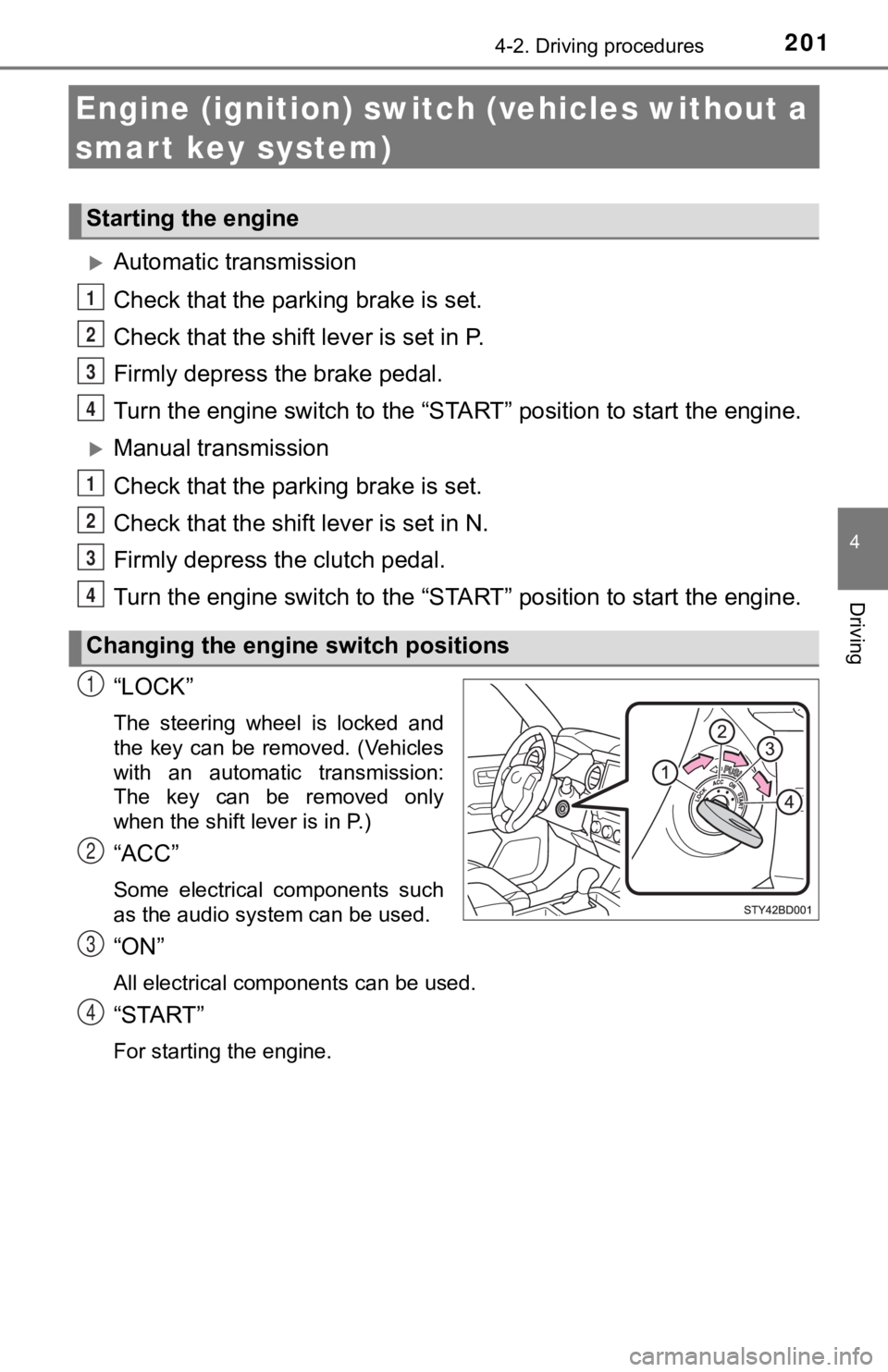
“LOCK”
The steering wheel is locked and
the key can be removed. (Vehicles
with an automatic transmission:
The key can be removed only
when the shift lever is in P.)
“ACC”
Some electrical components such
as the audio system can be used.
“ON”
All electrical components can be used.
“START”
For starting the engine.
Starting the engine
Changing the engine switch positions
1
2
3
4
1
2
3
4
1
2
3
4
Page 202 of 616
2024-2. Driving procedures
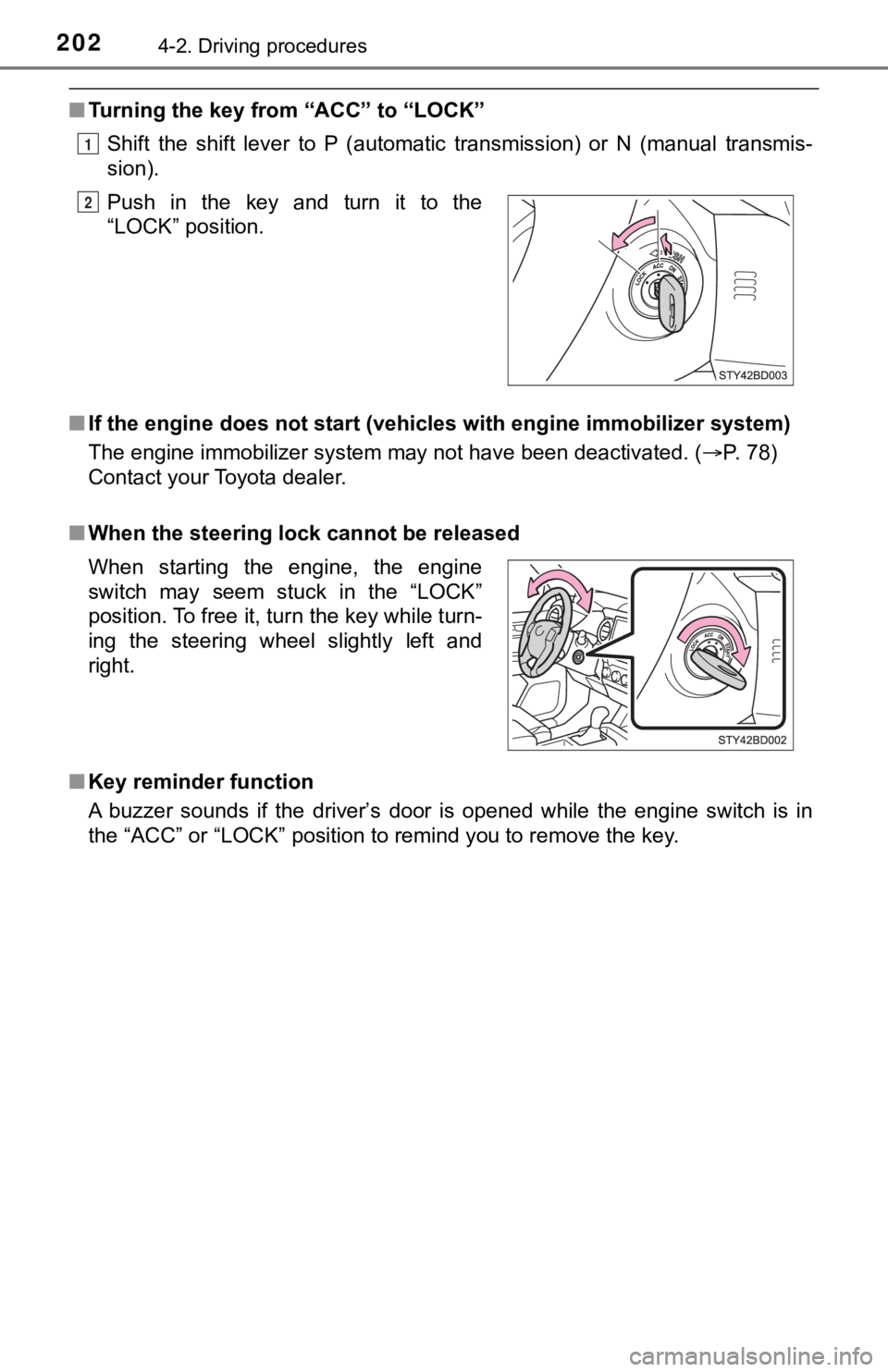
■Turning the key from “ACC” to “LOCK”
Shift the shift lever to P (automatic transmission) or N (manua l transmis-
sion).
■ If the engine does not start (vehicles with engine immobilizer system)
The engine immobilizer system may not have been deactivated. ( P. 78)
Contact your Toyota dealer.
■ When the steering lock cannot be released
■ Key reminder function
A buzzer sounds if the driver’s door is opened while the engine switch is in
the “ACC” or “LOCK” position to remind you to remove the key. Push in the key and turn it to the
“LOCK” position.
When starting the engine, the engine
switch may seem stuck in the “LOCK”
position. To free it, turn the key while turn-
ing the steering wheel slightly left and
right.
1
2
Page 207 of 616
2074-2. Driving procedures
4
Driving
■If the engine does not start
●The engine immobilizer system may not have been deactivated. ( P. 78)
Contact your Toyota dealer.
● Check that the shift lever is securely set in P. The engine may not start if the
shift lever is displaced out of P. “Shift to P Position” will b e displayed on the
multi-information display.
■ Steering lock
After turning the engine switch off and opening and closing the doors, the
steering wheel will be locked due to the steering lock function . Operating the
engine switch again automatically cancels the steering lock.
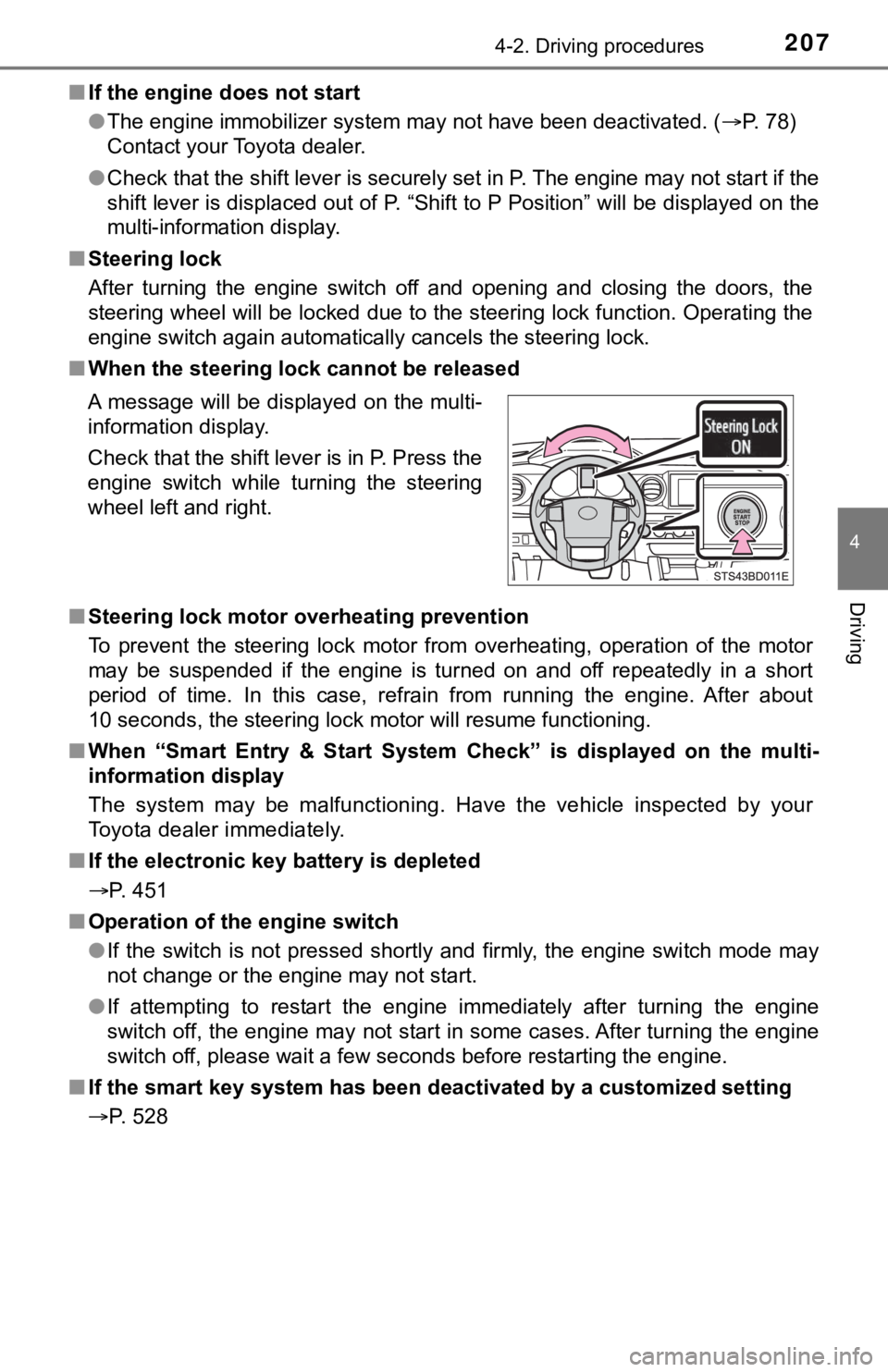
■ When the steering lock cannot be released
■ Steering lock motor overheating prevention
To prevent the steering lock motor from overheating, operation of the motor
may be suspended if the engine is turned on and off repeatedly in a short
period of time. In this case, refrain from running the engine. After about
10 seconds, the steering lock motor will resume functioning.
■ When “Smart Entry & Start System Check” is displayed on the multi-
information display
The system may be malfunctioning. Have the vehicle inspected by your
Toyota dealer immediately.
■ If the electronic key battery is depleted
P. 451
■ Operation of the engine switch
●If the switch is not pressed shortly and firmly, the engine swi tch mode may
not change or the engine may not start.
● If attempting to restart the engine immediately after turning t he engine
switch off, the engine may not start in some cases. After turni ng the engine
switch off, please wait a few seconds before restarting the eng ine.
■ If the smart key system has been d eactivated by a customized setting
P. 528 A message will be displayed on the multi-
information display.
Check that the shift lever is in P. Press the
engine switch while turning the steering
wheel left and right.
Page 246 of 616

2464-5. Using the driving support systems
WARNING
■Limitations of the pre-collision system
● The driver is solely responsible for safe driving. Always drive safely, taking
care to observe your surroundings.
Do not use the pre-collision system instead of normal braking o perations
under any circumstances. This system will not prevent collision s or lessen
collision damage or injury in every situation. Do not overly re ly on this sys-
tem. Failure to do so may lead to an accident, resulting in dea th or serious
injury.
● Although this system is designed to help avoid a collision or h elp reduce
the impact of the collision, its effectiveness may change according to vari-
ous conditions, therefore the system may not always be able to achieve
the same level of performance.
Read the following conditions carefully. Do not overly rely on this system
and always drive carefully.
• Conditions under which the system may operate even if there is no pos- sibility of a collision: P. 252
• Conditions under which the system may not operate properly: P. 254
● Do not attempt to test the operation of the pre-collision syste m yourself.
Depending on the objects used for testing (dummies, cardboard o bjects
imitating detectable objects, etc.), the system may not operate properly,
possibly leading to an accident.
■ Pre-collision braking
● When the pre-collision braking function is operating, a large a mount of
braking force will be applied.
● If the vehicle is stopped by the operation of the pre-collision braking func-
tion, the pre-collision braking function operation will be canceled after
approximately 2 seconds. Depress the brake pedal as necessary.
● The pre-collision braking function may not operate if certain operations are
performed by the driver. If the accelerator pedal is being depressed
strongly or the steering wheel is being turned, the system may determine
that the driver is taking evasive action and possibly prevent the pre-colli-
sion braking function from operating.
● In some situations, while the pre-collision braking function is operating,
operation of the function may be canceled if the accelerator pedal is
depressed strongly or the steering wheel is turned and the syst em deter-
mines that the driver is taking evasive action.
● If the brake pedal is being depressed, the system may determine that the
driver is taking evasive action and possibly delay the operation timing of
the pre-collision braking function.
Page 251 of 616

2514-5. Using the driving support systems
4
Driving
■Pedestrian detection function
■ Cancelation of the pre-collision braking
If either of the following occur while the pre-collision brakin g function is oper-
ating, it will be canceled:
● The accelerator pedal is depressed strongly.
● The steering wheel is turned sharply or abruptly.
The pre-collision system detects pedestri-
ans based on the size, profile, and motion
of a detected object. However, a pedes-
trian may not be detected depending on
the surrounding brightness and the
motion, posture, and angle of the
detected object, preventing the system
from operating properly. (P. 254)
Page 257 of 616
2574-5. Using the driving support systems
4
Driving
LDA (Lane Depar ture Alert)
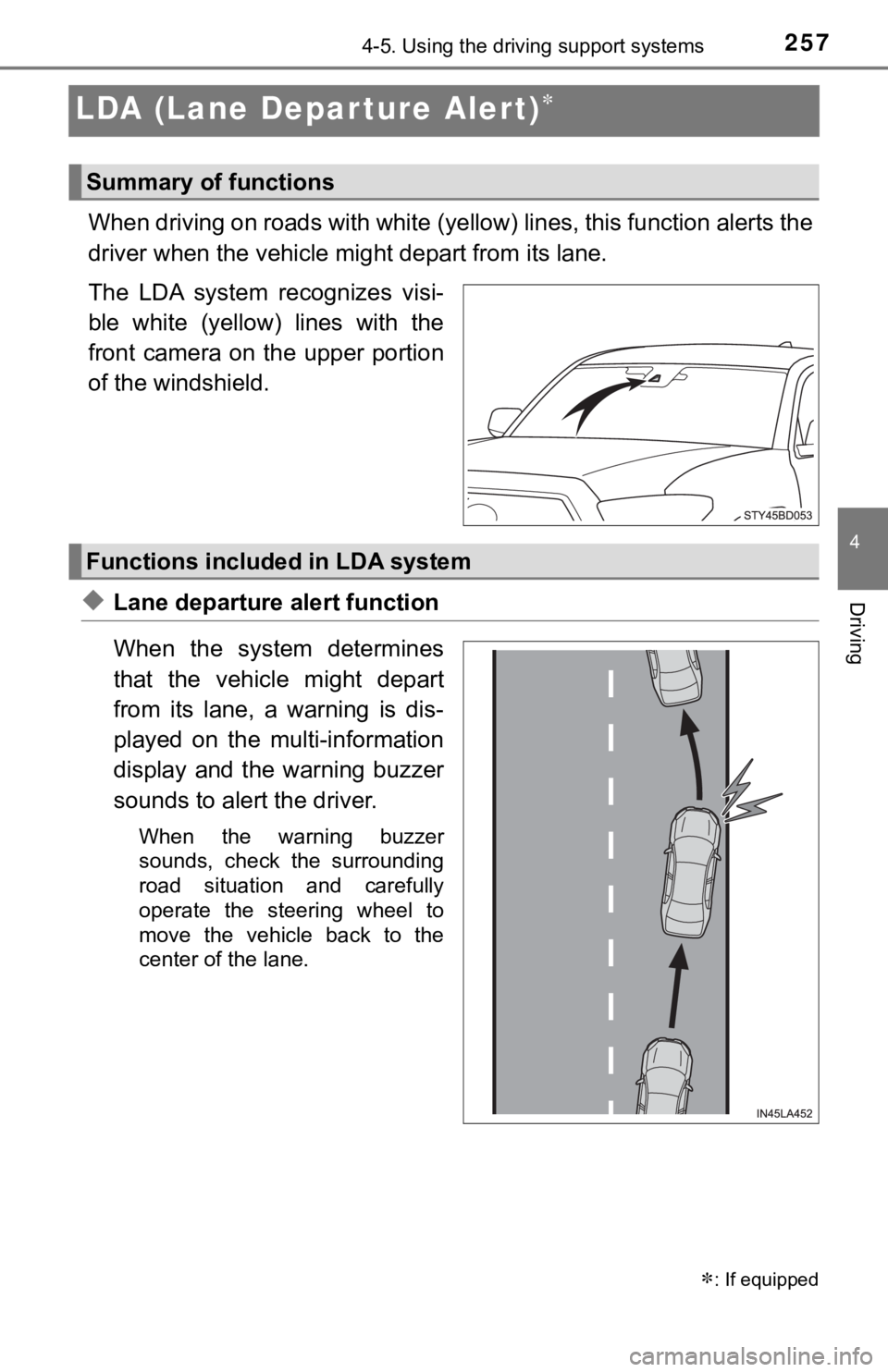
When driving on roads with white (yellow) lines, this function alerts the
driver when the vehicle mi ght depart from its lane.
The LDA system recognizes visi-
ble white (yellow) lines with the
front camera on the upper portion
of the windshield.
◆Lane departure alert function
When the system determines
that the vehicle might depart
from its lane, a warning is dis-
played on the multi-information
display and the warning buzzer
sounds to alert the driver.
When the warning buzzer
sounds, check the surrounding
road situation and carefully
operate the steering wheel to
move the vehicle back to the
center of the lane.
: If equipped
Summary of functions
Functions included in LDA system
Page 259 of 616
2594-5. Using the driving support systems
4
Driving
WARNING
■Before using LDA system
Do not rely solely upon the LDA system. The LDA system does not auto-
matically drive the vehicle or reduce the amount of attention t hat must be
paid to the area in front of the vehicle. The driver must always assume full
responsibility for driving safely by always paying careful atte ntion to the sur-
rounding conditions and operating the steering wheel to correct the path of
the vehicle. Also, the driver must take adequate breaks when fatigued, such
as from driving for a long period of time.
Failure to perform appropriate driving operations and pay careful attention
may lead to an accident, resulting in death or serious injury.
■ To avoid operating LDA system by mistake
When not using the LDA system, use the LDA switch to turn the system off.
■ Situations unsuitable for LDA system
Do not use the LDA system in the following situations.
The system may not operate properly and lead to an accident, re sulting in
death or serious injury.
● A spare tire, tire chains, etc., are equipped.
● Objects or patterns that could be mistaken for white (yellow) l ines are
present on the side of the road (guardrails, curbs, reflective poles, etc.).
● Vehicle is driven on a snow-covered road.
● White (yellow) lines are difficult to see due to rain, snow, fog, dust, etc.
● Asphalt repair marks, white (yellow) line marks, etc., are present due to
road repair.
● Vehicle is driven in a temporary lane or restricted lane due to construction
work.
● Vehicle is driven in a construction zone.
Page 278 of 616
2784-5. Using the driving support systems
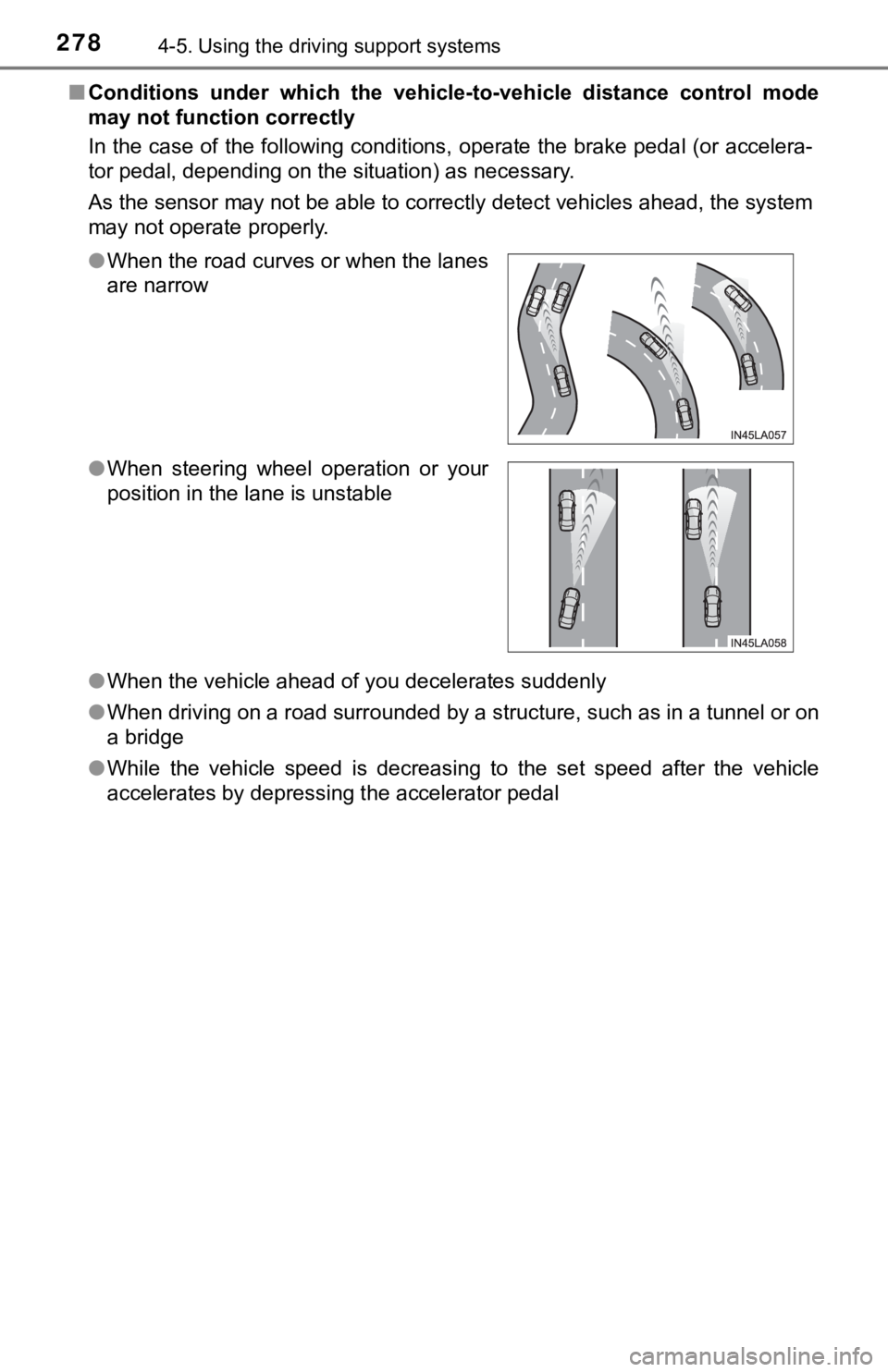
■Conditions under which the vehic le-to-vehicle distance control mode
may not function correctly
In the case of the following conditions, operate the brake peda l (or accelera-
tor pedal, depending on the situation) as necessary.
As the sensor may not be able to correctly detect vehicles ahead, the system
may not operate properly.
● When the vehicle ahead of you decelerates suddenly
● When driving on a road surrounded by a structure, such as in a tunnel or on
a bridge
● While the vehicle speed is decreasing to the set speed after th e vehicle
accelerates by depressing the accelerator pedal
●
When the road curves or when the lanes
are narrow
● When steering wheel operation or your
position in the lane is unstable
Page 310 of 616

3104-5. Using the driving support systems
■After unlocking the rear differential
Vehicles without a smart key system
To check that the indicator goes off, turn the engine switch to the “ON” posi-
tion, but do not start the engine.
Vehicles with a smart key system
To check that the indicator goes off, turn the engine switch to IGNITION ON
mode, but do not start the engine.
WARNING
■ To avoid an accident
● Do not use the rear differential lock system except when wheel spinning
occurs in a ditch or on a slippery or ragged surface. Large steering effort
and careful cornering control will be required.
● Do not lock the rear differential until the wheels have stopped spinning.
Otherwise, the vehicle may move in an unexpected direction when the dif-
ferential lock is engaged, resulting in an accident. This may also lead to
possible damage to differential lock component parts.
● Do not drive over 5 mph (8 km/h) when the differential is locke d.
● Do not keep driving with the rear differential lock switch on.