key TOYOTA TACOMA 2022 Repair Manual
[x] Cancel search | Manufacturer: TOYOTA, Model Year: 2022, Model line: TACOMA, Model: TOYOTA TACOMA 2022Pages: 616, PDF Size: 12.92 MB
Page 217 of 616
2174-2. Driving procedures
4
Driving
Turn signal lever
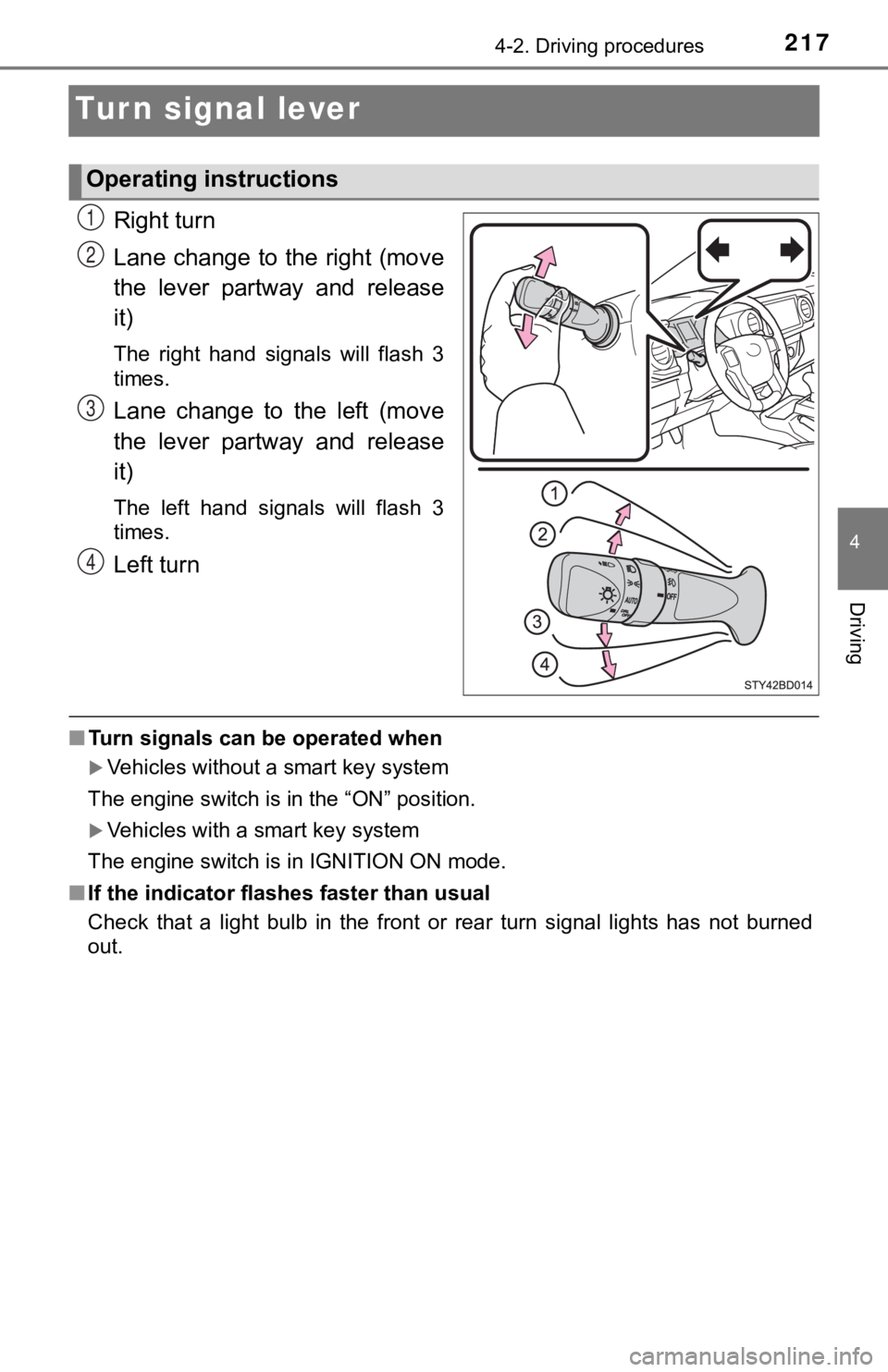
Right turn
Lane change to the right (move
the lever partway and release
it)
The right hand signals will flash 3
times.
Lane change to the left (move
the lever partway and release
it)
The left hand signals will flash 3
times.
Left turn
■Turn signals can be operated when
Vehicles without a smart key system
The engine switch is in the “ON” position.
Vehicles with a smart key system
The engine switch is in IGNITION ON mode.
■ If the indicator flashes faster than usual
Check that a light bulb in the front or rear turn signal lights has not burned
out.
Operating instructions
1
2
3
4
Page 219 of 616
2194-3. Operating the lights and wipers
4
Driving
Headlight switch
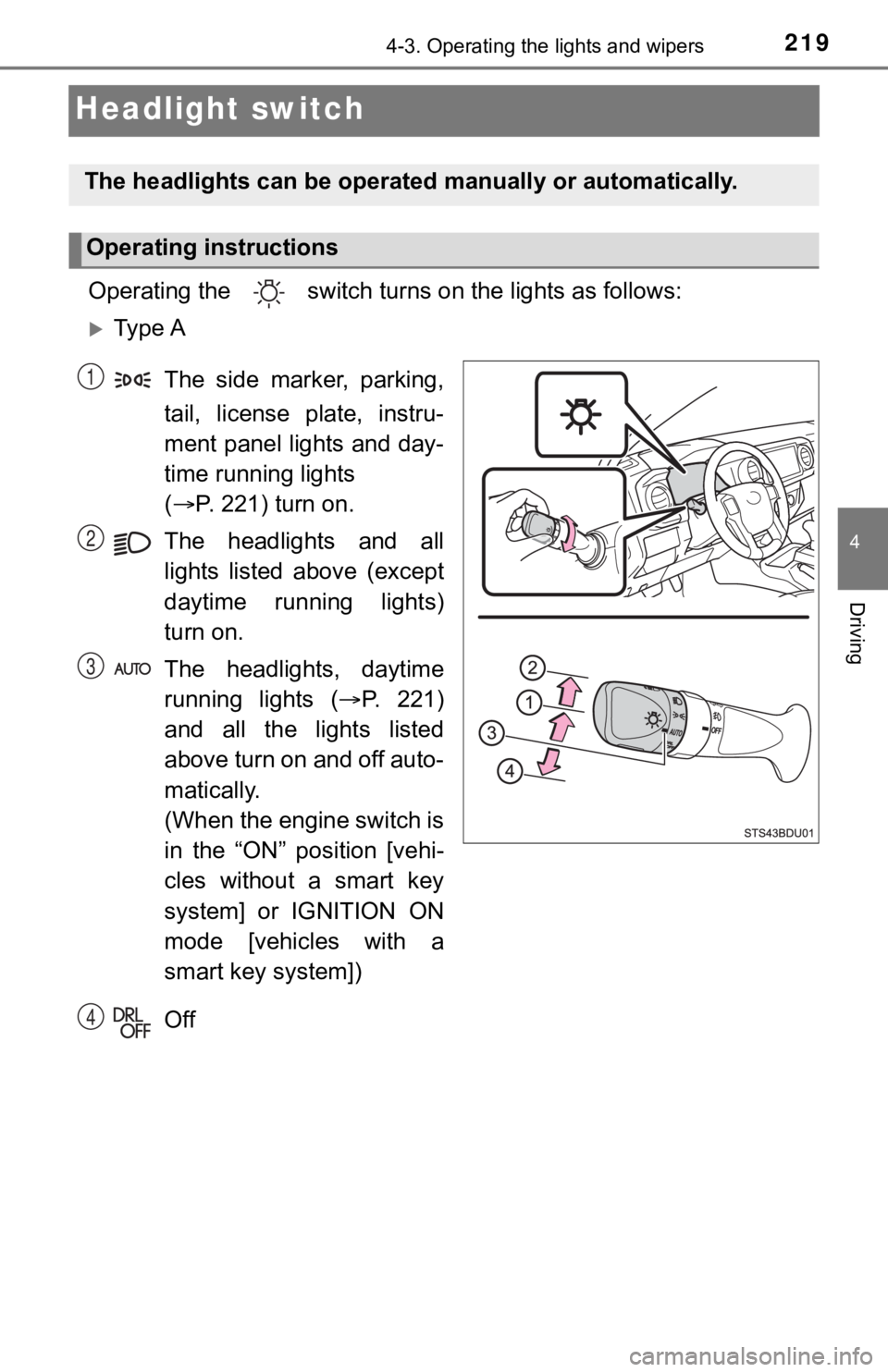
Operating the switch turn s on the lights as follows:
Ty p e A
The side marker, parking,
tail, license plate, instru-
ment panel lights and day-
time running lights
( P. 221) turn on.
The headlights and all
lights listed above (except
daytime running lights)
turn on.
The headlights, daytime
running lights ( P. 221)
and all the lights listed
above turn on and off auto-
matically.
(When the engine switch is
in the “ON” position [vehi-
cles without a smart key
system] or IGNITION ON
mode [vehicles with a
smart key system])
Off
The headlights can be operated manually or automatically.
Operating instructions
1
2
3
4
Page 220 of 616
2204-3. Operating the lights and wipers
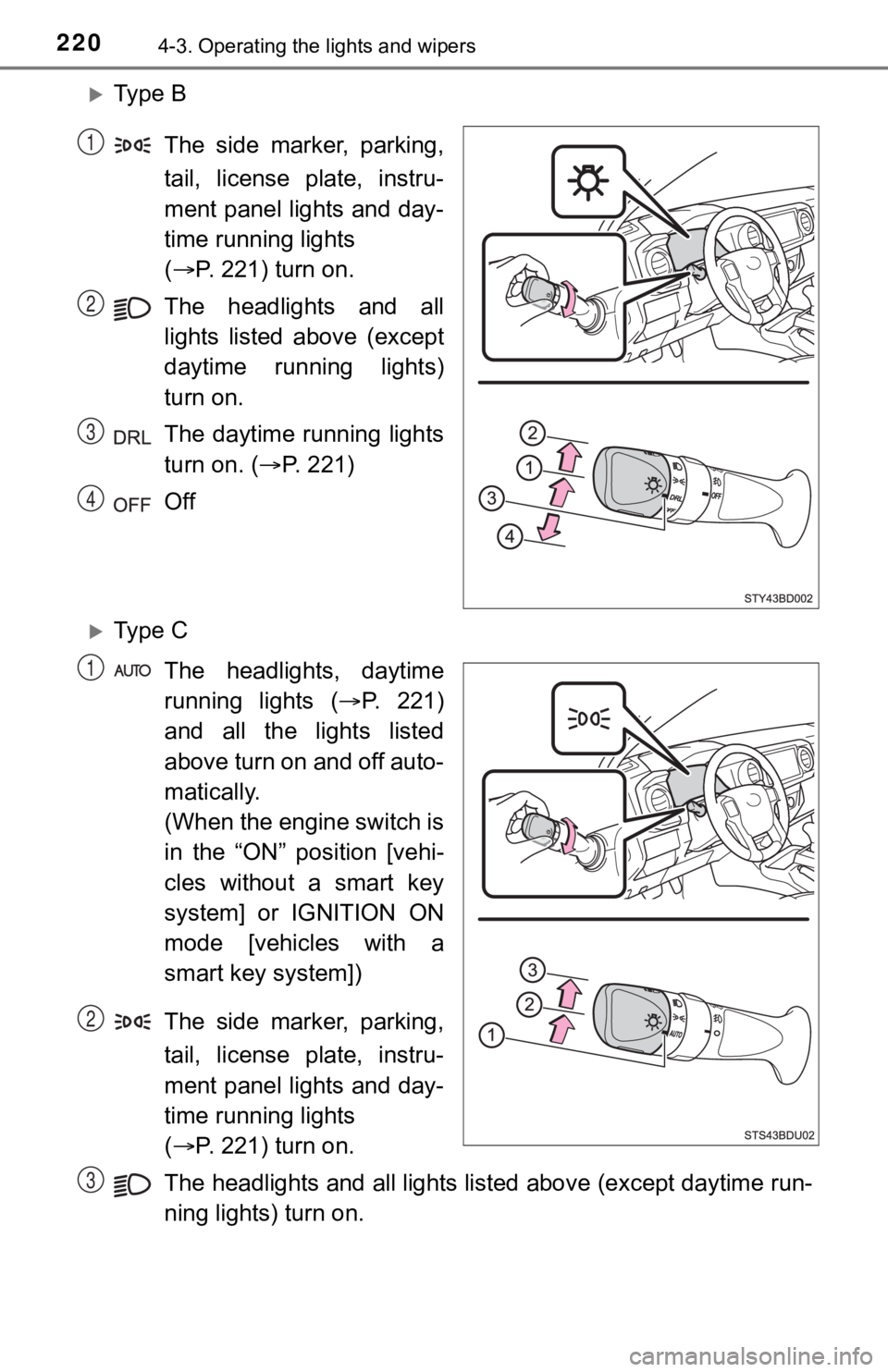
Ty p e BThe side marker, parking,
tail, license plate, instru-
ment panel lights and day-
time running lights
( P. 221) turn on.
The headlights and all
lights listed above (except
daytime running lights)
turn on.
The daytime running lights
turn on. ( P. 221)
Off
Ty p e C
The headlights, daytime
running lights ( P. 221)
and all the lights listed
above turn on and off auto-
matically.
(When the engine switch is
in the “ON” position [vehi-
cles without a smart key
system] or IGNITION ON
mode [vehicles with a
smart key system])
The side marker, parking,
tail, license plate, instru-
ment panel lights and day-
time running lights
( P. 221) turn on.
The headlights and all lights listed above (except daytime run-
ning lights) turn on.
1
2
3
4
1
2
3
Page 222 of 616
2224-3. Operating the lights and wipers
■Automatic light off system
When the light switch is in or : The lights turn off 30 secon ds after the
engine switch is turned to the “LOCK” position (vehicles withou t a smart key
system) or off (vehicles with a smart key system) and a door is opened and all
of the doors are closed. (Vehicles with a wireless remote control function: The
lights turn off immediately if on the key is pressed while all the doors are
locked.)
When the light switch is in : The lights turn off after the en gine switch is
turned to the “LOCK” position (vehicles without a smart key sys tem) or off
(vehicles with a smart key system) and the driver’s door is opened.
To turn the lights on again, turn the engine switch to the “ON” position (vehi-
cles without a smart key system) or to IGNITION ON mode (vehicles with a
smart key system), or turn the light switch off, then turn it to or to .
If any of the doors is kept open and the engine switch is in the “LOCK” posi-
tion (vehicles without a smart key system) or off (vehicles wit h a smart key
system), the lights automatically turn off after 20 minutes.
■ Light reminder function
An alarm will sound and message will be shown on the multi-information dis-
play when the driver 's door is opened with the lights are turned on and the
engine switch to the “LOCK” position (vehicles without a smart key system) or
off (vehicles with a smart key system).
■ Customization
Settings (e.g. light sensor sensitivity) can be changed.
(Customizable features: P. 568)
NOTICE
■To prevent battery discharge
Do not leave the lights on longer than necessary when the engin e is not
running.
Page 227 of 616

2274-3. Operating the lights and wipers
4
Driving
■Temporarily lowering sensor sensitivity
The sensitivity of the sensor can be temporarily lowered.
Turn the engine switch to the “LOCK” position (vehicles without a smart key
system) or off (vehicles with a smart key system) while the fol lowing condi-
tions are met.
• The headlight switch is in or (if equipped).
• The headlight switch lever is in high beam position.
• Automatic High Beam switch is on.
Turn the engine switch to the “ON” position (vehicles without a smart key
system) or IGNITION ON mode (vehicles with a smart key system).
Within 30 seconds after , repeat pulling the headlight switch lever to the
original position then pushing it to the high beam position qui ckly 10 times,
then leave the lever in high beam position.
If the sensitivity is changed, the Automatic High Beam indicato r is turn on
and off 3 times.
Automatic High Beam (headlights) may turn on even the vehicle i s stopped.
■ If “Headlight System Malfunction. Visit Your Dealer.” is displayed on the
multi-information display
The system may be malfunctioning. Have the vehicle inspected by your
Toyota dealer.
1
2
32
4
Page 231 of 616
2314-3. Operating the lights and wipers
4
Driving
■The windshield wipers and washer can be operated when
Vehicles without a smart key system
The engine switch is in the “ON” position.
Vehicles with a smart key system
The engine switch is in IGNITION ON mode.
■ If no windshield washer fluid sprays
Check that the washer nozzles are not blocked if there is washe r fluid in the
windshield washer fluid reservoir.
WARNING
■ Caution regarding the use of washer fluid
When it is cold, do not use the washer fluid until the windshie ld becomes
warm. The fluid may freeze on the windshield and cause low visi bility. This
may lead to an accident, resulting in death or serious injury.
NOTICE
■ When the windshield is dry
Do not use the wipers, as they may damage the windshield.
■ When the washer fluid tank is empty
Do not operate the switch continually as the washer fluid pump may over-
heat.
■ When a nozzle becomes blocked
In this case, contact your Toyota dealer.
Do not try to clear it with a pin or other object. The nozzle will be damaged.
Page 232 of 616

2324-4. Refueling
Opening the fuel tank cap
●Vehicles without a smart key system:
Turn the engine switch to the “LOCK” position and ensure that a ll
the doors and wind ows are closed.
● Vehicles with a smart key system:
Turn the engine switch off and ens ure that all the doors and win-
dows are closed.
● Confirm the type of fuel.
■Fuel types
P. 554
■ Fuel tank opening for unleaded gasoline
To help prevent incorrect fueling, your vehicle has a fuel tank opening that
only accommodates the special nozzle on unleaded fuel pumps.
■ If the malfunction indicator lamp illuminates
The malfunction indicator lamp may illuminate erroneously if re fueling is per-
formed repeatedly when the fuel tank is nearly full.
Perform the following steps to open the fuel tank cap:
Before refueling the vehicle
Page 248 of 616
2484-5. Using the driving support systems
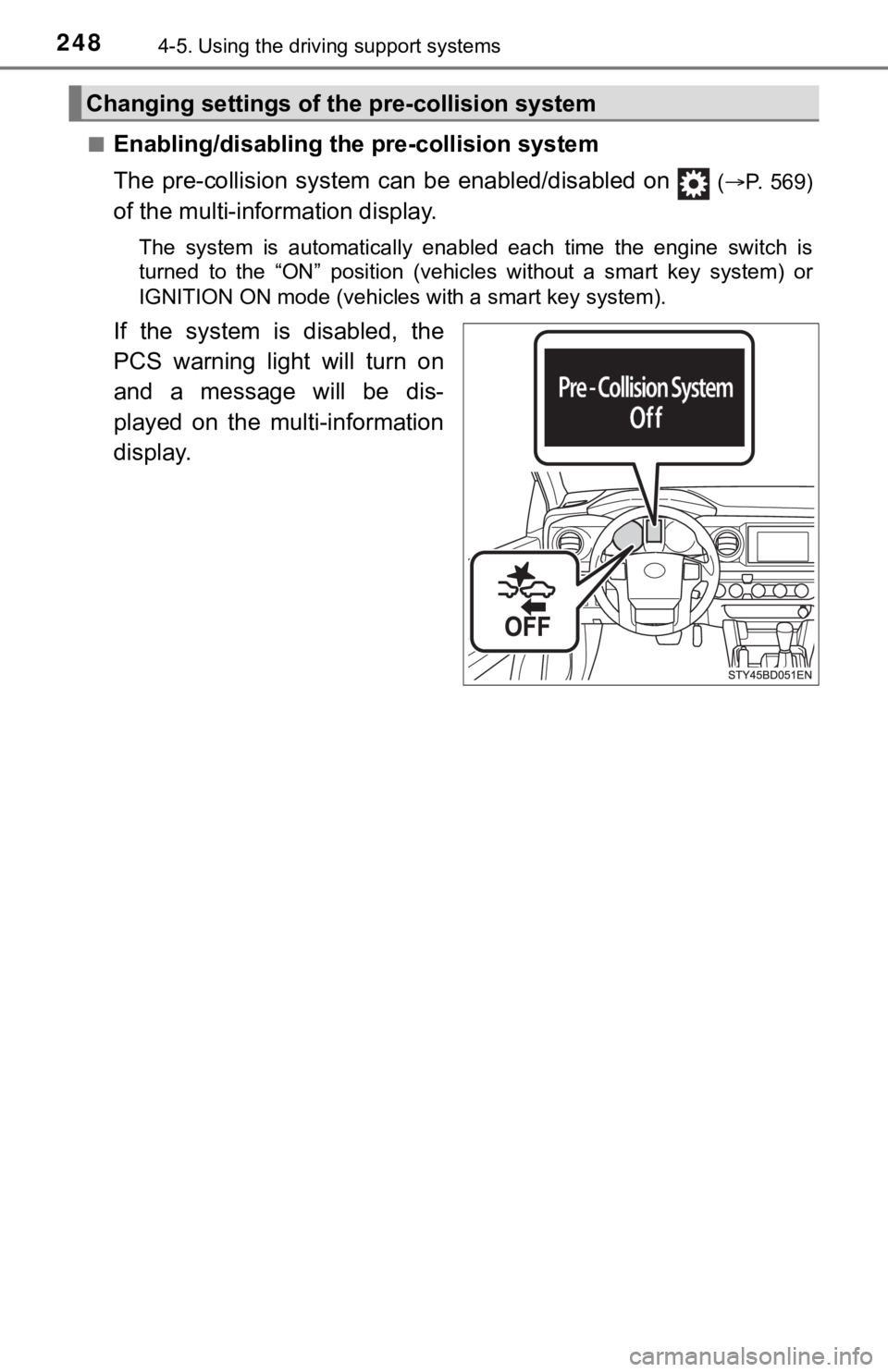
■Enabling/disabling th e pre-collision system
The pre-collision system c an be enabled/disabled on
(P. 569)
of the multi-information display.
The system is automatically enabled each time the engine switch is
turned to the “ON” position (vehicles without a smart key syste m) or
IGNITION ON mode (vehicles with a smart key system).
If the system is disabled, the
PCS warning light will turn on
and a message will be dis-
played on the multi-information
display.
Changing settings of the pre-collision system
Page 272 of 616
2724-5. Using the driving support systems
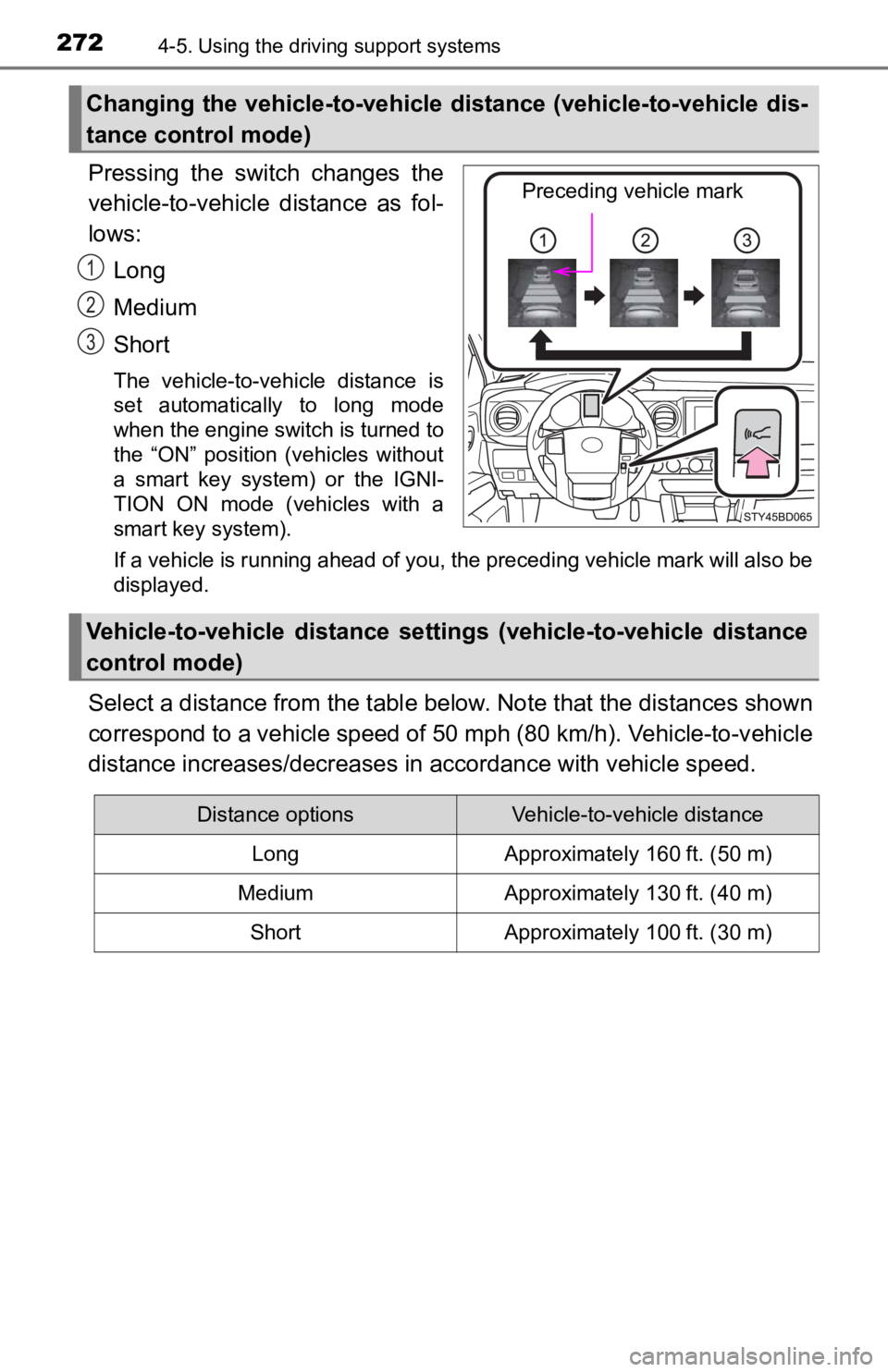
Pressing the switch changes the
vehicle-to-vehicle distance as fol-
lows:
Long
Medium
Short
The vehicle-to-vehicle distance is
set automatically to long mode
when the engine switch is turned to
the “ON” position (vehicles without
a smart key system) or the IGNI-
TION ON mode (vehicles with a
smart key system).
If a vehicle is running ahead of you, the preceding vehicle mark will also be
displayed.
Select a distance from the tabl e below. Note that the distances shown
correspond to a vehicle speed of 50 mph (80 km/h). Vehicle-to-v ehicle
distance increases/decreases in accordance with vehicle speed.
Changing the vehicle-to-vehicle d istance (vehicle-to-vehicle dis-
tance control mode)
Preceding vehicle mark
1
2
3
Vehicle-to-vehicle distance settings (vehicle-to-vehicle distan ce
control mode)
Distance optionsVehicle-to-vehicle distance
LongApproximately 160 ft. (50 m)
MediumApproximately 130 ft. (40 m)
ShortApproximately 100 ft. (30 m)
Page 309 of 616

3094-5. Using the driving support systems
4
Driving
Manual transmission
Before using the rear differential lock system.
Stop the vehicle or reduce your speed to less than 2 mph (3 km/h).
Depress the clutch pedal and turn the front-wheel drive control
switch in the “4L” position to see if this is sufficient. If th is has no
effect, additionally use the re ar differential lock system.
Be sure to stop the wheels.
Depress the clutch pedal.
Press the rear differential lock switch.
After the rear differential is locked, the indicator will come on.
Slowly release th e clutch pedal.
Unlock the rear differential as soon as the vehicle moves.
To unlock the rear different ial, press the switch again.
■Locking the rear differential
●When the rear differential is locked, VSC is automatically turn ed off.
(The rear differential lock and VSC off indicators come on.)
● The following systems do not operate when the rear differential is locked. It
is normal operation for the ABS warning light and VSC off indic ator to be on
at this time.
•ABS
• Multi Terrain ABS (if equipped)
• Brake assist system
•VSC
•TRAC
• Pre-Collision System (if equipped)
• Dynamic radar cruise control system (if equipped)
• Cruise control system (if equipped)
• Hill-start assist control (if equipped on 4WD models)
■ The rear differential lock is disengaged when
●Vehicles without a smart key system: When the engine switch is turned to
the “LOCK” position
● Vehicles with a smart key system: When the engine switch is tur ned off
● 4WD models only: Turn the front-wheel drive control switch to “ 2WD” or “4H”
position.
Never forget to turn off the switch after using this feature.
1
2
3
4
5