ESP TOYOTA TACOMA 2023 User Guide
[x] Cancel search | Manufacturer: TOYOTA, Model Year: 2023, Model line: TACOMA, Model: TOYOTA TACOMA 2023Pages: 616, PDF Size: 12.92 MB
Page 74 of 616
741-2. Emergency assistance
■Safety Connect Services Information
●Phone calls using the vehicle’s Bluetooth® technology will not be possible
when Safety Connect is active and in use.
● Safety Connect is available on select Toyota models (in the con tiguous
United States only). Contact with the Safety Connect response center is
dependent upon the telematics device being in operative conditi on, cellular
connection availability, and GPS satellite signal reception, which can limit
the ability to reach the response center or receive emergency s ervice sup-
port. Enrollment and Telematics Subscription Service Agreement are
required. A variety of subscription terms are available; charge s vary by sub-
scription term selected and location.
● Automatic Collision Notification, Emergency Assistance and Stolen Vehicle
Location are available in the United States, including Hawaii a nd Alaska,
Puerto Rico and Canada, and Enhanced Roadside Assistance are av ailable
in the United States, Puerto Rico and Canada.
● Automatic Collision Notification, Emergency Assistance, Stolen Vehicle and
Enhanced Road Assistance are not available in the U.S. Virgin Islands. For
vehicles first sold in the U.S. Virgin Islands, no Safety Conne ct services will
function in or outside the U.S. Virgin Islands.
● Safety Connect services are not subject to section 255 of the T elecommuni-
cations Act and the device is not TTY compatible.
■ Languages
The Safety Connect response center will offer support in multip le languages.
The Safety Connect system will offer voice prompts in English, Spanish, and
French. Please indicate your language of choice when enrolling.
■ When contacting the response center
You may be unable to contact the response center if the network is busy.
When the engine switch is turned to IGNITION ON mode, the red i ndi-
cator light comes on for 2 seconds then turns off. Afterward, t he green
indicator light comes on, indicat ing that the service is active.
The following indicator light patterns indicate specific system usage
conditions:
● Green indicator light on = Active service
● Green indicator light flashing = Safety Connect call in process
● Red indicator light (except at vehicle start-up) = System malfunction
(contact your Toyota dealer)
● No indicator light (off) = Saf ety Connect service not active
Safety Connect LED light Indicators
Page 75 of 616
751-2. Emergency assistance
1
For safety and security
■Automatic Collision Notification
In case of either airbag deployment or severe rear-end collision, the
system is designed to automatically call the response center. T he
responding agent receives the v ehicle’s location and attempts to
speak with the vehicl e occupants to assess the level of emergency.
If the occupants are unable to communicate, the agent automati-
cally treats the call as an emergency, contacts the nearest eme r-
gency services provider to descr ibe the situation, and requests that
assistance be sent to the location.
■Stolen Vehicle Location
If your vehicle is stolen, Safety Connect can work with local author-
ities to assist them in locating and recovering the vehicle. Af ter filing
a police report, call the Customer Experience Center at 1-800-3 31-
4331 in the United States, 1-877-855-8377 in Puerto Rico or 1-
888-869-6828 in Canada, and follow the prompts for Safety Con-
nect to initiate this service.
In addition to assisting law enforcement with recovery of a sto len
vehicle, Safety-Connect-equipped vehicle location data may, und er
certain circumstances, be shared with third parties to locate y our
vehicle. Further information is a vailable at Toyota.com in the United
States, Toyotapr.com in Puerto Rico and Toyota.ca in Canada.
■Emergency Assistance Button (“SOS”)
In the event of an emergency on t he road, push the “SOS” button to
reach the Safety Connect respons e center. The answering agent
will determine your vehicle’s loca tion, assess the emergency, and
dispatch the necessary assistanc e required.
If you accidentally press the “SOS” button, tell the response-c enter
agent that you are not experiencing an emergency.
Safety Connect services
Page 76 of 616
761-2. Emergency assistance
■Enhanced Roadside Assistance
Enhanced Roadside Assistance adds GPS data to the already
included warranty-based Toyota roadside service.
Subscribers can press the “SOS” button to reach a Safety Connec t
response-center agent, who can he lp with a wide range of needs,
such as: towing, flat tire, fuel delivery, etc. For a description of the
Enhanced Roadside Assistance se rvices and their limitations,
please see the Safety Connect Te rms and Conditions, which are
available at Toyota.com in the United States, Toyotapr.com in
Puerto Rico and Toyota.ca in Canada.
Important! Read this informatio n before using Safety Connect.
■Exposure to radio frequency signals
The Safety Connect system installed in your vehicle is a low-po wer
radio transmitter and receiver. I t receives and also sends out radio
frequency (RF) signals.
In August 1996, the Federal Communications Commission (FCC)
adopted RF exposure guidelines with safety levels for mobile wi re-
less phones. Those guidelines are consistent with the safety stan-
dards previously set by the following U.S. and international
standards bodies.
● ANSI (American National Stand ards Institute) C95.1 [1992]
● NCRP (National Council on Radi ation Protection and Measure-
ment) Report 86 [1986]
● ICNIRP (International Commission on Non-Ionizing Radiation
Protection) [1996]
Those standards were based on comprehensive and periodic eval-
uations of the relevant scienti fic literature. Over 120 scientists, engi-
neers, and physicians from unive rsities, and government health
agencies and industries reviewed the available body of research to
develop the ANSI Standard (C95.1).
The design of Safety Connect complies with the FCC guidelines i n
addition to those standards.
Safety information for Safety Connect
Page 101 of 616
1012. Instrument cluster
2
Instrument cluster
WARNING
■The information display at low temperatures
Allow the interior of the vehicle to warm up before using the liquid crystal
information display. At extremely low temperatures, the information display
monitor may respond slowly, and display changes may be delayed.
For example, there is a lag between the driver’s shifting and the new gear
number appearing on the display. This lag could cause the drive r to down-
shift again, causing rapid and excessive engine braking and pos sibly an
accident resulting in personal death or injury.
NOTICE
■ To prevent damage to the engine and its components
● Do not let the indicator needle of the tachometer enter the red zone, which
indicates the maximum engine speed.
● The engine may be overheating if the engine coolant temperature gauge is
in the red zone (H). In this case, immediately stop the vehicle in a safe
place, and check the engine after it has cooled completely. ( P. 534)
Page 103 of 616
1032. Instrument cluster
2
Instrument cluster
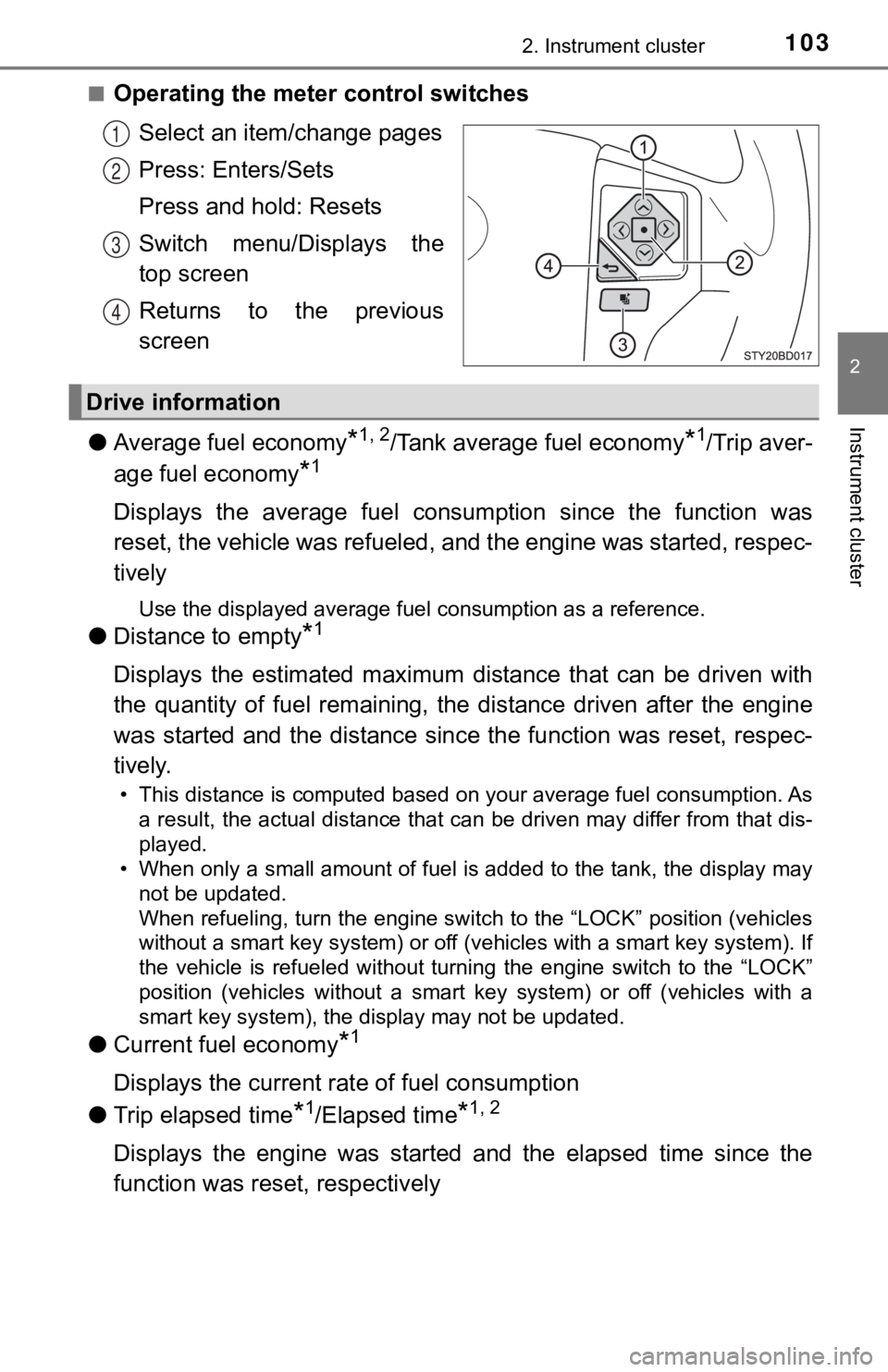
■Operating the meter control switchesSelect an item/change pages
Press: Enters/Sets
Press and hold: Resets
Switch menu/Displays the
top screen
Returns to the previous
screen
● Average fuel economy
*1, 2/Tank average fuel economy*1/Trip aver-
age fuel economy
*1
Displays the average fuel consum ption since the function was
reset, the vehicle was refueled, and the engine was started, respec-
tively
Use the displayed average fuel consumption as a reference.
● Distance to empty*1
Displays the estimated maximum distance that can be driven with
the quantity of fuel remaining, t he distance driven after the engine
was started and the distance sinc e the function was reset, respec-
tively.
• This distance is computed based on your average fuel consumpti on. As
a result, the actual distance that can be driven may differ fro m that dis-
played.
• When only a small amount of fuel is added to the tank, the dis play may
not be updated.
When refueling, turn the engine switch to the “LOCK” position ( vehicles
without a smart key system) or off (vehicles with a smart key system). If
the vehicle is refueled without turning the engine switch to th e “LOCK”
position (vehicles without a smart key system) or off (vehicles with a
smart key system), the display may not be updated.
● Current fuel economy*1
Displays the current rat e of fuel consumption
● Trip elapsed time
*1/Elapsed time*1, 2
Displays the engine was started and the elapsed time since the
function was reset, respectively
1
2
3
4
Drive information
Page 104 of 616
1042. Instrument cluster
●Trip average speed*1/Average speed*1, 2
Displays the engine was started and the average vehicle speed
since the function was reset, respectively
● Trip distance
*1/Distance*1, 2
Displays the engine was started and the distance since the func tion
was reset, respectively
● Digital speedometer
*1
●Display off*1
A blank screen is displayed
*1: Can be registered to Drive information 1 through 3.
*2: Resetting procedures:
• Select a function to be reset using the meter control switch a nd then
press and hold the center button to reset.
• If there is more than one function that can be reset, check bo xes will be
displayed next to the functions.
● Clinometer (if equipped)
Displays the longitudinal and lateral inclination of the vehicl e.
● LDA (Lane Departure Alert) (if equipped)
P. 2 5 8
● Dynamic radar cruise control (if equipped)
P. 2 6 6
● Intuitive parking a ssist (if equipped)
P. 2 8 4
● Multi-terrain select (if equipped)
P. 3 1 4
● Crawl control (if equipped)
P. 3 1 8
● Tire inflation pressure (if equipped)
P. 4 3 2
Vehicle information
Page 115 of 616

1153-1. Key information
3
Operation of each component
■When required to leave the vehicle ’s key with a parking attendant (type
D)
Lock the glove box as circumstances demand. ( P. 357)
Remove the mechanical key for your own use and provide the attendant with
the electronic key only.
■ If you lose your keys
Type A, B and C
New genuine key can be made by your Toyota dealer using the other key and
the key number stamped on your key number plate.
Keep the plate in a safe place such as your wallet, not in the vehicle.
Type D
New genuine key can be made by your Toyota dealer.
The following are necessary when making new keys.
Mechanical key:
The key number for the mechanical key stamped on the number pla te and the
other key.
Key:
The key number for key stamped on the key number plate.
Keep the plates in a safe place such as your wallet, not in the vehicle.
There are key number plates for the mechanical key and key resp ectively.
When storing them, keep them in a safe place in a manner to dis tinguish one
from the other (such as markings, etc.).
■ When riding in an aircraft (type C or type D)
When bringing an wireless remote control function onto an aircr aft, make sure
you do not press any button on the key while inside the aircraf t cabin. If you
are carrying the key in your bag, etc., ensure that the buttons are not likely to
be pressed accidentally. Pressing a button may cause the key to emit radio
waves that could interfere with the operation of the aircraft.
■ Conditions affecting operation (type C or type D)
Type C
The wireless remote control function may not operate normally i n the follow-
ing situations:
● Near a TV tower, radio station, electric power plant, airport o r other facility
that generates strong radio waves
● When carrying a portable radio, cellular phone or other wireles s communi-
cation devices
● When multiple wireless keys are in the vicinity
● When the wireless key is in contact with, or is covered by a me tallic object
● When a wireless key (that emits radio waves) is being used near by
● When the wireless key has been left near an electrical applianc e such as a
personal computer
Type D
P. 134
Page 124 of 616
1243-2. Opening, closing and locking the doors
■Setting and canceling the functions
The automatic door locking and unlocking functions can be set o r
canceled on the Audio system screen ( P. 568) or by following the
procedure below.
Vehicles without a smart key system: Close all the doors and tu rn
the engine switch to the “ON” po sition. (Perform step within
10 seconds.)
Vehicles with a smart key system : Close all the doors and turn
the engine switch to IGNITION ON mode. (Perform step
within 10 seconds.)
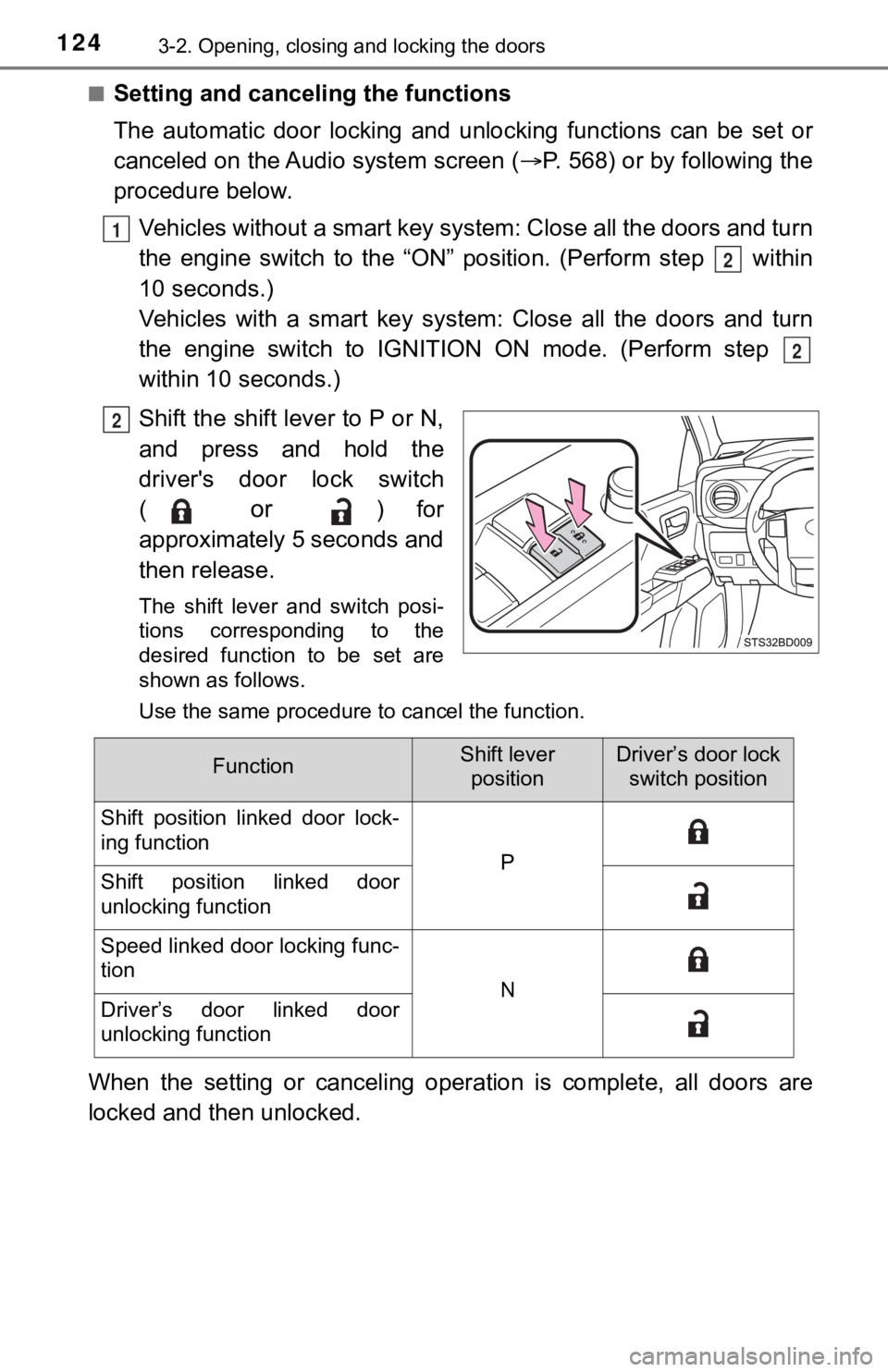
Shift the shift lever to P or N,
and press and hold the
driver's door lock switch
(
or ) for
approximately 5 seconds and
then release.
The shift lever and switch posi-
tions corresponding to the
desired function to be set are
shown as follows.
Use the same procedure to cancel the function.
When the setting or canceling oper ation is complete, all doors are
locked and then unlocked.
1
2
2
2
FunctionShift lever positionDriver’s door lock switch position
Shift position linked door lock-
ing function
PShift position linked door
unlocking function
Speed linked door locking func-
tion
NDriver’s door linked door
unlocking function
Page 125 of 616
1253-2. Opening, closing and locking the doors
3
Operation of each component
■Rear seat reminder function
●In order to remind you not to forget luggage, etc. in the rear seat, when the
engine switch is turned off after any of the following conditio ns are met, a
message will be displayed on the multi-information display for approximately
6 seconds.
• The engine is started within 10 minutes after opening and clos ing a rear
door.
• A rear door has been opened and closed after the engine was st arted.
However, if a rear door is opened and then closed within approx imately 2 sec-
onds, the rear seat reminder function may not operate.
● The rear seat reminder function determines that luggage, etc., has been
placed in a rear seat based on opening and closing of a rear door. There-
fore, depending on the situation, the rear seat reminder function may not
operate and you may still forget luggage, etc., in the rear seat, or it may
operate unnecessarily.
● The rear seat reminder function can be enabled/disabled. ( P. 574)
■ Customization that can be configured at Toyota dealer
Settings (e.g. unlocking function using a key) can be changed.
(Customizable features: P. 574)
WARNING
■ To prevent an accident
Observe the following precautions while driving the vehicle.
Failure to do so may result in a door opening and an occupant throwing out
of the vehicle, resulting in death or serious injury.
● Ensure that all doors are properly closed and locked.
● Do not pull the inside handle of the doors while driving.
Be especially careful for the front doors, as the doors may be opened even
if the inside lock buttons are in locked position.
● Double Cab models only: Set the rear door child-protector locks when chil-
dren are seated in the rear seats.
NOTICE
■When opening or closing the front door and access door (Access Cab
models only)
The front door and access door could be damaged if they hit each other
when being opened or closed.
Page 132 of 616
1323-2. Opening, closing and locking the doors
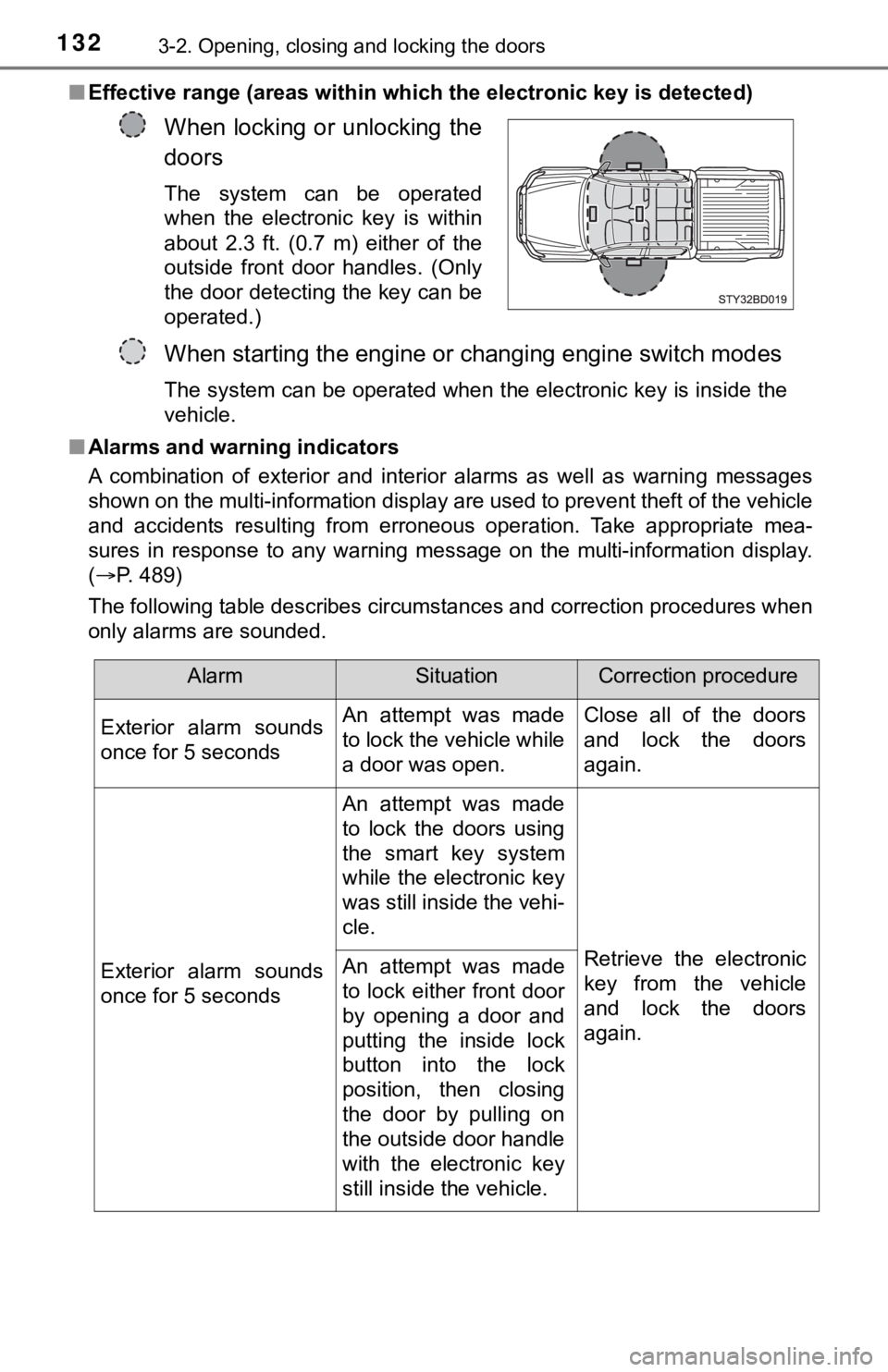
■Effective range (areas within which the electronic key is detec ted)
■ Alarms and warning indicators
A combination of exterior and interior alarms as well as warnin g messages
shown on the multi-information display are used to prevent theft of the vehicle
and accidents resulting from erroneous operation. Take appropriate mea-
sures in response to any warning message on the multi-information display.
( P. 489)
The following table describes circumstances and correction procedures when
only alarms are sounded.
When locking or unlocking the
doors
The system can be operated
when the electronic key is within
about 2.3 ft. (0.7 m) either of the
outside front door handles. (Only
the door detecting the key can be
operated.)
When starting the engine or changing engine switch modes
The system can be operated when the electronic key is inside the
vehicle.
AlarmSituationCorrection procedure
Exterior alarm sounds
once for 5 seconds An attempt was made
to lock the vehicle while
a door was open.Close all of the doors
and lock the doors
again.
Exterior alarm sounds
once for 5 seconds An attempt was made
to lock the doors using
the smart key system
while the electronic key
was still inside the vehi-
cle.
Retrieve the electronic
key from the vehicle
and lock the doors
again.
An attempt was made
to lock either front door
by opening a door and
putting the inside lock
button into the lock
position, then closing
the door by pulling on
the outside door handle
with the electronic key
still inside the vehicle.