100 kg TOYOTA TACOMA 2023 Owners Manual
[x] Cancel search | Manufacturer: TOYOTA, Model Year: 2023, Model line: TACOMA, Model: TOYOTA TACOMA 2023Pages: 616, PDF Size: 12.92 MB
Page 100 of 616

1002. Instrument cluster
■The multi-information display illuminate when
Vehicles without a smart key system:
The engine switch is in the “ON” position.
Vehicles with a smart key system:
The engine switch is in IGNITION ON mode.
■ The brightness of the in strument panel lights
When the tail lights are turned on, the display’s brightness will be reduced
slightly unless the meter brightness level adjustment is set to the brightest
setting.
■ Outside temperature display
●In the following situations, the correct outside temperature ma y not be dis-
played, or the display may take longer than normal to change.
• When stopped, or driving at low speeds (less than 12 mph [20 k m/h])
• When the outside temperature has changed suddenly (at the entr ance/
exit of a garage, tunnel, etc.)
● When “--” or “E” is displayed, the system may be malfunctioning .
Take your vehicle to your Toyota dealer.
■ Liquid crystal display
Small spots or light spots may appear on the display. This phen omenon is
characteristic of liquid crystal displays, and there is no prob lem continuing to
use the display.
Page 107 of 616
1072. Instrument cluster
2
Instrument cluster
■Setting items
●Setting items are not selectable during driving and cannot be o perated.
Also, the settings screen is temporarily canceled in the follow ing situations.
• A warning message is displayed.
• The vehicle starts off.
● Settings for functions not equipped to the vehicle are not displayed.
● When a function is turned off, the related settings for that fu nction are not
selectable.
■ Pop-up display
In some situations, such as when a switch operation is performe d, a pop-up
display will be temporarily displayed on the multi-information display.
■ When disconnecting and reco nnecting battery terminals
The drive information will be reset.
■ Ending display
When the engine switch is turned off, each of the following wil l be displayed
on the multi-information display, and will extinguish after app roximately
30 seconds.
● Distance traveled
● Average fuel economy
● Distance to empty
■ Tire inflation pressure (vehicles with tire pressure warning sy stem)
● It may take a few minutes to display the tire inflation pressur e after the
engine switch is turned to the “ON” position (vehicles without a smart key
system) or IGNITION ON mode (vehicles with a smart key system). It may
also take a few minutes to display the tire inflation pressure after inflation
pressure has been adjusted.
● “---” may be displayed if the tire position information cannot be determined
due to unfavorable radio wave conditions.
● Tire inflation pressure changes with temperature. The displayed values may
also be different from the values measured using a tire pressur e gauge.
■ Liquid crystal display
P. 100
Page 171 of 616

1714-1. Before driving
4
Driving
■Breaking in your new Toyota
To extend the life of the vehicle, observing the following prec autions is recom-
mended:
● For the first 200 miles (300 km):
Avoid sudden stops.
● For the first 500 miles (800 km):
Do not tow a trailer.
● For the first 1000 miles (1600 km):
• Do not drive at extremely high speeds.
• Avoid sudden acceleration.
• Do not drive continuously in low gears.
• Do not drive at a constant speed for extended periods.
■ Operating your vehicle in a foreign country
Comply with the relevant vehicle registration laws and confirm the availability
of the correct fuel. ( P. 554)
■ When turning off the engine
The emission system operating sounds may continue for a short time after
the engine is turned off. This is not a malfunction, and helps to ensure optimal
performance of the emission system.
Page 188 of 616
1884-1. Before driving
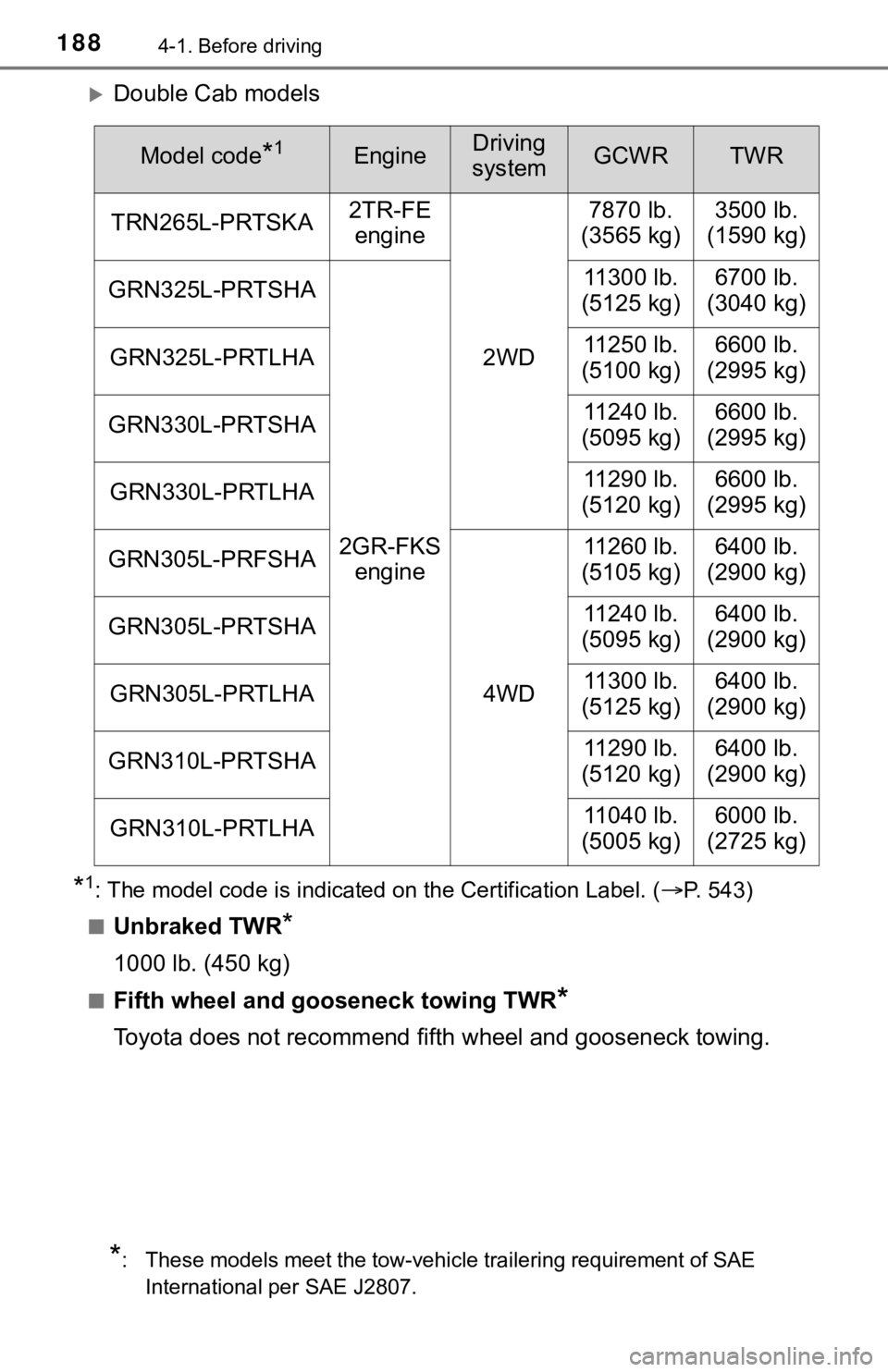
Double Cab models
*1: The model code is indicated on the Certification Label. (P. 543)
■Unbraked TWR*
1000 lb. (450 kg)
■Fifth wheel and gooseneck towing TWR*
Toyota does not recommend fifth wheel and gooseneck towing.
Model code*1EngineDriving
systemGCWRTWR
TRN265L-PRTSKA 2TR-FE
engine
2WD7870 lb.
(3565 kg) 3500 lb.
(1590 kg)
GRN325L-PRTSHA
2GR-FKS engine 11300 lb.
(5125 kg)
6700 lb.
(3040 kg)
GRN325L-PRTLHA 11250 lb.
(5100 kg)6600 lb.
(2995 kg)
GRN330L-PRTSHA 11240 lb.
(5095 kg)6600 lb.
(2995 kg)
GRN330L-PRTLHA 11290 lb.
(5120 kg)6600 lb.
(2995 kg)
GRN305L-PRFSHA
4WD11260 lb.
(5105 kg)
6400 lb.
(2900 kg)
GRN305L-PRTSHA 11240 lb.
(5095 kg)6400 lb.
(2900 kg)
GRN305L-PRTLHA 11300 lb.
(5125 kg)6400 lb.
(2900 kg)
GRN310L-PRTSHA 11290 lb.
(5120 kg)6400 lb.
(2900 kg)
GRN310L-PRTLHA 11040 lb.
(5005 kg)6000 lb.
(2725 kg)
*: These models meet the tow-vehicle trailering requirement of SAE
International per SAE J2807.
Page 189 of 616
1894-1. Before driving
4
Driving
●A recommended tongue weight or kingpin weight varies in accor-
dance with the types of trailer s or towing as described below.
● To ensure the recommended values shown below, the trailer must
be loaded by referring to t he following instructions.
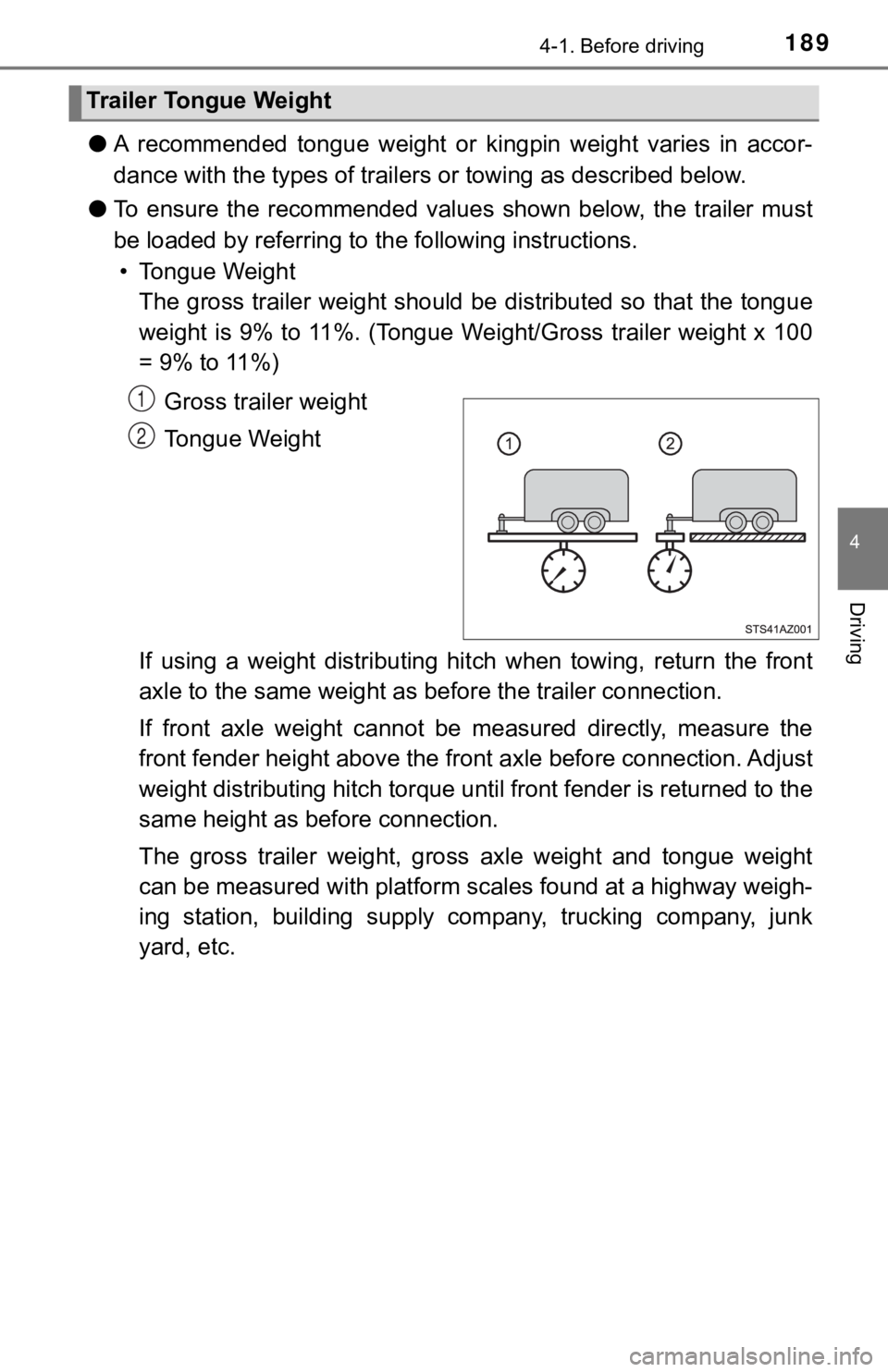
• Tongue Weight The gross trailer weight should be distributed so that the tong ue
weight is 9% to 11%. (Tongue We ight/Gross trailer weight x 100
= 9% to 11%)
Gross trailer weight
Tongue Weight
If using a weight distributing hi tch when towing, return the front
axle to the same weight as b efore the trailer connection.
If front axle weight cannot be measured directly, measure the
front fender height above the front axle before connection. Adjust
weight distributing hitch torque until front fender is returned to the
same height as b efore connection.
The gross trailer weight, gross axle weight and tongue weight
can be measured with platform sca les found at a highway weigh-
ing station, building supply company, trucking company, junk
yard, etc.
Trailer Tongue Weight
1
2
Page 197 of 616
1974-1. Before driving
4
Driving
■When towing a trailer
Disable the following systems, as the systems may not operate p roperly.
● LDA (Lane Departure Alert with Yaw Assist Function) (if equippe d)
( P. 258)
● Dynamic radar cruise control (if equipped) ( P. 266)
● Cruise control (if equipped) ( P. 280)
● BSM (Blind Spot Monitor) (if equipped) ( P. 292)
● Intuitive parking assist (if equipped) ( P. 284)
● RCTA (Rear Cross Traffic Alert) function (if equipped) ( P. 292)
■ Break-in schedule
If your vehicle is new or equipped with any new power train com ponents
(such as an engine, transmission, differential or wheel bearing ), Toyota rec-
ommends that you do not tow a trailer until the vehicle has bee n driven for
over 500 miles (800 km).
After the vehicle has been driven for over 500 miles (800 km), you can start
towing. However, for the next 500 miles (800 km), drive the veh icle at a speed
of less than 50 mph (80 km/h) when towing a trailer, and avoid full throttle
acceleration.
■ Maintenance
●If you tow a trailer, your vehicle will require more frequent m aintenance due
to the additional load. (See “Owner’s Warranty Information Book let” or
“Scheduled Maintenance Guide”/“Owner’s Manual Supplement”.)
● Retighten the fixing bolts of the towing ball and bracket after approximately
600 miles (1000 km) of trailer towing.
Page 269 of 616
2694-5. Using the driving support systems
4
Driving
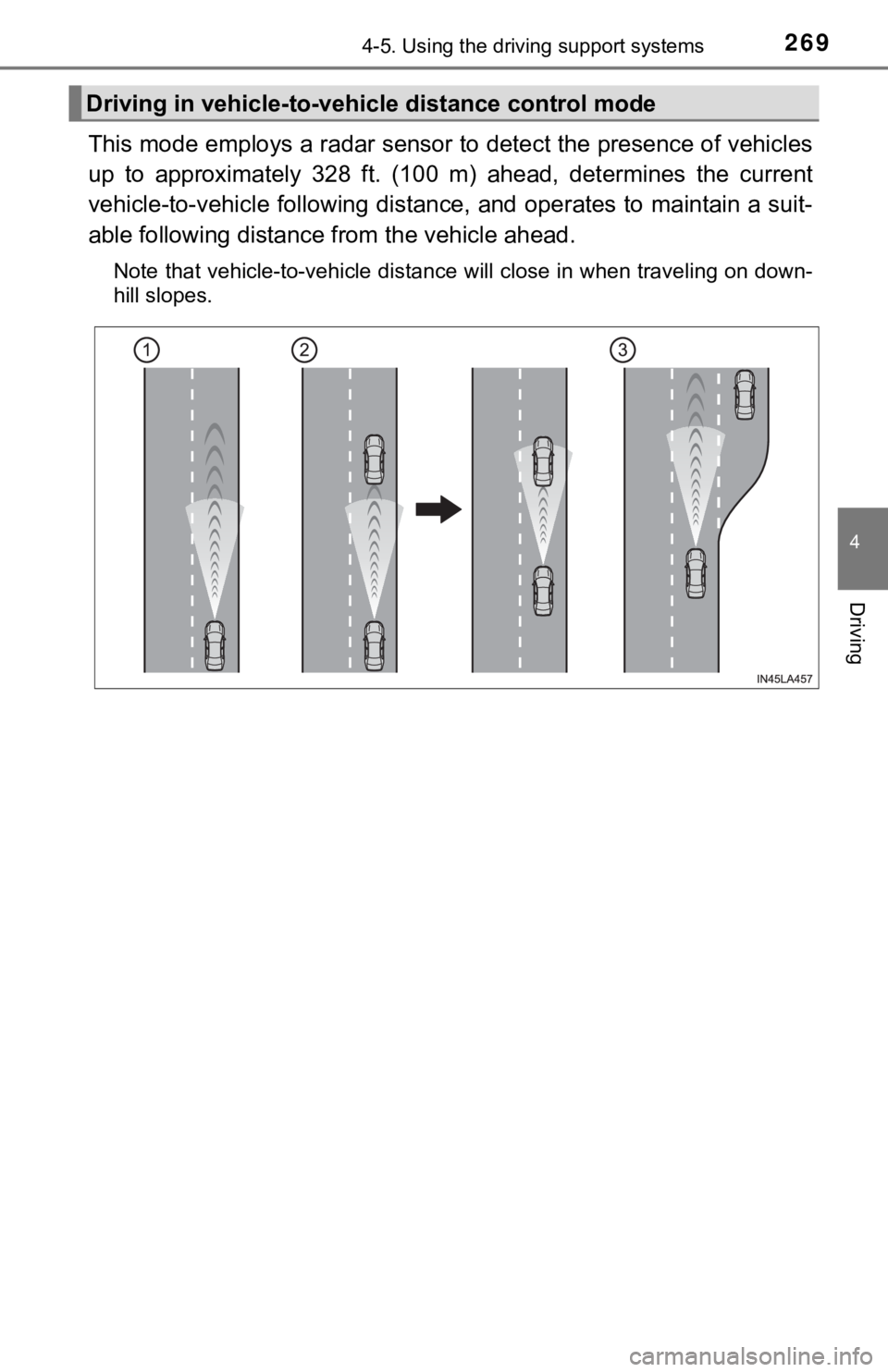
This mode employs a radar sensor to detect the presence of vehicles
up to approximately 328 ft. (100 m) ahead, determines the curre nt
vehicle-to-vehicle following distance, and operates to maintain a suit-
able following distance from the vehicle ahead.
Note that vehicle-to-vehicle distance will close in when travel ing on down-
hill slopes.
Driving in vehicle-to-vehi cle distance control mode
Page 273 of 616
2734-5. Using the driving support systems
4
Driving
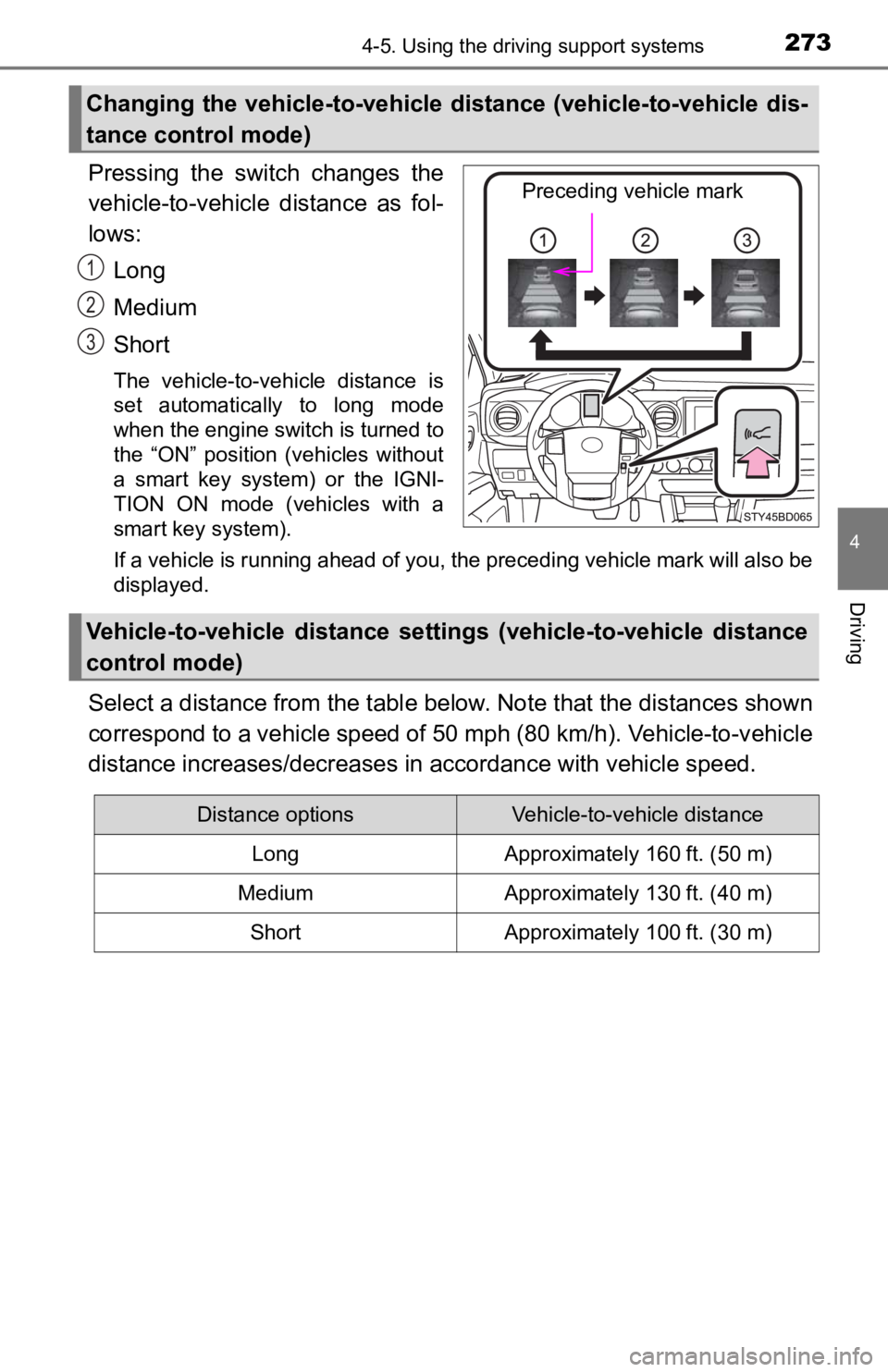
Pressing the switch changes the
vehicle-to-vehicle distance as fol-
lows:Long
Medium
Short
The vehicle-to-vehicle distance is
set automatically to long mode
when the engine switch is turned to
the “ON” position (vehicles without
a smart key system) or the IGNI-
TION ON mode (vehicles with a
smart key system).
If a vehicle is running ahead of you, the preceding vehicle mark will also be
displayed.
Select a distance from the tabl e below. Note that the distances shown
correspond to a vehicle speed of 50 mph (80 km/h). Vehicle-to-v ehicle
distance increases/decreases in accordance with vehicle speed.
Changing the vehicle-to-vehicle d istance (vehicle-to-vehicle dis-
tance control mode)
Preceding vehicle mark
1
2
3
Vehicle-to-vehicle distance settings (vehicle-to-vehicle distan ce
control mode)
Distance optionsVehicle-to-vehicle distance
LongApproximately 160 ft. (50 m)
MediumApproximately 130 ft. (40 m)
ShortApproximately 100 ft. (30 m)
Page 285 of 616
2854-5. Using the driving support systems
4
Driving
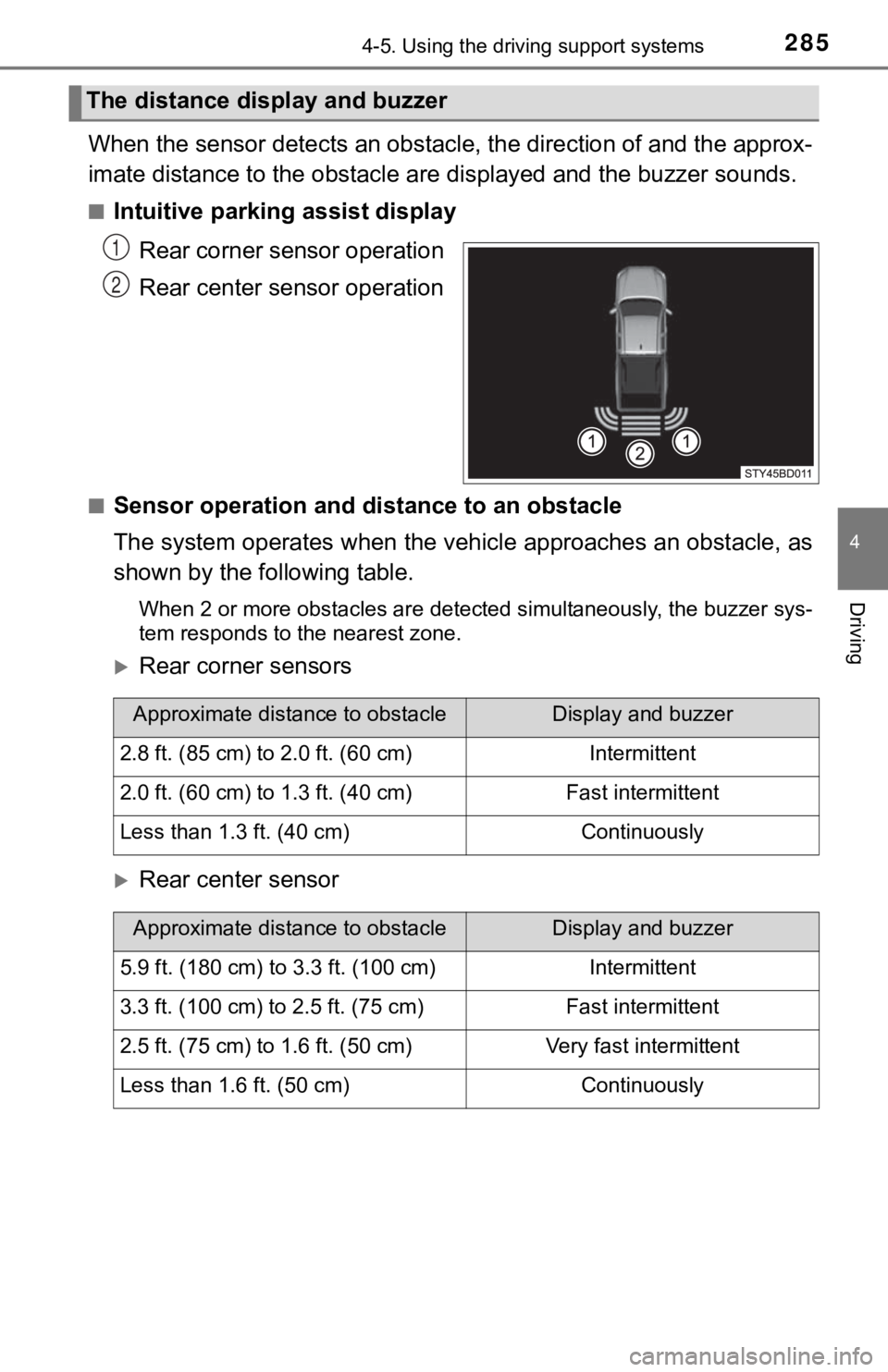
When the sensor detects an obstacle, the direction of and the approx-
imate distance to the o bstacle are displayed and the buzzer sou nds.
■Intuitive parking assist display
Rear corner sensor operation
Rear center sensor operation
■Sensor operation and di stance to an obstacle
The system operates when the vehi cle approaches an obstacle, as
shown by the following table.
When 2 or more obstacles are detected simultaneously, the buzze r sys-
tem responds to the nearest zone.
Rear corner sensors
Rear center sensor
The distance display and buzzer
1
2
Approximate distance to obstacleDisplay and buzzer
2.8 ft. (85 cm) to 2.0 ft. (60 cm)Intermittent
2.0 ft. (60 cm) to 1.3 ft. (40 cm)Fast intermittent
Less than 1.3 ft. (40 cm)Continuously
Approximate distance to obstacleDisplay and buzzer
5.9 ft. (180 cm) to 3.3 ft. (100 cm)Intermittent
3.3 ft. (100 cm) to 2.5 ft. (75 cm)Fast intermittent
2.5 ft. (75 cm) to 1.6 ft. (50 cm)Very fast intermittent
Less than 1.6 ft. (50 cm)Continuously
Page 304 of 616
3044-5. Using the driving support systems
■Shifting from “2WD” to “4H”
Reduce vehicle speed to less than 62 mph (100 km/h).
Turn the front-wheel drive control switch to “4H”.
The four-wheel drive indicator will come on.
■
Shifting from “4H” to “2WD”
Turn the front-wheel drive co ntrol switch to “2WD”.
This can be done at any speed. Y ou need not depress the clutch
pedal. (manual transmission only)
The four-wheel drive indicator will go off.
■
Shifting from “4H” to “4L”
Automatic transmission
Stop the vehicle completely and continue to depress the brake
pedal.
Shift the shift lever to N.
Push and turn the front-wheel drive control switch to “4L”.
The “4LO” indicator will come on.
If the four-wheel drive indicator flashes and the buzzer sounds, try the
above steps again.
Manual transmission
Stop the vehicle or reduce your speed to less than 2 mph (3 km/ h).
Depress and hold the clutch pedal.
Push and turn the front-wheel drive control switch to “4L”.
The “4LO” indicator will come on.
If the four-wheel drive indicator flashes and the buzzer sounds, try the
above steps again.
Shifting between “2WD” and “4H”
Shifting between “4H” and “4L”
1
2
1
2
3
1
2
3