engine TOYOTA tC 2011 (in English) Workshop Manual
[x] Cancel search | Manufacturer: TOYOTA, Model Year: 2011, Model line: tC, Model: TOYOTA tC 2011Pages: 473, PDF Size: 10.91 MB
Page 174 of 473
174 2-1. Driving procedures
Changing shift range in D position■ Shift lever
If the shift lever is shifted into the D position, the most appropriate
gear is automatically selected, as determined by the driving condi-
tions.
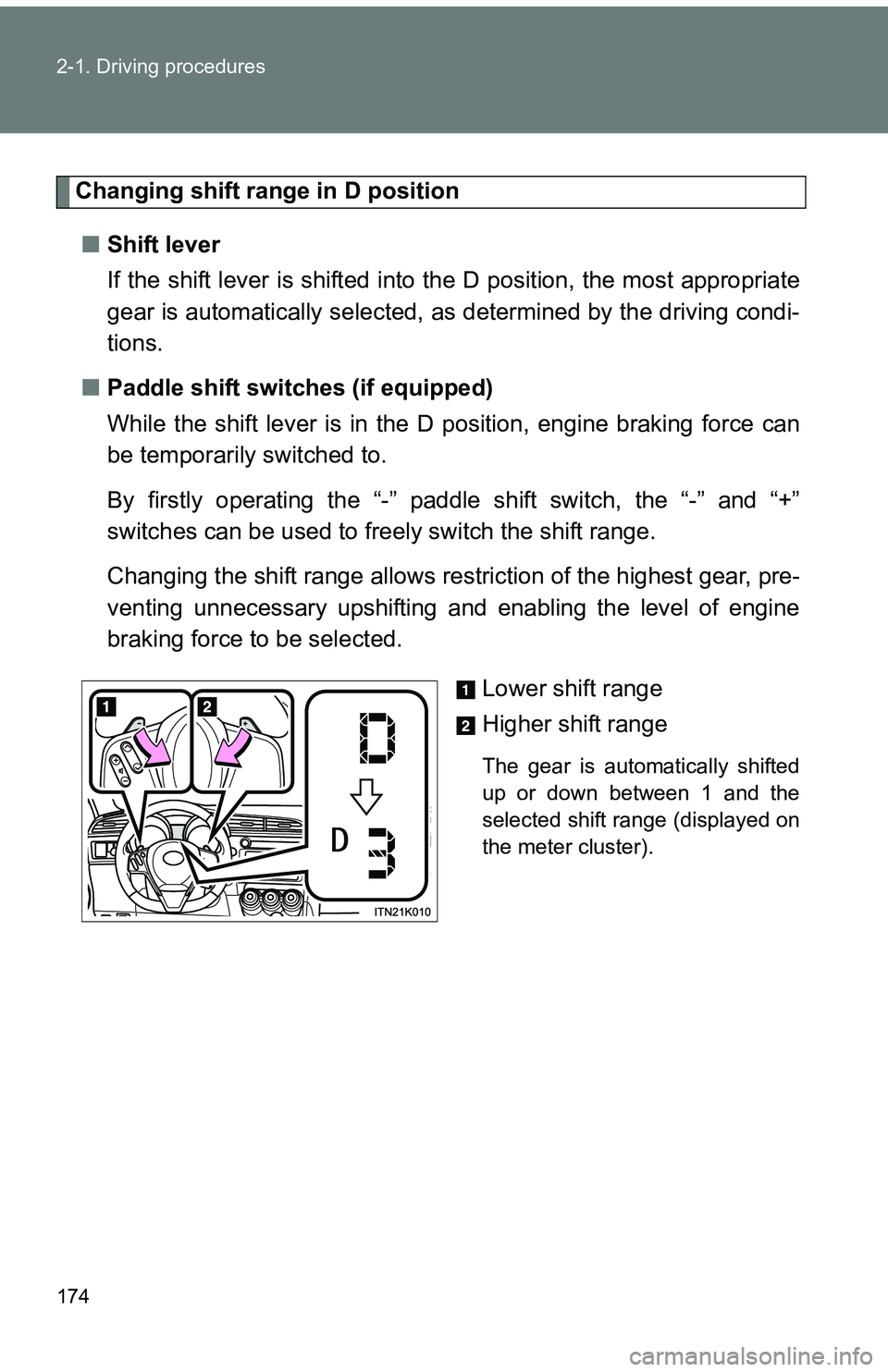
■ Paddle shift switches (if equipped)
While the shift lever is in the D position, engine braking force can
be temporarily switched to.
By firstly operating the “-” paddle shift switch, the “-” and “+”
switches can be used to freely switch the shift range.
Changing the shift range allows rest riction of the highest gear, pre-
venting unnecessary upshifting and enabling the level of engine
braking force to be selected.
Lower shift range
Higher shift range
The gear is automatically shifted
up or down between 1 and the
selected shift range (displayed on
the meter cluster).
Page 175 of 473
175
2-1. Driving procedures
2
When driving
■
Shift ranges and their functions
●Automatically selecting gears between 1 and 6 according to
vehicle speed and driving conditions. However, the gear is lim-
ited according to selected shift range.
● You can choose from 6 levels of engine braking force.
● A lower shift range will provide greater engine br aking force than
a higher shift range, and the engine speed will also increase.
Page 177 of 473
177
2-1. Driving procedures
2
When driving
■
Shift ranges and their functions
●Automatically selecting gears between 1 and 6 according to
vehicle speed and driving conditions. However, the gear is lim-
ited according to selected shift range.
● You can choose from 6 levels of engine braking force.
● A lower shift range will provide greater engine br aking force than
a higher shift range, and the engine speed will also increase.
■Paddle shift switch (if equipped)
●When the “-” paddle shift switch is operated in the D position, a shift
range will be automatically selected. The highest gear of the first shift
range will be one gear lower than the gear in use during normal D posi-
tion driving.
● Automatic deactivation of shift range selection in the D position
Shift range selection in the D position will be deactivated in the following
situations:
• The “+” paddle shift switch is held down for a period of time
• When the vehicle comes to a stop
• If the accelerator pedal is depressed for longer than a certain period of
time in one shift range
■ S mode
●When the shift range is 5 or lower, holding the shift lever toward “+” sets
the shift range to 6.
● To prevent excessive engine speed, a function was adopted that auto-
matically selects a higher shift range before the engine speed becomes
too high.
● To protect the automatic transmission, a function is adopted that auto-
matically selects a higher shift range when the fluid temperature is high.
Page 178 of 473
178 2-1. Driving procedures
■When driving with the cruise control system
The engine brake will not operate in the S mode, even when downshifting to
5 or 4. ( P. 200)
■ AI-SHIFT
AI-SHIFT automatically selects the suitable gear according to driver perfor-
mance and driving conditions.
AI-SHIFT automatically operates when the shift lever is in the D position.
(Shifting the shift lever to the S position cancels the function.)
■ If the “S” indicator does not come on even after shifting the shift lever
to S mode driving position
This may indicate a malfunction in the automatic transmission system. Have
the vehicle inspected by your Scion dealer immediately.
(In this situation, the transmission will operate in the same manner as when
the shift lever is in D.)
■ Downshifting restrictions warning buzzer
To help ensure safety and driving performance, downshifting operation may
sometimes be restricted. In some circumstances, downshifting may not be
possible even when the shift lever or a paddle shift switch (if equipped) is
operated. (The warning buzzer will sound twice.)
■ If the shift lever cannot be shifted from P
P. 392
CAUTION
■When driving on slippery road surfaces
Do not accelerate or shift gears suddenly.
Sudden changes in engine braking may cause the vehicle to spin or skid,
resulting in an accident.
Page 180 of 473
180 2-1. Driving procedures
■Maximum allowable speeds
Observe the downshifting speeds in the following table to prevent over-rev-
ving the engine.
mph (km/h)
NOTICE
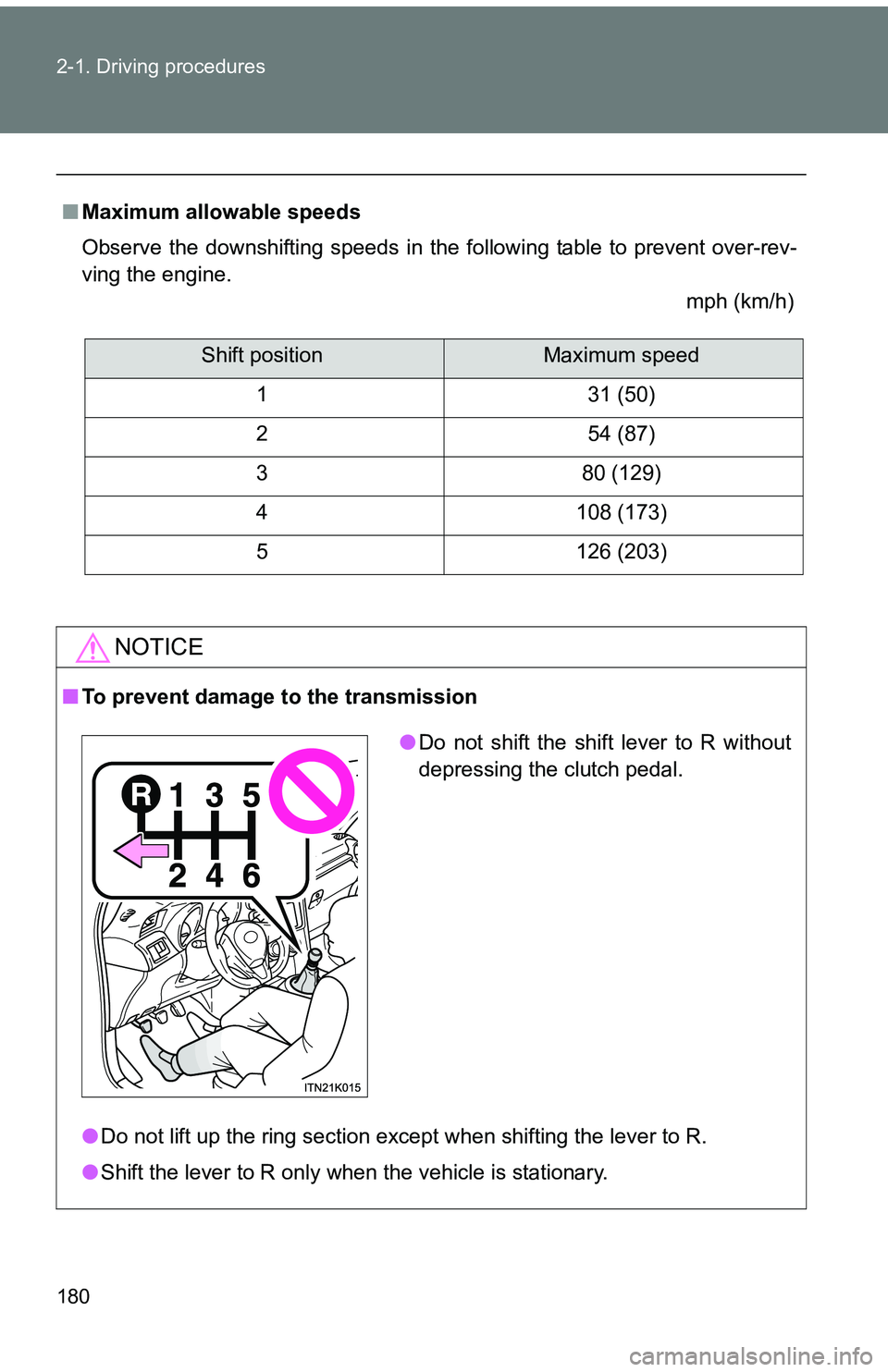
■To prevent damage to the transmission
●Do not lift up the ring section except when shifting the lever to R.
● Shift the lever to R only when the vehicle is stationary.
Shift positionMaximum speed
1 31 (50)
2 54 (87)
3 80 (129)
4 108 (173)
5 126 (203)
● Do not shift the shift lever to R without
depressing the clutch pedal.
Page 181 of 473
181
2-1. Driving procedures
2
When driving
Tur n signal lever
■Turn signals can be operated when
Vehicles without a smart key system
The engine switch is in the “ON” position.
Vehicles with a smart key system
The “ENGINE START STOP” switch is in IGNITION ON mode.
■ If the indicator flashes faster than usual
Check that a light bulb in the front or rear turn signal lights has not burned
out.
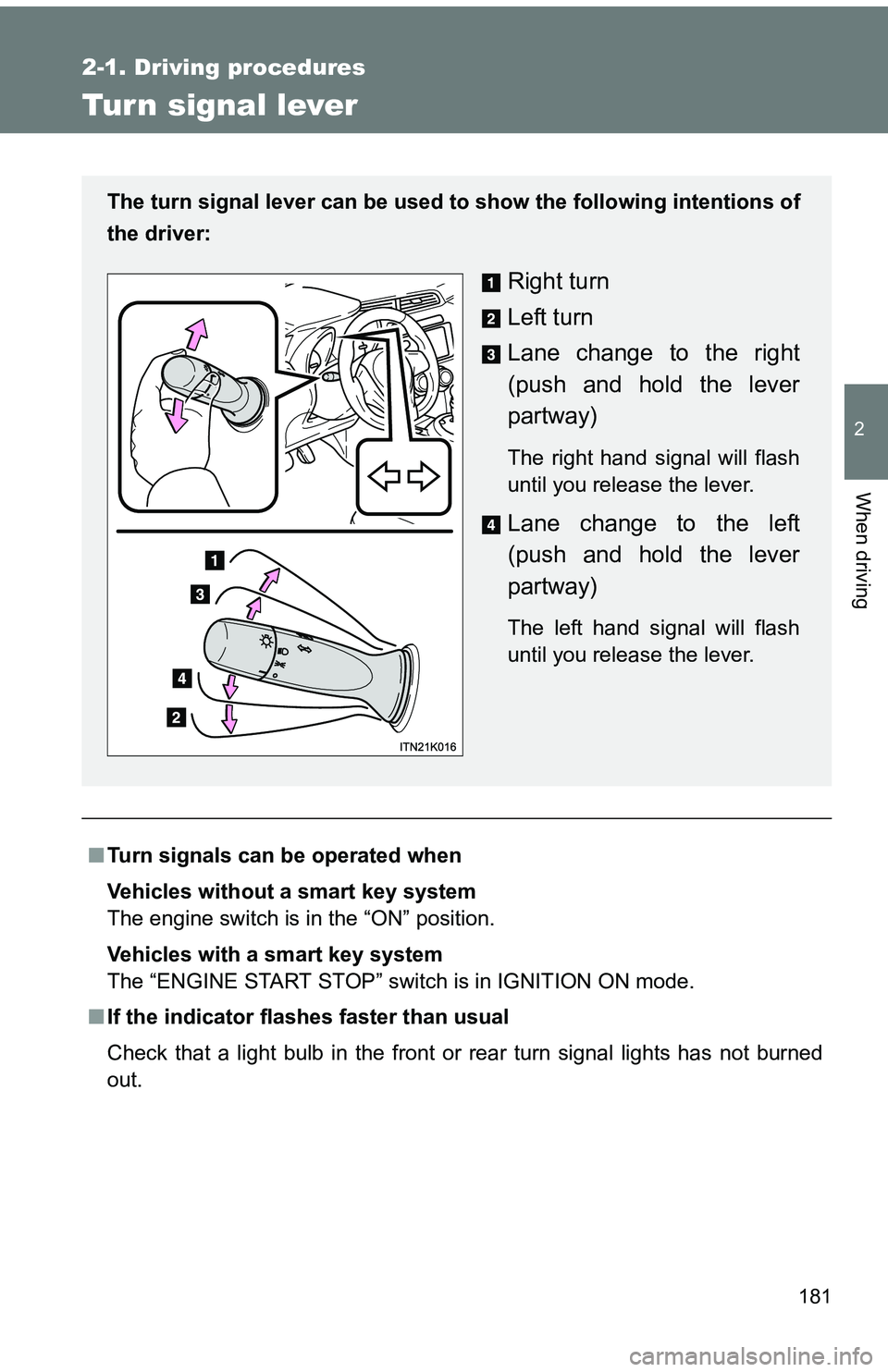
The turn signal lever can be used to show the following intentions of
the driver:
Right turn
Left turn
Lane change to the right
(push and hold the lever
partway)
The right hand signal will flash
until you release the lever.
Lane change to the left
(push and hold the lever
partway)
The left hand signal will flash
until you release the lever.
Page 184 of 473
184
2-2. Instrument cluster
Gauges and meters
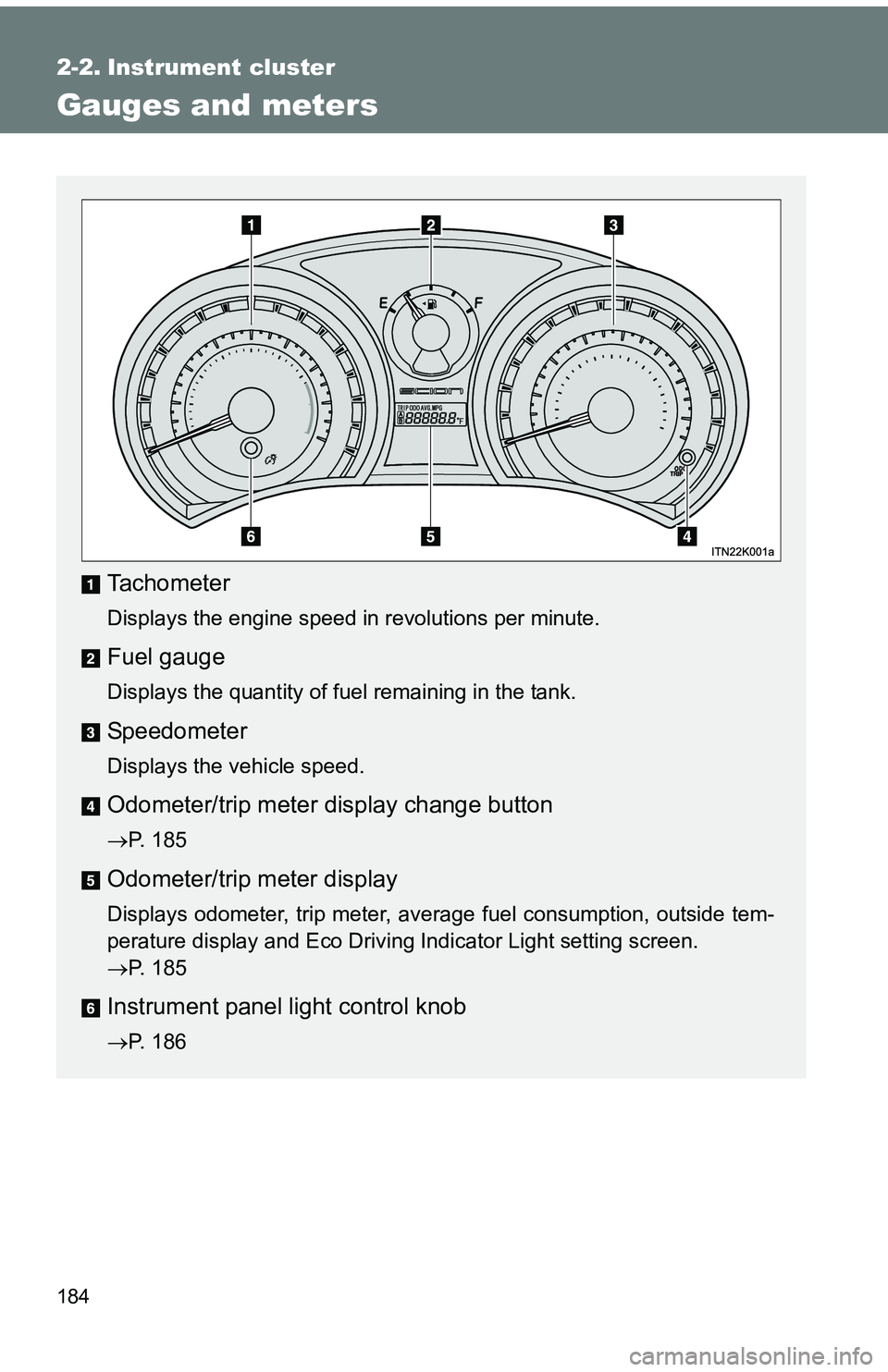
Tachometer
Displays the engine speed in revolutions per minute.
Fuel gauge
Displays the quantity of fuel remaining in the tank.
Speedometer
Displays the vehicle speed.
Odometer/trip meter display change button
P. 185
Odometer/trip meter display
Displays odometer, trip meter, average fuel consumption, outside tem-
perature display and Eco Driving Indicator Light setting screen.
P. 185
Instrument panel light control knob
P. 186
Page 187 of 473
187
2-2. Instrument cluster
2
When driving
■
The brightness of the instrument panel lights
When the headlight switch is turned to on, the brightness will be reduced
slightly unless the control knob is turned fully clockwise.
■ Outside temperature display
●In the following situations, the correct outside temperature may not be
displayed, or the display may take longer than normal to change.
• When stopped, or driving at low speeds (less than 12 mph [20 km/h])
• When the outside temperature has changed suddenly (at the entrance/
exit of a garage, tunnel, etc.)
● When “--” is displayed, the system may be malfunctioning.
Take your vehicle to your Scion dealer.
NOTICE
■To prevent damage to the engine and its components
Do not let the indicator needle of the tachometer enter the red zone, which
indicates the maximum engine speed.
■ The odometer/trip meter di splay at low temperatures
Allow the interior of the vehicle to warm up before using the liquid crystal
information display. At extremely low temperatures, the information display
monitor may respond slowly, and display changes may be delayed.
Page 189 of 473
189
2-2. Instrument cluster
2
When driving
■
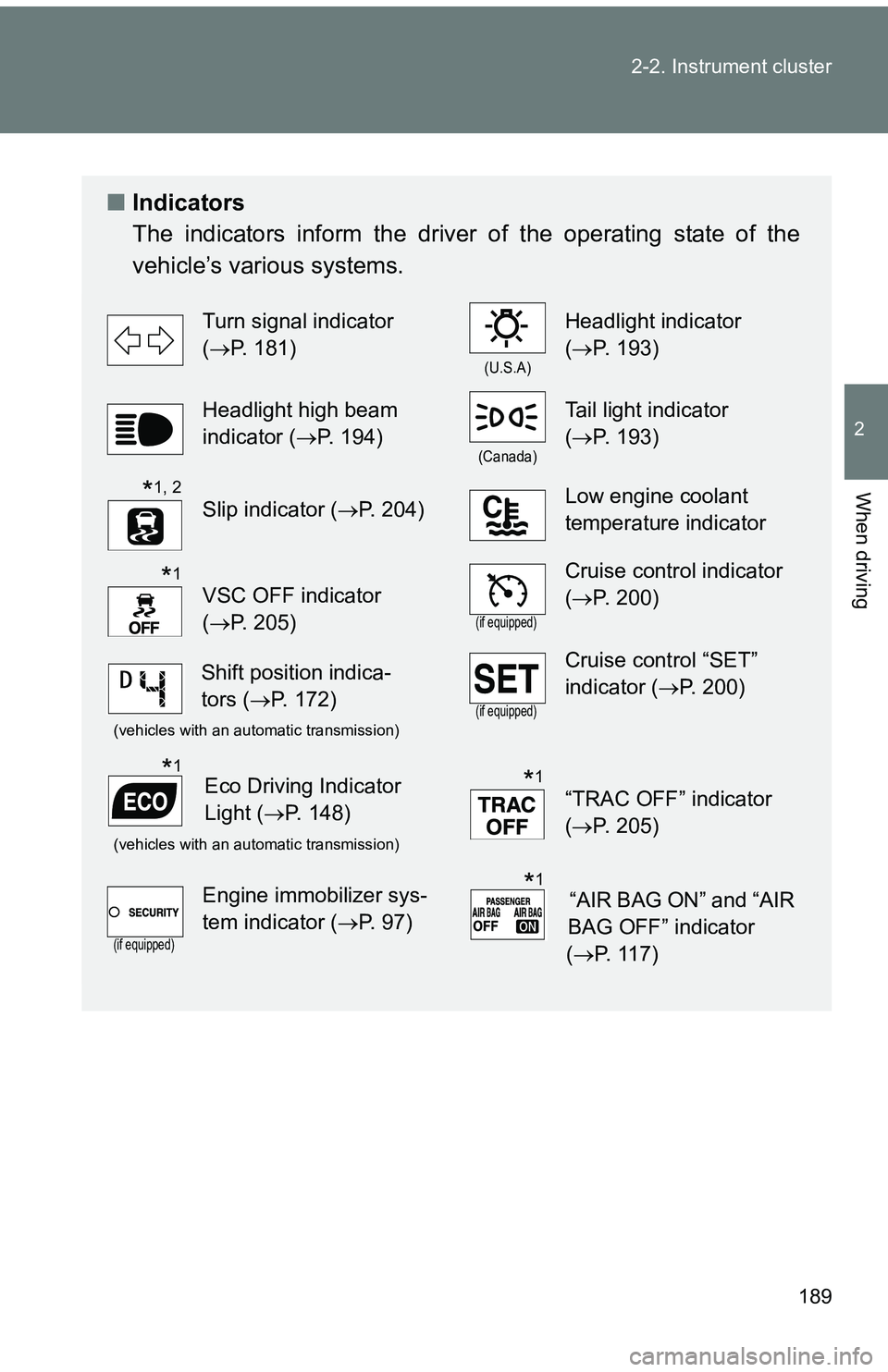
Indicators
The indicators inform the driver of the operating state of the
vehicle’s various systems.
Turn signal indicator
(P. 181)
(U.S.A)
Headlight indicator
(P. 193)
Headlight high beam
indicator ( P. 194)
(Canada)
Tail light indicator
(P. 193)
Slip indicator ( P. 204)Low engine coolant
temperature indicator
VSC OFF indicator
(P. 205)
(if equipped)
Cruise control indicator
(P. 200)
(vehicles with an automatic transmission)(if equipped)
Cruise control “SET”
indicator (P. 200)
(vehicles with an automatic transmission)
“TRAC OFF” indicator
(P. 205)
(if equipped)
Engine immobilizer sys-
tem indicator ( P. 97)
*1, 2
*1
Shift position indica-
tors (P. 172)
Eco Driving Indicator
Light ( P. 148)*1*1
“AIR BAG ON” and “AIR
BAG OFF” indicator
( P. 117)*1
Page 190 of 473
190 2-2. Instrument cluster
*1: These lights turn on when the engine switch is turned to the “ON” posi-tion (vehicles without a smart key system) or the “ENGINE START
STOP” switch is turned to IGNITION ON mode (vehicles with a smart
key system) to indicate that a system check is being performed. They
will turn off after the engine is started, or after a few seconds. There
may be a malfunction in a system if a light does not come on, or if the
lights do not turn off. Have the vehicle inspected by your Scion dealer.
*2: The light flashes to indicate that the system is operating.