alarm TOYOTA tC 2011 Owners Manual (in English)
[x] Cancel search | Manufacturer: TOYOTA, Model Year: 2011, Model line: tC, Model: TOYOTA tC 2011Pages: 473, PDF Size: 10.91 MB
Page 36 of 473
36 1-2. Opening, closing and locking the doors
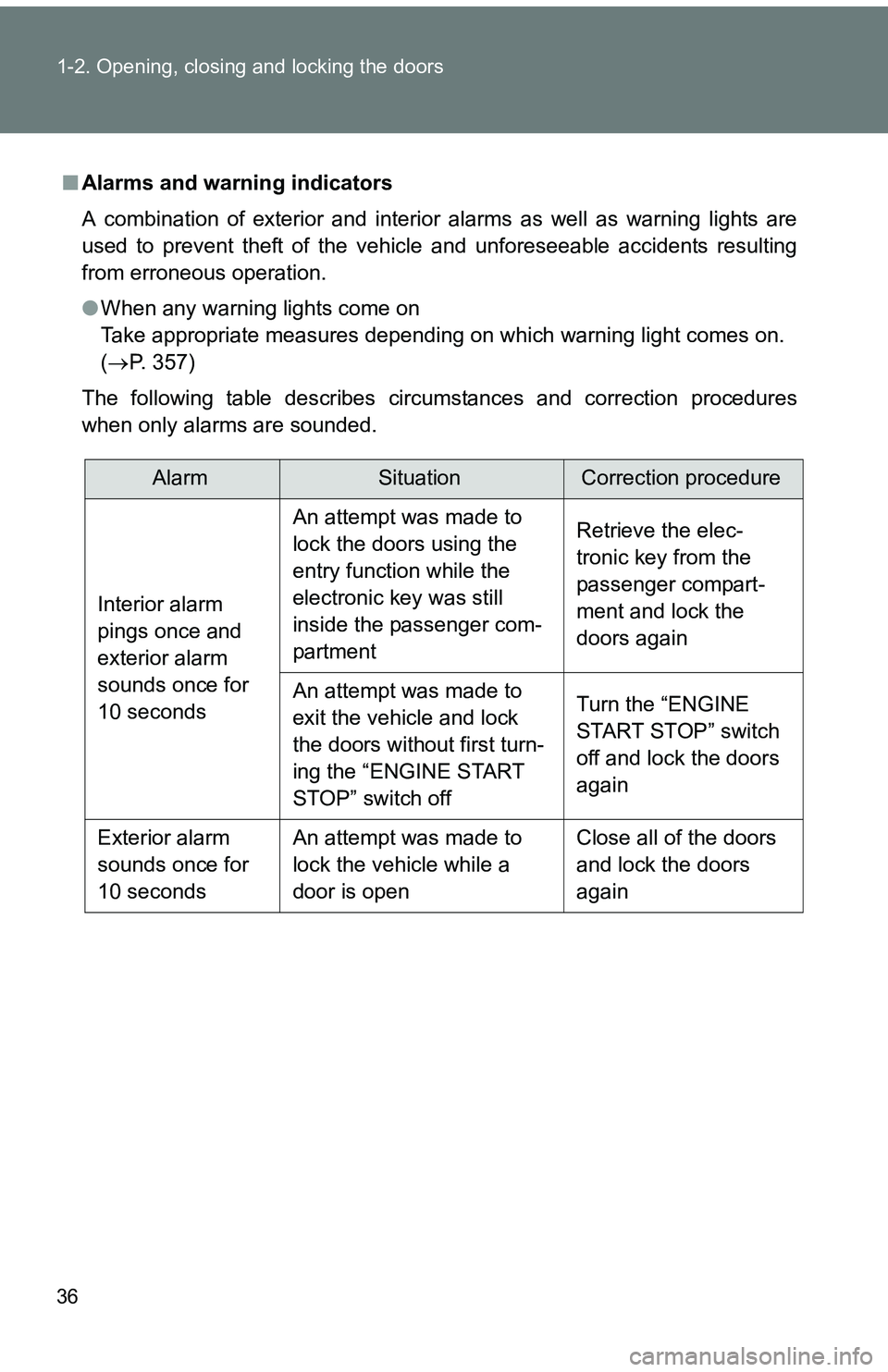
■Alarms and warning indicators
A combination of exterior and interior alarms as well as warning lights are
used to prevent theft of the vehicle and unforeseeable accidents resulting
from erroneous operation.
●When any warning lights come on
Take appropriate measures depending on which warning light comes on.
( P. 357)
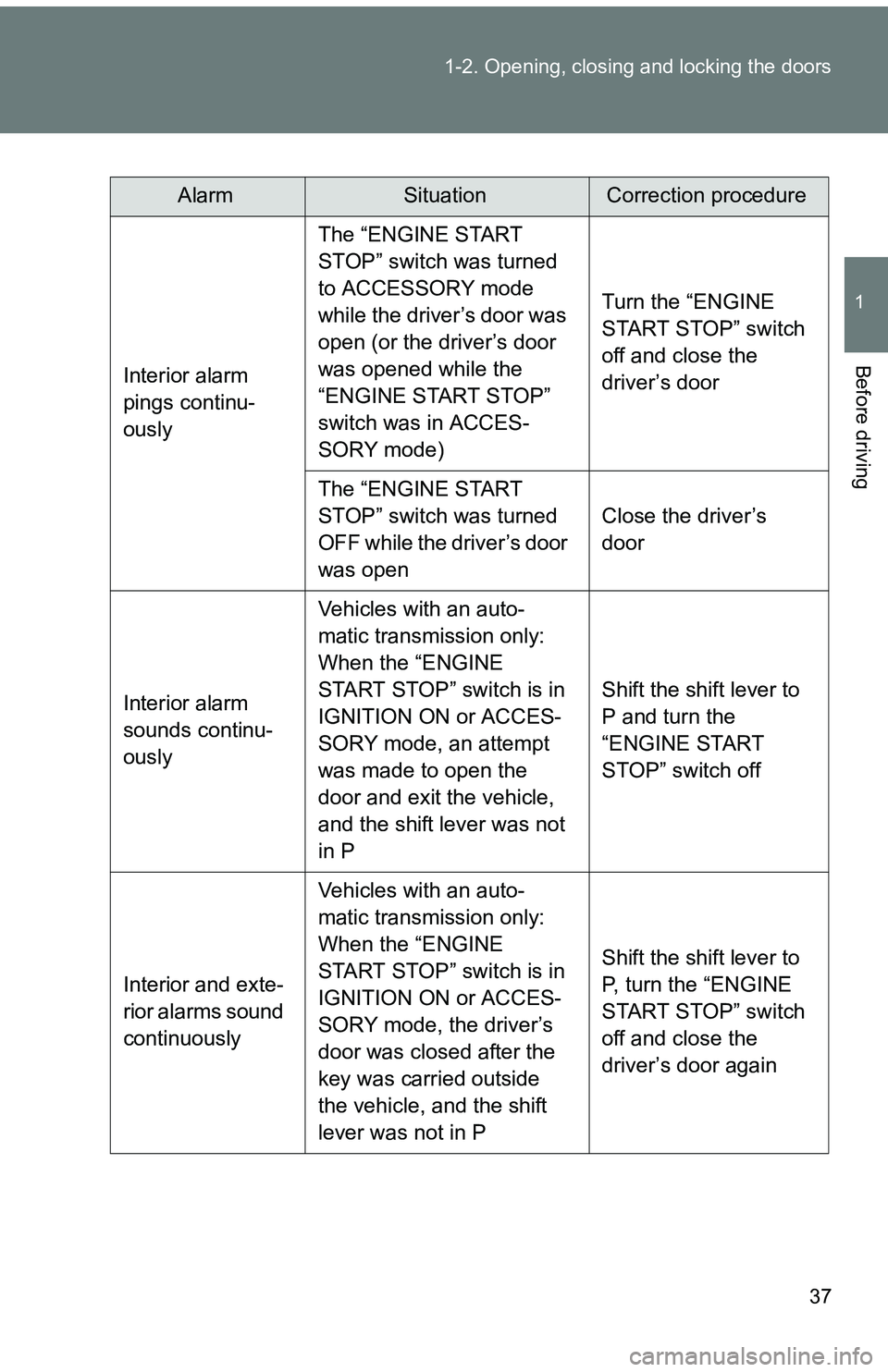
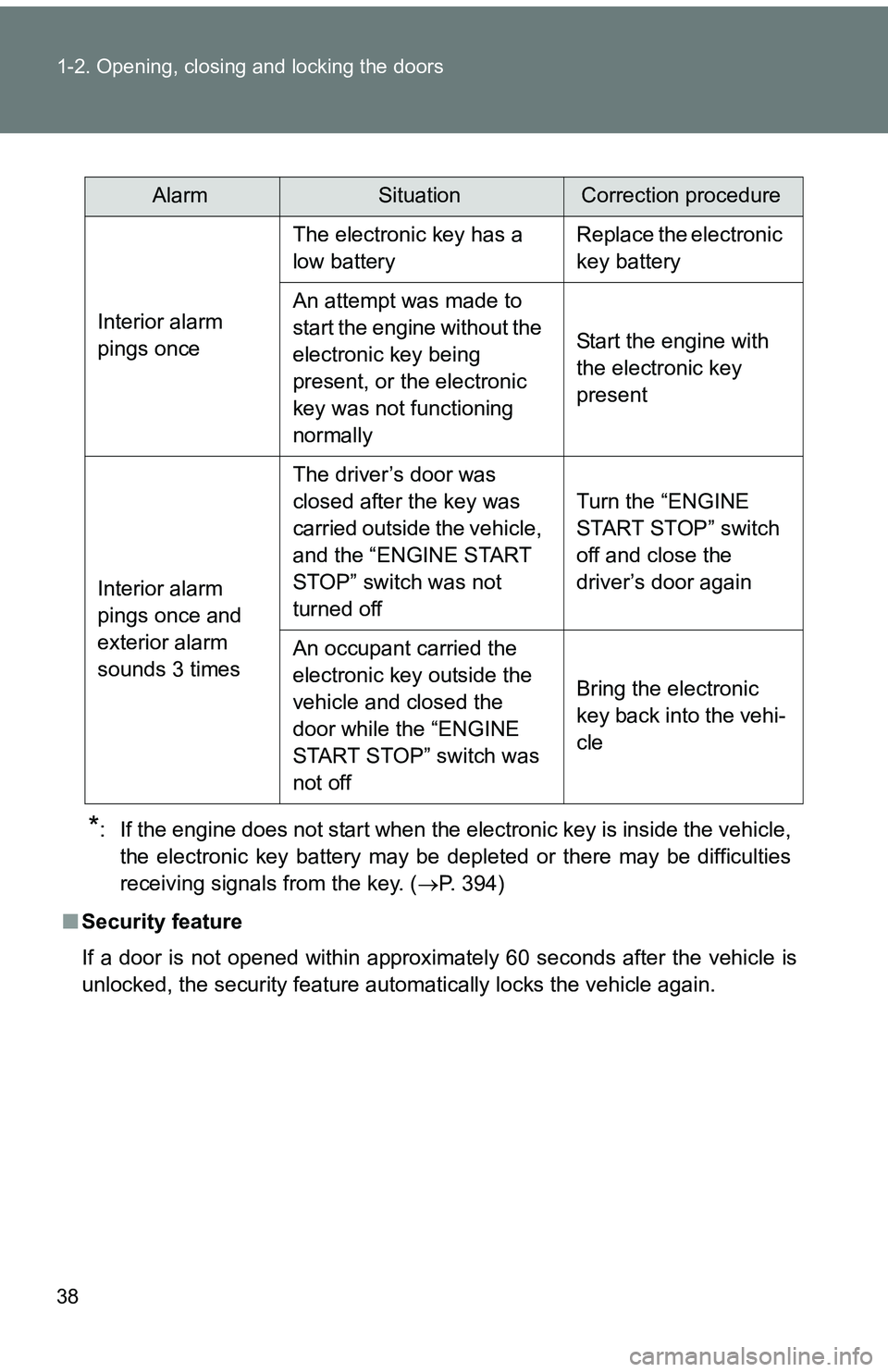
The following table describes circumstances and correction procedures
when only alarms are sounded.
AlarmSituationCorrection procedure
Interior alarm
pings once and
exterior alarm
sounds once for
10 seconds An attempt was made to
lock the doors using the
entry function while the
electronic key was still
inside the passenger com-
partment
Retrieve the elec-
tronic key from the
passenger compart-
ment and lock the
doors again
An attempt was made to
exit the vehicle and lock
the doors without first turn-
ing the “ENGINE START
STOP” switch off Turn the “ENGINE
START STOP” switch
off and lock the doors
again
Exterior alarm
sounds once for
10 seconds An attempt was made to
lock the vehicle while a
door is open Close all of the doors
and lock the doors
again
Page 37 of 473
37
1-2. Opening, closing and locking the doors
1
Before driving
AlarmSituationCorrection procedure
Interior alarm
pings continu-
ously The “ENGINE START
STOP” switch was turned
to ACCESSORY mode
while the driver’s door was
open (or the driver’s door
was opened while the
“ENGINE START STOP”
switch was in ACCES-
SORY mode)
Turn the “ENGINE
START STOP” switch
off and close the
driver’s door
The “ENGINE START
STOP” switch was turned
OFF while the driver’s door
was open Close the driver’s
door
Interior alarm
sounds continu-
ously Vehicles with an auto-
matic transmission only:
When the “ENGINE
START STOP” switch is in
IGNITION ON or ACCES-
SORY mode, an attempt
was made to open the
door and exit the vehicle,
and the shift lever was not
in P Shift the shift lever to
P and turn the
“ENGINE START
STOP” switch off
Interior and exte-
rior alarms sound
continuously Vehicles with an auto-
matic transmission only:
When the “ENGINE
START STOP” switch is in
IGNITION ON or ACCES-
SORY mode, the driver’s
door was closed after the
key was carried outside
the vehicle, and the shift
lever was not in P Shift the shift lever to
P, turn the “ENGINE
START STOP” switch
off and close the
driver’s door again
Page 38 of 473
38 1-2. Opening, closing and locking the doors
*: If the engine does not start when the electronic key is inside the vehicle,the electronic key battery may be depleted or there may be difficulties
receiving signals from the key. ( P. 394)
■ Security feature
If a door is not opened within approximately 60 seconds after the vehicle is
unlocked, the security feature automatically locks the vehicle again.
AlarmSituationCorrection procedure
Interior alarm
pings once The electronic key has a
low battery
Replace the electronic
key battery
An attempt was made to
start the engine without the
electronic key being
present, or the electronic
key was not functioning
normally Start the engine with
the electronic key
present
Interior alarm
pings once and
exterior alarm
sounds 3 times The driver’s door was
closed after the key was
carried outside the vehicle,
and the “ENGINE START
STOP” switch was not
turned off
Turn the “ENGINE
START STOP” switch
off and close the
driver’s door again
An occupant carried the
electronic key outside the
vehicle and closed the
door while the “ENGINE
START STOP” switch was
not off Bring the electronic
key back into the vehi-
cle
Page 43 of 473
43
1-2. Opening, closing and locking the doors
1
Before driving
■
Notes for locking the doors
●Touching the door lock sensor while wearing gloves may delay or prevent
lock operation. Remove the gloves and touch the lock sensor again.
● When the lock operation is performed using the lock sensor, recognition
signals will be shown up to two consecutive times. After this, no recogni-
tion signals will be given.
● If the door handle becomes wet while the electronic key is within the
effective range, the door may lock and unlock repeatedly. Place the key
in a position 6 ft. (2 m) or more separate from the vehicle while the vehi-
cle is being washed. (Take care to ensure that the key is not stolen.)
● If the electronic key is inside the vehicle and a door handle becomes wet
during a car wash, a buzzer will sound outside the vehicle. To turn off the
alarm, lock all the doors.
● The lock sensor may not work properly if it comes into contact with ice,
snow, mud, etc. Clean the lock sensor and attempt to operate it again, or
use the lock sensor on the lower part of the door handle.
Page 44 of 473
44 1-2. Opening, closing and locking the doors
■Notes for the unlocking function
●Gripping the side door handle when wearing a glove may not unlock or
lock the door.
● A sudden approach to the effective range or door handle operation may
prevent the doors from being unlocked. In this case, return the door han-
dle to the original position and check that the doors have unlocked before
pulling the door handle.
● If there is another electronic key in the detection area, it may take slightly
longer to unlock the doors after one of the side door handles are gripped.
■ When the vehicle is not driven for extended periods
●To prevent theft of the vehicle, do not leave the electronic key within 6 ft.
(2 m) of the vehicle.
● The smart key system can be deactivated in advance. Contact your
Scion dealer for details.
■ To operate the system properly
Make sure to carry the electronic key when operating the system. Do not get
the electronic key too close to the vehicle when operating the system from
outside of the vehicle.
Depending on the position and holding condition of the electronic key, the
key may not be detected correctly and the system may not operate properly.
(The alarm may go off accidentally, or the door lock prevention may not
operate.)
■ If the smart key system does not operate properly
● Locking and unlocking the doors: Use the mechanical key. ( P. 394)
● Starting the engine ( P. 395)
Page 45 of 473
45
1-2. Opening, closing and locking the doors
1
Before driving
■
Electronic key battery depletion
●The standard battery life is 1 to 2 years.
● If the battery becomes low, an alarm will sound in the cabin when the
engine stops. ( P. 36)
● As the electronic key always transmits radio waves, the battery will
become depleted even if the electronic key is not used. The following
symptoms indicate that the electronic key battery may be depleted.
Replace the battery when necessary. ( P. 318)
• The smart key system or the wireless remote control does not operate.
• The detection area becomes smaller.
• The LED indicator on the key surface does not turn on.
● To avoid serious deterioration, do not leave the electronic key within 3 ft.
(1 m) of the following electrical appliances that produce a magnetic field.
•TVs
• Personal computers
• Recharging cellular phones or cordless phones
• Cellular phones, cordless phones and battery chargers
• Glass top ranges
• Table lamps
■ When the electronic key battery is fully depleted
P. 318
■ Customization that can be configured at Scion dealer
Settings (e.g. smart key system) can be changed.
(Customizable features P. 438)
Page 48 of 473
48
1-2. Opening, closing and locking the doors
Wireless remote control
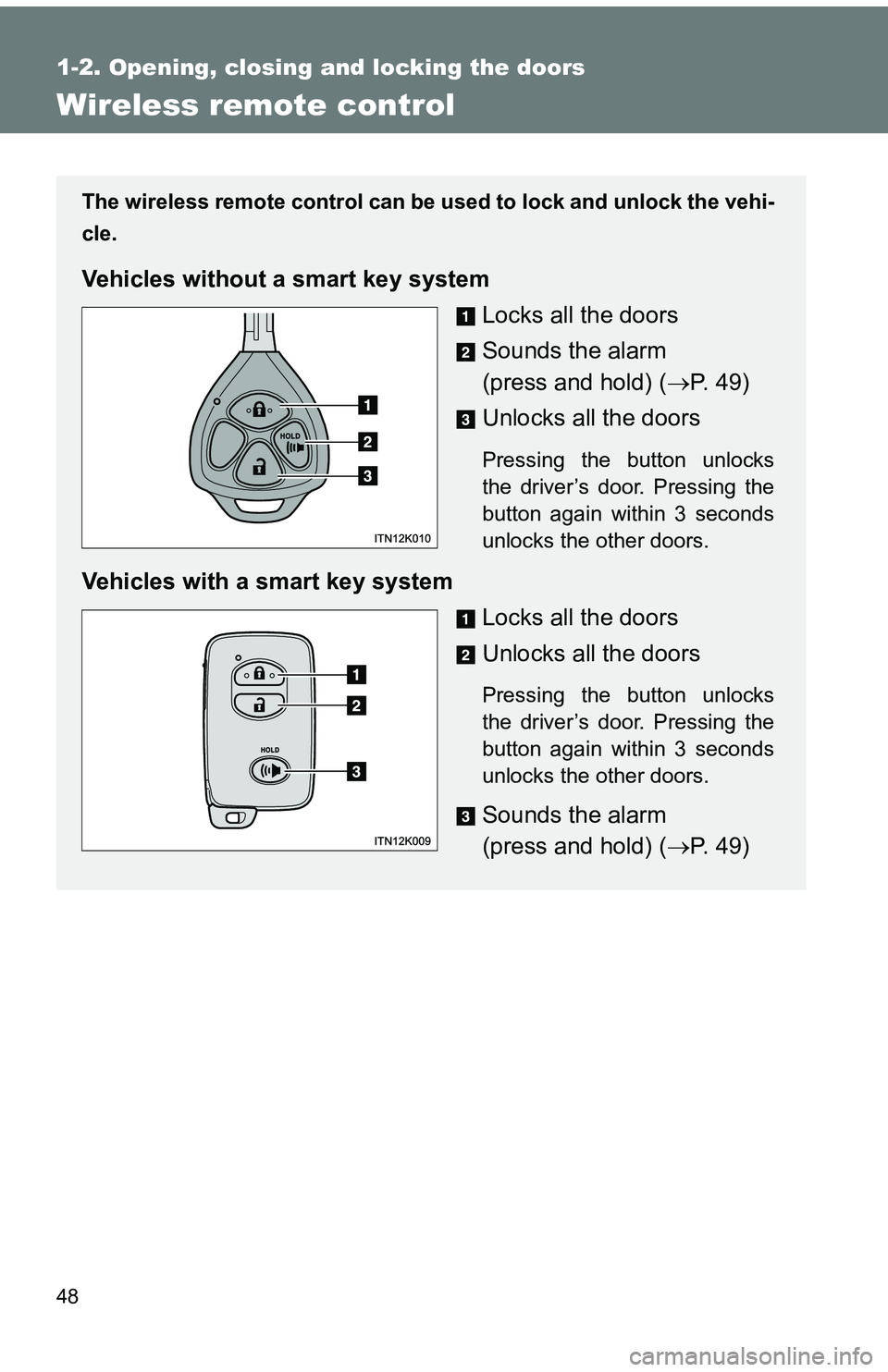
The wireless remote control can be used to lock and unlock the vehi-
cle.
Vehicles without a smart key system
Locks all the doors
Sounds the alarm
(press and hold) (P. 4 9 )
Unlocks all the doors
Pressing the button unlocks
the driver’s door. Pressing the
button again within 3 seconds
unlocks the other doors.
Vehicles with a smart key system Locks all the doors
Unlocks all the doors
Pressing the button unlocks
the driver’s door. Pressing the
button again within 3 seconds
unlocks the other doors.
Sounds the alarm
(press and hold) (P. 4 9 )
Page 49 of 473
49
1-2. Opening, closing and locking the doors
1
Before driving
■
Operation signals
A buzzer sounds and the emergency flashers flash to indicate that the doors
have been locked/unlocked. (Locked: Once; Unlocked: Twice)
■ Door lock buzzer
If an attempt to lock the doors is made when a door is not fully closed, a
buzzer sounds continuously. Fully close the door to stop the buzzer, and lock
the vehicle once more.
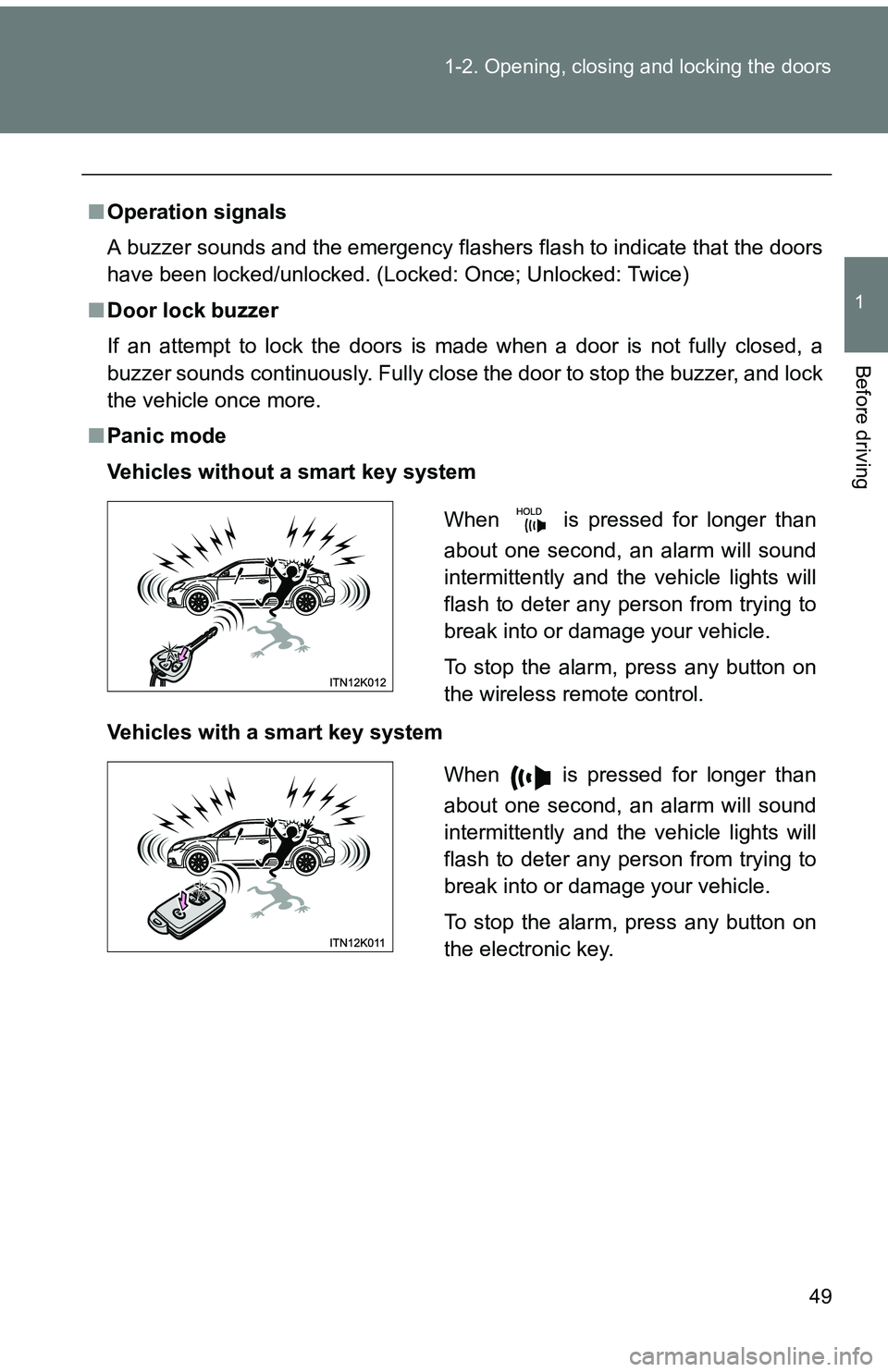
■ Panic mode
Vehicles without a smart key system
Vehicles with a smart key system
When is pressed for longer than
about one second, an alarm will sound
intermittently and the vehicle lights will
flash to deter any person from trying to
break into or damage your vehicle.
To stop the alarm, press any button on
the wireless remote control.
When is pressed for longer than
about one second, an alarm will sound
intermittently and the vehicle lights will
flash to deter any person from trying to
break into or damage your vehicle.
To stop the alarm, press any button on
the electronic key.
Page 263 of 473
263
4-1. Maintenance and care
4
Maintenance and care
■
Automatic car washes
●Fold the mirrors and remove the antenna before washing the vehicle.
Start washing from the front of the vehicle. Make sure to re-install the
antenna and extend the mirrors before driving.
● Brushes used in automatic car washes may scratch the vehicle surface
and harm your vehicle’s paint.
■ High pressure car washes
●Do not allow the nozzles of the car wash to come within close proximity
of the windows.
● Before using the car wash, check that the fuel filler door on your vehicle
is closed properly.
■ Aluminum wheels
●Remove any dirt immediately by using a neutral detergent. Do not use
hard brushes or abrasive cleaners. Do not use strong or harsh chemical
cleaners.
Use the same mild detergent and wax as used on the paint.
● Do not use detergent on the wheels when they are hot, for example after
driving for long distance in the hot weather.
● Wash detergent from the wheels immediately after use.
■ Bumpers and side moldings
Do not scrub with abrasive cleaners.
■ Notes for vehicles with a smar t key system (if equipped)
● If the door handle becomes wet while the electronic key is within the
effective range, the door may lock and unlock repeatedly. Place the key
in a position 6 ft. (2 m) or more separate from the vehicle while the vehi-
cle is being washed. (Take care to ensure that the key is not stolen.)
● If the electronic key is inside the vehicle and a door handle becomes wet
during a car wash, a buzzer will sound outside the vehicle. To turn off the
alarm, lock all the doors.
Page 396 of 473
5
When trouble arises
395
5-2. Steps to take in an emergency
Changing “ENGINE START STOP”
switch modes and starting the
engine
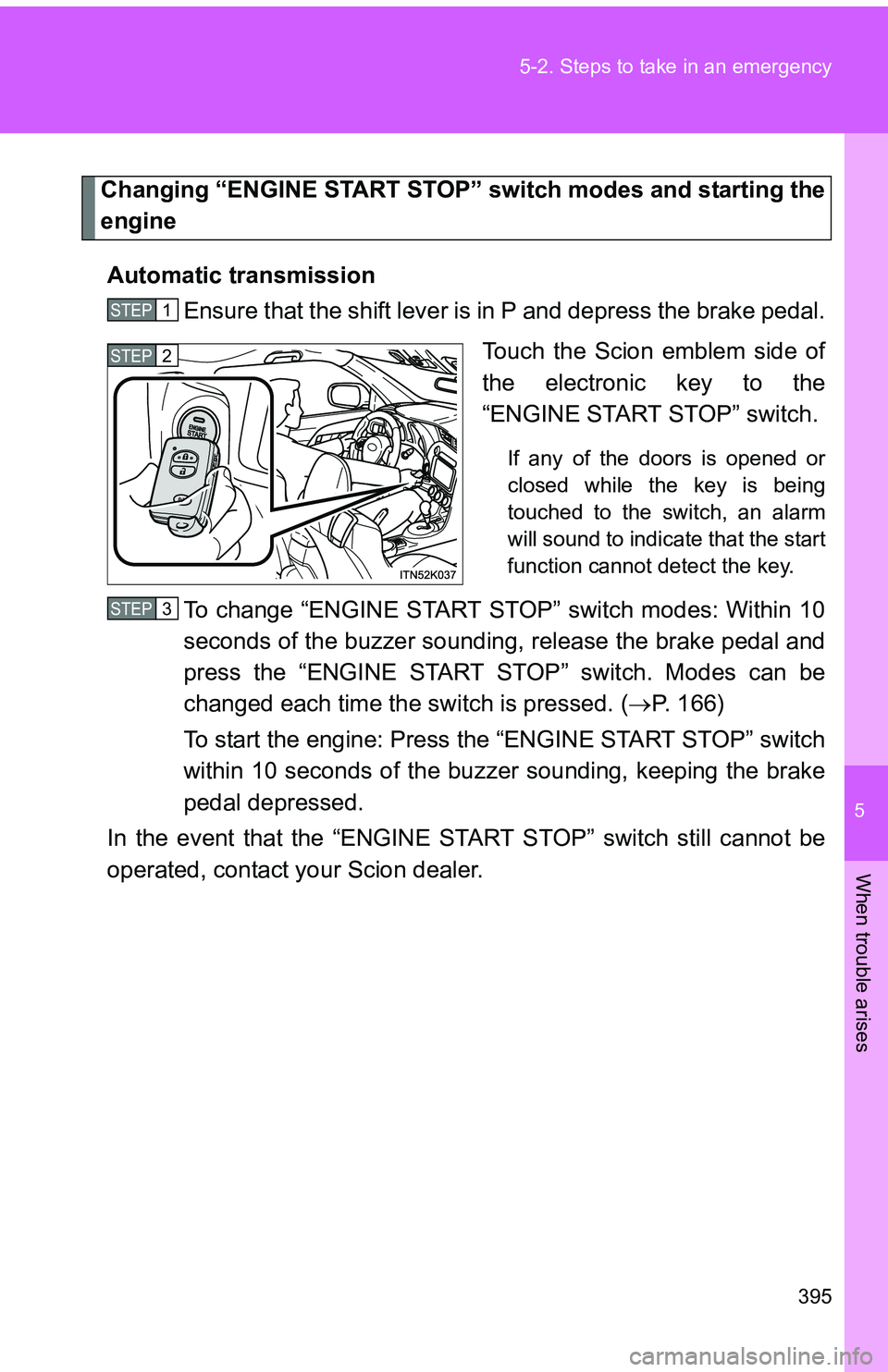
Automatic transmission Ensure that the shift lever is in P and depress the brake pedal.
Touch the Scion emblem side of
the electronic key to the
“ENGINE START STOP” switch.
If any of the doors is opened or
closed while the key is being
touched to the switch, an alarm
will sound to indicate that the start
function cannot detect the key.
To change “ENGINE START STOP” switch modes: Within 10
seconds of the buzzer soundin g, release the brake pedal and
press the “ENGINE START STOP” switch. Modes can be
changed each time the sw itch is pressed. (P. 166)
To start the engine: Press the “ENGINE START STOP” switch
within 10 seconds of the buz zer sounding, keeping the brake
pedal depressed.
In the event that the “ENGINE ST ART STOP” switch still cannot be
operated, contact your Scion dealer.
STEP 1
STEP 2
STEP 3