instrument cluster TOYOTA tC 2011 Owners Manual (in English)
[x] Cancel search | Manufacturer: TOYOTA, Model Year: 2011, Model line: tC, Model: TOYOTA tC 2011Pages: 473, PDF Size: 10.91 MB
Page 3 of 473
1
2
3
4
5
6
7
3
2-2. Instrument clusterGauges and meters ............ 184
Indicators and warning lights ................................. 188
2-3. Operating the lights and Windshield wipers
Headlight switch .................. 193
Windshield wipers and washer .............................. 196
Rear window wiper and washer .............................. 198
2-4. Using other driving systems Cruise control ...................... 200
Driving assist systems ........ 204
2-5. Driving information Cargo and luggage ............. 209
Vehicle load limits ............... 214
Winter driving tips ............... 215
Trailer towing ...................... 221
Dinghy towing (automatic transmission) .................... 222
Dinghy towing (manual transmission) .................... 223
3-1. Using the air conditioning system and defogger
Air conditioning system ....... 226
Rear window and outside rear view mirror
defoggers .......................... 234 3-2. Using the audio system
Using the AUX port/USB port ................................... 235
Using the steering wheel audio switches.................. 236
3-3. Using the interior lights Interior lights list ................. 237
• Personal/interior light main switch ...................... 238
• Personal/interior lights...... 239
• Interior light ...................... 240
3-4. Using the storage features List of storage features ....... 242
• Glove box ......................... 243
• Console box ..................... 244
• Auxiliary box ..................... 245
• Cup holders ...................... 245
• Bottle holders ................... 246
3-5. Other interior features Sun visors........................... 247
Vanity mirrors ..................... 248
Clock .................................. 249
Power outlet ....................... 250
Seat heaters ....................... 251
Sunshades ......................... 253
Floor mat ............................ 255
Luggage compartment features ............................ 257
3Interior features
Page 143 of 473
When driving2
143
2-1. Driving proceduresDriving the vehicle............ 144
Engine (ignition) switch (vehicles without a smart
key system).................... 159
Engine (ignition) switch (vehicles with a smart
key system).................... 163
Automatic transmission .... 172
Manual transmission ........ 179
Turn signal lever .............. 181
Parking brake ................... 182
Horn ................................. 183 2-2. Instrument cluster
Gauges and meters ......... 184
Indicators and warning lights .............................. 188
2-3. Operating the lights and Windshield wipers
Headlight switch ............... 193
Windshield wipers and washer ........................... 196
Rear window wiper and washer ........................... 198
2-4. Using other driving systems Cruise control ................... 200
Driving assist systems ..... 204
2-5. Driving information Cargo and luggage .......... 209
Vehicle load limits ............ 214
Winter driving tips ............ 215
Trailer towing ................... 221
Dinghy towing (automatic transmission) ................. 222
Dinghy towing (manual transmission) ................. 223
Page 184 of 473
184
2-2. Instrument cluster
Gauges and meters
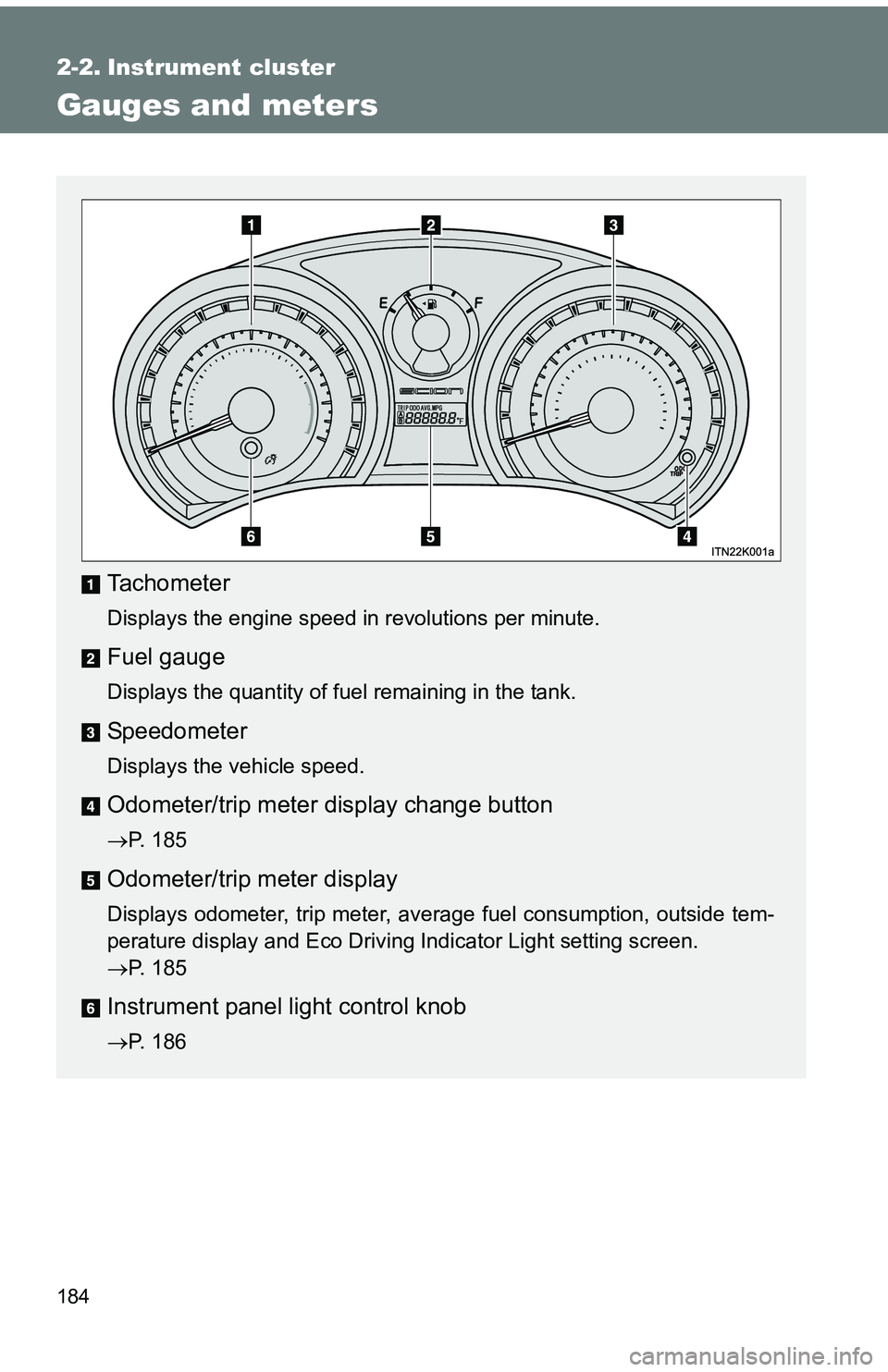
Tachometer
Displays the engine speed in revolutions per minute.
Fuel gauge
Displays the quantity of fuel remaining in the tank.
Speedometer
Displays the vehicle speed.
Odometer/trip meter display change button
P. 185
Odometer/trip meter display
Displays odometer, trip meter, average fuel consumption, outside tem-
perature display and Eco Driving Indicator Light setting screen.
P. 185
Instrument panel light control knob
P. 186
Page 185 of 473
185
2-2. Instrument cluster
2
When driving
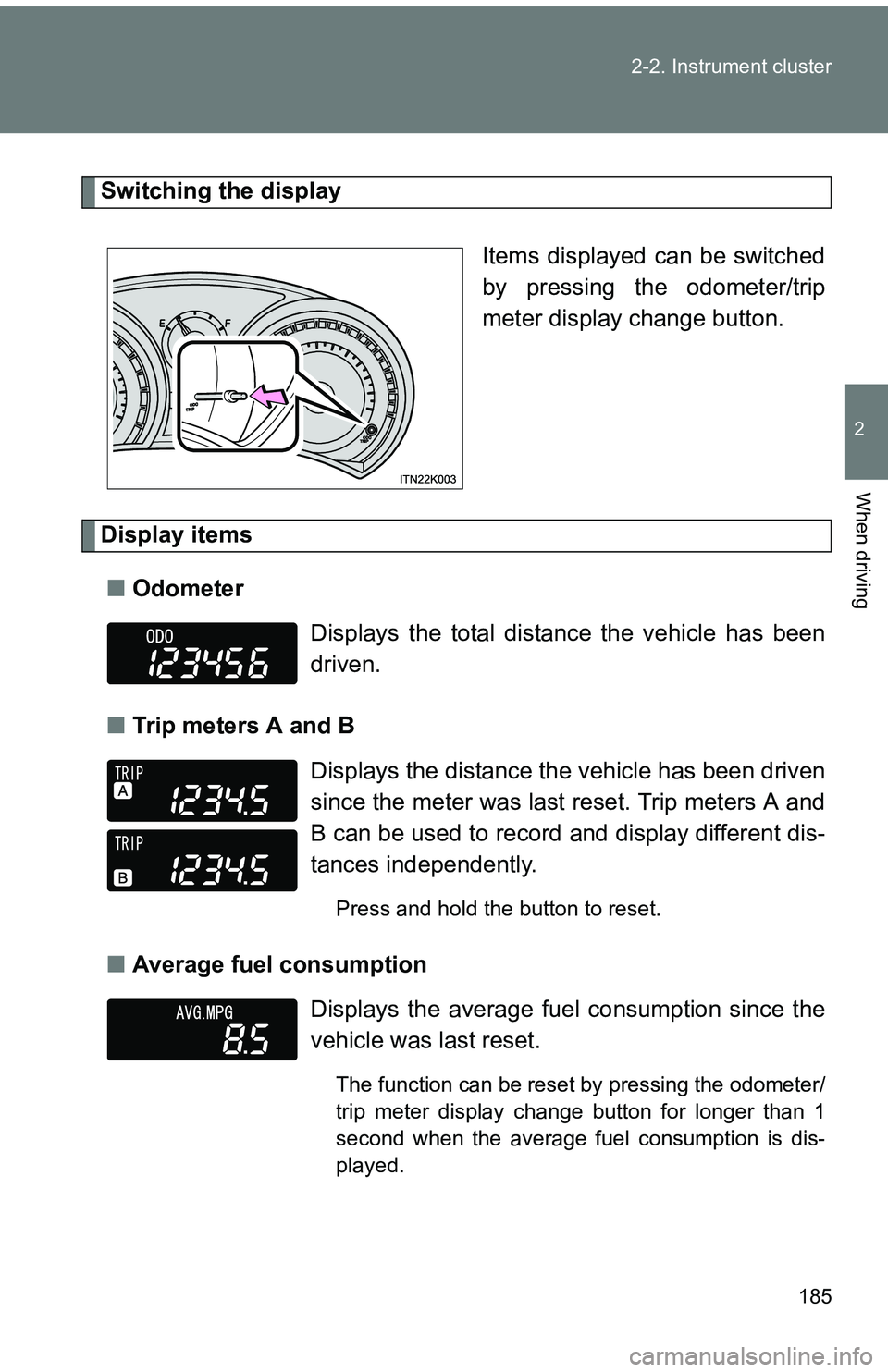
Switching the display
Items displayed can be switched
by pressing the odometer/trip
meter display change button.
Display items■ Odometer
■ Trip meters A and B
■ Average fuel consumption
Displays the total distance the vehicle has been
driven.
Displays the distance the vehicle has been driven
since the meter was last reset. Trip meters A and
B can be used to record and display different dis-
tances independently.
Press and hold the button to reset.
Displays the average fuel consumption since the
vehicle was last reset.
The function can be reset by pressing the odometer/
trip meter display change button for longer than 1
second when the average fuel consumption is dis-
played.
Page 186 of 473
186 2-2. Instrument cluster
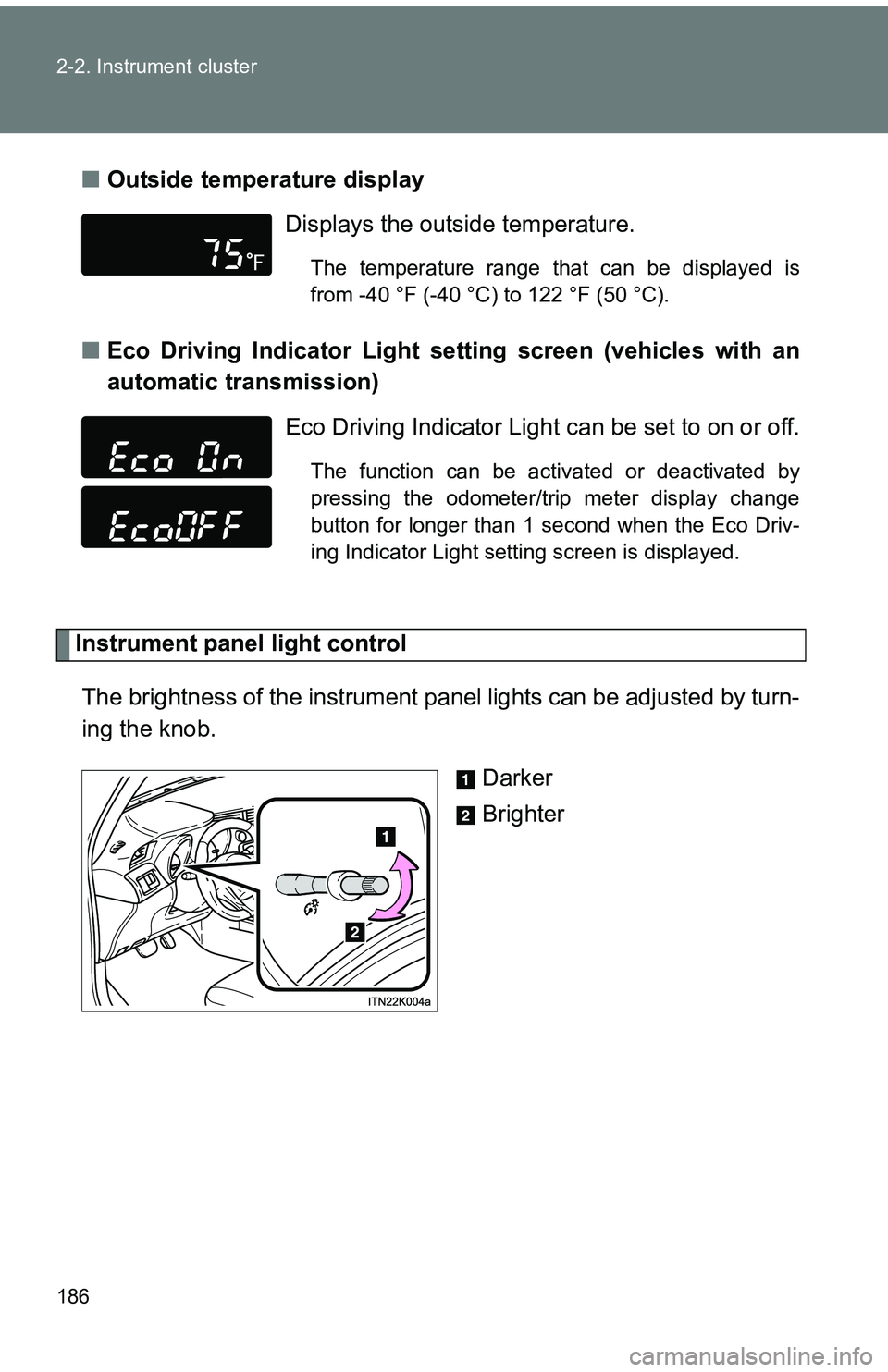
■Outside temperature display
■ Eco Driving Indicator Light set ting screen (vehicles with an
automatic transmission)
Instrument panel light control
The brightness of the instrument pa nel lights can be adjusted by turn-
ing the knob.
Darker
Brighter
Displays the outside temperature.
The temperature range that can be displayed is
from -40 °F (-40 °C) to 122 °F (50 °C).
Eco Driving Indicator Light can be set to on or off.
The function can be activated or deactivated by
pressing the odometer/trip meter display change
button for longer than 1 second when the Eco Driv-
ing Indicator Light setting screen is displayed.
Page 187 of 473
187
2-2. Instrument cluster
2
When driving
■
The brightness of the instrument panel lights
When the headlight switch is turned to on, the brightness will be reduced
slightly unless the control knob is turned fully clockwise.
■ Outside temperature display
●In the following situations, the correct outside temperature may not be
displayed, or the display may take longer than normal to change.
• When stopped, or driving at low speeds (less than 12 mph [20 km/h])
• When the outside temperature has changed suddenly (at the entrance/
exit of a garage, tunnel, etc.)
● When “--” is displayed, the system may be malfunctioning.
Take your vehicle to your Scion dealer.
NOTICE
■To prevent damage to the engine and its components
Do not let the indicator needle of the tachometer enter the red zone, which
indicates the maximum engine speed.
■ The odometer/trip meter di splay at low temperatures
Allow the interior of the vehicle to warm up before using the liquid crystal
information display. At extremely low temperatures, the information display
monitor may respond slowly, and display changes may be delayed.
Page 188 of 473
188
2-2. Instrument cluster
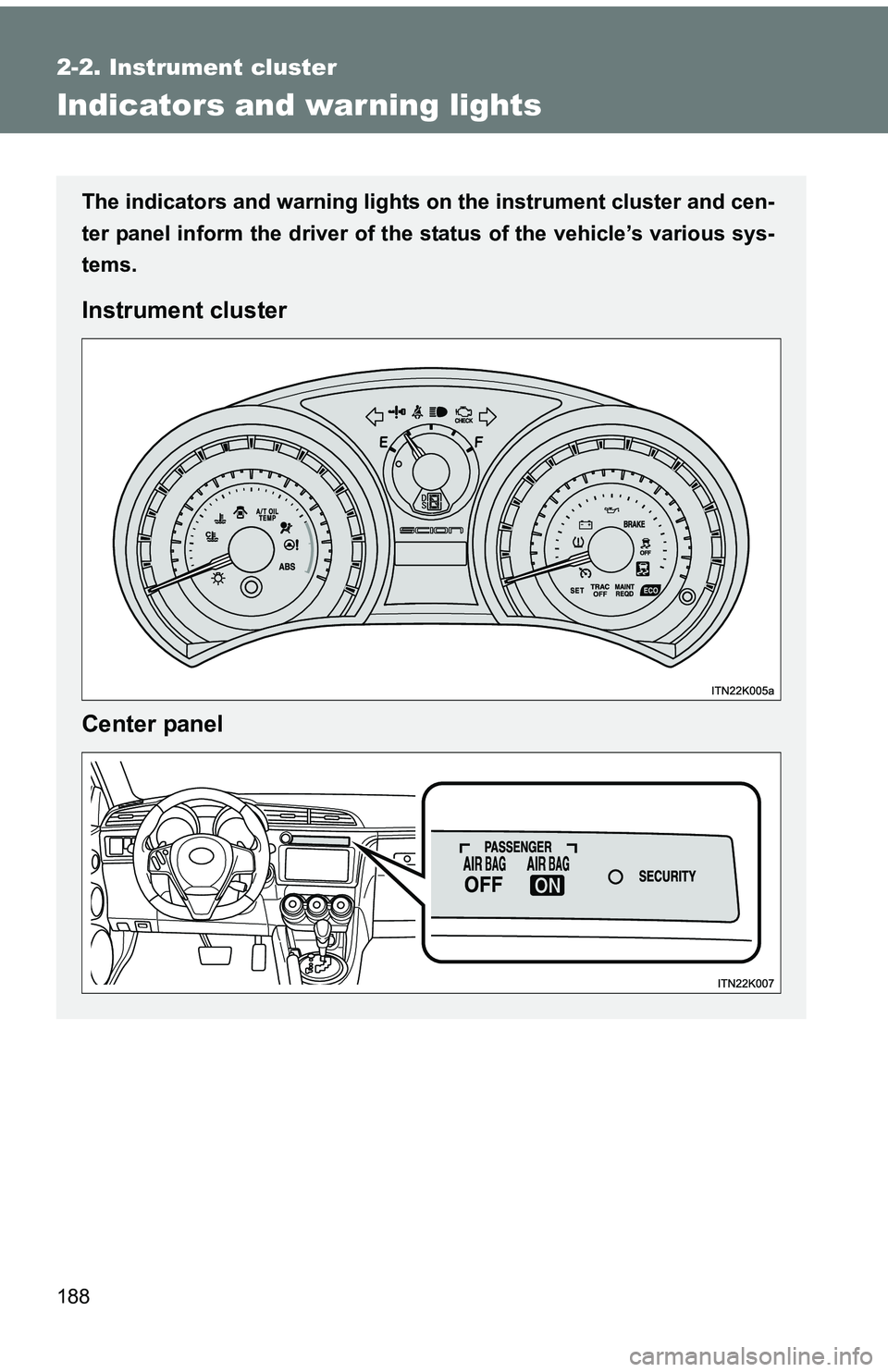
Indicators and warning lights
The indicators and warning lights on the instrument cluster and cen-
ter panel inform the driver of the status of the vehicle’s various sys-
tems.
Instrument cluster
Center panel
Page 189 of 473
189
2-2. Instrument cluster
2
When driving
■
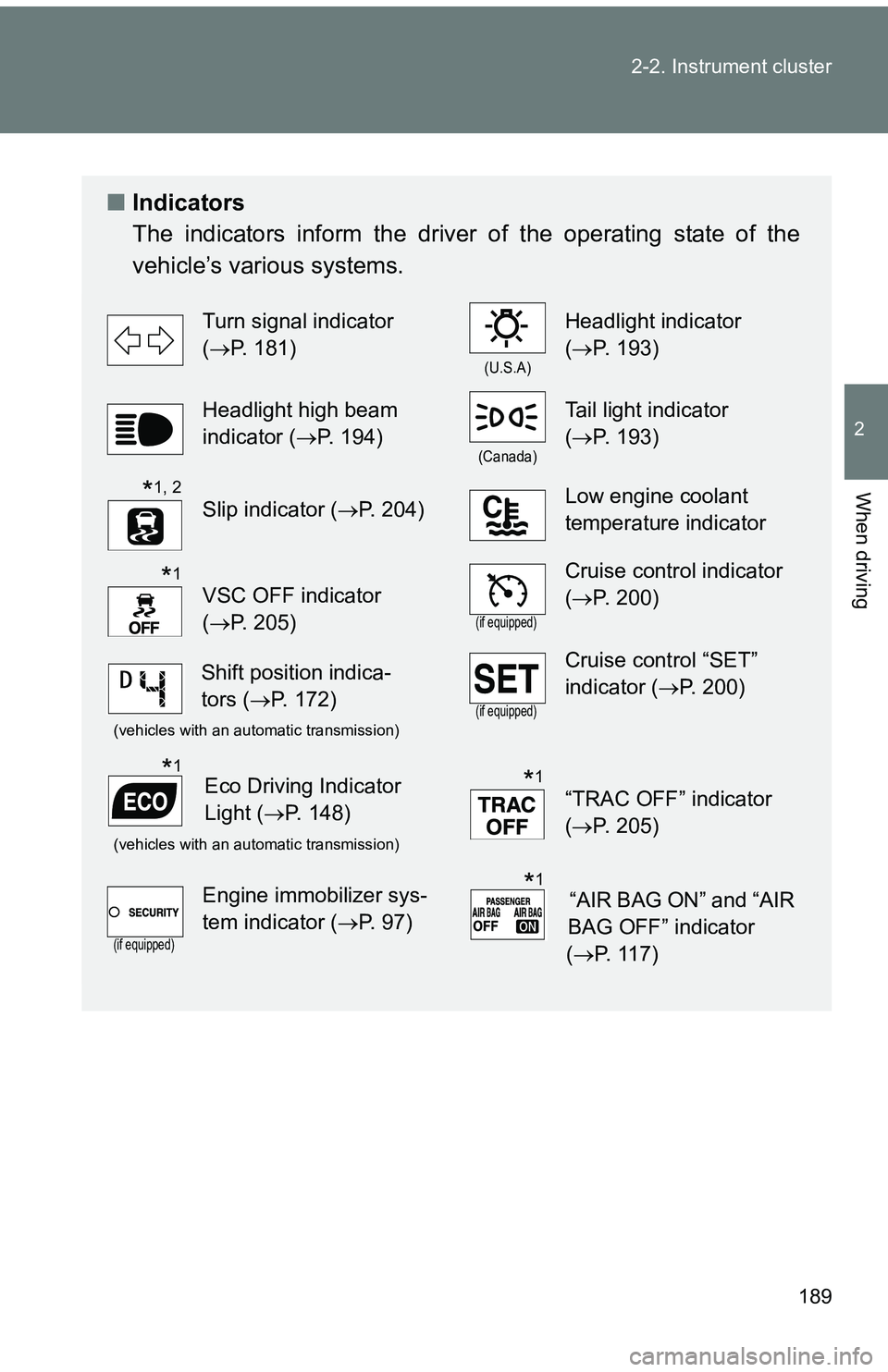
Indicators
The indicators inform the driver of the operating state of the
vehicle’s various systems.
Turn signal indicator
(P. 181)
(U.S.A)
Headlight indicator
(P. 193)
Headlight high beam
indicator ( P. 194)
(Canada)
Tail light indicator
(P. 193)
Slip indicator ( P. 204)Low engine coolant
temperature indicator
VSC OFF indicator
(P. 205)
(if equipped)
Cruise control indicator
(P. 200)
(vehicles with an automatic transmission)(if equipped)
Cruise control “SET”
indicator (P. 200)
(vehicles with an automatic transmission)
“TRAC OFF” indicator
(P. 205)
(if equipped)
Engine immobilizer sys-
tem indicator ( P. 97)
*1, 2
*1
Shift position indica-
tors (P. 172)
Eco Driving Indicator
Light ( P. 148)*1*1
“AIR BAG ON” and “AIR
BAG OFF” indicator
( P. 117)*1
Page 190 of 473
190 2-2. Instrument cluster
*1: These lights turn on when the engine switch is turned to the “ON” posi-tion (vehicles without a smart key system) or the “ENGINE START
STOP” switch is turned to IGNITION ON mode (vehicles with a smart
key system) to indicate that a system check is being performed. They
will turn off after the engine is started, or after a few seconds. There
may be a malfunction in a system if a light does not come on, or if the
lights do not turn off. Have the vehicle inspected by your Scion dealer.
*2: The light flashes to indicate that the system is operating.
Page 191 of 473
191
2-2. Instrument cluster
2
When driving
■
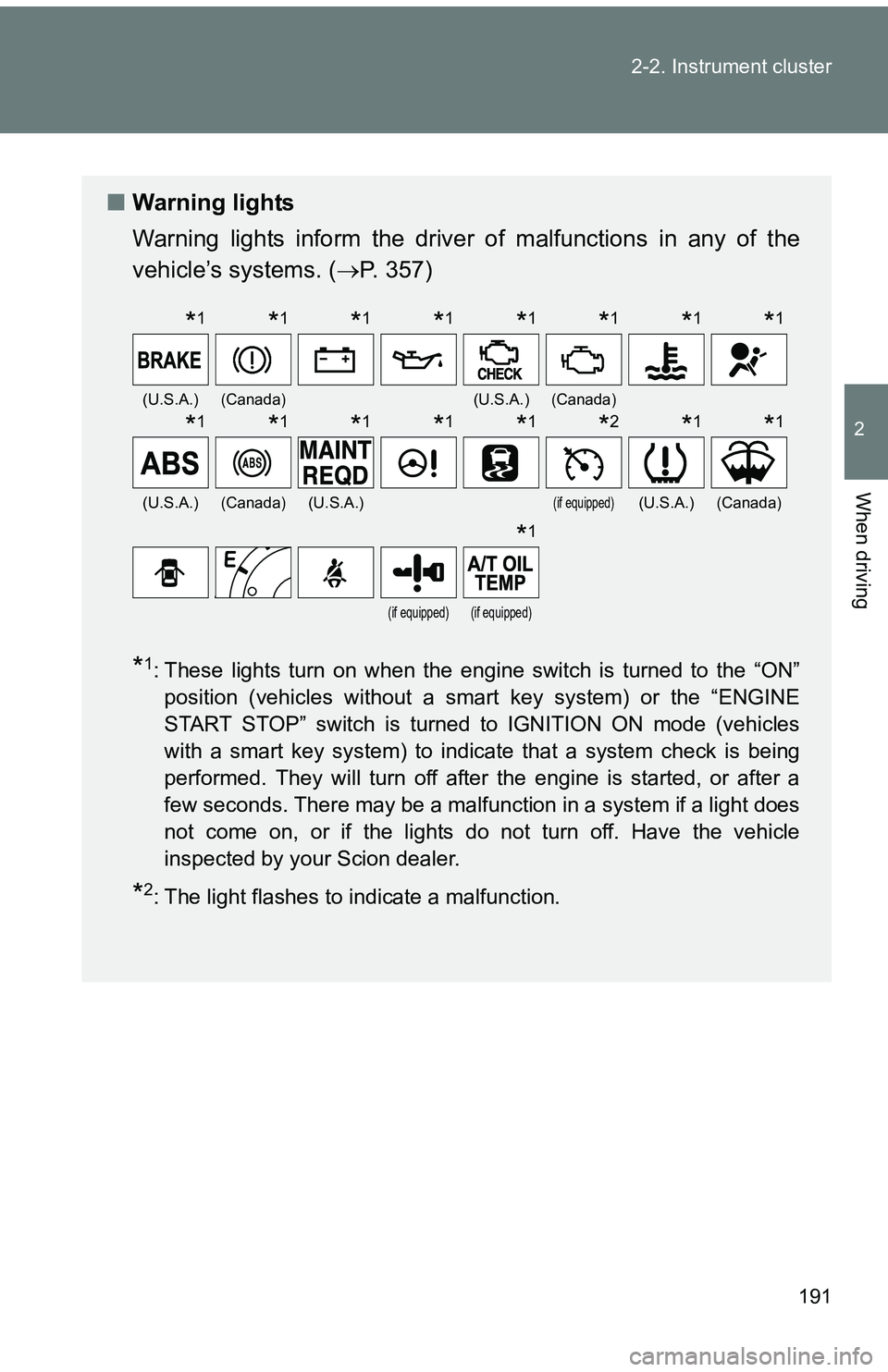
Warning lights
Warning lights inform the driver of malfunctions in any of the
vehicle’s systems. ( P. 357)
*1: These lights turn on when the engine switch is turned to the “ON”
position (vehicles without a smart key system) or the “ENGINE
START STOP” switch is turned to IGNITION ON mode (vehicles
with a smart key system) to indicate that a system check is being
performed. They will turn off after the engine is started, or after a
few seconds. There may be a malfunction in a system if a light does
not come on, or if the lights do not turn off. Have the vehicle
inspected by your Scion dealer.
*2: The light flashes to indicate a malfunction.
(U.S.A.)(Canada)(U.S.A.)(Canada)
(U.S.A.)(Canada)(U.S.A.)(if equipped)(U.S.A.)(Canada)
(if equipped)(if equipped)
*1*1*1*1*1*1*1*1
*1*1*1*1*1*2*1*1
*1