reset TOYOTA tC 2013 Owners Manual (in English)
[x] Cancel search | Manufacturer: TOYOTA, Model Year: 2013, Model line: tC, Model: TOYOTA tC 2013Pages: 484, PDF Size: 9.41 MB
Page 8 of 484
8
tC_OM_OM21050U_(U)
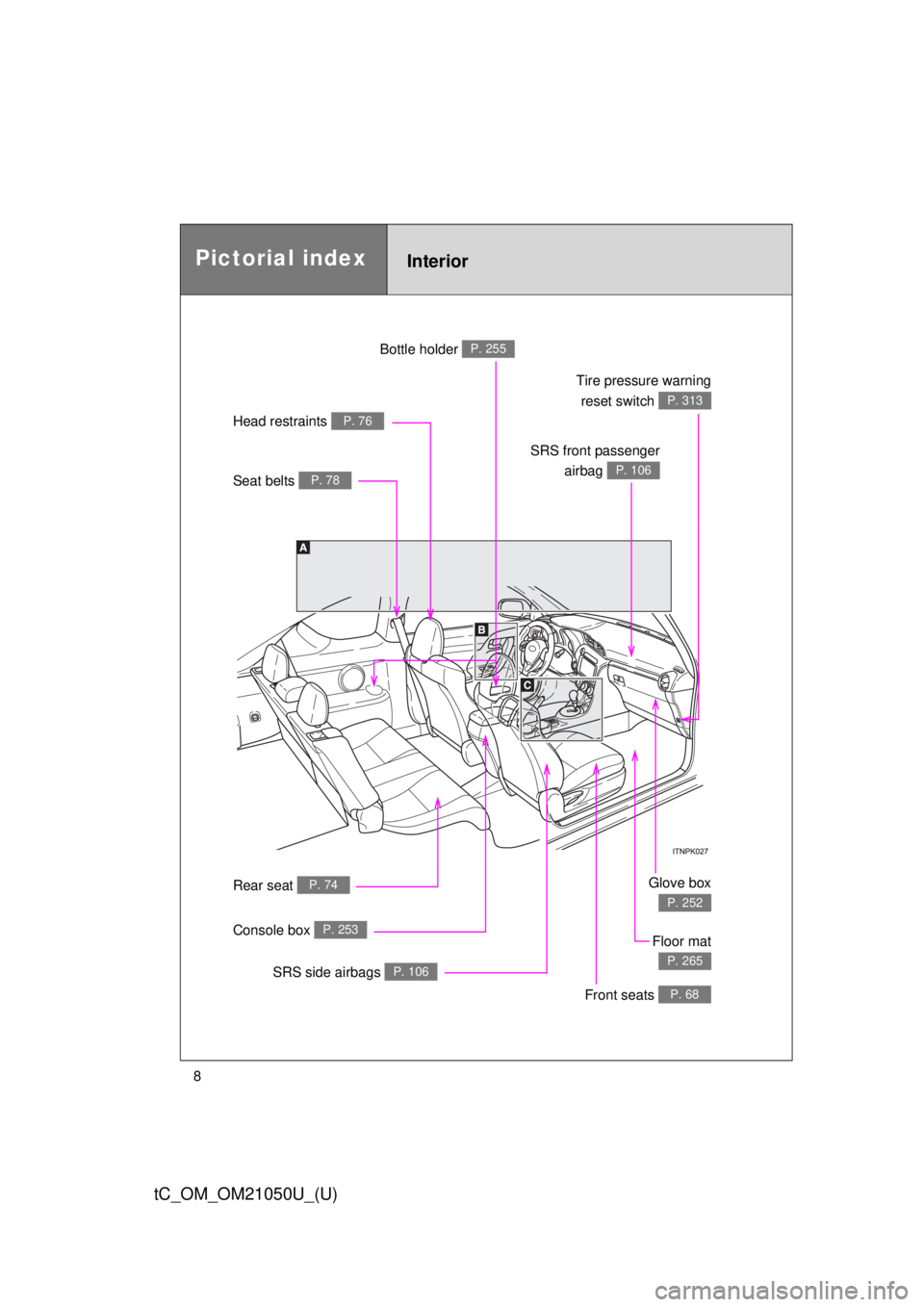
Seat belts P. 78
Head restraints P. 76
Bottle holder P. 255
SRS front passengerairbag
P. 106
Tire pressure warningreset switch
P. 313
Glove box
P. 252
Rear seat P. 74
Floor mat
P. 265
Front seats P. 68
SRS side airbags P. 106
Console box P. 253
Pictorial indexInterior
Page 189 of 484
189
2-2. Instrument cluster
2
When driving
tC_OM_OM21050U_(U)
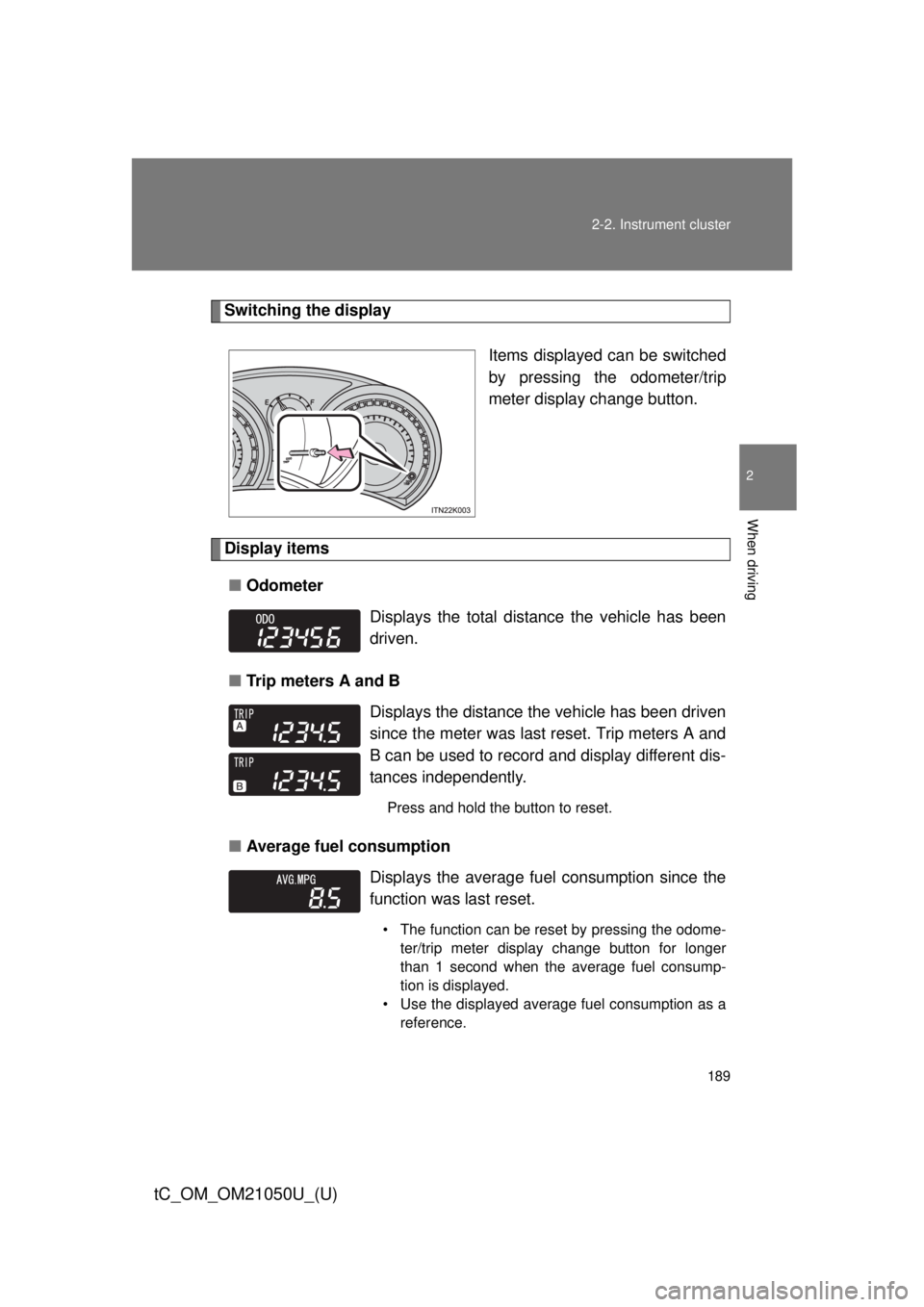
Switching the display
Items displayed can be switched
by pressing the odometer/trip
meter display change button.
Display items■ Odometer
■ Trip meters A and B
■ Average fuel consumption
Displays the total distance the vehicle has been
driven.
Displays the distance the vehicle has been driven
since the meter was last reset. Trip meters A and
B can be used to record and display different dis-
tances independently.
Press and hold the button to reset.
Displays the average fuel consumption since the
function was last reset.
• The function can be reset by pressing the odome-
ter/trip meter display change button for longer
than 1 second when the average fuel consump-
tion is displayed.
• Use the displayed average fuel consumption as a reference.
Page 210 of 484

210 2-4. Using other driving systems
tC_OM_OM21050U_(U)
■Cruise control can be set when
● The shift lever is in the D or range 4 or higher of S has been selected.
(vehicles with an automatic transmission)
● Range 4 or higher has been selected by using the paddle shift switch.
(vehicles with a paddle shift switch)
● Vehicle speed is above approximately 25 mph (40 km/h).
■ Accelerating
The vehicle can be accelerated normally. After acceleration, the set speed
resumes.
■ Automatic cruise control cancelation
Cruise control will stop maintaining the vehicle speed in any of the following
situations.
● Actual vehicle speed falls more than approximately 10 mph (16 km/h)
below the preset vehicle speed.
At this time, the memorized set speed is not retained.
● Actual vehicle speed is below approximately 25 mph (40 km/h).
● VSC is activated.
■ If the cruise control indicator light flashes
Press the “ON-OFF” button once to deactivate the system, and then press
the button again to reactivate the system.
If the cruise control speed cannot be set or if the cruise control cancels
immediately after being activated, there may be a malfunction in the cruise
control system. Have the vehicle inspected by your Scion dealer.
Page 280 of 484

280 4-2. Maintenance
tC_OM_OM21050U_(U)
■Reset the maintenance data (U.S.A. only)
After the required maintenance is performed according to the maintenance
schedule, please reset the maintenance data.
To reset the data, follow the procedures described below:
Switch the display to the trip meter A when the engine is running.
(P. 188)
Vehicles without a smart key system
Turn the engine switch off.
Vehicles with a smart key system
Turn the “ENGINE START STOP” switch off.
Vehicles without a smart key system
While pressing the odometer/trip meter display change button
( P. 188), turn the engine switch to the “ON” position (do not start
the engine because reset mode will be canceled). Continue to
press and hold the button until the trip meter displays “000000”.
Vehicles with a smart key system
While pressing the odometer/trip meter display change button
( P. 188), turn the “ENGINE START STOP” switch to the IGNI-
TION ON mode (do not start the engine because otherwise the
reset mode will be canceled). Continue to press and hold the but-
ton until the trip meter displays “000000”.
■ Allow inspection and repairs to be performed by a Scion dealer
● Scion technicians are well-trained specialists and are kept up to date with
the latest service information. They are well informed about the opera-
tions of all systems on your vehicle.
● Keep a copy of the repair order. It proves that the maintenance that has
been performed is under warranty coverage. If any problem should arise
while your vehicle is under warranty, your Scion dealer will promptly take
care of it.
STEP 1
STEP 2
STEP 3
Page 315 of 484
315
4-3. Do-it-yourself maintenance
4
Maintenance and care
tC_OM_OM21050U_(U)
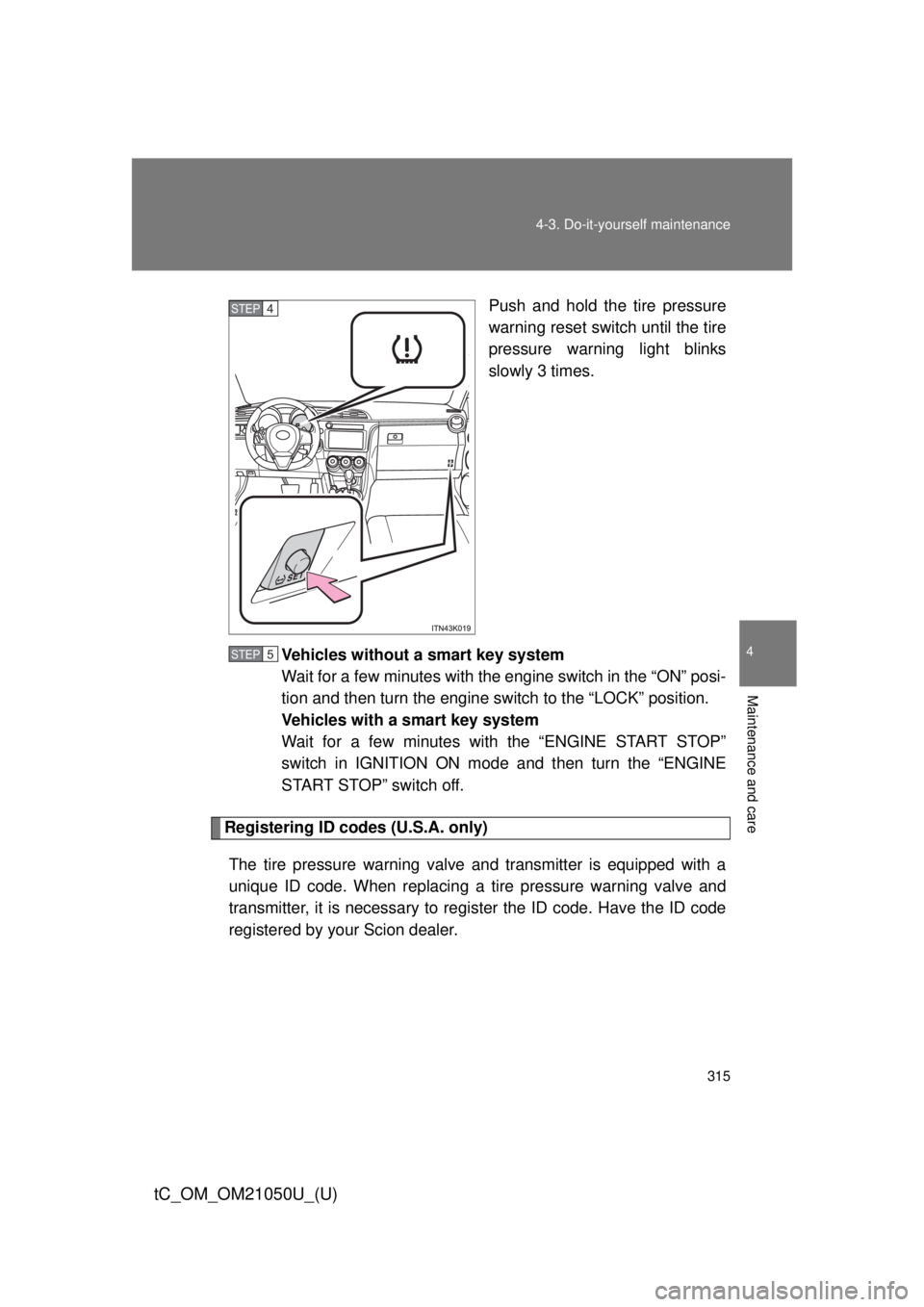
Push and hold the tire pressure
warning reset switch until the tire
pressure warning light blinks
slowly 3 times.
Vehicles without a smart key system
Wait for a few minutes with the engine switch in the “ON” posi-
tion and then turn the engine switch to the “LOCK” position.
Vehicles with a smart key system
Wait for a few minutes with the “ENGINE START STOP”
switch in IGNITION ON mode and then turn the “ENGINE
START STOP” switch off.
Registering ID codes (U.S.A. only) The tire pressure warning valve and transmitter is equipped with a
unique ID code. When replacing a tire pressure warning valve and
transmitter, it is necessary to regi ster the ID code. Have the ID code
registered by your Scion dealer.
STEP 4
STEP 5
Page 319 of 484

319
4-3. Do-it-yourself maintenance
4
Maintenance and care
tC_OM_OM21050U_(U)
■If you push the tire pressure warning reset switch accidentally
(U.S.A. only)
If initialization is performed, adjust t
he tire inflation pressure to the speci-
fied level and initialize the tire pressure warning system again.
■When initialization of the tire pressure warning system has failed
(U.S.A. only)
Initialization can be completed in a few minutes. However, in the follow-
ing cases, the settings have not b een recorded and the system will not
operate properly. If repeated attempts to record tire inflation pressure
settings are unsuccessful, have the vehicle inspected by your Scion
dealer.
●When operating the tire pressure warning reset switch, the tire pres-
sure warning light doe s not blink 3 times.
●After driving for a certain period of time since the initialization has
been completed, the wa rning light comes on after blinking for 1
minute.
■Tire pressure warning system certification (U.S.A. only)
FCC ID: PAXPMV107J
FCC ID: HYQ13BCX
NOTE:
This device complies with Part 15 of the FCC Rules. Operation is subject
to the following two conditions: (1) this device may not cause harmful
interference, and (2) this device must accept any interference received,
including interference that may cause undesired operation.
FCC WARNING:
Changes or modifications not expre ssly approved by the party responsi-
ble for compliance could void the user’s authority to operate the equip-
ment.
Page 320 of 484

320 4-3. Do-it-yourself maintenance
tC_OM_OM21050U_(U)
CAUTION
■When inspecting or replacing tires
Observe the following precautions to prevent accidents.
Failure to do so may cause damage to parts of the drive train as well as
dangerous handling characteristics, which may lead to an accident
resulting in death or serious injury.
●Do not mix tires of different makes, models or tread patterns.
Also, do not mix tires of remarkably different treadwear.
●Do not use tire sizes other t han those recommended by Scion.
●Do not mix differently constructed ti res (radial, bias-belted or bias-ply
tires).
●Do not mix summer, all season and snow tires.
●Do not use tires that have been used on another vehicle.
Do not use tires if you do not know how they were used previously.
●Do not tow if your vehicle has a compact spare tire installed.
■When initializing the tire pressure warning system (U.S.A. only)
Do not operate the tire pressure wa rning reset switch without first adjust-
ing the tire inflation pr essure to the specified level. Otherwise, the tire
pressure warning light may not come on even if the tire inflation pressure
is low, or it may come on when the tire inflation pressure is actually nor-
mal.
Page 372 of 484

372 5-2. Steps to take in an emergency
tC_OM_OM21050U_(U)
(U.S.A.)Maintenance required
reminder light
Indicates that mainte-
nance is required accord-
ing to the driven distance
on the maintenance
schedule.
*3
Illuminates for about 3
seconds and then flashes
for about 15 seconds
approximately 4500 miles
(7200 km) after the main-
tenance data has been
reset. If necessary, perform main-
tenance.
Comes on and remains on
if the distance driven
exceeds 5000 miles (8000
km) after the maintenance
data has been reset.
(The indicator will not work
properly unless the main-
tenance data has been
reset.) Perform the necessary
maintenance.
Please reset the mainte-
nance data after the mainte-
nance is performed.
(
P. 280)
Warning lightWarning light/DetailsCorrection procedure
Page 394 of 484
394 5-2. Steps to take in an emergency
tC_OM_OM21050U_(U)
■After completing the tire change (U.S.A. only)
The tire pressure warning system must be reset. ( P. 313)
■When using the compact spare tire (U.S.A. only)
As the compact spare tire is not equipped with a tire pressure warning
valve and transmitter, low inflation pressure of the spare tire will not be
indicated by the tire pressure warn ing system. Also, if you replace the
compact spare tire after the tire pressure warning light comes on, the
light remains on.
■If you have a flat front tire on a road covered with snow or ice
Install the compact spare tire on one of the rear wheels of the vehicle.
Perform the following steps and fit tire chains to the front tires:
Replace a rear tire with the compact spare tire.
Replace the flat front tire with the tire removed from the rear of
the vehicle.
Fit tire chains to the front tires.
STEP 1
STEP 2
STEP 3
Page 475 of 484

475
Alphabetical index
tC_OM_OM21050U_(U)
Maintenance
Do-it-yourself maintenance ...................... 287
General maintenance ........... 282
Maintenance data ................. 422
Maintenance requirements ... 279
Manual transmission .............. 183
Meter Instrument panel light
control ................................ 190
Meters .................................. 188
Microphone .............................. 245
Mirrors
Inside rear view mirror ............ 86
Side mirror heater................. 242
Side mirrors ............................ 87
Vanity mirrors ....................... 257
Moon roof................................... 91
Noise from under vehicle ......... 20
Odometer ................................. 188
Oil
Engine oil.............................. 297
Opener Back door ............................... 62
Fuel filler door......................... 95
Hood ..................................... 292
Outside rear view mirrors
Adjusting and folding .............. 87
Outside temperature display ................................... 190
Overheating, Engine ............... 413 Parking brake ...........................186
Parking lights
Replacing light bulbs .............345
Switch....................................197
Wattage .................................432
Personal/interior lights
Personal/interior light ............247
Switch....................................248
Wattage .................................432
Power outlet .............................259
Power windows ..........................89
Radiator ....................................303
Rear seats Adjustment ..............................74
Folding down ...........................74
Seat adjustment ......................74
Rear side marker lights Replacing light bulb ...............345
Wattage .................................432
Rear turn signal lights
Replacing light bulbs .............345
Wattage .................................432
Rear window defogger ............242
Rear window wiper ..................205
Replacing Fuses ....................................334
Key battery ............................330
Light bulbs .............................345
Tires ......................................385
Wireless remote control
battery .................................330
Reporting safety defects for
U.S.A. owners ........................456
Reset the maintenance data .........................................280M
N
O
P
R