key TOYOTA tC 2014 Owners Manual (in English)
[x] Cancel search | Manufacturer: TOYOTA, Model Year: 2014, Model line: tC, Model: TOYOTA tC 2014Pages: 488, PDF Size: 17.05 MB
Page 2 of 488

TABLE OF CONTENTSIndex
2
tC_OM_OM21053U_(U)
1-1. Key information
Keys ..................................... 26
1-2. Opening, closing and
locking the doors
Smart key system................. 30
Wireless remote control ....... 48
Side doors ............................ 54
Back door ............................. 61
1-3. Adjustable components
(seats, mirrors,
steering wheel)
Front seats ........................... 67
Rear seats ............................ 73
Head restraints ..................... 75
Seat belts ............................. 77
Steering wheel ..................... 84
Anti-glare inside
rear view mirror .................. 85
Outside rear view mirrors ..... 87
1-4. Opening and closing
the windows and moon roof
Power windows .................... 89
Moon roof ............................. 93
1-5. Refueling
Opening the fuel tank cap .... 971-6. Theft deterrent system
Engine immobilizer
system .............................. 102
Theft prevention labels
(for U.S.A.) ....................... 105
1-7. Safety information
Correct driving posture ....... 106
SRS airbags ....................... 108
Front passenger occupant
classification system ......... 123
Child restraint systems ....... 129
Installing child restraints ..... 135
2-1. Driving procedures
Driving the vehicle .............. 150
Engine (ignition) switch
(vehicles without a smart
key system) ...................... 165
Engine (ignition) switch
(vehicles with a smart
key system) ...................... 169
Automatic transmission ...... 178
Manual transmission........... 185
Turn signal lever ................. 187
Parking brake ..................... 188
Horn .................................... 189
2-2. Instrument cluster
Gauges and meters ............ 190
Indicators and warning
lights ................................. 194
1Before driving
2When driving
Page 4 of 488

TABLE OF CONTENTSIndex
4
tC_OM_OM21053U_(U)
4-1. Maintenance and care
Cleaning and protecting
the vehicle exterior ........... 274
Cleaning and protecting
the vehicle interior ............ 278
4-2. Maintenance
Maintenance
requirements .................... 281
General maintenance ......... 284
Emission inspection and
maintenance (I/M)
programs .......................... 288
4-3. Do-it-yourself maintenance
Do-it-yourself service
precautions ...................... 289
Hood................................... 294
Positioning a floor jack ....... 296
Engine compartment .......... 298
Tires ................................... 314
Tire inflation pressure......... 325
Wheels ............................... 329
Wireless remote control/
electronic key battery ....... 332
Checking and
replacing fuses ................. 338
Light bulbs .......................... 3495-1. Essential information
Emergency flashers ............ 362
If your vehicle needs to
be towed ........................... 363
If you think something
is wrong ............................ 371
Fuel pump shut off
system .............................. 372
5-2. Steps to take in an emergency
If a warning light turns on
or a warning buzzer
sounds... .......................... 373
If you have a flat tire ........... 391
If the engine will not
start .................................. 405
If the shift lever cannot be
shifted from P (automatic
transmission) .................... 408
If you lose your keys ........... 409
If the electronic key does
not operate properly ......... 410
If the vehicle battery
is discharged .................... 414
If your vehicle overheats..... 418
If the vehicle becomes
stuck ................................. 421
If your vehicle has to
be stopped in an
emergency........................ 423
4Maintenance and care5When trouble arises
Page 13 of 488
13
tC_OM_OM21053U_(U)
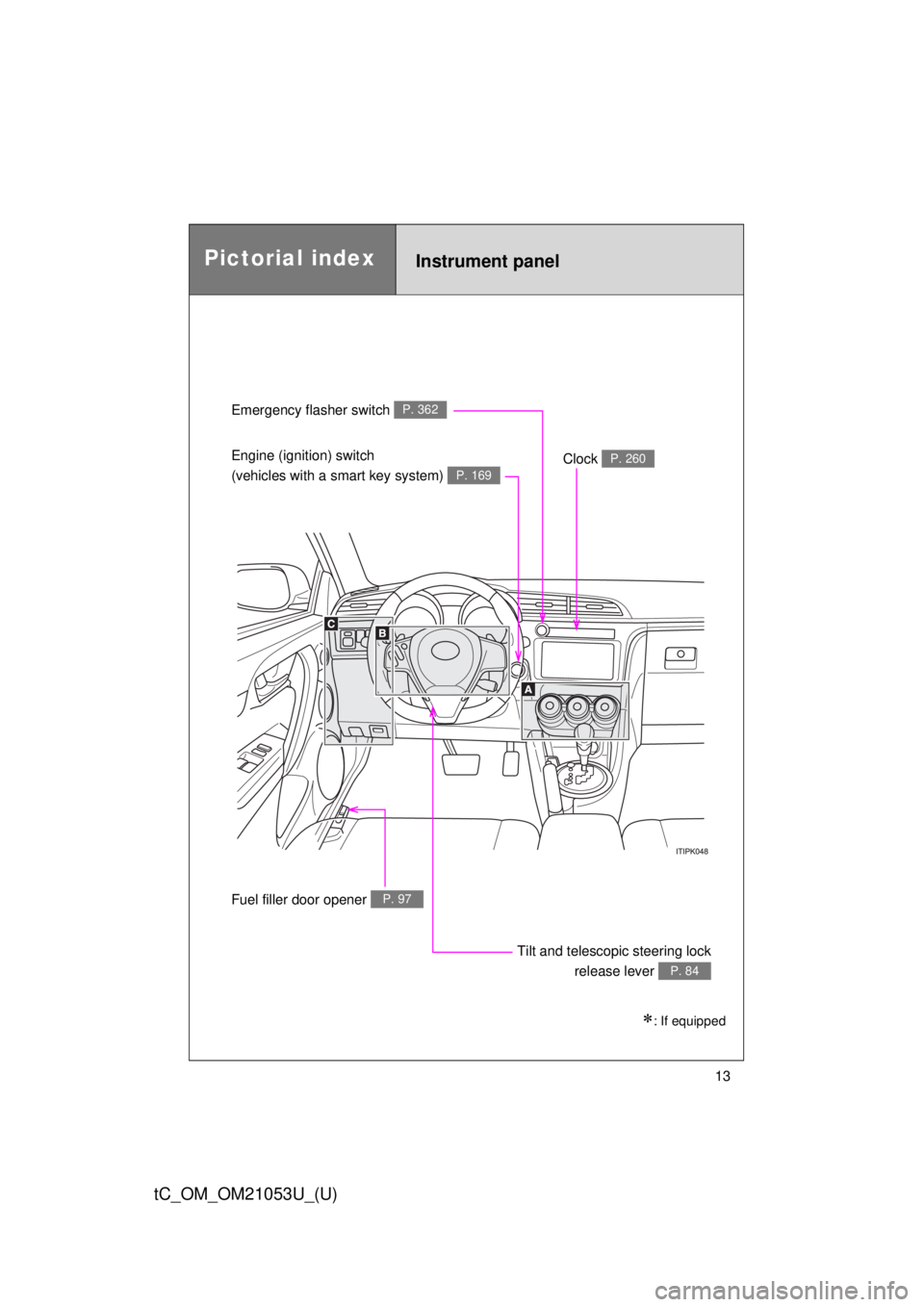
Emergency flasher switch P. 362
Engine (ignition) switch
(vehicles with a smart key system)
P. 169
Clock P. 260
Tilt and telescopic steering lock
release lever
P. 84
Fuel filler door opener P. 97
Instrument panelPictorial index
: If equipped
Page 15 of 488
15
tC_OM_OM21053U_(U)
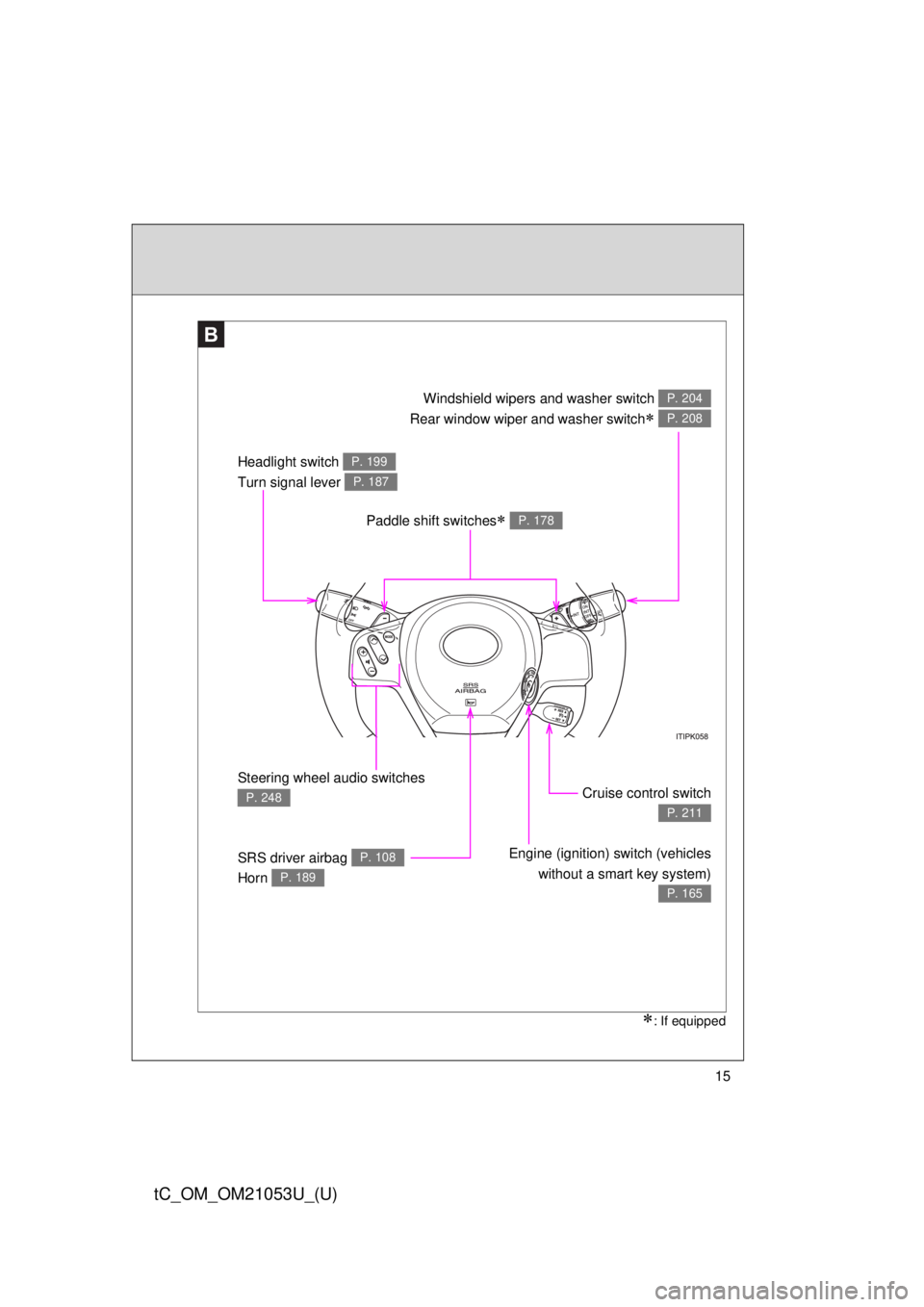
Paddle shift switches P. 178
Headlight switch
Turn signal lever P. 199
P. 187
Steering wheel audio switches
P. 248
SRS driver airbag
Horn P. 108
P. 189
Cruise control switch
P. 211
Engine (ignition) switch (vehicles
without a smart key system)
P. 165
Windshield wipers and washer switch
Rear window wiper and washer switch
P. 204
P. 208
B
: If equipped
Page 23 of 488

23
tC_OM_OM21053U_(U)
CAUTION
■General precautions while driving
Driving under the influence: Never drive your vehicle when under the influ-
ence of alcohol or drugs that have impaired your ability to operate your vehi-
cle. Alcohol and certain drugs delay reaction time, impair judgment and
reduce coordination, which could lead to an accident that could result in
death or serious injury.
Defensive driving: Always drive defensively. Anticipate mistakes that other
drivers or pedestrians might make and be ready to avoid accidents.
Driver distraction: Always give your full attention to driving. Anything that dis-
tracts the driver, such as adjusting controls, talking on a cellular phone or
reading can result in a collision with resulting death or serious injury to you,
your occupants or others.
■General precaution regarding children’s safety
Never leave children unattended in the vehicle, and never allow children to
have or use the key.
Children may be able to start the vehicle or shift the vehicle into neutral.
There is also a danger that children may injure themselves by playing with
the windows, the moon roof, or other features of the vehicle. In addition, heat
build-up or extremely cold temperatures inside the vehicle can be fatal to
children.
Page 25 of 488
Before driving1
25
tC_OM_OM21053U_(U)
1-1. Key information
Keys ................................... 26
1-2. Opening, closing and
locking the doors
Smart key system .............. 30
Wireless remote control ..... 48
Side doors .......................... 54
Back door ........................... 61
1-3. Adjustable components
(seats, mirrors,
steering wheel)
Front seats ......................... 67
Rear seats.......................... 73
Head restraints................... 75
Seat belts ........................... 77
Steering wheel ................... 84
Anti-glare inside rear
view mirror ....................... 85
Outside rear view
mirrors.............................. 871-4. Opening and closing
the windows and moon roof
Power windows .................. 89
Moon roof ........................... 93
1-5. Refueling
Opening the fuel tank
cap ................................... 97
1-6. Theft deterrent system
Engine immobilizer
system ........................... 102
Theft prevention labels
(for U.S.A.) ..................... 105
1-7. Safety information
Correct driving posture..... 106
SRS airbags ..................... 108
Front passenger
occupant classification
system ........................... 123
Child restraint systems..... 129
Installing child
restraints ........................ 135
Page 26 of 488
26
tC_OM_OM21053U_(U)
1-1. Key information
Keys
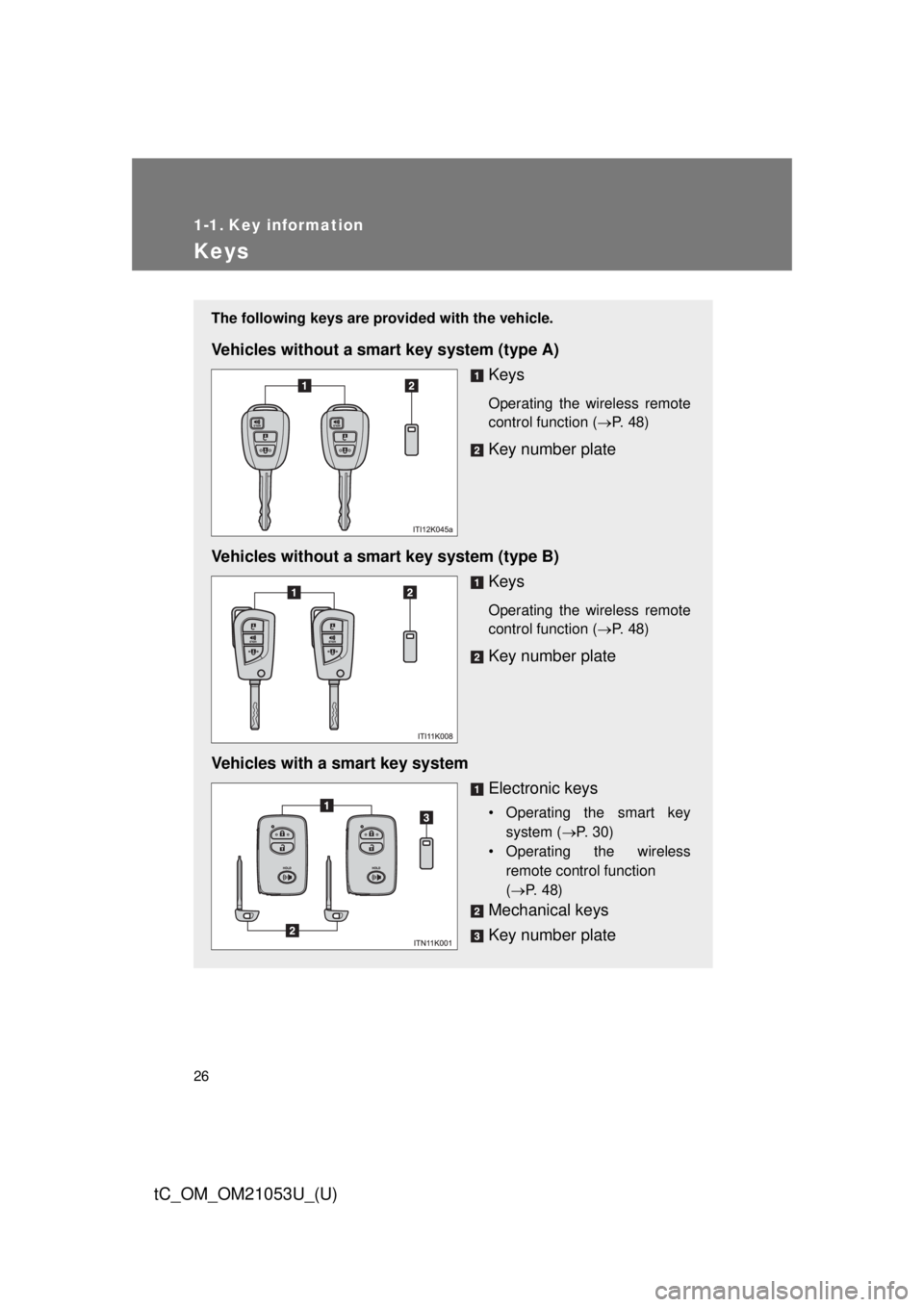
The following keys are provided with the vehicle.
Vehicles without a smart key system (type A)
Keys
Operating the wireless remote
control function (P. 48)
Key number plate
Vehicles without a smart key system (type B)
Keys
Operating the wireless remote
control function (P. 48)
Key number plate
Vehicles with a smart key system
Electronic keys
• Operating the smart key
system (P. 30)
• Operating the wireless
remote control function
(P. 48)
Mechanical keys
Key number plate
Page 27 of 488
27 1-1. Key information
1
Before driving
tC_OM_OM21053U_(U)
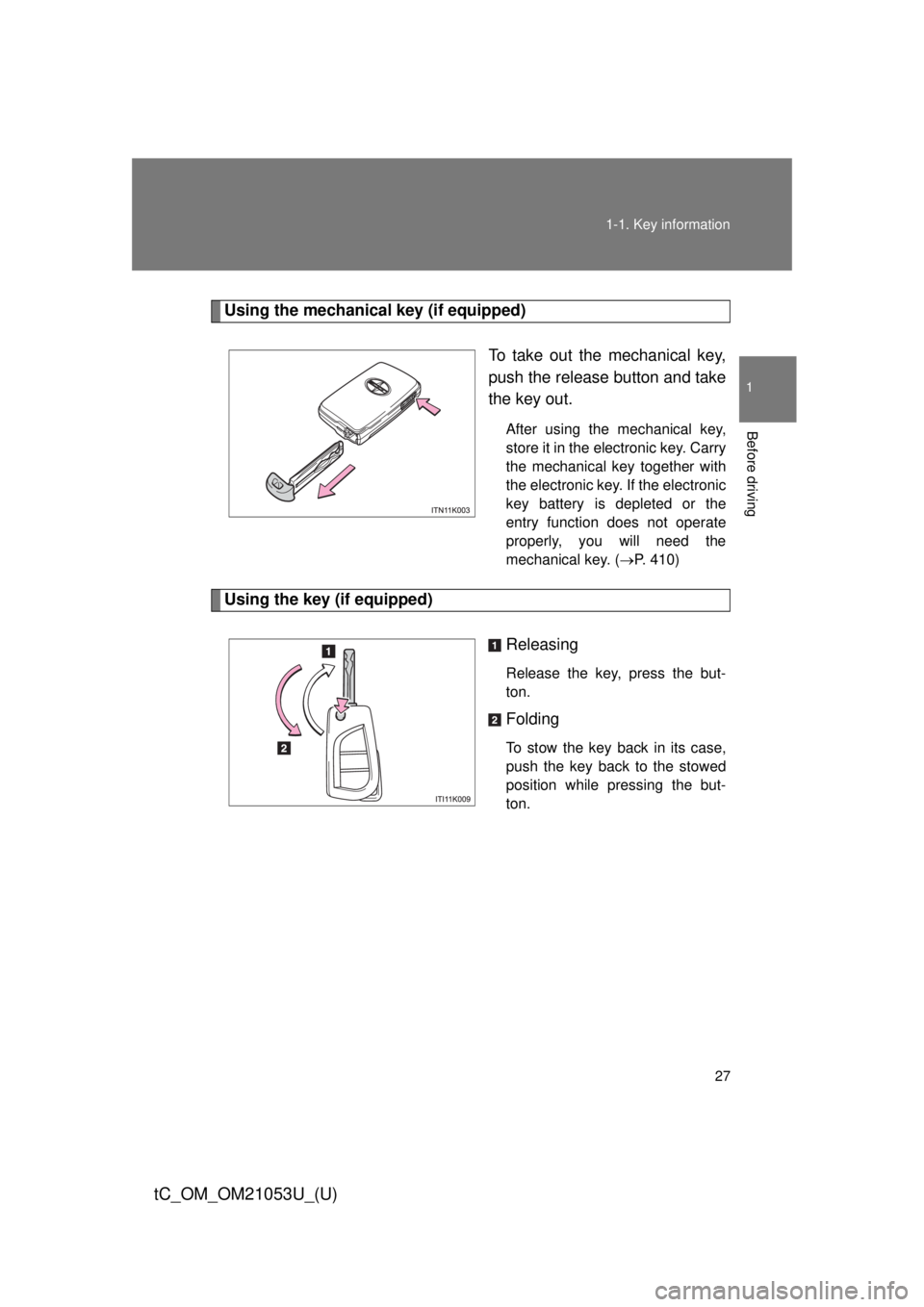
Using the mechanical key (if equipped)
To take out the mechanical key,
push the release button and take
the key out.
After using the mechanical key,
store it in the electronic key. Carry
the mechanical key together with
the electronic key. If the electronic
key battery is depleted or the
entry function does not operate
properly, you will need the
mechanical key. (P. 410)
Using the key (if equipped)
Releasing
Release the key, press the but-
ton.
Folding
To stow the key back in its case,
push the key back to the stowed
position while pressing the but-
ton.
Page 28 of 488

28 1-1. Key information
tC_OM_OM21053U_(U)
■When required to leave the vehicle’s key with a parking attendant
Lock the glove box as circumstances demand. (P. 254)
On vehicles with the smart key system, remove the mechanical key for your
own use and provide the attendant with the electronic key only.
■Key number plate
Keep the plate in a safe place such as your wallet, not in the vehicle. In the
event that a key (without a smart key system) or mechanical key (with a
smart key system) is lost, a new key can be made by your Scion dealer
using the key number plate. (P. 409)
■When riding in an aircraft
When bringing a key with wireless remote control function onto an aircraft,
make sure you do not press any buttons on the key while inside the aircraft
cabin. If you are carrying the key in your bag etc., ensure that the buttons
are not likely to be pressed accidentally. Pressing a button may cause the
key to emit radio waves that could interfere with the operation of the aircraft.
Page 29 of 488
29 1-1. Key information
1
Before driving
tC_OM_OM21053U_(U)
NOTICE
■To prevent key damage
Observe the following:
●Do not drop the keys, subject them to strong shocks or bend them.
●Do not expose the keys to high temperatures for long periods of time.
●Do not get the keys wet or wash them in an ultrasonic washer etc.
●Do not attach metallic or magnetic materials to the keys or place the keys
close to such materials.
●Do not disassemble the keys.
●Do not attach a sticker or anything else to the surface of the electronic key.
●Vehicles with a smart key system: Do not place the keys near objects that
produce magnetic fields, such as TVs, audio systems and induction cook-
ers, or medical electrical equipment, such as low-frequency therapy equip-
ment.
■Carrying the electronic key on your person (vehicles with a smart key
system)
Carry the electronic key 3.9 in. (10 cm) or more away from electric appli-
ances that are turned on. Radio waves emitted from electric appliances
within 3.9 in. (10 cm) of the electronic key may interfere with the key, causing
the key to not function properly.
■In case of a smart key system malfunction or other key-related prob-
lems (vehicles with a smart key system)
Take your vehicle with all the electronic keys provided with your vehicle to
your Scion dealer.
■When a vehicle key is lost (vehicles with a smart key system)
If the key remains lost, the risk of vehicle theft increases significantly. Visit
your Scion dealer immediately with all remaining electronic key that was pro-
vided with your vehicle.