TOYOTA TUNDRA 2007 2.G Navigation Manual
TUNDRA 2007 2.G
TOYOTA
TOYOTA
https://www.carmanualsonline.info/img/14/6824/w960_6824-0.png
TOYOTA TUNDRA 2007 2.G Navigation Manual
Page 135 of 235
122
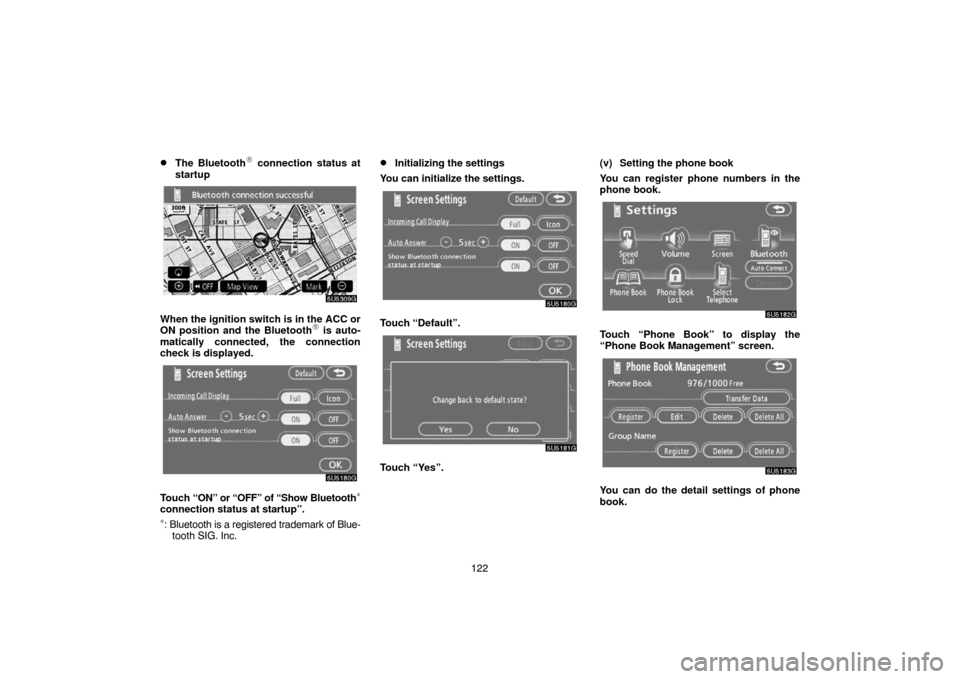
�The Bluetooth� connection status at
startup
5U5309G
When the ignition switch is in the ACC or
ON position and the Bluetooth� is auto-
matically connected, the connection
check is displayed.
5U5180G
Touch “ON” or “OFF” of “Show Bluetooth∗
connection status at startup”.
∗: Bluetooth is a registered trademark of Blue-
tooth SIG. Inc.
�Initializing the settings
You can initialize the settings.
5U5180G
Touch “Default”.
5U5181G
Touch “Yes”.(v) Setting the phone book
You can register phone numbers in the
phone book.
5U5182G
Touch “Phone Book” to display the
“Phone Book Management” screen.
5U5183G
You can do the detail settings of phone
book.
Page 136 of 235
123
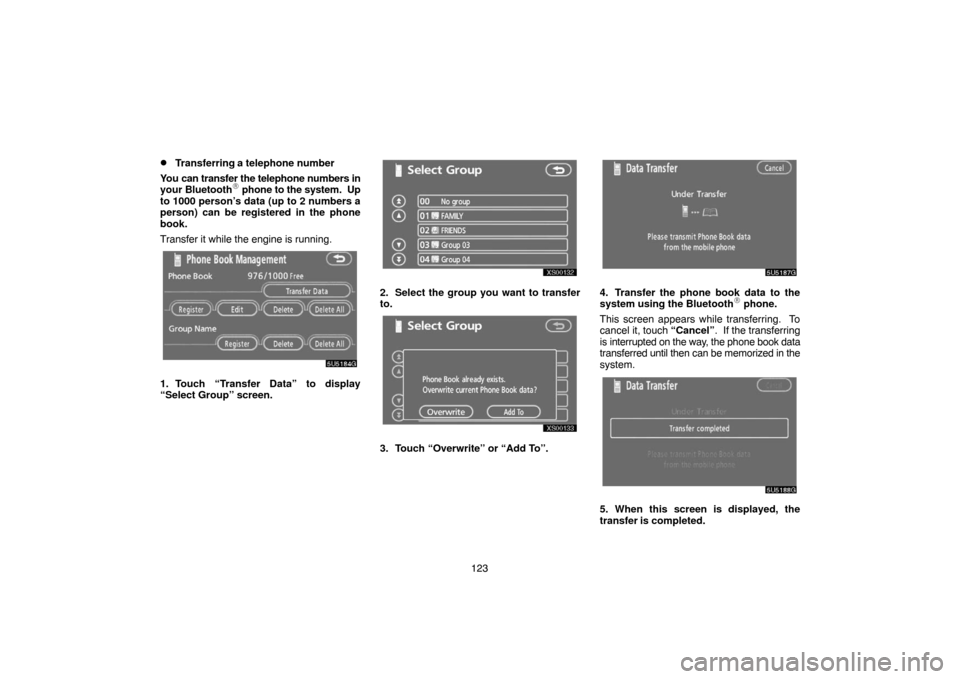
�Transferring a telephone number
You can transfer the telephone numbers in
your Bluetooth
� phone to the system. Up
to 1000 person’s data (up to 2 numbers a
person) can be registered in the phone
book.
Transfer it while the engine is running.
5U5184G
1. Touch “Transfer Data” to display
“Select Group” screen.
XS00132
2. Select the group you want to transfer
to.
XS00133
3. Touch “Overwrite” or “Add To”.
5U5187G
4. Transfer the phone book data to the
system using the Bluetooth� phone.
This screen appears while transferring. To
cancel it, touch “Cancel”. If the transferring
is interrupted on the way, the phone book data
transferred until then can be memorized in the
system.
5U5188G
5. When this screen is displayed, the
transfer is completed.
Page 137 of 235
124
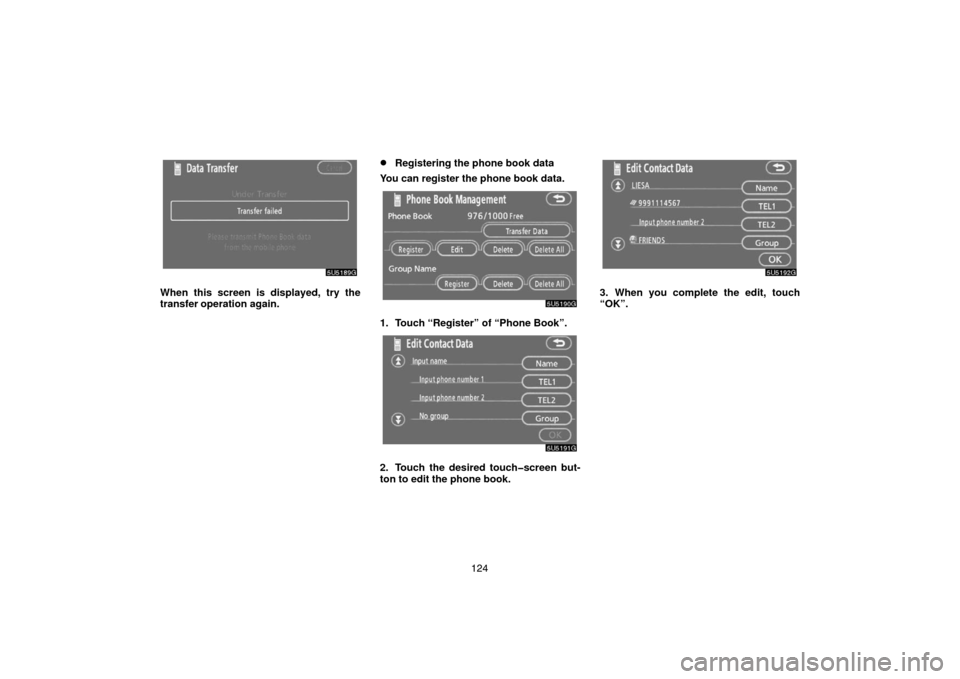
5U5189G
When this screen is displayed, try the
transfer operation again.
�Registering the phone book data
You can register the phone book data.
5U5190G
1. Touch “Register” of “Phone Book”.
5U5191G
2. Touch the desired touchscreen but-
ton to edit the phone book.
5U5192G
3. When you complete the edit, touch
“OK”.
Page 138 of 235
125
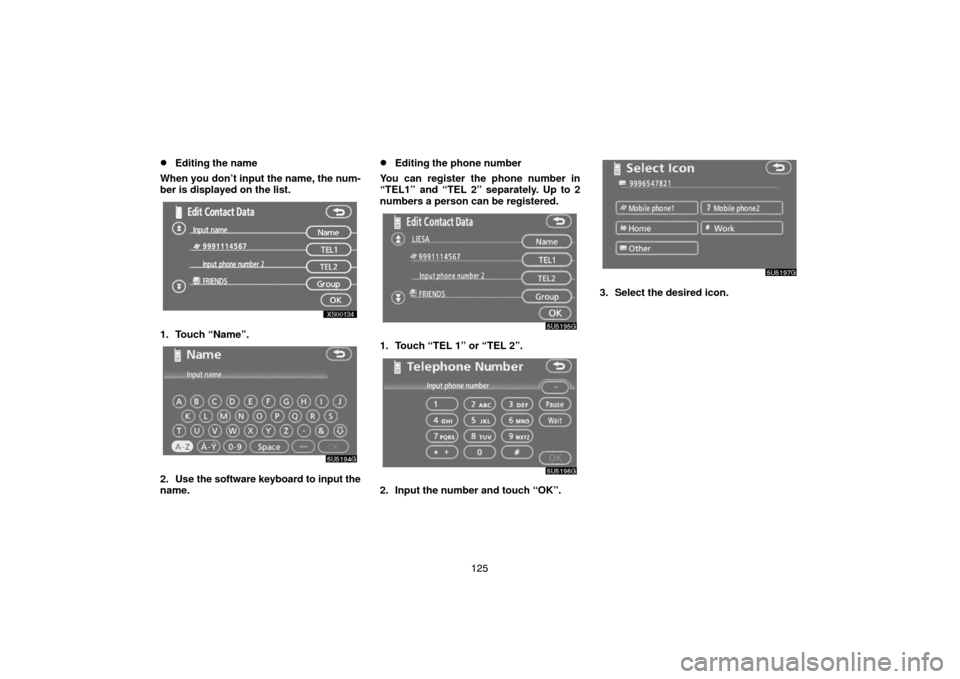
�Editing the name
When you don’t input the name, the num-
ber is displayed on the list.
XS00134
1. Touch “Name”.
5U5194G
2. Use the software keyboard to input the
name.
�Editing the phone number
You can register the phone number in
“TEL1” and “TEL 2” separately. Up to 2
numbers a person can be registered.
5U5195G
1. Touch “TEL 1” or “TEL 2”.
5U5196G
2. Input the number and touch “OK”.
5U5197G
3. Select the desired icon.
Page 139 of 235
126
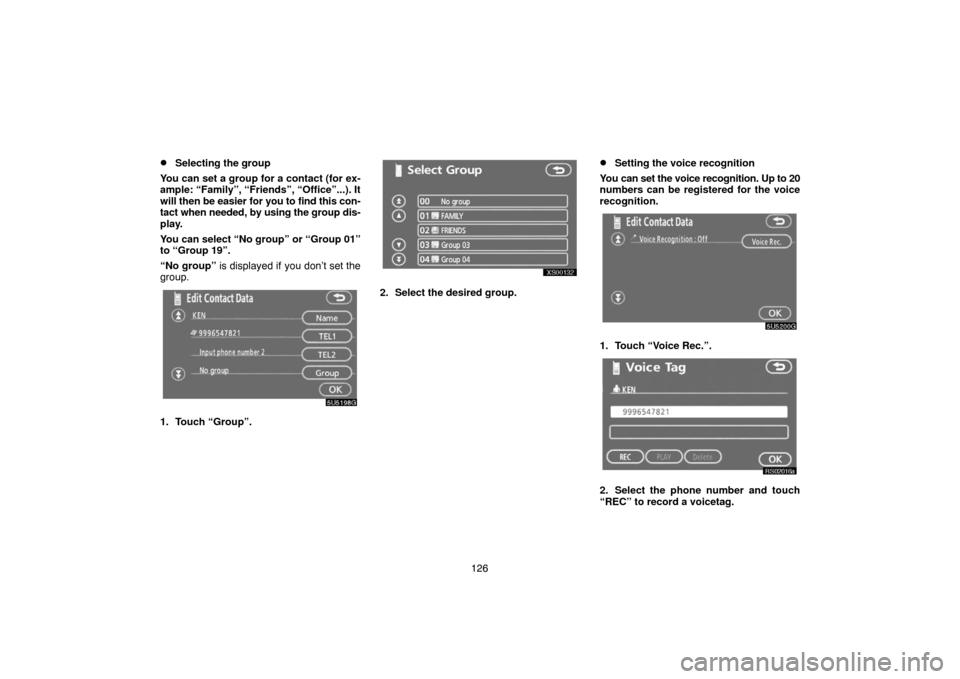
�Selecting the group
You can set a group for a contact (for ex-
ample: “Family”, “Friends”, “Office”...). It
will then be easier for you to find this con-
tact when needed, by using the group dis-
play.
You can select “No group” or “Group 01”
to “Group 19”.
“No group” is displayed if you don’t set the
group.
5U5198G
1. Touch “Group”.
XS00132
2. Select the desired group.
�Setting the voice recognition
You can set the voice recognition. Up to 20
numbers can be registered for the voice
recognition.
5U5200G
1. Touch “Voice Rec.”.
RS02016a
2. Select the phone number and touch
“REC” to record a voicetag.
Page 140 of 235
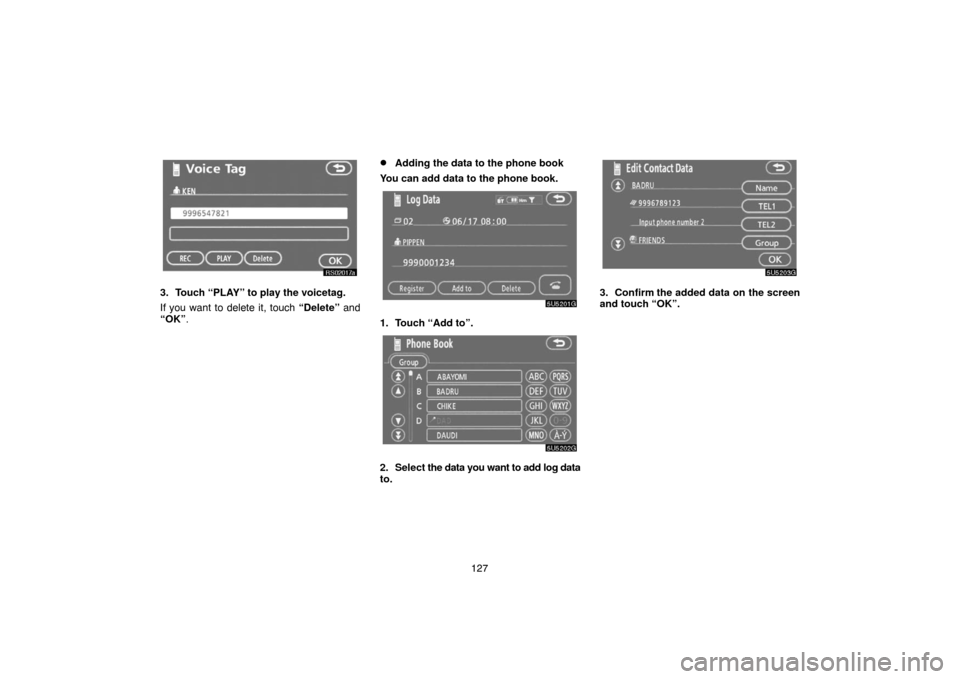
127
RS02017a
3. Touch “PLAY” to play the voicetag.
If you want to delete it, touch “Delete” and
“OK”.
�Adding the data to the phone book
You can add data to the phone book.
5U5201G
1. Touch “Add to”.
5U5202G
2. Select the data you want to add log data
to.
5U5203G
3. Confirm the added data on the screen
and touch “OK”.
Page 141 of 235
128
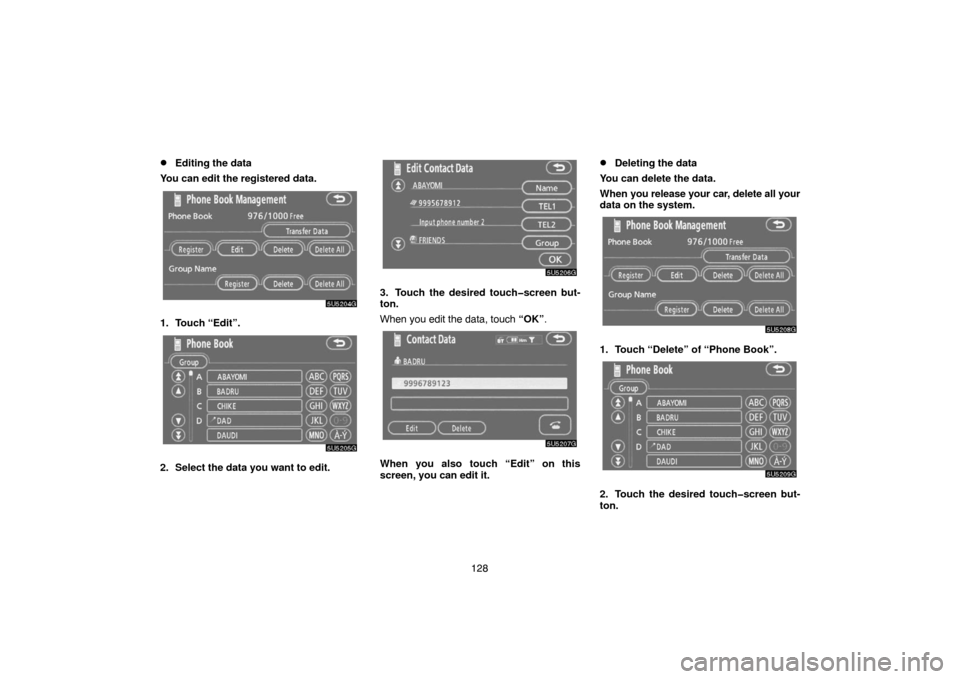
�Editing the data
You can edit the registered data.
5U5204G
1. Touch “Edit”.
5U5205G
2. Select the data you want to edit.
5U5206G
3. Touch the desired touchscreen but-
ton.
When you edit the data, touch “OK”.
5U5207G
When you also touch “Edit” on this
screen, you can edit it.
�Deleting the data
You can delete the data.
When you release your car, delete all your
data on the system.
5U5208G
1. Touch “Delete” of “Phone Book”.
5U5209G
2. Touch the desired touchscreen but-
ton.
Page 142 of 235
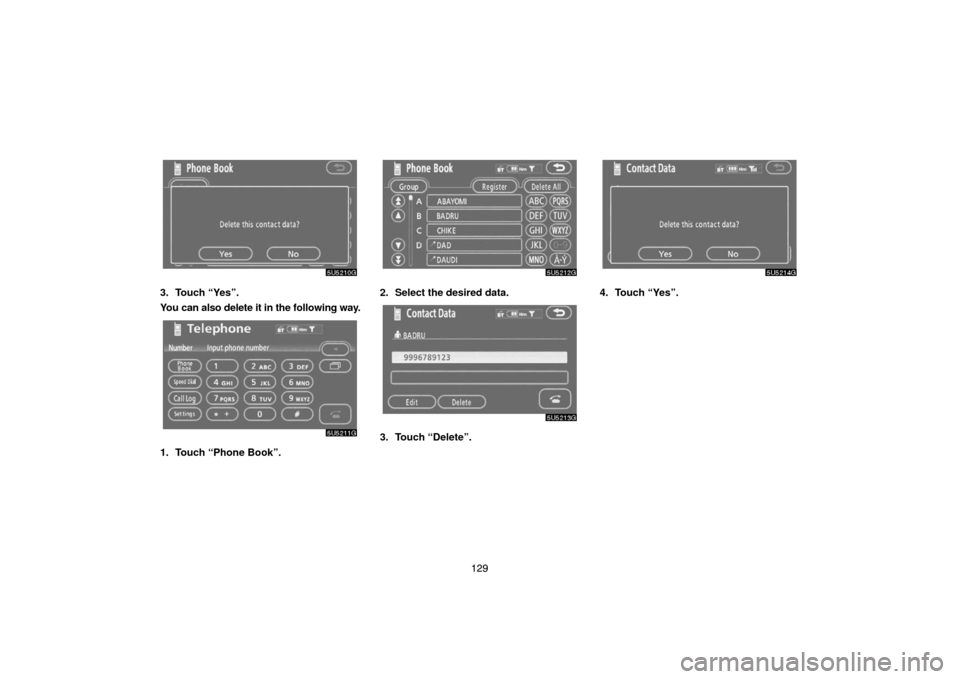
129
5U5210G
3. Touch “Yes”.
You can also delete it in the following way.
5U5211G
1. Touch “Phone Book”.
5U5212G
2. Select the desired data.
5U5203G
3. Touch “Delete”.
5U5214G
4. Touch “Yes”.
Page 143 of 235
130
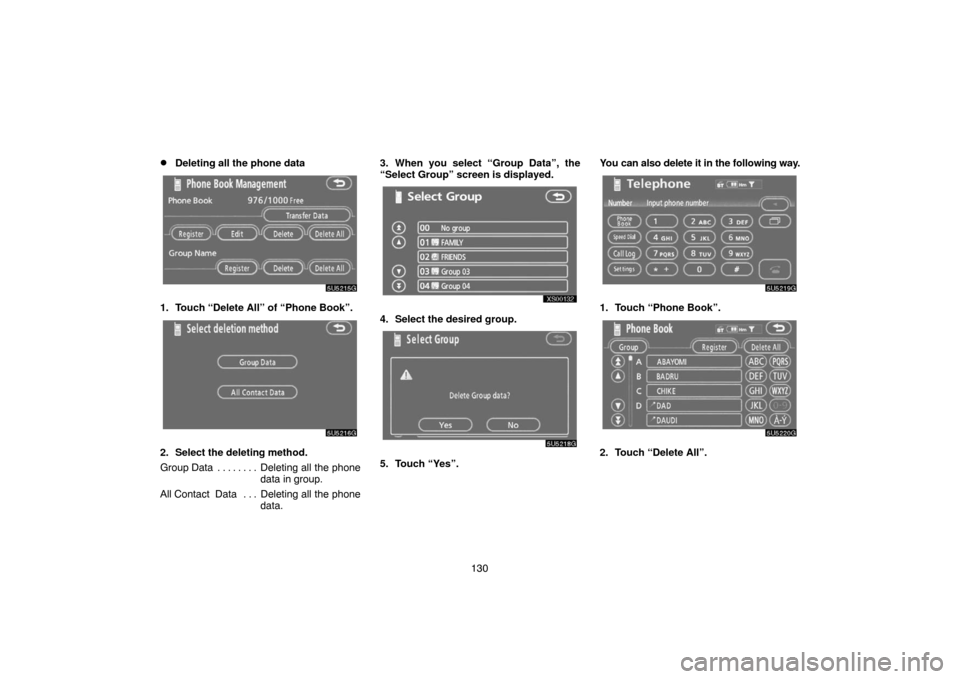
�Deleting all the phone data
5U5215G
1. Touch “Delete All” of “Phone Book”.
5U5216G
2. Select the deleting method.
Group Data Deleting all the phone. . . . . . . .
data in group.
All Contact Data Deleting all the phone. . .
data.3. When you select “Group Data”, the
“Select Group” screen is displayed.
XS00132
4. Select the desired group.
5U5218G
5. Touch “Yes”.You can also delete it in the following way.
5U5219G
1. Touch “Phone Book”.
5U5220G
2. Touch “Delete All”.
Page 147 of 235
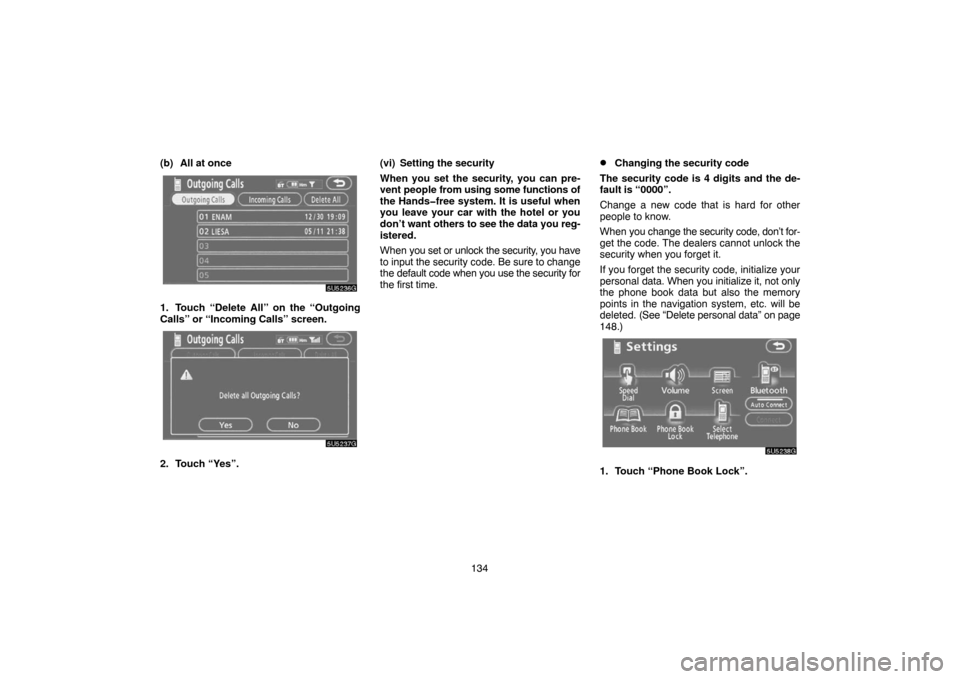
134 (b) All at once
5U5236G
1. Touch “Delete All” on the “Outgoing
Calls” or “Incoming Calls” screen.
5U5237G
2. Touch “Yes”.(vi) Setting the security
When you set the security, you can pre-
vent people from using some functions of
the Handsfree system. It is useful when
you leave your car with the hotel or you
don’t want others to see the data you reg-
istered.
When you set or unlock the security, you have
to input the security code. Be sure to change
the default code when you use the security for
the first time.
�Changing the security code
The security code is 4 digits and the de-
fault is “0000”.
Change a new code that is hard for other
people to know.
When you change the security code, don’t for-
get the code. The dealers cannot unlock the
security when you forget it.
If you forget the security code, initialize your
personal data. When you initialize it, not only
the phone book data but also the memory
points in the navigation system, etc. will be
deleted. (See “Delete personal data” on page
148.)
5U5238G
1. Touch “Phone Book Lock”.