change language TOYOTA TUNDRA 2008 2.G Owners Manual
[x] Cancel search | Manufacturer: TOYOTA, Model Year: 2008, Model line: TUNDRA, Model: TOYOTA TUNDRA 2008 2.GPages: 621, PDF Size: 11.62 MB
Page 335 of 621
325
2008 TUNDRA from Apr. ’08 Prod. (OM 34477U)
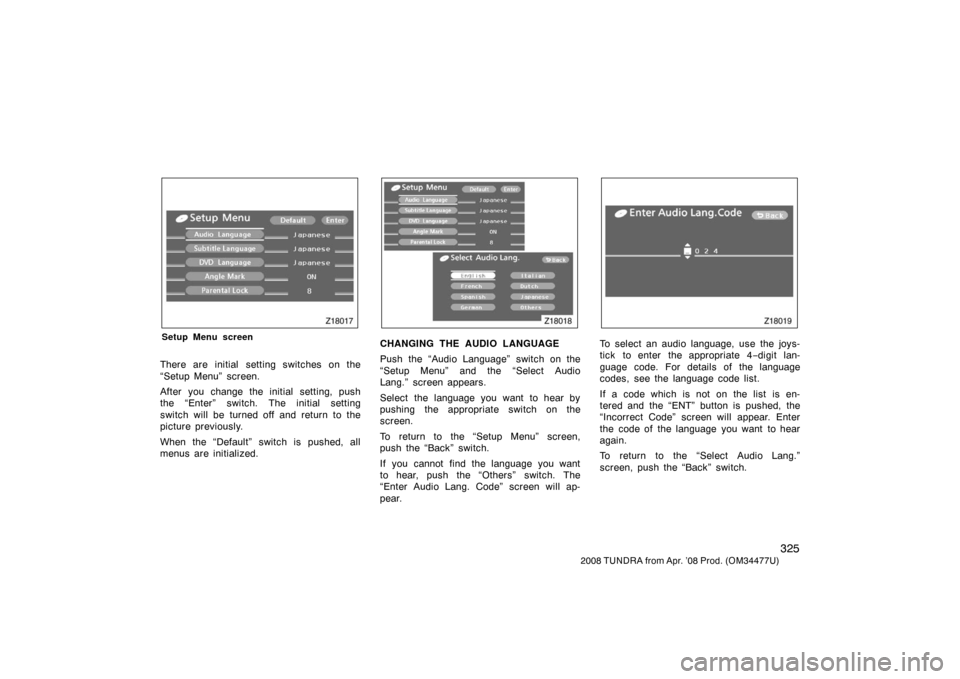
Z18017
Setup Menu screen
There are initial setting switches on the
“Setup Menu” screen.
After you change the initial setting, push
the “Enter” switch. The initial setting
switch will be turned off and return to the
picture previously.
When the “Default” switch is pushed, all
menus are initialized.
Z18018
CHANGING THE AUDIO LANGUAGE
Push the “Audio Language” switch on the
“Setup Menu” and the “Select Audio
Lang.” screen appears.
Select the language you want to hear by
pushing the appropriate switch on the
screen.
To return to the “Setup Menu” screen,
push the “Back” switch.
If you cannot find the language you want
to hear, push the “Others” switch. The
“Enter Audio Lang. Code” screen will ap-
pear.
Z18019
To select an audio language, use the joys-
tick to enter the appropriate 4 −digit lan-
guage code. For details of the language
codes, see the language code list.
If a code which is not on the list is en-
tered and the “ENT” button is pushed, the
“Incorrect Code” screen will appear. Enter
the code of the language you want to hear
again.
To return to the “Select Audio Lang.”
screen, push the “Back” switch.
Page 347 of 621
337
2008 TUNDRA from Apr. ’08 Prod. (OM 34477U)
DVD PLAYER AND DVD VIDEO DISCS
This DVD player conforms to NTSC col-
or TV formats. DVD video discs con-
forming to other formats such as PAL
or SECAM cannot be used.
Region codes: Some DVD video discs
have a region code indicating where the
disc can be used. If the DVD video disc
is not labeled “ALL” or “1”, you cannot
use it in this DVD player. If you attempt
to play an inappropriate DVD video disc
in this player, “REGION CODE ERROR”
appears on the screen. Even if the DVD
video disc does not have a region code,
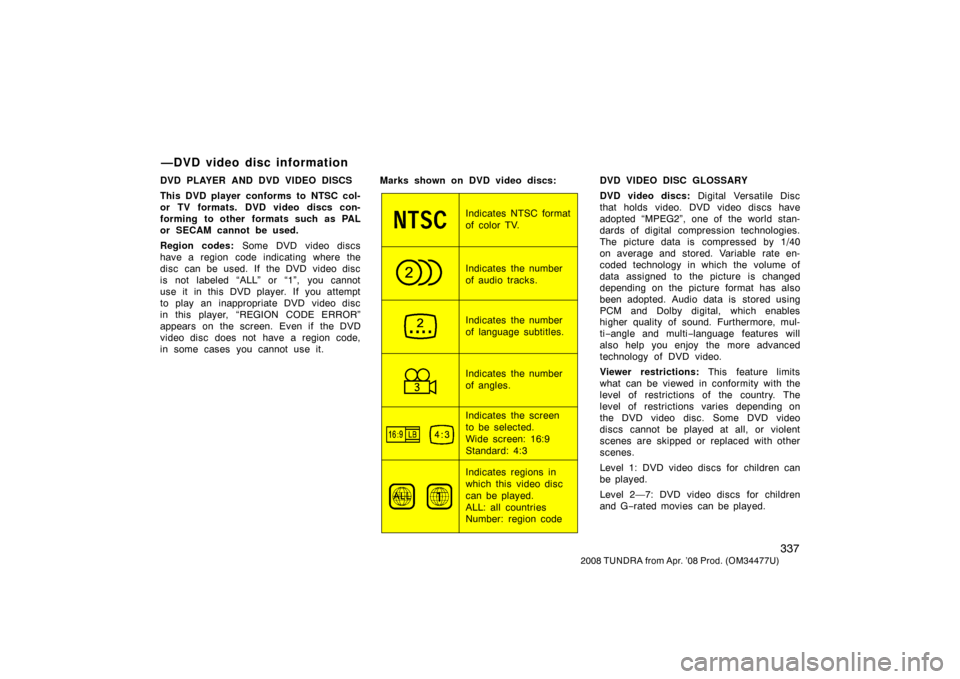
in some cases you cannot use it. Marks shown on DVD video discs:
Indicates NTSC format
of color TV.
Indicates the number
of audio tracks.
Indicates the number
of language subtitles.
Indicates the number
of angles.
Indicates the screen
to be selected.
Wide screen: 16:9
Standard: 4:3
Indicates regions in
which this video disc
can be played.
ALL: all countries
Number: region codeDVD VIDEO DISC GLOSSARY
DVD video discs:
Digital Versatile Disc
that holds video. DVD video discs have
adopted “MPEG2”, one of the world stan-
dards of digital compression technologies.
The picture data is compressed by 1/40
on average and stored. Variable rate en-
coded technology in which the volume of
data assigned to the picture is changed
depending on the picture format has also
been adopted. Audio data is stored using
PCM and Dolby digital, which enables
higher quality of sound. Furthermore, mul-
ti −angle and multi −language features will
also help you enjoy the more advanced
technology of DVD video.
Viewer restrictions: This feature limits
what can be viewed in conformity with the
level of restrictions of the country. The
level of restrictions varies depending on
the DVD video disc. Some DVD video
discs cannot be played at all, or violent
scenes are skipped or replaced with other
scenes.
Level 1: DVD video discs for children can
be played.
Level 2—7: DVD video discs for children
and G −rated movies can be played.
—DVD video disc information