reset TOYOTA TUNDRA 2010 2.G User Guide
[x] Cancel search | Manufacturer: TOYOTA, Model Year: 2010, Model line: TUNDRA, Model: TOYOTA TUNDRA 2010 2.GPages: 724, PDF Size: 13.74 MB
Page 210 of 724
210
2-2. Instrument cluster
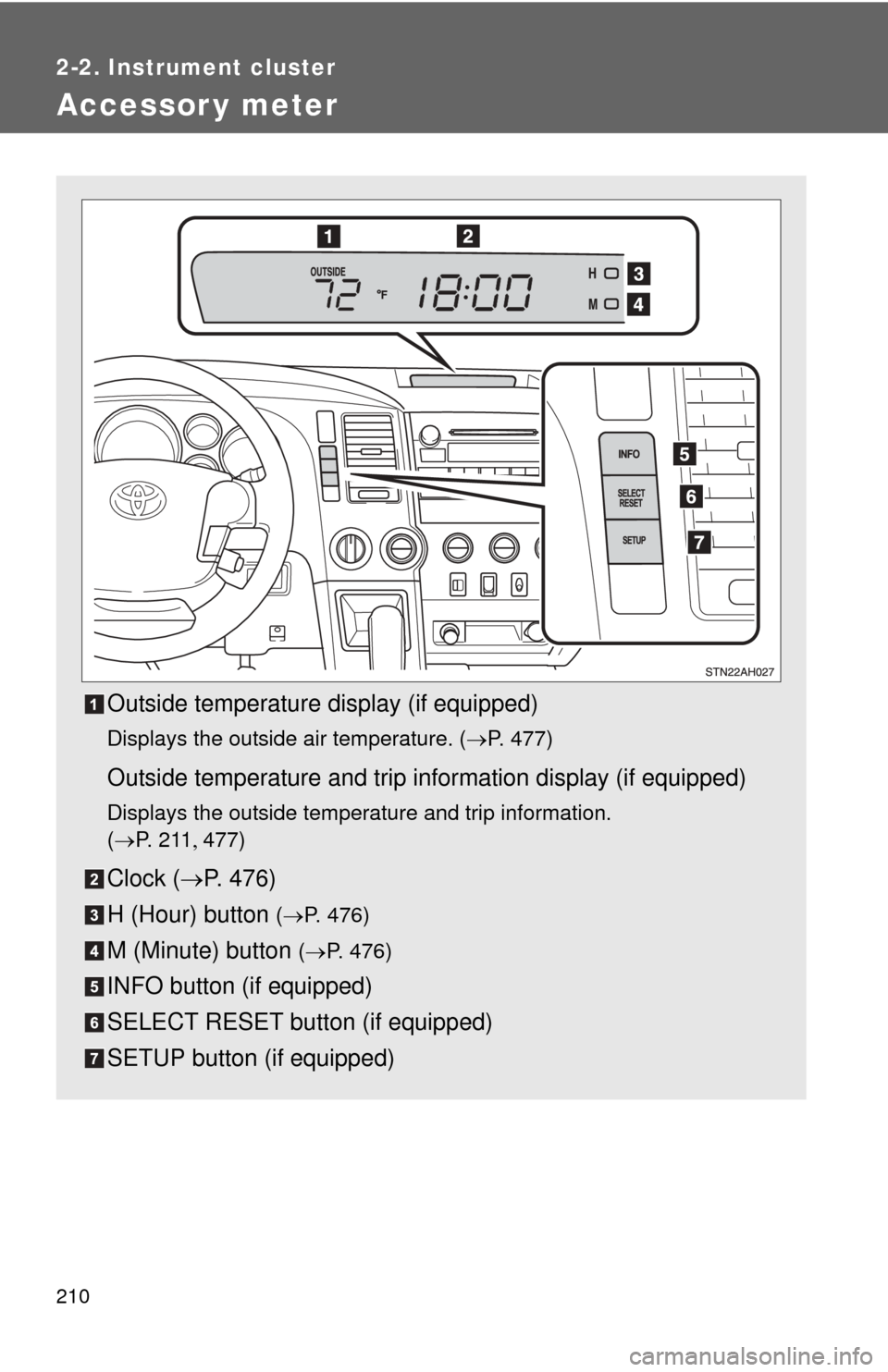
Accessor y meter
Outside temperature display (if equipped)
Displays the outside air temperature. (P. 477)
Outside temperature and trip information display (if equipped)
Displays the outside temperature and trip information.
(P. 2 1 1 477)
Clock ( P. 476)
H (Hour) button
( P. 476)
M (Minute) button ( P. 476)
INFO button (if equipped)
SELECT RESET button (if equipped)
SETUP button (if equipped)
Page 211 of 724
211
2-2. Instrument cluster
2
When driving
Outside temperature and trip in
formation display (if equipped)
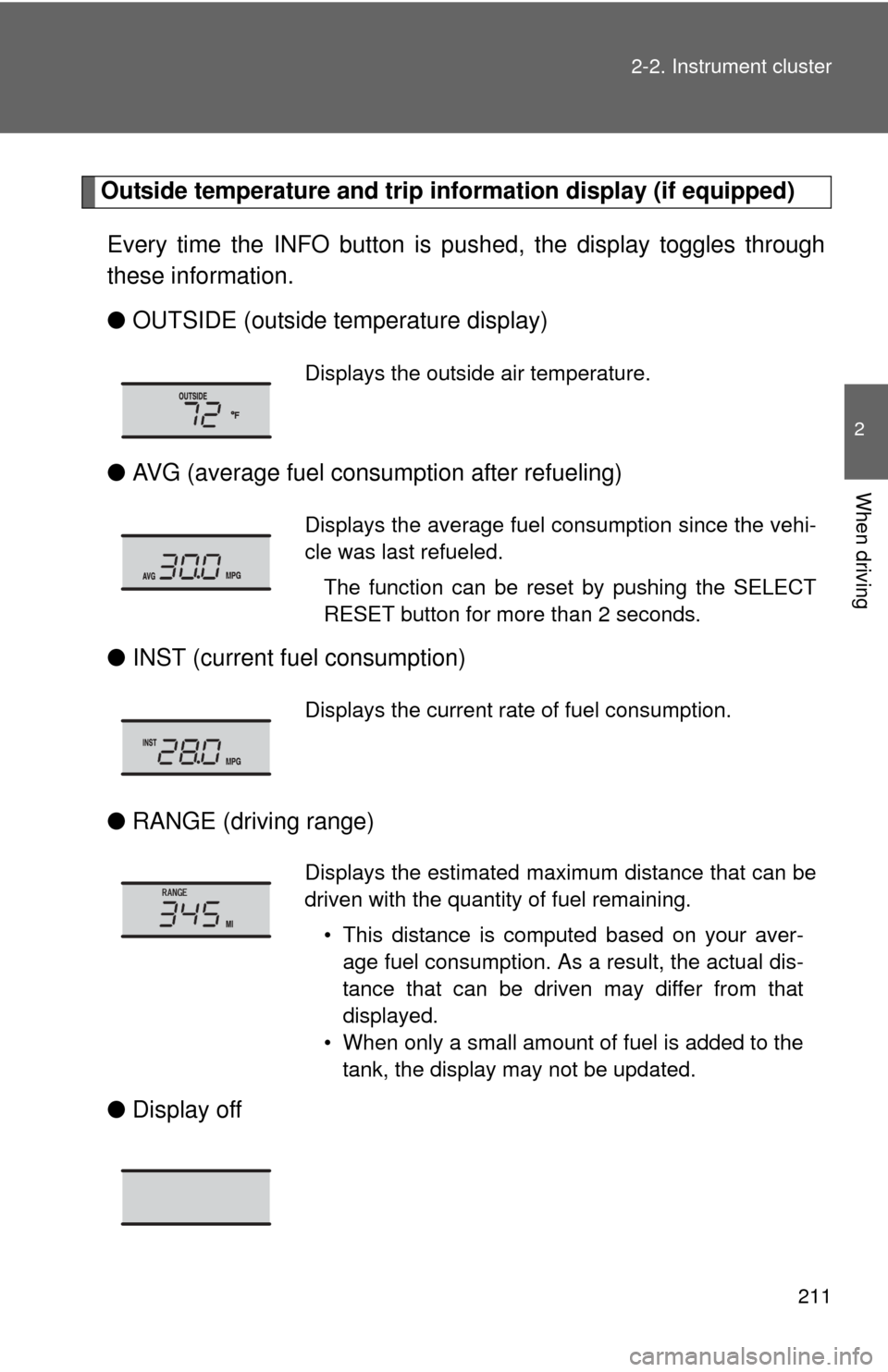
Every time the INFO button is pushed, the display toggles through
these information.
● OUTSIDE (outside temperature display)
● AVG (average fuel consumption after refueling)
● INST (current fu el consumption)
● RANGE (driving range)
● Display off
Displays the outside air temperature.
Displays the average fuel consumption since the vehi-
cle was last refueled.
The function can be reset by pushing the SELECT
RESET button for more than 2 seconds.
Displays the current rate of fuel consumption.
Displays the estimated maximum distance that can be
driven with the quantity of fuel remaining.• This distance is computed based on your aver-age fuel consumption. As a result, the actual dis-
tance that can be driven may differ from that
displayed.
• When only a small amount of fuel is added to the tank, the display may not be updated.
Page 223 of 724
223
2-4. Using other
driving systems
2
When driving
■Automatic cruise control cancellation
The set speed is automatically cancelled in any of the following situations.
●Actual vehicle speed falls more than 10 mph (16 km/h) below the preset
vehicle speed.
At this time, the memorized set speed is not retained.
● Actual vehicle speed is below 25 mph (40 km/h).
● VSC is activated.
■ If the cruise control indicator flashes
Press the ON-OFF button to turn the cruise control off, and then reactivate
the system.
If the cruise control speed cannot be set or if the cruise control cancels
immediately after being activated, there may be a malfunction in the cruise
control system. Have the vehicle inspected by your Toyota dealer.
CAUTION
■To avoid operating the cruise control by mistake
Keep the ON-OFF button off when not in use.
■ Situations unsuitable for cruise control
Do not use cruise control in any of the following situations.
Doing so may result in control of the vehicle being lost and could cause an
accident resulting in death or serious injury.
●In heavy traffic
● On roads with sharp bends
● On winding roads
● On slippery roads, such as those covered with rain, ice or snow
● On steep hills
● When towing a trailer or emergency towing
Page 314 of 724
314
3-2. Using the audio system
Using the radio
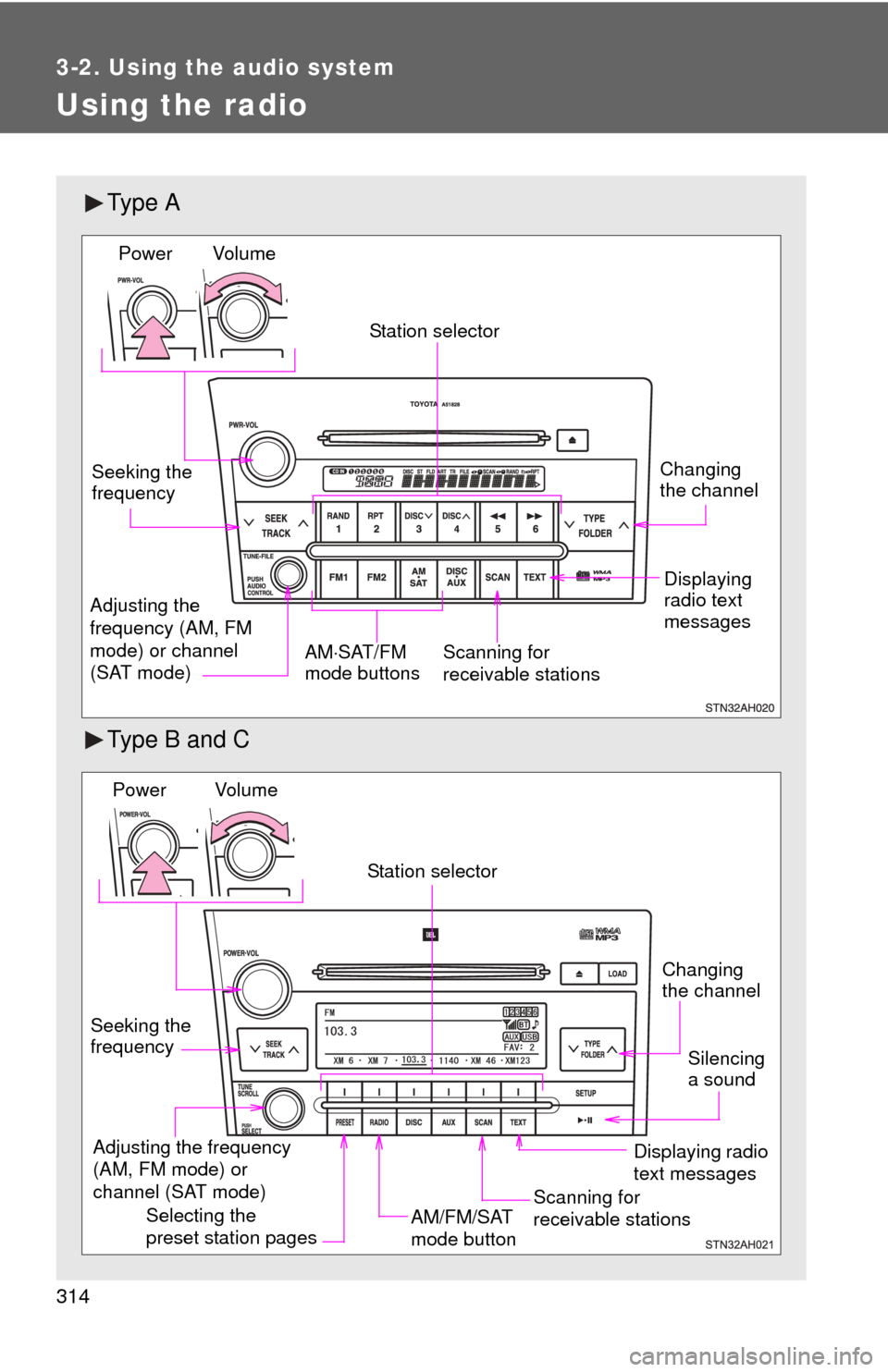
Ty p e A
Type B and C
Vol u m eScanning for
receivable stations
Station selector
Seeking the
frequency
Adjusting the
frequency (AM, FM
mode) or channel
(SAT mode) AM
SAT/FM
mode buttonsPower
Displaying
radio text
messages
Changing
the channel
AM/FM/SAT
mode button
Station selector
Seeking the
frequency Adjusting the frequency
(AM, FM mode) or
channel (SAT mode)
Displaying radio
text messages
Changing
the channel
Scanning for
receivable stations
Vo l u m e
Power
Silencing
a sound
Selecting the
preset station pages
Page 315 of 724
315
3-2. Using the audio system
3
Interior and exterior features
Setting station presets (excluding XM® Satellite Radio)
Search for desired stations by turning or or
pressing “
” or “ ” on .
Press and hold a button (from to or one of )
until you hear a beep.
Type B and C:
Each time
is pressed, station pages are changed. There are a
total of 6 pages.
Scanning radio stations (excluding XM® Satellite Radio)
■ Scanning the preset radio stations
Press and hold until you hear a beep.
Preset stations will be played for 5 seconds each.
When the desired station is reached, press again.
■ Scanning all radio stations within range
Press
.
All the stations with reception will be played for 5 seconds each.
When the desired station is reached, press again.
Page 317 of 724
317
3-2. Using the audio system
3
Interior and exterior features
■
Setting XM® Satellite Radio channel presets
Select the desired channel. Press and hold a button (from to
or one of ) until you hear a beep.
Type B and C:
Each time
is pressed, station pages are changed. There are a
total of 6 pages.
■ Changing the channel category
Press “ ” or “ ” on .
■ Scanning XM
® Satellite Radio channels
● Scanning channels in the current category
Press .
When the desired channel is reached, press again.
● Scanning the preset channels
Press and hold until you hear a beep.
When the desired channel is reached, press again.
Page 319 of 724
319
3-2. Using the audio system
3
Interior and exterior features
■
When the battery is disconnected
All preset stations are erased. (type A only)
■ Reception sensitivity
●Objects, especially metal objects, such as cargo, a camper, or a truck
rack, may adversely affect the reception of XM
® Satellite Radio.
● Maintaining perfect radio reception at all times is difficult due to the con-
tinually changing position of the antenna, differences in signal strength
and surrounding objects, such as trains, transmitters, etc.
■ XM
® Satellite Radio
An XM
® Satellite Radio is a tuner designed exclusively to receive broadcasts
provided under a separate subscription. Availability is limited to the 48 con-
tiguous states and 10 Canadian provinces.
● XM
® subscriptions
For detailed information about XM® Satellite Radio or to subscribe:
U.S.A.
Visit on the web at www.xmradio.com
or call 1-800-967-2346.
Canada
Visit on the web at www.xmradio.ca
or call 1-877-438-9677.
● Radio ID
You will need the radio ID when activating XM
® service or reporting a
problem. Select “CH000” using
or , and the receiver’s
8-character ID number will appear.
● Satellite tuner
The tuner supports only Audio Services (Music and Talk) and the accom-
panying Text Information of XM
® Satellite Radio.
Page 343 of 724
343
3-2. Using the audio system
3
Interior and exterior features
Switching the display
Press .
Each time is pressed, the display changes in the following order:
Track title Track title/Artist name Track title/Album name Track
title/Elapsed time
■ About iPod®
iPod® is registered trademarks of Apple, Inc.
■ iPod
® functions
● When an iPod
® is connected and the audio source is changed to iPod®
mode, the iPod® will resume play from the same point at which it was last
used.
● Depending on the iPod
® that is connected to the system, certain func-
tions may not be available. Disconnecting the device and reconnecting it
once again may resolve some malfunctions.
■ iPod
® problems
To resolve most problems encountered when using your iPod
®, disconnect
your iPod® from the vehicle iPod® connection and reset it.
For instructions on how to reset your iPod®, refer to your iPod® Owner’s
Manual.
■ Error messages
“IPOD ERROR”: This indicates a problem in the iPod
®, inside the USB box
or the connection between them.
“NO SONGS”:This indicates that there is no music data in the iPod
®.
“UPDATE YOUR IPOD”:This indicates that the version of the iPod
® is not
compatible.
Page 355 of 724
355
3-2. Using the audio system
3
Interior and exterior features
Type B and C
Press .
Press that corresponds to “MORE”.
Press that corresponds to “ASL”.
Press that corresponds to the desired mode.
Type B: “ON” or “OFF”
Type C: “LOW”, “MID”, “HIGH”, or “OFF”
ASL automatically adjusts the volume and tone quality according to
vehicle speed.
■Setting the number of preset pages (type B and C)
The number of preset pages desired c an be set from 1 to 6. The initial
setting is 6 pages.
Press .
Press that corresponds to “MORE”.
Press that corresponds to “PRESET”.
Press that corresponds to the desired number of preset
pages.
■ Language settings (type B and C)
P. 3 1 2
Page 426 of 724
426 3-5. Using the hands-free phone system (for cellular phone)
Dialing by inputting a name
Press the talk switch and say “Dial by name”.
Select a registered name to be input by either of the following
methods:
a. Press the talk switch and say a registered name.
b. Press the talk switch and sa y “List names”. Press the talk
switch while the desired name is being read aloud.
Dial by one of the following methods:
a. Press the off-hook switch.
b. Press the talk switch and say “Dial”.
c. Select “Dial” by using .
Speed dialing
Press the off-hook switch.
Press the preset button in which the desired number is regis-
tered.
Press the off-hook switch.
When receiving a phone call■ Answering the phone
Press the off-hook switch.
■ Refusing the call
Press the on-hook switch.