buttons TOYOTA TUNDRA 2010 2.G Owners Manual
[x] Cancel search | Manufacturer: TOYOTA, Model Year: 2010, Model line: TUNDRA, Model: TOYOTA TUNDRA 2010 2.GPages: 724, PDF Size: 13.74 MB
Page 45 of 724
45
1-2. Opening, closing and locking the doors
1
Before driving
■
Wireless remote control battery depletion
The standard battery life is 1 to 2 years. (The battery becomes depleted
even if the wireless remote control is not used.) If the wireless remot\
e control
function does not operate, the battery may be depleted. Replace the battery
when necessary. ( P. 558)
■ If the wireless remote control does not operate
Locking and unlocking the doors: Use the key. ( P. 47)
■ Security feature
If a door is not opened within approximately 60 seconds after the vehicle is
unlocked, the security feature automatically locks the vehicle again.
■ Alarm (if equipped)
Using the wireless remote control to lock the door will set the alarm sy\
stem.
(P. 116)
■ Conditions affecting operation
The wireless remote control function may not operate normally in the follow-
ing situations.
●Near a TV tower, radio station, electr ic power plant, airport or other facil-
ity that generates strong radio waves
● When carrying a portable radio, cell ular phone or other wireless commu-
nication device
● When multiple wireless keys are in the vicinity
● When the wireless key has come into contact with, or is covered by a
metallic object
● When a wireless key (that emits radio waves) is being used nearby
● When the wireless key has been left near an electrical appliance such as
a personal computer
■ When riding in an aircraft
When bringing a wireless remote control onto an aircraft, make sure you do
not press any buttons on the wireless remote control while inside the aircraft
cabin. If you are carrying a wireless remote control in your bag etc, ensure
that the buttons are not likely to be pressed accidentally. Pressing a button
may cause the wireless remote control to emit radio waves that could inter-
fere with the operation of the aircraft.
Page 51 of 724
51
1-2. Opening, closing and locking the doors
1
Before driving
CAUTION
■
To prevent an accident
Observe the following precautions while driving the vehicle.
Failing to do so may result in a door opening and an occupant falling out,
resulting in death or serious injury.
●Always use a seat belt.
● Always lock the doors.
● Ensure that all doors are properly closed.
● Do not pull the inside handle of the doors while driving.
The doors may be opened and the passengers are thrown out of the vehi-
cle and it may result in serious injury or death.
Be especially careful for the front doors, as the doors may be opened even
if the inside lock buttons are in locked position.
● Double Cab and CrewMax models: Set the rear door child protector locks
when children are seated in the rear seats.
Page 71 of 724
71
1-3. Adjustable components (s
eats, mirrors, steering wheel)
1
Before driving
Linking driving position memory with door unlock operation
Memorized driving positions can be recalled when you unlock the
driver’s door using the wireless remote control and open the driver’s
door.
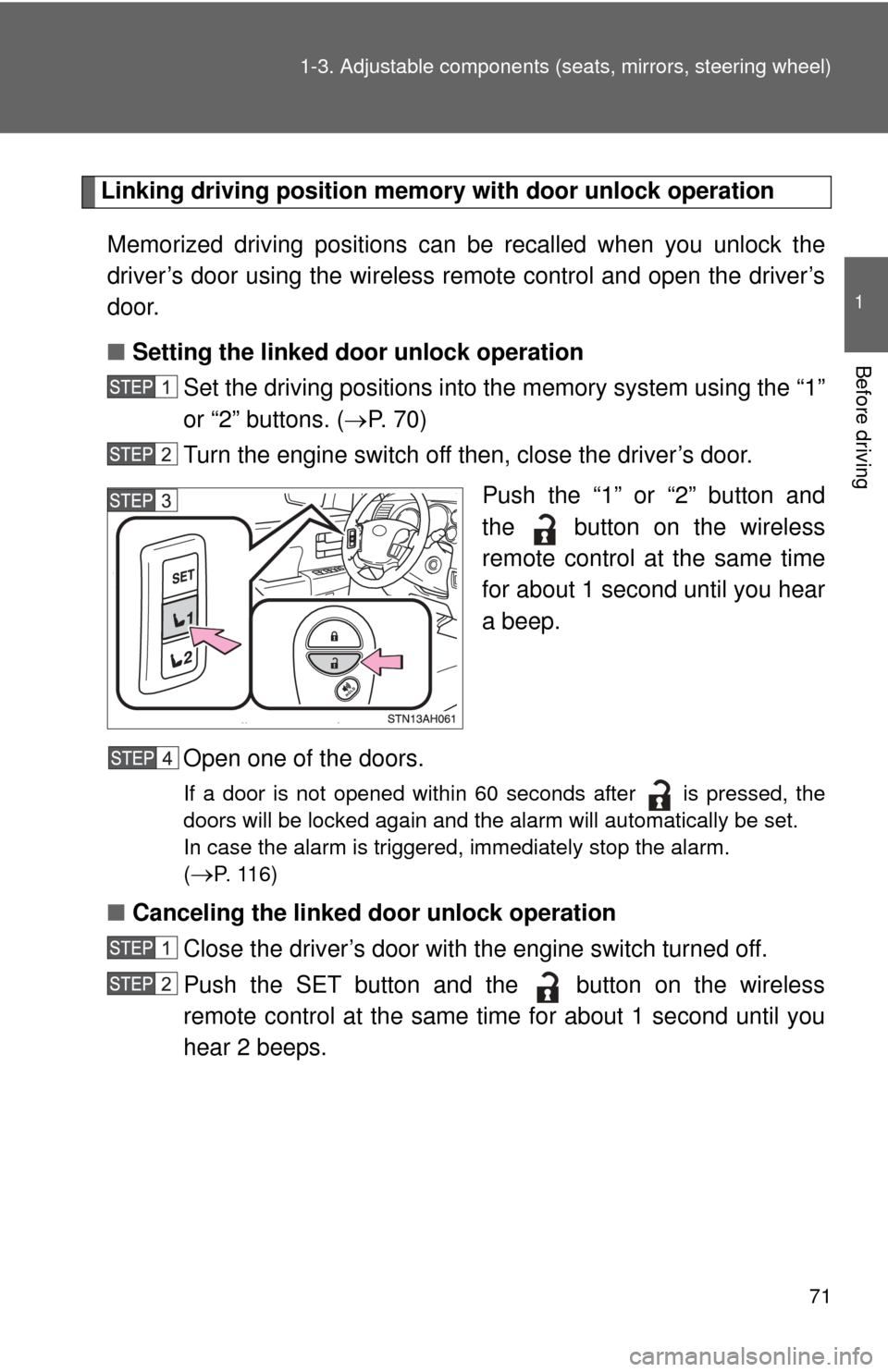
■ Setting the linked door unlock operation
Set the driving positions into the memory system using the “1”
or “2” buttons. ( P. 7 0 )
Turn the engine switch off then, close the driver’s door.
Push the “1” or “2” button and
the button on the wireless
remote control at the same time
for about 1 second until you hear
a beep.
Open one of the doors.
If a door is not opened within 60 seconds after is pressed, the
doors will be locked again and the alarm will automatically be set.
In case the alarm is triggered, immediately stop the alarm.
(
P. 1 1 6 )
■ Canceling the linked door unlock operation
Close the driver’s door with the engine switch turned off.
Push the SET button and the button on the wireless
remote control at the same time for about 1 second until you
hear 2 beeps.
Page 149 of 724
149
1
1-7. Safety information
Before driving
Installing child restraints
Follow the child restraint system manufacturer’s instructions. Firmly
secure child restraints to the seat s using the LATCH anchors or a
seat belt. Attach the top tether stra p when installing a child restraint.
The lap/shoulder belt can be used if your child restraint system is
not compatible with the LATCH (Low er Anchors and Tethers for Chil-
dren) system.
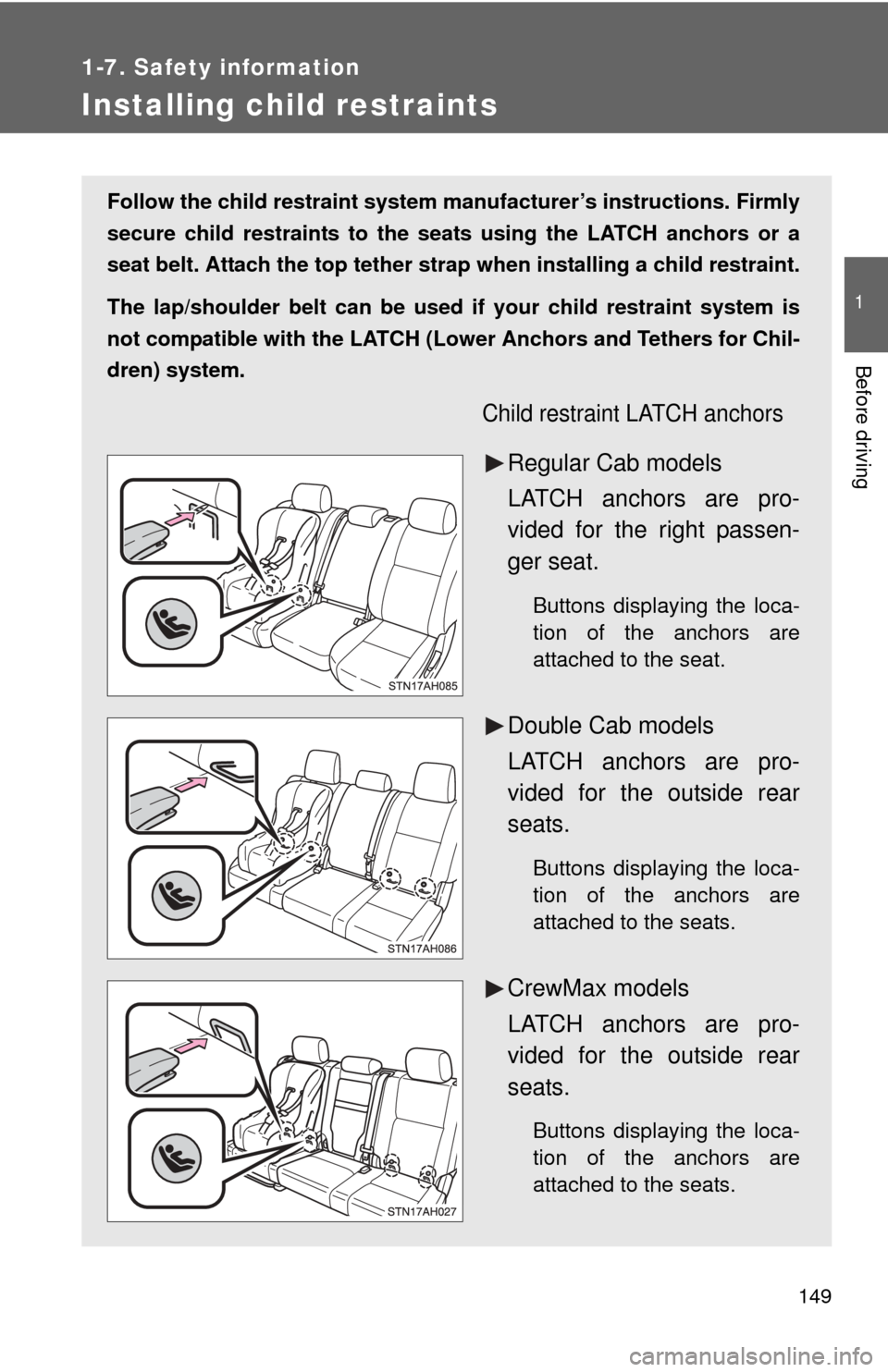
Child restraint LATCH anchors
Regular Cab models
LATCH anchors are pro-
vided for the right passen-
ger seat.
Buttons displaying the loca-
tion of the anchors are
attached to the seat.
Double Cab models
LATCH anchors are pro-
vided for the outside rear
seats.
Buttons displaying the loca-
tion of the anchors are
attached to the seats.
CrewMax models
LATCH anchors are pro-
vided for the outside rear
seats.
Buttons displaying the loca-
tion of the anchors are
attached to the seats.
Page 314 of 724
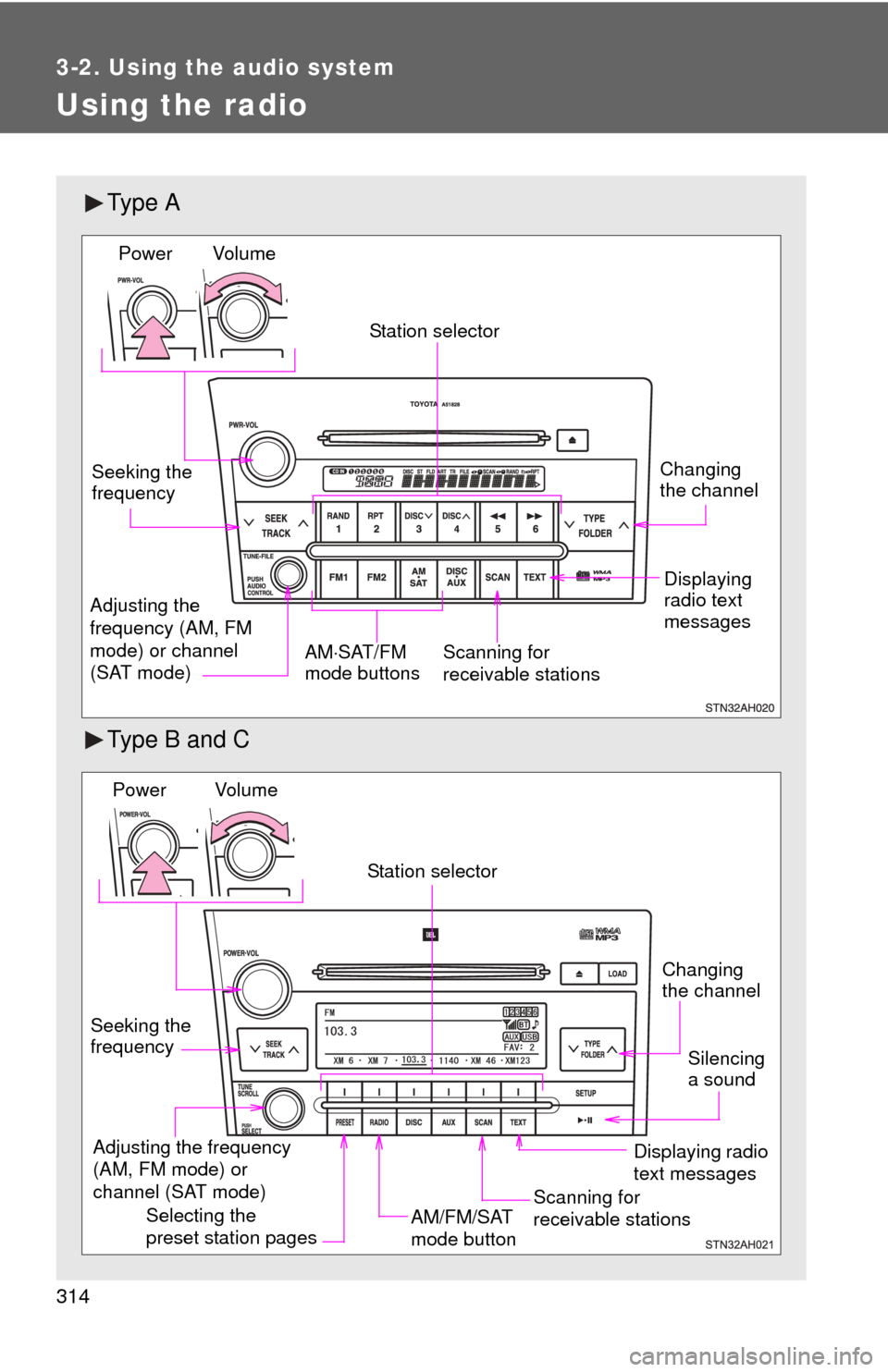
314
3-2. Using the audio system
Using the radio
Ty p e A
Type B and C
Vol u m eScanning for
receivable stations
Station selector
Seeking the
frequency
Adjusting the
frequency (AM, FM
mode) or channel
(SAT mode) AM
SAT/FM
mode buttonsPower
Displaying
radio text
messages
Changing
the channel
AM/FM/SAT
mode button
Station selector
Seeking the
frequency Adjusting the frequency
(AM, FM mode) or
channel (SAT mode)
Displaying radio
text messages
Changing
the channel
Scanning for
receivable stations
Vo l u m e
Power
Silencing
a sound
Selecting the
preset station pages
Page 322 of 724
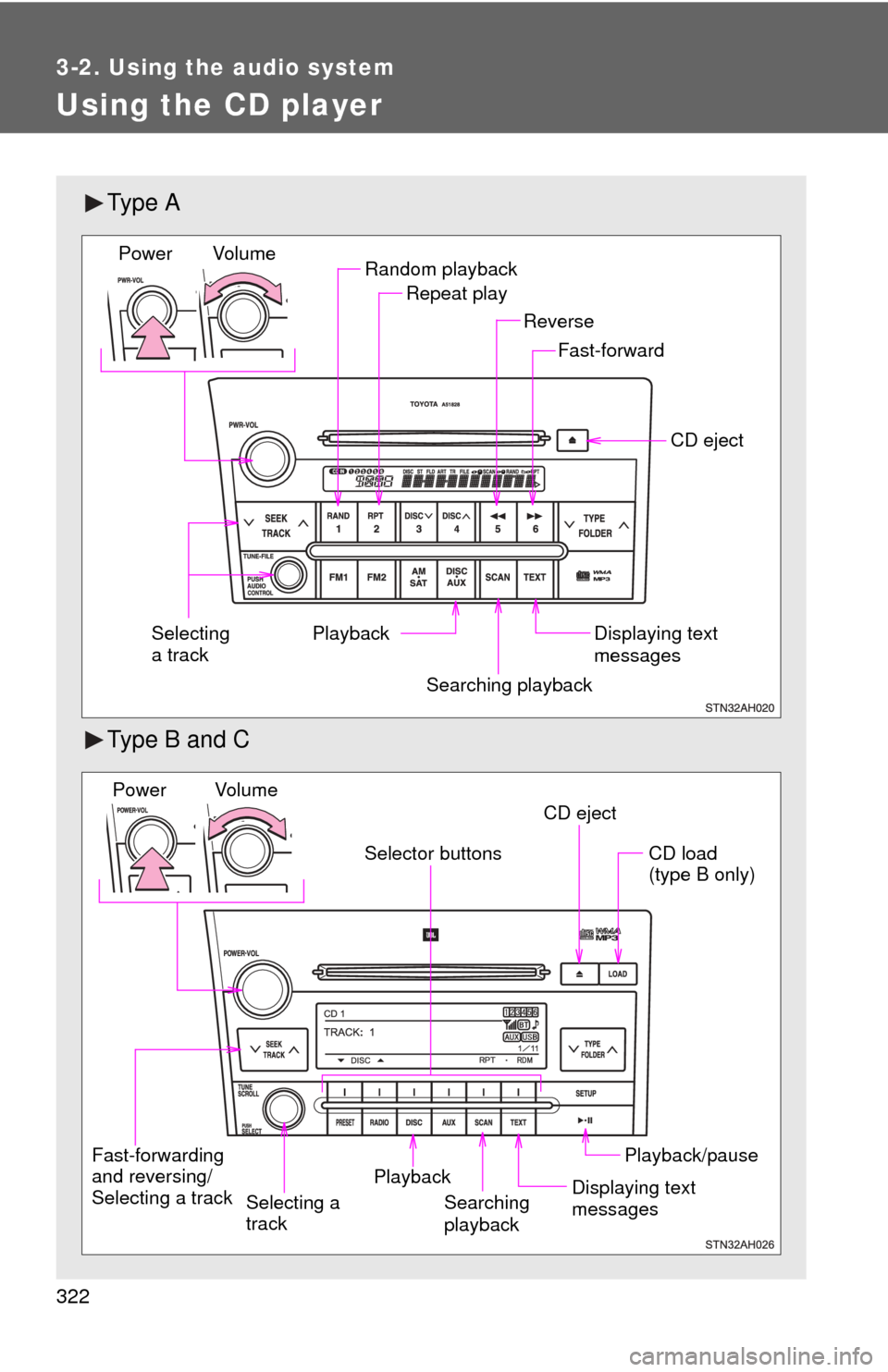
322
3-2. Using the audio system
Using the CD player
Ty p e A
Type B and C
Random playbackRepeat play
Playback CD eject
Displaying text
messages
Selecting
a track
Fast-forward
Reverse
Searching playback
Vol u m e
Power
CD eject
Fast-forwarding
and reversing/
Selecting a track Searching
playbackCD load
(type B only)
Playback/pause
Displaying text
messages
Selector buttons
Playback
Vo l u m e
Power
Selecting a
track
Page 331 of 724
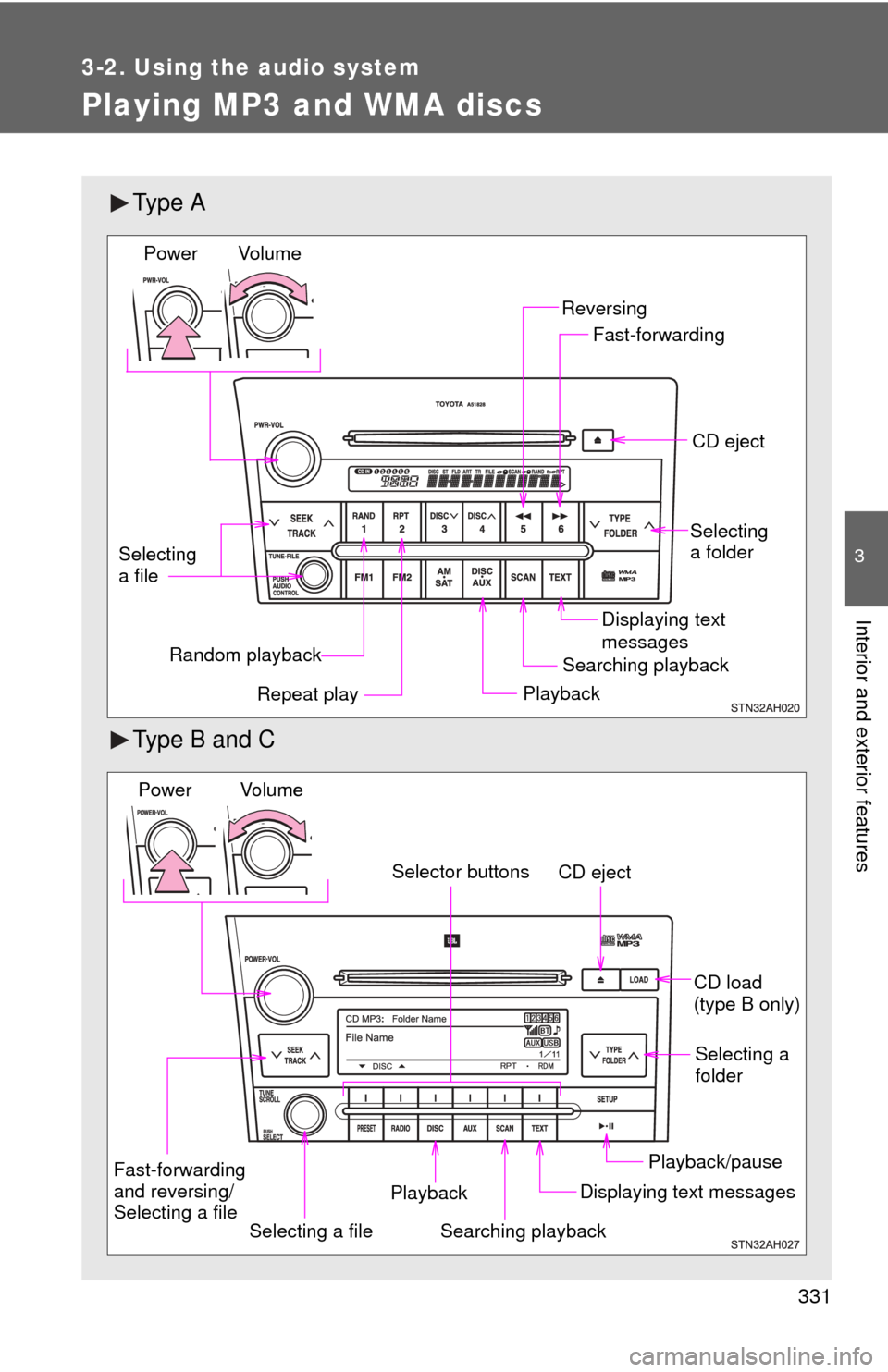
331
3-2. Using the audio system
3
Interior and exterior features
Playing MP3 and WMA discs
Ty p e A
Type B and C
Random playbackPlaybackCD eject
Displaying text
messages
Selecting
a file
Repeat play
Searching playback Selecting
a folder
Reversing
Fast-forwarding
Vol u m e
Power
CD eject
Searching playback Selecting a
folder
CD load
(type B only)
Playback/pause
Displaying text messages
Selecting a file
Selector buttons
Fast-forwarding
and reversing/
Selecting a file Playback
Vo l u m e
Power
Page 339 of 724
339
3-2. Using the audio system
3
Interior and exterior features
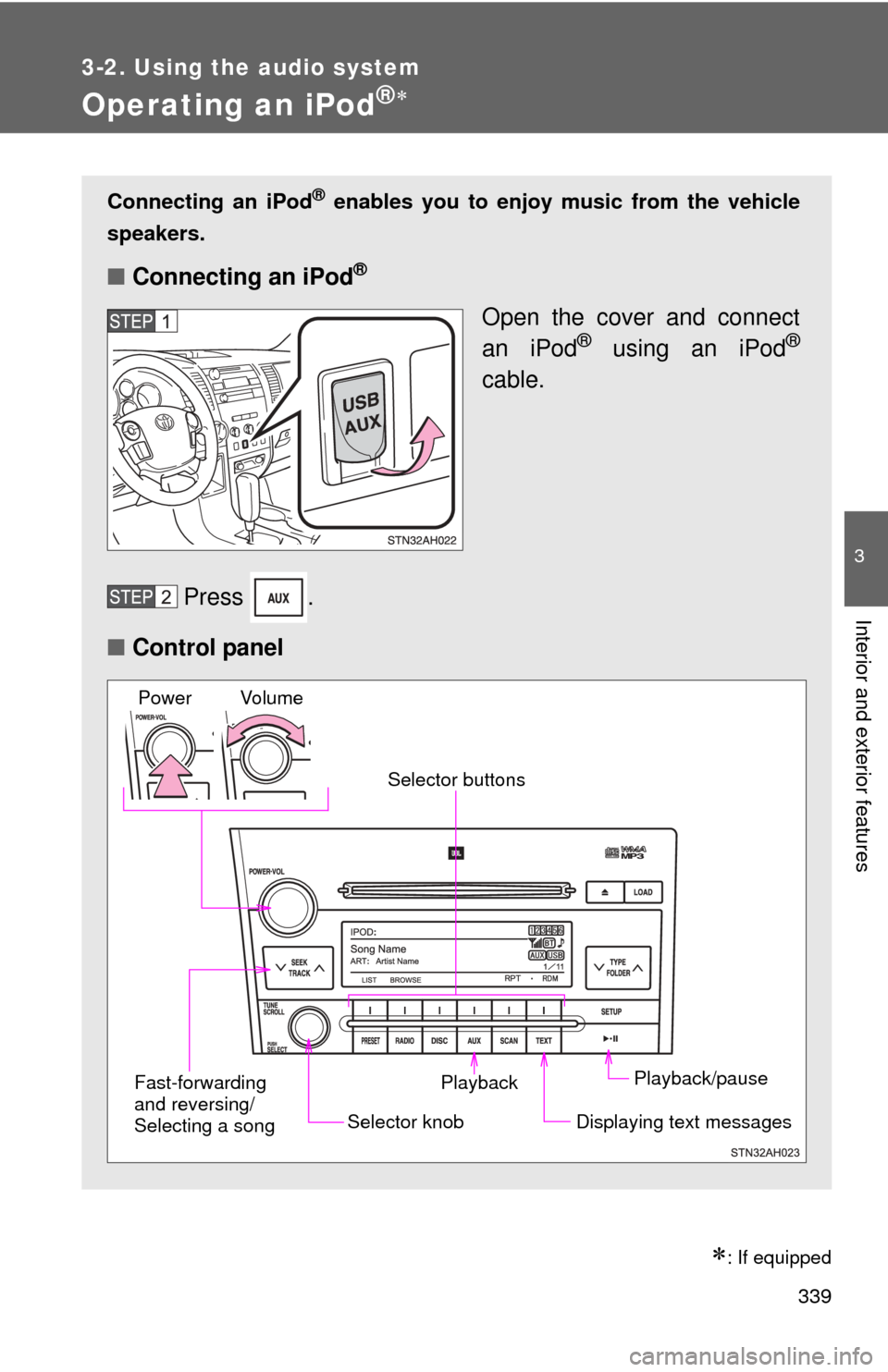
Operating an iPod®
: If equipped
Connecting an iPod® enables you to enjoy music from the vehicle
speakers.
■ Connecting an iPod®
Open the cover and connect
an iPod® using an iPod®
cable.
Press .
■ Control panel
Playback/pause
Displaying text messages
Selector knob
Selector buttons
Fast-forwarding
and reversing/
Selecting a song Playback
Vo l u m e
Power
Page 345 of 724
345
3-2. Using the audio system
3
Interior and exterior features
Operating a USB memor y
: If equipped
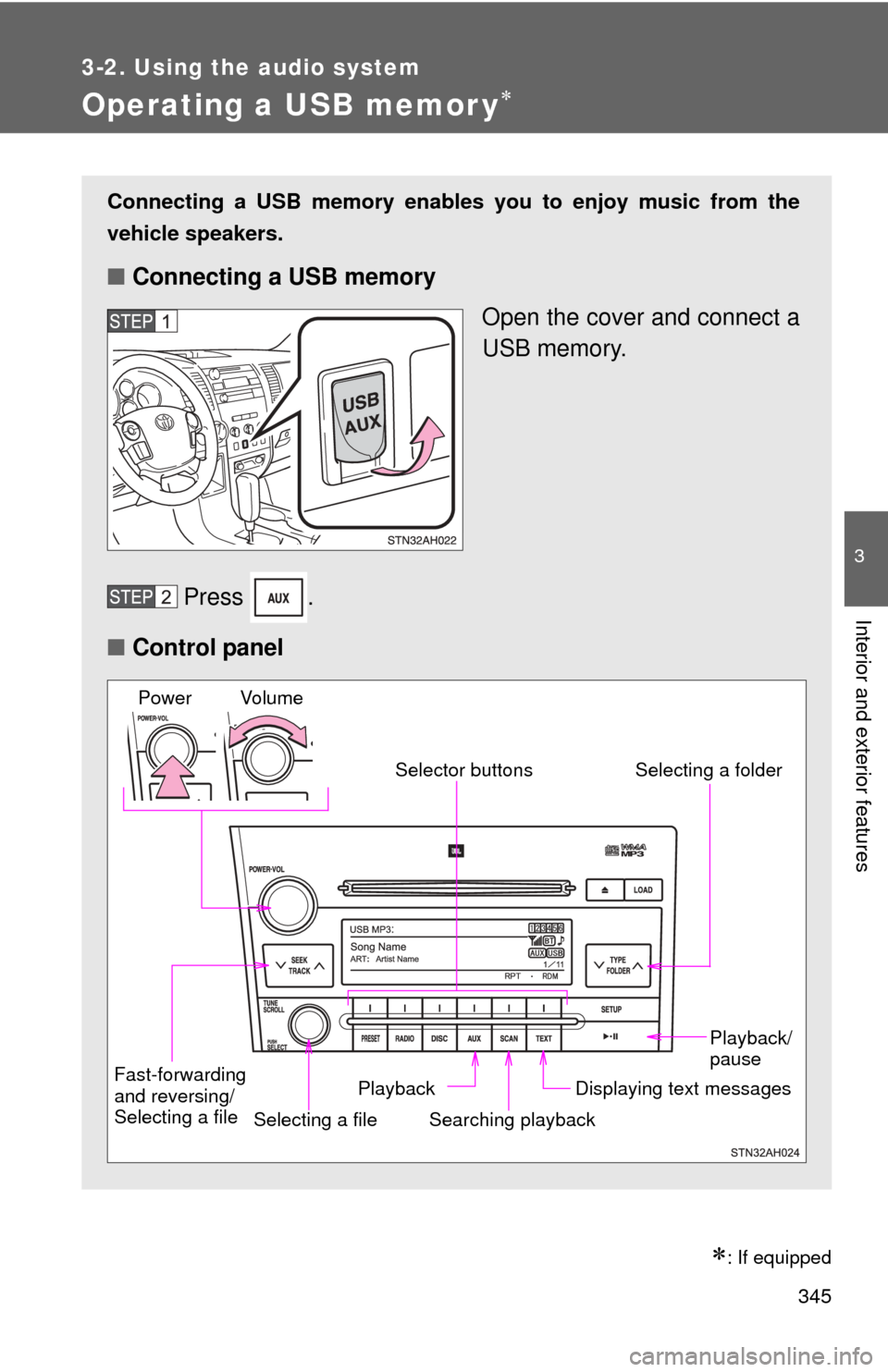
Connecting a USB memory enables you to enjoy music from the
vehicle speakers.
■Connecting a USB memory
Open the cover and connect a
USB memory.
Press .
■ Control panel
Fast-forwarding
and reversing/
Selecting a file
Selecting a file
Playback/
pause
Searching playback Displaying text messages
Selector buttons
Selecting a folder
Playback
Vo l u m e
Power
Page 352 of 724
352
3-2. Using the audio system
Optimal use of the audio system
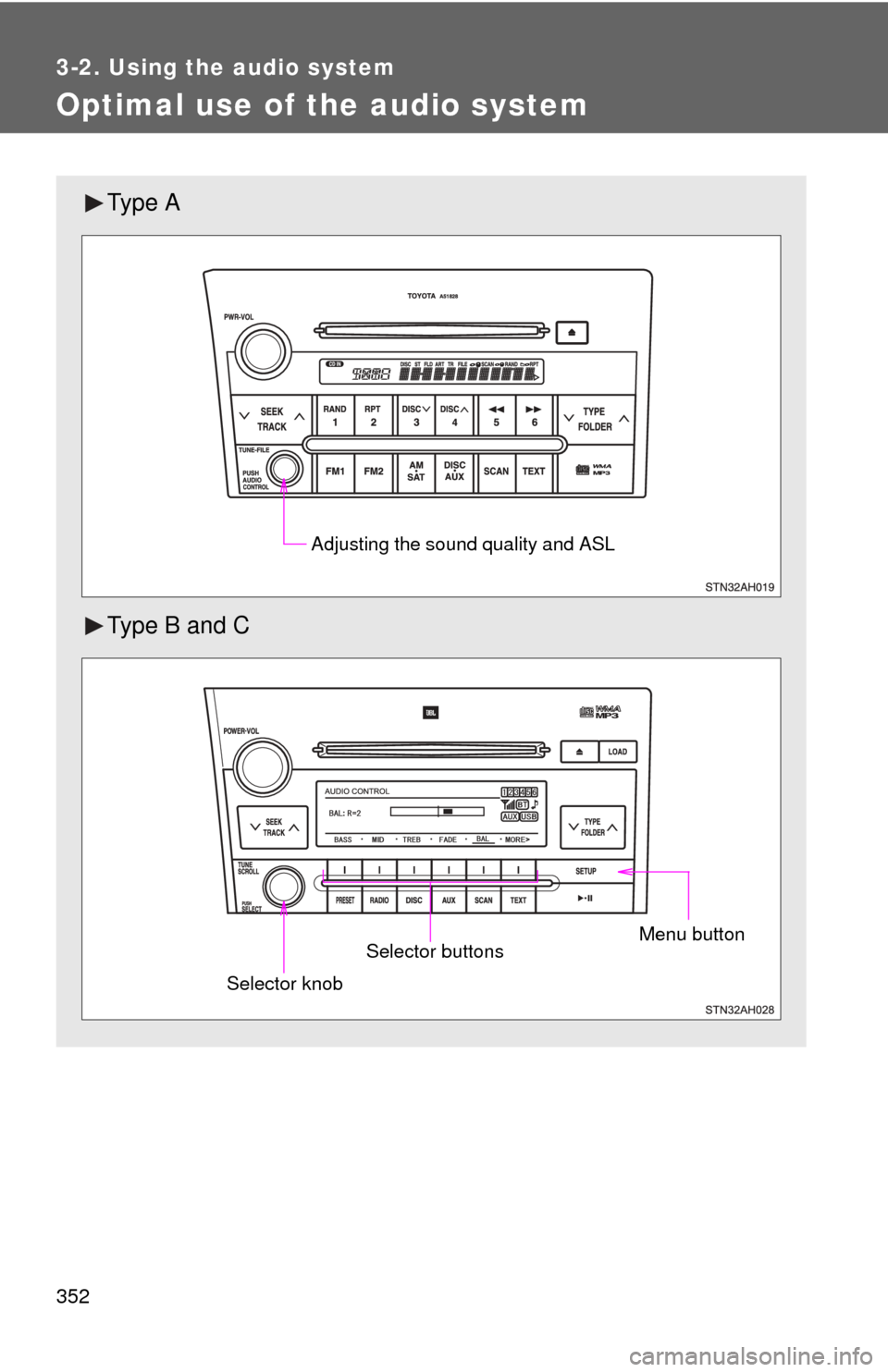
Ty p e A
Type B and C
Adjusting the sound quality and ASL
Menu buttonSelector buttons
Selector knob