ECU TOYOTA TUNDRA 2011 2.G Owners Manual
[x] Cancel search | Manufacturer: TOYOTA, Model Year: 2011, Model line: TUNDRA, Model: TOYOTA TUNDRA 2011 2.GPages: 732, PDF Size: 16.65 MB
Page 4 of 732

TABLE OF CONTENTSIndex
4
3-3. Using the Bluetooth® audio
system
Bluetooth
® audio system .... 365
Using the Bluetooth®
audio system .................... 368
Operating a Bluetooth
®
enabled portable player ... 373
Setting up a Bluetooth
®
enabled portable player ... 375
Bluetooth
® audio system
setup ................................ 380
3-4. Using the rear audio/video system
Rear seat entertainment system .............................. 381
Using the DVD player (DVD video)...................... 390
Using the DVD player (video CD) ........................ 399
Using the DVD player (audio CD/CD text) ........... 402
Using the DVD player (MP3 discs) ...................... 404
Using the video mode ........ 407
Changing the Setup Menu settings ............................. 409
3-5. Using the hands-free phone system (for cellular phone)
Hands-free phone system features ............................ 417
Using the hands-free phone system ................... 421
Making a phone call ........... 429
Setting a cellular phone...... 433
Security and system setup ................................ 437
Using the phone book ........ 440 3-6. Using the interior lights
Interior lights list.................. 446
• Personal/interior light main switch ....................... 447
• Personal/interior lights ...... 448
• Cargo lamp main switch ... 450
3-7. Using the storage features List of storage features ....... 451
• Glove boxes ..................... 453
• Console box ..................... 455
• Card holder ....................... 457
• Map holder ....................... 460
• Pen holder ........................ 463
• Tissue pocket ................... 465
• Overhead console ............ 467
• Front cup holders ............. 468
• Rear cup holders .............. 470
• Bottle holders ................... 471
• Auxiliary boxes ................. 473
• Storage box ...................... 475
3-8. Other interior features Sun visors ........................... 478
Vanity mirrors ..................... 479
Clock................................... 480
Outside temperature display .............................. 481
Power outlets (12V DC) ...... 483
Power outlets (115V AC) .... 488
Seat heaters ....................... 492
Seat heaters and ventilators ......................... 494
Armrest (CrewMax models only) .................................. 496
Seatback table .................... 497
Floor mat ............................ 498
Luggage compartment features ............................ 500
Garage door opener ........... 503
Page 29 of 732
29
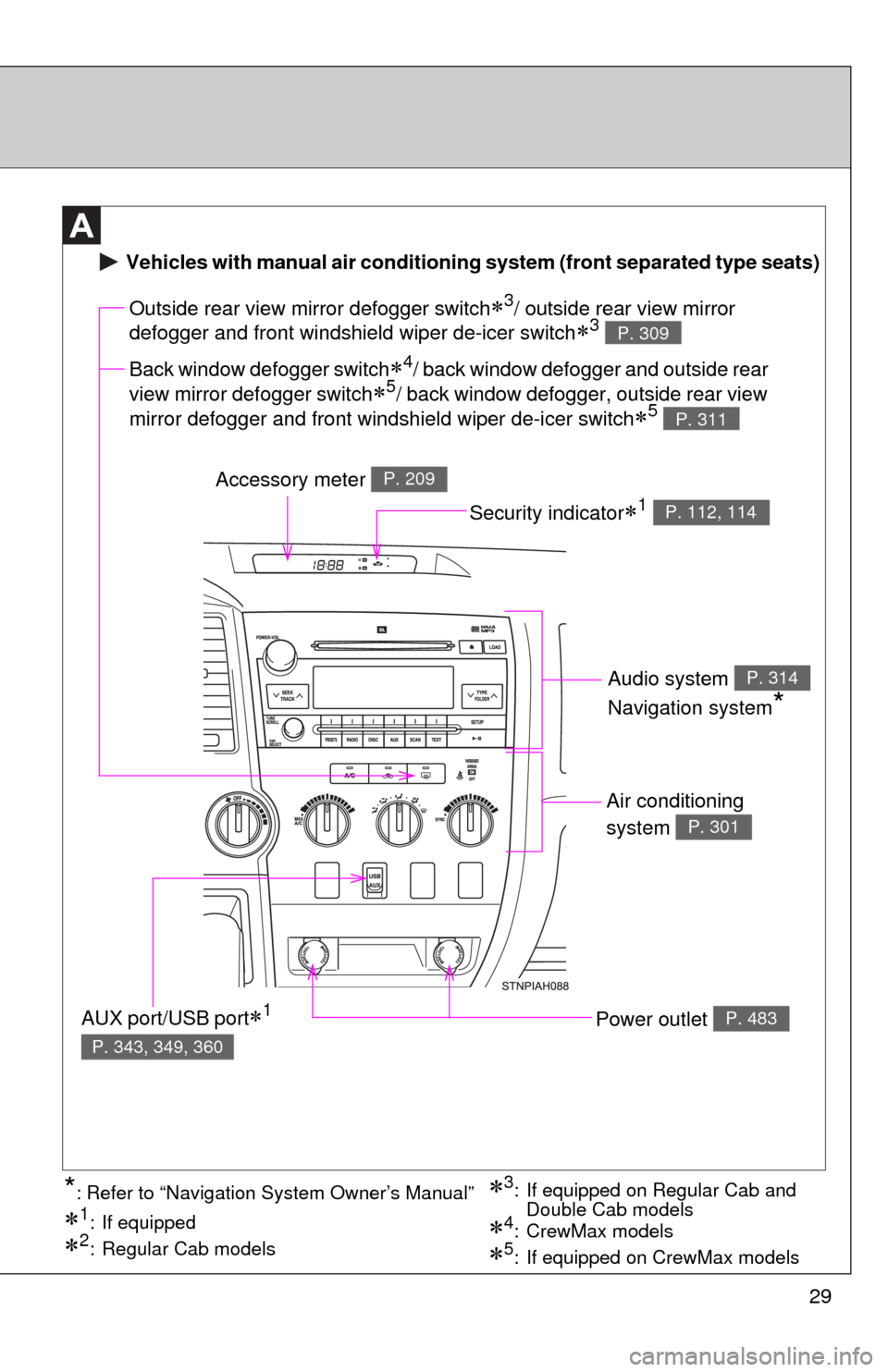
Air conditioning
system
P. 301
Power outlet P. 483
Outside rear view mirror defogger switch3/ outside rear view mirror
defogger and front windshield wiper de-icer switch
3 P. 309
Accessory meter P. 209
AUX port/USB port1
P. 343, 349, 360
Vehicles with manual air conditioning system (front separated type seats)
Back window defogger switch4/ back window defogger and outside rear
view mirror defogger switch
5/ back window defogger, outside rear view
mirror defogger and front windshield wiper de-icer switch
5 P. 311
Security indicator1 P. 112, 114
Audio system
Navigation system
*
P. 314
3: If equipped on Regular Cab and Double Cab models
1: If equipped
2: Regular Cab models5: If equipped on CrewMax models
4: CrewMax models
*: Refer to “Navigation System Owner’s Manual”
Page 30 of 732
30
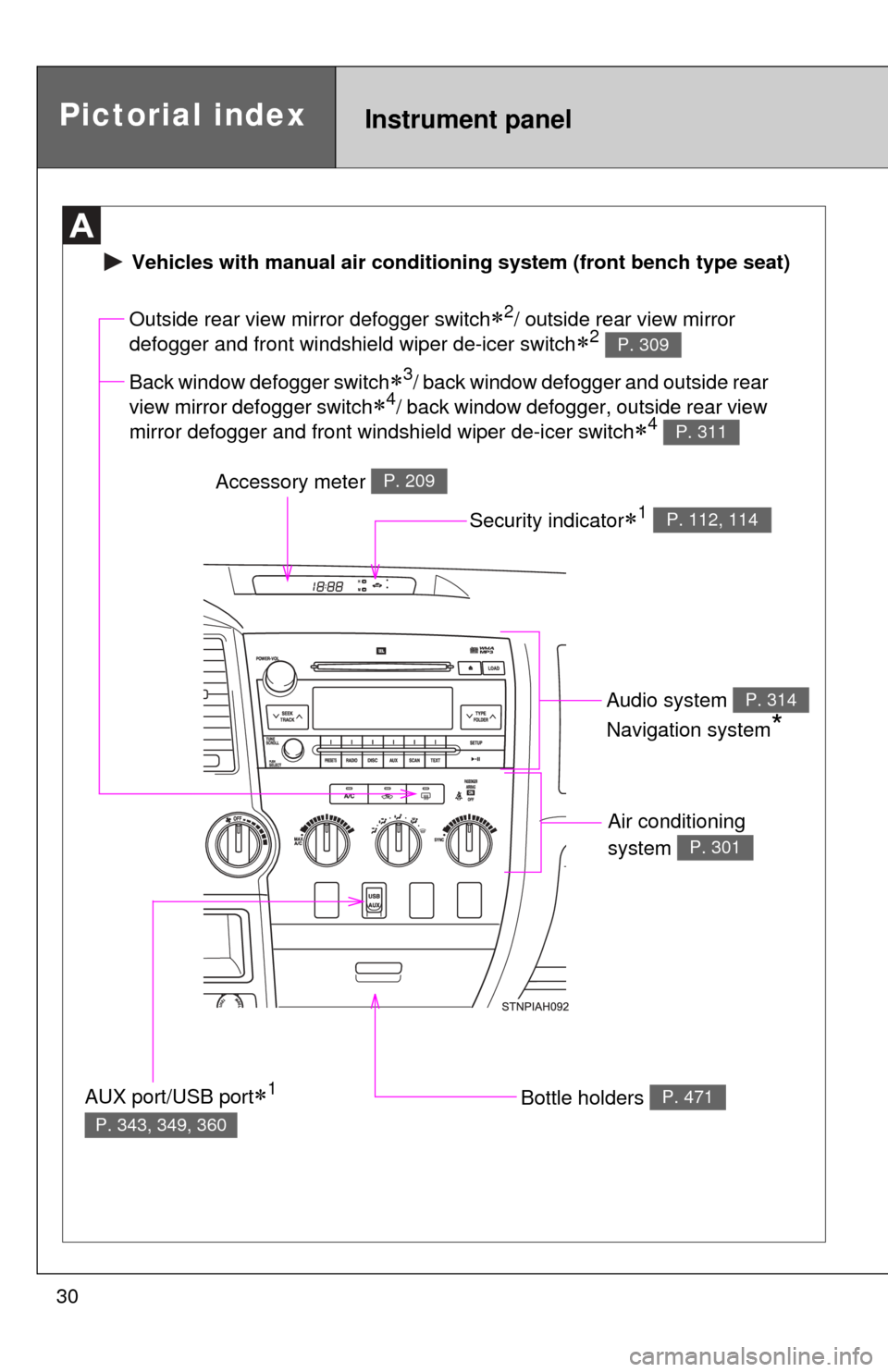
Air conditioning
system
P. 301
Bottle holders P. 471
Outside rear view mirror defogger switch2/ outside rear view mirror
defogger and front windshield wiper de-icer switch
2 P. 309
Accessory meter P. 209
AUX port/USB port1
P. 343, 349, 360
Vehicles with manual ai r conditioning system (front bench type seat)
Back window defogger switch3/ back window defogger and outside rear
view mirror defogger switch
4/ back window defogger, outside rear view
mirror defogger and front windshield wiper de-icer switch
4 P. 311
Security indicator1 P. 112, 114
Audio system
Navigation system
*
P. 314
Pictorial indexInstrument panel
Page 31 of 732
31
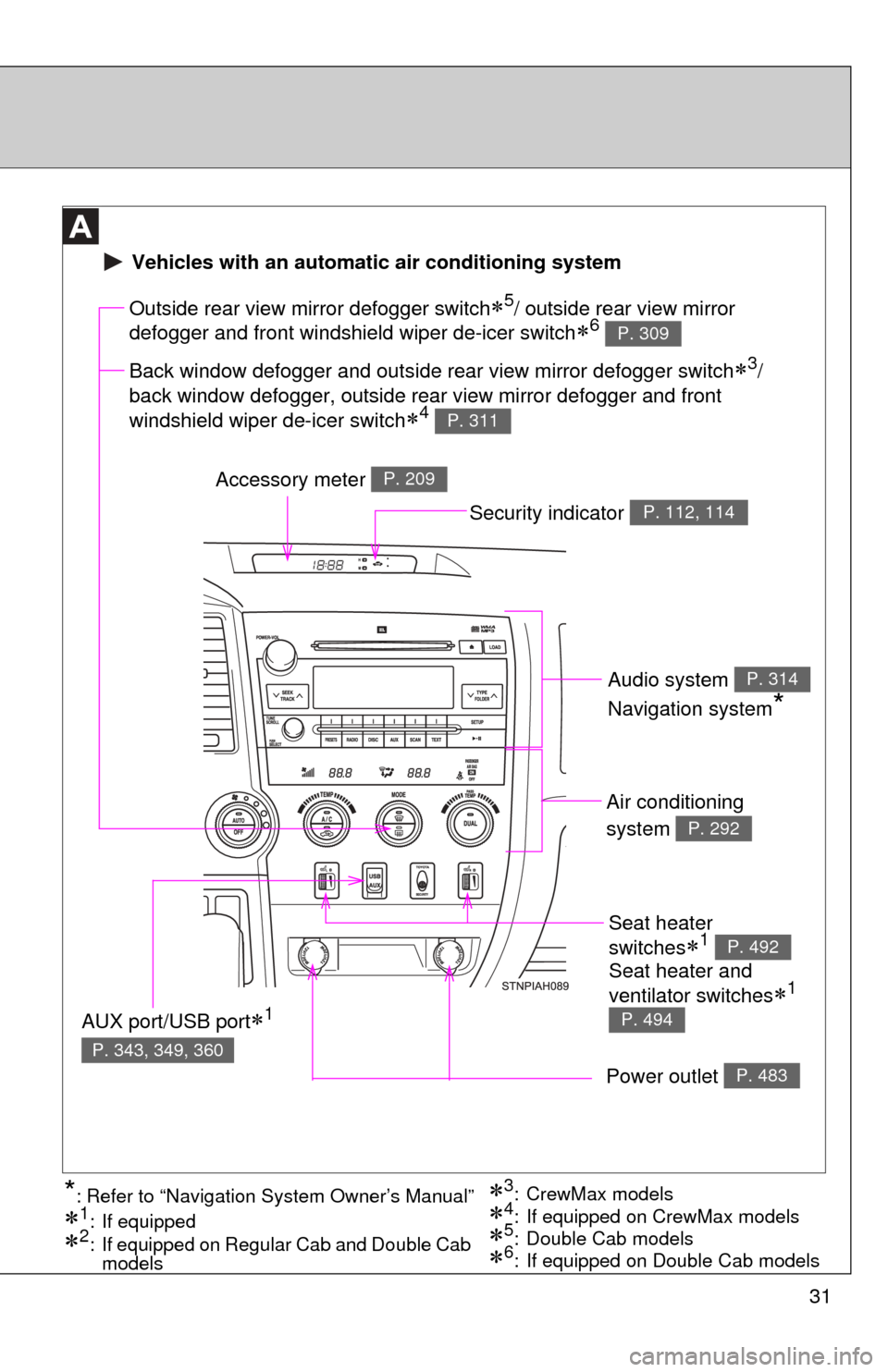
Seat heater
switches
1 P. 492
Air conditioning
system
P. 292
Power outlet P. 483
Outside rear view mirror defogger switch5/ outside rear view mirror
defogger and front windshield wiper de-icer switch
6 P. 309
Accessory meter P. 209
AUX port/USB port1
P. 343, 349, 360
3: CrewMax models
1: If equipped
2: If equipped on Regular Cab and Double Cab models5: Double Cab models4: If equipped on CrewMax models*: Refer to “Navigation System Owner’s Manual”
Vehicles with an automatic air conditioning system
Back window defogger and outside rear view mirror defogger switch3/
back window defogger, outside rear view mirror defogger and front
windshield wiper de-icer switch
4 P. 311
6: If equipped on Double Cab models
Security indicator P. 112, 114
Audio system
Navigation system
*
P. 314
Seat heater and
ventilator switches
1
P. 494
Page 45 of 732
45
1-2. Opening, closing and locking the doors
1
Before driving
■
Wireless remote control battery depletion
The standard battery life is 1 to 2 years. (The battery becomes depleted
even if the wireless remote control is not used.) If the wireless remot\
e control
function does not operate, the battery may be depleted. Replace the battery
when necessary. ( P. 563)
■ If the wireless remote control does not operate
Locking and unlocking the doors: Use the key. ( P. 47)
■ Security feature
If a door is not opened within approximately 60 seconds after the vehicle is
unlocked, the security feature automatically locks the vehicle again.
■ Alarm (if equipped)
Using the wireless remote control to lock the door will set the alarm sy\
stem.
(P. 114)
■ Conditions affecting operation
The wireless remote control function may not operate normally in the follow-
ing situations.
●Near a TV tower, radio station, electr ic power plant, airport or other facil-
ity that generates strong radio waves
● When carrying a portable radio, cell ular phone or other wireless commu-
nication device
● When multiple wireless keys are in the vicinity
● When the wireless key has come into contact with, or is covered by a
metallic object
● When a wireless key (that emits radio waves) is being used nearby
● When the wireless key has been left near an electrical appliance such as
a personal computer
■ When riding in an aircraft
When bringing a wireless remote control onto an aircraft, make sure you do
not press any buttons on the wireless remote control while inside the aircraft
cabin. If you are carrying a wireless remote control in your bag etc, ensure
that the buttons are not likely to be pressed accidentally. Pressing a button
may cause the wireless remote control to emit radio waves that could inter-
fere with the operation of the aircraft.
Page 52 of 732
52
1-2. Opening, closing and locking the doors
Tailgate
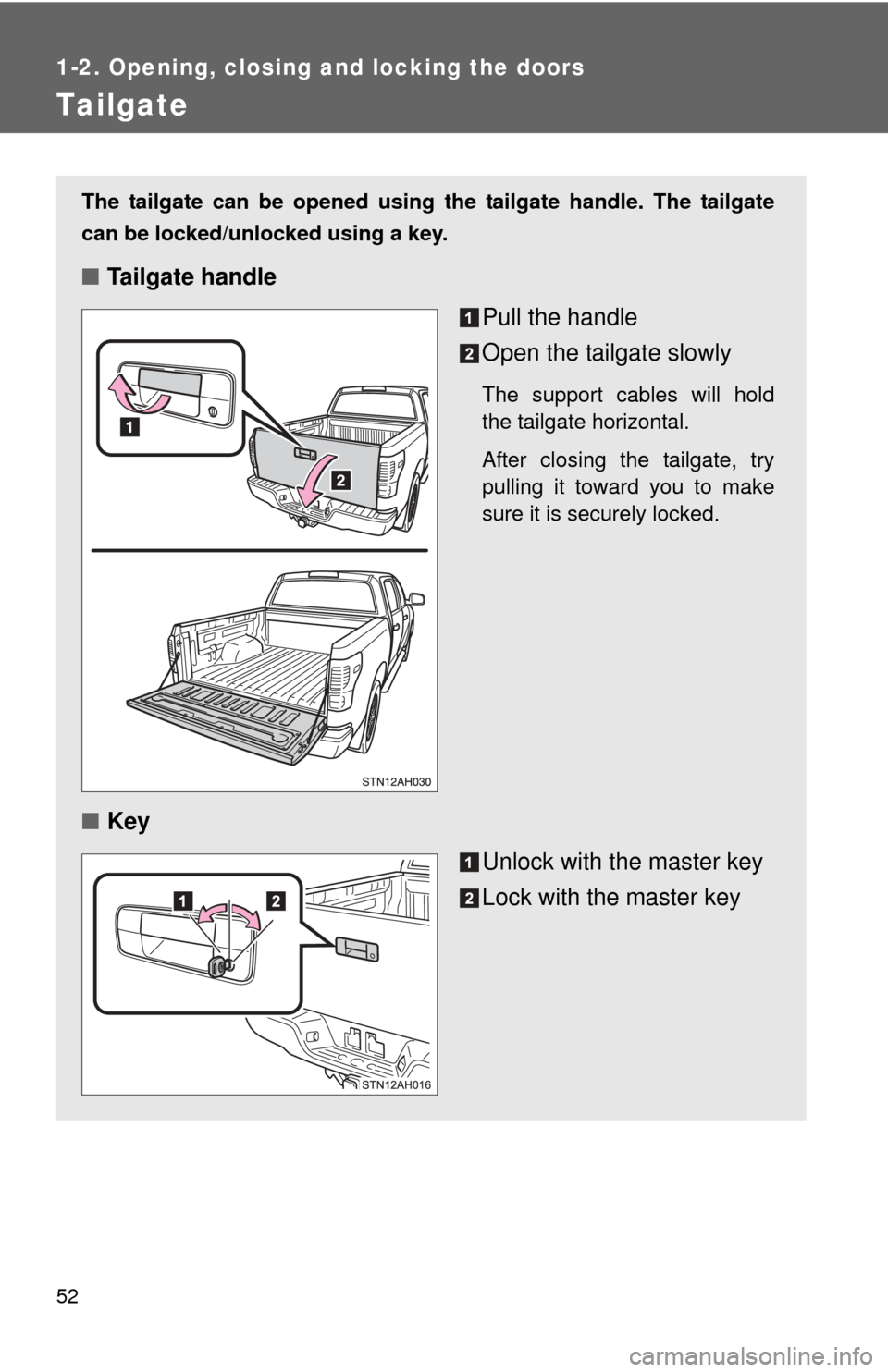
The tailgate can be opened using the tailgate handle. The tailgate
can be locked/unlocked using a key.
■Tailgate handle
Pull the handle
Open the tailgate slowly
The support cables will hold
the tailgate horizontal.
After closing the tailgate, try
pulling it toward you to make
sure it is securely locked.
■Key
Unlock with the master key
Lock with the master key
Page 57 of 732
57
1-2. Opening, closing and locking the doors
1
Before driving
CAUTION
■
Before removing the tailgate (vehic les with rear view monitor system)
Disconnect the wire harness between the back-up camera and the vehicle.
Failure to do so may result in serious personal injury or damage to the vehi-
cle components.
■ Caution while driving
Observe the following precautions.
Failure to do so may result in death or serious personal injury.
●Do not drive with the tailgate open.
● Do not get on the rear step bumper.
NOTICE
■To prevent damage to the tailgate wire harness (vehicles with rear view
monitor system)
Do not pull out all of the tailgate wire harness before open the tailgate.
■ To prevent damage to the camera lens (vehicles with rear view monitor
system)
Store the removed tailgate with the back-up camera lens facing upward.
■ After closing the tailgate
Try pulling it toward you to make sure it is securely locked.
■ To prevent damage to the rear step bumper
Do not allow more than one person to get on the rear step bumper at a time.
Page 62 of 732
62 1-3. Adjustable components (seats, mirrors, steering wheel)
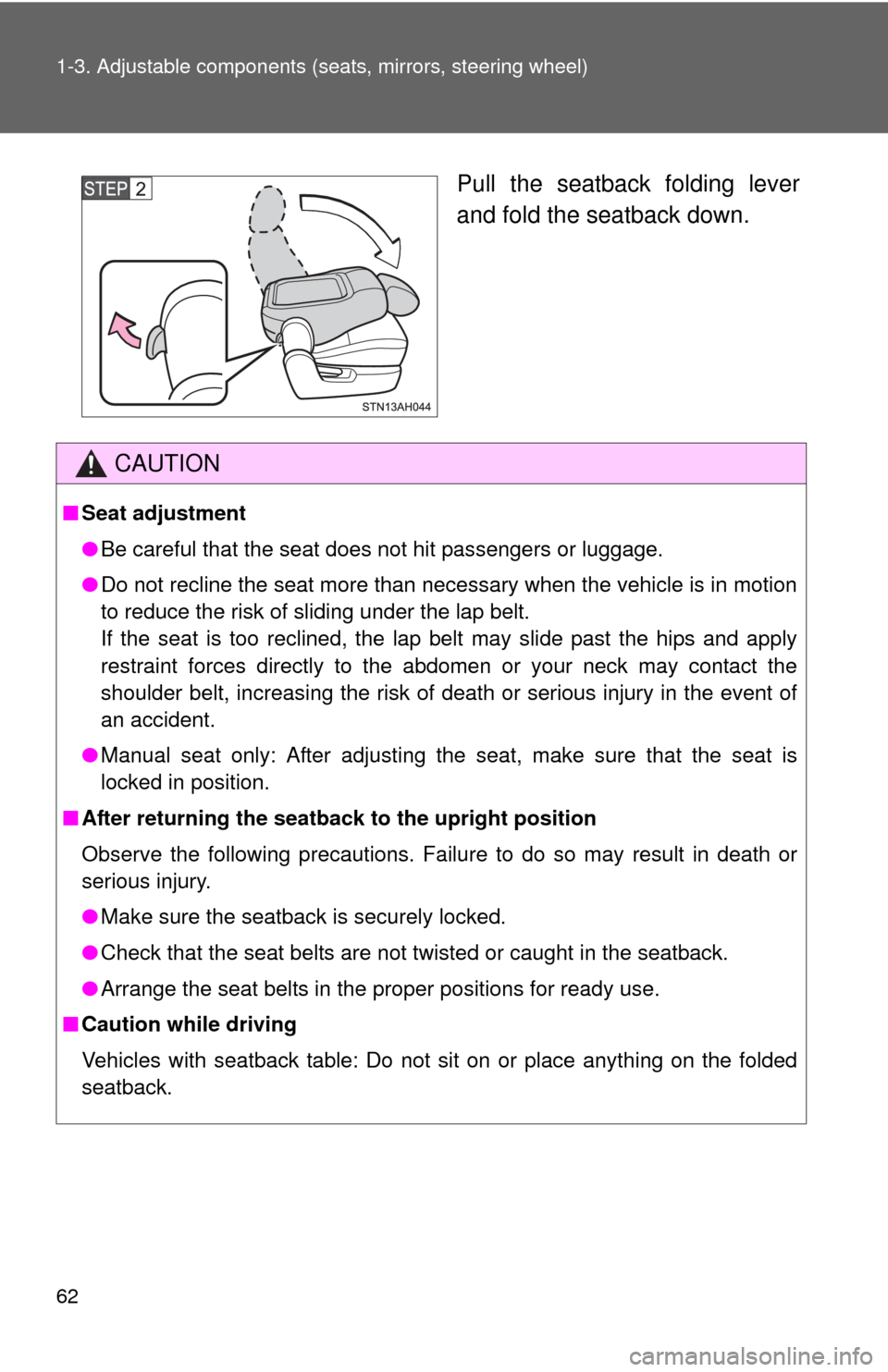
Pull the seatback folding lever
and fold the seatback down.
CAUTION
■Seat adjustment
●Be careful that the seat does not hit passengers or luggage.
● Do not recline the seat more than necessary when the vehicle is in motion
to reduce the risk of sliding under the lap belt.
If the seat is too reclined, the lap belt may slide past the hips and apply
restraint forces directly to the abdomen or your neck may contact the
shoulder belt, increasing the risk of death or serious injury in the event of
an accident.
● Manual seat only: After adjusting the seat, make sure that the seat is
locked in position.
■ After returning the seatback to the upright position
Observe the following precautions. Failure to do so may result in death or
serious injury.
● Make sure the seatback is securely locked.
● Check that the seat belts are not twisted or caught in the seatback.
● Arrange the seat belts in the proper positions for ready use.
■ Caution while driving
Vehicles with seatback table: Do not sit on or place anything on the folded
seatback.
Page 66 of 732
66 1-3. Adjustable components (seats, mirrors, steering wheel)
CAUTION
■When adjusting a rear seat (CrewMax models)
●Be careful that the seat does not hit passengers or luggage.
● Do not recline the seat more than necessary when the vehicle is in motion
to reduce the risk of sliding under the lap belt. If the seat is too reclined,
the lap belt may slide past the hips and apply restraint forces directly to the
abdomen or your neck may contact the shoulder belt, increasing the risk of
death or serious injury in the event of an accident.
● Be careful not to get your hands or feet caught in the seat.
■ Before folding down a rear seat
Do not fold down a rear seat when there are passengers sitting in the rear
seats or when there is luggage placed on/under the rear seats.
■ After adjusting a seat (CrewMax models)
Observe the following precautions. Failure to do so may result in death or
serious injury.
●Make sure that the seat and seatback are securely locked in position by
lightly rocking them back and forth.
● Check that the seat belts are not twisted or caught in the seat.
■ When the seatback is folded/the bo ttom cushion is raised (Double Cab
models)
Do not sit on or place anything on the seatback or storage box while driving.
■ When returning the seats to their original position
Observe the following precautions. Failure to do so may result in death or
serious injury.
●Be careful not to get your hands or feet pinched in the seat.
● Make sure the seatbacks and bottom cushions are securely locked. Fail-
ure to do so will prevent the seat belt from operating properly.
● Check that the seat belts are not twisted or caught in the seat.
● Arrange the seat belts in the proper positions for ready use.
Page 80 of 732
80 1-3. Adjustable components (seats, mirrors, steering wheel)
■Child seat belt usage
The seat belts of your vehicle were principally designed for persons of adult
size.
●Use a child restraint system appropriate for the child, until the child
becomes large enough to properly wear the vehicle’s seat belt. ( P. 142)
● When the child becomes large enough to properly wear the vehicle’s
seat belt, follow the instructions on P. 75 regarding seat belt usage.
■ Replacing the belt after the pretensioner has been activated
If the vehicle is involved in multiple collisions, the pretensioner will activate
for the first collision, but will not activate for the second or subsequent colli-
sions.
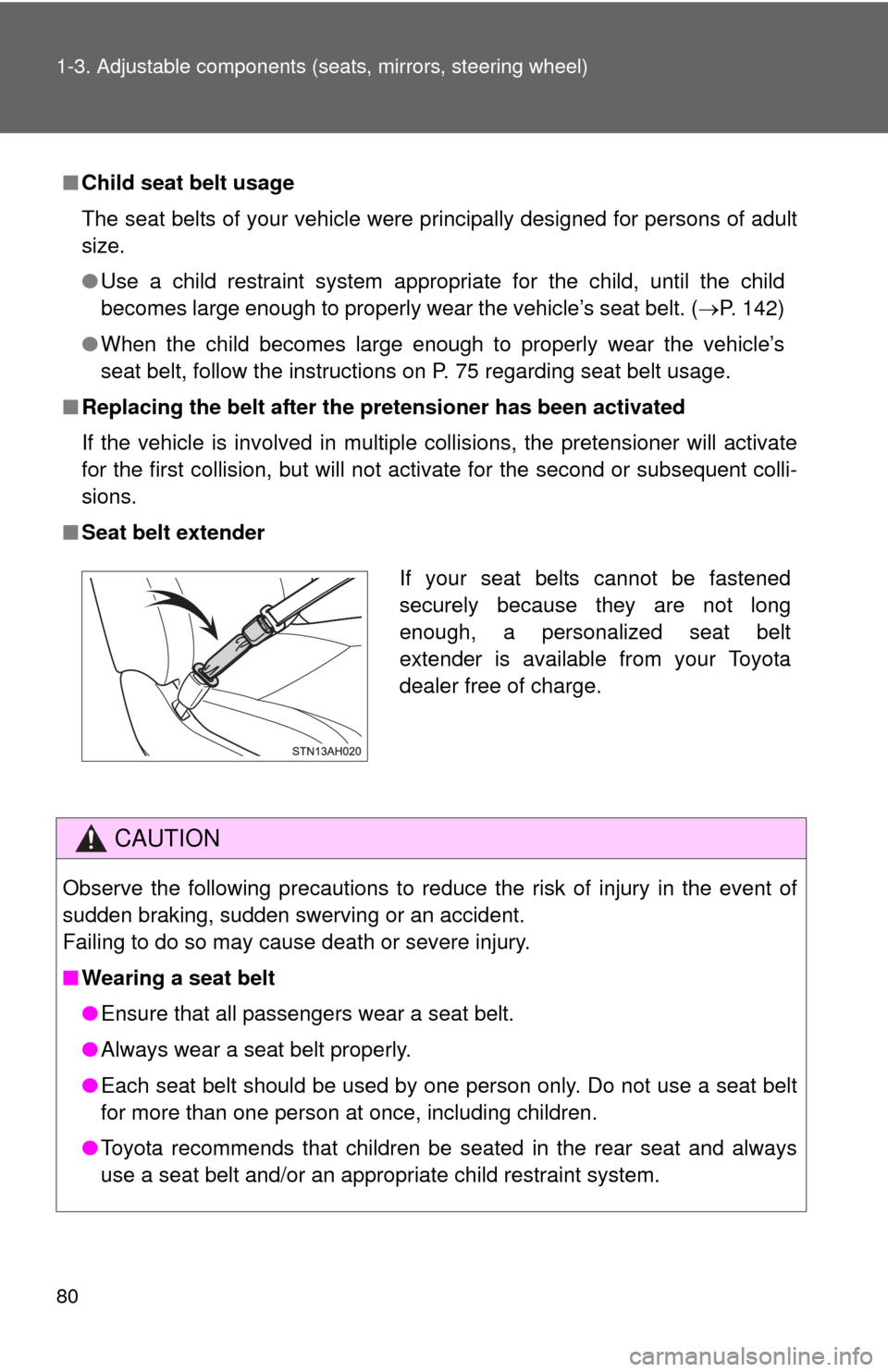
■ Seat belt extender
CAUTION
Observe the following precautions to reduce the risk of injury in the event of
sudden braking, sudden swerving or an accident.
Failing to do so may cause death or severe injury.
■Wearing a seat belt
●Ensure that all passengers wear a seat belt.
● Always wear a seat belt properly.
● Each seat belt should be used by one person only. Do not use a seat belt
for more than one person at once, including children.
● Toyota recommends that children be seated in the rear seat and always
use a seat belt and/or an appropriate child restraint system.
If your seat belts cannot be fastened
securely because they are not long
enough, a personalized seat belt
extender is available from your Toyota
dealer free of charge.