Info button TOYOTA TUNDRA 2011 2.G Owners Manual
[x] Cancel search | Manufacturer: TOYOTA, Model Year: 2011, Model line: TUNDRA, Model: TOYOTA TUNDRA 2011 2.GPages: 732, PDF Size: 16.65 MB
Page 148 of 732
148
1-7. Safety information
Installing child restraints
Follow the child restraint system manufacturer’s instructions. Firmly
secure child restraints to the seat s using the LATCH anchors or a
seat belt. Attach the top tether stra p when installing a child restraint.
The lap/shoulder belt can be used if your child restraint system is
not compatible with the LATCH (Low er Anchors and Tethers for Chil-
dren) system.
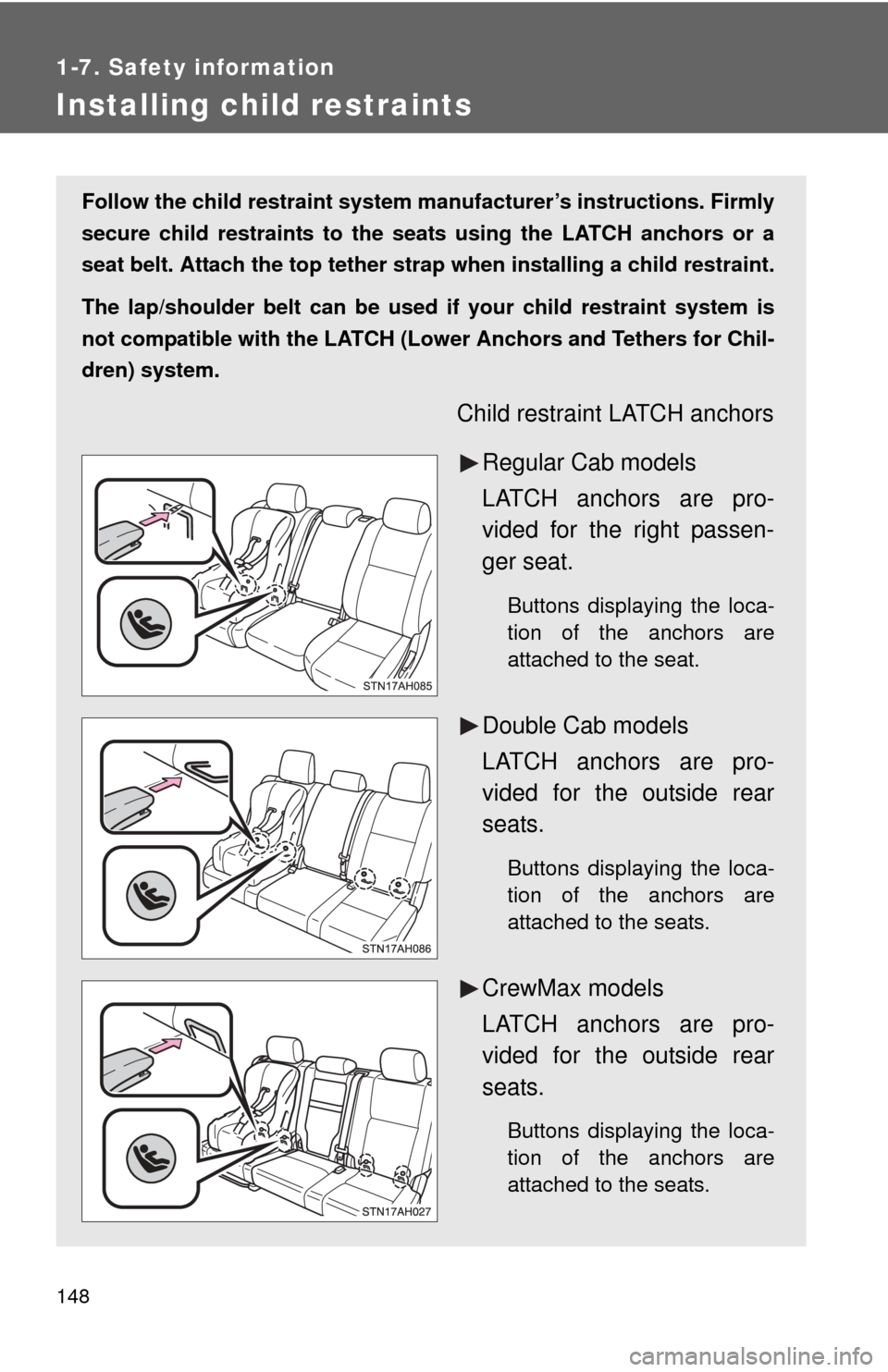
Child restraint LATCH anchors
Regular Cab models
LATCH anchors are pro-
vided for the right passen-
ger seat.
Buttons displaying the loca-
tion of the anchors are
attached to the seat.
Double Cab models
LATCH anchors are pro-
vided for the outside rear
seats.
Buttons displaying the loca-
tion of the anchors are
attached to the seats.
CrewMax models
LATCH anchors are pro-
vided for the outside rear
seats.
Buttons displaying the loca-
tion of the anchors are
attached to the seats.
Page 160 of 732
160 1-7. Safety information
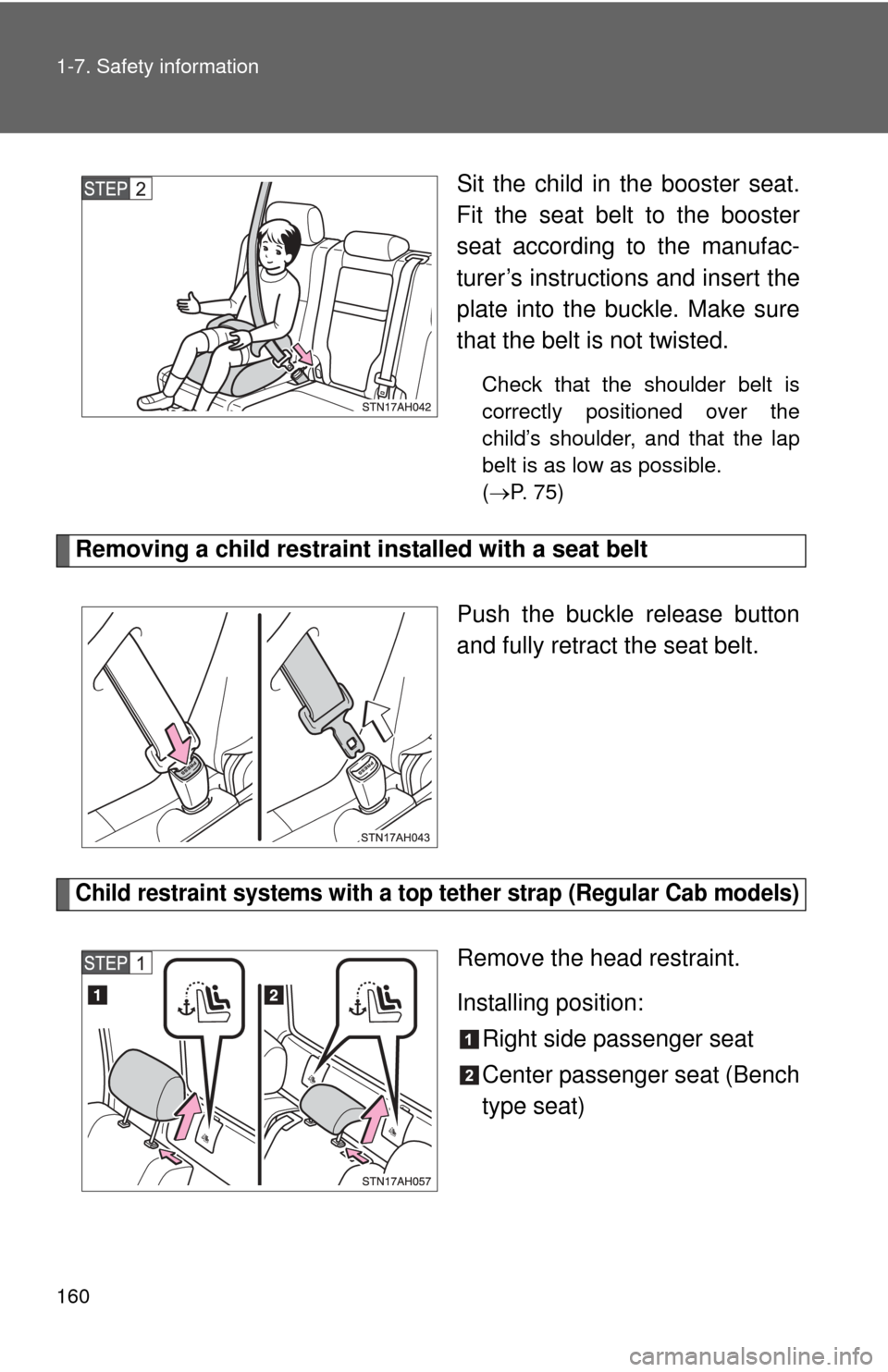
Sit the child in the booster seat.
Fit the seat belt to the booster
seat according to the manufac-
turer’s instructions and insert the
plate into the buckle. Make sure
that the belt is not twisted.
Check that the shoulder belt is
correctly positioned over the
child’s shoulder, and that the lap
belt is as low as possible.
( P. 75)
Removing a child restraint installed with a seat belt
Push the buckle release button
and fully retract the seat belt.
Child restraint systems with a top tether strap (Regular Cab models)
Remove the head restraint.
Installing position:Right side passenger seat
Center passenger seat (Bench
type seat)
Page 192 of 732
192
2-2. Instrument cluster
Gauges and meters
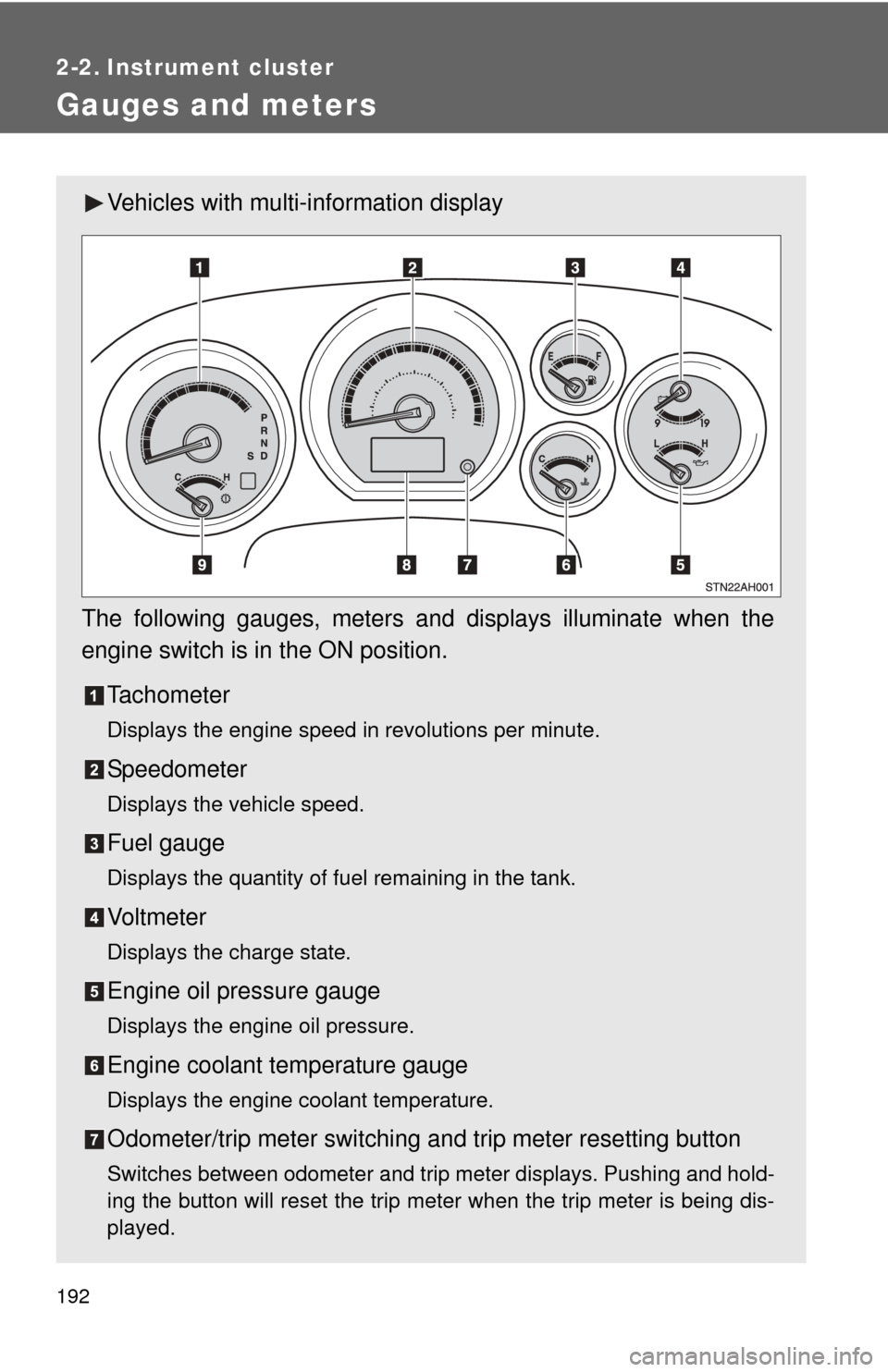
Vehicles with multi-information display
The following gauges, meters and displays illuminate when the
engine switch is in the ON position. Tachometer
Displays the engine speed in revolutions per minute.
Speedometer
Displays the vehicle speed.
Fuel gauge
Displays the quantity of fuel remaining in the tank.
Vo l t m e t e r
Displays the charge state.
Engine oil pressure gauge
Displays the engine oil pressure.
Engine coolant temperature gauge
Displays the engine coolant temperature.
Odometer/trip meter switching and trip meter resetting button
Switches between odometer and trip meter displays. Pushing and hold-
ing the button will reset the trip meter when the trip meter is being dis-
played.
Page 196 of 732
196 2-2. Instrument cluster
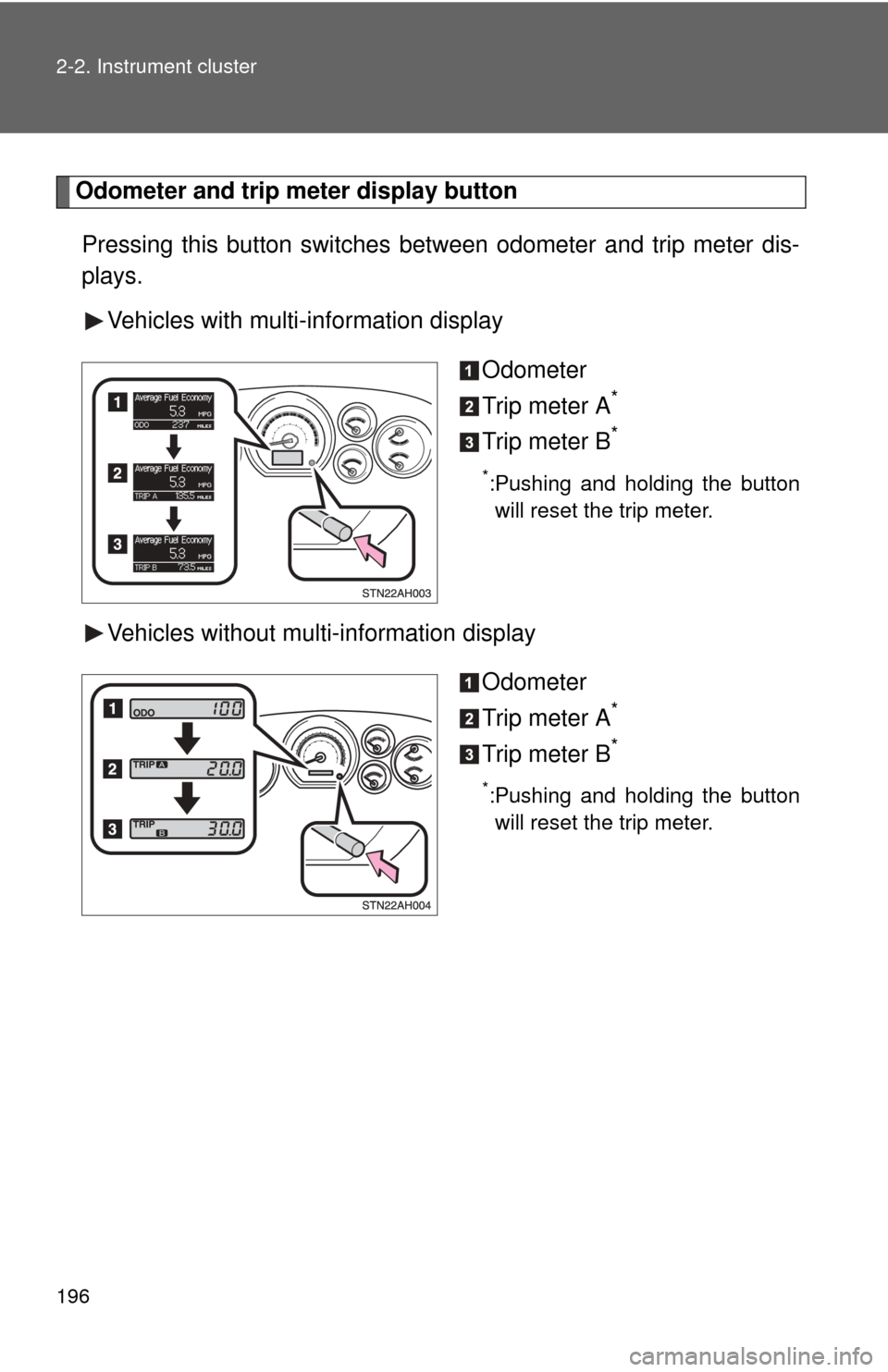
Odometer and trip meter display button
Pressing this button switches between odometer and trip meter dis-
plays.
Vehicles with multi-information display
Odometer
Trip meter A
*
Trip meter B*
*:Pushing and holding the buttonwill reset the trip meter.
Vehicles without multi-information display
Odometer
Trip meter A
*
Trip meter B*
*:Pushing and holding the buttonwill reset the trip meter.
Page 203 of 732
203
2-2. Instrument cluster
2
When driving
Multi-information display
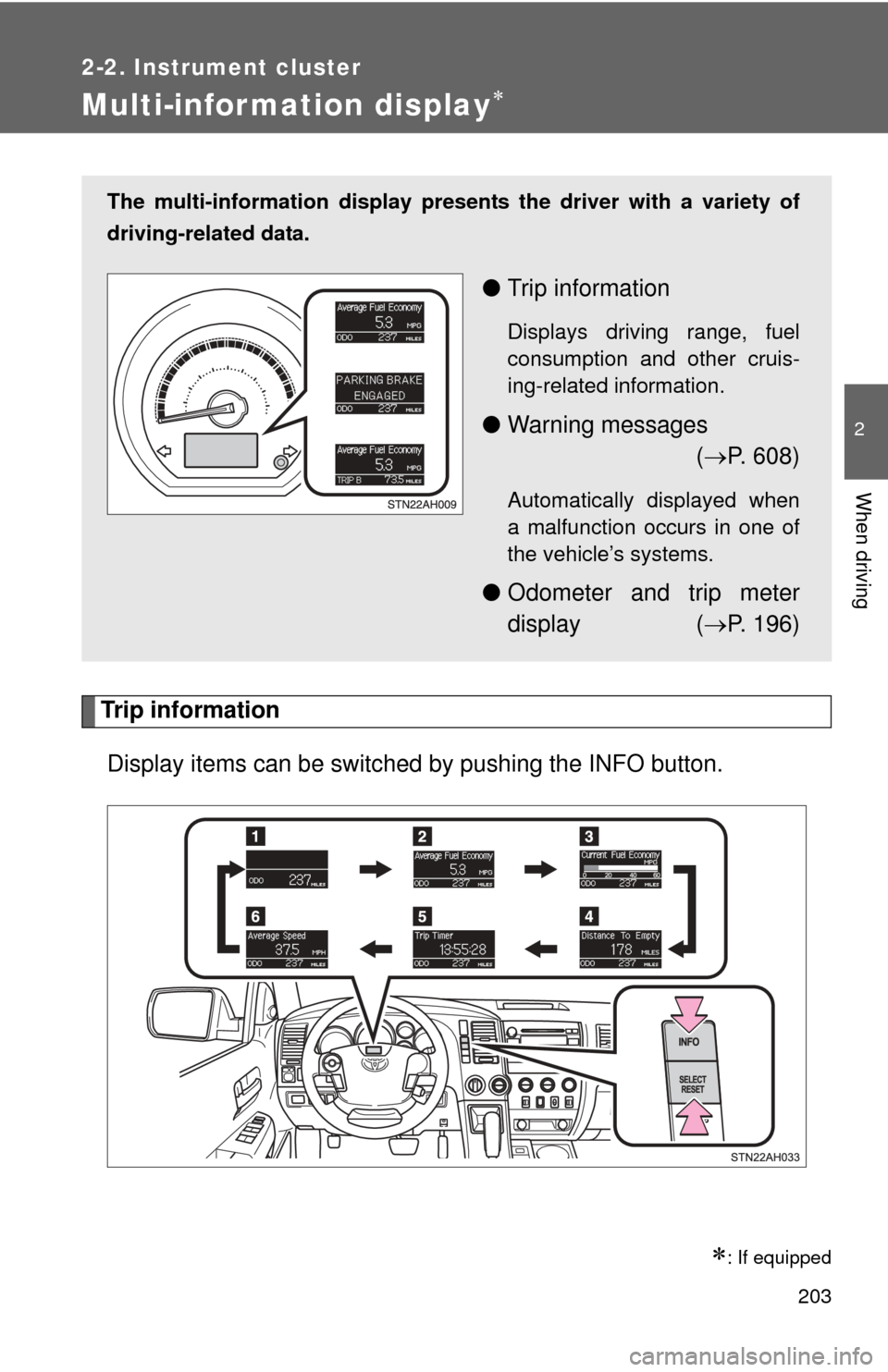
Trip informationDisplay items can be switched by pushing the INFO button.
: If equipped
The multi-information display presen ts the driver with a variety of
driving-related data.
● Trip information
Displays driving range, fuel
consumption and other cruis-
ing-related information.
●Warning messages
( P. 608)
Automatically displayed when
a malfunction occurs in one of
the vehicle’s systems.
● Odometer and trip meter
display ( P. 196)
Page 207 of 732
207
2-2. Instrument cluster
2
When driving
*: Default setting
After customize is complete, press the SETUP button to set
the selected item.
If the customization fails, the previously setting will be displayed.
If no button is pressed for 10 seconds, the display change to normal
display.
ItemsScreen textSelect in this order
Reset to default
settingHOLD RESET
TO RESTORE
DEFAULT SETTINGS
■
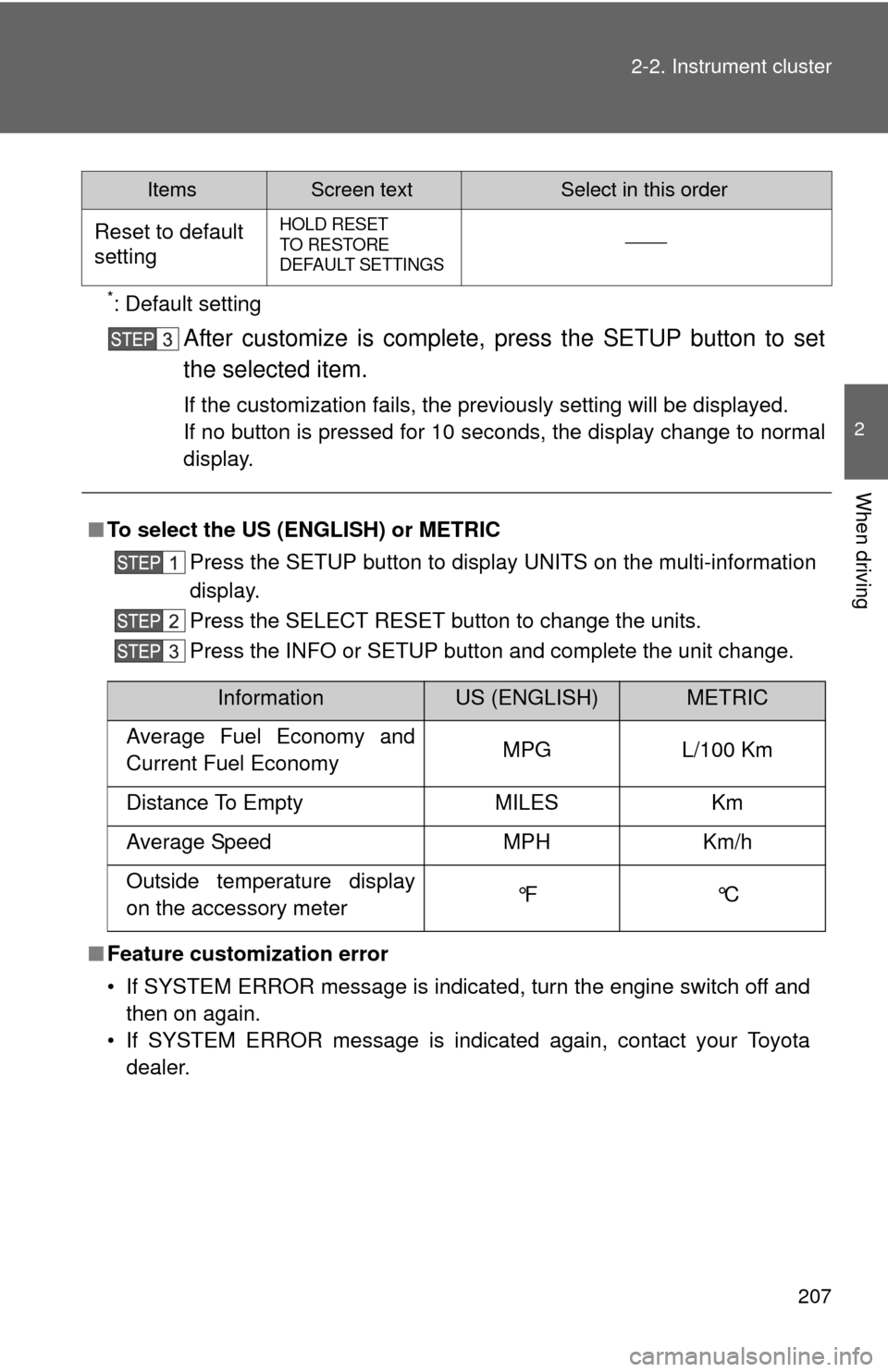
To select the US (ENGLISH) or METRIC
Press the SETUP button to display UNITS on the multi-information
display.
Press the SELECT RESET button to change the units.
Press the INFO or SETUP button and complete the unit change.
■ Feature customization error
• If SYSTEM ERROR message is indicated, turn the engine switch off and
then on again.
• If SYSTEM ERROR message is indicated again, contact your Toyota dealer.
InformationUS (ENGLISH)METRIC
Average Fuel Economy and
Current Fuel Economy MPG L/100 Km
Distance To Empty MILES Km
Average Speed MPH Km/h
Outside temperature display
on the accessory meter °F °C
Page 209 of 732
209
2-2. Instrument cluster
2
When driving
Accessor y meter
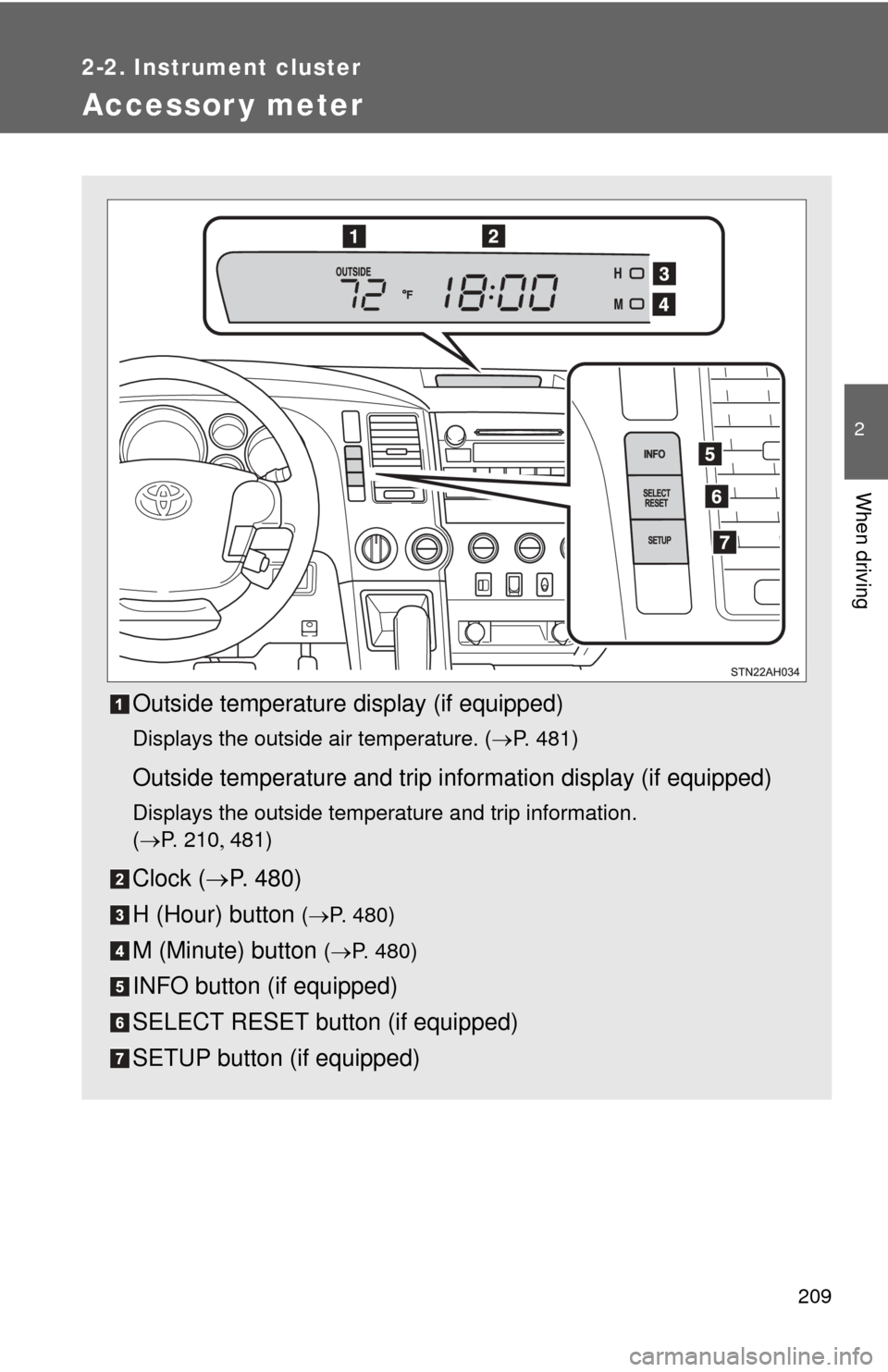
Outside temperature display (if equipped)
Displays the outside air temperature. (P. 481)
Outside temperature and trip information display (if equipped)
Displays the outside temperature and trip information.
(P. 2 1 0 481)
Clock ( P. 480)
H (Hour) button
( P. 480)
M (Minute) button ( P. 480)
INFO button (if equipped)
SELECT RESET button (if equipped)
SETUP button (if equipped)
Page 210 of 732
210 2-2. Instrument cluster
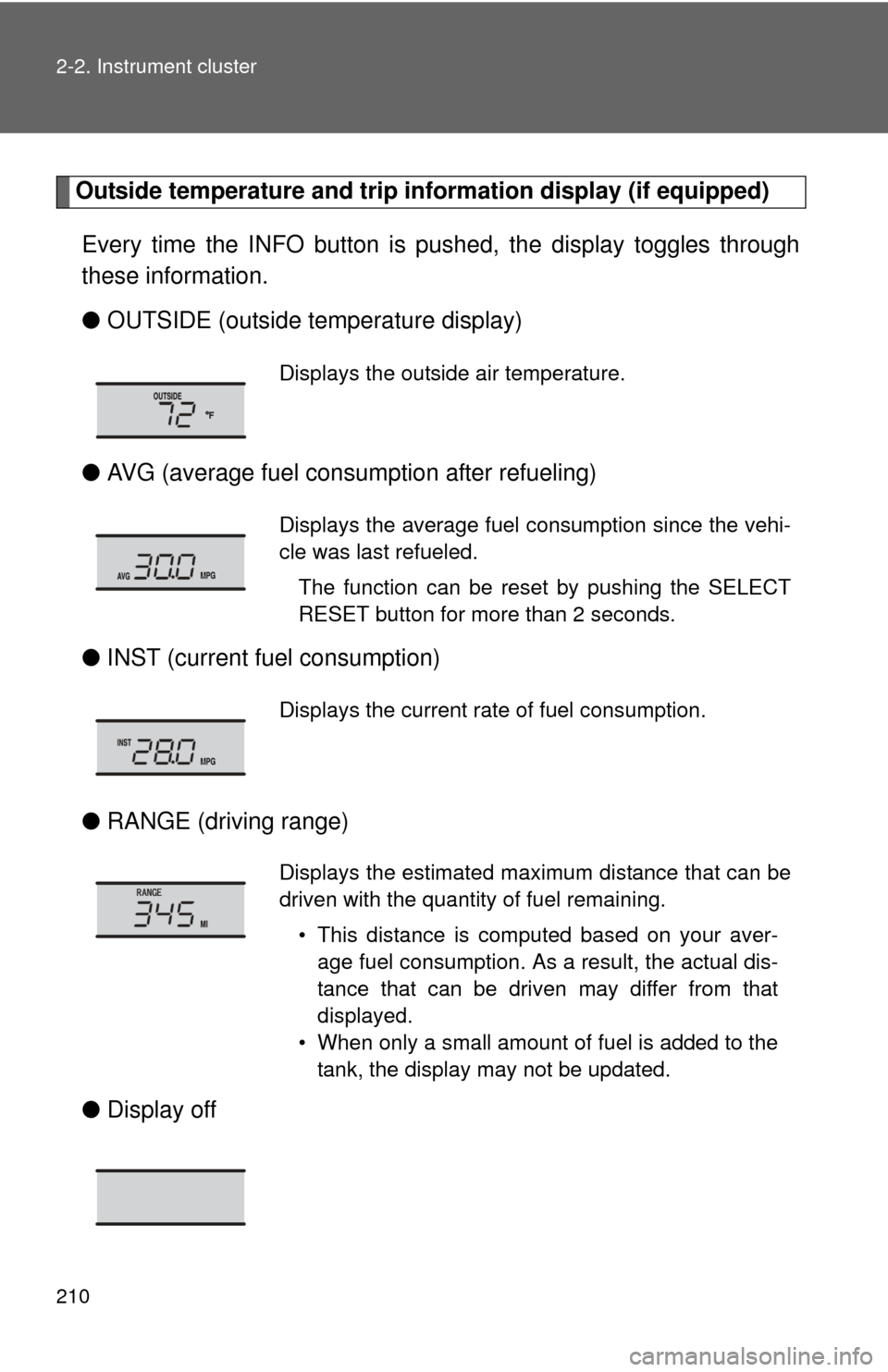
Outside temperature and trip information display (if equipped)
Every time the INFO button is pushed, the display toggles through
these information.
● OUTSIDE (outside temperature display)
● AVG (average fuel consumption after refueling)
● INST (current fu el consumption)
● RANGE (driving range)
● Display off
Displays the outside air temperature.
Displays the average fuel consumption since the vehi-
cle was last refueled.
The function can be reset by pushing the SELECT
RESET button for more than 2 seconds.
Displays the current rate of fuel consumption.
Displays the estimated maximum distance that can be
driven with the quantity of fuel remaining.• This distance is computed based on your aver-age fuel consumption. As a result, the actual dis-
tance that can be driven may differ from that
displayed.
• When only a small amount of fuel is added to the tank, the display may not be updated.
Page 211 of 732
211
2-2. Instrument cluster
2
When driving
■
The accessory meter can be operated when
The engine switch must be in the ON position.
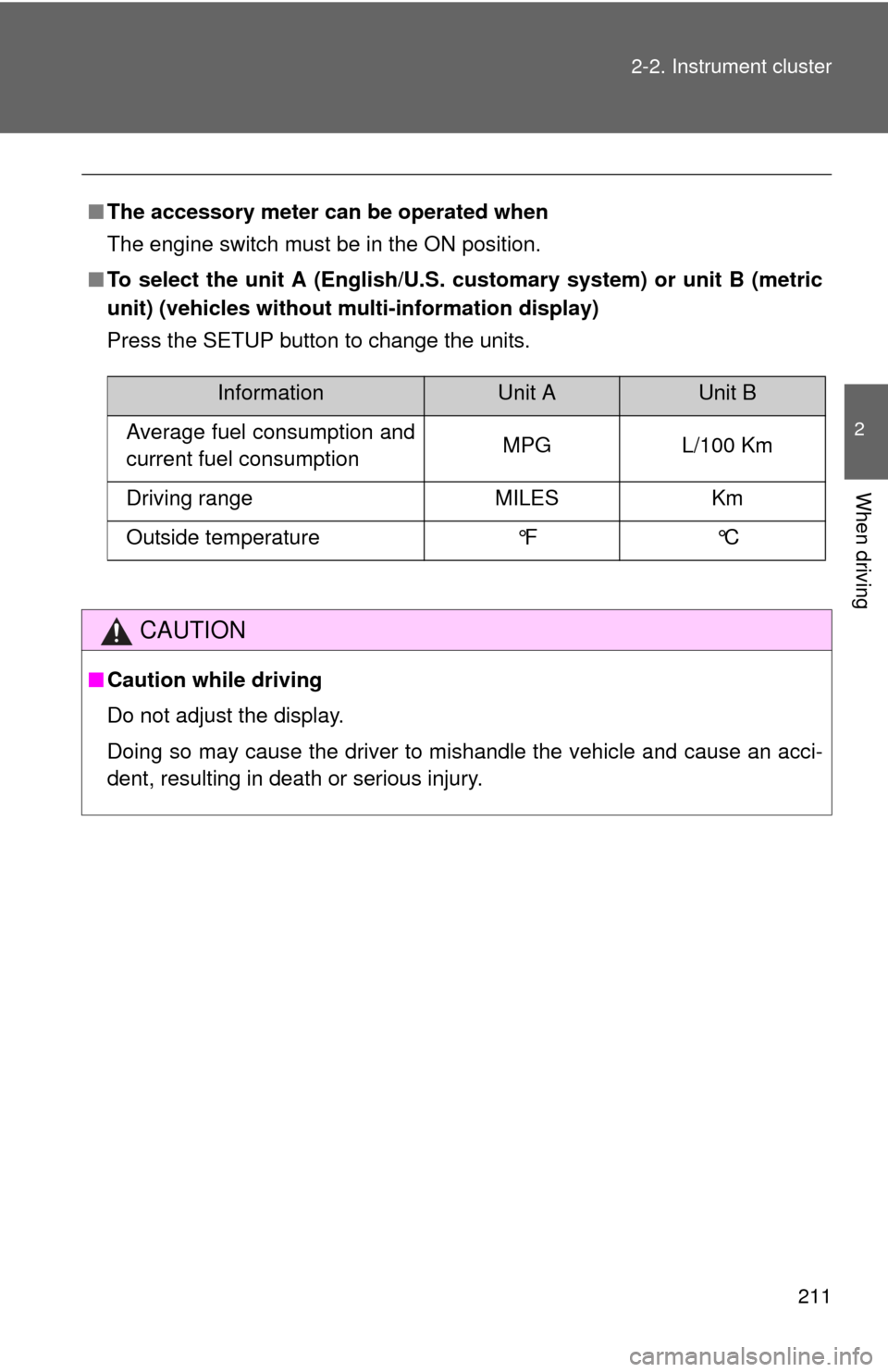
■ To select the unit A (English/U.S. customary system) or unit B (metric
unit) (vehicles without mu lti-information display)
Press the SETUP button to change the units.
CAUTION
■ Caution while driving
Do not adjust the display.
Doing so may cause the driver to mishandle the vehicle and cause an acci-
dent, resulting in death or serious injury.
InformationUnit AUnit B
Average fuel consumption and
current fuel consumption MPG L/100 Km
Driving range MILES Km
Outside temperature °F °C
Page 215 of 732
215
2-3. Operating the lights and wipers
2
When driving
■
Automatic light off system
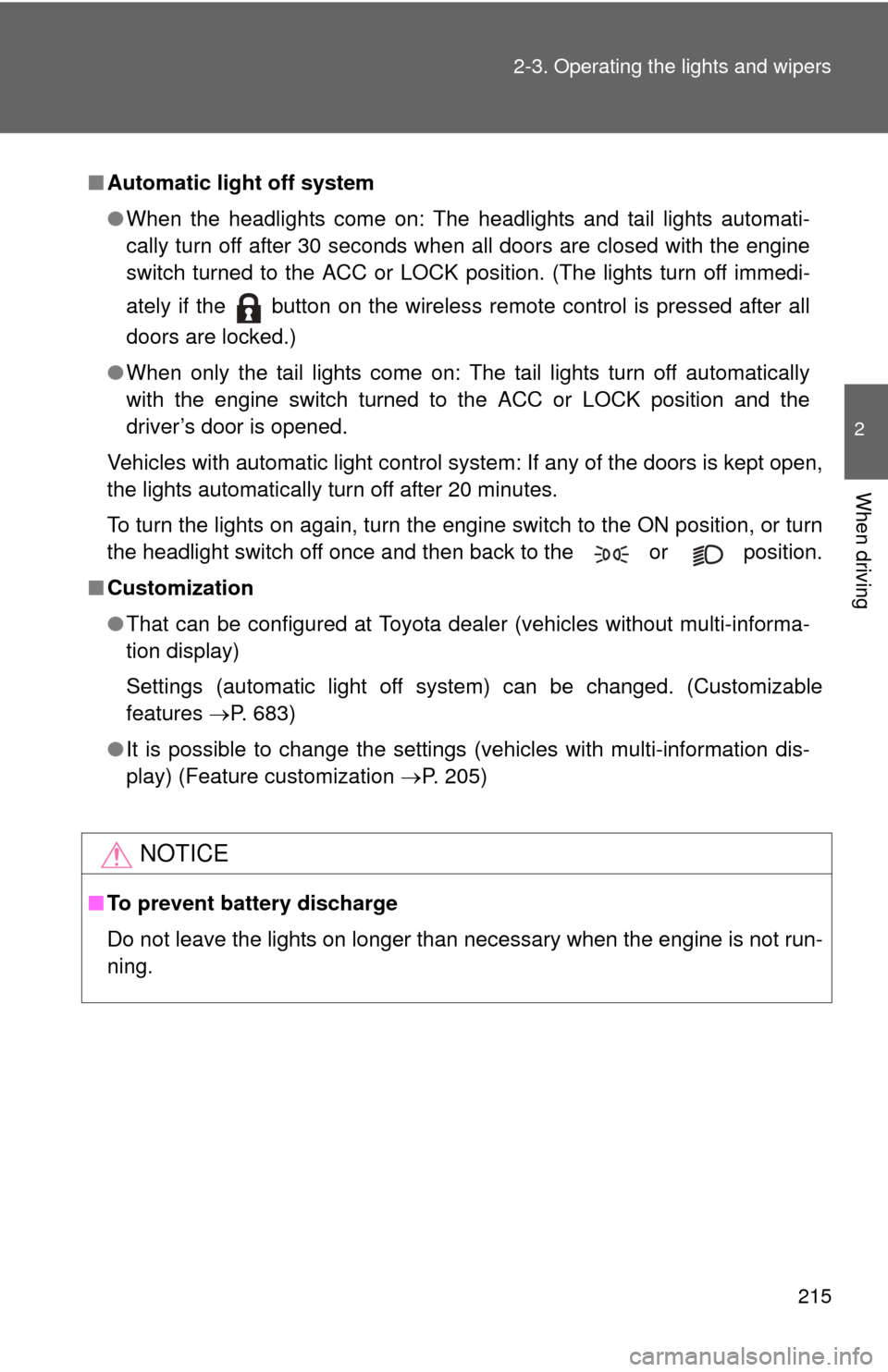
●When the headlights come on: The headlights and tail lights automati-
cally turn off after 30 seconds when all doors are closed with the engine
switch turned to the ACC or LOCK position. (The lights turn off immedi-
ately if the button on the wireless remote control is pressed after all
doors are locked.)
● When only the tail lights come on: The tail lights turn off automatically
with the engine switch turned to the ACC or LOCK position and the
driver’s door is opened.
Vehicles with automatic light control system: If any of the doors is kept open,
the lights automatically turn off after 20 minutes.
To turn the lights on again, turn the engine switch to the ON position, or turn
the headlight switch off once and then back to the or position.
■ Customization
●That can be configured at Toyota dealer (vehicles without multi-informa-
tion display)
Settings (automatic light off system) can be changed. (Customizable
features P. 683)
● It is possible to change the settings (vehicles with multi-information dis-
play) (Feature customization P. 205)
NOTICE
■To prevent battery discharge
Do not leave the lights on longer than necessary when the engine is not run-
ning.