language TOYOTA TUNDRA 2012 2.G Owners Manual
[x] Cancel search | Manufacturer: TOYOTA, Model Year: 2012, Model line: TUNDRA, Model: TOYOTA TUNDRA 2012 2.GPages: 744, PDF Size: 15.3 MB
Page 203 of 744
203
2-2. Instrument cluster
2
When driving
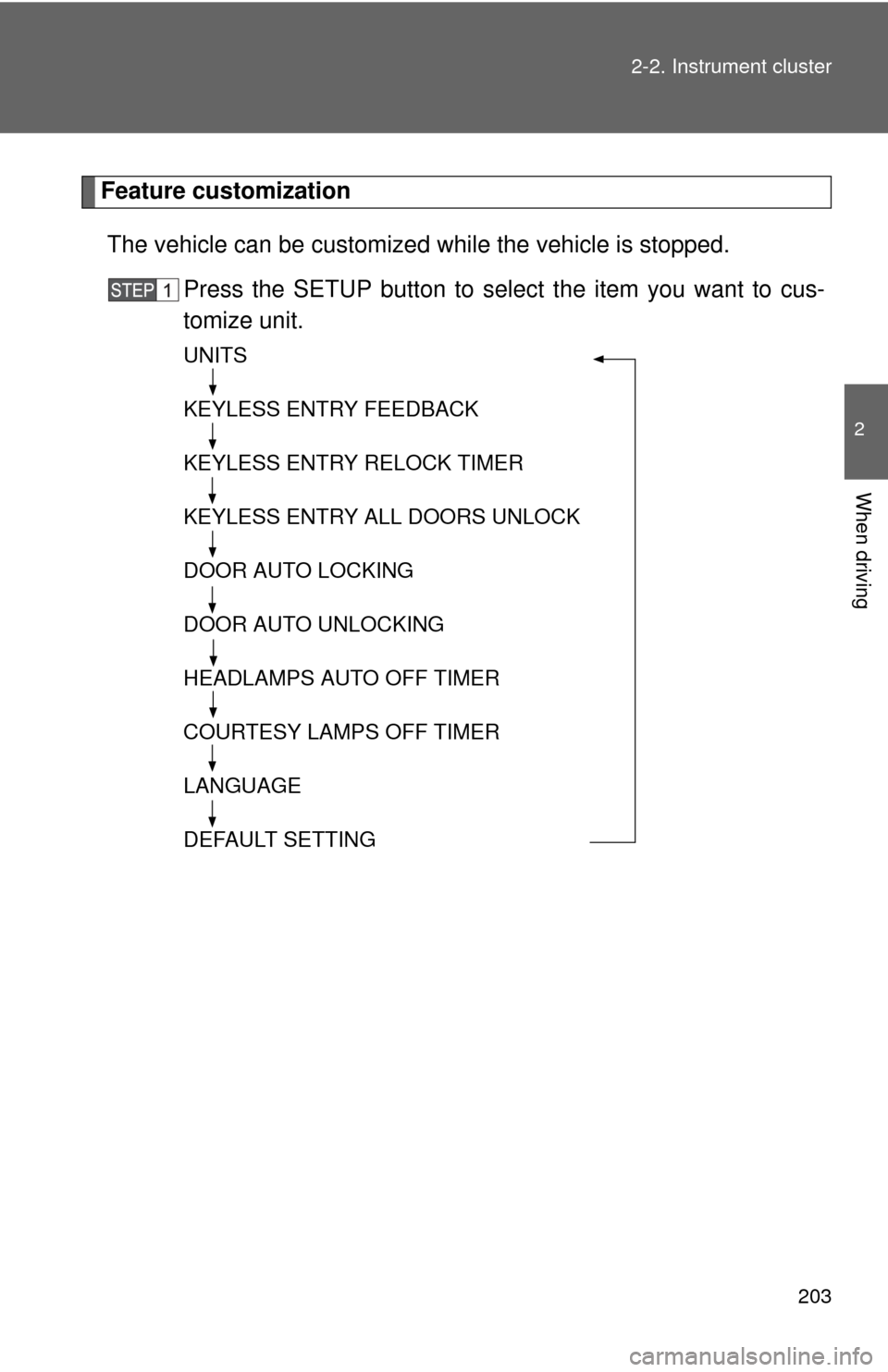
Feature customization
The vehicle can be customized while the vehicle is stopped.
Press the SETUP button to select the item you want to cus-
tomize unit.
UNITS
KEYLESS ENTRY FEEDBACK
KEYLESS ENTRY RELOCK TIMER
KEYLESS ENTRY ALL DOORS UNLOCK
DOOR AUTO LOCKING
DOOR AUTO UNLOCKING
HEADLAMPS AUTO OFF TIMER
COURTESY LAMPS OFF TIMER
LANGUAGE
DEFAULT SETTING
Page 205 of 744
205
2-2. Instrument cluster
2
When driving
*: Default setting
After customize is complete, press the SETUP button to set
the selected item.
If the customization fails, the previously setting will be displayed.
If no button is pressed for 10 seconds, the display change to normal
display.
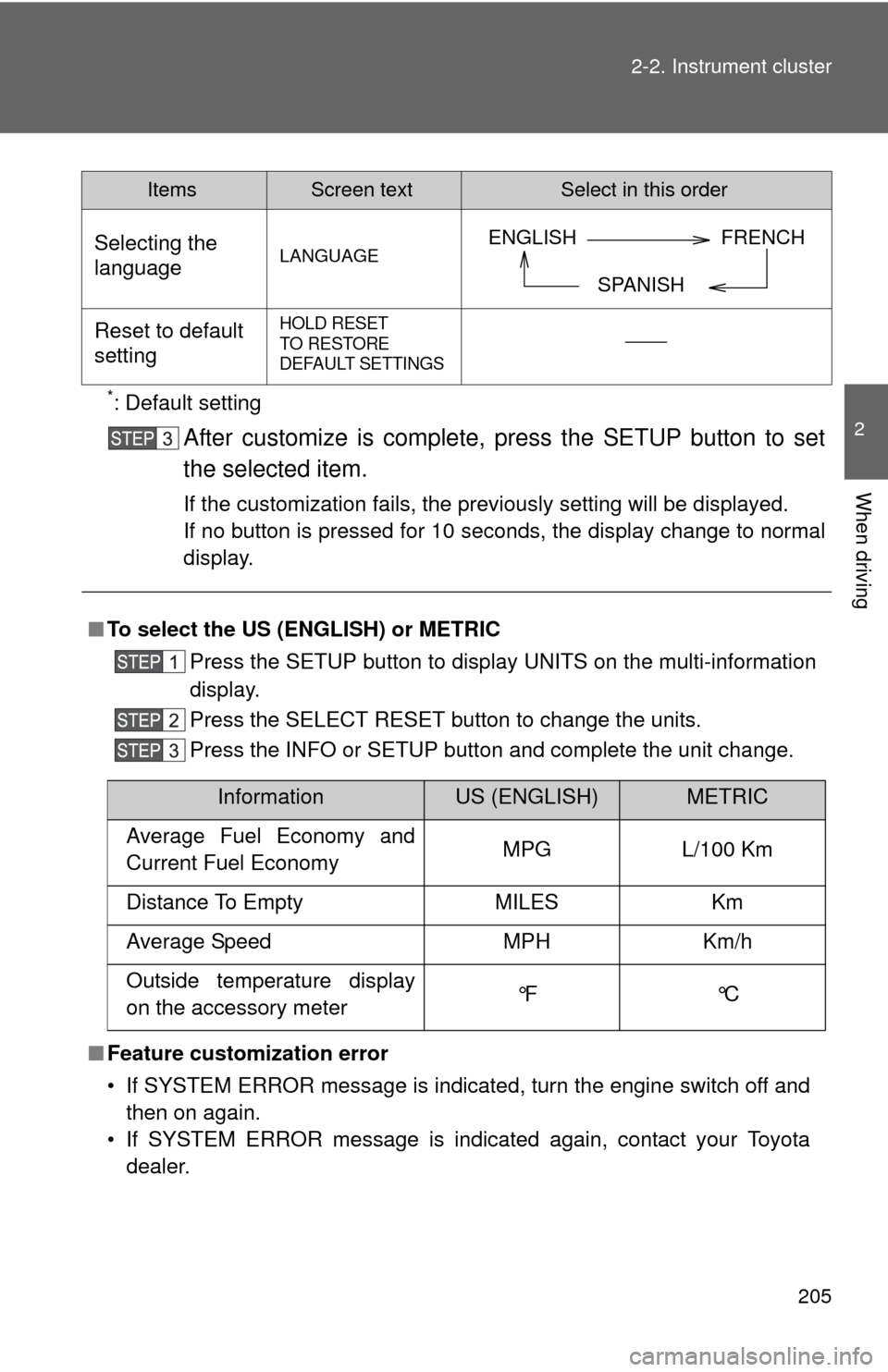
Selecting the
languageLANGUAGE
Reset to default
settingHOLD RESET
TO RESTORE
DEFAULT SETTINGS
■
To select the US (ENGLISH) or METRIC
Press the SETUP button to display UNITS on the multi-information
display.
Press the SELECT RESET button to change the units.
Press the INFO or SETUP button and complete the unit change.
■ Feature customization error
• If SYSTEM ERROR message is indicated, turn the engine switch off and
then on again.
• If SYSTEM ERROR message is indicated again, contact your Toyota dealer.
ItemsScreen textSelect in this order
ENGLISH FRENCH
SPANISH
InformationUS (ENGLISH)METRIC
Average Fuel Economy and
Current Fuel Economy MPG L/100 Km
Distance To Empty MILES Km
Average Speed MPH Km/h
Outside temperature display
on the accessory meter °F °C
Page 235 of 744
235
2-4. Using other
driving systems
2
When driving
■The rear view monitor system can be operated when
The shift lever is in R and the engine switch is ON.
■ Display mode
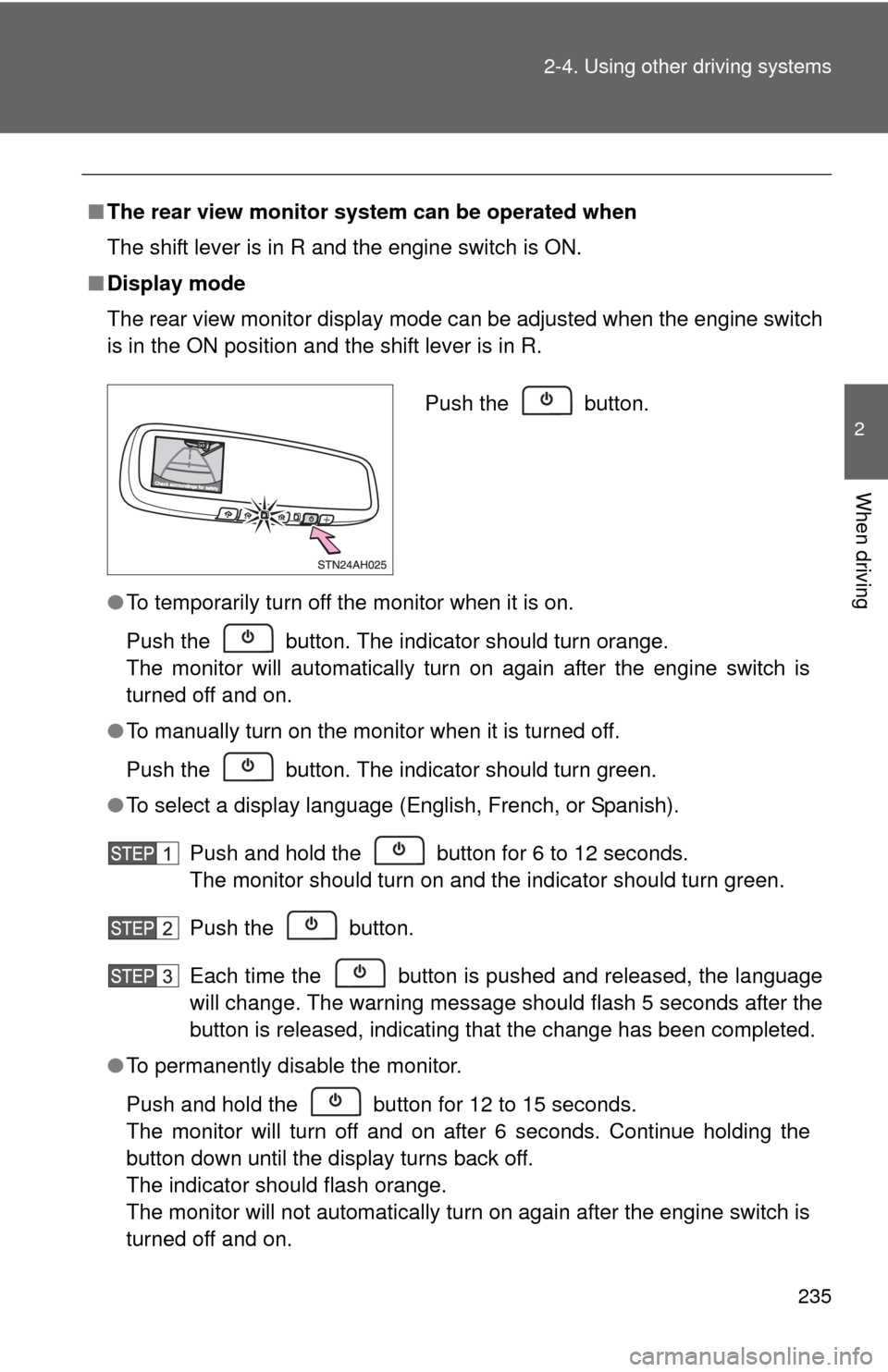
The rear view monitor display mode can be adjusted when the engine switch
is in the ON position and the shift lever is in R.
●To temporarily turn off the monitor when it is on.
Push the button. The indicator should turn orange.
The monitor will automatically turn on again after the engine switch is
turned off and on.
● To manually turn on the monitor when it is turned off.
Push the button. The indicator should turn green.
● To select a display language (English, French, or Spanish).
Push and hold the button for 6 to 12 seconds.
The monitor should turn on and the indicator should turn green.
Push the button.
Each time the button is pushed and released, the language
will change. The warning message should flash 5 seconds after the
button is released, indicating that the change has been completed.
● To permanently disable the monitor.
Push and hold the button for 12 to 15 seconds.
The monitor will turn off and on after 6 seconds. Continue holding the
button down until the display turns back off.
The indicator should flash orange.
The monitor will not automatically turn on again after the engine switch is
turned off and on.
Push the button.
Page 322 of 744
322 3-2. Using the audio system
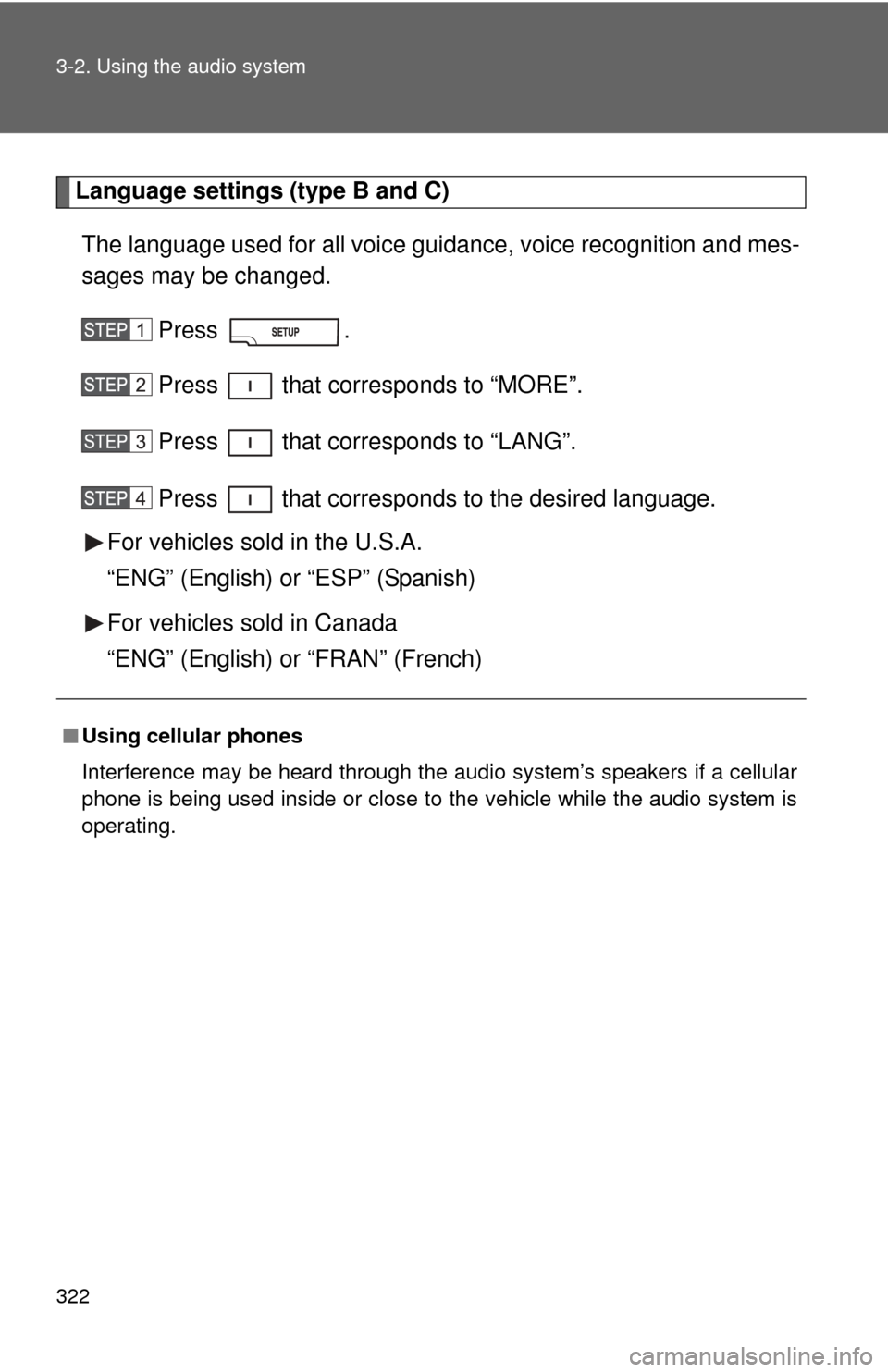
Language settings (type B and C)The language used for all voice guidance, voice recognition and mes-
sages may be changed.
Press .
Press that corresponds to “MORE”.
Press that corresponds to “LANG”.
Press that corresponds to the desired language.
For vehicles sold in the U.S.A.
“ENG” (English) or “ESP” (Spanish)
For vehicles sold in Canada
“ENG” (English) or “FRAN” (French)
■ Using cellular phones
Interference may be heard through the audio system’s speakers if a cellular
phone is being used inside or close to the vehicle while the audio syste\
m is
operating.
Page 365 of 744
365
3-2. Using the audio system
3
Interior and exterior features
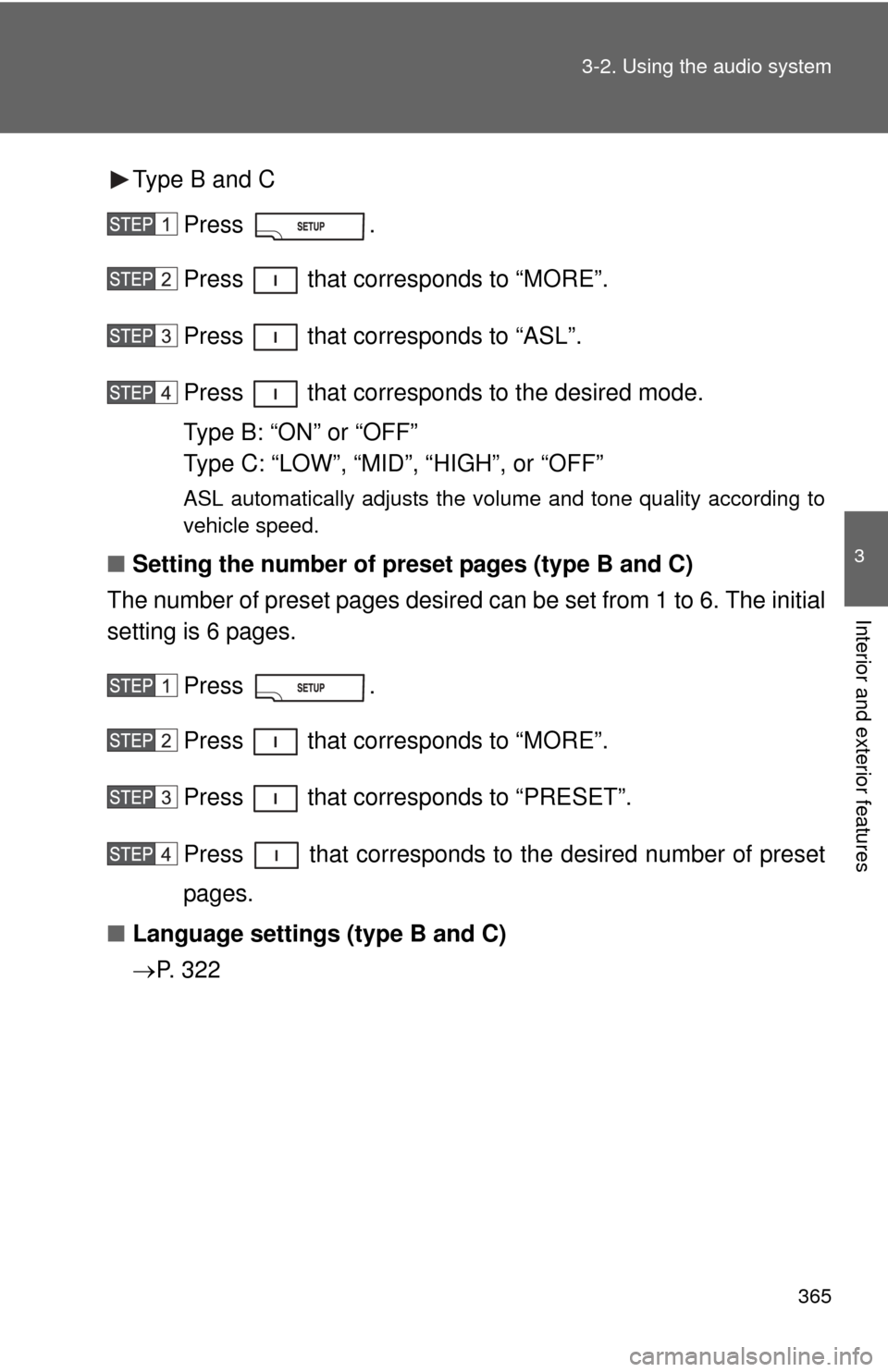
Type B and C
Press .
Press that corresponds to “MORE”.
Press that corresponds to “ASL”.
Press that corresponds to the desired mode.
Type B: “ON” or “OFF”
Type C: “LOW”, “MID”, “HIGH”, or “OFF”
ASL automatically adjusts the volume and tone quality according to
vehicle speed.
■Setting the number of preset pages (type B and C)
The number of preset pages desired c an be set from 1 to 6. The initial
setting is 6 pages.
Press .
Press that corresponds to “MORE”.
Press that corresponds to “PRESET”.
Press that corresponds to the desired number of preset
pages.
■ Language settings (type B and C)
P. 3 2 2
Page 404 of 744
404 3-4. Using the rear audio/video system
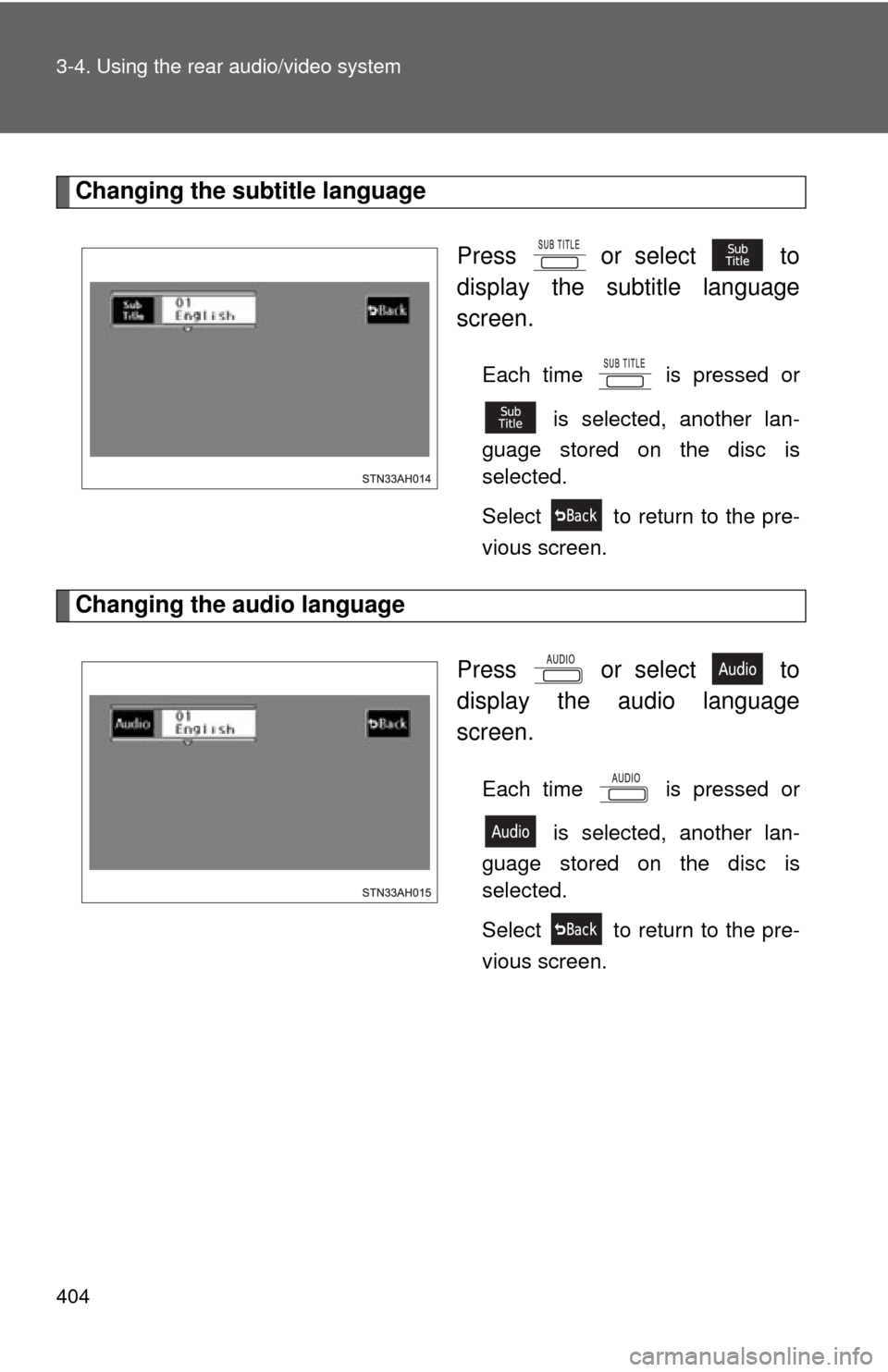
Changing the subtitle languagePress or select to
display the subtitle language
screen.
Each time is pressed or is selected, another lan-
guage stored on the disc is
selected.
Select to return to the pre-
vious screen.
Changing the audio language
Press or select to
display the audio language
screen.
Each time is pressed or is selected, another lan-
guage stored on the disc is
selected.
Select to return to the pre-
vious screen.
Page 406 of 744
406 3-4. Using the rear audio/video system
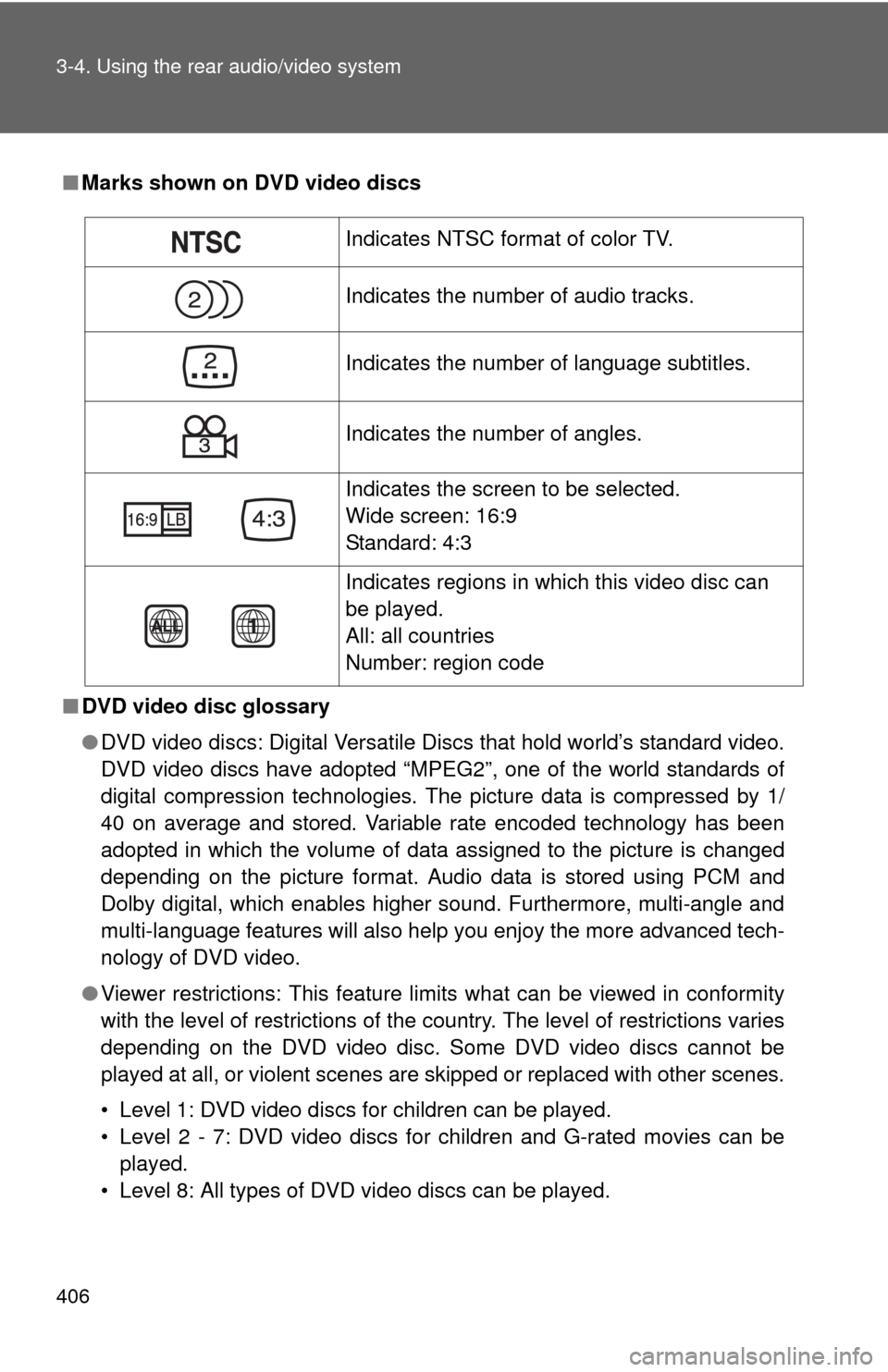
■Marks shown on DVD video discs
■ DVD video disc glossary
●DVD video discs: Digital Versatile Discs that hold world’s standard video.
DVD video discs have adopted “MPEG2”, one of the world standards of
digital compression technologies. The picture data is compressed by 1/
40 on average and stored. Variable rate encoded technology has been
adopted in which the volume of data assigned to the picture is changed
depending on the picture format. Audio data is stored using PCM and
Dolby digital, which enables higher sound. Furthermore, multi-angle and
multi-language features will also help you enjoy the more advanced tech-
nology of DVD video.
● Viewer restrictions: This feature limits what can be viewed in conformity
with the level of restrictions of the country. The level of restrictions varies
depending on the DVD video disc. Some DVD video discs cannot be
played at all, or violent scenes are skipped or replaced with other scenes.
• Level 1: DVD video discs for children can be played.
• Level 2 - 7: DVD video discs for children and G-rated movies can be
played.
• Level 8: All types of DVD video discs can be played.
Indicates NTSC format of color TV.
Indicates the number of audio tracks.
Indicates the number of language subtitles.
Indicates the number of angles.
Indicates the screen to be selected.
Wide screen: 16:9
Standard: 4:3
Indicates regions in which this video disc can
be played.
All: all countries
Number: region code
Page 407 of 744
407
3-4. Using the rear audio/video system
3
Interior and exterior features
●
Multi-angle feature: Allows you to enjoy the same scene at different
angles.
● Multi-language feature: Allows you to select the language of the subtitles
and audio.
● Region codes: Region codes are provided on DVD players and DVD
discs. If the DVD video disc does not have the same region code as the
DVD player, you cannot play the disc on the DVD player.
● Audio: This DVD player can play linear PCM, Dolby digital, dts and
MPEG audio format DVD. Other decoded types cannot be played.
● Title and chapter: Video and audio programs stored on DVD video discs
are divided into sections by title and chapter.
● Title: The largest unit of the video and audio programs stored on DVD
video discs. Usually, one piece of a movie, one album, or one audio pro-
gram is assigned as a title.
● Chapter: A unit smaller than a title. A title comprises multiple chapters.
■ Audio
Manufactured under license from Dolby Laboratories. “Dolby”, “Dolby
Digital”, “Pro Logic”, and the double-D symbol are trademarks of Dolby
Laboratories.
Confidential unpublished works.
1992-1997 Dolby Laboratories. All rights reserved.
“dts” is a trademark of Digital Theater Systems, Inc.
Page 418 of 744
418
3-4. Using the rear audio/video system
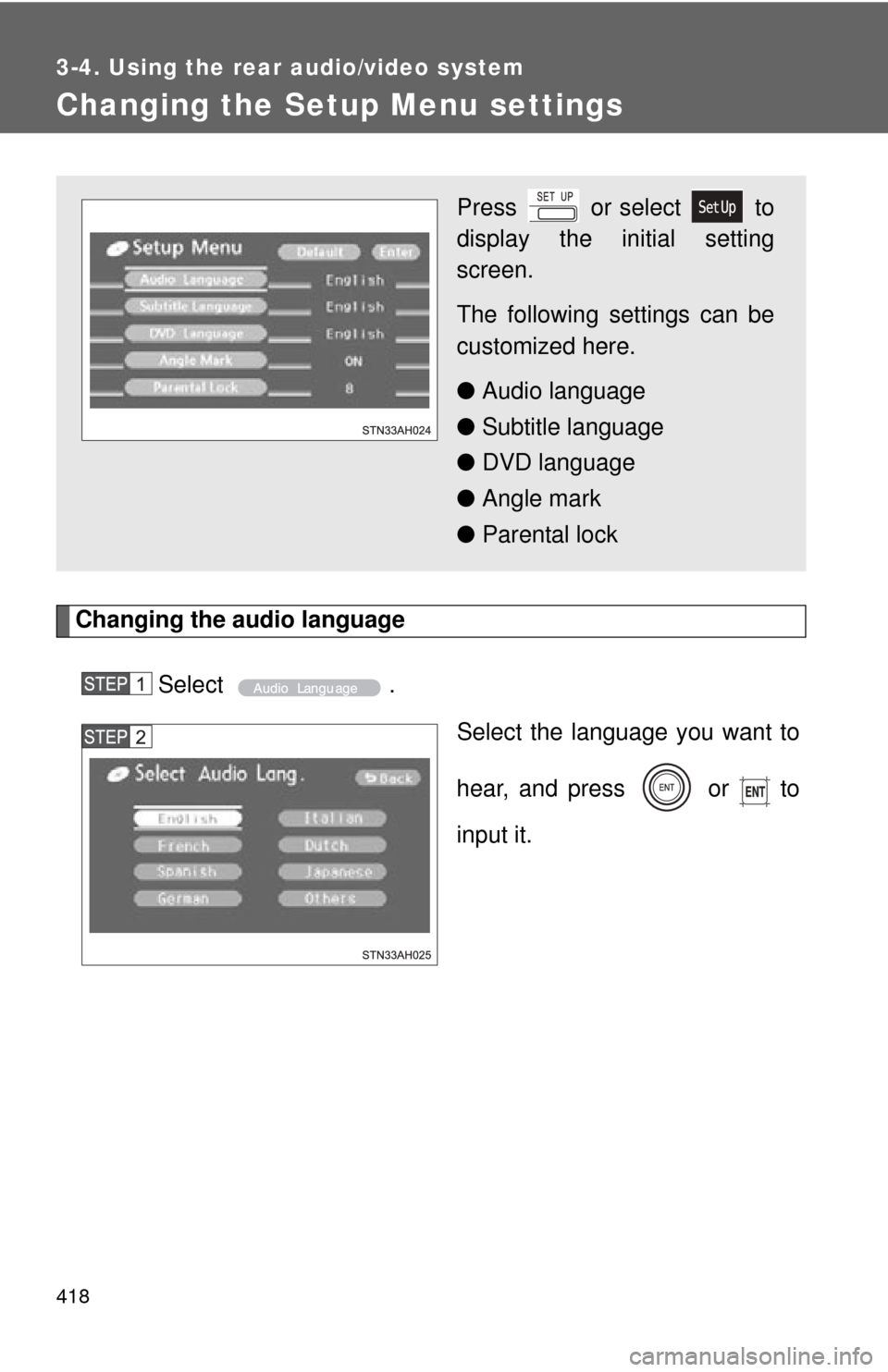
Changing the Setup Menu settings
Changing the audio languageSelect . Select the language you want to
hear, and press or to
input it.
Press or select to
display the initial setting
screen.
The following settings can be
customized here.
●Audio language
● Subtitle language
● DVD language
● Angle mark
● Parental lock
Page 419 of 744
419
3-4. Using the rear audio/video system
3
Interior and exterior features
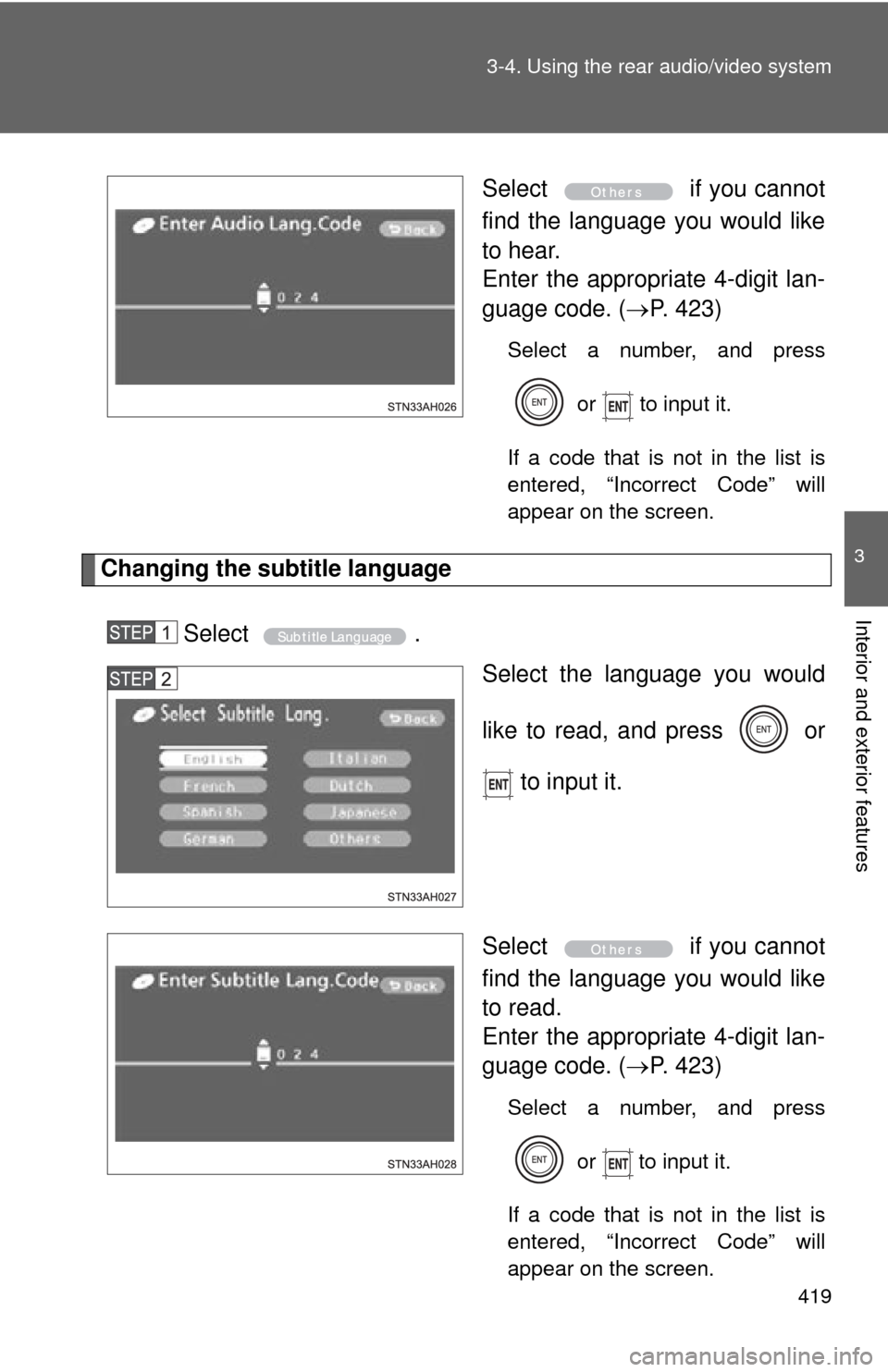
Select
if you cannot
find the language you would like
to hear.
Enter the appropriate 4-digit lan-
guage code. ( P. 423)
Select a number, and press
or to input it.
If a code that is not in the list is
entered, “Incorrect Code” will
appear on the screen.
Changing the subtitle language
Select . Select the language you would
like to read, and press or
to input it.
Select if you cannot
find the language you would like
to read.
Enter the appropriate 4-digit lan-
guage code. ( P. 423)
Select a number, and press
or
to input it.
If a code that is not in the list is
entered, “Incorrect Code” will
appear on the screen.