garage door opener TOYOTA TUNDRA 2013 2.G Owners Manual
[x] Cancel search | Manufacturer: TOYOTA, Model Year: 2013, Model line: TUNDRA, Model: TOYOTA TUNDRA 2013 2.GPages: 752, PDF Size: 15.87 MB
Page 4 of 752

TABLE OF CONTENTSIndex
4
Using the DVD player (DVD video)...................... 399
Using the DVD player (video CD) ........................ 408
Using the DVD player (audio CD/CD text) ........... 411
Using the DVD player (MP3 discs) ...................... 413
Using the video mode ........ 416
Changing the Setup Menu settings ................... 418
3-5. Using the hands-free phone system (for cellular phone)
Hands-free phone system (for cellular phone)
features ............................ 426
Using the hands-free phone system ................... 430
Making a phone call ........... 438
Setting a cellular phone...... 442
Security and system setup ................................ 446
Using the phone book ........ 449
3-6. Using the interior lights Interior lights list ................. 455
• Personal/interior light main switch ...................... 457
• Personal/interior lights...... 457
• Cargo lamp main switch ... 460 3-7. Using the storage features
List of storage features ....... 461
• Glove boxes ..................... 463
• Console box ..................... 465
• Card holder ....................... 467
• Map holder ....................... 470
• Pen holder ........................ 473
• Tissue pocket ................... 475
• Overhead console ............ 477
• Front cup holders ............. 478
• Rear cup holders .............. 480
• Bottle holders ................... 481
• Auxiliary boxes ................. 483
• Storage box ...................... 485
3-8. Other interior features Sun visors ........................... 488
Vanity mirrors ..................... 489
Clock................................... 490
Outside temperature display .............................. 491
Power outlets (12 V DC) ..... 493
Power outlets (115 V AC) ... 498
Seat heaters ....................... 502
Seat heaters and ventilators ......................... 504
Armrest (CrewMax models only) ..................... 506
Seatback table .................... 507
Assist grips ......................... 508
Floor mat ............................ 509
Luggage compartment features ............................ 511
Garage door opener ........... 514
Compass ............................ 521
Page 15 of 752
15
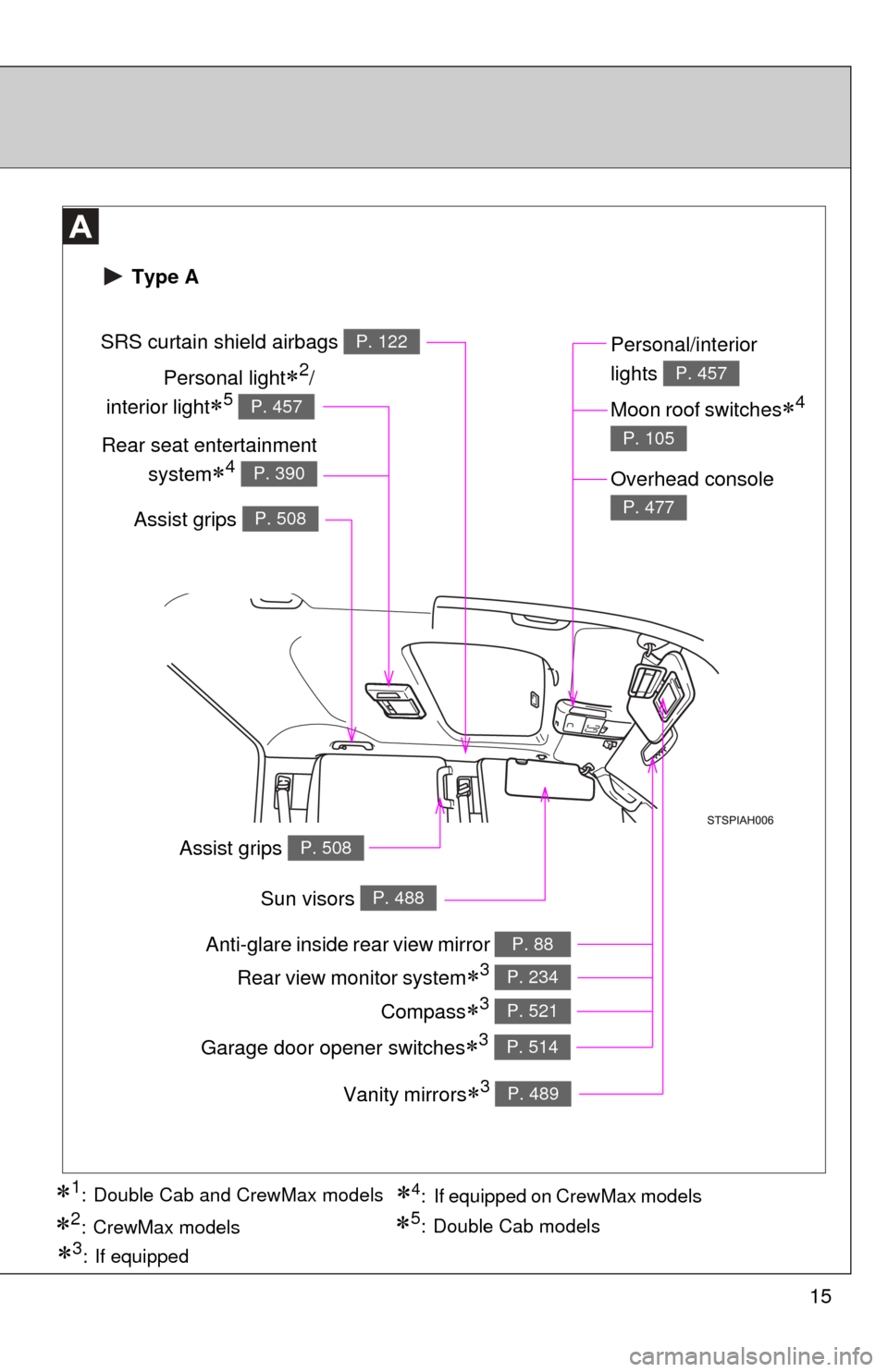
Anti-glare inside rear view mirror P. 88
Sun visors P. 488
SRS curtain shield airbags P. 122
Vanity mirrors3 P. 489
Type A
Personal light2/
interior light
5 P. 457
Rear seat entertainment system
4 P. 390
Personal/interior
lights
P. 457
Moon roof switches4
P. 105
Overhead console
P. 477
Compass3 P. 521
Garage door opener switches3 P. 514
4: If equipped on CrewMax models1: Double Cab and CrewMax models
2:CrewMax models5: Double Cab models
3: If equipped
Rear view monitor system3 P. 234
Assist grips P. 508
Assist grips P. 508
Page 16 of 752
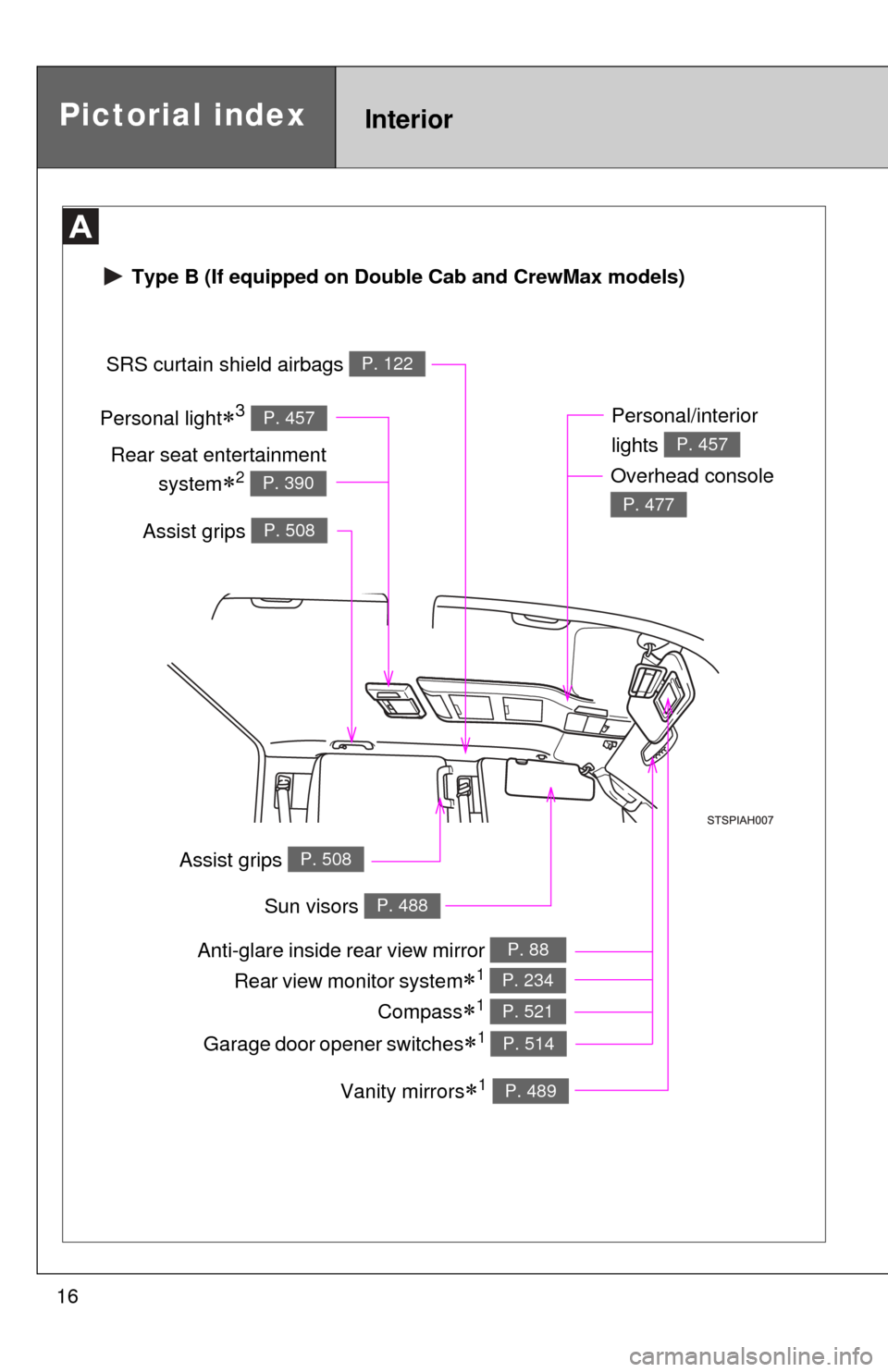
16Personal light
3 P. 457
Type B (If equipped on Double Cab and CrewMax models)
Pictorial indexInterior
Anti-glare inside
rear view mirror P. 88
Sun visors P. 488
SRS curtain shield airbags P. 122
Vanity mirrors1 P. 489
Rear seat entertainment
system
2 P. 390
Personal/interior
lights
P. 457
Overhead console
P. 477
Compass1 P. 521
Garage door opener switches1 P. 514
Rear view monitor system1 P. 234
Assist grips P. 508
Assist grips P. 508
Page 21 of 752
21
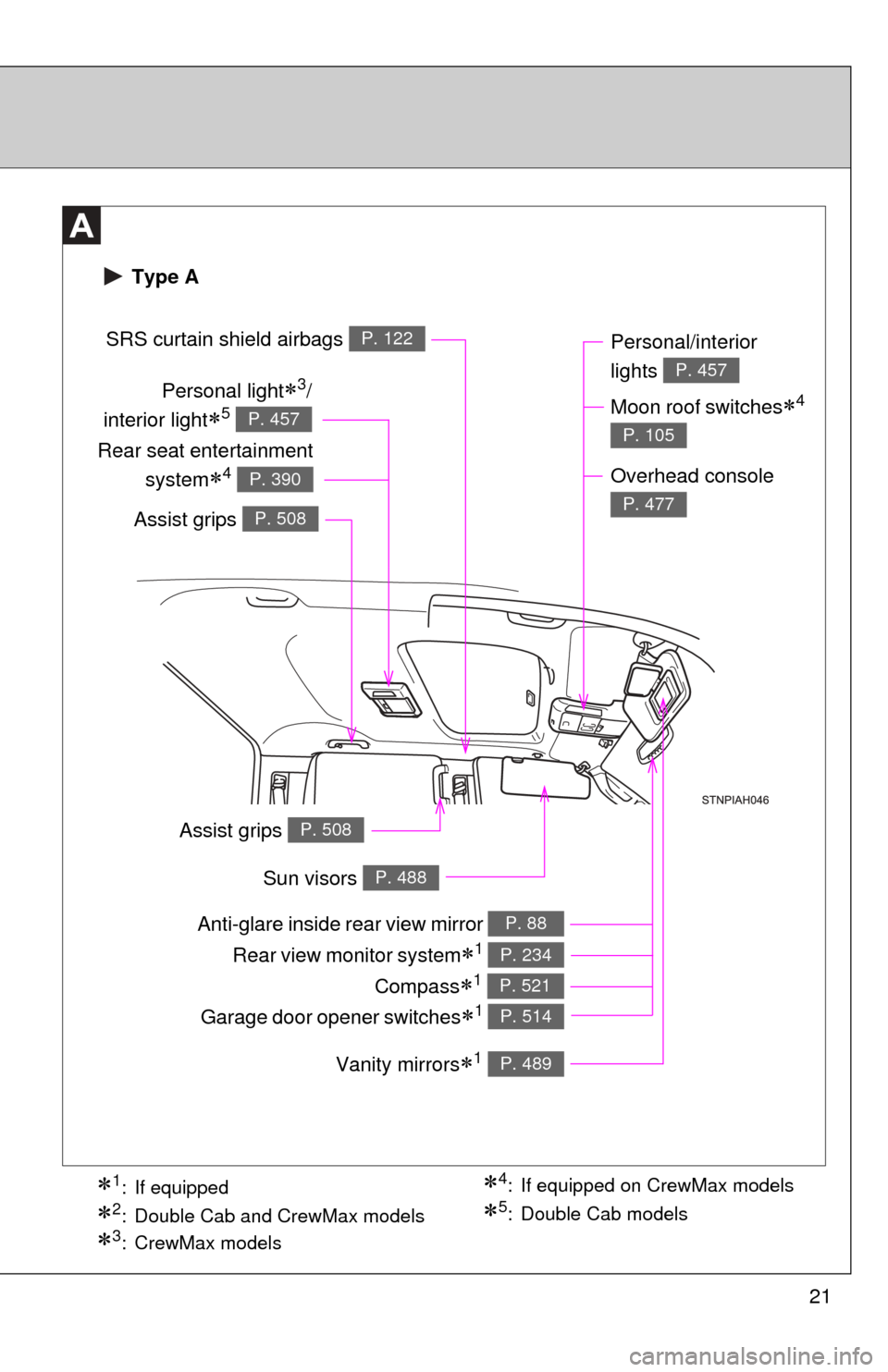
Anti-glare inside rear view mirror P. 88
Sun visors P. 488
SRS curtain shield airbags P. 122
Vanity mirrors1 P. 489
Type A
Personal light3/
interior light
5 P. 457
Rear seat entertainment
system
4 P. 390
Personal/interior
lights
P. 457
Moon roof switches4
P. 105
Overhead console
P. 477
Compass1 P. 521
Garage door opener switches1 P. 514
3:CrewMax models
1: If equipped
2: Double Cab and CrewMax models
4: If equipped on CrewMax models
5: Double Cab models
Rear view monitor system1 P. 234
Assist grips P. 508
Assist grips P. 508
Page 22 of 752
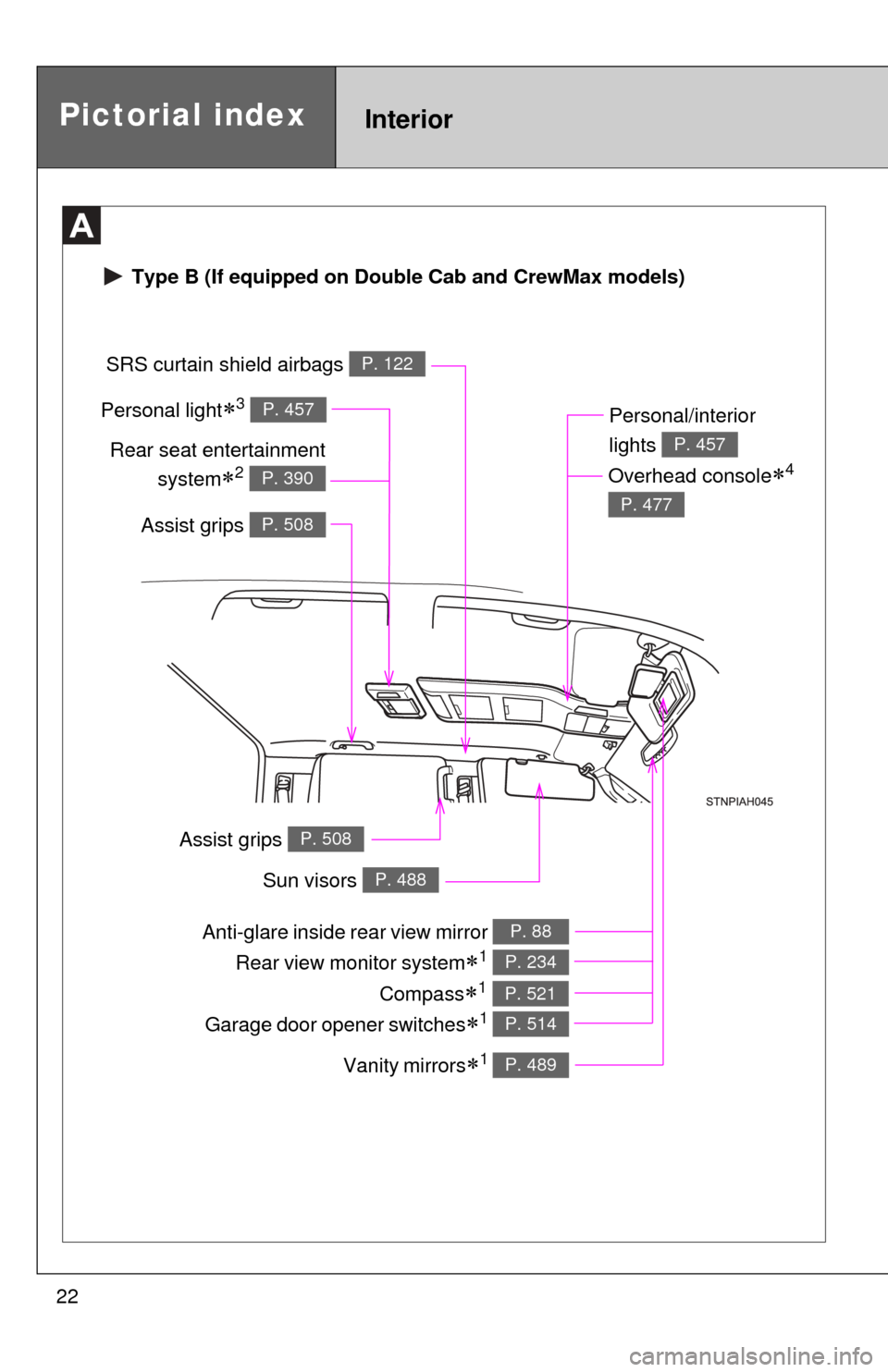
22Personal light
3 P. 457
Type B (If equipped on Double Cab and CrewMax models)
Pictorial indexInterior
Anti-glare inside rear view mirror P. 88
Sun visors P. 488
SRS curtain shield airbags P. 122
Vanity mirrors1 P. 489
Rear seat entertainment
system
2 P. 390
Personal/interior
lights
P. 457
Overhead console4
P. 477
Compass1 P. 521
Garage door opener switches1 P. 514
Rear view monitor system1 P. 234
Assist grips P. 508
Assist grips P. 508
Page 297 of 752
Interior and exteriorfeatures3
297
3-5. Using the hands-free phone
system (for cellular phone)
Hands-free phone system (for cellular phone)
features .......................... 426
Using the hands-free phone system ................ 430
Making a phone call ......... 438
Setting a cellular phone ... 442
Security and system setup .............................. 446
Using the phone book ...... 449
3-6. Using the interior lights Interior lights list ............... 455
• Personal/interior light main switch .................... 457
• Personal/interior lights ... 457
• Cargo lamp main switch ............................. 460
3-7. Using the storage features List of storage features .... 461
• Glove boxes ................... 463
• Console box ................... 465
• Card holder .................... 467
• Map holder ..................... 470
• Pen holder ..................... 473
• Tissue pocket................. 475
• Overhead console.......... 477 • Front cup holders ........... 478
• Rear cup holders ........... 480
• Bottle holders ................. 481
• Auxiliary boxes ............... 483
• Storage box ................... 485
3-8. Other interior features Sun visors ........................ 488
Vanity mirrors ................... 489
Clock ................................ 490
Outside temperature display............................ 491
Power outlets (12 V DC) ....................... 493
Power outlets (115 V AC) ..................... 498
Seat heaters..................... 502
Seat heaters and ventilators ...................... 504
Armrest (CrewMax models only) ............................... 506
Seatback table ................. 507
Assist grips....................... 508
Floor mat .......................... 509
Luggage compartment features .......................... 511
Garage door opener......... 514
Compass .......................... 521
Page 514 of 752
514
3-8. Other interior features
Garage door opener
The garage door opener (HomeLink® Universal Transceiver) is manufac-
tured under license from HomeLink®.
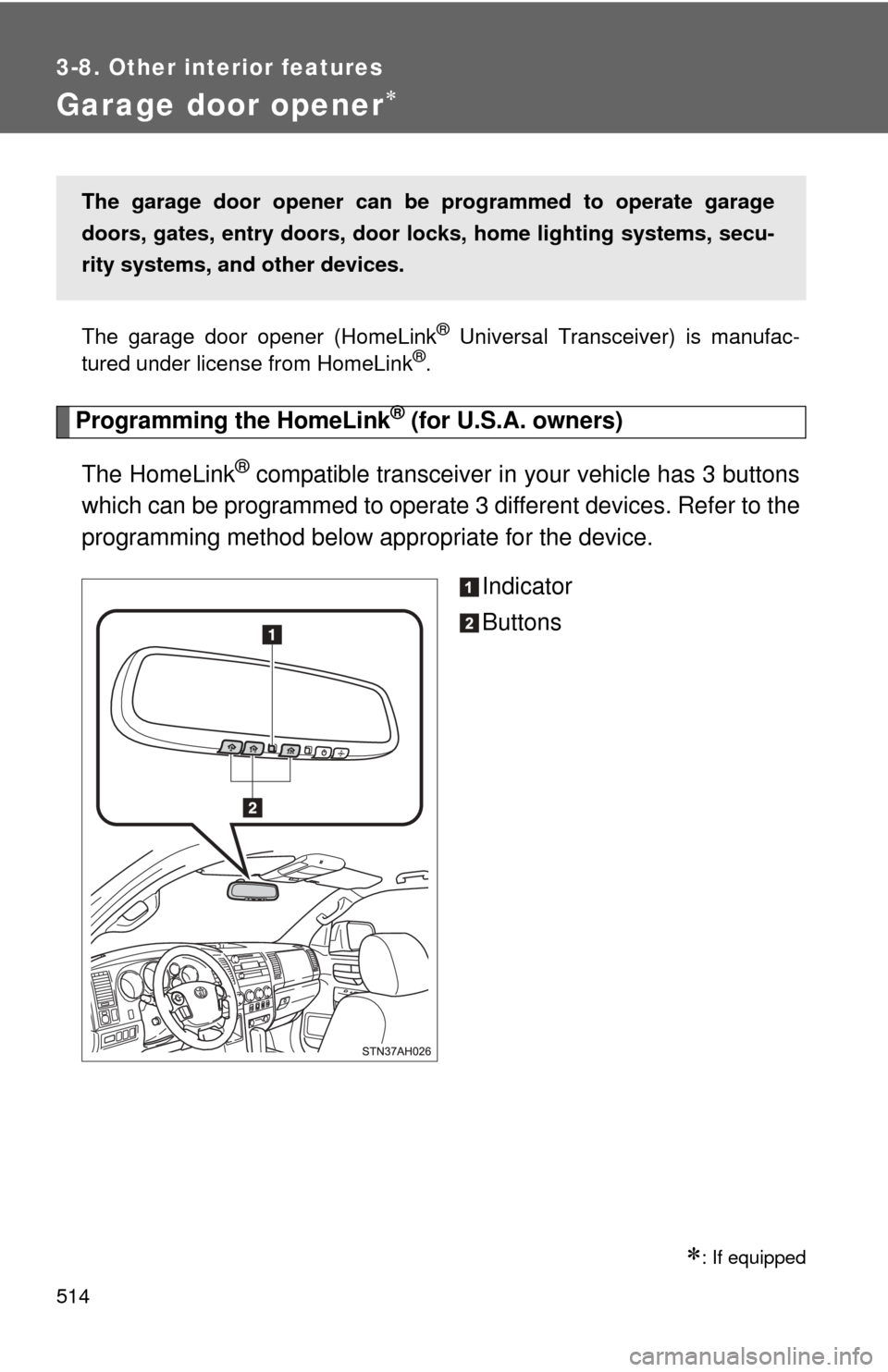
Programming the HomeLink® (for U.S.A. owners)
The HomeLink
® compatible transceiver in your vehicle has 3 buttons
which can be programmed to operate 3 different devices. Refer to the
programming method below appropriate for the device.
Indicator
Buttons
: If equipped
The garage door opener can be programmed to operate garage
doors, gates, entry doors, door locks, hom e lighting systems, secu-
rity systems, and other devices.
Page 516 of 752
516 3-8. Other interior features
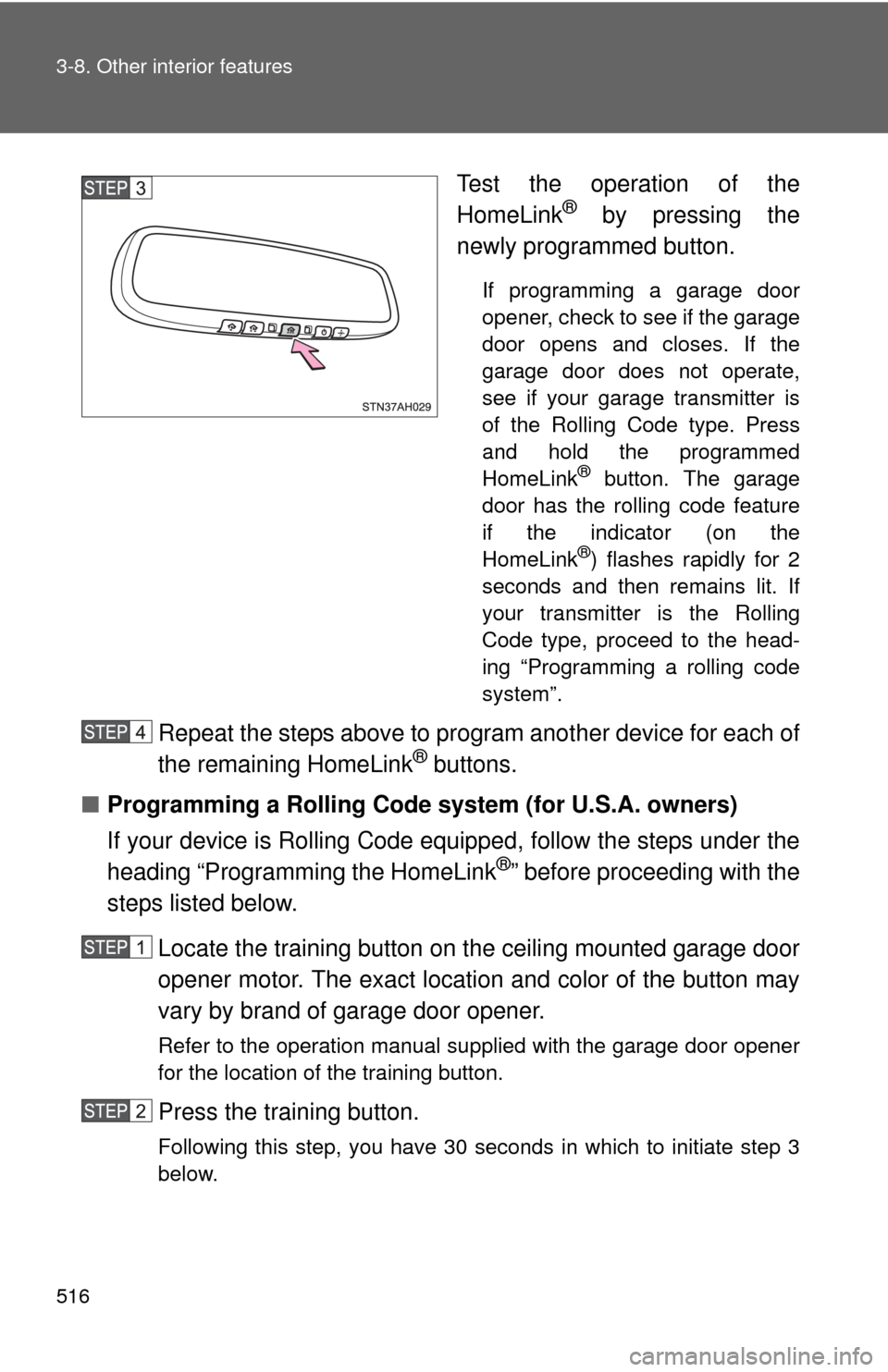
Test the operation of the
HomeLink® by pressing the
newly programmed button.
If programming a garage door
opener, check to see if the garage
door opens and closes. If the
garage door does not operate,
see if your garage transmitter is
of the Rolling Code type. Press
and hold the programmed
HomeLink
® button. The garage
door has the rolling code feature
if the indicator (on the
HomeLink
®) flashes rapidly for 2
seconds and then remains lit. If
your transmitter is the Rolling
Code type, proceed to the head-
ing “Programming a rolling code
system”.
Repeat the steps above to program another device for each of
the remaining HomeLink® buttons.
■ Programming a Rolling Code sys tem (for U.S.A. owners)
If your device is Rolling Code equipped, follow the steps under the
heading “Programming the HomeLink
®” before proceeding with the
steps listed below.
Locate the training button on the ceiling mounted garage door
opener motor. The exact location and color of the button may
vary by brand of garage door opener.
Refer to the operation manual supplied with the garage door opener
for the location of the training button.
Press the training button.
Following this step, you have 30 seconds in which to initiate step 3
below.
Page 517 of 752
517
3-8. Other interior features
3
Interior and exterior features
Press and hold the vehicle’s programmed HomeLink® button
for 2 seconds and release it. Repeat this step once again. The
garage door may open.
If the garage door opens, the programming process is complete. If
the door does not open, press and release the button a third time.
This third press and release will complete the programming process
by opening the garage door.
The ceiling mounted garage door opener motor should now recog-
nize the HomeLink
® transceiver and operate the garage door.
Repeat the steps above to prog ram another rolling code sys-
tem for any of the remaining HomeLink® buttons.
■ Programming an entry gate (f or U.S.A. owners)/Programming
all devices in the Canadian market
Place your transmitter 1 to 3 in. (25 to 75 mm) away from the
surface of the HomeLink
®.
Keep the indicator on the HomeLink® in view while programming.
Press and hold the selected HomeLink® button.
Repeatedly press and releas e (cycle) the device’s remote
control button for two seconds each until step 4 is completed.
When the indicator on the HomeLink
® compatible transceiver
start to flashing rapidly, release the buttons.
Test the operation of the HomeLink
® by pressing the newly
programmed button. Check to see if the gate/device operates
correctly.
Repeat the steps above to program another device for each of
the remaining HomeLink
® buttons.
■ Programming other devices
To program other devices such as home security systems, home
door locks or lighting, contact your authorized Toyota dealer for
assistance.
Page 519 of 752

519
3-8. Other interior features
3
Interior and exterior features
■
Before programming
●Install a new battery in the remote control transmitter.
● The battery side of the remote control transmitter must be pointed away
from the HomeLink
®.
■ Certification for the garage door opener
For vehicles sold in the U.S.A.
• Vehicles with rear view monitor system FCC ID: NZLGHSHL4
• Vehicles without rear view monitor system FCC ID: NZLWZLHL4
NOTE:
This device complies with Part 15 of the FCC Rules.
Operation is subject to the following two conditions: (1) this device may not
cause harmful interference, and (2) this device must accept any interference
received, including interference that may cause undesired operation.
FCC WARNING:
Changes or modifications not expressly approved by the party responsible
for compliance could void the user’s authority to operate the equipment
For vehicles sold in Canada
NOTE:
Operation is subject to the following two conditions: (1) this device may not
cause interference, and (2) this device must accept any interference, includ-
ing interference that may cause undesired operation of the device.
■ When support is necessary
Visit on the web at www.homelink.com
or call 1-800-355-3515.